Tested on macOS 26.3, Chromium 152, claude.ai on the web (signed in), Nov 6, 2026. Kingy opened the new-chat screen and checked the model picker, which showed Opus 5.5 by default.
Everything below is from Anthropic’s help, pricing and announcement pages, fetched Nov 6, 2026, and not tested by Kingy beyond the check in the line above.
Short answer: Claude is Anthropic’s AI assistant, available at claude.ai, in desktop apps for Mac, Windows and Linux (beta), and in iPhone and Android apps.
It is free to start. Anthropic says the Free plan “covers everyday questions” and includes web search, file creation, memory and voice.
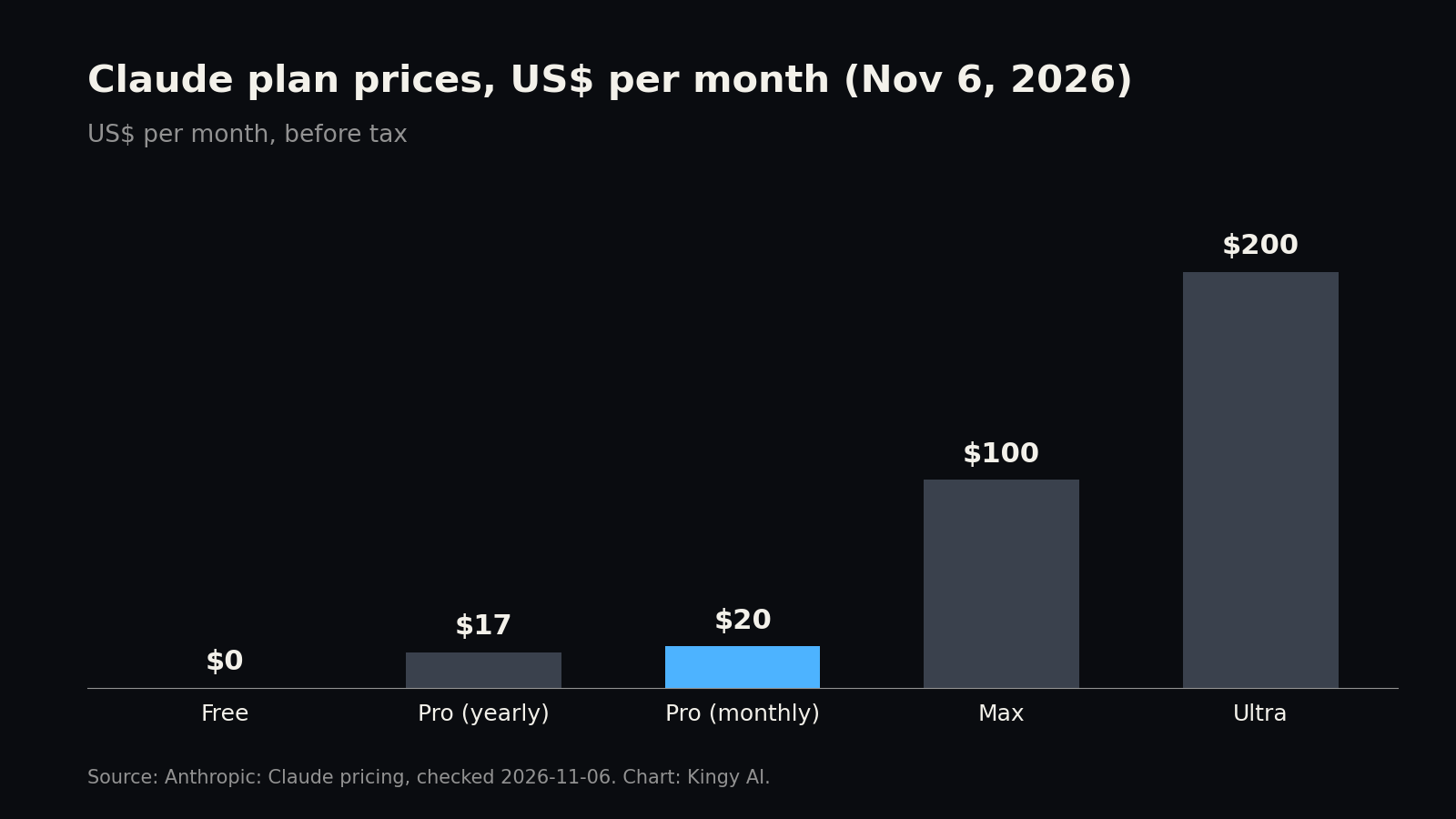
Pro ($20 a month, or $17 a month billed yearly) is the step up most people look at. It adds more usage, Research, Projects without the five-project cap, Claude Code and the larger Opus model.
The limit that bites: usage resets on a rolling five-hour window plus a weekly cap, and Anthropic publishes no fixed message count.
What Claude is, and the models behind it
You type or speak a request and Claude answers, searches the web, reads your files, writes documents and code, or builds small interactive pages called artifacts. The same account works on the web, the desktop app and the phone apps. Anthropic says your conversations, projects, memory and preferences sync across devices when you’re signed in.
Under the hood, Claude is a family of models you can switch between with the model menu next to the send button. Anthropic’s help pages list these as the current ones in the app:
- Claude Opus 5.5: Anthropic calls it the first model in its Claude 5.5 family and its new leading model, built for complex work that needs careful judgment.
- Claude Sonnet 5.5: the second 5.5 model, which Anthropic describes as faster and strongest at well-scoped everyday tasks, documents, slides and spreadsheets. Its default effort in the Claude apps is Medium.
- Claude Haiku 5.5: the small, efficient model. It replaced Haiku 4.5 in the chat model picker on Free, Pro and Max on Oct 29, 2026.
- Claude Fable 5.1 (and the older Fable 5): Anthropic’s top model in the app. Anthropic says Fable 5.1 is the same underlying model as Claude Mythos 5.1, with added safeguards for cybersecurity and biology. Mythos itself is limited to a small set of vetted organizations.
Anthropic’s help pages still list older models such as Opus 5, Sonnet 5 and Opus 4.8, and “More models” in the menu shows extra options. You may see a “Fable 5.5” name in rumours; as of Nov 6, 2026 Anthropic had not announced it, and Kingy’s Fable 5.5 watch page tracks it. For which model to pick, see Claude Sonnet vs Opus and Claude Opus vs Fable.
Two more controls sit in the same menu. Effort (Low, Medium, High, Extra high, Max) sets how thorough each answer is. Thinking shows Claude’s reasoning in an expandable section. On Opus 5.5, Sonnet 5.5, Haiku 5.5 and Fable 5.1, thinking can’t be turned off in the app; Anthropic says to lower the effort instead.
Is Claude free?
Yes. Anyone in a supported country who is 18 or older can sign up at claude.ai with an email address. Anthropic’s pricing page lists these on the Free plan at $0:
- Chat on the web, desktop and mobile, with limited usage every five hours and every week.
- Web search, file creation and code execution.
- Memory across conversations, and incognito chats.
- Connectors to your apps and tools, artifacts, and the Claude Design, Slides and Docs templates.
- Voice mode and up to 5 Projects.
- The Sonnet and Haiku models. Opus and Fable are not on Free.
Free does not include Research, Claude Code, Claude in Chrome, or searching your past chats. Anthropic says there are no standing discounts on Pro, Max or Ultra, only occasional limited-time promotions.
Claude plans and prices
These are Anthropic’s US prices from claude.com/pricing, checked Nov 6, 2026. Prices exclude tax, and Anthropic says mobile app-store prices can differ.
| Plan | US price | What it adds |
|---|---|---|
| Free | $0 | Limited usage every five hours and every week; Sonnet and Haiku; web search, memory, files, voice, up to 5 projects |
| Pro | $20 a month billed monthly, or $17 a month billed yearly ($200 up front) | More usage than Free; Opus; unlimited Projects; Research; Claude Code; Claude in Chrome and Microsoft 365; scheduled tasks; Fable on pay-as-you-go usage credits |
| Max | $100 a month (monthly only) | 5x Pro usage every five hours and every week; Fable included for up to half your weekly limit; $100 a month in API credits; priority access at busy times |
| Ultra | $200 a month (monthly only) | 10x Pro usage every week; no five-hour limit once Anthropic verifies the account; $200 a month in API credits. This is the plan formerly called Max 20x |
| Team | $25 a seat a month monthly, or $20 billed yearly; premium seats $125, or $100 yearly | For 2 to 150 people: admin and billing controls, single sign-on, no model training on your content by default |
| Enterprise | $20 a seat a month billed yearly, 20-seat minimum, plus usage billed at API rates | Audit logs, SCIM, custom data retention, role-based access |
Upgrades apply straight away with unused time credited; downgrades apply at the end of the billing period. Cancel at least 24 hours before renewal to avoid the next charge; cancelling moves Pro, Max and Ultra accounts to Free and keeps your chats. For local-currency prices see Kingy’s pages for India, the UK, Canada, Australia and Germany. If you’re choosing between the $100 and $200 tiers, read ChatGPT Pro vs Claude Max and Ultra. Every checked plan row also sits on Kingy Plans & Limits.
Claude usage limits
Anthropic does not publish a message count for any plan. Its help pages describe how the limits work instead:
- Five-hour session limit. The window starts with your first message and resets in full five hours later. Verified Ultra accounts don’t have one.
- Weekly limit. Paid plans have a weekly cap across all models that resets at a fixed day and time assigned to your account. Max and Ultra have a separate weekly limit for Fable, which can use up to half your weekly allowance.
- Relative sizes only. Anthropic says Pro gives at least 5x the usage of Free per session, Max gives 5x Pro, and Ultra gives 10x Pro’s weekly usage. The actual Free and Pro allowances are undisclosed.
- One shared pool. Chats on the web, desktop and mobile and Claude Code all count toward the same limit.
- What drains it faster. Long chats, big files, higher effort, bigger models, Research, web search, connectors and multi-step tasks.
- Anthropic can tighten it. It says it may add weekly or monthly caps or limit models and features to manage capacity.
Settings > Usage shows how much you’ve used and when each limit resets. On paid plans you can turn on usage credits there, so work continues at pay-as-you-go API rates instead of stopping; set a monthly spend limit when you do. Anthropic says credits bought on or after Dec 7, 2026 generally expire 12 months after purchase, and credit purchases are non-refundable. Usage credits are separate from the monthly API credits on Max and Ultra.
Chat length has its own cap, the context window. On paid plans Anthropic lists 1M tokens for Opus 5.5, Sonnet 5.5, Haiku 5.5 and Fable 5.1, and 500K or 200K for older models. With code execution on, Claude summarises older messages when a chat gets close to the limit, which also uses more of your allowance.
Getting started with Claude
- Make an account at claude.ai. Anthropic says you must be 18 or older and in a supported country.
- Pick your app. Use the browser, or download Claude Desktop from claude.com/download. It needs macOS 13 or later, Windows 10 or later, or Ubuntu 22.04 / Debian 12 for the Linux beta. On phones, search the App Store or Google Play for “Claude by Anthropic”. All apps work on every plan.
- Add instructions. Under Settings > Your Claude > Instructions, tell Claude how you like answers (tone, length, what you do). They apply to every chat.
- Decide on memory. Memory is on by default on Free, Pro, Max and Ultra. In Settings > Your Claude you can pause it, reset it (which deletes it permanently), stop Claude searching past chats, or let it save sensitive topics such as health or politics (off by default).
- Decide on training. In Settings > Privacy, the “Help improve our AI models” toggle controls whether your chats can be used to train future models. See the privacy section below.
- Check Settings > Usage once, so you know your reset times before a big task.
To start a chat, type in the box and send. The “+” button (or typing “/”) opens options such as adding files, turning on Research, or switching off memory for that one chat.
The Claude features people actually use
Web search and Research
Web search is on every plan. Claude searches when it helps and cites its sources, and it can read a page if you paste a link. In the newer app layout there’s no toggle; in the older one it’s under “+” > Web search. Research (Pro and up) runs many searches that build on each other, plus your connected tools such as Gmail and Google Docs. Start it from “+” > Research. Anthropic says Research runs on Opus 5.5 whatever model you picked, and on mobile it searches only the web, not your connectors.
Uploading files
Click “+” > Add files or photos, drag files in, or paste images. Claude reads PDF, DOCX, CSV, TXT, HTML, ODT, RTF, EPUB, JSON and XLSX, plus JPEG, PNG, GIF and WebP images. Anthropic lists up to 20 files per chat and PDFs up to 1,000 pages; it reads charts and images inside PDFs only up to 100 pages. Per-file size limits differ between Anthropic’s pages: the upload page says 500MB per chat file, while the file-creation page says 30MB per file.
Making documents, spreadsheets and slides
On every plan, Claude can run code to create Excel, PowerPoint, Word and PDF files you can download or save to Google Drive. Just ask, for example “turn these notes into a slide deck”. Artifacts are the pages it builds beside the chat: documents, decks, designs, dashboards or small tools you can edit and share. Docs, Slides and Design templates are on all plans; Dashboards is a beta on paid plans.
Images
Claude doesn’t generate photos or illustrations the way image tools do, Anthropic says. It can draw diagrams, charts and interactive visuals in the chat, show image results from web search, and analyse images you upload.
Projects
A project is a workspace with its own chats, uploaded files and instructions, so you don’t re-explain the background each time. Free users can make up to five; paid plans have no cap. On paid plans, large projects switch to a retrieval mode that Anthropic says expands capacity by up to 10x. Anthropic adds that project content is cached, so reusing it counts less against your limit.
Memory and past chats
Claude saves facts it learns as you chat, such as your role, projects and preferences, and you can say “remember this”. Paid plans can also ask Claude to search earlier conversations (“what did we decide about the budget?”). To skip memory for one chat, turn off “Memory” in the “+” menu before your first message.
Voice mode
Voice mode is a beta on all plans, on the web, desktop and mobile, and Anthropic says it works best on a phone. Tap the sound-wave icon next to the message box. It listens hands-free by default, with push-to-talk for noisy places. Fable isn’t available in voice mode, and voice counts toward your usage limit.
Claude Code and Cowork
Paid plans include Claude Code, Anthropic’s coding agent, and Cowork in the desktop app, which hands Claude longer tasks that use your local files in a sandbox. Kingy’s Claude Code guide covers the coding side.
Claude privacy: what’s kept and how to opt out
- Training. Anthropic says it uses consumer chats and coding sessions to improve its models if you allow it in your settings, if a chat is flagged for safety review, or if you join a programme such as Trusted Tester. Its pricing table lists model training as “Opt-out” on Free, Pro, Max and Ultra, and “None by default” on Team and Enterprise. To change it, go to Settings > Privacy and switch “Help improve our AI models”. Turning it off stops use in future training runs, but not training already done.
- How long data is kept. A deleted chat leaves your history immediately and Anthropic’s back-end systems within 30 days. If you allow training, Anthropic may keep de-identified data for up to 5 years. Chats flagged as breaking its Usage Policy are kept for up to 2 years, and their safety scores for up to 7. Thumbs up or down feedback stores that whole conversation for 5 years.
- Incognito chats. Click the ghost icon on a new chat outside a project. Incognito chats skip your history and memory and aren’t used for training, but Anthropic keeps them for 30 days.
- Export. Settings > Privacy > Export data on the web or desktop (not the phone apps). You get an emailed link that expires after 24 hours. The export includes chats, projects and memory, but not the original files you uploaded.
- Delete. Delete single chats from the “⋮” menu. To delete everything, cancel any paid plan, wait for it to end, then use Settings > Account > Delete account. This is permanent and forfeits unused usage credits.
Anthropic also advises being careful about pasting passwords, card numbers or health records into chats. Kingy’s Claude privacy and plan page goes deeper.
Common Claude problems and fixes
- “5-hour limit reached” or “You’ve reached your weekly limit”. Wait for the reset time shown, turn on usage credits (paid plans), or upgrade. Anthropic sometimes gives a one-time “Reset for free” in Settings > Usage, on the web or desktop only.
- “Your message will exceed the length limit for this chat”. Attach fewer or smaller files, split the content, or start a new chat. Projects help with large document sets.
- “Due to unexpected capacity constraints, Claude is unable to respond”. Anthropic says this is heavy demand, not an outage, and won’t show on its status page. Try again in a few minutes.
- Claude is down. Check status.claude.com or Kingy’s Is Claude down? page for outage history.
- “There was an error logging you in”. Turn off your VPN and browser extensions, clear cookies and cache, then check the status page.
- Chat switched from Sonnet 5.5 to Sonnet 5. Automated safety checks moved a flagged request to the older model, and the notice says so. Switch back in the model picker, or edit your message. Settings > Capabilities > “Switch models when a message is flagged” turns automatic switching off.
- Haiku 4.5 is missing. It was removed from the chat picker on Oct 29, 2026 and replaced by Haiku 5.5. Old chats are kept and continue on Haiku 5.5.
- Fable doesn’t appear. It needs a paid plan. On Pro it runs only on usage credits.
- Cowork on Windows fails with “Plan9 mount failed”: see Kingy’s Fix Finder page. For Claude Code MCP connection errors, see this fix.
Alternatives to Claude
- How to use ChatGPT: OpenAI’s assistant, with its plans, limits and fixes.
- How to use Gemini: Google’s assistant, with its plans, limits and fixes.
- AI Model Board: every model with a checked API price, plus Kingy’s own test results.
- Compare AI models: put any two models side by side on context window and retirement dates.
Sources
All fetched Nov 6, 2026.
- Anthropic: Claude pricing (plans, prices, feature table, FAQ)
- Claude Help Center: How do usage and length limits work?
- What is the Pro plan?, What is the Max plan?, What is the Ultra plan?
- Claude Fable models on your plan
- Change the model, effort and thinking settings
- How large is the context window on paid Claude plans?
- Manage usage credits for paid Claude plans
- What is a limit reset? and Usage limit best practices
- Get started with Claude
- Install Claude Desktop and Claude downloads page
- Understanding Claude’s personalization features
- Use Claude’s chat search and memory
- Use incognito chats
- Enable and use web search and Use research on Claude
- Upload files to Claude and Create and edit files with Claude
- What are artifacts?, Can Claude produce images?, What are projects?
- Use voice mode
- Troubleshoot Claude error messages
- Why Claude switched models with Sonnet 5.5 and Claude Haiku 4.5 was removed from the model selector
- Anthropic Privacy Center: Is my data used for model training?, How do I change my model improvement privacy settings?, How long do you store my data?
- Export your Claude data, Delete or rename a conversation, Delete your Claude account
- Anthropic: Introducing Claude Opus 5.5, Introducing Claude Sonnet 5.5, Claude Mythos
- Claude Status
- Kingy AI: Plans & Limits, Claude page, Fable 5.5 watch
Revision log
- Nov 6, 2026: first published.