Make an AI video
Follow a worked video project from brief and budget to a checked output.
Start the complete video projectCurtis Pyke · Kingy AI
Curtis tries AI tools and models on camera. Watch the videos, follow the projects and check the receipts.
On YouTube
The latest from Curtis’s channel. Open a receipt tile for the full review, sources and costs.
YouTube, platform-reported · updated Nov 6, 2026
 AI Marketing Tools: Create 2 Black Friday Ads with CapCut PC’s AI Video Editor
 Black Friday Advertising: Fix Your Ad with CapCut PC’s AI Video Editor
 This Box Runs AI Locally — Lucy AI Studio Max Hands-On
 Black Friday Advertising - The Final Take
 This AI Karaoke Machine Removes the Singer?! | Singcore S1 Pro
Latest uploads from the channel. Tiles with a receipt open the evidence page.
The Kingy Brief
AI changes, original tests and one practical thing to try. Fridays at 09:00 Vancouver time.
Free · Double opt-in · Unsubscribe anytime
After submitting, check your inbox for "Confirm your subscription to The Kingy Brief" and open its confirmation link. Check Spam or Promotions if you cannot find it.
Fridays at 09:00 Vancouver time: source-checked AI changes, original tests and one practical thing to try. We skip a week when there is not enough verified material. Free. Unsubscribe anytime.
Start with your task
Follow a worked video project from brief and budget to a checked output.
Start the complete video projectChoose a route, check costs and limits, and test a candidate against your task.
Start your AI setup planChoose a small project, build a preview, check it and keep a working version.
Start your first app projectVerified launches and operational changes checked within the last three days.
Google DeepMind announced Genie 4 on October 27, 2026, alongside a trusted-tester research preview and a waitlist.
Read launch →Find every call to gemini-2.5-pro. Before December 1, 2026, test gemini-3.8-flash against the breaking API changes in Google’s Gemini 3.8 Flash migration guide and check its pricing, or requests will be rerouted automatically.
Read update → View AI Deadlines record →Curtis used Codex and HyperFrames to make a motion graphic, then kept the prompt contract, checks and editable files beside the video. The companion shows what the workflow produced and where an editor still has work to do.
The June 20 video includes a paid Agent Opus segment. Kingy’s Codex workflow analysis is editorial; the companion identifies the sponsored part.
Watch and inspect the files → Meet Curtis and read the standards →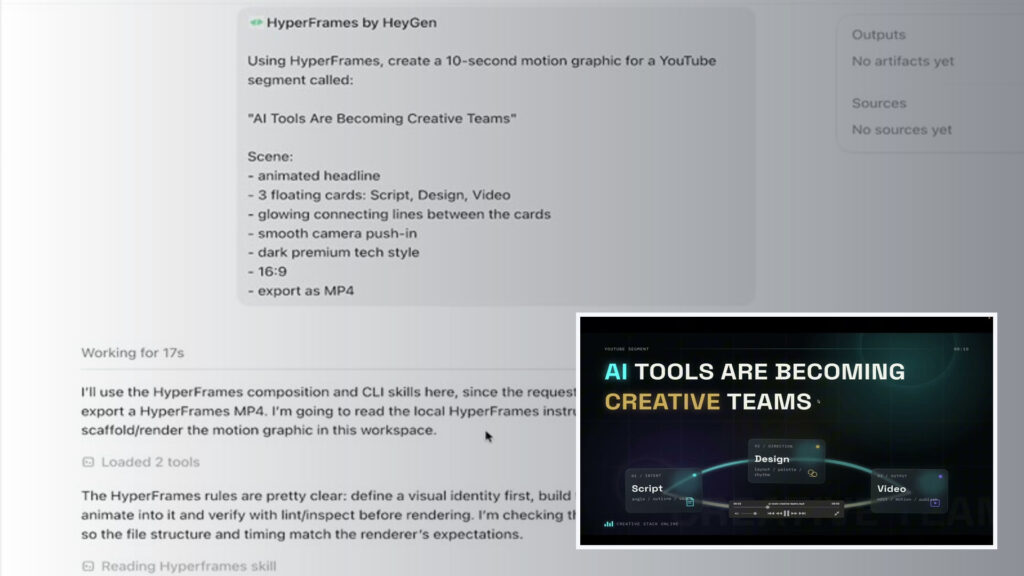
The evidence boundary stays visible from source check to published result.
Inspect the saved prompts, outputs, costs and failures from our September 10 tests and October 23 Kimi extension. Read the testing and disclosure standards.
Partnerships
Explore sponsored videos and distribution, with the relationship and evidence limits disclosed.
Partnership information →Sponsored video
See Air Jelly in Curtis’s sponsored video, with the companion and disclosure beside it.
A retained commercial example with supplied access. The companion page preserves the sponsorship disclosure and the limits of the recorded evidence. Audience reach does not establish product quality or attributable sales.