Tested on macOS 26.3, Chromium 152, chatgpt.com on the web while logged out, Nov 6, 2026. Kingy checked what ChatGPT gives you with no account and read the pricing page from Canada; plan features below are from OpenAI’s pages.
Short answer: ChatGPT is OpenAI’s AI assistant. You chat with it in a browser, on your phone or in its desktop app.
Is it free? Yes. OpenAI’s pricing page lists everyday text chats as unlimited on the free plan, subject to abuse guardrails. Uploads, images, voice and deep research are limited.
Which plan? Most people should start on Free. Plus ($20 a month) is the step up if you want the newer GPT-6.1 Sol and GPT-6 Astra models and full deep research.
The limit that bites: OpenAI does not publish a fixed message number for any plan. On Plus, uploads are capped at up to 80 files every 3 hours.
Prices and plan details on this page come from OpenAI’s own pricing pages and from Kingy AI’s Plans + Limits records, checked on Nov 6, 2026 (US prices). Feature steps come from OpenAI’s ChatGPT Learn docs. Anything Kingy has not run is marked as coming from OpenAI’s pages.
What ChatGPT is
ChatGPT is a chat app from OpenAI. You type or speak a request, and it answers, writes, searches the web, reads files or makes images. OpenAI now splits the app into three modes, per its “Use ChatGPT” doc:
- Chat for questions, explanations and short drafts.
- ChatGPT Work for handing off a task with a clear result, such as a brief, a deck, an analysis or a recurring update. OpenAI describes it as “a way to delegate real work to ChatGPT.”
- Codex for coding work. It shows more technical detail than the other two.
The models behind it depend on your plan. OpenAI’s US pricing page lists these:
| Plan | Models listed by OpenAI |
|---|---|
| Free and Go | GPT-6 Luna and GPT-5 Thinking Mini; limited GPT-5.6 Terra in Work and Codex on desktop |
| Plus | GPT-6.1 Sol, GPT-6 Astra, GPT-6 Sol, GPT-6 Luna, GPT-5.6 Sol, GPT-5.6 Terra, GPT-5.6 Luna, GPT-5 Thinking Mini and legacy models |
| Pro | Everything in Plus, with more use, plus GPT-5.6 Sol Pro, which is Pro-only |
Model names change often. For what each model is good at, see Kingy’s tested comparison GPT-6 Astra vs GPT-6.1 Sol and the Compare AI Models tool.
Is ChatGPT free?
Yes. OpenAI’s pricing FAQ says the free version is available to everyone. Here is what the US pricing page lists for the free plan:
- Unlimited text chats with GPT-6; the free plan’s model is GPT-6 Luna. A footnote says unlimited is “subject to abuse guardrails.”
- Limited uploads, image creation, data analysis and vision (reading pictures).
- Voice chats, but limited, and no voice with video.
- Limited deep research and limited memory.
- Web search, projects, study mode and plugins.
- Limited Codex, and limited ChatGPT Work in the desktop app only.
- No scheduled tasks.
The free plan also has the smallest “context window”, which is how much text ChatGPT can keep in view at once. OpenAI lists 27K for its Instant model on Free, which it puts at about 12 pages of text you can paste in. Paid plans get more (see Limits).
Your free chats can be used to train OpenAI’s models unless you opt out. The pricing page marks “Content is used to train our models” as “Opt-out available” on Free, Go, Plus and Pro. How to opt out is in Privacy.
ChatGPT plans and prices
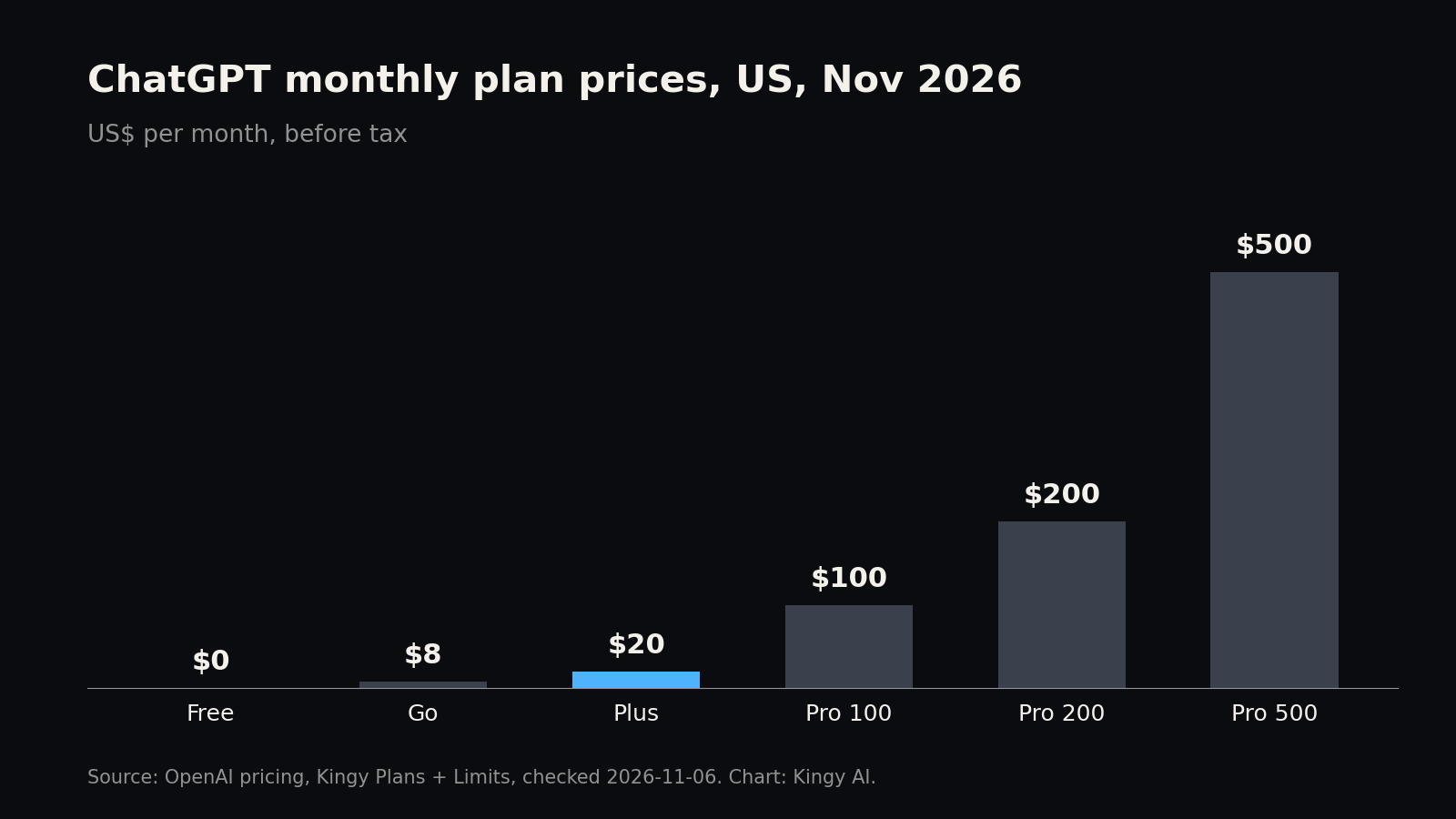
US prices per month, before tax. Free, Plus and Pro prices are from Kingy’s Plans + Limits records (Plus checked Nov 5, Pro tiers Nov 7, 2026 UTC) and OpenAI’s pricing page. The Go price is from OpenAI’s pricing page, fetched Nov 6, 2026.
| Plan | US price | What it adds |
|---|---|---|
| Free | $0 | Unlimited text chats on GPT-6 Luna; limited uploads, images, voice, deep research and memory |
| Go | $8 a month | Same models as Free, with more messages using tools, more uploads, more images, more voice, longer memory, voice with video and scheduled tasks. OpenAI says Go “may include ads.” |
| Plus | $20 a month | The newer GPT-6.1 Sol, GPT-6 Astra and GPT-6 Sol models, full deep research, ChatGPT Work on web and mobile, Codex, Sites and early feature tests. No annual billing; API use is billed separately. |
| Pro | $100, $200 or $500 a month | Everything in Plus with more use, GPT-5.6 Sol Pro, Dots (OpenAI’s “always-on agent”), monthly API credits and the largest context window. Ultrafast mode comes only with the $500 tier. |
| Business | $20 per user a month billed yearly, or $25 billed monthly | At least 2 users, a shared workspace with admin controls and single sign-on. OpenAI says it does not train on business data by default. |
| Enterprise and Edu | Contact OpenAI | Business features plus more admin, audit and data controls |
A few things to know before you pay:
- Go is sold in the US. OpenAI’s US pricing page shows Go next to Free, Plus and Pro. That page leaves the price box empty, so the $8 comes from OpenAI’s other pricing page on ChatGPT Learn.
- Pro credits. Pro includes monthly API credits that grow with the tier. Read from Canada on Nov 6, 2026, the pricing page listed CA$136 with Pro 100, CA$250 with Pro 200 and CA$680 with Pro 500; it did not show us the US amounts. OpenAI says the credits expire at the end of each billing cycle and can change.
- Teachers. OpenAI’s FAQ says ChatGPT for Teachers is free for verified US K–12 educators through June 2027.
- Nonprofits can get up to 75% off Business or Enterprise through OpenAI for Nonprofits, per the same FAQ.
What Kingy saw, Nov 6, 2026. Opened logged out, chatgpt.com goes straight to a chat box, no account needed. A notice says to log in “to get answers based on saved chats, plus create images and upload files”, so free use without an account is text chat only. Read from Vancouver, the pricing page showed Canadian prices: Go CA$11, Plus CA$25 and Pro from CA$136 a month. Prices change by country, so check the page from where you live.
For depth, see:
- Kingy Plans + Limits for dated prices and limits next to Claude and Gemini.
- ChatGPT Pro 500 vs Pro 200 and Pro 100 to pick a Pro tier.
- ChatGPT Pro vs Claude Max and Ultra for the $100 and $200 plans compared.
- Prices outside the US: UK, Canada, Australia, India and Germany.
ChatGPT limits
This section lists only limits OpenAI documents. Where OpenAI gives no number, we say so and don’t guess.
| Limit | What OpenAI says |
|---|---|
| Everyday text chats | Unlimited on every plan, subject to abuse guardrails and reasonable use (pricing page). No fixed message number is published for any plan. Kingy’s Plans + Limits keeps the Plus and Go message allowance as undisclosed. |
| Reasoning model messages on Plus | Undisclosed. Kingy’s record says OpenAI publishes no fixed number. |
| File uploads on Plus | Up to 80 files every 3 hours, a rolling window. OpenAI’s upload FAQ says limits may be lower at busy times. Kingy last confirmed this on Oct 19, 2026; OpenAI’s help page blocked our automated recheck on Nov 7. |
| Context window, Instant model | 27K on Free (about 12 pages in), 54K on Go and Plus (about 40 pages), 128K on Pro (about 250 pages) |
| Context window, reasoning model | “Varies” on Free; 256K on Go and Plus (about 320 pages); 400K on Pro (about 680 pages) |
| Image generation | OpenAI’s image doc, written for the desktop app and Codex, says image turns use included limits “3–5x faster on average” than similar turns without images. In ChatGPT on the web, image limits “depend on your plan.” |
| Codex (coding) on Pro | No five-hour limit at the moment, though weekly limits may apply. This is for Codex, not a chat cap. |
When you reach a limit, Kingy’s record notes that ChatGPT shows when it resets. That on-screen notice is the most reliable number for your own account.
How to get started
1. Make an account and pick an app
Go to chatgpt.com and sign up for the free plan. OpenAI’s pricing page lists access on web, iOS and Android for every plan. Its download page also offers:
- a desktop app (“Download ChatGPT for desktop”; the page does not name the operating systems);
- the iPhone app on the App Store and the Android app on Google Play;
- a Chrome extension.
Some features only work in the desktop app. Examples are the free plan’s ChatGPT Work and the new ChatGPT Voice (see Features).
2. Change these settings first
- Training opt-out. In Settings, open Data Controls and turn off “Improve the model for everyone.” This covers new chats and keeps your history. This is from OpenAI’s Data Controls help page as recorded on Kingy’s ChatGPT profile (checked Oct 22, 2026).
- Memory. OpenAI says memories “let ChatGPT carry useful context from earlier chats into future work.” You manage them in Settings > Personalization. Turn memory off if you don’t want past chats shaping new answers.
- Custom instructions. These are standing preferences ChatGPT follows in every chat, such as how long or formal answers should be. They live in Settings with the other personalization controls.
- Personality. On the web you can pick a response style in Settings. OpenAI says a personality “changes its style and tone; it doesn’t change its capabilities.”
3. Ask a first question
Type a request in plain words. Say what you want, who it’s for and how long it should be. If an answer needs current facts, ask ChatGPT to search the web and show sources.
The features people actually use
Plan availability below comes from OpenAI’s US pricing table, checked Nov 6, 2026. Kingy has not tested each feature for this guide unless the “Tested on” line above says so.
Web search
What: ChatGPT looks things up online and shows citations in the chat. Plans: all, including Free. Start: ask for current information or sources in a normal chat. OpenAI’s doc says to treat web results “as untrusted input,” so check the sources it shows.
Deep research
What: a longer, multi-source investigation that ends in a report you review. Plans: limited on Free and Go, full on Plus and Pro. Start: in a ChatGPT Work chat, use the + menu or the Deep research plugin.
Files and data analysis
What: upload documents, spreadsheets or images and ask questions about them. Plans: limited on Free; included from Go up. Plus allows up to 80 files every 3 hours. Start: attach the file in the message box.
Image generation
What: make or edit pictures from a description. Plans: limited on Free, included from Go up; “image generation with Thinking” is Plus and Pro only. Start: ask for an image in a chat, and attach a picture to edit or build on. For what the newest version can do, see Kingy’s Images 2.6 vs 2.5 hands-on test.
Voice
What: talk to ChatGPT instead of typing. Plans: OpenAI’s pricing table lists voice chats on every plan (limited on Free) and voice with video from Go up. Its separate doc for the newer ChatGPT Voice, “powered by GPT-Live,” says that version is in the desktop app on Plus, Pro, Business, Edu and Enterprise. Start: use the voice button in the app. Kingy’s ChatGPT Voice guide goes further.
Projects
What: a folder that keeps related chats, files and instructions together. Project instructions apply to every chat inside it. Plans: all. Start: create a project, add files in its Sources section, then start new chats from inside the project. OpenAI notes a project can’t open a folder on your computer, so upload what you need.
ChatGPT Work
What: hand off a task and follow its progress. ChatGPT asks questions and waits for your approval on important steps. Plans: limited and desktop-only on Free and Go; desktop, web and mobile on Plus and Pro. Start: OpenAI’s doc says “First, switch to Work. Then choose your first task.”
Scheduled tasks and study mode
Scheduled tasks run a prompt for you later or on repeat. They are on Go, Plus and Pro, not Free. Study mode, for learning step by step, is on every plan.
Privacy: what’s kept and how to opt out
- Training. On Free, Go, Plus and Pro, OpenAI’s pricing page says your content is used to train its models, with an opt-out. Use the Data Controls switch above. Kingy’s profile notes OpenAI’s warning that giving feedback on an answer can still make that chat eligible for training.
- Temporary Chat. Per OpenAI’s help page, as recorded by Kingy on Oct 22, 2026, temporary chats are left out of model training and “may be retained for up to 30 days for safety.” If you save one, it becomes a normal chat with normal rules.
- Memory. Managed in Settings > Personalization. The macOS Computer History feature is opt-in. OpenAI says you can pause it, exclude apps and sites, and delete items.
- Shared links. To see or revoke links you’ve shared, OpenAI says to open Data Controls and select Shared links.
- Business plans. OpenAI’s pricing page says Business does not train on business data by default.
- Security. OpenAI’s FAQ says data is encrypted in transit (TLS 1.2) and at rest (AES-256).
Kingy has not tested how fast deletions take effect. For background on a recent incident, see OpenAI data leak explained.
Common problems and fixes
| Problem | What to do |
|---|---|
| ChatGPT won’t load or keeps erroring | Check whether it’s down. OpenAI’s status page lists ChatGPT, API and Codex separately. Kingy’s OpenAI status page adds past incidents and reliability numbers. |
| “You’ve reached your limit” | Wait for the reset time ChatGPT shows. OpenAI publishes no fixed message number, so that notice is your real limit. |
| Uploads fail or stop | On Plus you get up to 80 files every 3 hours, and fewer at busy times. Kingy’s record notes that failed uploads can count and the remaining number isn’t shown. Wait, then retry. |
| A feature is missing | OpenAI says access “depends on plan, platform, region, and workspace settings.” Check your plan in the table above and try the desktop app. Workplace accounts may have features turned off by an admin. |
| Desktop app: “Unable to attach appshot” | See Kingy’s Fix Finder: how to fix “Unable to attach appshot” (update the app, check the shortcut, check Mac permissions). |
| Codex: “401 Unauthorized” | See Codex 401 fixes. More errors are in AI Fix Finder. |
Alternatives
- The same guide for the others: how to use Claude and how to use Gemini.
- Every model’s API price: the AI Model Board, with Kingy’s own test results.
- Compare models side by side: Compare AI Models shows price, context window and retirement dates.
- Claude or Gemini plans: Plans + Limits lists their prices and limits next to ChatGPT’s.
- Claude at $100 or $200: ChatGPT Pro vs Claude Max and Ultra.
- Free AI on your own computer: Local AI on a 24GB MacBook Pro vs ChatGPT, Kingy’s 20-task test.
Sources
- OpenAI: ChatGPT pricing (US), fetched Nov 6, 2026: plans, models, feature table, context windows, FAQ
- OpenAI ChatGPT Learn: Pricing, fetched Nov 6, 2026: Go $8, Plus $20, Pro $100/$200/$500, Business prices
- OpenAI: Use ChatGPT, fetched Nov 6, 2026
- OpenAI: Get started with ChatGPT Work, fetched Nov 6, 2026
- OpenAI: Personalize ChatGPT, fetched Nov 6, 2026
- OpenAI: Memories, fetched Nov 6, 2026
- OpenAI: Projects and chats, fetched Nov 6, 2026
- OpenAI: Web search, fetched Nov 6, 2026
- OpenAI: Image generation, fetched Nov 6, 2026
- OpenAI: ChatGPT Voice, fetched Nov 6, 2026
- OpenAI: Download ChatGPT, fetched Nov 6, 2026
- OpenAI status, fetched Nov 6, 2026
- Kingy AI Plans + Limits and its Kingy Facts records, read Nov 6, 2026: Free, Plus and Pro prices with check dates; Plus upload limit; undisclosed message allowances
- Kingy AI ChatGPT profile, read Nov 6, 2026: Data Controls and Temporary Chat, each citing OpenAI’s help pages, checked Oct 22, 2026
Revision log
- Nov 6, 2026: first published.