Tested on macOS 26.3, Chromium 152, gemini.google.com on the web while signed out, Nov 6, 2026. Kingy checked what Gemini offers with no Google account: the chat box opens, the model picker shows Flash-Lite, and saving your history needs a sign-in.
Everything below comes from Google’s own help, plan and release-note pages, read on Nov 6, 2026, unless it says otherwise. Apart from the signed-out check above, it is not a record of Kingy using each feature.
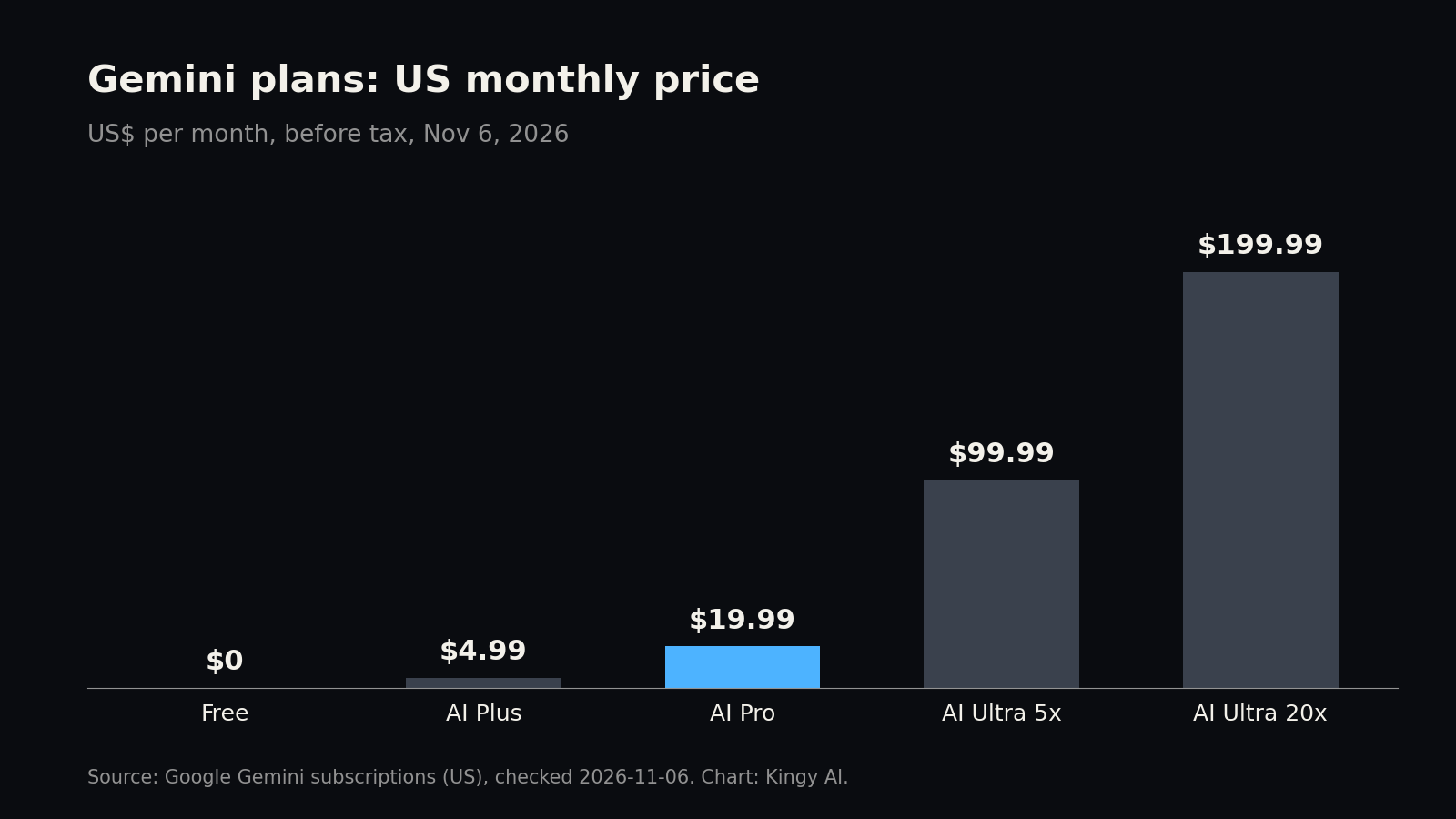
Short answer: Gemini is Google’s AI assistant, on the web at gemini.google.com, in Android and iPhone apps, and in desktop apps for Mac and Windows. It is free with a Google Account. Google AI Plus costs $4.99 a month in the US, Google AI Pro $19.99 and Google AI Ultra $99.99 or $199.99. Most people who want more than the free tier need AI Pro, the cheapest plan with Google’s top model, Gemini 4 Argon, and a 1 million token context window. The limit that bites is a usage allowance that refills every 5 hours until you reach a weekly cap. Google publishes no prompt count for it.
What Gemini is, and the models behind it
Gemini is a chat assistant: you type, speak or upload files, and it answers, writes, researches, makes images and video, and can act in apps you connect. Google calls the whole family “Gemini Apps”.
Google’s help page on models lists four models in the app today:
- Flash-Lite: the fastest, for quick everyday answers.
- Flash: a fast all-rounder.
- Pro: for complex prompts and coding.
- Argon: Google’s top model. Google’s release notes call it Gemini 4 Argon and say it began rolling out on Oct 13, 2026 for AI Pro and Ultra subscribers.
Free accounts get “Auto” by default. Since Oct 9, 2026, Auto sends most prompts to Flash-Lite and some harder ones to Flash or Pro, Google says. Turn Auto off and every free answer comes from Flash-Lite. On every plan you can also set a thinking level (Low, Medium or High). Higher levels give more thorough answers but use more of your allowance, and the default is Low.
Two names you may have seen are not app models. Deep Think, the old Ultra-only reasoning mode, “is being replaced by Gemini 4 Argon”, according to Google’s Deep Think help page. Gemini 4 Carbon, launched on Oct 28, went first to selected cyber defenders, with no consumer date announced, according to Kingy’s Gemini 4 Carbon page. Google’s app help pages we read don’t list it. The developer API (Google AI Studio) is priced separately and isn’t covered here.
Is Gemini free?
Yes. Google’s US plan page lists $0 a month with a Google Account. The free tier includes:
- chat with the Flash-Lite model (through Auto, as above);
- image generation and editing;
- Deep Research, Gemini Live, Canvas and Gems;
- limited access to Google Flow, Google’s AI film studio;
- Gemini Notebook, a research and writing assistant;
- 15 GB of Google storage across Gmail, Drive and Photos.
The catches: free accounts get the standard allowance and a 32k token context window, so Gemini reads only a fairly short document at once. Google says Deep Research may be unavailable to free users at busy times, and free limits may be cut first if capacity is short. Video generation needs a paid plan. Some web features work signed out, but saving chats needs a Google Account.
Gemini plans and prices
US prices from Google’s Gemini subscriptions page, checked Nov 6, 2026. Prices are monthly and before tax.
| Plan | US price | What it adds |
|---|---|---|
| Free | $0 | Flash-Lite through Auto, standard limits, 32k token context, 15 GB storage |
| Google AI Plus | $4.99 a month | 2x the free allowance, the Flash model, 128k token context, video generation and Daily Brief, Gemini in Gmail and Vids, 200 Google Flow credits, 400 GB storage |
| Google AI Pro | $19.99 a month | 4x the free allowance, Gemini 4 Argon and Pro, 1 million token context, Tasks, Gemini in Gmail, Docs and Vids, Chrome auto browse, 1,000 Flow credits, YouTube Premium Lite, Google Home Premium Standard, 5 TB storage |
| Google AI Ultra | $99.99 or $199.99 a month | 5x the AI Pro allowance at $99.99 or 20x at $199.99, the highest access to every model, first access to new features, Project Genie, YouTube Premium, Google Home Premium Advanced, 10,000 or 25,000 Flow credits, storage from 20 TB |
Two things to know before you buy:
- Google’s pages differ on AI Plus. The plan page names only Flash; the models help page lists Flash-Lite, Flash and Pro. Argon starts at AI Pro on both.
- You buy through Google One. The plans are sold as Google One memberships, so the storage, YouTube and Home extras come with them. Google says you can cancel at any time, but it gives no refunds for part of a billing period except where the law requires them. Plans are sold in more than 140 countries and territories. On age, Google’s pages disagree: the plan page says ages 18+, while the limits help page says 13+ in most countries and 18+ in the EEA, Switzerland and the UK.
For local prices, see Kingy’s country pages for India, the UK, Canada, Australia and Germany, checked Oct 19, 2026. To compare Gemini’s plans with ChatGPT, Claude and others, use Kingy’s Plans & Limits tool. The AI Price Index tracks the monthly price of typical AI subscriptions.
Gemini usage limits
Gemini doesn’t give you a fixed number of messages. Since May 2026 it has used what Google calls compute-based limits. Each prompt uses part of your allowance, and how much depends on how complex the prompt is, which model and features you use, and how long the chat is. The allowance refills every 5 hours until you reach a weekly limit.
| Plan | Allowance | Context window |
|---|---|---|
| Free | Standard limits | 32k tokens |
| AI Plus | 2x standard | 128k tokens |
| AI Pro | 4x standard | 1 million tokens |
| AI Ultra | 5x or 20x AI Pro | 1 million tokens |
Google doesn’t say how many prompts “standard” means, and Kingy hasn’t measured it, so we don’t give a number. Google says 1 million tokens is roughly 1,500 pages of text or 30,000 lines of code.
What uses it fastest, Google says: images, video and music; Deep Research; the Pro model; higher thinking levels; long chats; and large files. Its tip: start a new chat when you change topic.
Other published limits:
- Files: up to 10 per prompt. Each video can be up to 2 GB and other files up to 100 MB. Total video length is 5 minutes (1 hour on AI Pro or Ultra), and total audio is 10 minutes (3 hours on Pro or Ultra). One code folder or GitHub repository can have up to 5,000 files and 100 MB.
- Deep Research: there is a daily cap and a cap on reports running at once, both higher on Pro and Ultra. Google doesn’t publish the numbers.
- When you run out: on a paid plan, the chat carries on with Flash-Lite. Otherwise you wait for the refill or upgrade. Google’s plan page says you can also buy AI credits to extend your limits.
- Check where you stand: Settings (bottom left), then Usage limits. Gemini also warns you when you’re close.
Google says limits “may change without notice”, including when demand is high.
How to get started with Gemini
- Pick a surface. On the web, go to gemini.google.com in Chrome, Safari, Firefox, Opera or the Chromium-based Edge. On a phone, install the Gemini app on Android or iPhone. On Android you can also make Gemini your phone assistant, if the Google app is set as the default assist app. On a computer, download the desktop app (see below).
- Sign in with a personal Google Account. Work accounts need a qualifying Workspace plan and age 18+; school accounts need the school to turn Gemini on.
- Type, talk or attach. Enter a prompt, or click Add files to attach a document or image.
Desktop apps. The Mac app needs macOS Sequoia (15.0) or later on an Apple silicon Mac with 8 GB of memory. Download it from gemini.google/mac, then press Option + Space to call it up. The Windows app needs Windows 10 or later and 8 GB of memory. Download it from gemini.google/desktop, then press Alt + Space.
Settings worth changing first:
- Keep Activity and auto-delete. In Gemini Apps Activity you choose whether chats are saved and used to improve Google’s AI, and how long they stay: 3, 18 (the default) or 36 months, or until you delete them. More in Privacy below.
- Instructions and memory. Anyone can add instructions for how Gemini should respond. Having Gemini remember facts about you needs a paid plan, a personal account and age 18+. For now, Google says that part works only in the US.
- Auto model selection. Turn it on or off in Settings, then Usage limits. On a paid plan, you can also pick a model from the name under the chat box. A lock icon means your plan doesn’t include that model.
- Temporary chat. Click Temporary chat next to New chat for a conversation that stays out of your history.
- Moving from another AI? Settings, then Import memory to Gemini, brings over saved preferences and chat history (18+, not in the EEA, Switzerland or the UK).
The Gemini features people use most
- Deep Research. Gemini searches the web, and optionally your Gmail, Drive or uploaded files, and writes a sourced report. Start it from Add files, then Deep Research. It’s on every plan for users 18+. AI Pro and Ultra can use the Pro model and get higher daily limits. Kingy’s Deep Research guide covers sources and checking reports.
- Images. Ask for an image or upload one to edit. Gemini uses Google’s Nano Banana 2 model, and paid plans can regenerate images with Nano Banana Pro. Downloads are 2K on a Google AI plan and 1K without. Generating needs age 13+ and editing 18+.
- Video. Gemini makes 3 to 10 second clips (up to 15 seconds on AI Ultra) with Gemini Omni 1.2 Flash. It needs a Google AI plan and age 18+. Uploading your own video to edit isn’t available in the EEA, Switzerland, the UK or some US states. More in Kingy’s Gemini Omni 1.2 Flash page.
- Canvas. A side workspace for drafting a document, slides, code or a small web app, which can become an Audio Overview or quiz. Start it from Add files, then Canvas.
- Files and code. Upload PDFs, spreadsheets, images, audio or video, add files from Drive (needs Keep Activity on), or import a code folder or GitHub repository.
- Gemini Live. A spoken conversation that you can interrupt mid-answer. Google’s Android help page says Live runs in the mobile app and isn’t in the web app for now.
- Tasks. You hand Gemini a multi-step job, such as clearing newsletters from your inbox or watching for a flight price drop, and it works through it, on a schedule if you like. It needs AI Pro or Ultra, age 18+, a personal account, Keep Activity on and Personal Intelligence switched on. It isn’t offered in the EEA, Nigeria, Switzerland or the UK.
- Skills, connected apps and notebooks. Skills are saved instructions that Gemini applies when they fit. Google says skills will replace Gems, and your Gems will be moved over automatically. Connected apps let Gemini use Gmail, Calendar, YouTube Music, Spotify and, in the US, services such as Instacart and OpenTable. Both live under Customize in the side panel. Notebooks keep a project’s sources and chats together, on the web app only for now.
Gemini also works inside Gmail and Vids on AI Plus, and inside Gmail, Docs and Vids on AI Pro and Ultra.
Gemini privacy: what’s kept and how to opt out
From Google’s Gemini Apps Privacy Hub, last updated Oct 26, 2026:
- What’s collected: your prompts, uploads, Gemini Live recordings, what Gemini generates, data from apps you connect, and device and location information.
- Human review: trained reviewers, including staff at Google’s service providers, read a sample of chats. Google says chats are disconnected from your account before they reach outside reviewers. Google’s advice is not to enter anything confidential you wouldn’t want a reviewer to see. Reviewed chats are kept for up to three years, even if you delete your activity.
- Saved chats: with Keep Activity on, chats are saved, auto-deleted after 18 months by default (you can choose 3 or 36 months, or never), and used to improve Google’s AI, including training.
- Opting out of training: turn Keep Activity off, or use a temporary chat. Google still keeps those chats for 72 hours to answer you and for safety, but doesn’t use them to train its models unless you send feedback.
- Voice and Live video: not used to improve Google’s services by default, Google says.
- Ads: Google says your Gemini chats are not being used to show you ads, and that it will tell you clearly if that changes.
- Memory: ask “What do you know about me?” or open your memory summary in settings to see, edit or delete what Gemini has saved about you.
- Delete or export: delete chats in Gemini Apps Activity. To download them, go to takeout.google.com and pick Gemini (for Gems) and My Activity (for chats and uploads). Downloading doesn’t delete anything.
Common Gemini problems and fixes
- “You’ve reached your limit.” Your 5-hour or weekly allowance has run out. Settings, then Usage limits shows when it refills. To make it last, start new chats for new topics, pick a lighter model or a lower thinking level, and save video and Deep Research for when you need them. Otherwise, upgrade or buy AI credits.
- “Delete data to upload file.” Gemini has its own storage limit for saved chats and uploads, separate from Drive. Delete old activity in Settings and help, then Activity. Google says it can take a few minutes for space to free up.
- “You’ve reached your limit for chats with files.” File uploads have a rolling limit. Wait and try again later.
- “Your uploads may be too large for the best results.” The file is bigger than your context window, so Gemini may miss details. Split it up, or use AI Pro or Ultra for the 1 million token window.
- A model is greyed out or has a lock. Your plan doesn’t include it. Argon starts at AI Pro.
- A feature is missing. Many features need age 18+, a personal account, a paid plan or a supported country; check the “What you need” box on the feature’s Google help page.
- The desktop app misbehaves. On Mac, click Gemini, then Check for Updates. On Windows, accept the update prompt and click Restart to update.
- Is Gemini down? Google’s Workspace Status Dashboard has a Gemini row, aimed at Workspace customers. Kingy’s Google status page tracks Google Cloud’s Vertex AI, not the consumer app. Use it as a clue, not proof.
- Report a bug or a bad answer. Rate the answer, or use Settings, then Send feedback. Feedback includes the conversation and its files.
Alternatives to Gemini
- How to use ChatGPT and how to use Claude: the same guide for OpenAI’s and Anthropic’s assistants.
- AI Model Board: every model with a checked API price, plus Kingy’s own test results.
- Compare AI models side by side: prices, context windows and retirement dates across Google, OpenAI, Anthropic and others.
- Gemini 4 Argon vs GPT-6 Astra, GPT-6.1 Sol and Claude 5.5: how Google’s top model compares with ChatGPT’s and Claude’s.
- Plans & Limits: Gemini’s plans next to ChatGPT, Claude, Copilot and more, with dated sources.
- Gemini in Kingy’s AI tools directory: pricing, features and evidence on one card.
How we checked
We read Google’s US subscriptions page, the help articles below, the Privacy Hub and the release notes on Nov 6, 2026. Kingy’s own Google AI Pro record, last verified Oct 19, 2026, shows the same $19.99. Where Google’s pages disagree, we say so. Features roll out gradually, so yours may differ by account, country and device.
Sources
- Google: Gemini subscriptions (US), read Nov 6, 2026
- Gemini Apps Help: limits and feature availability, read Nov 6, 2026
- Gemini Apps Help: changes to model access and limits, read Nov 6, 2026
- Gemini Apps Help: About Gemini models, read Nov 6, 2026
- Gemini Apps release notes, read Nov 6, 2026
- Gemini Apps Help: Use Gemini Apps, read Nov 6, 2026
- Gemini Apps Help: What you need to sign in, read Nov 6, 2026
- Gemini Apps Help: Gemini app on Mac, read Nov 6, 2026
- Gemini Apps Help: Gemini app for Windows, read Nov 6, 2026
- Gemini Apps Help: Get started with the mobile app, read Nov 6, 2026
- Gemini Apps Help: Upload and analyze files, read Nov 6, 2026
- Gemini Apps Help: Deep Research, read Nov 6, 2026
- Gemini Apps Help: Generate and edit images, read Nov 6, 2026
- Gemini Apps Help: Generate videos, read Nov 6, 2026
- Gemini Apps Help: Canvas, read Nov 6, 2026
- Gemini Apps Help: Gemini Live, read Nov 6, 2026
- Gemini Apps Help: Tasks, read Nov 6, 2026
- Gemini Apps Help: Skills, read Nov 6, 2026
- Gemini Apps Help: Notebooks, read Nov 6, 2026
- Gemini Apps Help: Connected Apps, read Nov 6, 2026
- Gemini Apps Help: Customize, read Nov 6, 2026
- Gemini Apps Help: Manage what Gemini remembers, read Nov 6, 2026
- Gemini Apps Help: Import from other AI platforms, read Nov 6, 2026
- Gemini Apps Privacy Hub (last updated Oct 26, 2026), read Nov 6, 2026
- Gemini Apps Help: Manage your Google AI plan, read Nov 6, 2026
- Gemini Apps Help: Send feedback or report a problem, read Nov 6, 2026
- Gemini Apps Help: Deep Think, read Nov 6, 2026
- Gemini Apps Help: Download your Gemini Apps data, read Nov 6, 2026
- Google Workspace Status Dashboard, read Nov 6, 2026
- Kingy AI: Plans & Limits, Gemini rows, read Nov 6, 2026
- Kingy AI: Gemini 4 Carbon, for Carbon’s limited access, read Nov 6, 2026
- Kingy AI: Google status, for what that page covers, read Nov 6, 2026
Revision log
- Nov 6, 2026: first published.