
Last updated: June 21, 2026. Claude Code and Codex are no longer just two chatbots that write code. They are full coding-agent systems with terminals, IDE integrations, cloud workers, GitHub automation, permissions, review flows, and increasingly opinionated ways to move work from idea to pull request.
The short answer: Claude Code is the better default for terminal-native developers who want deep local control, hooks, scripting, MCP, and custom agent workflows. Codex is the better default if you already live in ChatGPT and want a polished multi-surface agent across desktop, CLI, IDE, cloud tasks, code review, and team workflows.
The real answer is less tidy. The best tool depends on where your code lives, how much autonomy you allow, whether your team trusts cloud coding environments, how you handle secrets, and how disciplined your review and test loops are.
Executive summary
Claude Code is Anthropic’s agentic coding tool. Its official docs describe it as a tool that reads your codebase, edits files, runs commands, and integrates with development tools across terminal, IDE, desktop app, and browser.
Codex is OpenAI’s coding agent for software development. OpenAI’s docs describe Codex as one agent for everywhere you code, included across ChatGPT Free, Go, Plus, Pro, Business, Edu, and Enterprise plans, with app, CLI, IDE extension, web, and cloud workflows.
If you are choosing for one developer, try both on the same repo and compare the diff quality, command discipline, and review burden. If you are choosing for a business, do not start with “which model is smarter?” Start with access controls, auditability, rate limits, data policy, cloud environment setup, and how easy it is to make the agent produce reviewable pull requests.
Key takeaways
- Choose Claude Code when your work is terminal-heavy, local, scriptable, and you want strong customization through CLAUDE.md, hooks, skills, MCP, and the Claude Agent SDK.
- Choose Codex when you want a broad OpenAI workflow across ChatGPT, Codex desktop, CLI, IDE extension, cloud tasks, worktrees, GitHub, Slack, and Linear.
- For businesses, both need guardrails. Do not let either tool touch production credentials, deploy pipelines, or private customer data until you have permissions, review rules, logging, and a rollback path.
- Benchmarks help, but they do not settle this comparison. SWE-bench is useful context, but OpenAI now warns that SWE-bench Verified is increasingly contaminated and recommends SWE-bench Pro for frontier coding evaluation.
- The winning workflow is usually hybrid. Use the agent for exploration, refactoring, tests, and draft PRs. Keep humans responsible for architecture, security, product judgment, and final merges.
Table of contents
- What is Claude Code?
- What is Codex?
- Why this matters
- Claude Code vs. Codex comparison table
- Best use cases
- Developer, business, and creator workflow comparison
- Pricing comparison
- Benchmarks and evaluations
- Strengths and weaknesses
- Which one should you choose?
- FAQ
- Sources
What is Claude Code?
Claude Code is Anthropic’s coding-agent product built around Claude. In plain English: you open it in a repo, ask it to do software work, and it can inspect files, edit code, run shell commands, use tools, and produce changes for you to review.
Its strongest identity is still terminal-first. The CLI is not just a command wrapper. It is the center of many Claude Code workflows: local repo work, shell pipelines, recurring jobs, GitHub Actions setup, GitLab CI/CD, hooks, MCP servers, and custom automation.
That said, Claude Code in 2026 is not only a terminal product. Anthropic now documents Claude Code across terminal, VS Code, JetBrains, desktop app, web, mobile/cloud sessions, Slack, Chrome, CI/CD, and the Claude Agent SDK. The product has clearly moved from “developer CLI” toward “agent platform for coding work.”
The useful mental model: Claude Code is a strong choice when you want the agent close to the repo and close to your tools. It feels especially natural when your workflow already involves terminals, logs, scripts, test runners, linters, project-specific instructions, and a human who wants to steer the agent step by step.
What is Codex?
Codex is OpenAI’s coding agent for software development. The current OpenAI developer docs describe Codex as a single coding agent that can help write code, understand unfamiliar codebases, review code, debug failures, and automate development tasks.
In 2026, Codex is a suite, not one surface. OpenAI documents the Codex app, Codex CLI, Codex IDE extension, Codex web/cloud, GitHub integration, Slack integration, Linear integration, Codex Security, app/server automation, and SDK workflows. The public openai/codex GitHub repository describes the CLI as a lightweight local coding agent, while OpenAI’s docs position cloud Codex as a way to delegate tasks in the background and in parallel.
The useful mental model: Codex is a strong choice when you want a coding agent integrated into the broader ChatGPT/OpenAI environment. It has a polished multi-surface story: local work in the CLI or app, side-by-side IDE help, cloud tasks, worktrees, PR review loops, and team integrations.
If you are already reading Kingy.ai’s AI coding agent stack guide, think of Codex as one of the clearest examples of the new stack: not autocomplete, but repo-connected agent infrastructure.
Why this matters
The old AI coding question was: “Which assistant writes the best snippet?”
The 2026 question is: “Which agent can safely move through my software workflow without creating chaos?”
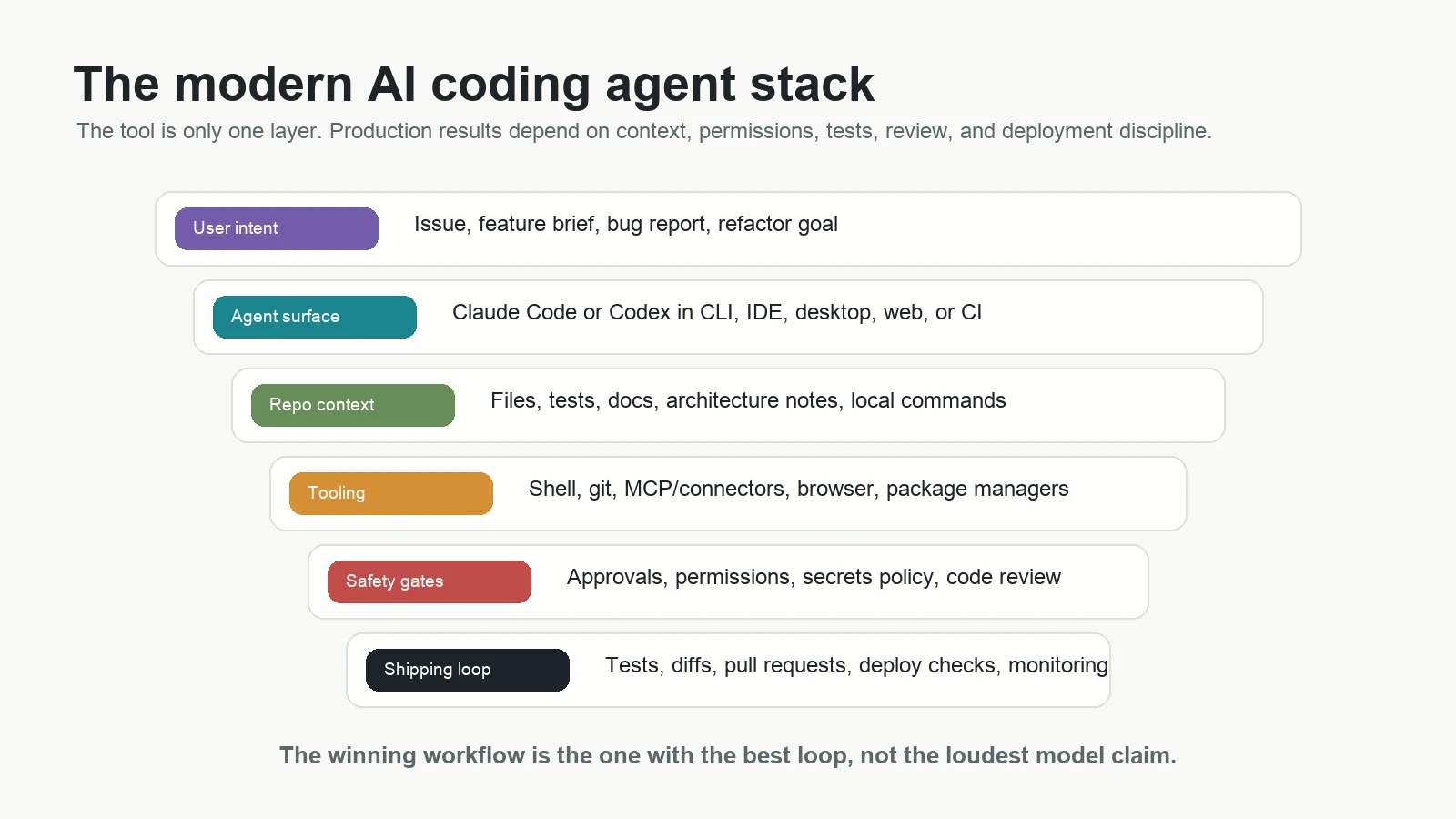
That is a much harder question. A coding agent is only useful if it can read the right context, avoid secrets, make small reviewable changes, run the right tests, explain tradeoffs, preserve project conventions, and stop when it is uncertain. A powerful model with weak workflow discipline is expensive. A slightly less flashy model in a clean review loop can be a better teammate.
This is why the comparison below focuses on practical work: debugging, refactoring, testing, repo navigation, automation, review, business rollout, and creator workflows.
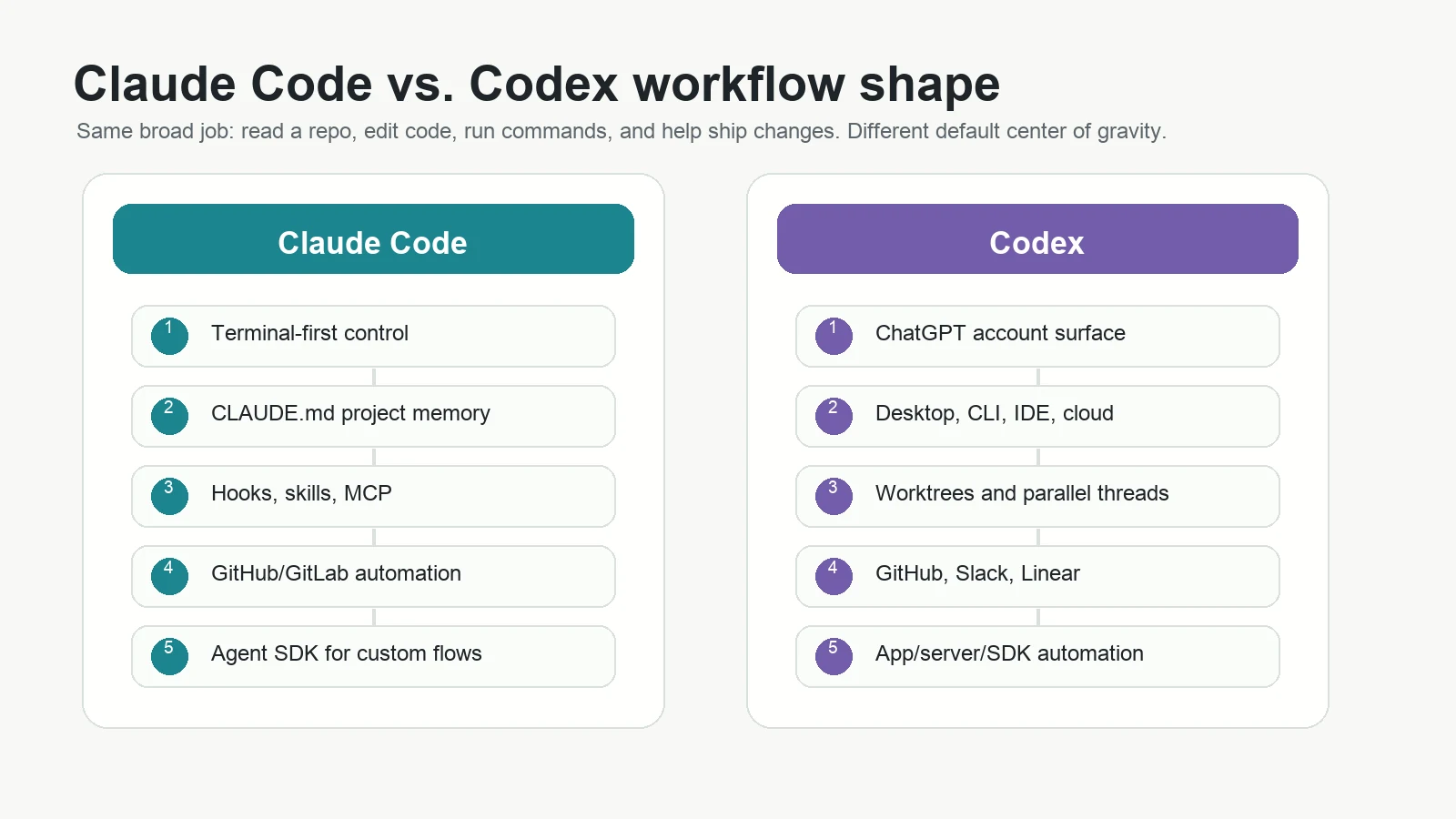
Claude Code vs. Codex comparison table
| Category | Claude Code | Codex | Practical read |
|---|---|---|---|
| Owner | Anthropic | OpenAI | Both are first-party products from major frontier AI labs. |
| Core identity | Agentic coding tool with strong terminal, local, and automation roots. | OpenAI coding agent across ChatGPT, desktop, CLI, IDE, and cloud. | Claude Code feels more shell-native. Codex feels more multi-surface and ChatGPT-native. |
| Local CLI | Yes. The CLI is central to the product. | Yes. Codex CLI runs locally and is open source. | Both are credible terminal agents. Claude Code has a longer public reputation as a CLI-first coding workflow. |
| IDE support | VS Code and JetBrains documented, with editor context and visual diffs. | VS Code-compatible editors and JetBrains documented, with model/reasoning/approval controls. | Both are usable inside editors. Test the exact IDE your team uses. |
| Cloud delegation | Claude Code on web supports long-running cloud tasks and parallel work. | Codex web/cloud supports background tasks, cloud environments, PR creation, and parallel work. | Codex has a very explicit cloud/worktree story. Claude Code has a broad cloud and remote-control story. |
| Customization | CLAUDE.md, hooks, skills, MCP, Agent SDK, project memory. | AGENTS.md/rules, approvals, MCP, plugins, subagents, app/server/SDK automation. | Claude Code is especially attractive for teams that love scripts and hooks. Codex is attractive for teams already building around OpenAI tools. |
| GitHub automation | Claude Code GitHub Actions supports @claude mentions, PR creation, issue work, reviews, and custom workflows. | Codex supports GitHub delegation and code review workflows from the OpenAI Codex docs. | Both can work in PR loops. Compare setup, permissions, and review quality. |
| Business fit | Good for engineering teams that want direct control, CI automation, and programmable agents. | Good for ChatGPT Business/Enterprise teams that want a managed agent workspace and cloud delegation. | Do not buy seats before mapping data policy, permission model, and cost controls. |
| Beginner fit | Good if the beginner can tolerate terminal workflows or uses desktop/web surfaces. | Good if the beginner already understands ChatGPT and wants a familiar account surface. | For non-developers, read Kingy.ai’s AI coding agents for non-developers guide before shipping anything real. |
| Best default user | Senior developer, platform engineer, automation-heavy team, codebase power user. | Developer, product builder, team using ChatGPT, business evaluating managed agent workflows. | For advanced users, both can be excellent. The difference is workflow fit. |
Best use cases for Claude Code
Claude Code is strongest when the task benefits from close contact with the repo and local tools.
1. Debugging a messy local failure
Give Claude Code the failing command, log output, test failure, and the repo. It can inspect files, trace the call path, edit code, rerun the command, and explain the cause. This is the kind of task where terminal-native flow matters.
2. Refactoring across many files
Claude Code is a strong fit for careful, multi-file refactors where you want it to follow project instructions, run formatters, update tests, and keep changes reviewable.
3. Repeatable engineering automation
Anthropic documents hooks, skills, CLI scripting, GitHub Actions, GitLab CI/CD, scheduled tasks, and the Agent SDK. That makes Claude Code attractive when you want repeatable workflows such as “review every changed file,” “write tests for untouched modules,” or “turn this issue into a draft PR.”
4. Custom agent products
The Claude Agent SDK is a serious differentiator if your goal is not only to use a coding agent, but to build one into a product or internal system. The SDK exposes the same style of file-reading, command-running, code-editing agent loop in Python and TypeScript.
Best use cases for Codex
Codex is strongest when you want a broad, managed agent surface that spans local work, cloud work, and team review loops.
1. Delegating parallel tasks
Codex web/cloud and the Codex desktop app are built around parallel threads, cloud tasks, and reviewable diffs. That is useful when you want one agent investigating a bug, another writing tests, and another updating docs without blocking your editor.
2. ChatGPT-native product builders
If you already use ChatGPT for planning, research, writing, image work, and product thinking, Codex gives you a cleaner bridge from idea to repo work. This matters for creators and small businesses who do not think of coding as a separate universe.
3. Business rollout inside OpenAI accounts
OpenAI’s Codex pricing page and help docs tie Codex to ChatGPT plans, workspace controls, Business, Edu, and Enterprise features. For companies already standardizing on ChatGPT, procurement and user management may be easier than introducing a separate vendor.
4. Code review and cloud environment workflows
Codex has a strong story around cloud tasks, GitHub code review, Slack, Linear, environments, worktrees, and applying diffs back into a local workflow. That makes it attractive when the desired output is not “answer my question,” but “produce a reviewed change I can test and merge.”
Developer workflow comparison
For developers, the decisive question is not whether either tool can write code. Both can. The question is how much useful work you get per unit of review burden.
Claude Code developer workflow: open a repo, run claude, give it a narrow task, let it inspect files and run commands, review the diff, ask for changes, run tests, commit when satisfied. For advanced users, add CLAUDE.md, hooks, MCP servers, skills, and scripted prompts.
Codex developer workflow: open Codex in desktop, CLI, IDE, or web, choose local or cloud, describe the task, let Codex work in a thread or cloud environment, review diffs, run tests, and apply or merge changes. For advanced users, use worktrees, subagents, approvals, rules, MCP, and GitHub/Slack/Linear integrations.
For intense debugging, I would start with Claude Code if I want to stay in the terminal and interrogate the repo step by step. I would start with Codex if I want to hand off multiple tasks, monitor them in parallel, and use ChatGPT-connected surfaces for planning and review.
Business workflow comparison
Businesses should care, but only if they treat coding agents as controlled infrastructure.
A business should ask:
- Who can connect repos?
- Can the agent access production secrets?
- Can the agent open PRs without human review?
- Can the agent run arbitrary commands?
- What happens to business data?
- Are audit logs available?
- Are usage limits predictable?
- Can the agent be disabled for certain workspaces or repos?
Claude Code can fit engineering organizations that want strong local control, direct CI automation, and custom agent tooling. Codex can fit organizations that already manage ChatGPT Business or Enterprise and want a coding agent inside that existing vendor relationship.
Either way, read Kingy.ai’s AI stack audit guide before buying broad seats. The hidden cost is not only subscription price. It is review time, failed tasks, context setup, cloud environment maintenance, and the occasional very confident wrong change.
Creator workflow comparison
Creators should care because coding agents are becoming the fastest way to ship small apps, websites, automations, calculators, lead magnets, content tools, and demos.
Codex has the advantage for many creators because it sits closer to ChatGPT habits. A creator can plan the thing, ask for copy, generate assets, build the app, test it, and write launch material in one OpenAI-centered workflow. If your next step is a hosted app or prototype, Kingy.ai’s OpenAI Sites guide is a useful adjacent read.
Claude Code is excellent for creators who are comfortable with a local project folder and want more direct control. It can be a strong fit for technically curious creators who want to build repeatable workflows, use MCP, or turn common content/product tasks into CLI scripts.
For complete beginners, neither tool removes the need to understand what you are publishing. A coding agent can make a broken login flow look convincing. It can also ship a privacy bug if you approve changes you do not understand.
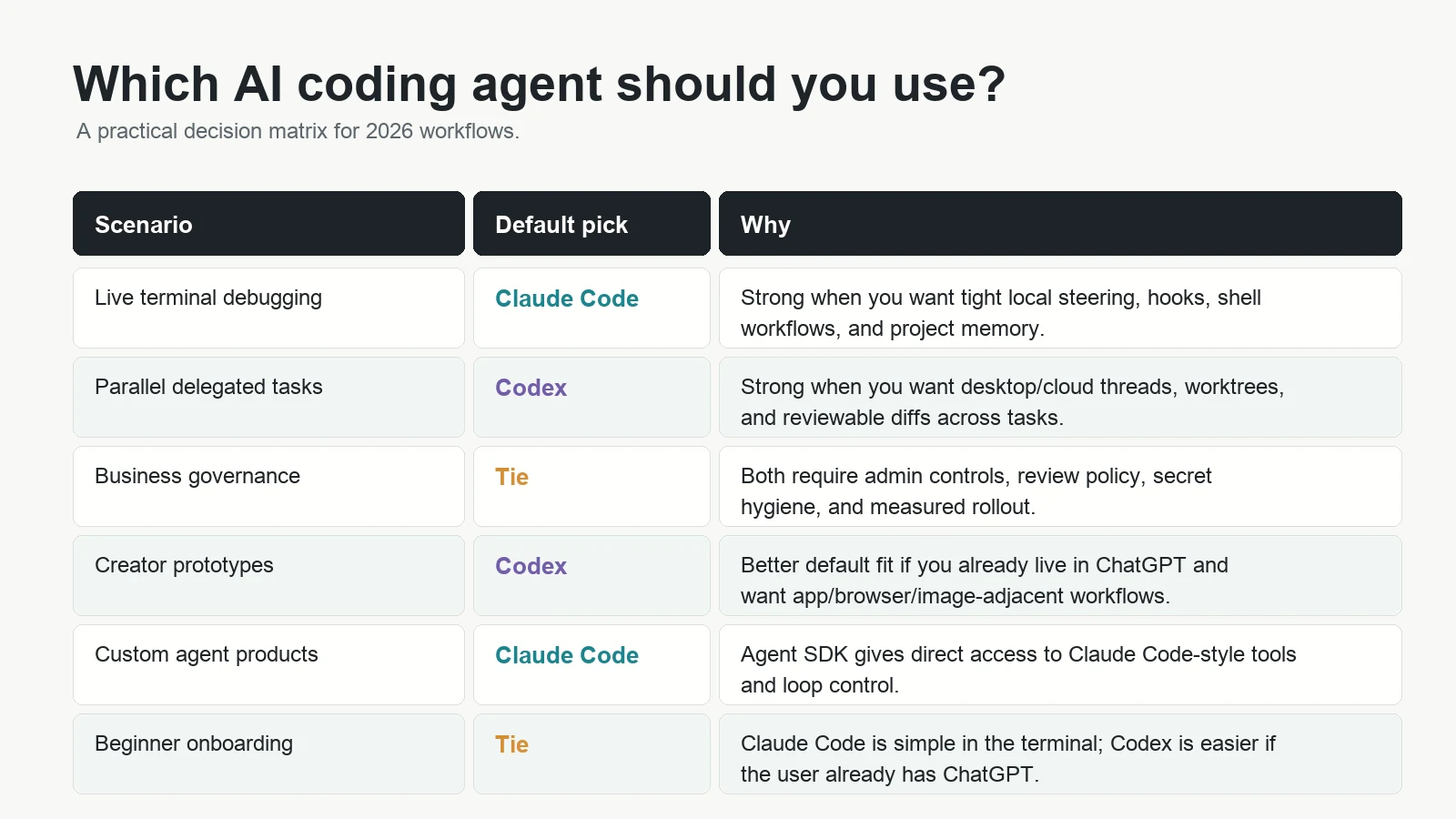
Pricing comparison if pricing is publicly available
Pricing changes quickly, so treat this as a snapshot from the public vendor pages checked on June 21, 2026.
Anthropic’s Claude pricing page lists Claude Pro at $20/month when billed monthly, with Claude Code included. It lists Claude Max from $100/month with 5x or 20x more usage than Pro. It also lists Team standard seats at $20 per seat/month if billed annually or $25 monthly, plus premium seats with more usage.
OpenAI’s Codex pricing page says Codex is included in ChatGPT Free, Go, Plus, Pro, Business, Edu, and Enterprise plans. The page lists Free at $0/month, Go at $8/month, Plus at $20/month, and Pro from $100/month. It also documents API-key usage for CLI, SDK, or IDE extension without cloud-based features, billed by API tokens.
The important comparison is not just sticker price. It is effective usable work. A $20 plan that gets blocked by rate limits during a large refactor may be worse than a more expensive plan. A powerful plan with poor review discipline may cost more in cleanup than it saves in coding time.
Benchmark and evaluation discussion
Benchmarks are useful, but they are easy to misuse in this comparison.
SWE-bench evaluates language models on real GitHub software issues. The SWE-bench site describes the task as generating a patch for a real-world issue from a codebase and problem statement. Its leaderboard reports the percentage of resolved instances across datasets such as Full, Verified, Lite, Multilingual, and Multimodal.
That sounds directly relevant, and it is. But it does not perfectly answer “Claude Code vs Codex.” A benchmark result may evaluate a model, a scaffold, an agent harness, a tool setup, or a particular run configuration. Claude Code and Codex are products and workflows, not just model names.
There is another complication. OpenAI published a February 23, 2026 note titled “Why SWE-bench Verified no longer measures frontier coding capabilities”. OpenAI argues that SWE-bench Verified is increasingly contaminated and says it no longer reflects meaningful improvements for frontier launches at current performance levels. OpenAI recommends SWE-bench Pro instead.
So the honest benchmark conclusion is:
- Use SWE-bench-style results as capability context, not as a buying decision.
- Prefer evaluations that test your actual repo, language, CI setup, code review standards, and security rules.
- Run both tools on identical tasks before choosing.
- Track acceptance rate, diff size, tests passed, review comments, time to merge, and rework rate.
If someone claims “Claude Code is objectively better” or “Codex wins because of one benchmark,” ask exactly what was tested, which model ran, what tools were available, whether the agent could run tests, how many attempts were allowed, and whether the result was independently verified.
Strengths and weaknesses table
| Tool | Strengths | Weaknesses and limits |
|---|---|---|
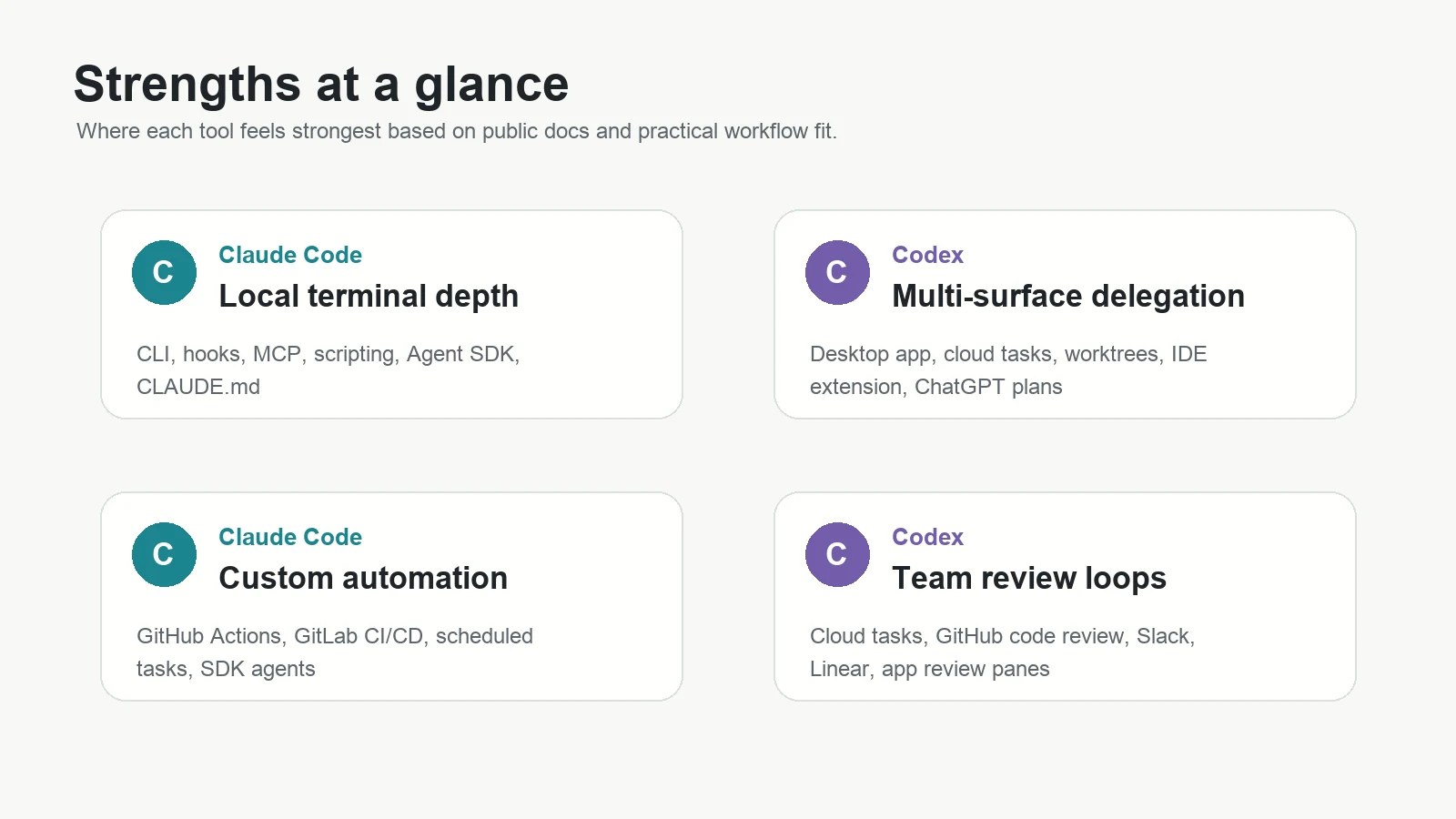
| Claude Code | Terminal-native flow, strong customization, hooks, MCP, skills, CLAUDE.md, Agent SDK, GitHub/GitLab automation, good fit for senior dev workflows. | Can be intimidating for beginners, still requires review discipline, cloud/web/desktop surfaces may not match every team’s procurement or governance needs, usage limits can matter on large tasks. |
| Codex | Broad OpenAI ecosystem, ChatGPT plan integration, app/CLI/IDE/web surfaces, cloud task delegation, worktrees, GitHub/Slack/Linear workflows, good fit for teams already using ChatGPT. | Some cloud and team features depend on plan/workspace setup, API-key mode lacks cloud-based features, newer surfaces can feel fast-moving, review burden remains real. |
What feels unproven
Several things still feel unproven in 2026.
Long-running autonomy is not solved. Agents can run longer tasks, but long tasks are where small misunderstandings compound. The longer an agent works without human checkpoints, the more you need tests, monitoring, and review.
Business ROI is uneven. Some teams will get real leverage. Others will create a pile of half-right PRs that senior engineers must untangle. The difference is workflow maturity.
Security posture depends on setup. The safest agent is not the one with the best marketing page. It is the one configured with least privilege, no production secrets, explicit approvals, and a boring rollback plan.
Benchmarks are lagging the product reality. Real coding-agent work includes repo setup, tests, code review, CI failures, ambiguous product requirements, and team conventions. Public leaderboards only capture part of that.
Should businesses care?
Yes, but with restraint.
Businesses should care because coding agents can reduce time spent on tests, migrations, dependency updates, docs, PR review, issue triage, and repetitive internal tooling. They can also help junior developers navigate unfamiliar codebases faster.
Businesses should be cautious because these agents can create plausible bad code at scale. The risk is not only one bad answer. The risk is a workflow where humans stop reading diffs because the agent is usually right.
A sensible business rollout looks like this:
- Start with low-risk repos and non-production tasks.
- Require human review for every change.
- Block access to production secrets.
- Define allowed commands and network access.
- Track accepted PRs, reverted PRs, review time, and incident rate.
- Only then expand to higher-value workflows.
Should creators care?
Yes. Creators should care because the gap between idea and working prototype is shrinking.
With a coding agent, a creator can build a calculator, landing page, content tool, internal dashboard, directory, course companion, or automation without waiting for a full development cycle. Codex may be the easier on-ramp for creators already using ChatGPT. Claude Code may be the better fit for creators who want to own a local codebase and learn the machinery.
The warning: do not publish tools that collect user data, take payments, or make important decisions unless a competent human reviews security, privacy, and failure modes.
Should developers care?
Definitely.
Developers should not think of Claude Code or Codex as replacements for engineering judgment. Think of them as junior-to-mid agents that can move quickly, read a lot, and make drafts. Your job shifts toward framing tasks, reviewing diffs, designing systems, writing tests, and keeping the agent inside useful boundaries.
If you want to go deeper on the workflow idea, Kingy.ai’s AI loops guide is the right companion piece: the loop matters more than the one prompt.
Recommended workflows
For developers
- Use Claude Code for local debugging, shell-heavy investigation, hooks, custom scripts, and SDK-style automation.
- Use Codex for parallel cloud tasks, desktop/app review loops, IDE delegation, and ChatGPT-connected product work.
- In both tools, ask for a plan before large edits, then review the diff before running broad commands.
For businesses
- Run a two-week pilot with both tools on the same backlog.
- Measure accepted PRs, review time, test pass rate, rework, and developer satisfaction.
- Keep agents away from production credentials and high-risk deployments at first.
- Use your existing code review process as the gate, not the agent’s confidence.
For creators
- Use Codex if you want the easiest bridge from ChatGPT planning to working code.
- Use Claude Code if you are willing to learn a local repo workflow and want more direct control.
- Start with prototypes that do not collect sensitive data.
- For learning, pair this with Kingy.ai’s AI skill stack and free courses guide.
Which one should you choose?
Choose Claude Code if:
- You live in the terminal.
- You want hooks, MCP, skills, scripts, and project instructions.
- You want to build custom agents with the Claude Agent SDK.
- You prefer local repo control and explicit steering.
- Your team wants automation inside CI/CD and GitHub/GitLab workflows.
Choose Codex if:
- You already use ChatGPT heavily.
- You want desktop, CLI, IDE, and cloud delegation under one OpenAI umbrella.
- You want parallel cloud tasks, worktrees, code review, Slack, or Linear workflows.
- You are a creator or business user who wants a smoother path from idea to app.
- Your company already manages ChatGPT Business, Edu, or Enterprise.
Use both if: you are serious about AI-assisted software work. Claude Code and Codex have different ergonomics. Many advanced teams will use one as the daily driver and the other as a second reviewer, refactor partner, or cloud delegation layer.
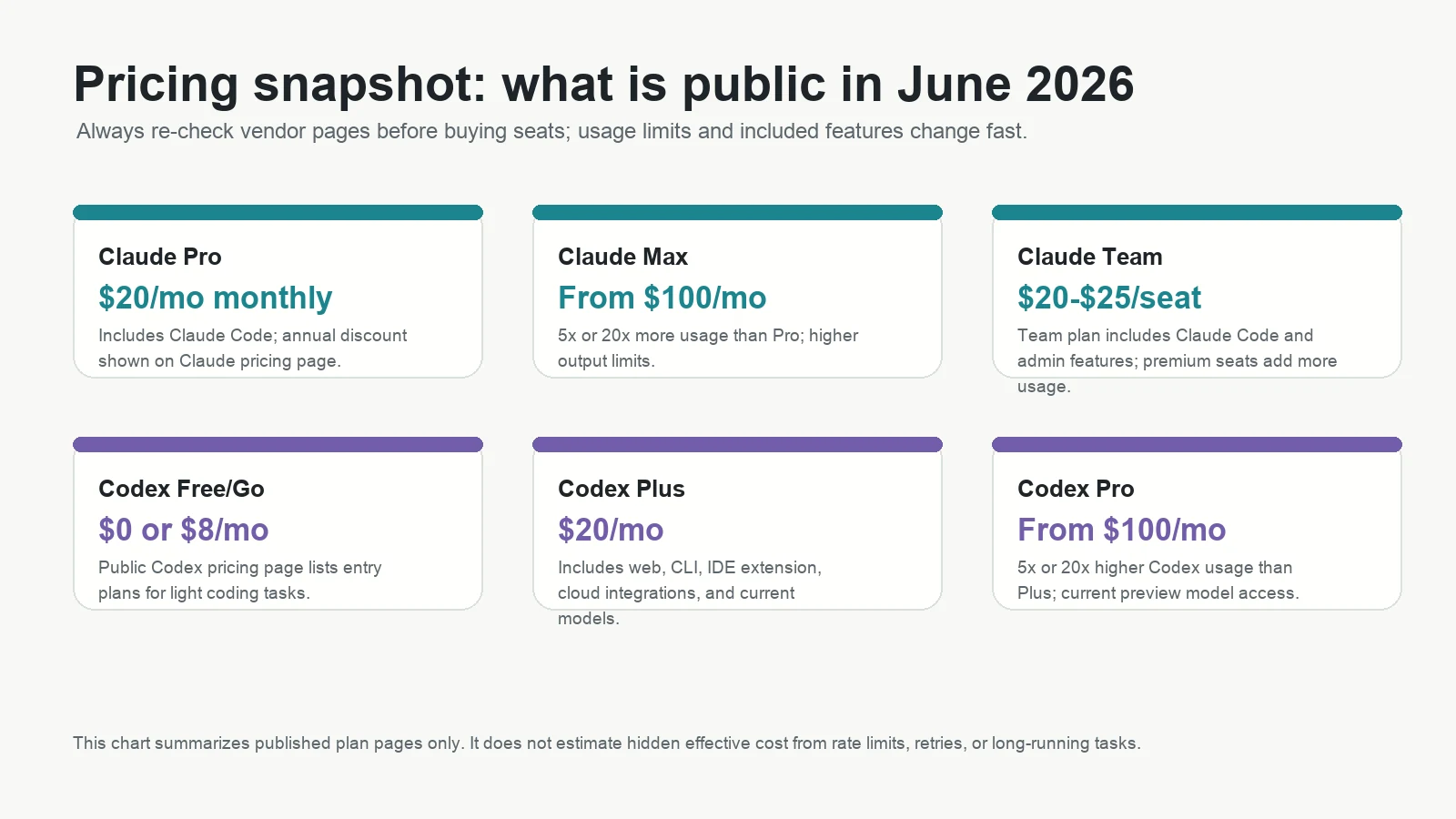
Practical decision matrix
| Need | Best first choice | Reason |
|---|---|---|
| Fix a local bug with logs and failing tests | Claude Code | Terminal-native debugging and command flow are a natural fit. |
| Run three repo tasks in parallel | Codex | Cloud tasks, worktrees, and desktop/web review surfaces are built for delegation. |
| Create a small app as a non-developer | Codex | ChatGPT-native planning and product workflows lower the on-ramp. |
| Build a custom coding agent inside your product | Claude Code | The Claude Agent SDK is designed for programmable agent workflows. |
| Standardize a large company’s AI coding workflow | It depends | Choose based on data controls, account management, auditability, procurement, and measured pilot results. |
| Review AI-generated code before merge | Both | Use one to generate and the other to critique when risk is high. |
FAQ: Claude Code vs. Codex 2026
1. Is Claude Code better than Codex?
Claude Code is usually better for terminal-native, local, highly customized workflows. Codex is usually better for teams or creators who want a broad OpenAI surface across ChatGPT, desktop, CLI, IDE, and cloud tasks. Neither is universally better.
2. Is Codex the same as the old OpenAI Codex model?
No. In 2026, Codex refers to OpenAI’s coding-agent product family, not only the older Codex model brand. It includes app, CLI, IDE, web/cloud, and integrations.
3. Does Claude Code work only in the terminal?
No. Claude Code has terminal roots, but Anthropic documents terminal, VS Code, JetBrains, desktop, web, mobile/cloud, Slack, Chrome, GitHub Actions, GitLab CI/CD, and Agent SDK workflows.
4. Does Codex work locally?
Yes. Codex CLI runs locally, and OpenAI’s docs say it can read, change, and run code on your machine in the selected directory. Codex also has cloud workflows.
5. Which is better for beginners?
Codex may be easier if the beginner already uses ChatGPT. Claude Code can be beginner-friendly too, but terminal workflows require more comfort with local projects, commands, and reviewing diffs.
6. Which is better for complex software engineering?
For complex local debugging and refactoring, Claude Code is often the cleaner first choice. For complex delegated work across parallel cloud tasks and team review loops, Codex is often the cleaner first choice. Serious teams should pilot both.
7. Which is better for businesses?
Businesses already using ChatGPT Business, Edu, or Enterprise may prefer Codex for account and workspace alignment. Engineering-heavy businesses that want local control, CI automation, and custom agent SDK workflows may prefer Claude Code.
8. Which is better for creators?
Codex is often better for creators who want a familiar ChatGPT-to-code workflow. Claude Code is better for creators who want to learn a local codebase, automate repeatable tasks, or build more technical workflows.
9. Can either tool replace a developer?
No. They can draft code, inspect repos, run commands, and accelerate work, but they still need human direction, review, testing, architecture judgment, and security oversight.
10. Are Claude Code and Codex safe to use with private repos?
They can be used with private repos, but safety depends on plan, settings, permissions, network access, secrets handling, and team policy. Start with least privilege and human review.
11. Which one is better for testing?
Both can write and run tests. Claude Code feels especially natural when tests are local shell commands. Codex is strong when tests are part of a cloud-task or review workflow. The key is requiring the agent to run the test suite and show what changed.
12. Which one is better for refactoring?
Both can refactor. Claude Code is strong for stepwise refactors guided by local commands and project instructions. Codex is strong for delegated refactors where you want a separate thread, worktree, or cloud task.
13. Which one is better for code review?
Both have code-review workflows. Codex has strong OpenAI-documented review and cloud delegation surfaces. Claude Code has GitHub Actions and CI/CD automation. For important PRs, using one tool to review the other’s output can be useful.
14. Should I trust public benchmarks?
Use them as context, not as the final decision. OpenAI now warns that SWE-bench Verified is increasingly contaminated and recommends SWE-bench Pro. Your own repo evals matter more.
15. What should I use next?
If you are technical, run the same three tasks in both tools: one bug fix, one refactor, and one test-writing task. If you are a business, run a controlled pilot. If you are a creator, start with Codex if you already use ChatGPT, and try Claude Code once you want more local control.
Conclusion
The best Claude Code vs. Codex answer is not a brand war. It is a workflow choice.
Claude Code is the sharper default for developers who want local control, terminal fluency, hooks, scripting, MCP, and custom agent engineering. Codex is the sharper default for ChatGPT-native users, creators, and teams that want a polished multi-surface coding agent with desktop, CLI, IDE, cloud tasks, worktrees, and business account alignment.
The practical move: pick a real repo, define three tasks, run both tools, and measure the diffs. The agent that creates the least review burden while passing your tests is the winner for your team.
Sources
- Claude Code docs: Overview
- Claude Code docs: Platforms and integrations
- Claude Code docs: GitHub Actions
- Claude Code docs: Agent SDK overview
- Claude Code docs: Hooks reference
- Claude pricing
- Claude API pricing
- OpenAI Codex docs: Overview
- OpenAI Codex app docs
- OpenAI Codex CLI docs
- OpenAI Codex IDE extension docs
- OpenAI Codex web/cloud docs
- OpenAI Codex pricing
- OpenAI Help: Using Codex with your ChatGPT plan
- GitHub: openai/codex
- GitHub: anthropics/claude-code-action
- SWE-bench leaderboards
- SWE-bench overview
- OpenAI: Why SWE-bench Verified no longer measures frontier coding capabilities
For more Kingy.ai context, see the AI coding agent stack, Codex reasoning levels guide, AI coding agents for non-developers, AI loops workflow guide, Claude Code artifacts explainer, and AI search visibility guide.
The Kingy Brief
Get the next Kingy Brief.
Source-checked AI changes, original tests and one practical thing to try.
Free · Choose your subjects · Double opt-in · Unsubscribe anytime