Updated June 21, 2026. This guide compares OpenAI Codex, Anthropic Claude Code, Cursor, and OpenCode using current public docs, pricing pages, GitHub/source references, and live status-page snapshots checked on June 21, 2026.
Executive Summary
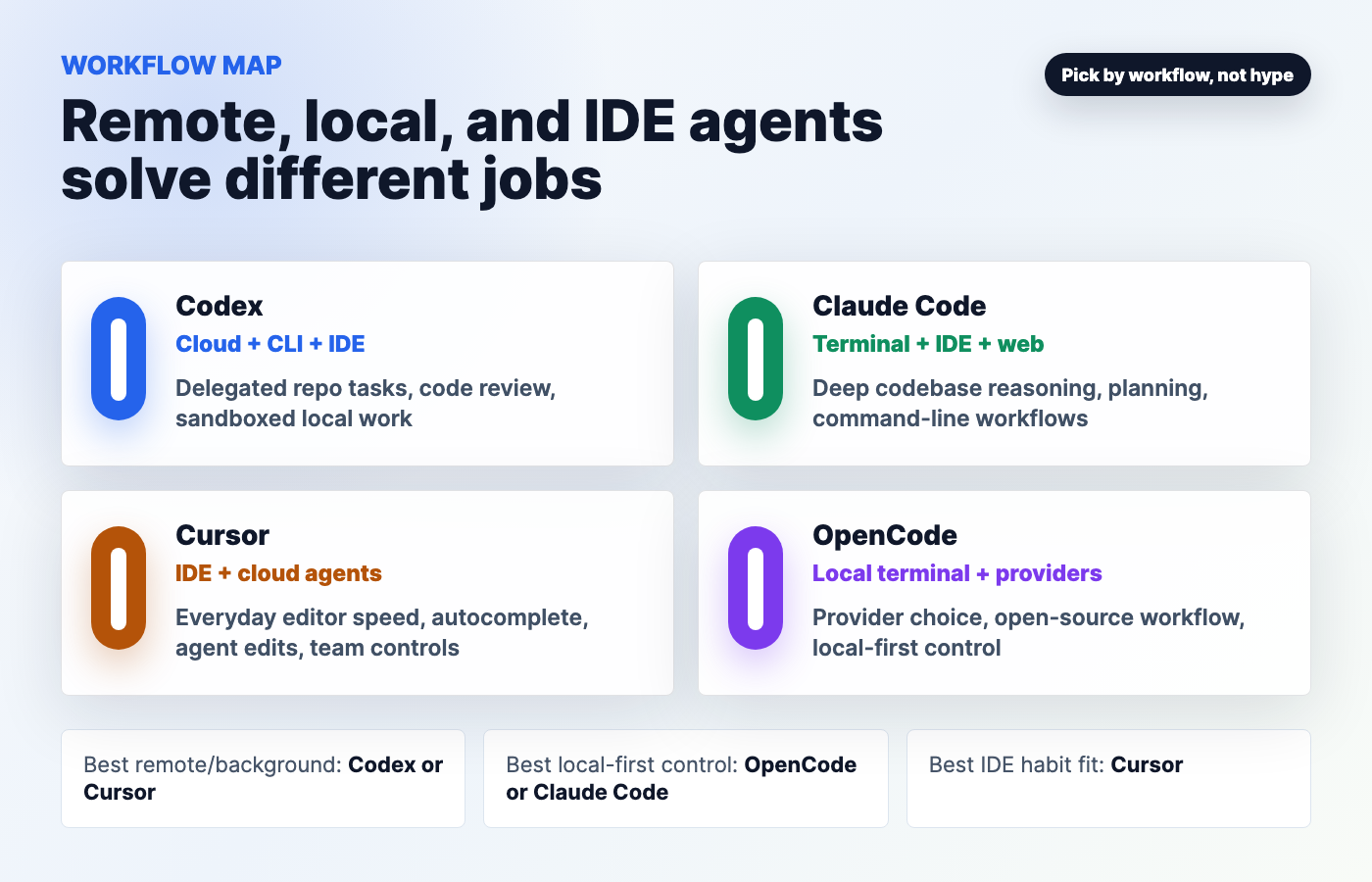
The best AI coding agent in 2026 is not one product for every builder. Codex is the strongest default for OpenAI-native remote tasks, sandboxed local work, GitHub review, and teams that want one agent across cloud, CLI, IDE, and app workflows. Claude Code is the strongest terminal-first coding partner for reading a codebase, planning changes, editing files, running commands, and keeping the developer in explicit control. Cursor is still the easiest everyday IDE choice because the agent, autocomplete, model access, rules, MCP, cloud agents, and team controls live where developers already work. OpenCode is the best local-first and open-source option when model choice, provider control, privacy posture, and repo ownership matter more than bundled cloud conveniences.
For the complete decision map behind this verdict, continue through Kingy’s AI Coding Agents hub.
The practical answer is usually a stack, not a duel. A solo builder might use Cursor for day-to-day editing, Claude Code for deep terminal sessions, and OpenCode when they want provider freedom. A serious software team might use Codex for delegated repo tasks and review, Cursor for IDE productivity, Claude Code for senior engineer-style investigation, and OpenCode for local/provider-controlled work. For broader context, pair this with Kingy.ai’s AI coding agent stack guide, the AI coding agents for non-developers guide, and the AI agent security guide.
Key Takeaways
- Best overall for serious software teams: Codex plus Cursor, with Claude Code for deep terminal work and OpenCode where provider control matters.
- Best for beginners: Cursor, because it keeps the agent inside the editor and reduces setup friction.
- Best for remote/background agents: Codex and Cursor. Claude Code also supports browser/cloud sessions, but its center of gravity remains the developer-controlled terminal and IDE flow.
- Best for local-first workflows: OpenCode, followed closely by Claude Code for terminal-first users.
- Best repo control: OpenCode if you want open-source local execution and provider choice; Claude Code if you want strict permission prompts; Codex if you want explicit sandbox and approval policies across local and cloud modes.
- Most cost-effective: the tool you already have and can safely finish work with. OpenCode can be cheapest if you use low-cost models well; Cursor Pro is simple for editor work; Codex and Claude Code are attractive if their subscriptions are already part of your stack.
- Most reliable: no permanent winner. On June 21, 2026, OpenAI’s public status API reported partial degradation, while Claude and Cursor reported all systems operational. Recent June incidents existed across all major hosted stacks.
- Benchmark warning: there is no clean public benchmark that fairly compares all four complete agent stacks. Model benchmarks do not measure repo permissions, cloud queues, IDE ergonomics, approval flow, or recovery from bad edits.
Table Of Contents
- Why AI coding agents changed in 2026
- Quick answer: which agent should you use?
- Codex vs Claude Code vs Cursor vs OpenCode table
- What Codex is best at
- What Claude Code is best at
- What Cursor is best at
- What OpenCode is best at
- Remote agents vs local agents vs IDE agents
- Repo control and permissions
- Pricing comparison
- Reliability and outages
- Benchmarks and capability claims
- Best workflows by user type
- Pros and cons
- Practical decision framework
- FAQ
- Sources
Why AI Coding Agents Changed In 2026
In 2024 and 2025, many AI coding tools were mostly chat windows bolted onto editors. In 2026, the category is different. The serious products now read whole codebases, edit files, run commands, create branches, review pull requests, use MCP servers, call browser or desktop tools, schedule work, and run background tasks. That changes the buying decision. You are no longer choosing “which chatbot writes the best function.” You are choosing who gets to operate inside your repo.
That is why pricing, permissions, status pages, and workflow fit matter as much as model quality. A coding agent with a better model can still be the wrong tool if it is always out of quota, cannot run your tests, has weak repo boundaries, or lives in a surface your team does not use. A slightly less glamorous tool can be better if it fits your editor, logs its changes, respects your sandbox, and makes rollback boring.
For anyone building products, automations, websites, or internal tools, this is the shift: AI coding agents are becoming operating layers for software work. The smart move is to choose a stack by workflow. If you are still building the fundamentals, Kingy.ai’s AI skill stack guide is a useful companion. If you are picking models behind agents, see the open-source AI models guide.
Quick Answer: Which AI Coding Agent Should You Use?
| If you are… | Start with | Why | Add next |
|---|---|---|---|
| A beginner or non-developer | Cursor | It is the easiest place to see code, diffs, chat, autocomplete, and agent actions in one IDE. | Codex or Claude Code when you need deeper repo work. |
| A solo developer shipping daily | Cursor + Claude Code | Cursor covers editor speed; Claude Code is strong for terminal investigation and multi-file changes. | Codex for delegated remote tasks. |
| A team with GitHub review and background tasks | Codex + Cursor | Codex has OpenAI-native cloud, review, sandbox, and approval concepts; Cursor keeps daily IDE workflows smooth. | Claude Code for deep debugging and architecture sessions. |
| A privacy-sensitive or provider-conscious builder | OpenCode | Open-source app, local repo control, provider/model choice, and no bundled lock-in as the main premise. | Claude Code or Codex when frontier hosted models are worth the tradeoff. |
| A creator or business owner | Cursor or Codex | Cursor is easiest for seeing the product evolve; Codex is better when you want to delegate tasks across repos and review changes. | Claude Code for complex fixes when a developer can supervise. |
Comparison Table: Codex Vs Claude Code Vs Cursor Vs OpenCode
| Tool | Best for | Workflow style | Repo access | Remote/background agent support | IDE/CLI/local workflow | Pricing model | Strengths | Weaknesses | Best user |
|---|---|---|---|---|---|---|---|---|---|
| OpenAI Codex | OpenAI-native coding work across cloud, CLI, IDE, app, GitHub review, and delegated tasks. | Hybrid: cloud agent, local app, CLI, IDE extension, GitHub/Slack/Linear integrations. | Local workspace sandbox and cloud environments; GitHub code review integration exists in the Codex docs. | Yes. Codex cloud runs in OpenAI-managed containers, with setup and agent phases documented separately. | Strong. Works across web/cloud, CLI, IDE extension, app, and local worktrees. | Included in ChatGPT Free, Go, Plus, Pro, Business, Edu, Enterprise; API-key path is token-based but lacks cloud integrations. | Strong platform breadth, explicit sandbox/approval model, remote work, GitHub review, enterprise controls. | Hosted reliability and quota can matter; cloud features are plan-gated; API-key route is not the same as full Codex cloud. | Teams and builders who want one OpenAI coding agent across surfaces. |
| Anthropic Claude Code | Terminal-first codebase understanding, planning, edits, commands, and careful developer-controlled sessions. | Terminal and IDE first, plus desktop app and browser/cloud sessions. | Reads codebase, edits files, runs commands, and asks permission for sensitive actions. Docs emphasize read-only defaults and permission prompts. | Yes, browser and cloud sessions exist, but the core value is still hands-on terminal/IDE control. | Excellent. Terminal CLI, VS Code/Cursor forks, JetBrains, desktop, and browser surfaces are documented. | Claude Free, Pro, Max, Team/Enterprise, and API/Console routes. Pro and Max include Claude Code, with usage shared across Claude and Claude Code. | Strong reasoning feel, transparent command workflow, permission-first architecture, excellent for complex codebase sessions. | Usage limits are shared with Claude; API-key environment variables can route usage to API billing; not as IDE-native as Cursor. | Developers who want a powerful CLI partner and are comfortable reviewing commands and diffs. |
| Cursor | IDE-first productivity, autocomplete, agent edits, model choice, MCP, rules, team controls, cloud agents. | Editor-first with agent, Tab completions, cloud agents, CLI, review, Bugbot, and team/enterprise controls. | Project and IDE context, Git workflows, rules, MCP, and enterprise controls around repository/model/MCP access. | Yes. Pricing page lists cloud agents, automations with shared team context, and Enterprise auto-run/browser/network controls. | Excellent if you live in an IDE. Less ideal if you want a pure terminal tool. | Hobby free; Individual starts at $20/month; Teams $40/user/month; Enterprise custom; usage-based overages after included usage. | Best day-to-day editor experience, low friction, strong team plan, good beginner path. | Less open than OpenCode; cloud-agent reliability has had incidents; serious teams may need Enterprise for deeper controls. | Beginners, product builders, and teams that want the agent inside the editor. |
| OpenCode | Open-source, local-first AI coding with provider/model control and terminal workflow. | Terminal-based interface, desktop beta, IDE extension, provider-driven model access. | Works in your local project; `/init` creates `AGENTS.md`; plan/build agents separate read-only planning from change-making. | Not in the same bundled hosted-agent sense. Remote behavior depends on the provider and OpenCode services such as Zen/share features. | Strong terminal/local workflow. Desktop beta and IDE extension are available according to OpenCode docs. | Open-source app; costs depend on Zen, provider API keys, existing subscriptions, Copilot/OpenAI login, or local models. | Most provider control, MIT-licensed repo metadata, local-first posture, broad model/provider options. | You assemble more of the stack yourself; reliability depends on chosen providers; fewer bundled enterprise conveniences than Codex/Cursor. | Developers who want control, open source, local workflow, and BYO model/provider economics. |
What Codex Is Best At
Codex is best when you want a coding agent that spans multiple work surfaces instead of living in only one editor. OpenAI’s current Codex docs describe Codex across the app, IDE extension, CLI, cloud, GitHub Action, GitHub review, Slack, Linear, local environments, worktrees, permissions, sandboxing, subagents, MCP, skills, and enterprise governance. That breadth is the product story. Codex wants to be the agent layer for software work, not just a chat pane.
The strongest Codex use case is delegated repo work where you want clear sandbox and approval boundaries. OpenAI’s security docs say Codex runs locally with OS-enforced sandboxing, no network by default, workspace-limited write permissions, and approval policies for actions like network access or edits outside the workspace. Codex cloud runs in isolated OpenAI-managed containers, with setup able to install dependencies and the agent phase offline by default unless internet access is enabled. That is a meaningful architecture detail for teams that care about where code runs and when secrets exist.
Codex is also a practical fit for GitHub-centric teams. The Codex docs list GitHub code review, GitHub Actions, cloud environments, and enterprise access-token workflows. If your team wants an agent to review pull requests, run tasks from Slack or Linear, or work in parallel worktrees from the Codex app, Codex has a more complete OpenAI-native story than a simple terminal-only tool.
The tradeoff is that Codex is a platform, and platform breadth introduces plan and reliability complexity. The official pricing page says Codex is included across ChatGPT Free, Go, Plus, Pro, Business, Edu, and Enterprise plans. It also separates an API-key option that works in the CLI, SDK, or IDE extension but does not include cloud-based features such as GitHub code review and Slack integration. That distinction matters. A developer using Codex with an API key is not buying the same workflow as a team using Codex cloud and integrations.
What Claude Code Is Best At
Claude Code is best when you want a strong terminal-first coding partner that can read the repo, reason through a plan, edit files, run commands, and keep the human in the loop. Anthropic describes Claude Code as an agentic coding tool available in the terminal, IDE, desktop app, and browser. The docs say it reads your codebase, edits files, runs commands, and integrates with development tools. That is exactly the workflow many experienced developers want: less UI ceremony, more direct work inside the project.
The permission model is a major selling point. Anthropic’s security docs say Claude Code uses strict read-only permissions by default and asks for explicit permission for additional actions such as editing files, running tests, or executing commands. They also describe a sandboxed bash tool, write access limited to the folder where Claude Code was started and its subfolders, network command approval for tools like curl and wget, and allowlisting to reduce prompt fatigue. This is a good mental model for serious repo work: read first, plan, ask before risky actions, then patch.
Claude Code is also attractive if you already pay for Claude. Anthropic’s help center says Pro and Max subscribers can use Claude Code with the same Claude credentials, and usage is shared across Claude and Claude Code. It also warns that an ANTHROPIC_API_KEY environment variable can cause Claude Code to use API billing instead of the subscription allocation. That is not a footnote. It is the kind of thing that can surprise teams during heavy coding sprints.
The weakness is not capability; it is fit. Claude Code is wonderful for developers who like terminal control. It may feel heavier for beginners who want the IDE to explain everything visually. It also shares usage with Claude, so a week of research, writing, and coding can collide against the same plan limits. For advanced users building loops, see Kingy.ai’s AI loops guide.
What Cursor Is Best At
Cursor is best when you want an AI coding agent where the code already lives: the editor. This remains the simplest recommendation for beginners, designers who are learning code, founders, and teams that want AI help without constantly switching between terminal, web app, and IDE. Cursor’s pricing page frames the product around Agent requests, Tab completions, frontier models, MCPs, skills, hooks, cloud agents, Bugbot, teams, privacy mode, and enterprise access controls. That is a lot of capability, but the everyday value is simple: you can ask, edit, autocomplete, inspect, and review inside one place.
Cursor is particularly strong for repeated work. Autocomplete and agent edits matter because most development is not one giant autonomous task. It is a thousand small moves: rename this, understand that, change a component, update tests, compare diffs, fix the lint issue, ask why a file exists, and keep going. Cursor is good at lowering friction for those moves.
Cursor’s team and enterprise story has also become more important. The pricing page lists centralized billing, a team marketplace for internal rules, skills, and plugins, agentic code reviews with Bugbot, cloud agents and automations with shared team context, usage analytics, team-wide privacy mode, SAML/OIDC SSO, and Enterprise controls for repository, model, MCP access, auto-run, browser, and network. If you are standardizing agent behavior across a team, those controls can matter more than a single model benchmark.
The tradeoff is that Cursor is less local/provider-controlled than OpenCode and less terminal-pure than Claude Code. Some developers also prefer not to move their editor habits into a Cursor-specific environment. The reliability section below matters too: Cursor’s status page shows resolved June incidents around Cloud Agents and Agent Sessions, so heavy background-agent users should keep local workflows ready.
What OpenCode Is Best At
OpenCode is best when you want the coding agent itself to be open source and you want control over which model/provider powers it. OpenCode’s homepage calls it “the open source AI coding agent” and says it works in the terminal, IDE, or desktop. Its docs say you configure provider API keys, or use OpenCode Zen, a curated set of models tested by the OpenCode team. The homepage also says OpenCode supports 75+ LLM providers through Models.dev, including local models, and can connect to existing GitHub Copilot and ChatGPT Plus/Pro accounts.
The practical workflow is straightforward. Install OpenCode, configure a provider, go into a project, run opencode, then run /init. The docs say this analyzes the project and creates an AGENTS.md file in the project root, and they recommend committing that file so OpenCode understands the project structure and coding patterns. The README describes built-in agents: build as the default full-access development agent and plan as a read-only agent for analysis and code exploration.
OpenCode’s strongest advantage is not that it magically beats frontier hosted agents. It is that it gives builders leverage over the stack: local workflow, provider keys, model choice, an MIT-licensed repository metadata signal, and less dependence on one vendor’s cloud runner. That makes it compelling for open-source maintainers, privacy-conscious teams, and developers who want to experiment with local models or lower-cost providers. It also pairs naturally with Kingy.ai’s open-source models and AI sovereignty guide.
The weakness is assembly cost. With OpenCode, you are closer to the metal. That is good if you enjoy controlling the engine. It is less good if you want a fully managed team dashboard, polished cloud task queue, or enterprise procurement path out of the box. Costs also depend on the model/provider you connect, so “OpenCode is free” is only half true. The app may be open source, but model usage is still paid somewhere unless you use free included models, existing subscription access, or local models you already operate.
Remote Agents Vs Local Agents Vs IDE Agents
The most useful way to compare coding agents is by where the work runs.
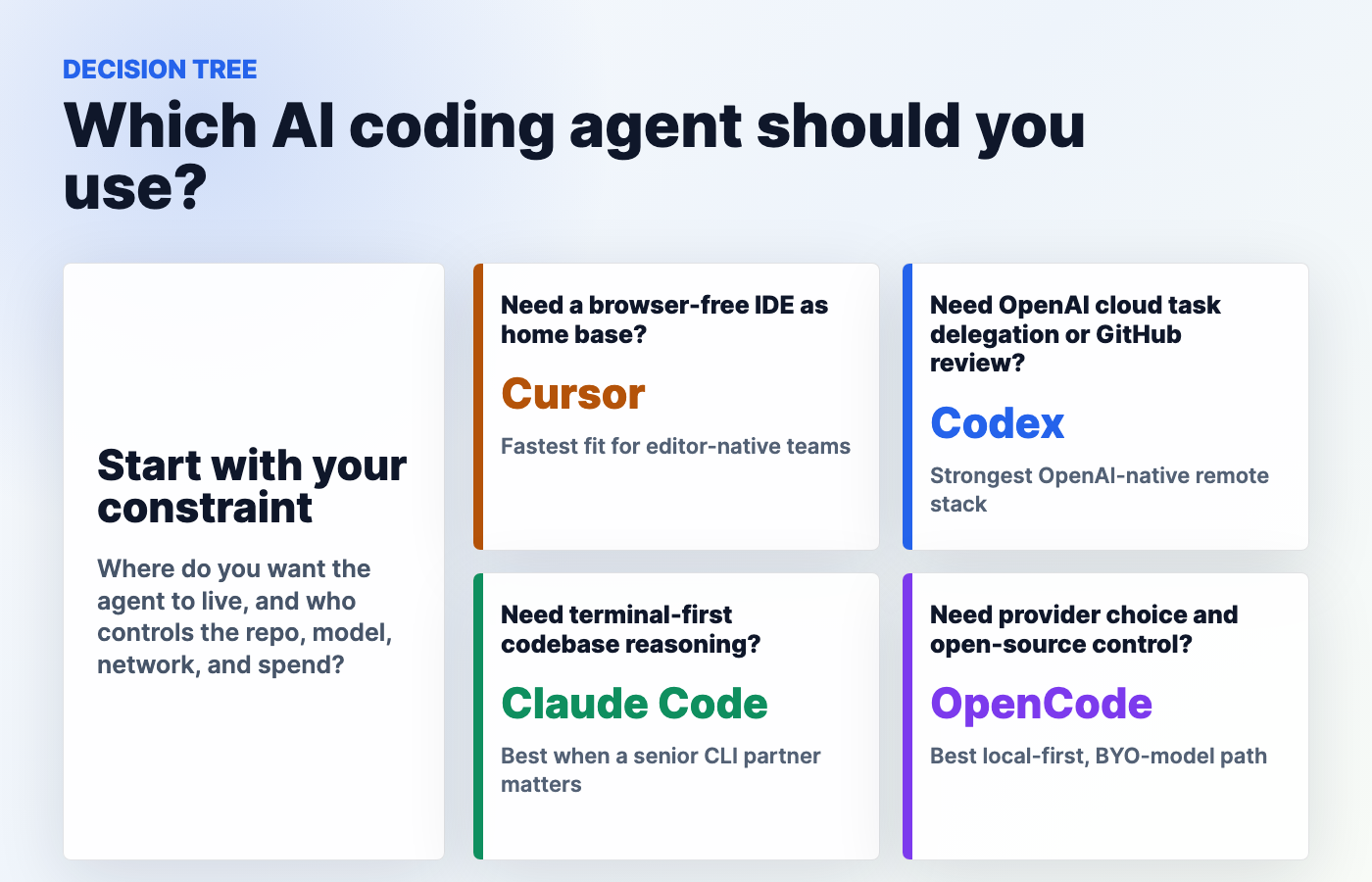
| Workflow | Best tool | Why | Risk/limitation |
|---|---|---|---|
| Remote/background repo task | Codex or Cursor | Codex has a documented cloud agent/environment model; Cursor includes cloud agents and team automations. | Cloud runner outages, queueing, quotas, and network restrictions can block work. |
| Terminal-first investigation | Claude Code | Reads codebase, edits files, runs commands, and uses permission prompts in a developer-controlled workflow. | Less beginner-friendly than an IDE; usage limits can collide with regular Claude usage. |
| Everyday IDE productivity | Cursor | Agent, autocomplete, diffs, models, rules, MCP, and reviews are in the editor. | Team controls may require higher plans; not open-source/local-first like OpenCode. |
| Open-source local/provider-controlled workflow | OpenCode | Open-source agent, provider keys, local model options, plan/build modes, and AGENTS.md project guidance. | You own more setup and provider reliability; fewer bundled cloud conveniences. |
| GitHub review and governed team workflow | Codex + Cursor | Codex has GitHub review and enterprise governance docs; Cursor has team privacy, usage, SSO, and enterprise controls. | Teams must define who can approve agent changes and how to audit them. |
Repo Control And Permissions Comparison
Repo control is the real security question. The agent’s model matters, but the more important questions are: can it write files? Can it run commands? Can it hit the network? Can it access secrets? Can it push to GitHub? Can it run in a cloud environment? Can admins restrict models or MCP servers? Can a human review the diff before merge?
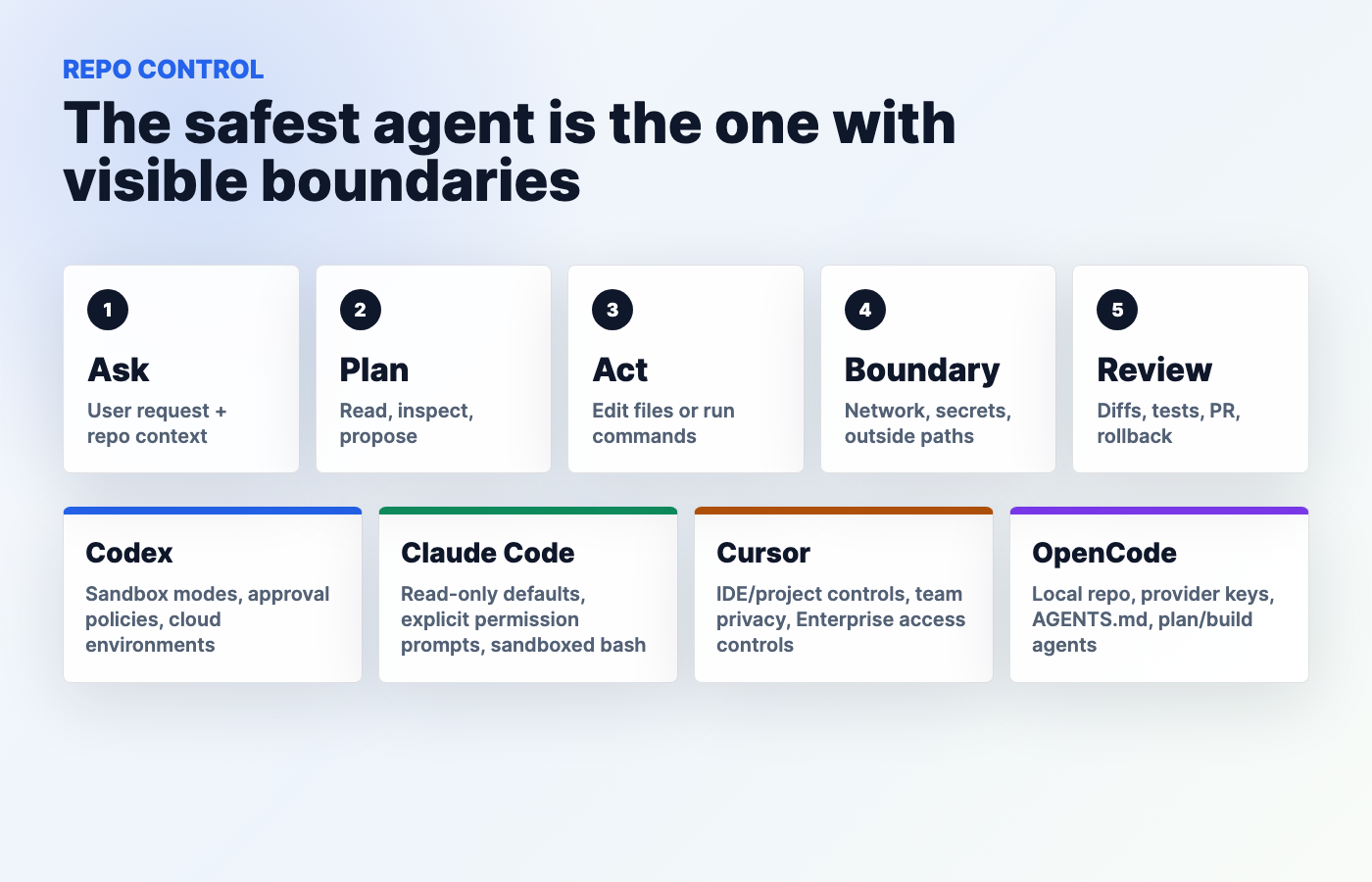
| Tool | Control model | What looks strong | What to watch |
|---|---|---|---|
| Codex | Sandbox modes, approval policies, workspace write controls, cloud setup/agent phases, managed enterprise configuration. | OpenAI docs are unusually explicit about local sandboxing, default offline behavior, and approvals for network/outside-workspace actions. | Do not assume the API-key route includes full Codex cloud integrations. Confirm plan, environment, secrets, and internet settings. |
| Claude Code | Permission-based architecture, read-only defaults, explicit approvals, sandboxed bash, write scope limited to project folder and subfolders. | Very clear human-in-the-loop model for terminal users; network commands like curl/wget are not auto-approved by default. | Users can allowlist commands; teams need policy discipline to avoid normalizing risky approvals. |
| Cursor | IDE/project context plus team and enterprise settings for privacy, access, model/MCP controls, auto-run/browser/network controls. | Enterprise controls are directly tied to model, repository, MCP, browser, and network access. | Deeper governance appears concentrated in Enterprise; free/individual users get less central control. |
| OpenCode | Local open-source agent, provider keys, project AGENTS.md, plan/build agents, rules/configuration. | Most transparent if you want local project control and inspectable source. | Provider keys, local permissions, and model routing are your responsibility. |
Pricing Comparison
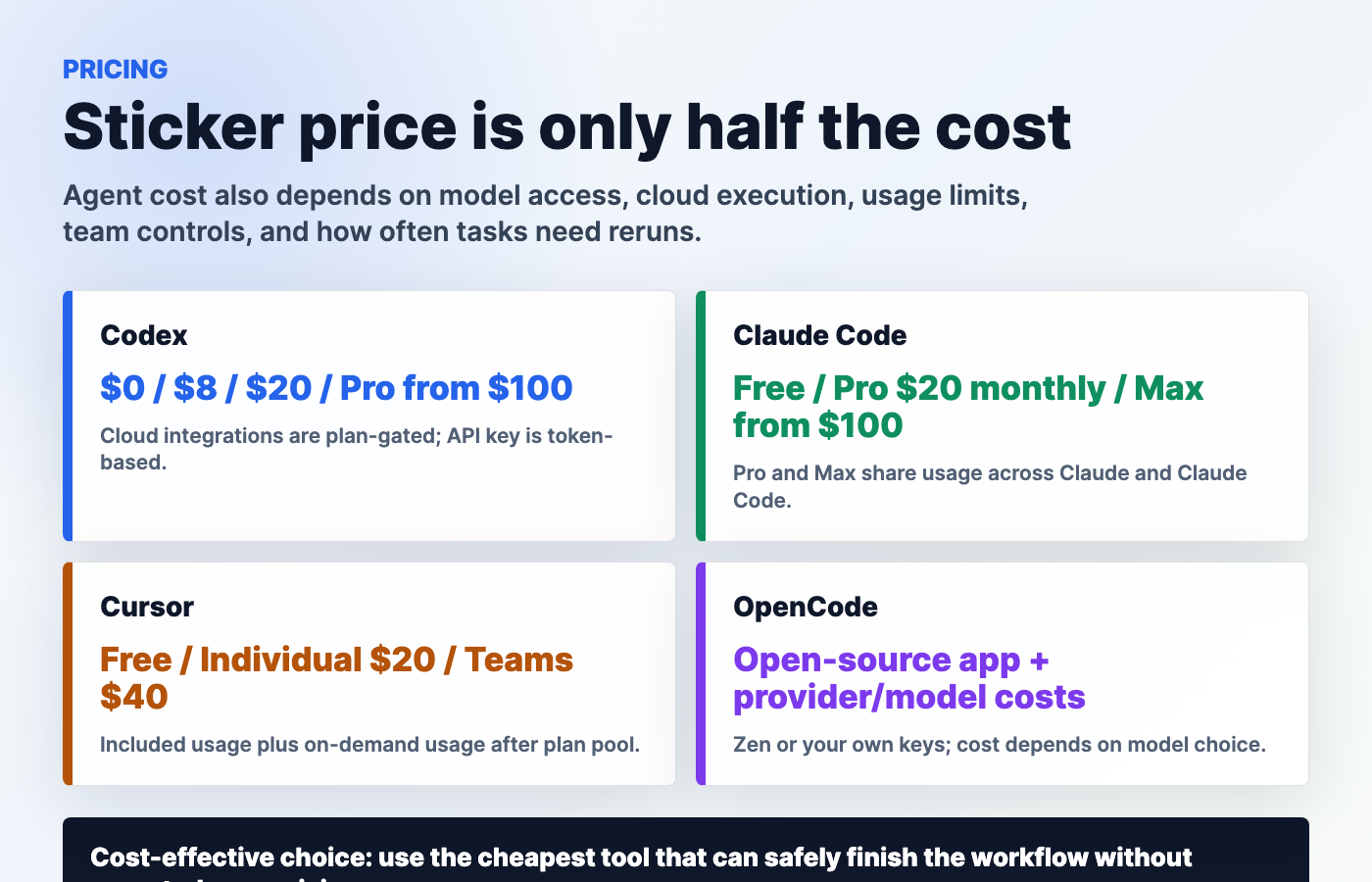
Pricing is messy because the tools do not sell the same thing. Codex and Claude Code are partly subscription products. Cursor is an IDE subscription with included usage and usage-based overages. OpenCode is open source, but the models behind it can cost money through Zen, provider APIs, existing subscriptions, Copilot/OpenAI login, or local infrastructure.
| Tool | Free option | Paid plans | Usage limits | Enterprise/team options | Notes and caveats |
|---|---|---|---|---|---|
| Codex | Free plan for quick coding tasks, according to OpenAI’s Codex pricing page. | Go $8/month, Plus $20/month, Pro from $100/month. Business is pay-as-you-go; Enterprise/Edu contact sales. | Plan-based usage; Pro offers 5x or 20x more Codex usage than Plus, according to the pricing page. | Business, Enterprise, Edu; enterprise security, priority processing, admin controls listed by OpenAI. | API-key route uses token pricing but does not include cloud features such as GitHub code review and Slack integration. |
| Claude Code | Claude Free exists, but Claude Code plan access is primarily described for Pro, Max, Team, Enterprise, and API/Console users. | Claude Pro is $17/month annually or $20 monthly; Max starts at $100/month with 5x or 20x more usage than Pro. | Pro and Max usage is shared across Claude and Claude Code. Users can wait for reset or opt into API credits. | Team and Enterprise options exist; pricing/features depend on plan path and organization needs. | If ANTHROPIC_API_KEY is set, Claude Code may use API billing instead of subscription usage. |
| Cursor | Hobby Free with limited Agent requests and Tab completions. | Individual starts at $20/month; pricing page also references Pro, Pro+, Ultra tiers. Teams is $40/user/month. Enterprise is custom. | Every plan includes a set amount of model usage; on-demand usage can continue after included amount is consumed and is billed later. | Teams includes centralized billing, shared context, privacy mode, SAML/OIDC. Enterprise adds pooled usage, SCIM, audit logs, repository/model/MCP controls. | Check current plan details before heavy cloud-agent usage because included usage and overages determine real cost. |
| OpenCode | Open-source app; homepage says free models are included and you can connect existing accounts/providers. | OpenCode Zen and provider/API costs vary. The app can connect to Claude, GPT, Gemini, local models, GitHub Copilot, and ChatGPT Plus/Pro access according to docs/homepage. | Depends on model/provider, local hardware, or subscription integration. | OpenCode Enterprise is promoted by the site; exact terms require current vendor details. | Do not call it simply “free” if you use paid models. The app may be open source; model tokens still have economics. |
Reliability And Outage Considerations
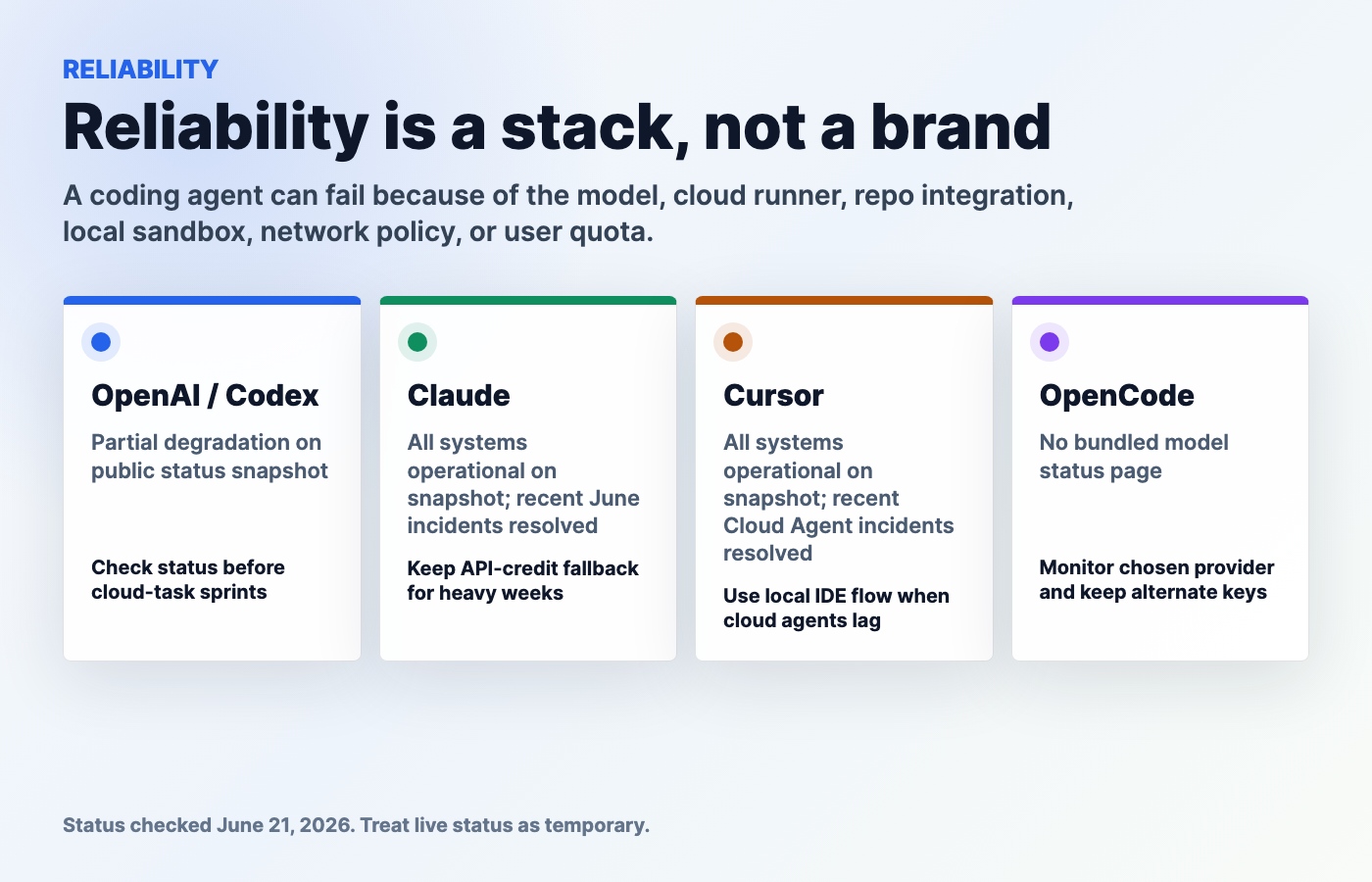
Reliability is not a vibes category. It is a stack question. A coding agent can fail because the model is at capacity, the cloud runner is degraded, GitHub auth is broken, the IDE extension is buggy, the provider API is down, the plan quota is gone, or the local sandbox blocks a command the agent needs.
On June 21, 2026, OpenAI’s public status API reported Partial System Degradation. The same status API listed recent resolved incidents including Codex “Selected Model is at Capacity,” Codex Cloud task issues, and elevated GPT 5.5 errors in Codex. Claude’s status API reported All Systems Operational at the time checked, but its recent incident history included June 2026 elevated error and service disruption events. Cursor’s status API also reported All Systems Operational at the time checked, while its incident history included resolved June issues for Cloud Agents, Agent Sessions, Composer, Auto model, and Anthropic-backed model degradation.
| Tool | Status page/source | Known reliability concerns | Best mitigation |
|---|---|---|---|
| Codex | OpenAI status page | Recent June 2026 Codex capacity/cloud-task incidents and OpenAI-wide partial degradation snapshot. | Keep local CLI/app workflows ready; avoid scheduling critical releases around cloud-agent dependency; check status first. |
| Claude Code | Anthropic/Claude status page | Recent June 2026 API/model/service incidents, even though snapshot was operational. | Use plan/status checks, keep API-credit decisions explicit, and have a fallback model/tool for urgent fixes. |
| Cursor | Cursor status page | Recent resolved Cloud Agents and Agent Sessions incidents; hosted model dependencies can matter. | Use local IDE work when cloud agents lag; keep branch/diff review human-readable. |
| OpenCode | OpenCode GitHub repo plus chosen provider status pages | No single bundled model status page. Reliability depends on OpenCode version, provider, model, local setup, and network. | Keep alternate provider keys/models and avoid hard-coding one model path for critical work. |
Benchmark And Capability Comparison
There is no credible single public benchmark that ranks Codex, Claude Code, Cursor, and OpenCode as complete products. That matters because full coding-agent performance is not just “which underlying LLM got a better SWE-bench score.” A real builder workflow includes repo setup, context selection, permissions, command execution, branch hygiene, tests, cloud runner reliability, model routing, cost, and human review.
Use benchmarks carefully. Model-level benchmarks can help you choose a model family, but they do not prove that a specific agent will safely modify your repo. For OpenCode especially, model capability changes depending on whether you use Zen, Claude, GPT, Gemini, a local model, Copilot access, or another provider. For Cursor, the model and plan matter. For Codex, the surface and plan matter. For Claude Code, subscription versus API billing and usage limits matter.
Best Workflows By User Type
| User type | Best starting tool | Best stack | Why |
|---|---|---|---|
| Beginner | Cursor | Cursor + Kingy.ai tutorials + occasional Codex/Claude help | The visual IDE makes code, chat, diffs, and edits easier to understand. |
| Non-developer founder | Cursor or Codex | Cursor for building, Codex for delegated repo tasks, human review before production | Fastest path to visible product changes with less terminal friction. |
| Experienced solo developer | Claude Code | Claude Code + Cursor + OpenCode | Terminal depth, IDE flow, and provider freedom cover most solo work. |
| Startup engineering team | Codex + Cursor | Codex for delegated/review tasks, Cursor for IDE, Claude Code for hard debugging | Balances speed, cloud tasks, review, and deep codebase reasoning. |
| Enterprise team | Codex or Cursor Enterprise | Codex Enterprise + Cursor Enterprise + strict agent policy | Admin controls, SSO/SCIM/audits, repo/model/MCP controls, and governance matter. |
| Open-source maintainer | OpenCode | OpenCode + Codex for OSS credits/review where useful | Open tooling and provider choice fit public repo work. |
| Privacy-sensitive team | OpenCode or Claude Code | OpenCode with approved providers/local models + Claude Code with strict permissions | Local-first and explicit permissions reduce surprise exposure. |
Best Stack Recommendations
Best one-tool stack for beginners: Cursor. It keeps the loop tight: ask, see the file, inspect the diff, run the app, repeat.
Best one-tool stack for terminal developers: Claude Code. It feels closest to pairing with a senior command-line engineer, especially when you force it to plan before editing.
Best one-tool stack for remote/background delegation: Codex. Its documented cloud environments, approval model, worktrees, GitHub review, and integrations make it the strongest OpenAI-native remote agent path.
Best one-tool stack for local/provider control: OpenCode. It is the clearest pick when the agent itself should be open source and the model/provider layer should be yours to choose.
Best serious team stack: Codex for remote tasks and review, Cursor for IDE productivity, Claude Code for hard investigations, and OpenCode where local/provider control is required. That sounds like a lot, but teams already use multiple tools for source control, CI, observability, security, and design. AI coding agents are joining that stack.
What Feels Unproven
- Autonomy at production scale: coding agents are better, but unsupervised production changes still need tests, review, and rollback.
- Cloud-agent reliability under launch pressure: recent incidents show hosted agents can degrade at inconvenient times.
- Usage economics: subscription limits, overages, credits, model routing, and retries can make a cheap-looking plan expensive.
- Benchmark translation: public model benchmarks do not cleanly predict repo-level outcomes.
- Enterprise governance maturity: controls are improving quickly, but teams still need their own agent policy, audit approach, and approval norms.
Why This Matters
AI coding agents are not just developer toys. They affect product velocity, security, hiring, technical debt, documentation, customer support, internal automation, and creator workflows. Businesses should care because agentic development can shorten implementation cycles. Creators should care because a single person can build sites, apps, automations, and launch assets faster. Developers should care because the job is shifting from typing every line to specifying, supervising, testing, and integrating work.
The danger is treating the agent like magic. The winning teams will not be the teams that blindly grant full access to the loudest tool. They will be the teams that build a repeatable loop: define the task, constrain the agent, inspect the plan, approve the right actions, run tests, review diffs, and document what changed. For search and distribution teams, Kingy.ai’s AI search visibility guide is a useful next step once the product exists.
Pros And Cons Tables
Codex Pros And Cons
| Pros | Cons |
|---|---|
| Broad surface area: cloud, app, CLI, IDE, GitHub review, worktrees, integrations. | Plan differences matter; API-key route lacks some cloud features. |
| Strong sandbox and approval documentation. | Hosted reliability and capacity can affect cloud workflows. |
| Good fit for governed teams using OpenAI already. | Users must understand environment, network, and secret settings. |
Claude Code Pros And Cons
| Pros | Cons |
|---|---|
| Excellent terminal-first codebase reasoning and command workflow. | Less beginner-friendly than a visual IDE-first product. |
| Permission-first architecture with read-only defaults and explicit approvals. | Usage is shared with Claude under Pro/Max subscriptions. |
| Available across terminal, IDEs, desktop app, and browser. | API-key environment variables can unexpectedly shift billing route. |
Cursor Pros And Cons
| Pros | Cons |
|---|---|
| Best IDE-first daily workflow for many builders. | Not open-source/local-first in the same way OpenCode is. |
| Strong combination of Agent, Tab, models, MCP, skills, hooks, reviews, cloud agents. | Cloud-agent incidents can affect background workflows. |
| Clear Teams and Enterprise controls around billing, privacy, access, SSO, and audits. | Advanced governance requires higher-tier plans. |
OpenCode Pros And Cons
| Pros | Cons |
|---|---|
| Open-source agent with local-first and provider-choice posture. | You assemble more of the model/provider workflow yourself. |
| Supports many providers and local models; docs describe Zen curated models. | Reliability depends on chosen model/provider and local setup. |
| Plan/build modes and AGENTS.md fit serious repo workflows. | Less bundled enterprise polish than Codex or Cursor. |
Practical Decision Framework
FAQ
What is the best AI coding agent in 2026?
For most beginners, Cursor is the best first AI coding agent. For serious teams, Codex plus Cursor is the strongest default stack. For terminal-first developers, Claude Code is often the best daily partner. For local-first and open-source control, OpenCode is the best fit.
Is Codex better than Claude Code?
Codex is better for OpenAI-native cloud tasks, GitHub review, worktrees, and cross-surface platform workflows. Claude Code is better for terminal-first codebase reasoning, explicit command review, and developer-controlled sessions. The right answer depends on where you want the agent to work.
Is Claude Code better than Cursor?
Claude Code is better if you want a powerful terminal partner. Cursor is better if you want the agent inside an IDE with autocomplete, diffs, and visual editing. Many developers use both.
What is OpenCode?
OpenCode is an open-source AI coding agent available as a terminal interface, desktop beta, and IDE extension. It can connect to many model providers and local models, and its docs describe project initialization through AGENTS.md plus plan/build modes.
Is OpenCode free?
The OpenCode app is open source, and the homepage says free models are included, but real usage cost depends on the model or provider you connect. If you use paid APIs, Zen, subscription access, or local hardware, those costs still matter.
Which AI coding agent is best for beginners?
Cursor is the best starting point for beginners because the agent lives in the editor, the code is visible, diffs are easier to inspect, and the setup burden is lower than a terminal-first workflow.
Which AI coding agent is best for businesses?
Businesses should start with Codex or Cursor, depending on whether they need remote delegated tasks or IDE productivity first. Larger teams should evaluate enterprise controls, SSO, SCIM, audit logs, repository access, model controls, MCP controls, and approval policies.
Which tool is best for remote coding agents?
Codex and Cursor are the best fits for remote/background coding-agent workflows. Codex has a documented cloud environment model; Cursor includes cloud agents and team automations. Claude Code browser/cloud sessions are useful too, but its strongest identity remains terminal-first control.
Which tool gives developers the most repo control?
OpenCode gives the most open-source local/provider control. Claude Code gives strong explicit permission control in terminal workflows. Codex gives strong sandbox and approval configuration across local and cloud. Cursor gives the strongest IDE/team-admin route.
Should I use more than one AI coding agent?
Yes, if software work matters to your business. Use Cursor for everyday IDE flow, Claude Code for deep terminal sessions, Codex for remote tasks and review, and OpenCode for local/provider-controlled work. The stack approach reduces vendor, outage, and workflow risk.
Which AI coding agent is most reliable?
No tool is permanently most reliable. Check live status pages. On June 21, 2026, OpenAI showed partial degradation, while Claude and Cursor showed all systems operational, but all had recent June reliability events. OpenCode reliability depends heavily on your chosen model provider and local setup.
Which AI coding agent is most cost-effective?
For beginners, Cursor’s $20/month individual starting point is simple. For existing Claude users, Claude Code can be cost-effective inside Pro or Max. For OpenAI users, Codex can be efficient if you use the plan features. For provider-conscious developers, OpenCode can be cheapest when paired with low-cost or local models that still finish the job.
Final Verdict
If you want one answer, use Cursor if you are learning or live in an IDE, Claude Code if you are a terminal-first developer, Codex if you need remote/background OpenAI-native repo work, and OpenCode if you care most about local-first open-source control.
If you want the best 2026 stack, do not force one tool to do every job. Use Cursor for daily editing, Codex for delegated cloud/review tasks, Claude Code for deep codebase reasoning, and OpenCode for provider-controlled local work. The winning workflow is not “let the agent do everything.” It is “give the right agent the right job, inside clear boundaries, with tests and review.”
Sources
- OpenAI Codex full documentation export
- OpenAI Codex pricing
- OpenAI status page
- Anthropic Claude Code overview
- Anthropic Claude Code security docs
- Using Claude Code with Pro or Max
- Anthropic Claude pricing
- Anthropic/Claude status page
- Cursor pricing
- Cursor docs
- Cursor status page
- OpenCode homepage
- OpenCode docs
- OpenCode GitHub repository
The Kingy Brief
Get the next Kingy Brief.
Source-checked AI changes, original tests and one practical thing to try.
Free · Choose your subjects · Double opt-in · Unsubscribe anytime