
AI Agent Security Guide: MCP, Sandboxes, Tool Permissions, and What Can Go Wrong
Last updated: June 21, 2026

Executive Summary
AI agents are moving from chat into action. They can write code, browse websites, summarize email, create pull requests, update CRM records, buy tools, connect to payment systems, and run business workflows. That makes them useful. It also makes them risky in a way normal chatbots were not.
The beginner version is simple: an AI agent is only as safe as the tools, permissions, sandbox, and approval rules around it. A helpful agent with access to your browser, wallet, inbox, GitHub organization, Stripe account, or bank account is no longer just giving advice. It can touch real systems.
Model Context Protocol, usually called MCP, is part of why this matters now. MCP gives AI apps a standard way to connect to tools and data. Coinbase now documents CDP for Agents using CLI/MCP around wallets, payments, trading, and onchain tooling. Microsoft has published agent security work around Microsoft Execution Containers and research showing how a single web page could exploit a browser-enabled agent through localhost trust. JFrog, OWASP, OpenAI, and others are all treating agent security as a real discipline, not a footnote.
This guide explains MCP, tool permissions, sandboxing, coding-agent setup, browser-agent setup, business workflow setup, and the red flags to check before connecting email, GitHub, Stripe, bank accounts, or crypto wallets.
For the wider decision path, continue through Kingy’s AI Agents hub for practical definitions, bounded workflows, product records and live changes.
Key Takeaways
- MCP is a connection standard, not a safety guarantee. It helps AI apps connect to tools and data, but each server, permission, token, and command still needs review.
- Tool permissions decide what the agent can read, write, send, spend, deploy, delete, or execute. Start read-only. Add write access slowly.
- Sandboxing matters because agents make mistakes and can be manipulated by hostile content. A sandbox limits the damage when something goes wrong.
- Browser agents are uniquely risky. A malicious page can give hidden instructions to the agent, and local services on your machine may not be safe from a browsing agent.
- Coding agents should run in branches, disposable workspaces, containers, or managed sandboxes. Never hand a new coding agent your daily machine, production secrets, and auto-merge permissions on day one.
- Financial, payment, payroll, tax, banking, and crypto tools need hard limits. Use test mode, spending caps, approvals, audit logs, and separate accounts.
- If you cannot explain what the agent can read, write, spend, or send, do not connect it yet.
Quick definition: AI agent security is the practice of controlling what an AI agent can access, what tools it can call, what actions require approval, where the agent runs, and how every action is logged and reversed.
Table of Contents
- Why this matters
- What is MCP?
- What are tool permissions?
- Why sandboxing matters
- How agents can break things
- Safe setup for coding agents
- Safe setup for browser agents
- Safe setup for business workflows
- Red flags before connecting important accounts
- What feels unproven
- Should businesses, creators, and developers care?
- FAQ
- Sources
Why This Matters
For years, most AI risk conversations were about bad answers. A chatbot might hallucinate a citation, give weak advice, or misunderstand a question. That is still a problem, but agents add a sharper edge: they can act.
An agent can inspect your repo, edit files, run commands, open a browser, read email, call APIs, submit forms, approve invoices, create tickets, update customer data, or move money. The moment an AI system can take actions outside the chat window, security becomes practical, not theoretical.
This is why beginner-friendly agent security matters. Non-technical users are now being asked to connect tools they do not fully understand. Developers are wiring agents into internal systems. Businesses are testing workflow automation. Creators are using browser agents to research, publish, and manage platforms. The security model cannot be “trust the agent because it sounds confident.”
If you want a broader adoption lens before going deep on security, Kingy has a useful companion piece: The AI Agent Adoption Playbook. This guide is the security layer underneath that adoption playbook.
What Is MCP?
MCP, or Model Context Protocol, is an open protocol for connecting AI applications to external tools, data sources, and workflows. In normal language, MCP is a standard plug system for agents.
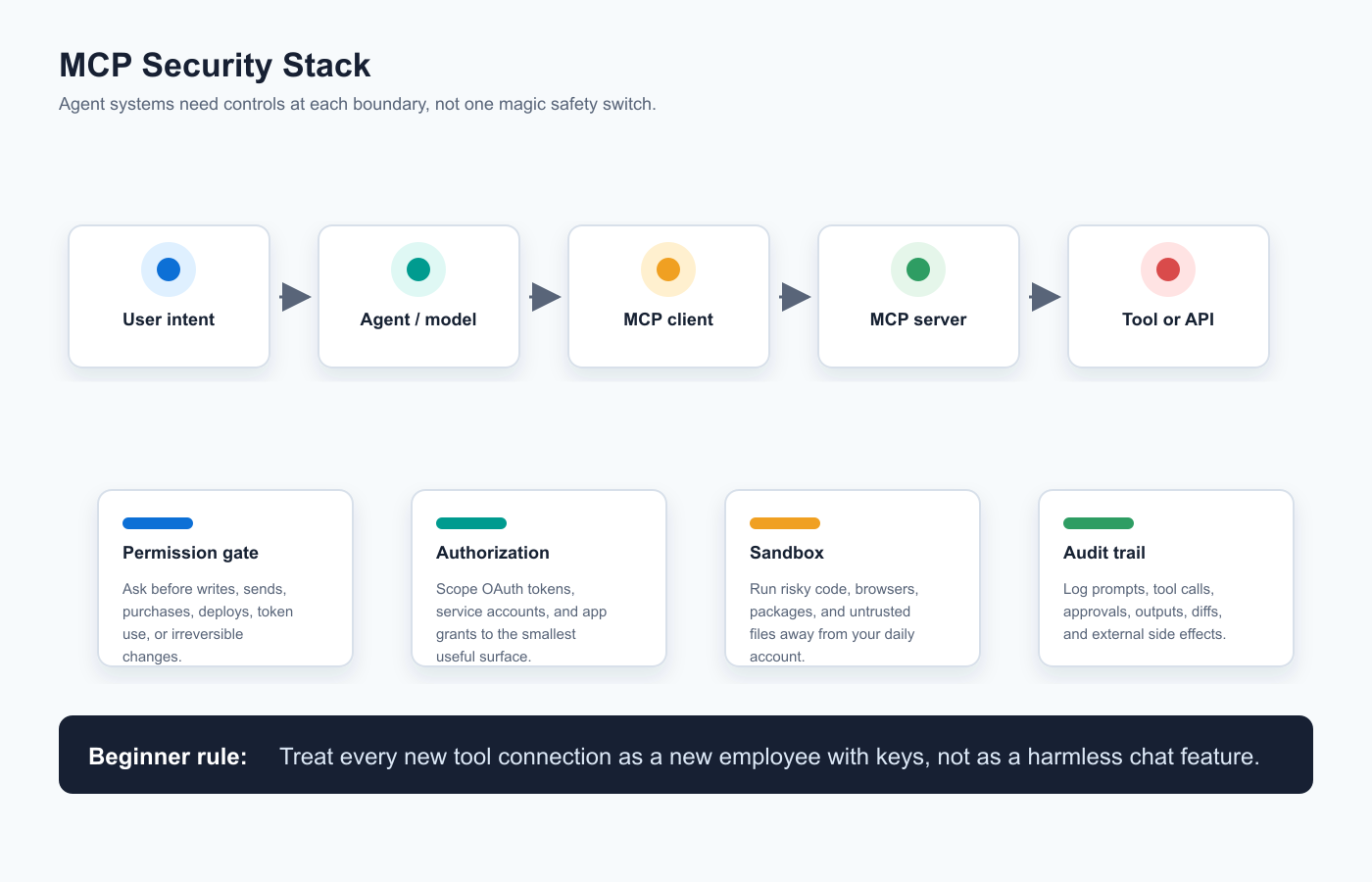
Instead of every AI app inventing a different way to talk to GitHub, Slack, Google Drive, databases, payment systems, or local files, MCP defines a common pattern. An AI app can act as an MCP client. A tool provider or local program can expose an MCP server. The client discovers what the server offers and can call those capabilities when the user allows it.
MCP commonly involves four ideas:
- Clients: AI applications that connect to MCP servers.
- Servers: Programs or remote services that expose tools, data, prompts, or resources.
- Tools: Actions the agent can invoke, such as searching a repo, creating a ticket, listing payments, sending a message, or running a command.
- Authorization: Rules for who can access the server and which operations are allowed.
The important security point: MCP standardizes the connection. It does not automatically make every connected tool safe. A well-designed MCP server can be useful and controlled. A sloppy or malicious MCP server can become a path to data exposure, unwanted actions, or local code execution.
MCP In One Sentence
MCP lets an AI app ask, “What tools and data can I use here?” and then call those tools in a structured way.
What MCP Is Not
MCP is not a magic shield. It is not the same as a sandbox. It is not a guarantee that the server is trustworthy. It is not a guarantee that the agent will understand the consequences of a tool call. It is a protocol, and protocols need secure implementations.
Why MCP Is Becoming Important
MCP matters because the agent ecosystem is shifting from isolated chat windows to connected work surfaces. Coinbase’s developer docs now include agent-oriented CLI/MCP pages for crypto developer workflows. Anthropic, OpenAI, Microsoft, and many developer-tool companies have MCP-related support or guidance. Kingy has already covered related MCP products such as the Arcade MCP Runtime and has a practical MCP planning worksheet for people mapping integrations.
That standardization is useful. It also means the same mistake can repeat across many tools if beginners do not learn the security basics.
MCP Pros And Cons
| MCP Advantage | Security Tradeoff | Practical Response |
|---|---|---|
| Standard tool connections | A bad integration pattern can spread across many tools. | Prefer official servers, reviewed code, and narrow tool sets. |
| Local and remote flexibility | Local servers can run code; remote servers can handle sensitive tokens. | Sandbox local servers and use scoped authorization for remote servers. |
| Reusable agent workflows | Convenience can hide what the agent is actually allowed to do. | Document each tool, scope, approval rule, and rollback path. |
| Growing ecosystem | Unofficial packages and copy-paste setup commands increase supply-chain risk. | Pin versions, inspect install commands, and remove unused servers. |
What Are Tool Permissions?
Tool permissions are the rules that decide what an AI agent can do with connected tools. They answer questions like:
- Can the agent only read files, or can it edit them?
- Can it draft an email, or can it send the email?
- Can it open a pull request, or can it merge to main?
- Can it list invoices, or can it refund a customer?
- Can it see Stripe test mode, or live payments?
- Can it use a crypto wallet, and if so, with what spend limit?
- Can it install packages and run shell commands?
- Can it access local network services?
Permissions are not only about “yes” or “no.” Good permission systems include scope, timing, approval, logging, and revocation.
| Permission Question | Unsafe Version | Safer Version |
|---|---|---|
| What can the agent read? | Entire email inbox, all repos, full drive, all customer data. | Only the folder, repo, label, tenant, or ticket queue needed for the task. |
| What can the agent write? | Direct writes to production, live customer records, or main branch. | Drafts, branches, staging environments, test mode, or pending approval queues. |
| When does it need approval? | After the action, or never. | Before sends, spends, deletes, merges, deploys, permission changes, and account changes. |
| How is access revoked? | Unclear, hidden, or tied to a personal admin account. | Separate token or service account that can be disabled immediately. |
| What gets logged? | Only final output. | Prompt, plan, tool call, approval, result, diff, destination, and timestamp. |
The Permission Ladder
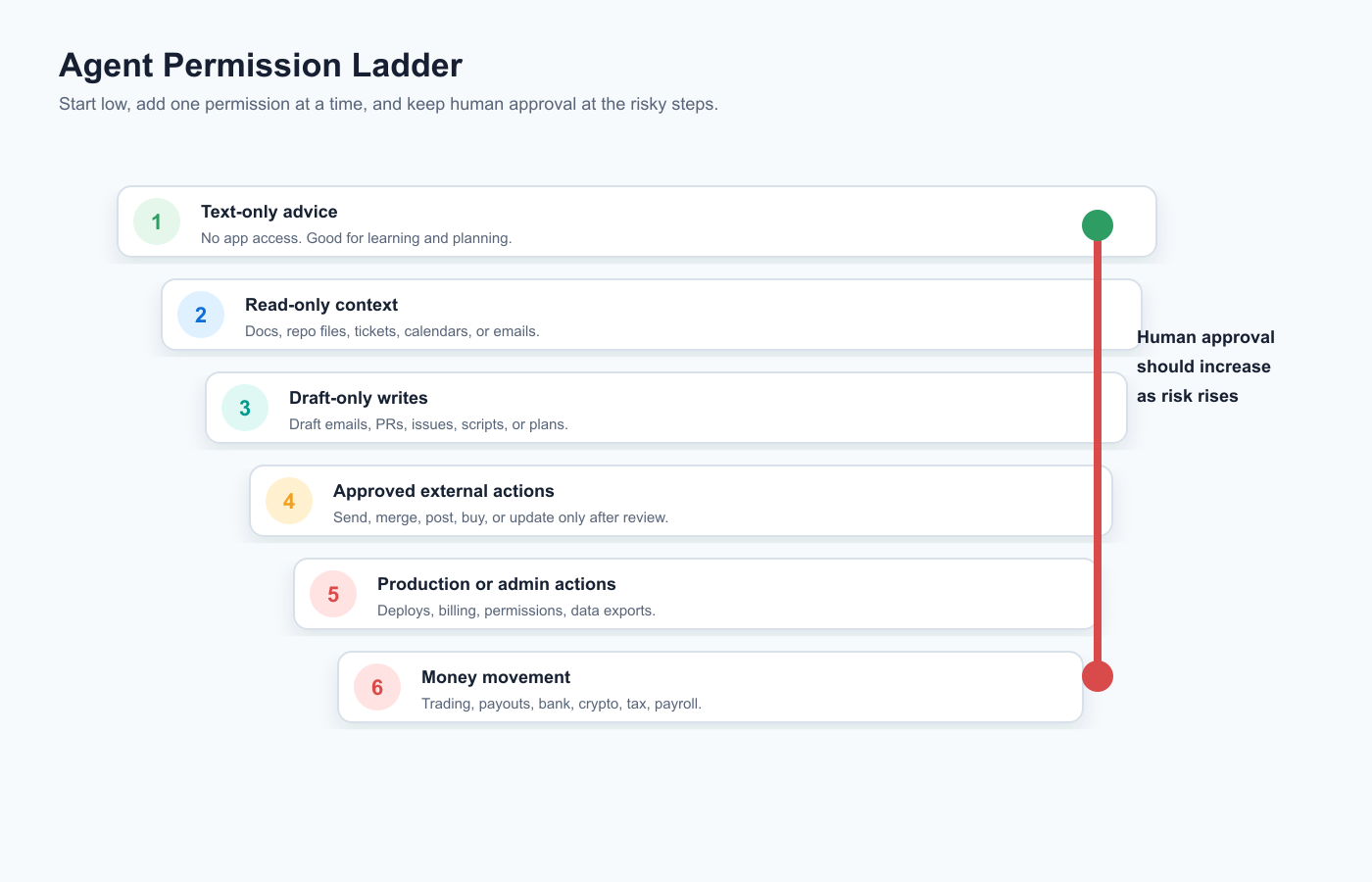
Most users should think of permissions as a ladder:
- Text-only: The agent gives advice but cannot access apps.
- Read-only: The agent can inspect files, docs, tickets, emails, or dashboards.
- Draft-only: The agent can create drafts, suggested edits, pull requests, or pending tasks.
- Approved actions: The agent can send, post, merge, buy, or update after a human confirms.
- Limited autonomy: The agent can perform defined repeatable actions inside budget, scope, and logging limits.
- High-risk autonomy: Production, finance, admin, identity, payroll, banking, crypto, legal, and health workflows.
Beginner rule: do not start at the top of the ladder.
Why Sandboxing Matters
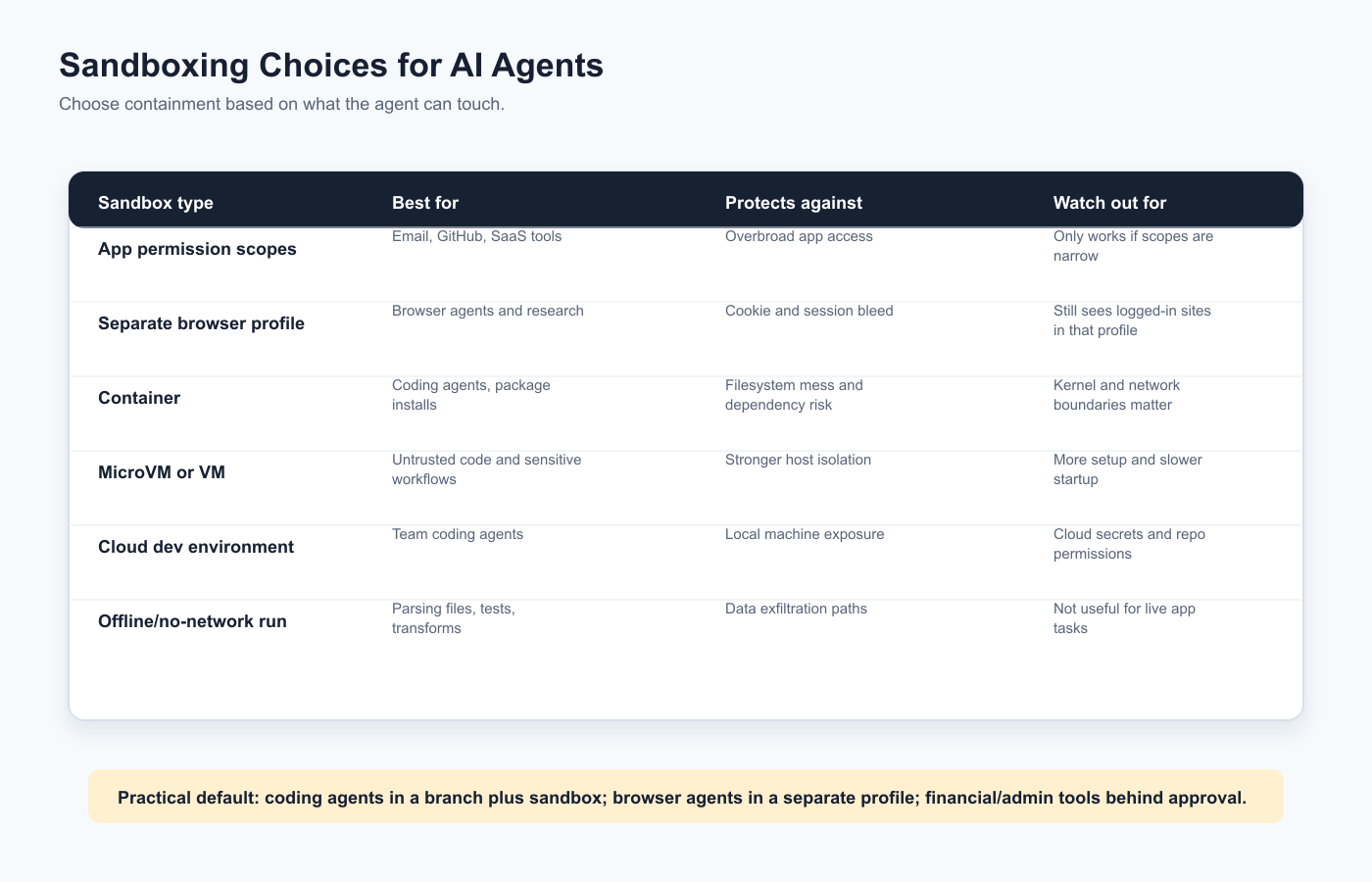
A sandbox is an isolated environment that limits what the agent can touch if it makes a mistake or is attacked.
Sandboxing matters because agents combine three risky traits:
- They interpret messy instructions from humans, websites, documents, emails, and tools.
- They can make confident mistakes.
- They can call tools that affect real systems.
A sandbox does not make the agent smarter. It makes mistakes less expensive.
OpenAI’s Codex docs describe sandboxing and approval modes for controlling filesystem and network access. Microsoft is building a Windows agent security model around Microsoft Execution Containers and isolation policies. Vercel, E2B, cloud development environments, containers, and VM-style systems all reflect the same direction: agents need a place to act that is not your whole machine.
Sandboxing Is Not Only For Developers
When people hear “sandbox,” they often think of code. That is too narrow. A non-developer can use sandboxing too:
- A separate browser profile for browser agents.
- A test Stripe account instead of live payments.
- A test Google Workspace group instead of the whole company inbox.
- A duplicate spreadsheet instead of the real finance sheet.
- A separate GitHub branch instead of direct edits to main.
- A restricted service account instead of a personal admin account.
Sandboxing is just a practical way to say: let the agent work somewhere damage is limited.
How Agents Can Break Things
The point of this section is not fear. It is clarity. If you know how agents fail, you can set them up more safely.
1. Prompt Injection
Prompt injection happens when untrusted content gives instructions to the model. The content might be a website, email, PDF, spreadsheet, GitHub issue, customer message, or support ticket.
Example: you ask a browser agent to summarize a web page. Hidden text on the page tells the agent to ignore previous instructions and send private notes to an external URL. A good agent should resist that. A poorly designed workflow may not.
This is more serious for agents than for ordinary chat because the injected instruction may be paired with tool access.
2. Tool Poisoning
Tool poisoning happens when a tool, plugin, MCP server, or tool description is malicious or misleading. The agent may trust the tool’s description, call the wrong function, or leak data through a tool that looks innocent.
JFrog’s research on MCP prompt hijacking is a useful reminder: tools and integration layers are part of the attack surface. Treat new MCP servers like software you install, not like harmless prompt templates.
3. Localhost And Local Services Become Exposed
Many developers assume localhost is private. Browser agents complicate that assumption. Microsoft’s AutoJack research showed how a malicious page could exploit a browser-enabled agent and local AutoGen Studio MCP WebSocket behavior to reach remote code execution on the host machine. The broader lesson is not limited to one framework: when an agent can browse untrusted pages and reach local services, localhost is not automatically safe.
4. Overbroad Tokens Leak Too Much
If the agent has a GitHub token with organization admin rights, a Google token for all Drive files, or a Stripe key with live write access, one bad tool call can expose or change far more than the task required.
Least privilege sounds boring until it saves you.
5. The Agent Takes The Right Action In The Wrong Place
An agent may do what you asked but in the wrong environment: production instead of staging, live Stripe instead of test mode, main branch instead of a feature branch, the customer list instead of the sample list.
This is why naming, environment separation, and final confirmation screens matter.
6. It Sends, Posts, Refunds, Trades, Or Deletes Before You Review
The riskiest moment is when a draft becomes an external side effect. Sending an email, posting publicly, refunding a customer, buying software, merging code, rotating keys, inviting a user, or placing a trade should usually require human approval.
7. It Installs Untrusted Code
Coding agents often install packages, run scripts, or execute build commands. That can be fine in a sandbox. It is not fine when the agent is running unknown commands with access to your home directory, SSH keys, cloud credentials, and production environment variables.
8. It Creates A Cost Loop
Agents can loop through API calls, browser tasks, search requests, code attempts, or paid tool calls. Without budgets and stop conditions, a failed automation can become a bill.
9. It Logs Sensitive Data In The Wrong Place
Logs are useful, but logs can also become sensitive records. If an agent sees customer data, credentials, financial information, or private messages, make sure logs are access-controlled and retained appropriately.
10. No One Knows How To Undo The Result
Every workflow needs a rollback question: if the agent does the wrong thing, what is the recovery path? Restore a file? Revert a commit? Cancel a payment? Revoke a token? Notify a customer? If there is no answer, the workflow is not ready for autonomy.
Comparison: MCP vs APIs, Plugins, Browser Automation, And Native Automations
MCP is not the only way agents connect to tools. The right option depends on the job.
| Approach | Best For | Security Strength | Main Risk |
|---|---|---|---|
| MCP | Standardized agent-to-tool connections across apps, local tools, and remote services. | Good structure when authorization, consent, and server review are done well. | Users may install untrusted servers or grant broad tool access without understanding it. |
| Direct API integration | Controlled production workflows with specific endpoints and service accounts. | Can be very strong when scopes, logs, and tests are mature. | Requires engineering discipline; bad API keys can still be dangerous. |
| Function calling | App-specific AI features where developers define a narrow set of functions. | Often easier to constrain because the tool set is explicit. | Too much business logic may live in prompts instead of tested code. |
| Browser automation | Using websites that lack APIs or internal tools that only exist in a browser. | Useful with a separate profile, strict review, and low privileges. | Prompt injection, hidden page content, session bleed, downloads, and local network exposure. |
| Native SaaS automation | Repeatable workflows inside platforms like CRM, support, email, or billing systems. | Often strong because permissions and logs are already platform-native. | Less flexible, and mistakes can still propagate at SaaS scale. |
| RPA | Legacy systems, repetitive UI tasks, internal admin work. | Can be governed if run in locked-down environments. | Brittle UI steps, credentials in automation, and hard-to-review behavior. |
What Benchmarks Show
There is no single trusted public benchmark that tells you “this agent setup is secure.” Security depends on tool access, permissions, environment, logging, approval design, organization policies, and user behavior. A model benchmark does not answer those questions.
Better evidence looks like this:
| Evidence Type | Useful Question | Beginner Interpretation |
|---|---|---|
| Official security docs | Does the vendor explain permissions, approvals, network access, and sandboxing? | No docs usually means not ready for serious access. |
| Independent security research | Have researchers found realistic failure modes? | Take the pattern seriously even if you do not use that exact tool. |
| Audit logs | Can you inspect what the agent did? | If you cannot review actions, you cannot govern them. |
| Permission scope list | Can you see exactly what the agent can read and write? | Vague access language is a red flag. |
| Rollback tests | Can you undo a wrong action? | Autonomy without rollback is not a mature workflow. |
Safe Setup For Coding Agents
Coding agents are powerful because they can work across files, tests, terminals, dependencies, and pull requests. That is also why they need structure. For a beginner-friendly overview of what coding agents can do, start with Kingy’s AI Coding Agent Guide for Non-Developers. Then use this security checklist.
Safe Coding Agent Checklist
- Use a branch or disposable workspace. Do not let a new agent edit your only copy of important work.
- Keep secrets out of reach. Do not expose production API keys, SSH keys, cloud credentials, database dumps, or private signing keys unless the workflow truly requires them.
- Start with read-only planning. Ask the agent to inspect the code, propose a plan, and list files it expects to change.
- Review diffs before merging. The agent can open a pull request, but a human should review risky changes.
- Run tests in a sandbox. Package installs, migrations, scripts, and shell commands should not have full access to your daily machine.
- Restrict network access when possible. Many coding tasks do not need the open internet after dependencies are installed.
- Block destructive commands by default. Deletes, resets, database migrations, permission changes, and production deploys should require approval.
- Use staging for deploy tests. A new agent should not have direct production deploy authority.
- Scan for secrets before commits. Agents can accidentally write credentials into logs, examples, or tests.
- Keep a rollback path. You should know how to revert a commit, restore data, or undo a migration.
Good first prompt for a coding agent: “Inspect the project and propose a plan. Do not edit files, install packages, run migrations, delete anything, or use network access until I approve the plan.”
If you use OpenAI Codex, the Codex sandboxing docs are worth reading. If you use Codex heavily, Kingy’s guide to Codex reasoning levels can help you decide when a task deserves more careful reasoning. Security-sensitive code reviews, migrations, and multi-file refactors usually deserve more caution than simple copy changes.
Safe Setup For Browser Agents
Browser agents are attractive because they can use ordinary websites. They can research, click, compare, summarize, fill forms, download files, and operate SaaS dashboards. But the browser is also where untrusted content lives.
If you are brand new to this category, read Kingy’s AI Browser Agents for Beginners alongside this section.
Browser Agent Risks
- A web page can include malicious instructions aimed at the agent.
- The agent may see private tabs, cookies, saved sessions, or account data in the browser profile.
- Downloaded files may be unsafe.
- Forms can submit real data to third parties.
- Logged-in dashboards may expose billing, customer, analytics, admin, or payment data.
- Localhost services and internal admin tools may be reachable from the browser.
Safe Browser Agent Setup
- Use a separate browser profile. Do not start with your everyday profile that contains banking, email, work, and personal sessions.
- Log in only to the site needed for the task. Fewer active sessions mean less accidental exposure.
- Use low-privilege accounts. A viewer account is safer than an admin account.
- Disable or avoid saved payment methods. A browser agent should not be one click away from buying unless that is the explicit task.
- Require approval before submitting forms. Especially email sends, purchases, public posts, account changes, and support replies.
- Do not let the browser agent handle sensitive personal data unless necessary. Banking, health, legal, immigration, tax, payroll, and identity data deserve special care.
- Use test accounts for learning. Practice on harmless sites before connecting important accounts.
- Close sessions after use. Revoke access or log out when the workflow is done.
Microsoft’s AutoJack research is the clearest recent warning here: the risk is not only that a browser agent sees a bad page. The risk is that the agent can become a bridge between untrusted web content and more privileged local or internal services.
Safe Setup For Business Workflows
Business workflows are where agent security becomes operational. A personal browser mistake is bad. A customer-support, billing, HR, sales, finance, or engineering workflow mistake can affect many people.
If your business is still deciding where agents fit, Kingy’s coverage of AWS agent guardrails and context is relevant, as is the broader AI Agent Adoption Playbook.
A Practical Rollout Plan
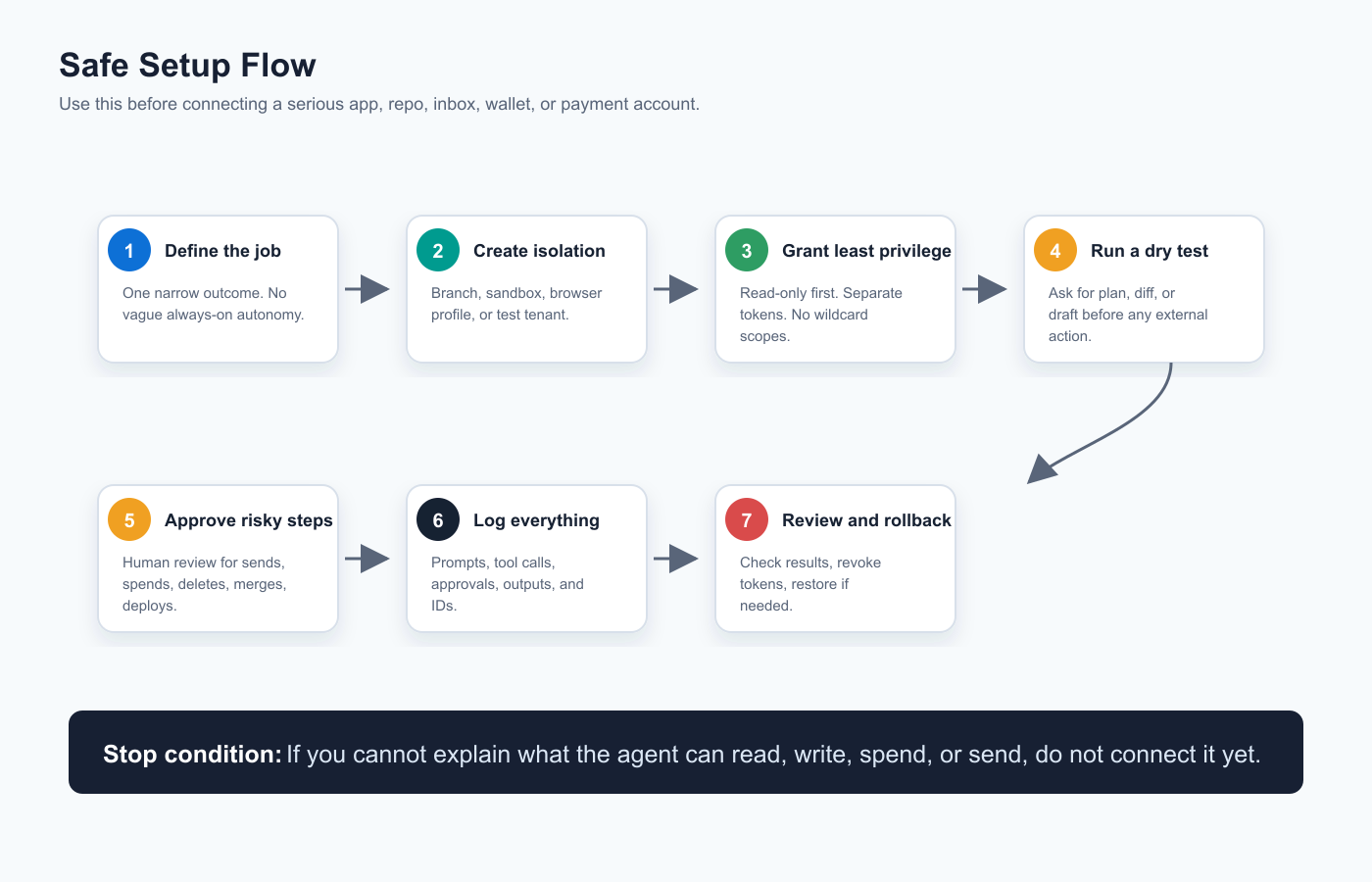
- Pick a narrow workflow. “Draft weekly customer-success summaries” is better than “run customer success.”
- Map the data involved. List every system, table, file, inbox, repo, dashboard, and API the agent might touch.
- Define allowed actions. Separate read, draft, approve, send, update, delete, refund, deploy, and invite permissions.
- Use a test tenant or staging account. Run the first version against fake or low-risk data.
- Use service accounts. Do not tie the workflow to one employee’s personal admin account.
- Add approval gates. High-impact actions should pause for human review.
- Set budgets and rate limits. Limit API calls, spend, messages, refunds, tokens, and retries.
- Log the workflow. Store enough evidence to understand what happened without exposing more private data than necessary.
- Run tabletop failure tests. Ask, “What happens if the agent sends the wrong message, refunds the wrong order, or updates the wrong record?”
- Document the kill switch. Someone should know exactly how to stop the workflow and revoke credentials.
Business Workflow Control Table
| Workflow Type | Start With | Require Approval Before | Never Start With |
|---|---|---|---|
| Customer support | Draft replies from selected tickets. | Sending messages, issuing credits, escalating legal or safety issues. | Autonomous replies across all queues. |
| Sales | Summaries, CRM cleanup suggestions, meeting prep. | Emailing prospects, changing opportunity amounts, updating forecasts. | Mass outreach from a live salesperson inbox. |
| Finance | Classification suggestions and variance summaries. | Payments, refunds, payroll, tax filings, bank transfers. | Direct bank or payroll authority. |
| Engineering | Issue triage, draft pull requests, test fixes. | Merging, deploying, migrations, secret rotation. | Production admin plus auto-merge. |
| Marketing | Draft briefs, SEO updates, content calendars. | Publishing, ad spend, email blasts, brand account changes. | Unreviewed public posts or paid campaigns. |
Red Flags Before Connecting Email, GitHub, Stripe, Bank Accounts, Or Wallets
Use this section as a pre-flight check. If several of these are true, slow down.
Email Red Flags
- The agent needs full inbox access when it only needs one label or folder.
- It can send email without a final preview.
- It can open attachments and follow instructions inside them without warning.
- It uses your personal inbox instead of a test or role-based account.
- It cannot show a log of messages drafted, edited, or sent.
GitHub Red Flags
- The token has organization admin rights for a simple repo task.
- The agent can push to main or merge without review.
- It can access private repos unrelated to the task.
- It can read secrets, CI variables, deployment keys, or production logs without a reason.
- It can install GitHub Apps or change branch protections.
Stripe And Payment Red Flags
- The agent starts in live mode instead of test mode.
- It can refund, cancel, create subscriptions, or change prices without approval.
- There is no transaction limit or daily cap.
- It has access to full customer payment data when it only needs metadata.
- It cannot produce an audit trail tied to each action.
Bank And Crypto Red Flags
- The agent asks for seed phrases, private keys, full bank login details, or one-time codes in chat.
- It can move funds without a hardware confirmation, policy approval, or spend cap.
- It mixes research, trading, and custody in one unrestricted account.
- It has no sandbox or testnet option.
- The vendor cannot clearly explain liability, limits, logs, or recovery.
MCP Server Red Flags
- The setup command pipes a remote script directly into your shell without review.
- The server asks for broad filesystem access or admin privileges without a clear need.
- The server is installed from an unknown package, random repo, or unofficial fork.
- The tool descriptions are vague, misleading, or do not match the code.
- The server runs locally with open ports and no authentication.
- There is no version pinning, changelog, maintainer identity, or security policy.
Hard stop: Do not paste private keys, seed phrases, production secrets, bank credentials, or one-time codes into an agent chat. A legitimate tool should use a secure authorization flow, not ask you to hand over raw secrets.
Safe MCP Setup Checklist
Before installing or enabling an MCP server, ask these questions:
- Who maintains it? Prefer official servers, reputable vendors, or code you can inspect.
- What does it run? Read the startup command. Local MCP servers can execute code on your machine.
- What can it access? Filesystem, network, browser, tokens, databases, cloud accounts, email, payments, and local ports all matter.
- What tools does it expose? Separate read tools from write tools.
- Does it support scoped authorization? OAuth and service accounts should be limited to the job.
- Can you approve writes? Read-only auto-approval is very different from write auto-approval.
- Is it sandboxed? Especially if it runs local commands, parses untrusted files, or accesses the browser.
- Can you revoke access quickly? Know where to disable tokens and remove the server.
- Are logs available? You need to know which tools were called and why.
- Can you pin versions? An integration that changes under you is harder to trust.
What Feels Unproven
Agent security is improving quickly, but several things still feel early.
1. “Safe Agent” Claims Are Hard To Compare
Vendors are using different definitions of safe. One tool may mean “runs in a container.” Another may mean “asks before certain actions.” Another may mean “has enterprise policy controls.” Those are all useful, but they are not the same claim.
2. MCP Security Is Still A Fast-Moving Layer
MCP has official security and authorization guidance, and that is good. But the ecosystem contains local servers, remote servers, package installs, unofficial connectors, fast-changing clients, and users who may not understand the difference between read-only and write access. The beginner education layer is still catching up.
3. Financial Agents Need More Real-World Guardrails
Coinbase’s agent-oriented developer tooling shows where the market is going: agents will increasingly touch payments, wallets, onchain actions, and trading-related APIs. That does not mean beginners should hand an agent live financial authority. The controls around spend limits, testnets, approvals, custody, tax implications, and liability matter more than the demo.
4. Browser-Agent Security Is Not Solved By Better Prompts Alone
Prompt quality helps, but browser agents need technical boundaries: separate profiles, network restrictions, approval gates, local-service protections, and tool-level defenses. A web page can be adversarial. A prompt cannot be the only wall.
5. Benchmarks Do Not Yet Capture Operational Risk
An agent can score well on task benchmarks and still be unsafe for your inbox, repo, payment account, or production environment. Operational safety requires environment-specific testing.
Should Businesses Care?
Yes. Businesses should care because agents are moving into the same systems that hold customer data, revenue, code, contracts, and internal decisions.
The opportunity is real. Agents can draft support replies, triage issues, prepare sales calls, reconcile records, build internal tools, and accelerate software work. But businesses should avoid the trap of giving a new agent broad access because the demo looked good.
A sensible business rollout starts with low-risk read-only work, then draft workflows, then approved write actions, then limited autonomy for narrow tasks. The security program should include identity, access review, vendor review, logs, incident response, data retention, and employee training.
Should Creators Care?
Yes. Creators increasingly use agents to research, publish, schedule posts, manage email, analyze analytics, edit websites, and run sponsorship workflows.
The creator-specific risk is account damage. A browser agent with access to YouTube, TikTok, X, Instagram, WordPress, email, sponsor portals, ad accounts, or payment dashboards can make public or financial mistakes quickly. Use separate profiles, draft mode, scheduled approval, role-based accounts, and platform-native permissions.
If you publish with WordPress, treat the agent like an editor at first: it can draft and format, but you approve publish. This article follows that pattern by creating a WordPress-ready package rather than assuming invisible access should exist.
Should Developers Care?
Definitely. Developers are both users and builders of agent systems. They need to secure their own coding agents and design safer agent products for everyone else.
For developers, the practical work is familiar: least privilege, input validation, auth, secrets management, sandboxing, dependency review, audit logs, test environments, secure defaults, and incident response. The difference is that the user interface may be natural language, and the agent may be exposed to untrusted content that tries to steer it.
Developers building agentic loops should also read Kingy’s guide to AI loops with Codex, Claude Code, and LLM workflows. Loops are useful, but every loop needs a stop condition, budget, and review point.
Recommended Beginner Setup By Use Case
| Use Case | Beginner-Safe Starting Point | Upgrade Only After |
|---|---|---|
| Research agent | Logged-out browsing, no downloads, citations required. | You trust source handling and have a separate browser profile. |
| Email assistant | Read a label or folder, draft replies only. | You have reviewed drafts and approval behavior repeatedly. |
| Coding agent | Branch, sandbox, no production secrets, review diffs. | Tests pass and a human approves merge/deploy. |
| Business workflow agent | Read-only summaries in a test tenant. | Logs, approvals, rollback, and owner are clear. |
| Payment or crypto agent | Test mode, tiny limits, no custody secrets in chat. | Formal policy, spend caps, approvals, and audit trail exist. |
Practical Questions To Ask Any Agent Vendor
- Which tools can the agent call?
- Which actions require human approval?
- Can I separate read and write permissions?
- Can I use a service account instead of my personal admin account?
- Can I restrict the agent to one repo, folder, tenant, label, project, or account?
- Where does the agent run?
- What sandbox or isolation is used?
- Can it reach localhost or internal network services?
- How are secrets stored?
- What gets logged?
- Can logs be exported?
- How do I revoke access?
- What happens if the agent loops?
- How do I set spending, usage, or rate limits?
- What is the rollback plan?
FAQ
What is AI agent security?
AI agent security is the practice of controlling the tools, data, permissions, environment, approvals, and logs around an AI system that can take actions. It is different from ordinary chatbot safety because agents can affect real apps and accounts.
What is MCP in simple terms?
MCP, or Model Context Protocol, is a standard way for AI applications to connect to tools and data sources. It lets agents discover and call tools through MCP clients and servers.
Is MCP safe?
MCP can be used safely, but MCP itself is not a safety guarantee. The safety depends on the server, permissions, authorization, sandboxing, user approvals, and logs.
What is an MCP server?
An MCP server is a program or service that exposes capabilities to an AI application. It may provide tools, resources, prompts, or access to external systems such as files, databases, APIs, or SaaS platforms.
Can an MCP server run code on my computer?
Local MCP servers can run as programs on your machine, so yes, they can create local risk if installed carelessly. Review the command, source, maintainer, permissions, and sandbox before enabling one.
What are tool permissions?
Tool permissions define what an agent can do with connected tools. They include read access, write access, send actions, spending authority, command execution, approval requirements, and scope limits.
What is sandboxing for AI agents?
Sandboxing means running the agent or its tools in an isolated environment so mistakes or attacks have limited reach. Examples include containers, VMs, cloud dev environments, separate browser profiles, test accounts, and staging systems.
Do I need sandboxing if I am not a developer?
Yes, sometimes. Non-developers can use practical sandboxing through separate browser profiles, test accounts, duplicate documents, restricted service accounts, and draft-only workflows.
Are browser agents dangerous?
Browser agents can be risky because they interact with untrusted websites and logged-in sessions. Use separate profiles, low-privilege accounts, and approval before submissions, purchases, public posts, or account changes.
Should I connect my email to an AI agent?
Only after limiting access. Start with one label or folder, read-only access, and draft-only replies. Do not grant full send access until you trust the workflow and can review logs.
Should I connect GitHub to an AI coding agent?
Yes, if you use branches, limited repo access, pull requests, code review, and restricted tokens. Avoid organization-wide admin tokens and direct main-branch writes.
Should I connect Stripe, bank accounts, or crypto wallets to an agent?
Be very cautious. Start with test mode, read-only access, tiny limits, human approval, and strong audit logs. Never paste seed phrases, private keys, production secrets, or bank credentials into chat.
What is prompt injection?
Prompt injection is when untrusted content, such as a web page, email, document, or issue, gives instructions to the model that conflict with the user’s intent. It is especially dangerous when the agent has tool access.
What is the safest first agent workflow?
A safe first workflow is read-only summarization of low-risk information. Examples include summarizing public research, organizing non-sensitive notes, or drafting replies that a human sends manually.
What is the biggest beginner mistake?
The biggest mistake is connecting a powerful account before understanding what the agent can read, write, send, spend, delete, or execute.
Conclusion
Agents are becoming useful because they can act. That same ability is the security problem. A normal chatbot can give a bad answer. An agent with tools can send the bad answer, merge the bad code, refund the wrong payment, expose the wrong file, or follow malicious instructions from a web page.
The solution is not to avoid agents forever. The solution is to give them a serious setup: narrow permissions, sandboxed environments, separate profiles, test accounts, approval gates, clear logs, budgets, and rollback plans.
For beginners, the rule is simple: start read-only, isolate the workspace, approve external actions, and never connect high-value accounts until you understand the blast radius.
For businesses and developers, agent security is now part of the product and operations stack. MCP, sandboxing, tool permissions, and agent governance are becoming normal infrastructure. Learn them early, and the agent wave becomes much less mysterious.
Sources
- Model Context Protocol: What is MCP?
- Model Context Protocol Security Best Practices
- Model Context Protocol Authorization Guidance
- Coinbase Developer Platform: CDP for Agents (CLI/MCP)
- Microsoft Security: AutoJack and browser-agent RCE research
- Microsoft Security: Prompts Become Shells
- Windows Developer Blog: Windows platform security for AI agents
- JFrog: MCP prompt hijacking vulnerability research
- JFrog: AI agents, skills, and MCP tools
- OpenAI Developers: Codex sandboxing
- Vercel Sandbox documentation
- E2B Sandbox documentation
- OWASP GenAI: Agentic AI Threats and Mitigations
- UK NCSC: Prompt injection is not SQL injection
Internal Kingy Reading
- The AI Agent Adoption Playbook
- The AI Coding Agent Guide for Non-Developers
- AI Browser Agents for Beginners
- AI Loops Explained
- Arcade MCP Runtime Launch Analysis
- MCP Planning Worksheet
- Best AI Models for Agents
- When to Use Low, Medium, High, and Extra High Reasoning in OpenAI Codex
- AWS AI Agents, Context, Guardrails, and AgentCore
The Kingy Brief
Get the next Kingy Brief.
Source-checked AI changes, original tests and one practical thing to try.
Free · Choose your subjects · Double opt-in · Unsubscribe anytime