October 11 clarification: Kimi K3’s native checkpoint still needs data-centre-scale hardware for supported serving. Third-party low-bit GGUFs allow experimental local execution, but this review does not establish their speed or quality on an ordinary Mac or PC.
Commercial relationship for this article: None. This is based on Curtis Pyke’s direct confirmation on October 7, 2026.
The weights are downloadable under the Kimi K3 License. Hardware, hosting and operation still have costs.
Editor’s update, July 29, 2026: The analysis below covers Kimi K3’s native 1.56TB checkpoint and supported vLLM/SGLang deployments. Unsloth has since released an experimental 594GB GGUF that can run from local weights and may use SSD-backed offloading, but it still does not fit in a standalone 128GB Mac Studio. Read Kingy’s full fact-check of the 128GB Mac claim.
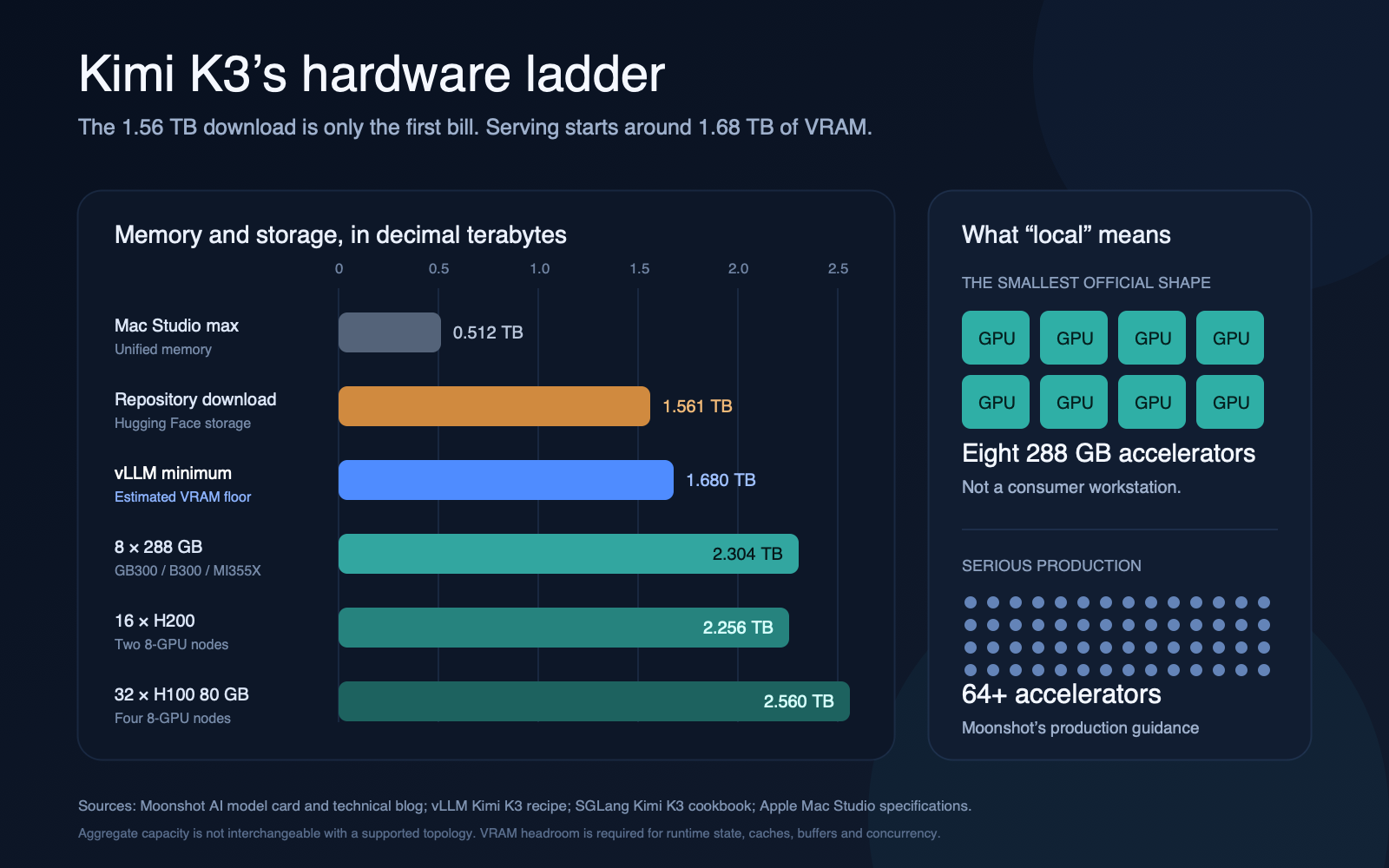
Kimi K3’s native checkpoint is open-weight, but it is too large for a desktop memory-resident deployment. The live Hugging Face repository occupies 1.561 TB, the official vLLM metadata estimates a 1,680 GB minimum VRAM footprint, and vLLM’s deployment recipe calls for at least eight GB300 GPUs. Moonshot’s own production guidance goes much further: use a high-bandwidth supernode with 64 or more accelerators. For the most extreme consumer-hardware claim, see our audit of running Kimi K3 with 8GB RAM and a 1.7TB SSD.
For the native checkpoint and supported vLLM/SGLang serving paths, “locally” means an enterprise AI cluster under your control. A Mac Studio or conventional workstation cannot hold the native weights in memory or match those supported topologies. A third-party GGUF can be addressed from local storage, but no responsive standalone-Mac result is established here.
This guide works through the download, storage, memory, interconnect and cost math using the released checkpoint and current first-party deployment guidance. It also shows when renting a cluster could beat the official Kimi API, and why that crossover is much farther away than the raw GPU-hour calculation suggests.
Bottom line: An individual should use Kimi K3 through the official API or a Kimi subscription. A serious self-hosted evaluation starts with eight 288 GB data-centre accelerators. Production serving is a multi-node infrastructure project.
Related Kimi K3 coverage: Read the benchmark, specifications and pricing analysis, the official-weight download guide, and the commercial-licence analysis.
Kimi K3 hardware requirements at a glance
| Item | Current figure | What it means |
|---|---|---|
| Total parameters | 2.8T (2.7799T in the repository metadata) | This is the full weight set that must be addressable |
| Activated parameters | 104B | Fewer parameters compute each token, but the other experts do not disappear from memory |
| Native checkpoint | MXFP4 weights, MXFP8 activations | K3 is already aggressively quantized |
| Repository storage | 1,561,018,243,668 bytes | 1.561 TB decimal, or about 1.420 TiB |
| Weight shards | 96 Safetensors files | The download is operationally closer to a dataset than a normal model file |
| vLLM VRAM minimum | 1,680 GB | A planning floor, not a production target |
| Smallest official vLLM shape | 8 × GB300 | 2,304 GB of aggregate HBM at 288 GB per GPU |
| Other supported shapes | 8 × MI355X; 16 × H200/B200; 32 × H100 | Hardware generation changes the required GPU and node count |
| Context window | 1,048,576 tokens | Long-context state consumes part of the remaining HBM |
| Production recommendation | 64+ accelerators | Moonshot optimizes for a large, high-bandwidth communication domain |
Sources: the Kimi K3 model card, Hugging Face repository metadata, vLLM Kimi K3 recipe, SGLang Kimi K3 cookbook and Moonshot’s Kimi K3 technical blog.
What we verified—and what we did not
This is a source-and-calculation guide, not a claimed hands-on cluster benchmark. We inspected the released repository metadata and configuration, checked the current vLLM and SGLang deployment recipes, and recalculated storage, transfer and cost figures. We did not rent an eight-GPU K3 cluster or independently measure tokens per second.
Deployment requirements checked September 5, 2026 are more specific: the current vLLM recipe lists 0.27.1+ and a K3-specific CUDA 13 image requiring an r580-or-newer NVIDIA driver. It explicitly rules out a CUDA 12.9 image tag or K3 wheels on that nightly index. The SGLang cookbook now verifies final-weight speed for two B300 1×8 Unified configurations; other configurations still await final verification, and accuracy has not been re-measured for any of them. Check the exact driver, image and deployment profile before renting hardware.
The Kimi K3 download is 1.56 TB, not “about 600 GB”
The released checkpoint ends a lot of speculative hardware math. Hugging Face reports 1,561,018,243,668 bytes of repository storage. AMD’s independent deployment analysis arrives at essentially the same number, describing approximately 1.5609 TB of mixed MXFP4 and BF16 weights.
That is:
- 1.561 TB using decimal storage units;
- 1.420 TiB using binary units;
- an effective 4.49 stored bits per parameter across the 2.7799T parameters.
The last number is the useful one. Pure four-bit arithmetic suggests 1.4 TB, but real checkpoints also carry quantization scales, metadata and components that are not all packed at four bits. The extra 161 GB is not a rounding error.
How long does the Kimi K3 download take?
These are ideal transfer times followed by a more realistic estimate at 75% link utilization:
| Internet connection | Perfect-line minimum | At 75% effective throughput |
|---|---|---|
| 100 Mbps | 34.7 hours | 46.3 hours |
| 300 Mbps | 11.6 hours | 15.4 hours |
| 1 Gbps | 3.47 hours | 4.63 hours |
| 2.5 Gbps | 1.39 hours | 1.85 hours |
| 10 Gbps | 20.8 minutes | 27.8 minutes |
| 25 Gbps | 8.3 minutes | 11.1 minutes |
| 100 Gbps | 2.1 minutes | 2.8 minutes |
Those figures assume the remote host, route, local disk and download client all keep up. In practice, metadata operations, retries and write speed can matter as much as the nominal network link.
A 2 TB drive is technically large enough—and still a bad plan
A nominal 2 TB SSD leaves less than 440 GB after one clean copy. That margin has to absorb filesystem overhead, model revisions, temporary data, container layers, logs and any duplicate cache layout created by your download workflow.
For an evaluation node, treat a 4 TB fast NVMe volume as the practical minimum. For a multi-node deployment, decide in advance whether every node will keep a local copy or whether the cluster will load from shared high-throughput storage. Eight GPUs do not solve a storage bottleneck if each worker starts by pulling 1.56 TB over an ordinary network.
Why 104B active parameters do not make K3 a 104B download
Kimi K3 is a sparse mixture-of-experts model. It contains 896 routed experts and selects 16 per token, alongside shared experts. Moonshot lists 104B activated parameters out of 2.8T total.
That sparsity reduces the amount of computation performed for each token. It does not mean the server can delete the 880 experts that were not selected for the current token. The router may choose a different set on the next token or for the next request, so the cluster still needs the full expert pool ready and reachable.
Kimi K3’s sparse design splits the hardware bill in two:
Active parameters determine much of the compute bill. Total stored parameters determine whether the model can load.
Offloading inactive experts to ordinary system RAM sounds tempting, but expert routing turns memory movement and interconnect latency into the problem. A model that technically memory-maps from 2 TB of RAM but generates at unusable speed is not a practical local deployment.
The real Kimi K3 VRAM math
A four-bit lower bound is simple:
2.8 trillion parameters × 4 bits ÷ 8 = 1.4 trillion bytes
The released checkpoint is larger: 1.561 TB. vLLM’s current model metadata sets vram_minimum_gb to 1,680 GB. That extra room is still only a floor. A serving process also needs memory for runtime workspaces, communication buffers, allocator fragmentation, model state, the vision encoder, caches and concurrent requests.
AMD published the most useful day-one breakdown. On an eight-GPU MI355X TP8 system, it calculates:
- 190.974 GiB of weights per GPU;
- 14.427 GiB of known state per GPU for one 1M-token sequence;
- 205.401 GiB known total per GPU;
- 82.599 GiB remaining out of 288 GiB before unmodelled framework and communication overhead.
AMD then validated a more conservative 16K-context serving configuration across 1,319 GSM8K samples. In other words, an eight-by-288 GB node has meaningful headroom, but “supports a 1M context window” should not be confused with “serves many simultaneous 1M-token sessions.”
Can Kimi K3 run on a Mac, workstation or consumer GPU?
Mac Studio: not for the native checkpoint
Apple’s highest-memory Mac Studio configuration offers 512 GB of unified memory. That is less than one-third of vLLM’s 1,680 GB planning floor and roughly one-third of the checkpoint itself.
Pooling four 512 GB Macs does not turn them into a supported K3 server. There is no official K3 MLX deployment, and a normal Ethernet fabric is not a substitute for the scale-up interconnects assumed by the data-centre recipes. A multi-Mac experiment might eventually prove an interesting engineering stunt; it is not a current path to useful K3 inference.
One RTX 5090: not remotely close
An RTX 5090 has 32 GB of GDDR7. It would take 53 cards just to cross 1,680 GB on paper. That imaginary system would have almost no memory headroom, no supported 53-way K3 topology, enormous power and cooling requirements, and no NVLink fabric joining the cards.
RTX PRO 6000 Blackwell: still not a workstation solution
NVIDIA’s RTX PRO 6000 Blackwell Workstation Edition has 96 GB. Eighteen cards provide 1,728 GB in aggregate, only 48 GB above vLLM’s minimum estimate. The arithmetic says “barely”; the platform reality says “no.” A conventional workstation cannot host 18 full-power cards with the memory fabric and communication topology K3 needs.
This is why adding VRAM numbers across PCIe cards can mislead. Aggregate capacity is necessary, but it is not sufficient. Software support, peer-to-peer communication, topology, power delivery and cooling all matter.
What about 2 TB of CPU RAM?
A large server can hold the files in system memory. That does not make CPU inference practical. K3’s sparse expert routing still demands high memory bandwidth and frequent data movement, and the official deployment work is focused on vLLM, SGLang, TokenSpeed and accelerator-specific kernels.
“It loaded” is not the same benchmark as “it answers at an acceptable speed.”
The supported deployment ladder: 8, 16, 32 and 64 GPUs
The current vLLM and SGLang recipes form a coherent ladder.
| Configuration | Aggregate accelerator memory | Current role | Reality check |
|---|---|---|---|
| 8 × B300, GB300 or MI355X (288 GB each) | 2,304 GB | Smallest modern configuration | Enough capacity and headroom; still enterprise hardware |
| 16 × H200 (141 GB each) | 2,256 GB | Two-node Hopper route | vLLM’s generated recipe uses TP16 across two H200 nodes |
| 16 × B200 (180 GB each) | 2,880 GB | Two-node Blackwell route | More memory, but still a fabric-dependent multi-node deployment |
| 32 × H100 80 GB | 2,560 GB | Older-generation compatibility route | Four nodes and substantially more communication |
| 64+ accelerators | Topology-dependent | Serious production | Optimizes throughput, concurrency and expert-parallel communication |
The eight-GPU configuration is a loading and evaluation floor, not the architecture Moonshot recommends for a busy service.
Eight GPUs: the smallest credible K3 server
vLLM says “at least 8× GB300.” Its metadata also recognizes an eight-GPU MI355X path. SGLang is more specific:
- B300: one node with eight GPUs;
- MI350X or MI355X: one node with eight GPUs;
- GB300: two four-GPU trays;
- balanced serving: TP8 with decode-context parallelism on B300/GB300.
This is the closest K3 gets to a “single box,” and the box is a data-centre appliance.
Sixteen GPUs: H200 and B200 territory
SGLang maps H200 and B200 to two eight-GPU nodes. vLLM’s currently generated default recipe is a two-node H200 deployment with tensor parallel size 16, a K3-specific container, fast Safetensors loading and Hopper-specific MoE settings.
At this point, networking is part of the model. The vLLM recipe calls for an InfiniBand-class multi-node setup and exposes different all-to-all backends for RDMA and NVLink communication domains.
Thirty-two H100s: capacity through scale
H100 80 GB systems need four eight-GPU nodes in the SGLang matrix. They cross the memory requirement through card count, but every extra boundary adds communication cost. This is a compatibility route for organizations that already own H100 infrastructure, not the economical way to build a fresh K3 cluster.
Sixty-four GPUs: production, not a bigger “minimum”
Moonshot recommends 64 or more accelerators because K3 benefits from a larger high-bandwidth communication domain. SGLang’s large-scale presets cover 16, 32 and 64 Blackwell GPUs and combine tensor, expert, data and decode-context parallelism.
The goal is no longer to make one model copy fit. It is to create useful throughput and concurrency, manage KDA state, and keep expert traffic efficient across a production fleet. Simply multiplying 64 GPUs by their HBM capacity does not describe how that memory is partitioned or replicated.
Kimi K3 on vLLM versus SGLang
Both engines are official recommendations. Neither is a one-line desktop install.
| Question | vLLM | SGLang |
|---|---|---|
| Best fit | Teams already standardized on vLLM and its OpenAI-compatible server | Teams willing to tune K3-specific large-scale serving |
| Current install | vllm/vllm-openai:kimi-k3; CUDA 13, r580+ driver; recipe lists vLLM 0.27.1+ |
Current NVIDIA image or the cookbook-pinned ROCm image; select the exact hardware recipe |
| Smallest headline target | At least 8 × GB300; 8 × MI355X on ROCm | 8 × B300/MI355X or 2 × 4 GB300 |
| Hopper route | Generated TP16 recipe over two H200 nodes | Two H200 nodes; H100 uses four nodes |
| Production features | Tensor/expert/data parallel strategies, OpenAI API, K3 parsers | Unified or disaggregated prefill/decode, DCP, K3 state and cache controls, 16–64 GPU presets |
| Main caution | Exact driver/container compatibility and workload validation | Large tuning surface; final-weights validation is not complete for every preset |
Use vLLM when you want the more familiar serving surface and your team already knows its operational model. Use SGLang when K3 is important enough to justify deeper tuning around prefill/decode disaggregation, KDA state, expert parallelism and large Blackwell deployments.
In both cases, pin the model revision, container digest and engine version. A generic pip install command copied from an older K2 tutorial is not a reproducible K3 deployment.
Can Kimi K3 be quantized further?
K3 is not waiting for a basic four-bit conversion. Moonshot applied quantization-aware training from supervised fine-tuning onward, using MXFP4 weights and MXFP8 activations. The configuration uses packed four-bit weights for routed linear layers while leaving several sensitive components outside that blanket treatment.
That creates three practical limitations.
1. “Q4” is not a free next step
The official model is already roughly at the four-bit storage floor. Converting it to another four-bit container may improve compatibility with a particular runtime, but it does not magically cut 1.56 TB to workstation size.
2. Third-party low-bit conversions exist
At exactly two bits per parameter, the raw storage floor is about 700 GB before scales and exceptions. Unsloth’s guide documents a 594 GB 1-bit GGUF and recommends roughly 610 GB of total memory for it; its current model repository also lists a 466 GB variant. These are third-party conversions, not the native checkpoint or a supported Moonshot serving profile.
Smaller files establish storage size, not independent task accuracy, practical Mac speed or full multimodal and long-context behaviour. Validate the exact quant and runtime before planning around them.
3. Runtime support is as important as file size
SGLang’s current K3 paths use FlashInfer MXFP4 kernels on Blackwell, Marlin paths elsewhere and ROCm/AITER on MI355X. A community GGUF or experimental conversion needs corresponding loader, kernel and architecture support. Newly appearing conversions should be treated as research artifacts until they publish checksums, reproducible perplexity or task validation, supported context limits and measured speed.
For most teams, the rational optimization order is:
- use the native checkpoint;
- reduce context and concurrency to fit the evaluation target;
- choose the hardware-specific supported kernel path;
- validate quality and tool calling;
- only then investigate a lower-precision derivative.
Cloud rental estimates
GB300 multi-GPU availability is usually quote-driven, so there is no universal eight-GPU list price. The most defensible public estimate uses current B300 and H200 listings as a proxy, then adds a range for scarce, fabric-connected capacity.
As of July 27, 2026, GPU Finder lists an eight-B300 node at $59.12 per hour on Runpod and $62.80 per hour on Nebius, with availability limited or unknown. Its one-GPU floor is $6.94 per hour. ComputeTape’s sourced H200 band is $3.99–$10 per GPU-hour.
| Deployment | Planning range | 24-hour test | 730-hour month |
|---|---|---|---|
| 8 × B300/GB300-class | $59–$142/hour | $1,419–$3,418 | $43,158–$103,967 |
| 16 × H200 | $64–$160/hour | $1,532–$3,840 | $46,603–$116,800 |
| 64 × B300-class, extrapolated | $473–$1,139/hour | $11,351–$27,345 | $345,261–$831,733 |
These are GPU-only planning estimates, not provider quotes. Budget separately for:
- CPU and host RAM;
- at least 2–4 TB of fast storage per required copy;
- high-bandwidth inter-node networking;
- data egress and public IP charges;
- idle time while the model downloads, loads and compiles kernels;
- observability, redundancy and failover;
- engineering time;
- unavailable or pre-empted capacity.
The cheapest visible single-GPU price is irrelevant if the provider cannot allocate the required eight-card topology with the right interconnect.
The self-hosting versus API break-even math
Moonshot prices the official Kimi K3 API at:
- $0.30 per million cache-hit input tokens;
- $3.00 per million cache-miss input tokens;
- $15.00 per million output tokens.
Moonshot also says its coding workloads exceed a 90% cache-hit rate. Your workload may not.
Use this formula. The rental examples above quote whole-node rates: multiply a whole-node rate by billable hours once, or multiply a per-GPU rate by GPU count and hours. Do not multiply the quoted node rate by its GPU count again.
Monthly self-host cost = per-GPU hourly rate × GPU count × billable hours + storage/network/ops
API cost per 1M total tokens = input share × [cache hit rate × $0.30 + cache miss rate × $3.00] + output share × $15.00
Break-even total tokens per month = monthly self-host cost ÷ API cost per token
Assume an 80/20 input-to-output token mix:
| Workload | Blended API cost per 1M total tokens |
|---|---|
| No input cache hits | $5.40 |
| 90% of input tokens hit cache | $3.456 |
Now compare that with the published eight-B300 node prices:
| Cluster assumption | Monthly GPU bill | Break-even with no cache hits | Break-even with 90% input cache hits |
|---|---|---|---|
| $59.12/hour, 24/7 | $43,158 | 7.99B tokens/month | 12.49B tokens/month |
| $142.42/hour, 24/7 | $103,967 | 19.25B tokens/month | 30.08B tokens/month |
Use the formula and worked examples above to substitute your own GPU rate, runtime, overhead and token mix; then discount the result for idle capacity and operations.
Why this calculator is optimistic about self-hosting
The crossover assumes your cluster can actually produce the required token volume while meeting latency targets. It also gives every purchased GPU-hour full economic credit. Real services have idle periods, queue variation, maintenance, failed requests and capacity reserved for latency.
Self-hosting can still win before the token-only crossover when data control, custom serving logic or guaranteed capacity has independent value. It can lose after the crossover if engineering and reliability costs are ignored.
The cheapest realistic way for an individual to use Kimi K3
For occasional programmatic use, the official API is the clear answer. A request with 50,000 input tokens and 5,000 output tokens costs:
- $0.225 with no cache hits;
- about $0.104 if 90% of the input tokens are cached.
For interactive use, the linked Kimi membership help page, checked October 10, 2026, lists Andante at ¥49/month and Moderato at ¥99/month; its current table lists million-token chats under Allegro. Separately, Kimi Code release notes dated July 16 said Moderato and above could use K3 and Allegretto and above could use its one-million-token context. Those are different product surfaces and observation dates. A current US-dollar checkout price was not verified; confirm the product, region and terms before subscribing.
Rent an eight-GPU node only when you have a concrete evaluation objective: compatibility testing, privacy validation, throughput measurement or integration work. At roughly $60 an hour before setup overhead, an exploratory weekend can cost more than a year of light API use.
If the requirement is “a private coding model on my own desk,” choose a smaller model designed for a workstation. K3’s open weights give organizations control and researchers access; they do not make 2.8 trillion parameters personal-computer friendly.
A practical decision guide
| Your goal | Best route |
|---|---|
| Try Kimi K3 once | Kimi.com or the official API |
| Use K3 for personal coding | Kimi subscription or pay-as-you-go API |
| Build an application with variable traffic | Official API first; measure real token and cache patterns |
| Evaluate self-hosting | Short reservation on an 8 × B300/GB300 or 8 × MI355X system |
| Serve sensitive enterprise workloads | Compare API/enterprise controls with a 16–64 GPU private deployment |
| Run a frontier model on a Mac or gaming PC | Use a smaller local model; K3 is the wrong target |
| Operate K3 at serious production scale | Plan around 64+ accelerators, not the eight-GPU fit test |
Before you download: a Kimi K3 deployment checklist
License boundary: K3 uses a custom license, but this article evaluates hardware feasibility rather than commercial permission. Questions about commercial use, attribution, redistribution, the $20 million threshold and whether “open source” is the right label belong in a dedicated Kimi K3 license guide. Until that guide is public, review the official Kimi K3 License.
- Review the commercial-use conditions before deployment. Open weights do not mean there are no use conditions.
- Reserve at least 4 TB of fast staging storage.
- Pin the Hugging Face revision. The repository changed on release day and may change again.
- Choose the hardware recipe before downloading. Eight GB300/B300/MI355X, 16 H200/B200 and 32 H100 are different operational projects.
- Use the K3-specific container. Do not assume the latest stable pip package contains the required kernels and parsers.
- Start with a shorter context and low concurrency. Prove correctness before testing the 1M-token limit.
- Validate reasoning history and tool calls. K3 expects preserved reasoning history in multi-turn sessions, and the vLLM recipe recommends schema validation and retry for occasional tool-call format mismatches.
- Measure end-to-end cost. Include loading time, idle capacity, storage, network, failures and engineering.
- Benchmark your prompts. A public benchmark does not reveal your prefill size, output length, cacheability or latency target.
- Keep the API as the baseline. If self-hosting cannot beat the API on cost, control or reliability, it is infrastructure theatre.
FAQ
Can you run Kimi K3 locally?
For the native checkpoint with supported serving stacks, yes: use an enterprise multi-GPU server or cluster. Third-party GGUFs can be run from local files with experimental offloading, but their useful speed and quality on an ordinary Mac or PC are not established here.
How much VRAM does Kimi K3 need?
vLLM lists a 1,680 GB minimum estimate. The smallest modern recipes use eight 288 GB accelerators, providing 2,304 GB of aggregate HBM before accounting for how the runtime partitions memory.
How large is the Kimi K3 download?
The Hugging Face repository occupies 1,561,018,243,668 bytes: 1.561 TB decimal or about 1.420 TiB. It includes 96 Safetensors weight shards.
Can a 512 GB Mac Studio run Kimi K3?
Not for the native checkpoint, which is roughly three times larger than 512 GB of unified memory. Unsloth’s documented 594 GB GGUF also exceeds that memory, while its repository now lists smaller variants. Storage-backed execution is experimental, and no reproducible standalone-Mac performance result is cited here.
Can an RTX 5090 run Kimi K3?
Not as a memory-resident host for the native checkpoint. One RTX 5090 has 32 GB of VRAM, while the vLLM minimum is more than 52 times larger. Third-party GGUF offloading is a separate experimental path; this review does not establish useful speed or quality for it on one RTX 5090.
Does Kimi K3 work in Ollama, llama.cpp or LM Studio?
Moonshot’s native serving recommendations are vLLM, SGLang and TokenSpeed. Unsloth also distributes GGUF conversions for its llama.cpp path. A downloadable file is not, by itself, proof of full multimodal behaviour, long-context performance, downstream quality or useful speed on a specific machine.
Is Kimi K3 already quantized?
Yes. Moonshot used quantization-aware training with MXFP4 weights and MXFP8 activations. The released repository averages about 4.49 stored bits per parameter after scales, exceptions and metadata.
Should I use vLLM or SGLang for Kimi K3?
Use vLLM for a more familiar OpenAI-compatible serving path and existing vLLM operations. Use SGLang when you need its detailed K3 deployment matrix, prefill/decode disaggregation and large-scale tuning controls. Both currently require K3-specific, fast-moving builds.
Why does Moonshot recommend 64 GPUs if eight can load the model?
Eight high-memory GPUs can fit the model and support evaluation. Sixty-four or more accelerators create the communication domain, parallelism, concurrency and throughput needed for serious production traffic.
What is the cheapest way to use Kimi K3?
For an individual, use the official API or a Kimi subscription. Self-hosting becomes a rational cost discussion only at sustained multi-billion-token monthly volumes or when privacy and control have enough independent value to justify the infrastructure.
Verdict
Kimi K3’s native checkpoint needs data-centre-scale hardware for supported serving. Third-party low-bit GGUFs allow experimental local execution, with speed and quality still to validate.
The native checkpoint is 1.56 TB. Its supported serving floor is roughly 1.68 TB of VRAM, with eight 288 GB accelerators as the smallest modern configuration. Moonshot’s production recommendation starts at 64 accelerators. Third-party low-bit GGUF experiments have different memory and validation requirements.
A lab or company with the right cluster can serve the native checkpoint. A workstation owner can investigate third-party GGUF offloading, but should use the API when reliable K3 performance matters.
Primary sources and calculation references
- Kimi K3 model card and released weights
- Hugging Face repository metadata
- Kimi K3 configuration
- Moonshot Kimi K3 technical blog and API pricing
- vLLM Kimi K3 recipe
- vLLM Kimi K3 machine-readable recipe
- SGLang Kimi K3 cookbook
- AMD Kimi K3 memory analysis and MI355X validation
- NVIDIA GB300 NVL72 specifications
- NVIDIA H200 specifications
- Apple Mac Studio specifications
- NVIDIA RTX 5090 specifications
- NVIDIA RTX PRO 6000 Blackwell specifications
- B300 price snapshot, July 27, 2026
- H200 sourced price band, July 27, 2026
- Kimi membership plans
The Kingy Brief
Get The Kingy Brief.
AI changes, original tests and one practical thing to try. Fridays at 09:00 Vancouver time.
Free · Double opt-in · Unsubscribe anytime
Sign up for The Kingy Brief on Beehiiv.
Signup help and newsletter schedule
Signup form provided by Beehiiv. After submitting, check your inbox for "Confirm your subscription to The Kingy Brief" and open its confirmation link. Check Spam or Promotions if you cannot find it.
Fridays at 09:00 Vancouver time: source-checked AI changes, original tests and one practical thing to try. We skip a week when there is not enough verified material. Free. Unsubscribe anytime.