Editor’s note: This is a documented three-project production pilot, not a benchmark. The prompts below are our original briefs inspired by public posts on X; they are not recovered private prompts from the creators whose work sparked the idea. Each result came from one local production task with autonomous implementation, debugging, verification and packaging—not from a single text completion.
The posts that trigger the most interest tend to show the payoff and hide the working file: no prompt, no failed render, no clue whether the page works outside a flattering screen recording.
We ran three separate local production tasks on Astra Ultra, froze the first delivered candidate for each, and kept the editable project, real exports, original brief, timing records and replay checks.
The interactive V8 and the Pocket Observatory are strong examples of what a directed build can produce in roughly half an hour of task time. After Hours is a real editable Blender scene and a coherent short film, but it is a stylised procedural study—not evidence that the same workflow has solved premium photoreal filmmaking.
What we actually ran
The three tasks started independently and concurrently on the same Mac. The recorded initial-turn metadata identifies gpt-6-astra with ultra effort for all three; the CLI version was 0.153.1. The service/speed tier was not exposed, so it remains unknown. These timings include research, implementation, QA, capture and packaging inside each task. They are not a speed comparison between modes.
| Project | Delivered result | Initial task elapsed | Export facts |
|---|---|---|---|
| Inside the Machine | Interactive teaching exhibit for a schematic V8 | 33.1 min | 18.0 s, 1440×1000, H.264, 30 fps, silent |
| Pocket Observatory | Responsive fictional creative-technologist portfolio | 29.3 min | 22.4 s, 1440×1080, H.264, 25 fps, silent |
| After Hours | Editable Blender conservatory scene, clean and archival films | 76.8 min | Two 24.0 s, 1920×1080, H.264, 24 fps, silent |
Shared account snapshots read 26% used before dispatch and 51% used at the final recorded snapshot. Other work was active on the account, so that difference is not a measured cost for this pilot. We do not have a defensible per-project dollar cost or token total. No credit was purchased, no reset was consumed, no paid external generator was used, and nothing was published.
1. Inside the Machine: the best opening act
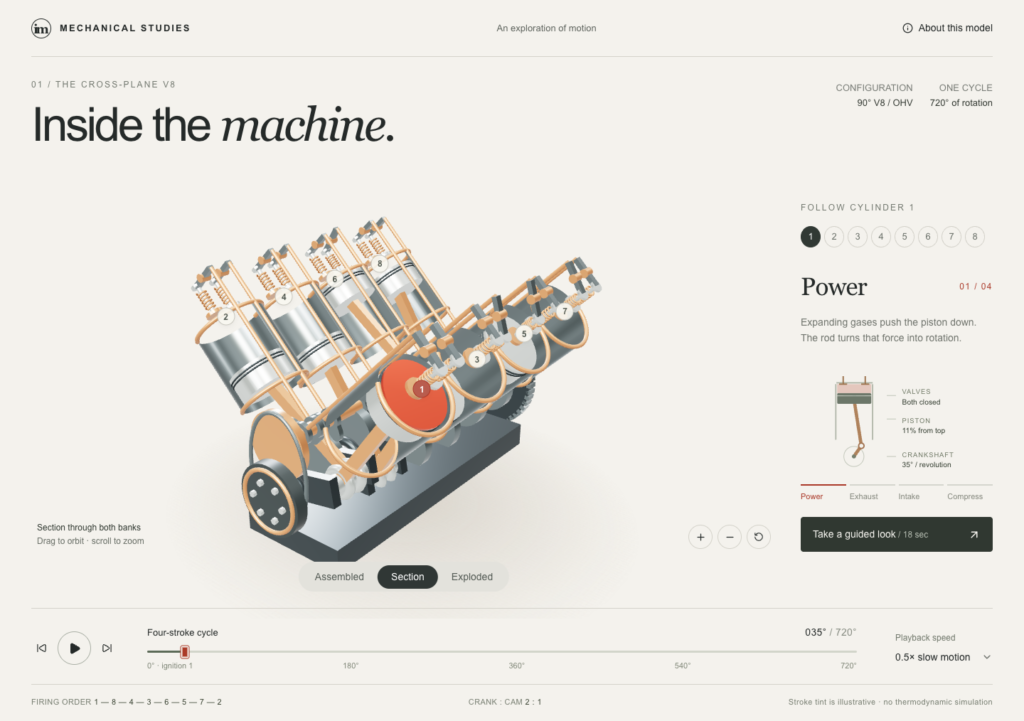
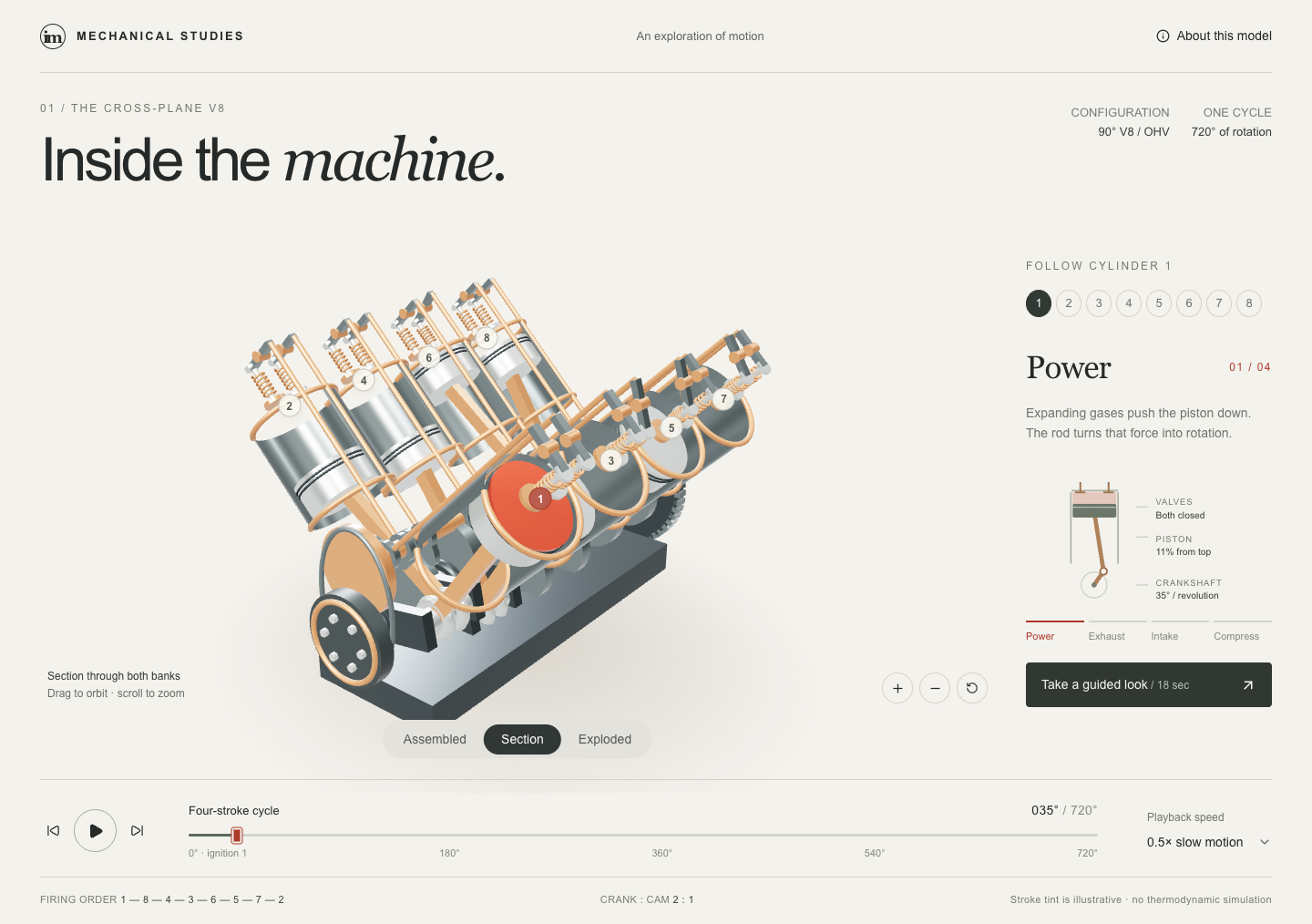
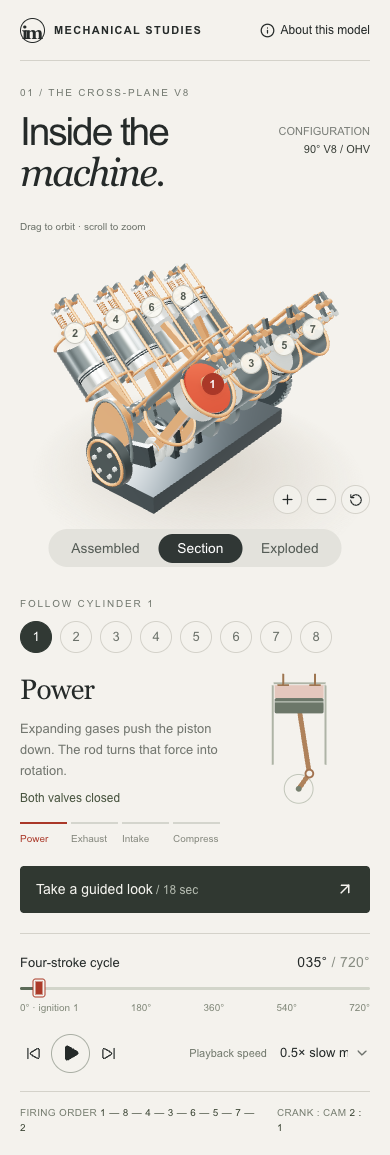
The strongest result is an original web exhibit called Inside the Machine. It makes the engine the centre of the page and keeps the controls secondary until the viewer needs them. The working controls include orbit/zoom, reset camera, pause/play, a 0–720° scrubber, speed changes, cylinder selection, assembled/section/exploded views and a guided sequence.
It is a schematic 90° cross-plane V8 with the conventional 1–8–4–3–6–5–7–2 firing sequence. The rods, pistons, crank and selected-cylinder display share a crank-angle model. Four numerical test groups, a 0–720° sweep, actual browser control checks, rendered-coordinate checks, full MP4 decode and static GLB loading passed. The interactive source is the deliverable; the GLB is a static section pose, not an animated engine or certified CAD model.
Exact production brief used
Open the verbatim directed production brief
Build an original interactive web exhibit called “Inside the Machine.” The opening view should make the viewer want to rotate the engine and understand it. Use a restrained warm-white interface, graphite metal, copper details, and one red accent. Give the engine most of the screen. Keep technical controls secondary until requested.
Choose and document one consistent V8 configuration. Establish cylinder numbering, firing order, crank geometry, cam relationship, and the four-stroke cycle using primary technical references before implementation. Use the same definitions throughout the geometry, animation, labels, and diagrams. If a mechanically credible V8 is blocked, report the specific problem before substituting another mechanism.
Model recognizable crankshaft, connecting rods, pistons, cylinder banks, and the valve/cam mechanism required by your explanation. Derive connected part positions from a shared crank angle and explicit geometry. Add a section view that reveals the working parts, an assembled view, and an exploded inspection view. Use a fixed, reproducible timeline that can be scrubbed, paused, and stepped without changing the mechanical relationships.
Controls: orbit/zoom, reset camera, pause/play, scrub a full four-stroke cycle, change playback speed, select a cylinder, and switch inspection views. A selected cylinder should show its current stroke and a simple linked diagram. Separate any illustrative pressure coloring from measured or simulated thermodynamics. Label the mechanical simplifications in an accessible information panel.
Create a short guided sequence: assembled engine, cutaway, slow-motion cylinder cycle, exploded inspection, return to the complete engine. Every transition should help the viewer follow the same object. Preserve an easy manual-control mode. Recompose the controls for a phone; do not shrink a desktop dashboard until the text is unreadable.
Use the installed website-building workflow and suitable available local tools. Record libraries and versions. Keep geometry and animation editable. Build and inspect the actual app. Check linked motion at several crank angles, the period of the cycle, control behavior, and desktop/phone layouts. Make one targeted correction if a material defect remains.
Deliver a runnable web project, source and dependencies, a 15–20-second demonstration capture, two actual screenshots, a README, the mechanics references and assumptions, and a change example. Include a geometry export if the chosen workflow supports it reliably; distinguish that geometry from the interactive app.
Work inside this task's new local project. Make routine design choices yourself. Use available dependencies and original/procedural assets. Identify missing installations or permissions precisely. Do not publish, buy services, or operate physical hardware. Record the first delivered result and all human follow-ups.
What failed before delivery
The first rocker implementation moved valve stems sideways with the rocker tips. The fix kept the stems on fixed guide axes and added a sliding contact pad. The phone cylinder diagram was too cramped, rocker tips protruded through the assembled cover, and the exploded view crowded the frame; each was corrected before the first delivery. A screenshot helper could capture a tab before its visual selection settled, so the helper was made to wait and the screenshot was refreshed. The verified MP4 did not need to be re-encoded for that screenshot-only fix.
The final production build took 4.964 seconds. Final capture, screenshots and GLB export took 69.787 seconds; the much longer task time is where authoring and QA happened. One environment deviation matters: the task fetched free npm packages after an initial network restriction, despite the preference for available dependencies. Its starter records 11 dependency advisories, eight high severity. Treat it as a local pilot, not a production security approval.
Static geometry download
The GLB is a static section pose and contains no animation.
Download the original Inside the Machine candidate ZIP · Download the static V8 GLB
Remix it: duplicate the project, then change INITIAL in project/app/page.tsx to begin at a different crank angle, selected cylinder or playback speed. A material-only colour change lives in project/lib/engine-scene.mjs. Changing a crank throw, rod length, bank angle or journal phase is a mechanics change: recheck the shared model before presenting it as a new engine configuration.
2. Pocket Observatory: a portfolio with an actual interaction model
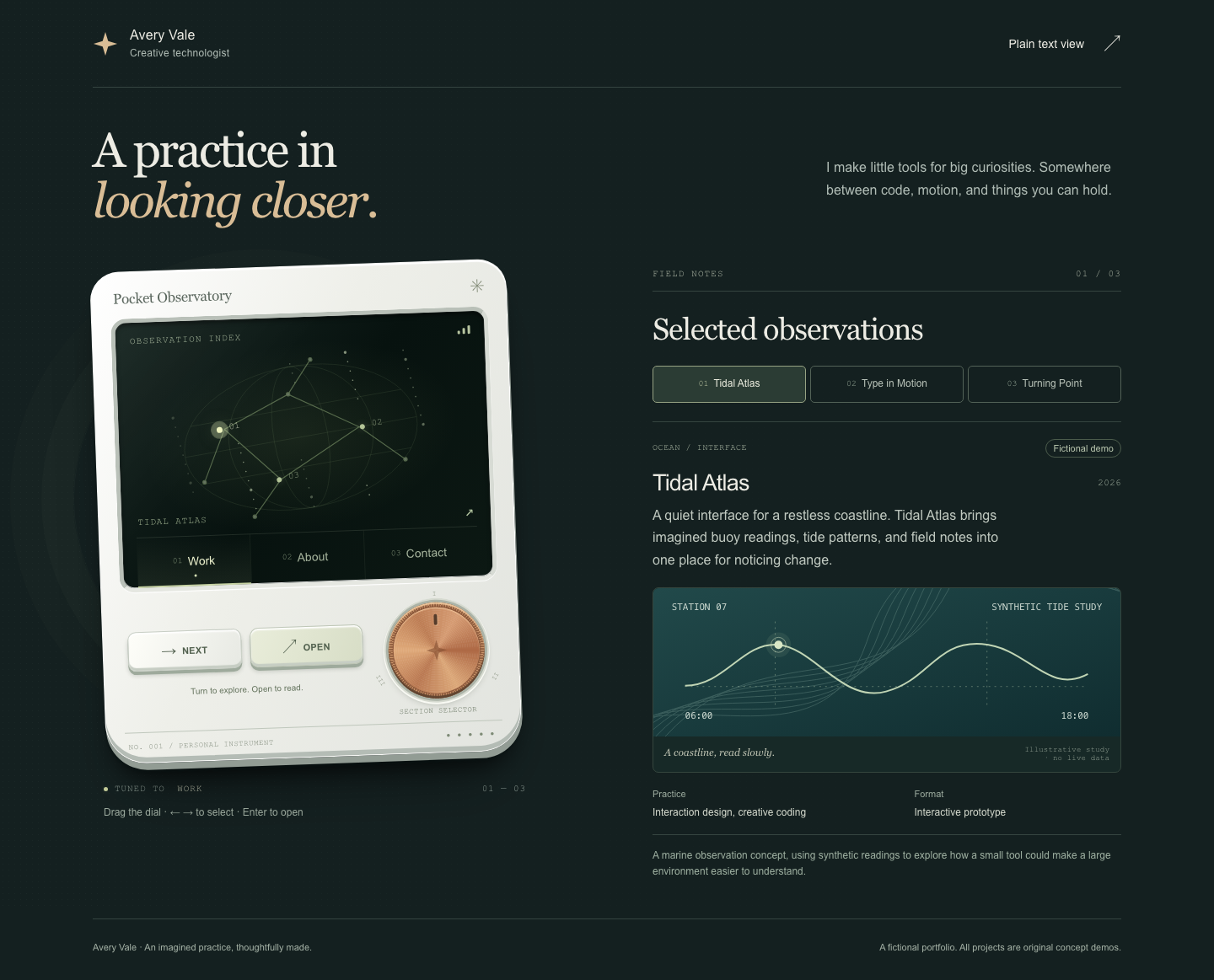
Pocket Observatory turns a fictional portfolio for Avery Vale into a small ceramic-white instrument with a dark glass screen, copper dial and two buttons. The dial or arrow keys select Work, About or Contact; a button opens the selection. Pointer, touch and keyboard paths work, focus states are visible, reduced motion is respected, and the page contains a no-JavaScript plain-text view with the same content.
The result is especially useful as a public download because identity and project content live in one editable data file. It contains three clearly fictional project demos and a deliberately nonfunctional contact address.
Exact production brief used
Open the verbatim directed production brief
Create “Pocket Observatory,” a portfolio for the fictional creative technologist Avery Vale. The page centers on an original pocket instrument with a ceramic-white housing, dark glass screen, a copper rotary dial, and two tactile buttons. Design its own proportions and visual identity. Use precise reflections, recesses, and shadows sparingly so it feels physical without making text harder to read.
The instrument's screen contains a small star map and three sections: Work, About, and Contact. Turning the dial or pressing arrow keys changes the selected section. A button opens it. Normal pointer, touch, and keyboard navigation must also work. Focus states should be visible. Provide a plain, accessible text view containing the same portfolio content.
Use three fictional projects with honest demo labels: a marine observation tool, a kinetic typography system, and a mechanical learning exhibit. Write concise project descriptions. Use a clearly fictional contact address rather than sending messages or connecting a form. Put all content in one editable data file.
Give the opening one memorable interaction: moving the dial smoothly shifts the constellation and highlights the selected project. After that, prioritize reading and navigation. Respect reduced-motion preferences. On a narrow screen, redesign the instrument placement and content area so the project text remains comfortably readable and controls remain touch-sized.
Use the installed website-building workflow. Use CSS, SVG, or a light 3D layer as appropriate; choose the simplest stack that achieves the visual goal. Avoid heavyweight rendering that compromises the core experience. Use available fonts and original geometry. Record dependencies and asset origins.
Build, run, and inspect the actual website. Verify all sections, keyboard navigation, focus, reduced motion, a phone layout, and a desktop layout. Correct material defects once. Deliver the editable project, runnable build instructions, actual desktop/phone screenshots, a brief demonstration capture, and a README showing how to replace the fictional identity and projects.
Work locally in a fresh task-owned project. Make routine creative choices. Do not deploy, purchase assets, connect accounts, or send any contact message. Save the first result before any human-directed revision.
What failed before delivery
The mobile instrument initially occupied too much height before the selected project became readable. It was recomposed so the project begins in the phone viewport. An unused malformed SVG path caused a browser error and was removed. On emulated touch, a custom rotary pointer handler competed with a native range input and selected the wrong section; the visible rotary surface now owns pointer movement while the native range retains keyboard and assistive-technology semantics.
The final static build took 0.004 seconds. Browser capture took 22.259 seconds and MP4 conversion 1.86 seconds. The dependency-free build reproduced all six static files byte-for-byte in the replay check. Chromium desktop and phone emulation, not physical devices, Safari, Firefox or a human screen-reader session, supplied the verification coverage.
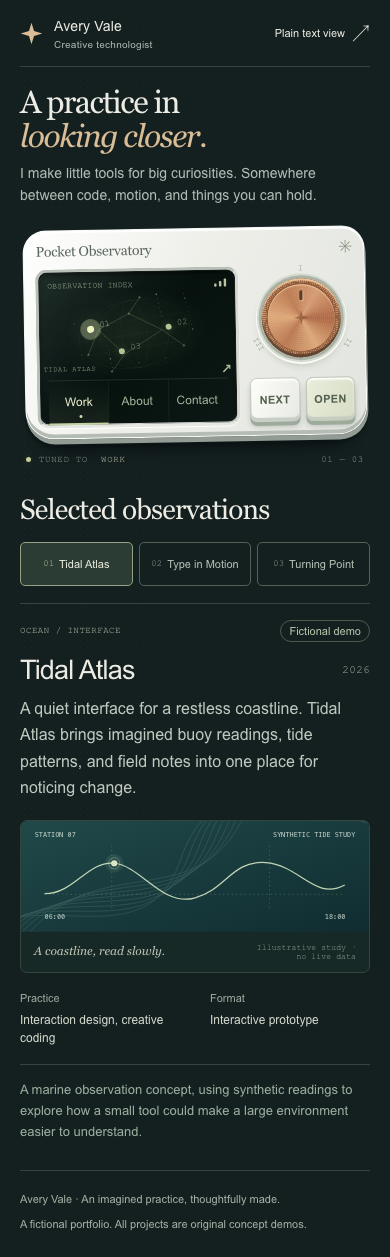
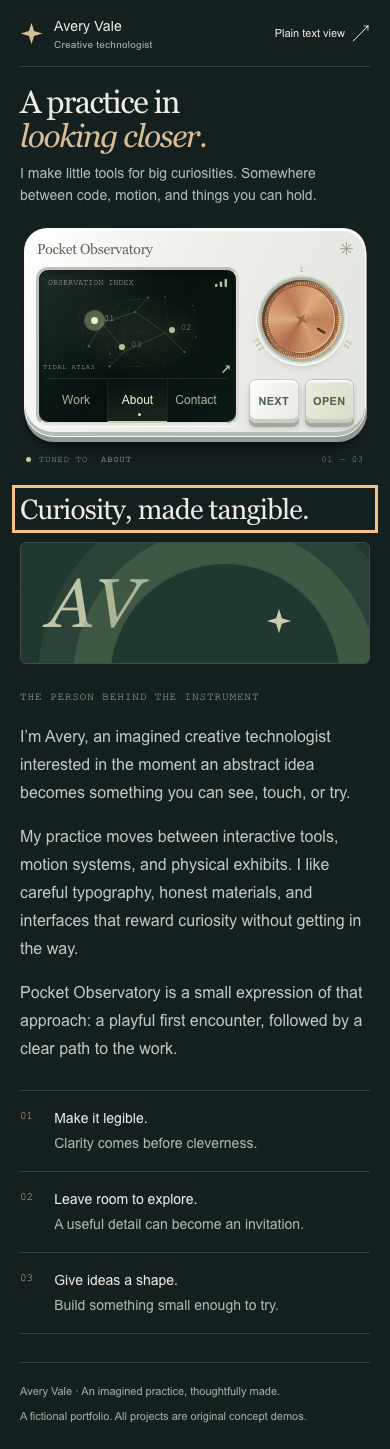
Download the original Pocket Observatory candidate ZIP
Remix it: copy the project, edit project/src/portfolio.mjs, then rebuild. The included project/examples/portfolio-remix.mjs demonstrates replacing Avery Vale and the three projects with Rowan Moss and a Coastal Notebook project. The interaction model stays intact because the content remains data-driven.
3. After Hours: real Blender source, honest limits
The third run built After Hours, a 24-second silent film in an original small botanical conservatory. Six editable cameras follow a maintenance light through damp glass, foliage, warm amber practical light and blue night, ending on one glowing seedling. The clean master and a separate archival-look master are both included, along with six source clips that retain one-second handles before and after each selected four-second edit.
This is a substantive source-file result: the native scene reopened with six animated cameras, editable geometry, materials and lights, and no missing external assets. A material remix rendered successfully. The scene contains 675 objects, 648 meshes, 19 materials and six cameras.
It is also where the evidence needs to be blunt. The foliage, soil, glazing and lighting are deliberately compact EEVEE approximations. The blue/amber palette and planted-seedling story hold together, but the faceted foliage, simplified materials and regular pacing do not justify a “world-class photoreal film” claim.
Clean master
Archival treatment
Exact production brief used
Open the verbatim directed production brief
Create “After Hours,” a 24-second original Blender film set in a small botanical conservatory after closing. The visual identity is damp glass, dark green foliage, warm amber utility light, and a restrained blue night sky. Make the space convincing through composition, materials, and a few carefully chosen details. Use a manageable original environment rather than filling it with unrelated props.
The story has one clear event: the camera follows a dim maintenance light through the conservatory and discovers a seedling giving off an unexpected soft glow. Keep the seedling's location, pot, nearby objects, and lighting relationships consistent across every shot.
Create six shots in the same editable scene: exterior establishment, entrance, tracking along the central aisle, close view of the maintenance light, discovery of the seedling, and a final wider composition that reveals where it sits. Total duration is exactly 24 seconds at 24 fps. Choose the shot lengths and explain them briefly. Use restrained camera acceleration and framing with an identifiable subject in every shot.
Build separate editable geometry, materials, lights, and camera paths. Use procedural/original assets where practical. Clearly document any permitted external assets and pack dependencies so the scene can reopen. Do not use a generated still as a substitute for a navigable 3D environment.
Make small preview renders before full export. Check silhouettes, texture scale, shadow noise, camera collisions, and continuity across cuts. Keep the clean version as the master. Create a second archival-look version with modest grain, chromatic imperfections, and handheld movement, but preserve the clean export and document the effect controls.
Use the installed video workflow for assembly and effects, and Blender for the scene rendering. Render a 1920×1080 master. Export each of the six clean source clips with at least one extra second before and after its selected edit segment, providing enough handles for a later 30-second recut. Deliver the .blend file, reproducible scripts, those six source clips, the complete 24-second clean film, the archival-look film, a source-shot manifest identifying the selected segments, two real stills, and render/remix instructions. Start with a silent film; separately generated audio is outside this initial brief.
Inspect the complete exported sequence and its last frame, and verify duration, dimensions, and frame rate. Make one targeted correction for material defects. Record construction and render time separately. Preserve the first delivered candidate and all human direction.
Work in a fresh local project using available tools. Make routine creative decisions yourself. Identify missing dependencies or permissions precisely. Do not use paid services, purchase assets, or publish.
What failed before delivery
Previews found pot caps hiding the soil and a lamp close-up that was too tight. The scene was corrected before the full source batch; glass, bump scale and fill illumination were also adjusted. Blender’s native animation range required explicit negative-frame handling for the first source handle. A registry camera-shake fetch failed, so the archival treatment uses local deterministic GSAP keyframes instead. A first archival export was refused before frame zero because temporary disk space was insufficient; the unchanged timeline then rendered successfully in one-worker streaming mode.
The original 864-frame Blender source batch took 2,395.49 seconds (39 minutes 55 seconds), including source encoding. Clean assembly/export took 58.401 seconds. The successful archival assembly/export took 111.295 seconds after the disk-space recovery. Both masters decode at 576 frames, 24.0 seconds, 1920×1080 and 24 fps. All 89 package/export checks passed; full decode covered 2,016 frames across the two masters and six sources.
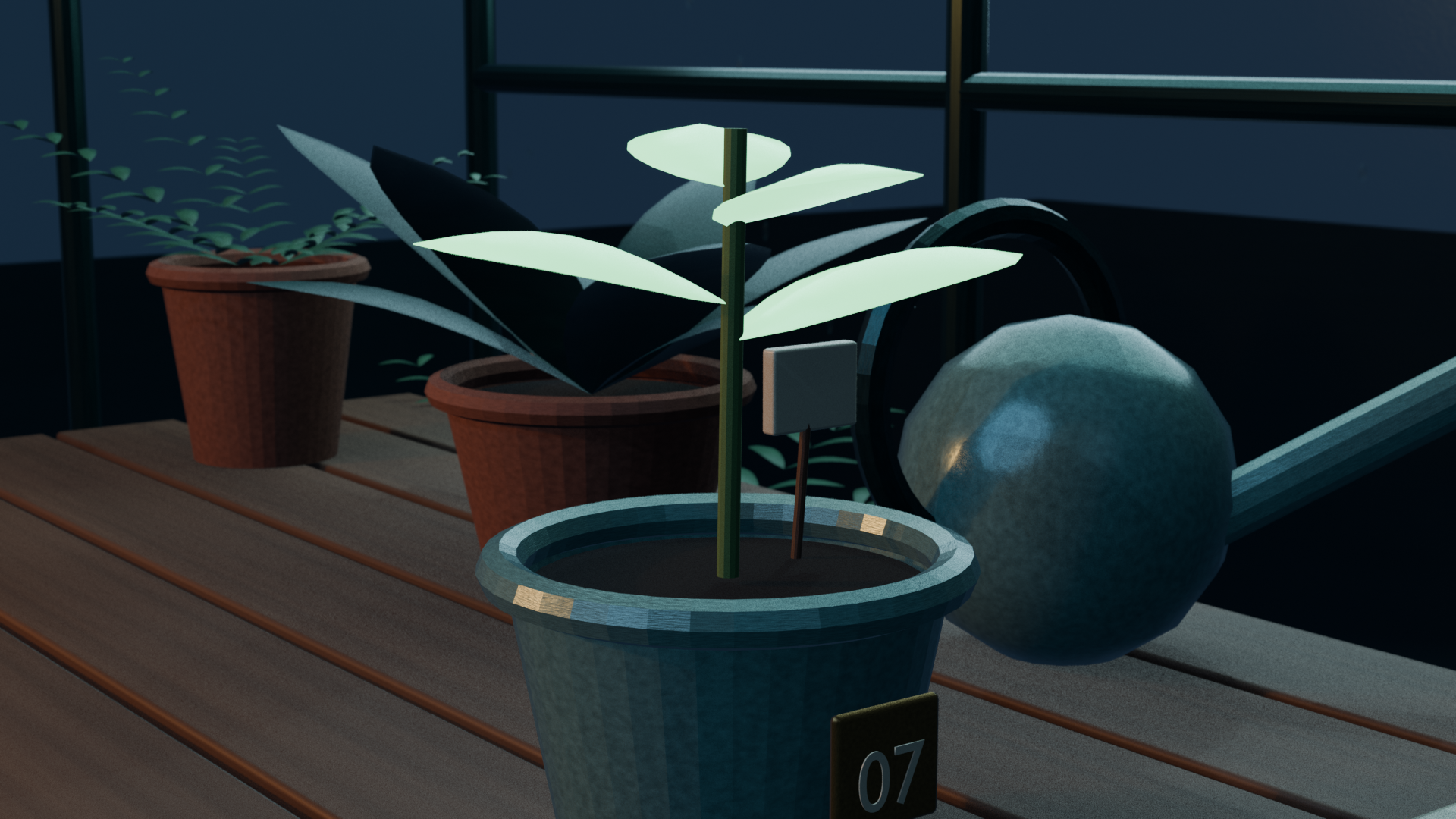
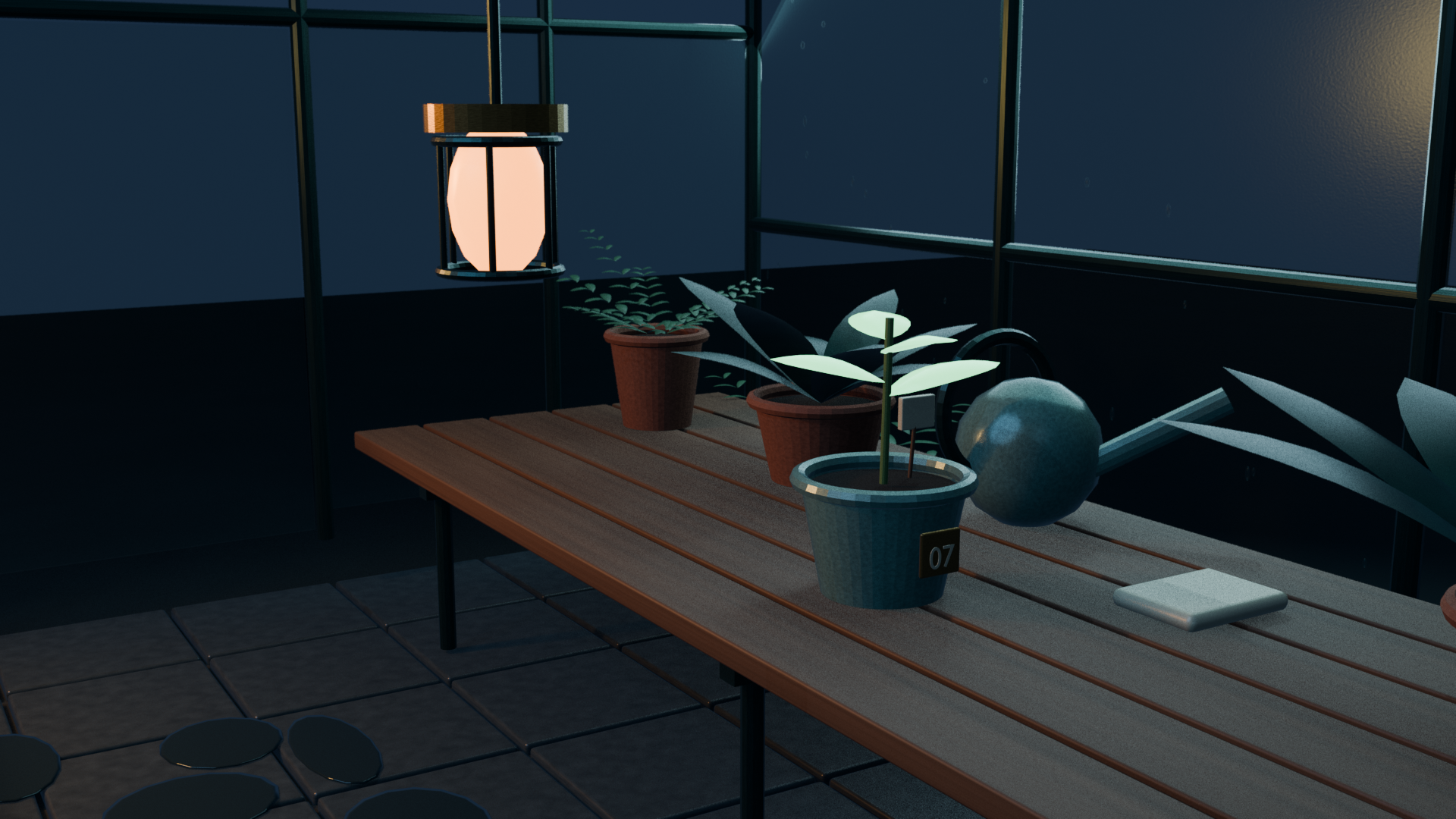
Download the original After Hours candidate ZIP · Download the editable .blend source · Download the clean master
Remix it: keep the original clean master intact, duplicate the project, and use the supplied clean-30s.html or archival-30s.html timelines to make a 30-second recut from the existing six-second source clips. Each uses source frames [12,132) / 0.5–5.5 seconds, preserving a half-second handle on each end. For an archival change, edit the grain, chromatic-aberration and deterministic handheld controls in project/assembly/edit.json, regenerate, then render the archival variant. If you move the seedling or pot, move the shared scene object once and inspect every camera.
The production record: interventions, verification and boundaries
No human-selected creative revision was sent after any first delivery. The initial implementation allowance did include agent-led debugging, preview renders and fixes described above. One reserved targeted correction per project remains unused.
| Area | What happened |
|---|---|
| Human direction | One original brief plus a local controller wrapper per task. No post-delivery creative correction, manual edit or publication instruction was used. |
| One later question | During the film render, a question about possible Kingy publication produced editorial advice only. It did not change the scene or publish it. |
| Internal work | The V8 used a bounded mechanics-reference reviewer, Pocket Observatory used an accessibility reviewer, and the film used assembly and delivery-audit workers. These were within-task implementation roles, not separate public experiments. |
| Verification | Website replay, build checks, browser interaction coverage, media decode and native Blender replay are documented with the deliverables. |
| What this cannot prove | It does not prove that a fresh prompt rerun will reproduce these files, that Ultra beats another model or setting, or that it matches X creators’ selected work. |
The public ideas that inspired the briefs are worth crediting: Dilum Sanjaya’s V8 post, Angel’s portfolio post and Duncan Trussell’s Blender post. The V8’s configuration is a teaching model; it is not a Chevrolet replica, a thermodynamic simulation or engineering certification.
Downloads and how to inspect them
The download buttons above are intentionally publication placeholders. The accompanying media-and-download map identifies the real local files to upload when publication is separately approved. Keep the preserved initial ZIPs unchanged; use a duplicate for every remix.
For a useful reader journey, do this in order:
- Watch the V8 clip, then open the live project and scrub the full 720° cycle.
- Open Pocket Observatory on a phone-sized viewport, keyboard-navigate it, then replace the single data file.
- Watch the clean and archival After Hours cuts back to back, then open the
.blendand inspect the six shared cameras.
The V8 package includes a runnable app and static geometry; Pocket Observatory keeps its content in one editable file; and After Hours includes the native scene, source clips and assembly project. Readers can inspect and rebuild each result from the download.
The source record
Each download retains its original brief, README, run record and remix instructions. The published page reports the measured results and limits from the verified pilot.
The Kingy Brief
Get The Kingy Brief.
AI changes, original tests and one practical thing to try. Fridays at 09:00 Vancouver time.
Free · Double opt-in · Unsubscribe anytime
Sign up for The Kingy Brief on Beehiiv.
Signup help and newsletter schedule
Signup form provided by Beehiiv. After submitting, check your inbox for "Confirm your subscription to The Kingy Brief" and open its confirmation link. Check Spam or Promotions if you cannot find it.
Fridays at 09:00 Vancouver time: source-checked AI changes, original tests and one practical thing to try. We skip a week when there is not enough verified material. Free. Unsubscribe anytime.