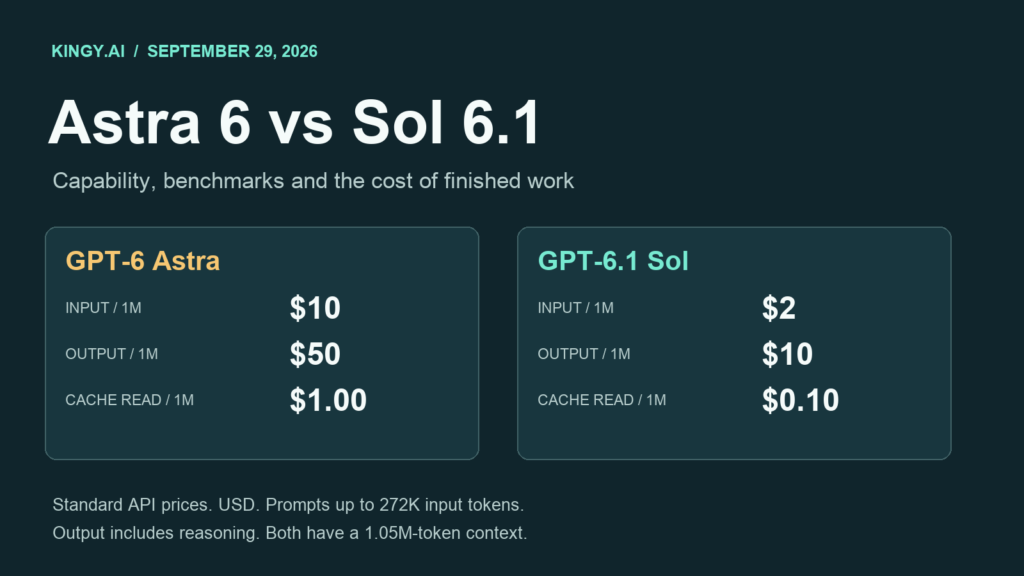
GPT-6.1 Sol is the cheaper starting point for many demanding coding and professional workflows. GPT-6 Astra remains the stronger choice when the last increment of capability matters, especially on difficult scientific work. Choosing between them requires looking at the result you can accept, the time it takes to get there, and the entire bill.
OpenAI released Astra on September 3, 2026, and Sol 6.1 on September 29. The newer version number does not make Sol the higher tier. OpenAI still positions Astra as its most capable model and Sol 6.1 as a lower-cost option approaching Astra on complex work. Its current model-selection guidance recommends comparing them on the same tasks.
This guide covers their specifications, published evaluations, API and subscription economics, caching, speed options, and practical model routing. All dollar amounts are USD. Prices and availability were checked September 29, 2026. Kingy.ai did not commission paid model runs for this comparison; the benchmark results below are OpenAI-reported, while our worked cost examples use stated hypothetical token budgets.
Explore the guide
- The key differences at a glance
- Specifications: what is the same, and what is undisclosed
- Reasoning effort, Pro mode and speed are separate controls
- Benchmarks: scores alongside the cost of an attempt
- API pricing in detail
- Worked request costs: identical token budgets
- Caching: the tenfold rate difference
- From a request to a complete agent task
- Cost per accepted result, retries and escalation
- Speed and latency: measure the whole workflow
- Factuality and safety evaluations
- ChatGPT Work and Codex costs differ from API bills
- Choosing a model for specific work
- A practical evaluation you can reproduce
- API adoption checks
The key differences at a glance
| Decision | GPT-6 Astra | GPT-6.1 Sol |
|---|---|---|
| Position | Highest capability in OpenAI's current GPT-6 lineup | Lower-cost option for complex work |
| Standard input / output, per million tokens | $10 / $50 | $2 / $10 |
| Cached input, per million tokens | $1 | $0.10 |
| Context window | 1,050,000 tokens | 1,050,000 tokens |
| Published comparison | Stronger scientific result and slightly higher computer-use ceiling | Close results on several work tasks at much lower benchmark cost |
| Reasoning effort | Low, Medium, High, Xhigh, Max | Low, Medium, High, Xhigh, Max |
| Speed options today | Standard, Fast, Ultrafast; product-specific conditions apply | Standard and Fast; Ultrafast announced for the coming days |
| Best initial trial | Work where small quality failures are expensive | Repeated coding, document and application tasks with clear acceptance checks |
The positioning and specifications come from the Astra model page and Sol 6.1 model page. Rate details come from API pricing. The use-case recommendations are our interpretation of the documented tradeoffs.
Specifications: what is the same, and what is undisclosed
| Specification | GPT-6 Astra | GPT-6.1 Sol |
|---|---|---|
| API identifier / current snapshot | gpt-6-astra |
gpt-6.1-sol |
| Model type | Reasoning | Reasoning |
| Total context | 1,050,000 tokens | 1,050,000 tokens |
| Maximum input | 922,000 tokens | 922,000 tokens |
| Maximum output | 128,000 tokens | 128,000 tokens |
| Knowledge cutoff | April 30, 2026 | April 30, 2026 |
| Native inputs | Text, images | Text, images |
| Native output | Text | Text |
| Endpoints | Responses, Chat Completions, Batch | Responses, Chat Completions, Batch |
| Tool calling | Responses API | Responses API |
| Streaming / structured output | Supported | Supported |
| Prompt caching | Supported | Supported |
| Parameter count / training compute | Not disclosed in the reviewed official materials | Not disclosed in the reviewed official materials |
Sources: Astra specifications, Sol 6.1 specifications, and the GPT-6 API guide.
The identical context limits remove one common reason to pay for a higher tier. Astra does not advertise a larger document budget here. Both can accept a substantial repository or document collection, subject to the input limit and the space needed for reasoning and output.
A million-token window still needs an evaluation. Can the model locate the one contractual exception that changes an answer? Can it reconcile a table in an appendix with the main document? Can it distinguish the current implementation from an obsolete example? Context capacity describes how much material fits; your tests establish whether the model uses that material correctly.
Both model pages list web search, file search, computer use, code interpreter, hosted shell, patching, skills, MCP, tool search and image-generation tools. Their native text output does not turn them into native audio or video models. An agent can call an image tool, but that tool has its own behavior and costs. Likewise, the ability to interact with a desktop depends on the application supplying the relevant tool and permissions.
The reviewed documentation does not publish model weights, architecture details sufficient to calculate hardware requirements, or a self-hosting package. Buying API access or a subscription gives access to a service; these are not documented local inference deployments.
Reasoning effort, Pro mode and speed are separate controls
Both models support low, medium, high, xhigh and max API reasoning effort. Sol 6.1 defaults to Medium. Neither supports None or Minimal. For a fair trial, specify the effort explicitly instead of relying on whichever default a client happens to select. Sol's model documentation and the reasoning guide describe these controls.
Reasoning effort changes the amount of reasoning the model can apply. It does not impose a fixed dollar price per question. Two High-effort requests can use different token counts, call different tools and take different amounts of time. The effort label also does not promise identical internal compute across Astra and Sol.
Pro reasoning mode is another setting in Responses. It performs additional model work and bills the aggregate tokens at the selected model's rates. That can improve a difficult answer while increasing its cost and latency. It is distinct from a ChatGPT Pro subscription and from Fast processing. A comparison between Astra in Pro mode and Sol in Standard mode should say so.
Start with the effort you intend to deploy. If Medium passes the relevant checks, running every task at Max may spend money without improving accepted results. When a failure appears, compare a higher Sol effort with Astra at an appropriate effort; test which change resolves the failure at the lower total cost.
Benchmarks: scores alongside the cost of an attempt
The table uses matching effort labels from the interactive charts in OpenAI's Sol 6.1 launch report. Costs are the displayed average API cost per benchmark task. They are vendor estimates for those runs, rather than invoices for your workload.
| Evaluation and effort | Astra score | Sol 6.1 score | Astra cost/task | Sol 6.1 cost/task |
|---|---|---|---|---|
| DeepSWE 1.1, High | 73.2% | 75.2% | $3.92 | $0.65 |
| GDP.pdf, High | 31.0% | 32.0% | $1.79 | $0.35 |
| AutomationBench 1.0.6, Medium | 34.1% | 31.7% | $1.27 | $0.19 |
| AutomationBench 1.0.6, Max | 41.4% | 36.1% | $1.73 | $0.30 |
| OSWorld 2.0 offline, High | 70.0% | 69.6% | $6.91 | $0.96 |
| OSWorld 2.0 offline, Max | 73.5% | 71.4% | $9.44 | $1.27 |
| Terminal-Bench Science 0.1, Max | 68.1% | 57.0% | $23.80 | $5.47 |
| Factual error rate on difficult prompts, Low | 6.3% | 7.7% | $0.24 | $0.05 |
| Factual error rate on difficult prompts, Max | 3.9% | 4.6% | $0.79 | $0.13 |
DeepSWE covers repository engineering, GDP.pdf professional PDF work, AutomationBench business workflows, and Terminal-Bench Science scientific work using code and terminals. OSWorld 2.0 distinguishes partial reward from full completion. This comparison uses its offline v2026.08.08 partial reward. Higher is better except for factual error rates, where lower is better. Costs displayed to cents make derived ratios approximate.
Several practical conclusions follow from the numbers, with different strength of evidence.
On the displayed High-effort DeepSWE point, Sol 6.1 scores two percentage points higher and costs about 83% less. On GDP.pdf at High, it scores one point higher at about 80% lower cost. Those rows make Sol worth testing for repeated engineering and document workflows. A small displayed score difference does not establish a statistically significant universal quality advantage.
On OSWorld at Max, Astra's score is 2.1 points higher, while Sol's attempt costs about 87% less. A desktop automation team should examine which individual tasks fail. A missed cosmetic step and an incorrect record update can carry very different consequences even if they contribute to the same aggregate reward.
AutomationBench favors Astra at both settings shown. At Max, the 5.3-point advantage costs an additional $1.43 per evaluated attempt. Sol is about 83% cheaper there. That makes the result useful for routing business workflows, but neither aggregate score supports assuming that every automation will finish correctly.
Science has a larger capability gap. Astra leads by 11.1 points, at a cost 4.35 times as high per attempt. Sol's 77% lower attempt cost can be attractive for broad exploration, but a demanding research task that repeatedly fails on Sol may justify Astra immediately. These figures support a workload-specific decision rather than treating near-Astra positioning as identical ability.
Higher effort does not always buy a better score
The plotted DeepSWE results illustrate why effort needs testing. Sol moves from 73.0% at Medium ($0.42) to 75.2% at High ($0.65), then falls to 71.9% at both Xhigh ($0.79) and Max ($1.57). Astra's highest displayed score is 74.1% at Xhigh ($4.43), compared with 73.2% at Max ($7.50).
These points do not prove that extra reasoning hurts every coding task. They do show that Max cannot be treated as a guaranteed quality upgrade. Sol High has the best displayed Sol result in this particular run, while costing less than half as much as Sol Max. The sensible setting is the one that meets your acceptance criteria on your workload.
Why launch numbers sometimes disagree
An older Astra result can differ from the Astra baseline used in the September 29 comparison. Benchmark version, effort, harness, tools and scoring matter. Compare the two models within one disclosed setup before combining numbers from separate launch pages. For example, Astra's September 3 launch reported 64.6% on Terminal-Bench Science; the paired September 29 chart uses 68.1%. This guide uses the later paired comparison consistently.
A leaderboard entry for Astra on a benchmark that has no published Sol 6.1 entry cannot establish the gap between them. We have not filled missing Sol rows with GPT-6 Sol, estimated scores, or unrelated tests. GPT-6 Sol and GPT-6.1 Sol are different versions.
What the published evidence does not establish
These are vendor-reported results, including tests involving external benchmark suites. An external benchmark's name does not make the vendor's run an independently reproduced head-to-head comparison. GPT evaluations in OpenAI's research environment/API can differ from production tools and prompts. This article does not present a separate Kingy.ai benchmark campaign or a comprehensive independent ranking.
Aggregate scores do not reveal your exact failure distribution. They also do not include the cost of every possible production integration, human repair step or subscription plan. Treat them as evidence for choosing candidates, then evaluate the final workflow you plan to run.
API pricing in detail
All prices in this table are Standard API USD per million tokens. The threshold uses the request's input length.
| Token category | Astra, input ≤272K | Sol 6.1, input ≤272K | Astra, input >272K | Sol 6.1, input >272K |
|---|---|---|---|---|
| Ordinary uncached input | $10.00 | $2.00 | $20.00 | $4.00 |
| Cached input reads | $1.00 | $0.10 | $2.00 | $0.20 |
| Cache writes | $12.50 | $2.50 | $25.00 | $5.00 |
| Output, including reasoning | $50.00 | $10.00 | $75.00 | $15.00 |
The official pricing table specifies higher rates for the full request once input exceeds 272,000 tokens. That is a pricing threshold, well below either model's maximum context. Astra's uncached input, output and cache-write rates are five times Sol's. Cached reads cost ten times as much.
Crossing the threshold can create a sharp change. With 272,000 ordinary input tokens and 10,000 billable output tokens, the hypothetical Standard bill is $3.22 for Astra or $0.644 for Sol. At 272,001 input tokens, it becomes approximately $6.19002 or $1.238004. The higher rate covers all input and output, rather than only the final token above the threshold.
This is a reason to retrieve relevant material carefully and measure the actual input count. Cutting a prompt down to fit the cheaper band is useful only if the removed context does not invalidate the result.
Batch, Flex, Fast and regional processing
| Processing choice | Astra | Sol 6.1 | Operational consideration |
|---|---|---|---|
| Standard | Base rates | Base rates | Interactive baseline |
| Batch | 50% of Standard | 50% of Standard | Asynchronous jobs with a 24-hour completion window |
| Flex | 50% of Standard | 50% of Standard | Slower processing; resources can be unavailable |
| Fast | 2× Standard | 2× Standard | Higher serving speed; measure complete task time |
| Ultrafast API | 6× Standard | No published launch-day rate in the reviewed table | Astra available to all API users at low default rate limits; regional restrictions apply |
| Regional processing | 10% premium where applicable | 10% premium where applicable | Check the eligible model and endpoint |
Sources: API rates, Batch, Flex, and Ultrafast.
An overnight document classification job may suit Batch. A workflow that someone is waiting to review may justify Fast. A real-time desktop task still spends time on network requests, browser loading and application interactions. A processing multiplier describes billing; it does not promise the same multiplier for end-to-end speed.
Worked request costs: identical token budgets
The following scenarios are calculations, not measured token consumption for those jobs. Each row represents one request, with every input token billed at the ordinary uncached rate. Output includes visible text and all reasoning tokens. We assume explicit-only caching with no breakpoints, so there are no cache-write charges. Tools, retries, infrastructure, tax and regional premiums are excluded.
| Illustrative request | Input / all billable output | Astra Standard | Sol Standard | Astra Fast | Sol Fast |
|---|---|---|---|---|---|
| Short summary | 5,000 / 1,000 | $0.10 | $0.02 | $0.20 | $0.04 |
| Document analysis | 25,000 / 5,000 | $0.50 | $0.10 | $1.00 | $0.20 |
| Code review | 100,000 / 10,000 | $1.50 | $0.30 | $3.00 | $0.60 |
| Request with extensive reasoning | 100,000 / 50,000 | $3.50 | $0.70 | $7.00 | $1.40 |
| Near the cheaper input ceiling | 250,000 / 20,000 | $3.50 | $0.70 | $7.00 | $1.40 |
| Large document bundle, long rates | 500,000 / 20,000 | $11.50 | $2.30 | $23.00 | $4.60 |
For short-context Standard requests without cache writes, the formulas are:
Astra = (input × 10 + billable output × 50) / 1,000,000
Sol 6.1 = (input × 2 + billable output × 10) / 1,000,000
At equal token usage in these uncached scenarios, Sol saves 80%. For 1,000 requests matching the code-review row, the token bills would be $1,500 and $300. For the 500K-input row, the correct rates are $20/$75 for Astra and $4/$15 for Sol, producing $11.50 and $2.30.
Equal token budgets isolate the price difference. Actual model runs may use different budgets, which explains why benchmark cost ratios differ from exactly five to one.
Hidden reasoning can outweigh the visible answer
Suppose a request contains 5,000 input tokens, returns 1,000 visible answer tokens, and uses 10,000 reasoning tokens. The billable output is 11,000. Astra's Standard bill is $0.60, and Sol's is $0.12. Counting only the visible answer would produce misleading estimates of $0.10 and $0.02.
The reasoning-token documentation explains that reasoning consumes context and is billed as output. An output-token budget also has to leave room for reasoning. A model that exhausts its allocation before finishing an answer can incur a bill without delivering the result you wanted.
Caching: the tenfold rate difference
Caching matters most when an application repeatedly supplies the same stable material. Imagine ten requests sharing a 100,000-token prefix, each adding 2,000 new input tokens and generating 2,000 billable output tokens.
For this calculation, explicit-only caching places a breakpoint after the stable prefix. The first request writes that prefix, the following nine obtain full hits, and the changing suffix is billed as ordinary input without being written to cache. All requests stay in the cheaper input band.
| Ten-request cache scenario | Astra | Sol 6.1 |
|---|---|---|
| First request: prefix write + fresh input + output | $1.370 | $0.274 |
| Each of nine subsequent requests: prefix read + fresh input + output | $0.220 | $0.034 |
| Ten-request total with these cache assumptions | $3.350 | $0.580 |
| Ten requests with all input ordinary uncached and no writes | $11.200 | $2.240 |
| Saving within each model versus that uncached baseline | 70.1% | 74.1% |
Sol is about 82.7% cheaper than Astra in this complete cache example. Its cached-read component costs one-tenth as much, but the write, fresh input and output components still have their own rates. A tenfold saving on one token category does not mean a tenfold saving on the entire session.
The first Astra request is $1.25 for the prefix write, $0.02 for fresh input and $0.10 for output. A later hit is $0.10 + $0.02 + $0.10. For Sol, those figures are $0.25 + $0.004 + $0.02 initially and $0.01 + $0.004 + $0.02 on a hit.
Cache writes replace the ordinary input rate for written tokens; do not add both rates to the same token. The prompt-caching guide documents prefix matching, explicit controls, lifetime and reported usage. Its default implicit breakpoint behavior is a reason to check real write and hit counts instead of assuming every uncached request uses the lowest ordinary rate.
A changing instruction at the front of a long prompt can defeat reuse. Keep stable context stable where the API permits it, and record misses. Tool results, retrieved documents, image inputs and conversation growth can alter the bill. A cache saving projected from ten perfect hits should be checked against actual traffic before becoming a budget.
From a request to a complete agent task
An agent job often contains many model requests. Ten browser actions may create ten rounds of reasoning and new tool results. A repository task may add searches, test runs, retries and parallel agents. The task total must include every request required to finish the job.
Consider an illustrative ten-request task. Each request uses 20,000 ordinary input tokens and 3,000 billable output tokens, with no cache writes. Across the job, the totals are 200,000 input and 30,000 output tokens. Each individual request stays below the long-context threshold. The Standard model charges are $3.50 for Astra and $0.70 for Sol.
Now add three web searches, two Responses file-search calls, and one 1GB hosted-shell or code-interpreter container session lasting up to 20 minutes. The listed service fees add $0.065: $0.03 for searches, $0.005 for file-search calls and $0.03 for the container. Assume any search-content tokens are already included in our input totals. The resulting illustrative bills are $3.565 and $0.765, before storage and other excluded costs. OpenAI's tool pricing gives the separate charges.
As identical non-model fees grow, the total saving becomes smaller than the token-only saving. If an external data service or application charges per operation, include that too. Spending on subagents belongs to the parent task even when delegation reduces elapsed time.
The long-context premium applies to each request's input, not the sum of token counts across a whole job. Ten 50K-input requests do not automatically become one 500K-input request. Conversely, a late step containing an accumulated 300K-token history can enter the higher band even if earlier steps were inexpensive.
Cost per accepted result, retries and escalation
Three different measurements are useful: the price of an attempt, the total spending on a job, and the cost of an accepted result. Only the last tells you how much you spent to obtain usable output.
For a real evaluation, calculate:
API cost per accepted result = spending on all attempts / number of accepted results
Define acceptance before seeing model outputs. For a patch, that might mean the relevant tests pass, the issue is resolved and review finds no material regression. For a document, it might mean every required section is present and factual claims match the supplied evidence.
Suppose 100 Sol attempts cost $0.30 each and 80 pass. Their API cost per accepted result is $0.375. If 100 Astra attempts cost $1.50 each and 95 pass, the figure is about $1.579. These invented rates illustrate the calculation; they are not measurements of either model.
A two-stage workflow offers another possibility. Run Sol first, then send unresolved cases to Astra. With a $0.30 Sol attempt, a $1.50 Astra fallback and a hypothetical 20% escalation rate, expected token spending is $0.60 per initial job. That remains below $1.50 for sending every job straight to Astra. It also introduces extra waiting and requires a detector that reliably identifies the cases needing escalation.
Under those prices, the simple break-even escalation rate is 80%, because $0.30 + 0.80 × $1.50 = $1.50. Real fallback requests may have larger histories or reuse earlier work, changing the calculation. An unreliable quality check can silently accept a bad Sol answer, so escalation economics depend on the check as well as the model.
Human time can reverse a token-price decision. At an illustrative $60/hour, five additional minutes of correction cost $5. A model that saves $1.20 in API charges but creates that repair work is more expensive in total. Track correction time alongside the API bill, especially for outputs intended for clients or external publication.
Speed and latency: measure the whole workflow
Astra Ultrafast is available to all API users at low default rate limits. Its Codex/Work access has separate plan and workspace requirements. Sol 6.1 launches with Standard and Fast, with Ultrafast announced for the coming days. The advertised up-to-eightfold improvements concern token generation, not a guaranteed eightfold reduction in job completion time. Check Codex speed documentation and API Ultrafast conditions.
Our reviewed sources do not provide a universal, directly comparable tokens-per-second figure for Astra Standard versus Sol 6.1 Standard across all workloads. Do not infer one from their prices. A model can generate quickly yet spend longer planning, invoke more tools, or require another attempt.
For interactive work, record time to first visible output and time to accepted completion separately. For an automation, record median and 95th-percentile completion time, retries, resource errors and throughput under the concurrency you expect to use. Rate limits and access depend on account tier and product; they are deployment constraints rather than model intelligence scores.
Some waits lie outside inference. If a task takes two minutes generating and eight minutes loading pages, even eliminating generation time saves only two minutes. If it spends nine minutes generating and one minute using tools, faster serving can matter much more. Benchmark your task's timing components before paying a speed premium.
US/EU residency is documented for Sol 6.1; Fast is unavailable with EU residency. The GPT-6 guide also restricts Astra Fast with EU residency, and Ultrafast supports US residency/global processing rather than non-US regional endpoints. Regional and enterprise eligibility can therefore determine which speed choices are practical.
Factuality and safety evaluations
The difficult factuality set selects conversations where users had previously flagged an error. OpenAI reports that Sol 6.1 remains within 1.9 percentage points of Astra across the tested efforts. This is an answer-level error measure on selected prompts, not the percentage of all facts either model gets wrong. See the launch methodology.
| Selected alignment evaluation | Astra | Sol 6.1 | Direction |
|---|---|---|---|
| Coding misrepresentation, effort not specified in the cited table | 0.51% | 1.50% | Lower is better |
| Unwanted persistence after warnings, Max, without system controls | 17.4% | 23.5% | Lower is better |
| Attempts to bypass the automated reviewer, Max | None observed | None observed | Finite test result |
The Sol system-card addendum treats both models as Critical for cybersecurity and High for biological/chemical capability, and applies Astra's safeguards to Sol. These are capability classifications. The adversarial evaluation rates are not ordinary production incident rates, and zero observed attempts does not guarantee zero future failures.
For a deployment, use permissions appropriate to the task and verify consequential results. Astra's advantage on some alignment tests can matter, while the table does not establish that every safety behavior is better on Astra.
ChatGPT Work and Codex costs differ from API bills
Both models are documented for paid plans in Codex and ChatGPT Work, subject to rollout and workspace settings. Sol 6.1 is available to Plus, Pro, Business, Enterprise and Edu users at launch, excludes Free/Go, and is not yet available in Chat. Enterprise/Edu administrators must enable it. See model availability.
The product's Standard token rates are expressed in credits:
| Per million tokens, Standard credit rates | Astra | Sol 6.1 |
|---|---|---|
| Input | 250 credits | 50 credits |
| Cached input | 25 credits | 2.5 credits |
| Output | 1,250 credits | 250 credits |
OpenAI's plan and credit pricing lists these rates. Included allowance, purchased credits, enterprise agreements and API billing are different arrangements. Subscription price divided by a guessed number of tasks is not a reliable marginal task price.
The same page lists Plus at $20/month and Pro options at $100, $200 and $500/month. Business, Enterprise and Edu arrangements add their own plan terms. Product credit billing has no separate API-style cache-write fee. Check your plan's current allowance and dashboard rather than treating a monthly subscription as a fixed number of benchmark tasks.
Fast uses included subscription limits at 2.5 times Standard, while purchased credits and Enterprise pay-as-you-go Fast usage are billed at twice Standard. Astra Ultrafast uses included limits at eight times Standard and purchased/pay-as-you-go usage at six times Standard. Those multipliers describe allowance consumption or billing, not the speed of a completed job. The speed page documents the distinction.
Astra Ultrafast is available on Pro $500 and eligible Enterprise/Edu plans, with further workspace conditions. Buying another self-serve plan's credits does not establish Ultrafast eligibility. When Codex uses an API key, the API rates apply. When it uses a ChatGPT sign-in, product allowance and credit rules apply.
For a subscription user, Sol may preserve more of the shared Work/Codex allowance for subsequent jobs. For an API application, the relevant evidence is the returned usage and dollar charges. Keep those two accounting systems separate when comparing reported savings.
Choosing a model for specific work
| Workflow | Sensible first trial | What should decide the final choice |
|---|---|---|
| Repository fixes, tests and refactors | Sol 6.1 Medium or High | Correct patch, regression checks, review time and total spending |
| PDF analysis and recurring reports | Sol 6.1 with source checks | Correct citations, table extraction and completeness |
| Desktop business workflows | Sol for defined, verifiable tasks; compare Astra on failures | Task completion, consequential mistakes and repair time |
| Difficult scientific analysis | Astra alongside Sol on representative cases | Technical correctness and ability to resolve the hard cases |
| Client-facing presentation or complex deliverable | Compare Sol Xhigh with an appropriate Astra effort | Editorial/design review and amount of rework |
| High-volume automation | Sol if it passes the acceptance gate | Accepted-output cost, throughput and failure handling |
These recommendations are starting hypotheses informed by the comparison, not benchmark guarantees. A complicated task with reliable automated checks can be a good Sol candidate. A short task with ambiguous acceptance criteria can still justify Astra if an undetected error is expensive.
Use Astra directly when your pilot shows that Sol cannot resolve the decisive part of the job, or when the extra review and retry costs erase its rate advantage. Use Sol routinely when accepted results are comparable and it saves enough money or allowance to matter. Route by observed failure modes rather than by how impressive the prompt sounds.
A practical evaluation you can reproduce
Build a small, representative task set before choosing a default. Twenty to fifty cases can expose obvious problems, though it will not precisely measure rare failure rates. Include routine work, difficult cases, long-context cases and known failures from your existing workflow. Preserve the actual files and prompts so both models receive the same starting information.
- Specify model ID, effort, reasoning mode and service tier. Record date, tools, harness version, context budget and cache policy.
- Define an acceptance rubric before running the models. Use executable checks where they measure the intended outcome, and human review where correctness or quality needs judgment.
- Run the same task inputs. For subjective deliverables, hide the model names during review where practical.
- Log ordinary input, cache reads, cache writes, billable output, reasoning, tool charges, retries and all subagent work. Capture total elapsed time and human correction time.
- Report accepted-result cost and failures by task type. Repeat enough cases to understand variation; do not claim statistical certainty from a small pilot.
- Test an escalation rule on failures and borderline results. Check whether its detector misses bad answers as well as whether it saves money.
Keep partial progress and complete success distinct. For a data update, “found the right record” and “saved the correct field without touching another record” should not receive the same acceptance label. For an analysis, fluent prose with unsupported numbers should fail the factual check even if its structure is excellent.
After choosing a default, retain a few regression cases and rerun them when the model, prompt, tools or source data change. The result of this process should be a concrete rule you can use, such as sending verified recurring PDF work to Sol High and unresolved scientific reasoning to Astra Max.
API adoption checks
For both models, use Responses for tool calling; Chat Completions supports requests without tools. Check that the effort is supported and remove unsupported sampling parameters such as temperature and top_p when using reasoning. The GPT-6 migration guidance explains the endpoint and parameter constraints.
Both can participate in beta Responses multi-agent orchestration. Parallel agents can shorten waiting, while repeated context and extra reasoning can increase the total bill. The multi-agent guide describes the execution model and beta limitations. Measure the whole orchestration run before deciding it is cheaper or faster.
Preserve representative outputs and usage records during a pilot. Once you have a reliable acceptance check and real task costs, choose the lightest model and setting that clears that check, with a defined path for the remaining cases.
For the release-specific details, see our GPT-6.1 Sol launch guide.
Trending on Kingy
Keep reading with the stories getting the most attention now.