
Last updated: June 18, 2026
Cursor just made its automation story feel much less like a settings screen and much more like an agent-native workflow.
In the Cursor 3.8 changelog, the headline is “Improvements to Cursor Automations.” The practical news is the new /automate skill: you can now start in a normal local Cursor Agent session, describe a recurring engineering task in plain language, and have Cursor help configure the automation’s triggers, instructions, and tools.
That sounds small until you look at the shape of the workflow. Cursor is trying to turn one-off AI coding sessions into reusable, always-on agents that respond to pull request activity, Slack reactions, schedules, webhooks, incident tools, and other software events. If you have been following Kingy.ai’s coverage of AI loops, agent workflows in 2026, and the broader AI coding-agent landscape, this is the next obvious step: less “ask the agent when you remember” and more “wire the agent into the places where work already appears.”
Here is what /automate is, how to use it, why it matters, and where teams should be careful before handing recurring work to autonomous coding agents.
TL;DR
- What launched: Cursor 3.8 introduced the
/automateskill for creating Cursor Automations directly from a local Agent chat session. - What it does: You describe the task you want to automate; Cursor helps configure the automation’s trigger, instructions, repository context, and enabled tools.
- Where it runs: Automations kick off Cursor Cloud Agents, which work in cloud environments rather than depending on your laptop staying online.
- What else changed: Cursor added a Slack emoji reaction trigger, five new GitHub triggers, and computer use support for automations.
- Why it matters: AI coding agents are moving from interactive copilots to event-driven software workers.
- Big caveat: You still need careful permissions, clear prompts, good repository environments, and human review. Automated does not mean trustworthy by default.
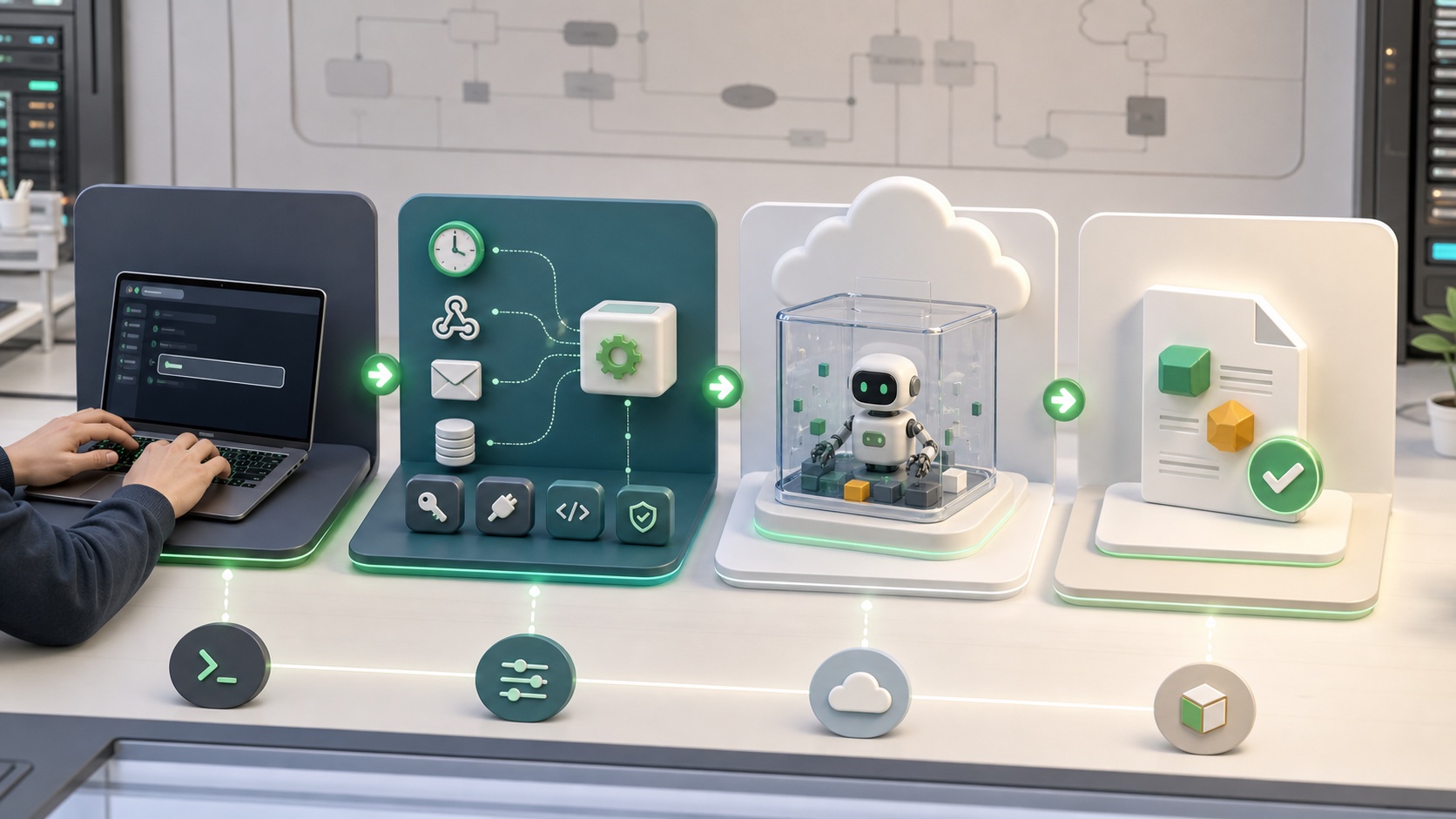
What Is Cursor /automate?
/automate is a Cursor Agent skill that helps you create a Cursor Automation from inside your local agent session.
Cursor’s Automations documentation describes automations as cloud-agent workflows that run automatically on a schedule or in response to events. The new part is the creation flow: instead of beginning in a dashboard and manually piecing together a trigger, repository context, prompt, and tool permissions, you can invoke /automate in Agent chat and describe what you want.
Cursor then helps turn that plain-language request into an automation configuration.
In plain English: /automate is the bridge between “I asked an AI coding agent to do this once” and “I want this agent to keep doing this whenever the right event happens.”
That bridge matters because much of engineering work is repetitive but not trivial. Failed CI runs need diagnosis. Pull request review comments need patches. Slack bug reports need triage. Security checks need regular review. Dependency changes need scanning. Release notes need summaries. These are not all “one button” tasks, but they are structured enough that a well-scoped agent can often do the first pass.
How Cursor Automations Work
Cursor Automations are built around a few ingredients:
- A trigger: the event that starts a run, such as a schedule, GitHub event, GitLab event, Slack event, webhook, Linear issue, Sentry issue, or PagerDuty incident.
- Instructions: the prompt that tells the agent what to inspect, change, decide, and report.
- Repository context: no repo, one repo, or a multi-repo environment, depending on whether the automation needs to read or change code.
- Tools: optional capabilities such as creating pull requests, commenting on pull requests, requesting reviewers, sending Slack messages, reading Slack channels, connecting MCP tools, using memories, and using a computer.
- Permissions and identity: whether the automation is private, team visible, or team owned, and which account or service identity it uses when it acts.
Under the hood, the run is a Cursor Cloud Agent session. Cursor says Cloud Agents clone your repository from providers such as GitHub, GitLab, Azure DevOps Services, or Bitbucket Cloud, work on a separate branch, and push changes back for handoff. Cursor’s Cloud Agents documentation also emphasizes the importance of a configured development environment, because an agent that cannot run tests, access needed services, or verify changes cannot reliably close the loop.
That last point is not a footnote. It is the difference between an agent that produces plausible code and an agent that produces work you can actually merge.
What Cursor 3.8 Added
The Cursor 3.8 announcement is not only about /automate. The release expands the places where automations can be triggered and what they can do after they start.
1. The /automate Skill
The new /automate skill lets you create an automation from a local Agent session. You describe the repetitive task in natural language, and Cursor configures the trigger, instructions, and tools.
This is a user-experience shift. Cursor already had Automations. Now it is putting the setup flow inside the same conversational environment where developers already explain their intent to an agent.
2. Slack Emoji Triggers
Cursor now lets a designated Slack emoji reaction start an automation. The use case is clean: a teammate reacts to a Slack message with a chosen emoji, and that reaction becomes the trigger for an agent run.
For example, a team could react to a bug report with a “triage” emoji. The automation could read the message, gather context from the relevant channel, inspect the codebase, open a draft pull request, or write a summary back to Slack. Cursor’s docs note that Slack automations can also respond to messages in connected channels, and that Slack-triggered or scheduled automations may default to no repository unless you specify the repo they should use.
3. Five New GitHub Triggers
Cursor says Automations now support five additional GitHub triggers:
- Issue comment: when someone comments on a non-pull-request issue.
- PR review comment: when someone leaves an inline comment on a pull request diff.
- PR review submitted: when a pull request review is submitted.
- Review thread updated: when a review thread is marked resolved or unresolved.
- Workflow run completed: when a GitHub Actions workflow run finishes on a pull request or branch.
That is a serious expansion because it moves Cursor deeper into the pull request lifecycle. It also pairs naturally with Cursor’s new marketplace templates for triaging failed GitHub Actions and auto-fixing PR review comments.
This puts Cursor in the same competitive conversation as other AI coding-agent launches Kingy.ai has covered recently, including GitHub Copilot Auto Mode, the GitHub Copilot app, and Claude Code artifacts. The pattern is unmistakable: coding agents are becoming integrated with review, CI, artifacts, and team communication, not just editor-side autocomplete.
4. Computer Use for Automations
Cursor also added computer use support for automations. Cursor’s Automations docs say computer use lets cloud agents kicked off by automations operate a browser, produce screenshots or recordings, or use internal services. Cursor says the computer use tool is included by default for every automation.
That matters because many tasks are not fully verifiable through code and tests alone. A frontend fix might need a screenshot. A workflow change might need a short recording. A bug triage run might need the agent to open the app, reproduce behavior, and attach evidence. Cursor’s direction here is very clear: the automation should not only make a change; it should help show its work.
How to Use /automate in Cursor
The basic workflow is straightforward.
Step 1: Update Cursor
Cursor says the new automation improvements are part of the June 18, 2026 Cursor 3.8 release. Start by updating to the latest version of Cursor.
Step 2: Open Agent Chat and Type /automate
In a local Cursor Agent session, invoke the skill by typing /automate. This is where Cursor’s Agent Skills system matters. Cursor describes Agent Skills as an open standard for packaging reusable knowledge, workflows, scripts, templates, and references that agents can use. Skills can be discovered automatically or invoked manually with a slash command.
So /automate is not just a command shortcut. It is an agent skill specifically aimed at turning an intent into a standing workflow.
Step 3: Describe the Repetitive Task
Write the request the way you would brief a competent engineer. Do not merely say “fix CI.” Say what the agent should inspect, what it is allowed to change, how it should verify the result, and when it should stop.
For example:
When a GitHub Actions workflow fails on a pull request, inspect the failed logs, identify the smallest likely fix, make the change on a branch, run the relevant tests, and open a pull request or comment with a concise explanation. If the failure is flaky or unrelated to the PR, comment with evidence and do not change code.
That is much better than:
Automatically fix failed builds.
The difference is not style. It is governance.
Step 4: Review the Trigger
Pick when the automation should run. Useful options include scheduled triggers, GitHub and GitLab triggers, Slack triggers, webhooks, Linear triggers, Sentry triggers, and PagerDuty triggers.
The trigger should match the job. A daily summary should be scheduled. A PR review fixer should respond to review comments. A Slack triage agent should react to a specific message or emoji. A deployment monitor might start from a webhook or incident event.
Step 5: Choose Repository Context
Cursor lets automations run with no repository, a single repository, or a multi-repo environment. This is a key design choice.
- No repository: good for Slack summaries, webhook analysis, or workflows that only use connected tools.
- Single repository: best when the agent should inspect or change one codebase.
- Multi-repo environment: useful when frontend, backend, infrastructure, and shared libraries all matter.
If the agent needs to change code, make the repository explicit. Cursor’s docs warn that some triggers, such as Slack or cron schedules, can default to no repository.
Step 6: Enable Only the Tools the Automation Needs
Tools are where automations become powerful and risky. Cursor Automations can use tools around pull requests, Slack, memories, MCP, and computer use. MCP support is especially important because it can connect agents to external tools and data sources.
The rule is simple: give the automation enough access to do the job, but not more than that. An automation that only summarizes failures does not need broad write access. An automation that patches PR review comments needs repository write access, but it probably should not have access to billing systems, production consoles, or unrelated internal data.
Step 7: Set the Quality Bar
Cursor’s docs recommend writing prompts with decision rules, output format, and a quality bar. This is where teams should get serious.
A good automation prompt should say:
- What the agent should check.
- What the agent may change.
- What the agent must not change.
- Which tests or verification steps are required.
- When to open a pull request.
- When to leave a comment and stop.
- How to summarize uncertainty.
This is the difference between an agentic workflow and an expensive auto-clicker.
Practical /automate Examples
The most useful automations are narrow, frequent, and easy to verify.
Failed CI Triage
Trigger: GitHub workflow run completed.
Agent job: inspect logs, classify the failure, search the codebase, propose a patch when confidence is high, run tests, and comment when confidence is low.
Why it works: CI failures usually produce structured evidence. The agent has logs, code, and a clear pass/fail loop.
PR Review Comment Fixer
Trigger: PR review comment or review submitted.
Agent job: read the review, inspect the diff, make a targeted patch, run relevant tests, and reply with a summary.
Why it works: The work is narrow and tied to a specific reviewer request.
Slack Bug Triage
Trigger: designated Slack emoji reaction.
Agent job: read the message, gather thread context, map it to a likely code area, create a ticket or draft PR, and post a short status update.
Why it works: Teams already report bugs in Slack. Emoji triggers turn that messy human flow into a lightweight intake mechanism.
Weekly Codebase Digest
Trigger: scheduled cron trigger.
Agent job: summarize merged PRs, risky changes, new dependencies, open incidents, and suggested follow-up tasks.
Why it works: It is useful even if it does not change code. Low-risk, high-signal automations are a good place to start.
Frontend Demo Capture
Trigger: PR opened or review submitted.
Agent job: run the app, open the changed route, capture screenshots or a short recording, and attach artifacts to the PR.
Why it works: Cursor’s computer use support is specifically aimed at helping agents produce demos and artifacts of their work.
Why /automate Matters
The most interesting part of /automate is not that it saves a few clicks. It changes the entry point for automation.
Traditional automation starts with configuration. You open a settings page, pick events, grant permissions, write a script, set up secrets, and hope the workflow behaves.
Agent automation starts with intent. You describe the job, constraints, and quality bar. The system helps map that intent onto triggers, tools, and execution environments.
That is a meaningful shift for four reasons.
1. Agents Are Becoming Event-Driven
Most people still experience AI coding agents as interactive tools: open chat, ask for a change, review output. Cursor Automations point toward event-driven agents that wake up when the work arrives.
This is closer to how software teams operate. Work arrives through pull requests, CI, issues, Slack, incidents, schedules, and webhooks. Cursor is placing agents on those rails.
2. Skills Make Agent Behavior More Reusable
Cursor’s Agent Skills documentation describes skills as portable, version-controlled packages for domain-specific tasks. The wider Agent Skills project frames the pattern as an open standard.
That matters because teams do not want to keep re-explaining every workflow from scratch. They want reusable operating knowledge: how to triage this repo, how to run this test suite, how to handle this review pattern, how to produce this artifact, how to avoid touching risky areas.
/automate applies that idea to the creation of ongoing cloud-agent work.
3. The Pull Request Is Becoming an Agent Operating Surface
The new GitHub triggers are telling. Issue comments, inline review comments, submitted reviews, resolved threads, and workflow completions are all signals from the normal pull request lifecycle.
If Cursor can reliably attach an agent to those moments, then the PR becomes less of a passive review document and more of an operating surface. The agent can read feedback, attempt a fix, run checks, attach artifacts, and ask for review. This is exactly where coding-agent competition is heading.
4. Non-Experts Can Set Up Useful Automation Faster
The lower the setup friction, the more teams will try narrow automations. That is not automatically good; careless automation can create noise. But it does mean engineers, PMs, QA leads, support engineers, and founders may be able to express recurring workflows without writing a bespoke bot from scratch.
That is a big market signal. The next wave of AI developer tools will not only generate code. They will sit inside the operational nervous system of software teams.
Where Teams Should Be Careful
There is a boring sentence that should sit above every agent automation project: automate the first pass, not the final authority.
Cursor gives teams knobs for permissions, identity, tools, repositories, and prompts. Use them. The risk is not that an agent writes bad code once. The risk is that a poorly scoped automation writes bad code repeatedly, comments noisily, burns usage, leaks context into the wrong tools, or trains future runs through bad memory.
| Risk | What can go wrong | Safer pattern |
|---|---|---|
| Over-broad tool access | The automation can read or act in systems unrelated to the task. | Enable only the exact tools the workflow needs. |
| Weak prompts | The agent changes too much or cannot decide when to stop. | Write decision rules, constraints, verification steps, and stop conditions. |
| Poor environment setup | The agent cannot run tests, build the app, or access required services. | Configure the cloud-agent environment before trusting the automation. |
| Untrusted inputs | Issue comments, Slack messages, or webhooks may contain misleading instructions. | Treat external text as data, not authority. Keep privileged actions narrow. |
| Memory misuse | Persistent memories can carry bad assumptions into future runs. | Use memories only when the workflow truly benefits, and review them periodically. |
| Cost drift | Frequent triggers can create lots of cloud-agent usage. | Start with low-frequency triggers and monitor billing. |
Also remember identity. Cursor’s docs distinguish between private, team-visible, and team-owned automations. Private automations can act as the creator’s account in some contexts; team-scoped automations can use the team’s shared service account. That changes both accountability and billing.
Who Should Try It First?
/automate is most attractive for teams that already trust Cursor for daily engineering work and already have a few repetitive workflows they can describe clearly.
Start with:
- CI failure triage.
- PR review comment fixes.
- Slack bug intake.
- Daily or weekly engineering digests.
- Screenshot or demo artifact capture.
- Security review checklists that produce findings rather than automatic risky changes.
Wait before automating:
- Production deployments.
- Database migrations.
- Billing or account changes.
- Security-sensitive permission changes.
- Customer-facing messages without review.
- Anything where a false positive is expensive or embarrassing.
The right first automation should be useful even when it only comments with a diagnosis. Once that works, move toward draft pull requests. Only after repeated success should you consider higher-trust workflows.
The Bigger Picture
Cursor’s /automate skill lands at a moment when every serious AI coding product is trying to escape the chat box.
GitHub is pushing Copilot deeper into review, model routing, and platform workflows. Anthropic is making Claude Code outputs easier to share and inspect. OpenAI Codex is pushing toward persistent agentic work. Cursor is leaning into cloud agents, skills, automations, triggers, and tool-connected software work. For Cursor’s broader infrastructure strategy, see our analysis of Origin and its challenge to GitHub.
The product category is changing from “AI writes code when asked” to “AI participates in the software delivery loop.” That is why this release matters.
/automate is not the final form of coding agents. It is an important interface pattern: tell the local agent what recurring work matters, and let the system scaffold an event-driven cloud agent around it.
That is the direction most AI work tools are heading. The winners will not be the ones that simply answer prompts. They will be the ones that understand where work appears, what context matters, which tools are safe, how to verify output, and when to ask humans to decide.
Bottom Line
Cursor’s new /automate skill is best understood as a setup assistant for always-on coding agents. It lets you start from a local Agent conversation, describe a workflow in plain language, and turn that into a Cursor Automation with triggers, instructions, repositories, and tools.
For individual developers, it can remove repetitive cleanup from the day. For teams, it can turn PR review, CI, Slack triage, and artifact generation into reusable agent loops. For the AI coding-tool market, it is another sign that agents are becoming infrastructure, not just chat windows.
Use it. Start narrow. Keep humans in the loop. And treat every automation prompt like production code, because in practice, that is what it is becoming.
Sources and Further Reading
- Cursor 3.8 changelog: Improvements to Cursor Automations
- Cursor Automations documentation
- Cursor Agent Skills documentation
- Cursor Cloud Agents documentation
- Cursor Marketplace
- Agent Skills open standard
- Kingy.ai: AI Loops Explained
- Kingy.ai: The State of AI Agents in 2026
- Kingy.ai: Cursor SDK Review
The Kingy Brief
Get the next Kingy Brief.
Source-checked AI changes, original tests and one practical thing to try.
Free · Choose your subjects · Double opt-in · Unsubscribe anytime