Last updated: 2026-07-23
Last verified: 2026-07-23
TL;DR: GitHub Copilot Chat Auto mode is generally available on GitHub.com and GitHub Mobile for all Copilot plans. It routes each request to an available model based on task complexity and can reduce premium-request consumption for paid subscribers. Users can see which model answered and switch models for the next response, while organization policies still determine which models are allowed.
What Auto mode changes
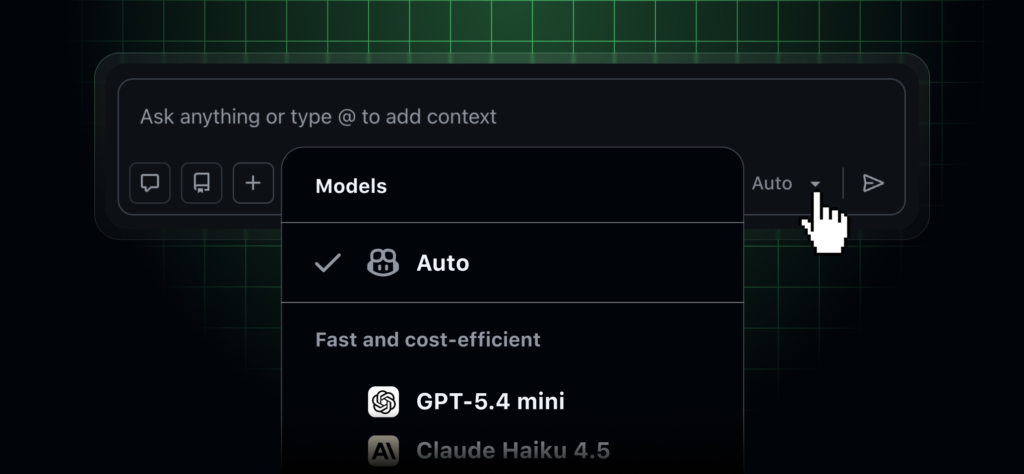
GitHub announced general availability on June 17, 2026. When Auto is selected in Copilot Chat, GitHub chooses a model for the request rather than asking the user to make that choice in advance. The launch note says routing considers the complexity of the task and current model availability.
Auto mode can choose again on a later response. That means a single conversation may use more than one model. Copilot identifies the model used, and the user can change the selection manually for a follow-up if the response needs a different balance of speed, depth, or coding behavior.
Availability and billing
The release covers GitHub.com and GitHub Mobile across Copilot Free, Pro, Pro+, Business, and Enterprise plans. GitHub says paid subscribers receive a 10% discount on premium-request use when Auto mode selects a model. The discount does not mean every request is free or that Auto always picks the least expensive option.
Check the current Copilot plan page for included premium requests and features. Organization administrators can control model access, so an Auto choice in one account may not be available in another. Record the plan and policy state when comparing results.
Why routing can help
Developers often choose a familiar model for every question even when a quick explanation and a complex repository plan have different needs. Automatic routing can remove that decision and spread demand across available models. It may also keep chat responsive when a preferred model is constrained.
The tradeoff is less predictability. A team may see different answers, latency, or style from similar prompts if routing changes. Recent AI News about model selectors should be evaluated with repeatable tasks rather than impressions from one conversation.
What users can verify
GitHub’s Auto model-selection documentation explains that the interface shows the model selected for a response. This visibility matters for debugging and governance. A reviewer can note which model produced a suggestion and choose another before asking for a revised answer.
- Confirm that Auto is available in the account and interface being tested.
- Record the selected model for each representative prompt.
- Compare premium-request usage with a manually selected model.
- Check whether organization policy excludes any candidate model.
- Review code and citations regardless of which model is selected.
How to evaluate Auto mode
- Create a fixed set of simple, medium, and complex coding questions.
- Run each once with Auto and once with the team’s normal manual choice.
- Measure correctness, latency, request usage, and reviewer effort.
- Repeat selected tasks to see whether routing or results vary materially.
- Define when policy requires a specific approved model instead of Auto.
Risks and controls
Automatic routing does not remove the need to review generated code. A model can introduce a security flaw, invent an API, or misunderstand repository conventions. Treat the displayed model name as provenance information, not a quality guarantee.
Regulated or audited teams may need consistent model selection for a class of work. If a policy, data-processing term, or validation record applies only to one model, choose it explicitly. Administrators should test policy enforcement rather than assuming the router knows the organization’s internal approval rules.
Alternatives
The alternatives are manual model selection, organization-level defaults, a separate coding assistant, or an internal router with custom policy and evaluation data. Auto is simplest for individual chat use. A custom router offers more control but adds engineering, observability, and maintenance work.
Kingy AI verdict
Auto mode is worth enabling for everyday Copilot Chat when the user wants less model-selection overhead. The visible model label and manual override make it reasonably reviewable. Teams should still pin a model for validated workflows that require repeatability, documented terms, or a known evaluation baseline.
FAQ
Can users see which model Auto selected?
Yes. GitHub says the interface identifies the model used for the response.
Can a user switch after Auto answers?
Yes. A user can choose another model for a follow-up response.
Does Auto mode ignore organization policy?
No. GitHub says Auto respects model restrictions configured by the organization.
Official links
Related Kingy AI links
The Kingy Brief
Get the free AI price sheet.
26 AI plans and models on one page, from official pricing pages, updated every month. Free when you join The Kingy Brief: AI changes, original tests and one practical thing to try, Fridays at 09:00 Vancouver time.
Free · Double opt-in · Unsubscribe anytime
Sign up for The Kingy Brief on Beehiiv.
Signup help and newsletter schedule
Signup form provided by Beehiiv. After submitting, check your inbox for "Confirm your subscription to The Kingy Brief" and open its confirmation link. Your price sheet download is on the page that opens. Check Spam or Promotions if you cannot find it.
Fridays at 09:00 Vancouver time: source-checked AI changes, original tests and one practical thing to try. We skip a week when there is not enough verified material. Free. Unsubscribe anytime.