Updated September 5, 2026. Pricing, models, limits, cancellation terms, and data-handling statements were checked against Cline’s current product page, documentation, Terms of Service, and Privacy Notice.
Testing disclosure: Kingy.ai did not purchase or benchmark ClinePass for this source-based review. The verdict is based on Cline’s current public disclosures.
What is ClinePass?
ClinePass is an optional subscription provider inside Cline. It gives subscribers access to a curated set of open-weight coding models in Cline’s IDE extensions and command-line interface. The same model IDs can also be called through Cline’s OpenAI-compatible API.
It is separate from Cline’s pay-as-you-go usage-billing provider, bring-your-own-key (BYOK) connections, and local models. Subscribing does not remove those other options.
The short verdict
ClinePass is easiest to justify for frequent Cline users who want several models in the current bundle and accept undisclosed quota caps. The published subscription price is modest, and one Cline account replaces separate setup with each included model provider.
The main reservation is predictability. Cline discloses rolling five-hour, weekly, and monthly limits, but not the numerical allowance for any window. Its claim of two to five times the usage available at standard API rates is a vendor comparison, not a capacity guarantee or an independent Kingy.ai benchmark.
It is a weaker fit for light users who prefer to pay only for the inference they use, teams that need direct provider terms, or anyone who must know exact capacity before buying. The clearest uses are comparing included models, routine repository work, and small API experiments after quota and data checks.
Who should consider it — and who should skip it
The strongest case is an existing Cline user who already recognizes several names in the included lineup. For that person, the subscription reduces provider setup and keeps model switching inside one familiar agent. It may also make a controlled comparison easier because the Cline workflow stays constant while the selected model changes.
A buyer who wants only one model should be more cautious. Model access can change, and the public quota does not promise a fixed amount of work. The same caution applies to a team whose coding sessions are long, tool-heavy, or difficult to pause when a limit is reached.
Skip the plan, at least initially, if your workload is infrequent, your required model is outside the bundle, or procurement needs a direct agreement with the underlying provider. Also skip it for sensitive repositories until the data route and the selected provider’s policy have been approved. Cline usage billing, BYOK, and local models remain available, so this is a provider choice rather than a decision about whether to use Cline at all.
ClinePass pricing, fees, renewal, and cancellation
Cline’s ClinePass documentation lists the standard price as $9.99 per month. When checked on September 5, Cline’s current announcement advertised a limited $1.99 Cline CLI promotion; the standard subscription remained $9.99 per month.
That product page also says an additional processing fee may apply. Cline does not publish the amount or formula on the page. Its Terms of Service say applicable taxes are additional and subscriptions renew automatically until cancelled.
| Pricing question | Official disclosure at this check |
|---|---|
| Standard subscription | $9.99 per month |
| Limited Cline CLI promotion | $1.99; confirm eligibility and the renewal price before purchase |
| Processing fee | May apply; no public amount is stated |
| Taxes | Applicable taxes are additional under Cline’s Terms |
| Renewal | Automatic until cancelled |
| Cancellation | Cancel before the next term in account settings or through Cline support |
| Access after cancellation | Continues through the current paid term |
| Refunds | Generally unavailable unless required by law or granted by Cline |
Promotions and eligibility can change. Confirm the first charge, recurring price, fee, tax, currency, and renewal date at checkout.
Which models are included?
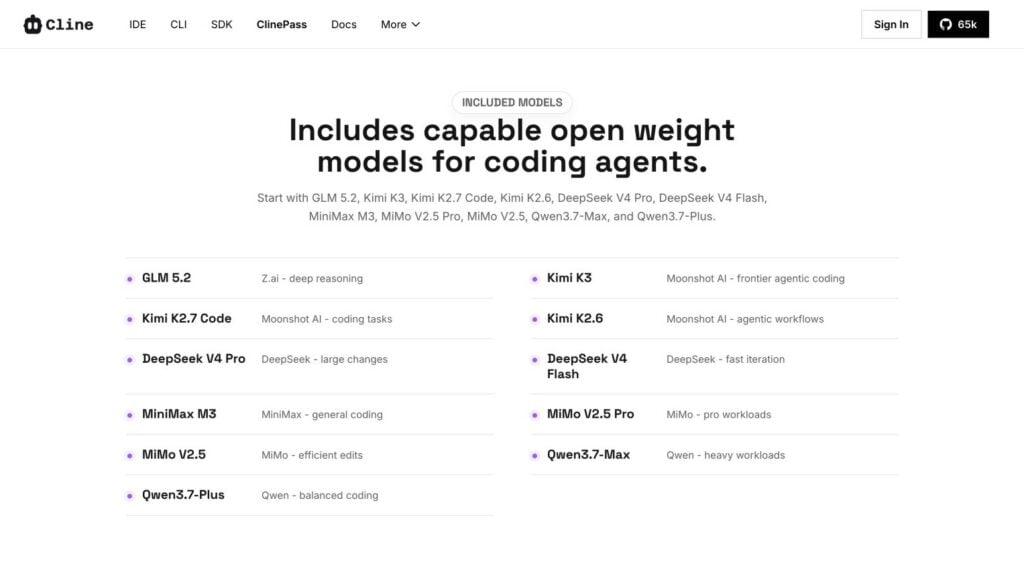
Cline’s current ClinePass guide and model directory listed the following 11 models on September 5. The descriptions summarize Cline’s positioning; they are not Kingy.ai performance findings.
| Model lab | Included model | ClinePass model ID | Cline’s stated fit |
|---|---|---|---|
| Z.ai | GLM-5.2 | cline-pass/glm-5.2 |
Deep reasoning |
| Moonshot AI | Kimi K3 | cline-pass/kimi-k3 |
Agentic coding |
| Moonshot AI | Kimi K2.7 Code | cline-pass/kimi-k2.7-code |
Coding tasks |
| Moonshot AI | Kimi K2.6 | cline-pass/kimi-k2.6 |
Agent workflows |
| DeepSeek | DeepSeek V4 Pro | cline-pass/deepseek-v4-pro |
Large changes |
| DeepSeek | DeepSeek V4 Flash | cline-pass/deepseek-v4-flash |
Fast iteration |
| MiniMax | MiniMax M3 | cline-pass/minimax-m3 |
General coding |
| MiMo | MiMo-V2.5 Pro | cline-pass/mimo-v2.5-pro |
Pro workloads |
| MiMo | MiMo-V2.5 | cline-pass/mimo-v2.5 |
Efficient edits |
| Qwen | Qwen3.7 Max | cline-pass/qwen3.7-max |
Heavy workloads |
| Qwen | Qwen3.7 Plus | cline-pass/qwen3.7-plus |
Balanced coding |
The lineup is curated, not exhaustive, and can change. Confirm that any model central to your decision still appears in the live selector before subscribing.
ClinePass vs Cline usage billing vs BYOK
Cline offers several ways to authorize and pay for inference. Its pay-as-you-go option is called Cline (usage-billing) in current documentation and is also referred to as the Cline Provider in some product copy.
| Option | Billing | Model choice | Limits and control | Best fit |
|---|---|---|---|---|
| ClinePass | Standard $9.99 recurring monthly price; promotions, fees, and taxes can change the checkout total | Curated open-weight bundle | Five-hour, weekly, and monthly quota windows; exact caps are not public | Frequent use of included models |
| Cline usage billing | Cline credits used on a pay-as-you-go basis | Broader catalog | Usage draws down the credit balance | Irregular use or broader model choice |
| BYOK | Pay the chosen provider directly | Models available through that provider and supported by Cline | Provider pricing, quotas, and terms | Existing provider customers or direct provider control |
| Local model | No external inference bill; hardware and electricity are yours | Models supported by a local runtime | Capacity depends on local hardware | Workloads prioritizing local control |
The authorization guide explains these provider paths. Existing Cline users should compare ClinePass with Cline usage billing and BYOK before changing their editor or agent workflow.
How the limits work
ClinePass is quota-based, not unlimited. The public documentation identifies three simultaneous controls:
- a rolling five-hour usage window;
- a weekly usage window;
- a monthly usage window.
Cline does not publish the numerical allowance for any of them. It also does not provide a guaranteed number of prompts, coding tasks, tokens, agent runs, or hours.
Cline publishes model-specific reference token prices and says they help explain how usage is measured against the subscription quota. Subscribers are not billed those individual reference prices for ClinePass requests. Because reference rates differ by model and Cline does not publish the complete quota formula, readers should not derive a token allowance from the table.
Cline says the plan provides two to five times the usage available at standard API rates on included models. The comparison baseline and per-model calculation are not fully disclosed. Public documentation also does not state the reset timezone, whether unused capacity rolls over, or precisely what happens at each limit. Cline also does not say whether limits vary by account, promotion, region, or abuse controls.
The dashboard therefore matters more than the number of prompts sent. Agentic coding requests can read files, invoke tools, produce long outputs, and repeat steps before one user task finishes. Two tasks that look similar in the interface may consume different amounts of quota because the model, context, cache use, and generated output differ. Cline’s public material does not provide enough information to forecast those differences before subscribing.
Before relying on the plan for production work, run representative, non-sensitive tasks and record:
- the model and task;
- dashboard consumption before and after the task;
- which limit window becomes restrictive.
These measurements help you judge whether the plan’s actual allowance fits your workload.
How to set up ClinePass
For Cline’s IDE extension:
- Create or sign in to a Cline account and subscribe.
- Open Cline settings and set API Provider to ClinePass.
- Complete sign-in, select an included model, and start a task.
- Monitor usage in the Cline dashboard.
For the CLI, install Cline, open /settings, select ClinePass, sign in, and choose an included model. Cline’s product page and ClinePass documentation contain the current setup path.
Using the models through an API
ClinePass models are also available through Cline’s OpenAI-compatible API. Create a Cline API key under Settings → API Keys, store it in an environment variable or secrets manager, configure Cline’s endpoint, and use a full model ID such as cline-pass/qwen3.7-max.
Another coding agent may work if it supports a custom OpenAI-compatible endpoint, Bearer API key, and ClinePass model slug. Cline does not publish a compatibility matrix for every third-party agent.
The public docs do not say whether external API calls share the same allowance or use a separate one. Verify the behavior in the dashboard with a small, non-production request before connecting an automation.
Privacy and material risks
The subscription’s low entry price does not remove several practical risks:
- Quota opacity: Public numeric caps are undisclosed, so capacity is hard to predict before purchase.
- Changing lineup: Cline curates the bundle and can add or remove models.
- Unverified performance: This source-based review does not establish model quality. Cline’s positioning and usage claims were not independently tested on a Kingy.ai repository or workflow.
Cline markets ClinePass as stable and reliable access, but its public terms do not provide an uptime or uninterrupted-access guarantee.
The data path also deserves attention. Cline’s Privacy Notice says that when users rely on access provided by Cline, Cline collects submitted user content to facilitate requests and transmits it to third-party model providers. That content can include prompts, files, code snippets, and related material.
Cline warns that an upstream provider may use content for training unless an available opt-out is used. The reviewed public pages do not provide a ClinePass-wide no-training or zero-retention promise, or a model-by-model retention table.
Cline’s Terms say users retain ownership of their content as between themselves and Cline. The service still needs rights to process and transmit that content to operate the product, and the selected provider’s terms can apply after transmission.
BYOK creates a different relationship. Cline says that when users provide their own keys and route calls through infrastructure they control, Cline does not receive or store their model input, output, or underlying code. The model provider still processes those requests, and extension telemetry is a separate consideration.
Do not assume ClinePass is a local-only privacy path. Teams handling confidential code, secrets, regulated data, or client material should review the selected provider’s policy and their own requirements before use.
Frequently asked questions
Is ClinePass worth it?
It can be worth considering for a frequent Cline user who wants several models in the current bundle and accepts undisclosed quota caps. Light users and buyers who need predictable capacity should compare usage billing or BYOK first.
How much does ClinePass cost?
The documented standard price is $9.99 per month. On September 5, Cline advertised a limited $1.99 promotion through the Cline CLI. Confirm the first charge and renewal terms at checkout.
What models does it include?
At this check, the bundle contained 11 models from Z.ai, Moonshot AI, DeepSeek, MiniMax, MiMo, and Qwen. The dated table above gives the exact model IDs; confirm the live selector because the lineup can change.
What does the two-to-five-times usage claim mean?
It is Cline’s comparison with usage at standard API rates. Because Cline does not publish numerical caps or the full quota formula, it cannot be converted into a guaranteed number of prompts or agent runs.
How does ClinePass differ from usage billing and BYOK?
ClinePass is a monthly subscription for a curated bundle. Cline usage billing draws down credits on a pay-as-you-go basis, while BYOK uses a provider account and billing relationship that you manage directly.
Can I use ClinePass outside Cline or cancel it?
You can call the included models through Cline’s OpenAI-compatible API from compatible software. Cline says you can cancel before renewal and retain access through the current paid term; unused time is generally not refunded.
Kingy’s decision rule
This is an editorial rule of thumb, not a Cline guarantee. Consider subscribing only if:
- at least two models in the current lineup are models you genuinely plan to use;
- you expect enough regular use to prefer a subscription over usage billing;
- you can test the five-hour, weekly, and monthly limits before depending on the plan for production work.
Choose Cline usage billing or BYOK instead when broader model choice, pay-as-you-go billing, direct provider terms, or data-path control matters more than a monthly bundle.
For the first week, use a non-sensitive repository, record dashboard consumption around representative tasks, and cancel before renewal if the quota or lineup does not fit.
Official sources checked
- ClinePass product page
- ClinePass documentation
- Cline model directory
- Cline authorization documentation
- Cline usage-billing documentation
- Cline API getting-started guide
- Cline API authentication
- Cline Terms of Service
- Cline Privacy Notice
The Kingy Brief
Get future Kingy Brief editions.
Source-checked AI changes, original tests and one practical thing to try.
Free · Choose your subjects · Double opt-in · Unsubscribe anytime
Regular sending is paused; no restart date is set.