
The Slide Deck Finally Talks Back
PowerPoint has survived clip art, laser pointers, “next slide, please,” and that one coworker who thinks 87 bullet points count as design. Now it has a new roommate: ChatGPT.
OpenAI has launched ChatGPT for PowerPoint, a beta add-in that puts the AI assistant directly inside Microsoft PowerPoint. Instead of bouncing between ChatGPT, email, spreadsheets, and a half-broken deck called FINAL_final_v9_REAL.pptx, users can now work with ChatGPT from inside the presentation itself. OpenAI says the tool can create, edit, summarize, and explain presentations in PowerPoint. It can also help polish existing decks while keeping them editable.
That matters because presentations are not just files. They are office theater, they turn raw data into arguments, They turn executive confusion into neat rectangles. They turn “we need alignment” into twelve slides and a roadmap.
The new add-in changes the workflow. You can ask ChatGPT to build a deck from notes, documents, spreadsheets, images, or existing presentations. You can ask it to tighten slides for executives, add a chart, rewrite a dense section, or tell you where the story falls apart.
Not Just a Slide Generator
The obvious use case is simple: “Make me a deck.” But that undersells the point.
Plenty of AI tools already generate slides. Some make them pretty. Some make them suspiciously pretty. This one aims at something stickier: conversation inside the deck.
According to OpenAI’s product page, users can ask ChatGPT to turn notes and KPIs into a 10-slide board update, customize a QBR deck with account data, reduce text-heavy slides, generate chart slides, summarize a deck’s story, or identify where the narrative feels weakest.
That last bit is the real knife. Decks usually fail before anyone notices the font. They fail because the argument is mushy. The opening does not set stakes. The data slide has no takeaway. The recommendation arrives like a ghost at the end.
ChatGPT’s pitch is that it can act less like a design intern and more like a strategy editor. WeRSM described the shift neatly: the assistant can help identify weak storytelling, missing context, unclear logic, and likely audience questions.
That is a bigger deal than prettier bullet points. Pretty nonsense is still nonsense. It just wears nicer shoes.
How It Works Inside PowerPoint
The setup is straightforward. OpenAI says users can add ChatGPT for PowerPoint from Home → Add-ins, search for ChatGPT, open it from the PowerPoint ribbon, and sign in with an OpenAI account. Access depends on plan type, workspace settings, and admin controls.
Once inside, ChatGPT appears as part of the PowerPoint workflow. Users can ask it to build a new presentation, edit an existing one, summarize slide content, explain the structure, or revise selected sections. Windows Report says the add-in can create new decks from prompts, notes, spreadsheets, uploaded documents, or existing presentations. It can also rewrite slides, tighten executive messaging, add sections, summarize long presentations, and clean up dense layouts.
The Decoder reports that the beta runs directly inside PowerPoint and requires users to sign in with an OpenAI account. It also notes that access depends on user plan and admin settings.
In other words, this is not “copy text from ChatGPT, paste it into PowerPoint, then cry softly while aligning boxes.” It is closer to telling the deck what you want and letting the assistant make changes in place.
Who Gets Access?
OpenAI says ChatGPT for PowerPoint is available globally in beta to Free, Go, Plus, Pro, Business, Enterprise, ChatGPT Edu, Teachers, and K-12 users. Free and Go users get limited usage access, while paid plans have access subject to plan limits and admin settings.
That broad rollout matters. OpenAI is not positioning this only as an enterprise toy locked behind procurement paperwork and three solemn meetings with IT. It is aiming at students, teachers, solo professionals, analysts, founders, sales teams, executives, and anyone else trapped in the slide mines.
Still, business access will depend heavily on administrators. OpenAI says workspace admins can enable the add-in, manage apps, and control access depending on workspace configuration. For organizations that cannot access the Microsoft Store, OpenAI says Microsoft 365 admins can deploy the add-in internally using a manifest XML file.
Translation: individuals may try it quickly. Companies may need the usual blessing from the people who protect the kingdom from rogue browser extensions.
The Real Prize: Company Knowledge

The more interesting feature is not that ChatGPT can write slide text. It is that it can work from source materials.
OpenAI says users can use common source files supported in ChatGPT, including presentations, spreadsheets, documents, images, and text files, subject to file and attachment limits.
WeRSM notes that ChatGPT for PowerPoint can connect with tools like Gmail, Outlook, and SharePoint, depending on plan and permissions, so teams can build presentations using existing company knowledge instead of copying and pasting information manually.
That could reshape routine business work. Quarterly business reviews, client updates, board decks, strategy memos, and performance recaps often start with scattered material. A spreadsheet here. A customer note there. An email thread nobody wants to reread. A template from last quarter that still says “Q3” in the footer because of course it does.
If ChatGPT can pull the relevant context into a deck, the bottleneck moves. Less time hunting. More time deciding what the presentation should actually argue.
That is the optimistic version. The less glamorous version: people will generate more decks, faster. Humanity always finds a way to make meetings multiply.
The Feature Everyone Should Use First
The best first prompt may not be “make slides.” It may be: “What is wrong with this deck?”
OpenAI’s examples include asking ChatGPT to summarize the story of a deck and identify where the narrative feels weakest. (ChatGPT) Windows Report also says the assistant can point out weak narrative flow, missing information, and possible questions executives may ask during meetings.
That is useful because most decks suffer from three diseases.
First: no spine. The slides exist, but they do not build toward a conclusion.
Second: too much sludge. Every stakeholder added one “important” bullet until the deck became a landfill with transitions.
Third: cowardice. The deck presents data but avoids the recommendation.
A conversational PowerPoint assistant could help by forcing structure. It can ask what the audience needs, It can spot missing context, It can flag claims without evidence. It can say, in its polite robot way, “Slide 8 does not support Slide 9.” Devastating. Necessary.
This is where AI becomes less like a content machine and more like a rehearsal partner. The deck stops being a static object. It becomes something you can interrogate.
But Yes, It Can Break Things
Here comes the cold water.
OpenAI warns that ChatGPT for PowerPoint is still in beta. The company says outputs may be incomplete or incorrect and that users should review slide content, formatting, claims, and numbers before sharing or relying on them.
More pointedly, OpenAI says ChatGPT can make mistakes when editing or deleting presentation content. Its help page recommends being specific about what to change, what to preserve, and where the edit should happen. For important work, OpenAI advises duplicating the file first so users can revert if needed.
The Decoder highlighted the sharpest warning: ChatGPT may change or delete content if a request is unclear, so users should be specific, review changes, and save important decks before letting the tool edit them.
That is not a minor footnote. Slide decks often contain sensitive financials, legal language, customer data, pricing assumptions, or board-level recommendations. An AI assistant that edits directly inside the file needs supervision.
So the smart workflow is simple. Duplicate the deck. Ask for a plan first. Approve the plan. Then let ChatGPT edit. Trust, but keep version history close.
Formatting Is Still the Dragon
PowerPoint is not just text. It is layouts, shapes, charts, placeholders, masters, fonts, brand systems, animations, and a thousand little design gremlins.
OpenAI says some advanced PowerPoint capabilities may not be fully supported yet, including complex formatting, template handling, custom fonts, chart editing, shape editing, and slide-management tasks.
That means ChatGPT may help with structure and content before it becomes perfect at design fidelity. It may match a template “where possible,” but OpenAI says generated or edited slides may not always match a preferred style perfectly.
This is not shocking. PowerPoint is deceptively complex. A slide can look simple while hiding a swamp of formatting rules. Anyone who has copied one chart between decks and watched the colors mutate like radioactive frogs understands.
So, no, this does not eliminate designers. It probably gives them a cleaner starting point. The AI can rough out the argument. Humans can still make it beautiful, brand-safe, and not embarrassing.
Microsoft Copilot Now Has Company
The comparisons to Microsoft Copilot are unavoidable. Microsoft has been pushing AI deeply into Office, and PowerPoint has long been central to that strategy.
OpenAI’s move is interesting because it puts ChatGPT into Microsoft’s own productivity territory through an add-in. Windows Report frames it as a direct PowerPoint integration that follows OpenAI’s earlier add-ons for Google Sheets and Microsoft Excel.
The distinction may come down to user preference and ecosystem. Copilot lives natively inside Microsoft 365. ChatGPT brings OpenAI’s assistant, app connections, and familiar conversational interface into PowerPoint. OpenAI says app availability depends on plan, admin settings, app availability, user permissions, and data-source entitlements.
For users, the winner will not be the tool with the grandest launch language. It will be the one that saves the most time without mangling the deck.
That sounds boring. It is not. In office software, boring reliability wins wars.
What This Means for Work
The old deck workflow was linear. Gather facts. Draft outline. Make slides. Edit. Rewrite. Reformat. Rehearse. Panic. Present.
The new workflow could become conversational. Ask for a structure. Feed it source material. Challenge the storyline. Generate slides. Ask what is weak. Revise. Ask what the CFO will attack. Revise again.
That loop is faster. It is also more demanding. When tools make production cheap, judgment becomes more valuable. People who know what they want to say will move faster. People who do not will produce glossy fog.
This is the brutal truth: AI will not make bad thinkers good. It will make their bad thinking more presentable.
But for competent users, ChatGPT in PowerPoint could remove a huge amount of mechanical friction. It can help turn raw information into a draft, It can make the deck easier to question. It can reduce the blank-slide dread that stalks offices like a tiny corporate werewolf.
The result may be fewer hours spent nudging boxes. That alone deserves a parade.
The Bottom Line
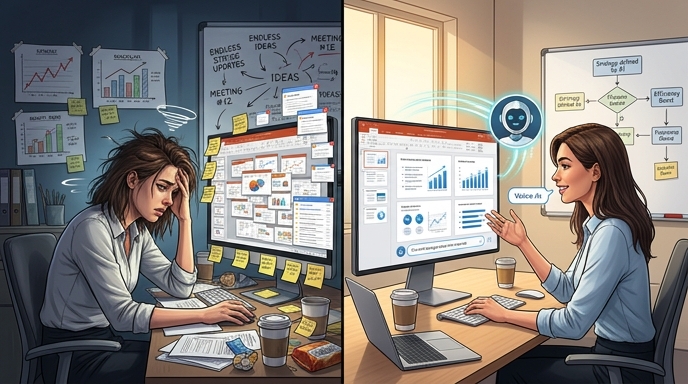
ChatGPT for PowerPoint is not just another AI slide toy. It is part of a bigger shift: workplace software is becoming conversational.
Instead of commanding PowerPoint through menus, users can explain the outcome they want. Build this. Tighten that. Make this clearer. Find the weak logic. Add a chart. Preserve the style. Do not touch slides 1 through 4, or I will scream.
The beta label matters. Users should expect mistakes. They should review numbers, claims, formatting, and edits. They should duplicate important decks before experimenting. OpenAI says as much.
Still, the direction is obvious. Presentations are becoming less like static files and more like editable conversations. That is a big shift for a tool that has defined corporate communication for decades.
PowerPoint is not dead. Not even close.
It just learned to talk back.
Sources
- Digital Trends — ChatGPT comes to PowerPoint
- The Decoder — OpenAI launches a ChatGPT PowerPoint plugin
- WeRSM — ChatGPT Just Turned PowerPoint Into A Conversation
- 4sysops — IT News Activity
- Windows Report — ChatGPT Now Works Directly Inside Microsoft PowerPoint
- TechMyMoney — ChatGPT PowerPoint Beta Puts AI Inside Your Decks
- OpenAI Help Center — ChatGPT for PowerPoint
- OpenAI — ChatGPT for PowerPoint
The Kingy Brief
Get The Kingy Brief.
AI changes, original tests and one practical thing to try. Fridays at 09:00 Vancouver time.
Free · Double opt-in · Unsubscribe anytime
Signup help and newsletter schedule
Signup form provided by Beehiiv. After submitting, check your inbox for "Confirm your subscription to The Kingy Brief" and open its confirmation link. Check Spam or Promotions if you cannot find it.
Fridays at 09:00 Vancouver time: source-checked AI changes, original tests and one practical thing to try. The weekly restart begins October 9, 2026. We skip a week when there is not enough verified material. Free. Unsubscribe anytime.