Arrange your shots, review the words on screen, and keep prompts and source links together. Preview your approved sequence, then export an MP4 with original sound and optional music in this browser.
Start with my footage
Select images and videos to create your shots. Videos start with up to 5 seconds; images hold for 5 seconds. Change the order, timing and words before exporting.
Files stay on this device. No account or generation needed. Up to 64 MB per file and 192 MB in your library.
Review your new shots
Loading your saved project…
Review incoming project
Opening this replaces the project saved in this browser. If saved data is unreadable, its original text will download first for recovery. Download your current media package first if you want to keep it with imported files.
Project name & format
You can start with footage without completing a brief. These notes are optional.
Start from an existing three-shot edit
These nine recipes reuse retained footage from the library. Copy starts as needing your review; no video generation or paid requests run here.
Watch every shot in order, with its approved copy and planned duration. Video starts at each shot’s source in-point; images hold for the shot’s duration.
Play your shots with the saved music, volume and fades. Seeking and pause/resume move picture, original sound and music together. Original sound follows each shot’s mute and volume settings. Media loads when you play or choose a shot. Loading pauses the clock; short videos hold their last frame. Framing follows each shot’s saved Fit or Fill setting. Use Watch project for larger playback with sound, or Frame shot to adjust one shot. MP4 export uses hard cuts and the approved copy layout. Short or missing sources must be fixed before export.
No music · silent preview
Sound mix
Select a shot to adjust its original sound.
Changes save automatically.
Track & fades
Hear changes in the project above. Saved sound and source credits are included in JSON and media backups.
Choose an existing CC0 music loop, set its volume, and fade it in or out. Music starts with the first shot, repeats to fill your project and stops at the end. Enable original sound in each shot’s sound settings to mix it with music.
No music. Shot sound settings still apply.
Music settings and source credits save in your JSON backup. Music edits preserve copy approvals and clear the final export check. If both fades do not fit, they shorten proportionally. Track sources · CC0 license
Export your approved video
Export details & limits
Create an H.264 MP4 with your shot order, timing, saved Fit/Fill framing, approved copy layouts, original sound and optional music. Your media stays in this browser; no upload or paid generation is needed.
Up to 2 minutes, 30 fps, 720p at your project’s aspect ratio. Local files are read from this browser. URL sources must be directly downloadable: still JPG, PNG, WebP or AVIF, or video this browser can decode. Maximum 64 MB per source and 192 MB total. Cross-site sources need to allow browser access. H.264 encoding, plus AAC encoding when sound is enabled, must be supported; current Chrome or Edge is recommended.
Review every shot’s copy, or mark it as having no copy, before exporting. Keep this tab open until you download the finished file.
Optional and off by default. Sends only a download-action label, video-tool label and broad traffic channel. No footage, copy, filenames or project details. Privacy controls still apply.
The MP4, JSON and media package use this export’s project snapshot. Later edits belong to your next export. The media package includes imported footage; URL-only footage and licensed music remain online. Play and inspect the finished file before marking your final check complete.
About this export
Each frame is encoded from a snapshot of this project. Enabled original sound is trimmed with each shot and mixed with your selected music at the saved volumes and music fades. Images hold for their planned duration, and videos begin at their source in-point. Unapproved copy, overflowing text and short or inaccessible sources stop export so you can fix them. This export does not add effects, transitions or crop controls.
Record outputs and charges, including failed attempts. Unknown amounts stay unknown. The spend limit is a note, not a provider-enforced cap.
Record attempts and check your final export
No new attempts recorded. The historical attempts above are kept separate.
Your project has not been checked yet.
Completion checks save in this browser when changed. These are your own checks; they do not make this a Kingy-tested result.
Save or open a project
Project + media (.kingy) includes imported footage and your editable project. JSON keeps settings and references only. Choose a media package to move your imported footage to another browser.
Autosaves on this device in this browser. No account or cloud sync. Clearing site data removes saved work. Download a media package to back up imported files with the project. JSON alone stores file references, not their bytes. URL-only sources and licensed music still need internet access.
JSON includes every shot, copy approval and layout, original sound and music setting and source credit, prompt, source link, returned draft, attempt and check. Import it here to continue in another browser. The edit guide is readable Markdown for assembly in your video editor. JSON contains source links and local file references, not media files. Download a media package to include imported files; URL-only sources and licensed music remain online. Use Export MP4 above to render the approved sequence.
A four-second, 720p, 16:9 image-to-video attempt with no generated audio. The retained agent-assisted screen marked it usable. Some frames hide the white face marker, so this is not a strict pass against every original condition.
The selected route has two recorded attempts costing $0.24 USD in total. All six attempts across three routes total $1.81332 USD. These are historical provider charges. Human editing, hardware and electricity costs are unknown.
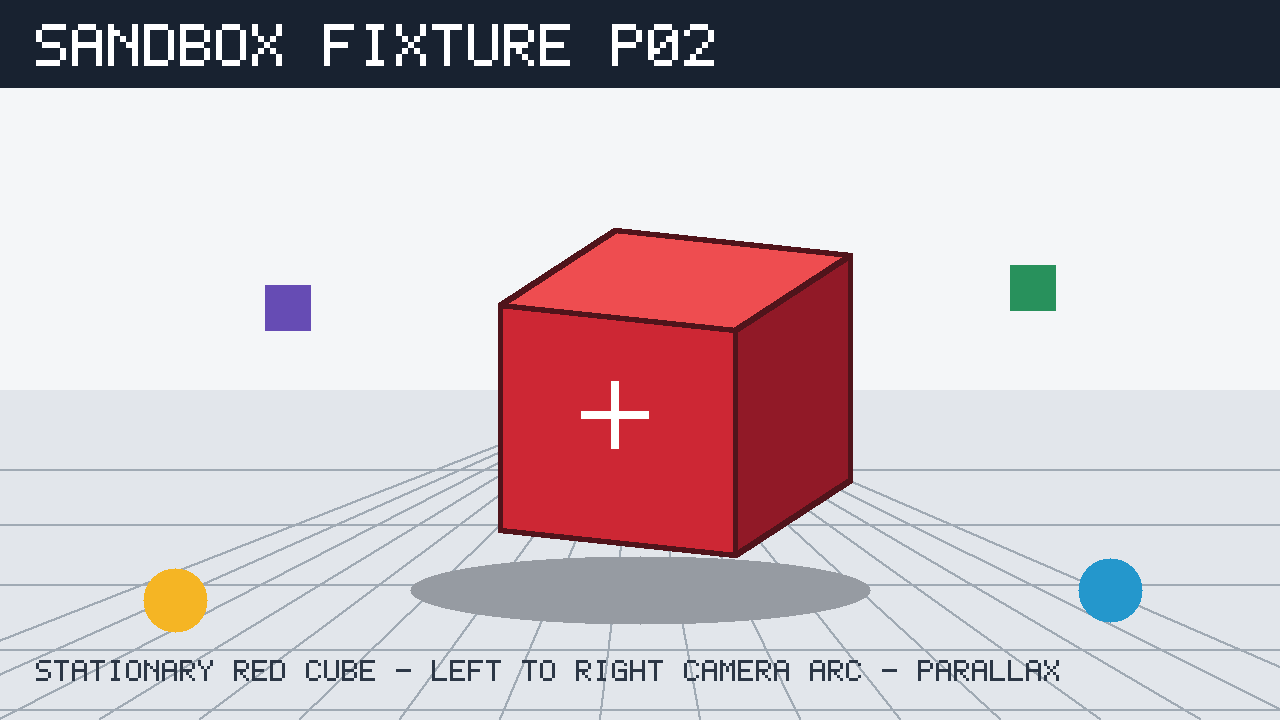
A continuous four-second geometry test. The camera travels left-to-right through a 45-degree arc around the exact stationary matte red cube shown. Preserve the cube orientation, white face marker, floor grid and all colored depth markers. Produce clear foreground/background parallax. No cube rotation, no zoom substitution, no cut, no new objects.
The original recipe, retained assets and cost evidence continue below this workspace.
Original generated output. View the recorded limitations before reproducing it.
Output generated August 26, 2026; evidence reviewed 2026-09-13. Marked usable in an agent-assisted screen; some outputs deviate from the original brief. This is not a strict-compliance pass. Inspect the full cohort and assessment notes before reproducing it.
Download the complete task pack and inspect the original MP4s and input.png.
Check the provider’s current route, pricing and terms before choosing to generate anything.
Attach only the unchanged first frame, then copy the exact prompt and settings for a baseline.
Preserve every original output and charge. Log active editing separately; do not replace failed outputs in the ledger.
Inspect the result against the original brief. For an adaptation, use your own matching first frame and treat the result as a new, untested run.
Original input and exact settings
Original procedural first frame: video-cube-parallax-input.png (download below).
The exact prompt below and the recorded requested seed; only one image was supplied.
aspect_ratio
16:9
duration_seconds
4
first_frame_count
1
generate_audio
resolution
720p
seed
271828
prompt_enhancement
off
Original first-frame input PNGOriginal prompt
A continuous four-second geometry test. The camera travels left-to-right through a 45-degree arc around the exact stationary matte red cube shown. Preserve the cube orientation, white face marker, floor grid and all colored depth markers. Produce clear foreground/background parallax. No cube rotation, no zoom substitution, no cut, no new objects.
Attribution and rights: Kingy provides its original procedural input cards, exact instructions and retained AI results for inspection and reproduction. Model/provider terms govern generated outputs. No claim of exclusive ownership or unrestricted third-party rights is made.
Two retained attempts per model for this task. This is too small to establish population-level reliability or a universal model ranking.
Marked usable means the historical agent-assisted screen marked the clip usable. It does not mean independent human approval or measured strict compliance with the original brief.
Historical provider charges include every attempt, including rejected outputs. They are not current prices.
Active human editing and repair time, hardware costs and electricity were not recorded; unknown values are not zero.
The first frame is a procedural non-human test card, not a camera photograph or production advertisement.
The three recorded routes were publicly listed by OpenRouter on September 13, 2026, with the same canonical model identifiers as these historical runs. Account-specific access, current prices and fresh generation were not verified. Re-running a route or seed may not recreate identical pixels; seed behavior was not independently established.
The original constraints required the white face marker to remain stable. Some Veo frames hide it as perspective changes; retained usability does not establish strict visibility compliance.
Help improve this tool
Did this help you finish?
About Make This. Your feedback goes to Kingy’s private review queue.
Check the exact product, account or model before choosing. These records include dated source notes, an owner and a next review date. Inclusion is an editorial starting point, not a quality ranking or a hands-on test.