On macOS 26.3, Claude Desktop’s Code mode connected to Roblox Studio through MCP, built a small jumping course, and triggered its completion message in a real playtest on October 4, 2026.
The connection and Claude build were Kingy-tested on October 4; the full course, message reset and native file reopen were checked on October 5.
What we tested
| Component | Retained observation |
|---|---|
| Machine | MacBook Pro, Mac16,7, Apple M4 Pro, 24 GB RAM |
| Operating system | macOS 26.3, build 25D125 |
| Roblox Studio runtime | 0.741.19.7411056, returned by version() inside Studio |
| MCP server | The bundled StudioMCP binary; a separate server version was not established |
| Claude client | Claude Desktop 2.19675.0, in Code mode |
| Model and effort | The client displayed Fable 5.1, High; an exact underlying model identifier was not established |
| Access | Existing signed-in Claude Max plan and existing Roblox Studio access |
The separately installed Claude Code CLI reports 2.1.283. We did not finish its first-run setup, and this guide does not count that terminal route as tested.
Connect the apps
Roblox’s official MCP documentation describes a server built into Studio, using stdio. A separate Roblox MCP plugin download is unnecessary for this documented route.
Start with a new local place. Keep an existing game separate, and ask the client to list Studio instances before it makes changes. Each tool call must target the chosen instance. Our test used a new unpublished local Baseplate place; the existing place was preserved.
If Studio’s server is not enabled, Roblox’s documented steps are Assistant → the three-dot menu → Manage MCP Servers → Enable Studio as MCP server. Those enabling steps are Official source here: the server was already enabled on our Mac, so we did not reproduce switching it on from a disabled state.
In an isolated local workspace, create a file named .mcp.json at the folder root. This is the project configuration we used with Claude Desktop’s Code mode:
{
  "mcpServers": {
    "Roblox_Studio": {
      "command": "/Applications/RobloxStudio.app/Contents/MacOS/StudioMCP"
    }
  }
}
The binary path is also supplied in Roblox’s macOS documentation. To open this workspace, follow these Official source steps from the Claude Desktop documentation:
- Open the Code tab in your signed-in Claude Desktop app.
- Before sending the first message, choose Local as the environment and select the isolated project folder containing
.mcp.json. - Send the read-only connection request below to start the session. If project MCP approval appears, review the server command and approve only the intended bundled Studio server; Claude’s MCP documentation explains project approval.
Local runs on your Mac, where that binary is installed. Our Kingy-tested check used an existing Code session in this folder; fresh-session onboarding and an approval prompt were not separately reproduced. We asked Claude to list studios and read the new place’s state and version without modifying it. Those calls succeeded. Roblox also documents Quick connect for Claude Code and Claude Desktop; that separate setup route was not tested in this pass.
For the read-only connection check, ask the Code session to use list_roblox_studios, identify your intended new local place, then call get_studio_state and read version(), game.Name and game.PlaceId through execute_luau in its Edit datamodel. Pass that place’s current studio_id on each targeted call. These are the checks retained in our connection receipt; do not permit a build until the returned place is the one you intended.
The connection check returned Edit mode and a local place ID of zero. Only then did we allow Claude to build in that place. Never copy a studio instance ID from someone else’s guide: list the instances in your own session.
Windows configuration is documented by Roblox, but Windows was not tested on this Mac.
Build one small project
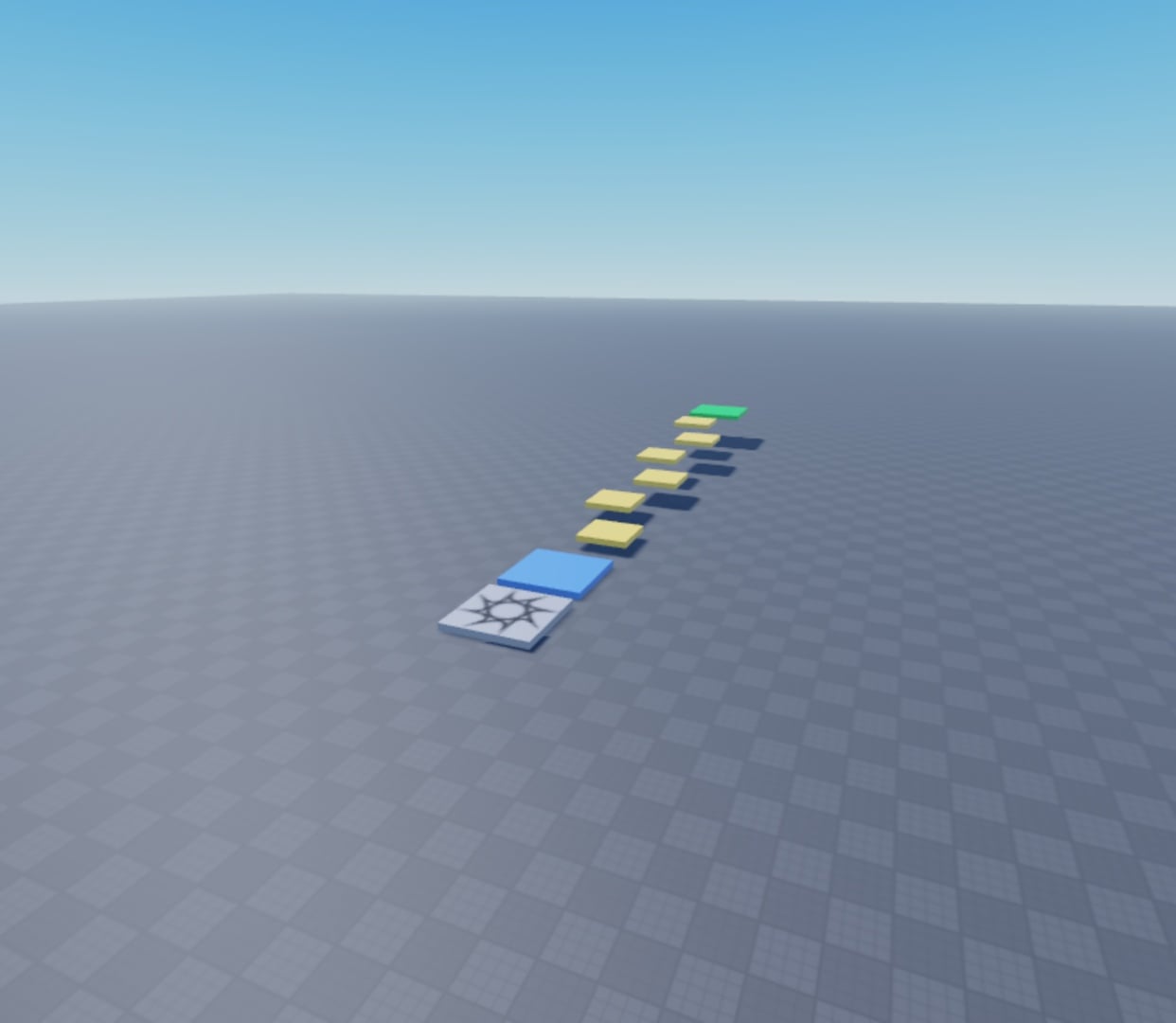
Our prompt asked for a blue spawn pad, six yellow jumping platforms, a green finish pad, and a completion message. It allowed primitive Parts and Luau only, with no assets, purchases, generation, uploads, HTTP requests or data storage.
After the read-only check identifies your intended new local Baseplate, download and extract the course ZIP. Put the build source and the rules into the selected project folder. Copy this prompt into the same Local Code session:
Read roblox-course-rules.md and inspect build-course.luau before running it.
Use Roblox Studio MCP to list the current Studio instances. Identify only
the new unpublished local Baseplate selected in our read-only check.
Read its Edit state, name and PlaceId again. If the target is ambiguous,
not in Edit mode, or PlaceId is not zero, stop and ask me to identify it.
Use its current studio_id on every targeted call; preserve all other places.

In that place's Edit datamodel, execute the inspected build-course.luau
only if KingyMakerCourse and KingyMakerCourseServer do not already exist.
Keep its overwrite guards. Create the blue spawn, six yellow platforms,
green finish and one completion-message server script. Preserve existing
Baseplate, Camera, Terrain and spawn. Use primitives and Luau only.
Do not install, buy, generate assets, upload, publish, make HTTP requests,
store data or collect account identifiers.

Inspect the eight course objects and server source. Run a bounded Play
check with normal Humanoid movement and jump physics. One initial move
to the blue pad is allowed; report it. Do not teleport between platforms
or fabricate touch events or GUI results. Report each landing, the visible
completion message, exact errors and any incomplete checks. Return to Edit.
This reader prompt is adapted from the retained project and test scope, not the original prompt transcript. Its exact wording and the guarded portable build copy are Not yet verified by a new live run. The native download below was reopened and playtested; the portable source's geometry and embedded server script were statically inspected.
Claude created eight anchored parts inside Workspace.KingyMakerCourse and one script at ServerScriptService.KingyMakerCourseServer. The original Baseplate, Camera, Terrain and spawn remained intact. Static inspection found five-stud edge gaps along the Z axis and one-stud rises between the six yellow platforms; a later automated traversal landed on all six platforms and the finish pad. This verifies feasibility with normal jump physics. Keyboard comfort was not tested.
The build source contains the geometry and server script. Its portable copy requires a new unpublished local Baseplate place and refuses to overwrite an existing course. The exact original executed source is retained separately in the test evidence. The server source and portable rules are also prepared for downloads. The native place file is copied from Studio’s own autosave, rather than reconstructed XML. We reopened the exact binary, verified all eight pads and the exact server source, then traversed it successfully in Play mode. Its place ID and creator ID were both zero. See the download instructions.
What the playtest proved
Claude started Studio Play mode and checked both Server and Client. It moved the test character above the finish pad, let normal physics bring the character into contact, and read the resulting client GUI. The test harness neither created the GUI nor fired the touch event artificially. The course’s server script created the GUI in response to the character’s real contact with the finish pad.
The client returned the exact visible text Course complete! Nice jumping!. The console returned [KingyMakerCourse] A player reached the finish pad. No error or warning appeared in that bounded playtest. Studio returned to Edit mode afterward.
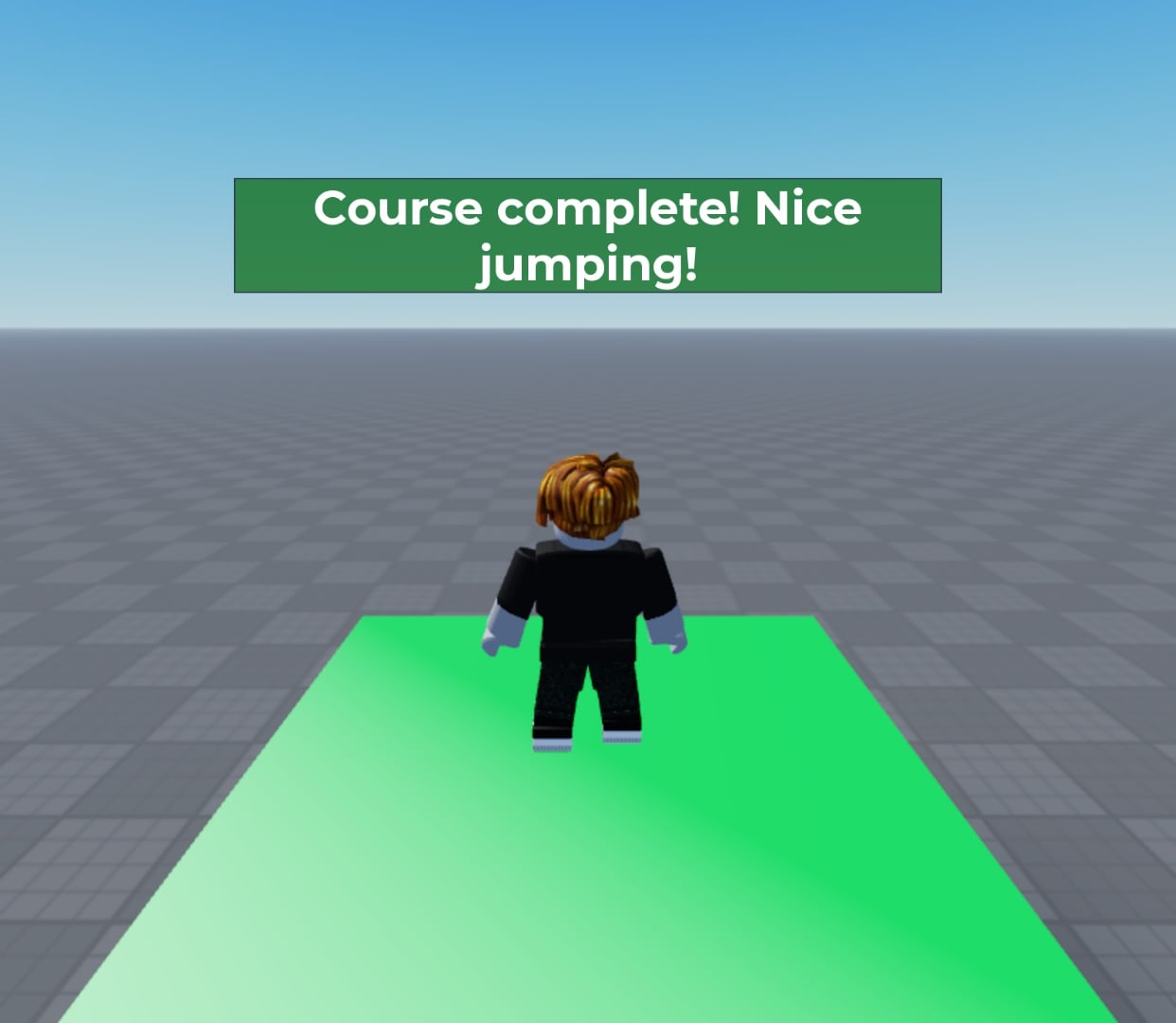
On October 5, Codex extended the verification through the same Studio MCP connection. After one initial positioning move to the blue pad, normal Humanoid movement and jump physics carried the character across all six platforms to the finish. There were no teleports between platforms. The recorded retry and the reopened native file both returned seven successful landings.
A separate contact check found the message present with the exact text, gone about 5.17 seconds after it appeared, and present again after the next eligible contact. Repeated contact during the window left exactly one completion GUI.
Two early fixed-wait traversal attempts stopped after failed landings. In the recording, another fixed-wait attempt checked while the character was still airborne. Waiting for a landing produced the passing result without changing the course geometry. This is a limitation of that automated check; no claim about keyboard comfort or an assistant comparison follows from it.
What broke or remains open
The terminal inventory check returned:
No MCP servers configured. Use `claude mcp add` to add a server.
A separate terminal launch stopped at the first-run theme screen. We did not finish onboarding or sign in again. The successful test used the already signed-in Desktop Code session.
The course’s original spawn was preserved, so the test place has two neutral spawn pads. The test character spawned at the original pad. Spawn selection is not claimed as verified.
An XML project reconstructed from the measured objects parsed locally, but its initial file-open attempt did not complete. That XML remains an unverified working artifact. The download uses a native Studio autosave instead: selecting its binary copy in File → Open created a new Studio instance, whose course, script and successful playtest were checked. The original two places were preserved.
Studio printed a camera-type reset notice during recorded verification. It did not report a Luau error in the bounded reopened-file playtest. We have not reproduced a general MCP connection failure or established a troubleshooting fix.
Time, cost and assistant comparison
The measured playtest bracket was 46 seconds, from the clock read immediately before starting Play to the read after confirming Edit mode. It includes tool round trips; it is neither pure gameplay time nor end-to-end build time. The initial build was not timed. The recorded full-course retry took 54 seconds between its surrounding clock reads; that includes tool overhead and is not a same-task assistant benchmark.
The tests used the existing Claude subscription. Its usage meter was readable before testing, with usage credits switched off. No installation, purchase, paid generation or extra-usage request was made. Per-project monetary allocation within the existing subscription was not measured.
Only Claude built this project in this pass. Codex independently checked the Studio connection and retained evidence. ChatGPT and Gemini did not perform the same build, so no best-assistant verdict is supported.
Downloads and related guides
Download the course, source and rules ZIP. All file links in this guide download this same ZIP; extract it to access the named file. The ZIP contains the native Studio place, portable build source, server source, rules and download instructions.
For related local 3D workflows, see Kingy’s Blender + OpenAI Astra guide and drawing-to-editable-3D test.
Featured image: an original Kingy course diagram created locally for this guide. Course screenshots: retained from our own local test.
Last checked: October 5, 2026 (the existing connection, course traversal, message reset and native file reopen). Last changed: October 5, 2026. Connection and original Claude build evidence: October 4, 2026. Disabled-to-enabled setup, Windows and a same-task assistant comparison remain untested.