Does it still work? Not tested · Advice: under review Details
Use Claude Data (formerly Claude Dashboards) to explore connected business data, and Claude Motion to turn approved text, charts and images into editable animations. Start with a dashboard whose totals you can check, or a short Motion brief whose wording and numbers are already approved.
Design migration correction, November 18, 2026: HIPAA-ready organizations can now move projects with the required owner controls, but moved work is outside the BAA and must exclude PHI. Published-artifact links survive closure; temporary links expire separately. Move or download needed standalone work before December 14. Current migration conditions. No account migration was tested.
November 14, 2026: Anthropic moved the conditional Enterprise Data default-on date from November 19 to November 20. Owners’ saved settings and the separate beta controls still apply. Confirm the current Data guide before planning a rollout.
November 11, 2026: Claude Data is now generally available on Pro, Max, Ultra, Team and Enterprise. Existing dashboards keep working. Certified queries and live sharing remain beta; Motion remains a separate Team/Enterprise beta. Enterprise Data turns on November 20 unless an owner has already saved a setting. Check the current Data guide before sharing results, and the updated Design migration restrictions before moving projects. These are source-confirmed changes, not Kingy product or account tests.
Claude Data and Motion at a glance
| Feature | Release status | Who gets it | Main purpose |
|---|---|---|---|
| Claude Data, formerly Dashboards | Generally available; certified queries and live sharing are beta | Pro, Max, Ultra, Team, Enterprise | Explore connected data through dashboards, stories, short videos and written analysis |
| Claude Motion | Beta | Team, Enterprise | Build short, editable animations from supplied content |
| Claude Docs, Slides, Design | Out of beta | Free, Pro, Max, Ultra, Team, Enterprise | Documents, presentations and visual work |
Data and its two beta features are on by default on Team, as is Motion. On Enterprise, Data turns on by default on November 20, 2026, unless an owner has already saved a setting. Its certified-query and live-sharing betas stay off by default. Motion also stays off until an owner enables it. Owners manage Data under Organization settings > Artifacts > Templates, with its beta controls separately under Data. Docs, Slides and Design became enabled by default for Enterprise on October 15, 2026. Artifacts also require Cloud code execution and file creation (called Create and edit files in the updated Settings layout): individual users enable it under Settings > Capabilities; Team and Enterprise organizations use Organization settings > Capabilities. See the current Artifacts feature matrix and prerequisites.
A solo creator paying for Max or Ultra should pay attention to that table. A larger individual allowance does not unlock Motion in this launch. The eligibility boundary is the plan type.
Create a first dashboard you can check
- Confirm that your plan includes Data and that the required capabilities are enabled. In Artifacts, select Data, or ask for a dashboard in chat. Enterprise access may need an owner.
- Connect a data warehouse or app you are authorized to use. Name the source and table in your request.
- Ask one business question, then inspect each chart’s SQL and refresh time.
- Compare one period’s total with the source before sharing or adding more charts.
Example brief to adapt to your own schema: “Using our orders table, compare completed orders by week for the last four complete weeks. Exclude cancelled and refunded orders, use our reporting timezone, and show the SQL for each chart. Add a region filter.” This is an illustrative prompt, not a Kingy test result. The official Data guide explains the supported connection and creation steps.
Download a small dashboard dataset
Download the synthetic orders CSV (four rows; sample data). Use it to check the counting rules before trying a real business dataset. For a connected dashboard, import it as orders_demo in a supported data source you are authorized to use, then follow the official connection steps above.
Sample brief: From orders_demo, show completed order count and total amount_usd by region for October 1–31, 2026. Include only status = completed. Exclude cancelled and refunded rows. Show the SQL and source refresh time. Check that each order_id is unique.
- Input check: four rows and four unique order IDs; dates are ISO calendar dates in October 2026.
- Expected result: two completed orders totaling US$250.00: West US$100.00 and East US$150.00.
- Exclusion check: the cancelled US$90.00 and refunded US$40.00 rows contribute nothing. US$380.00 means the status filter was missed.
- Query check: inspect the status filter, October date boundary, grouping and joins for duplicated orders before accepting a chart.
These expected values were calculated from the supplied CSV. Kingy has not run this fixture through Claude Dashboards.
How to use Claude Motion: create, edit and export
- Start an animation. In a chat, request an animation or select Output > Motion. You can also open Artifacts and choose a Motion template.
- Supply the brief. Name the audience, where the animation will play and its approximate length. Attach the approved report, data or images.
- Review and revise. Check the draft against the source. Request a specific change in chat or edit directly, then compare the result with the previous version.
- Export and check. Select Export > MP4. Play the file in its intended delivery app and check wording, figures, timing and readability.
These creation, editing and export steps follow the official Motion guide, checked October 18, 2026. The example below is a reusable evaluation brief; Kingy has not run a Motion test.
Example Motion brief: Create a 30-second explainer from this approved report for our internal sales meeting. Use the supplied images and brand references. Keep every number and qualifier exactly as provided. Give viewers enough time to read each chart. Then change the second scene’s price and compare the revised version with the original.
This is an evaluation brief, not a promise that Motion supports every requested production control. Record what works, what needs correction and what cannot be specified. Export the MP4, open it in the intended finishing workflow and check the actual delivery format before committing a client deadline.
Why can’t I see Claude Motion?
Check the account and organization you are using. Motion beta is available on Team and Enterprise; Free, Pro, Max and Ultra do not include it. Team starts with Motion enabled, but an owner can turn it off. Enterprise needs an owner to enable it under Organization settings > Artifacts; custom roles can also restrict access to particular groups.
Artifacts require Cloud code execution and file creation under Organization settings > Capabilities. Once access is enabled, look for Output > Motion in chat or a Motion template in Artifacts. The checked guides do not promise a per-account rollout date. If your plan and settings qualify but Motion is missing, ask your owner to confirm your role and contact Claude support. Sources checked October 18: Motion access and admin controls and Artifacts prerequisites.
Beta limitations to check before a project
| Specification | What the checked launch documentation establishes |
|---|---|
| Output | MP4 download; animation remains editable within Claude |
| Content and construction | Code animating text, charts, shapes and images |
| Editing | Conversational changes and direct editor adjustments |
| Resolution, frame rate, maximum duration | No fixed specification stated in the checked announcement or Motion guide |
| Audio, captions and transparent exports | The checked launch documents do not establish a complete feature specification |
| Native 3D assets or scene interchange | No mesh, rig, material or scene-export specification established |
| Underlying implementation | No named animation framework or single required model established in those documents |
The announcement is a product-feature release. Parameter counts, model context windows and general coding benchmark scores would tell us little about whether a particular MP4 meets a client brief. The missing production specifications matter more to this audience.
What Claude Data does, and how Dashboards changed
Anthropic launched Dashboards and Motion on October 8, 2026. Claude Docs, Slides and Design left beta at the same time and became available on every plan, including Free.
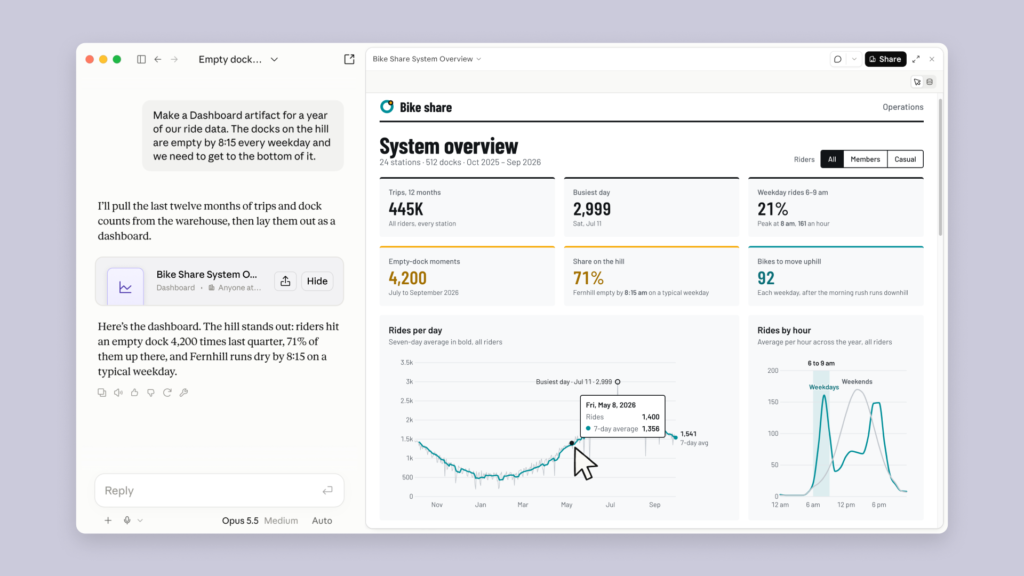
Dashboards are now one format within Claude Data. Other formats include scrolling data stories (Scrollyteller), narrated short videos (Visual short) and written summaries (Visual analysis). Claude generates SQL for charts and exposes the query and refresh time. Supported connections include Redshift, BigQuery, ClickHouse, Databricks, Snowflake and apps such as Salesforce. Data artifacts start private and count toward your plan’s allowance. See the current Data guide.
Check access before live sharing. Ordinary shared dashboards use each viewer’s own connections. The live-sharing beta instead uses the sharer’s source permissions: people in the organization can see those results without their own access to that source. It limits execution to the dashboard’s queries, with editor approval required to change them. Review the results and recipients before enabling it. A certified-query badge also needs care: write access permits certification, and editing the query removes its certification. Neither feature replaces checking the business definition.
For an analyst, the query is the most consequential part of the interface. A polished chart can hide a poor definition. Revenue might mean booked revenue, collected cash or recurring revenue. A signup count might include test accounts. A customer join might duplicate orders. Seeing the query gives the team something concrete to inspect before it presents the answer.
That does not make every answer correct. It makes some errors easier to locate. A designer can improve visual hierarchy, but an analyst still needs to confirm the denominator, date window, join behavior and business definition.
Refresh is triggered by opening a dashboard when its data is due. The current guide says it does not refresh on a schedule; intelligent refresh considers the specified interval and access patterns. Check the displayed refresh time before using a number. Do not treat a shared link as an always-running scheduled report.
Anthropic lists handoffs to Amplitude, Grafana, Hex, Mixpanel, Omni, Perplexity, PostHog and Sigma, with Looker, monday.com and Tableau coming soon. Those are launch-day statuses, not guarantees that every destination supports the same workflow. Source: launch announcement.
Sigma provides a concrete example. Its launch documentation says Send to Sigma turns a Claude dashboard draft into a Sigma workbook or app through its MCP server. It requires a Claude paid subscription, a Sigma Build license and the Use Sigma MCP with OAuth permission. In Sigma, existing permissions apply, including row- and column-level security. That is evidence for Sigma’s specific handoff, not a blanket claim about permissions in every Claude connector. Source: Sigma’s launch guide.
Claude Motion’s key specification is editable code
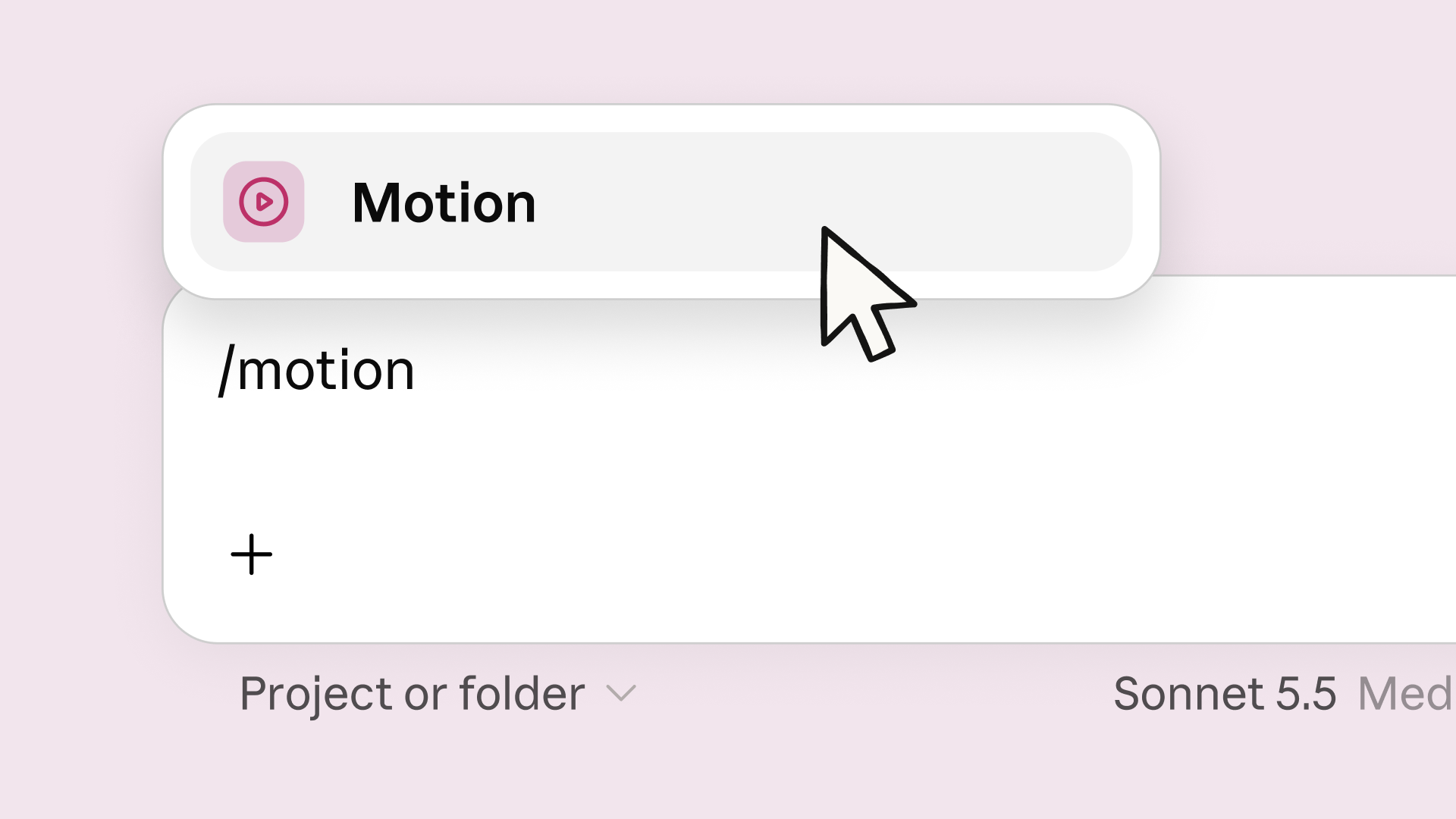
Motion builds code that animates your text, charts, shapes and images. You can request changes in chat or edit directly, then export MP4. It does not use a video-generation model to synthesize realistic footage or people. Anthropic says a word, number or timing can be changed while the rest stays as it was. Longer or more complex animations consume more allowance than a typical message. See the Motion guide.
That editability claim is where a working designer should focus. Suppose an explainer is approved except for a price. If a targeted revision preserves the composition, timing and other text, the production process becomes easier to manage. If the tool quietly rearranges unrelated scenes, the time saved on the first draft can disappear during review.
Anthropic’s launch materials list ways to continue Motion work in Adobe, Descript, HeyGen, Higgsfield, invideo, Luma AI and Runway. Canva and Captions are coming soon. An integration listing does not establish a native After Effects project export with editable layers, expressions and keyframes. Buyers should verify the actual handoff format for their destination. Source: launch announcement.
Price and availability: what it costs to get access
Choose the plan by feature access first. Ultra does not unlock Motion: that beta still requires Team or Enterprise. Max provides five times Pro’s usage per five-hour window and per week; Ultra provides ten times Pro’s weekly usage, with no five-hour limit for verified accounts. Unverified Ultra accounts retain a temporary limit. Anthropic says existing Max 20x subscriptions move automatically to Ultra without a price change. Max terms; Ultra terms. Check the plan’s current usage and feature matrix before upgrading; these are published entitlements, not a Kingy account test.
The following are the published US web prices checked on November 1, 2026, excluding applicable taxes. They are subscription prices, not quoted prices per dashboard or finished video. Source: Claude pricing; Max price; Ultra price and usage terms.
| Plan | Published price | Data (formerly Dashboards) | Motion |
|---|---|---|---|
| Free | $0 | No | No |
| Pro | $20 monthly; $200 billed annually (advertised as about $17/month) | Yes | No |
| Max | $100 monthly | Yes | No |
| Ultra | $200 monthly | Yes | No |
| Team Standard | $25/seat/month monthly; $20/seat/month annually | Yes | Yes |
| Team Premium | $125/seat/month monthly; $100/seat/month annually | Yes | Yes |
| Enterprise | $20/seat/month billed annually; 20-seat minimum, plus usage at API rates | Yes; default on November 20 unless owner already saved a setting | Yes, owner enables |
Team is advertised for 2–150 people. At two Standard seats, the arithmetic is $50/month on monthly billing, or a $40/month equivalent on annual billing: $480 per year. This is a calculation from listed seat prices, not a Motion-only offer. It matters for an individual freelancer considering a team plan solely to try Motion.
Buying more allowance and buying access are different decisions. Max can provide more individual capacity without adding Motion eligibility. Team Standard includes Data and the Motion beta; Premium buys more capacity, not a separate Motion feature tier.
The currently advertised Enterprise offer has a 20-seat minimum. At $20 per seat per month billed annually, that is a calculated $400 monthly equivalent, or $4,800 per year, before metered usage and tax. It is a separate offer from the two-seat Team example above. Current Enterprise pricing
The real production cost goes beyond the seat price
A studio should budget for the accepted deliverable, including review. The useful equation is:
Total production cost = Claude subscription or usage charges + connected platform costs + finishing tools + human preparation, review and revision time.
Claude usage depends on the task, model, conversation and features used. There is no fixed message count that translates into a guaranteed number of animations. Extra usage can add charges where enabled; Enterprise’s pricing explicitly includes metered usage. See Anthropic’s usage-limit explanation and the pricing page.
Connected data also has its own economics. A warehouse query may incur charges under the warehouse’s contract. A BI handoff may require an existing license, as Sigma’s Build requirement illustrates. Finishing an animation in another application may add a subscription or paid processing cost. The Claude seat price is not an all-inclusive production budget.
Here is an illustrative break-even calculation, not a measured result. If an additional tool cost is $50/month and a producer values working time at $50/hour, saving one accepted hour per month covers that incremental subscription cost. But a first draft that saves 20 minutes and creates 40 minutes of repair work has made the job more expensive. Track both generation and cleanup.
This makes revision reliability commercially significant. A tool that can produce ten plausible drafts may still be less useful than one that makes a single approved draft easy to update every month.
Evals: what has been demonstrated, and what still needs testing
The announcement and getting-started pages checked for this article do not provide a reproducible, scored Dashboards or Motion benchmark. They do not establish a measured time-saving percentage, a designer-preference win rate or a native-project compatibility score. The launch demo is vendor evidence of a workflow; it does not establish how often the workflow succeeds across unseen briefs.
We would evaluate the betas against a small set of real production tasks, with the same inputs and acceptance criteria for each tool. For Motion, a fair comparison would use the same report, brand assets and required revisions in Claude and the studio’s existing animation workflow. For Dashboards, the reference should include verified queries and known answers, not merely another attractive chart.
| Test | What to measure | Why it matters |
|---|---|---|
| Data correctness | Every displayed value against verified source queries, including totals, date boundaries and duplicates | A wrong metric stays wrong when animated |
| Targeted revision | Change one price, one label and one scene duration; inspect all unrelated content afterward | Tests Anthropic’s edit-preservation claim |
| Brand and readability | Typography, spacing, color, contrast and legibility at the intended viewing size | Business explainers need to be readable, not merely visually busy |
| Export and handoff | MP4 dimensions, timing, playback and the actual editable content retained by the receiving tool | A playable video and an editable production project are different deliverables |
| Refresh and permissions | Source changes, displayed refresh time and behavior for users with different authorized access | Tests whether a shared dashboard remains useful and appropriately scoped |
| Cost per accepted output | Usage, attempts, elapsed time and human repair time through final approval | Measures the economic result a studio can act on |
These are proposed tests, not results. A useful published evaluation would retain prompts, input files, exported outputs, revision instructions and failures. It would also distinguish what Claude made from what a human fixed before the output was judged.
Impact on motion design: routine explainers face the first pressure
Our expectation is that Motion will have its earliest effect on work with structured content and repeatable layouts: a pricing comparison, a chart reveal, a product setup sequence or a monthly performance recap. These jobs often have a clear information order. They also attract small, recurring changes that can cost more attention than the initial composition.
Consider a sales team that needs the same 30-second pricing explainer for three regions. The expensive part may be ensuring that each price, currency label and qualifier stays correct across versions. If Motion preserves a layout while making those changes, it could reduce the time spent rebuilding routine variations. That outcome still needs testing.
Designers retain a demanding role. They decide what the audience needs to understand, which detail deserves emphasis, how long a chart needs on screen and when movement becomes a distraction. Fast generation can multiply weak communication as easily as it can produce useful drafts.
The commercial response for a motion studio is to separate routine assembly from direction and approval. A client may become less willing to pay for a simple first pass it can request internally. It may become more willing to pay for a distinctive visual language, careful pacing and reliable delivery across formats. We expect pressure on some production tasks; the evidence does not support a numerical job-loss forecast.
Impact on graphic design: more people can produce the first layout
The wider graphic-design change includes Claude Design’s availability on Free. Its documented workflow includes a canvas, direct editing, design-system context and exports such as ZIP, PDF, PPTX and standalone HTML. Design systems can supply colors, typography and component patterns. Those are capabilities of Claude Design; the launch does not establish identical design-system behavior for every Motion output. Source: Claude Design guide.
That wider access could increase the volume of one-pagers, internal proposals and product mockups made by people outside design departments. A designer might receive a concrete starting point instead of a loose brief. That can help: it exposes the content and the requester’s assumptions earlier.
It can also create more review work. A plausible first layout may have poor hierarchy, excessive copy or inconsistent brand treatment. Organizations will need someone to distinguish a usable draft from an approved asset. The ability to generate a canvas does not settle that judgment.
Dashboards adds a related challenge. Visual polish should follow the meaning of the data. A designer working on analytics needs to ask whether two numbers are comparable before giving them equal prominence. An animated percentage can attract attention while concealing an unsuitable denominator.
Impact on 2D animation: strong fit for graphics, unproven for character work
The documented Motion building blocks fit many kinds of 2D communication: type, charts, shapes, diagrams and supplied images. Our assessment is that simple explanatory sequences are a closer match to the beta than complex character performances.
A diagram of an onboarding process has explicit states and a clear order. A character scene requires acting choices, appealing poses, continuity and expressive timing. Both involve animation, but they demand different forms of control. The checked launch documentation does not establish a rigging system, lip-sync workflow, frame-by-frame drawing environment or animation interchange format.
Studios should therefore scope a trial around tasks the product describes. Test an animated diagram or a chart sequence first. A successful explainer should not be used as evidence that the tool can handle an episodic character-production pipeline.
Motion may still help earlier in that pipeline through presentation and planning. A producer could use a short explanatory animation to communicate a concept or sequence to stakeholders. That is a possible workflow benefit, not a confirmed character-animation capability.
Impact on 3D: the current evidence supports an indirect effect
The announcement does not establish native modeling, rigging, physically based materials, simulation, scene interchange or 3D render controls. It would be premature to describe this beta as a replacement for a 3D production suite.
The likely near-term value for 3D teams is around the work surrounding a shot: explaining a concept, assembling a presentation from existing images, communicating a sequence or preparing an internal review. Those are our proposed uses. They do not imply that Motion exports an editable 3D scene.
Even if code can create a convincing impression of depth, a rendered rotation is not evidence of a usable mesh, a controllable rig or a material system. A production artist needs those assets to make subsequent changes. Until the feature’s documentation and hands-on exports establish them, budget for specialist 3D tools and artists.
Why this release matters beyond a good demo
The important possibility is reducing the distance between analysis and explanation. A team may discover a useful result in a dashboard and then need to communicate it to people who will never open the dashboard. Motion gives that second step a dedicated place in Claude.
That does not establish a continuously linked pipeline where every MP4 automatically updates when a database changes. An exported video is a deliverable that needs its own accuracy check. Teams should record which data snapshot supplied the numbers and regenerate or revise the video when those numbers change.
The release also brings the work closer to its source context. The brief, source report and requested edits can sit in one conversation. When a tool retains that context well, a producer spends less effort explaining the same project again. When it retains an incorrect assumption, the error can travel into several outputs. Review at the source matters.
Finally, the handoff strategy gives the betas a route into existing workflows. A studio can judge Claude on whether it delivers a useful draft and a clean continuation into its finishing tools. It does not have to decide whether one application can handle every stage of production.
Claude Design migration: December 14, 2026
Save the discussions you need, review what your account can move, and keep a project archive before moving important work. The project owner can review and move a project from the standalone site into Claude as an artifact. The review explains what transfers and what stays behind. Keep the tab open until the move finishes. Official move instructions and rollout limits.
A moved original becomes read-only immediately, and that cannot be undone. Chats and comments remain in the standalone copy rather than moving with its files. Design systems that already moved also become read-only there once Move to Claude reaches the organization; edits left only in the standalone system must be made again in Claude. Pages published with “Publish as artifact” already live in Claude and keep their links through the closure. Temporary public links expire in about an hour. Save needed discussion separately before then.
On Team and Enterprise, an Owner or Primary Owner can use Move everything from Artifacts to move the organization’s projects, templates and design systems; an Admin cannot start it. Where the earlier Move team design systems option is still shown, it moves eligible systems across the organization. Check ownership, sharing and the results before proceeding. Published design systems that are not private can become available to everyone in the organization. Once the new rollout is available, design systems move through the project workflow; the older Move again process does not update an already moved system.
Artifacts must be enabled. Anthropic now says organizations with customer-managed encryption keys (CMEK) can move individual projects, lists of projects, design systems, or everything at once. Standalone Claude Design data is not encrypted under your key before the move; moved content is encrypted under it. Account rollout and organization permissions still apply. HIPAA-ready organizations can now move projects after an owner enables Artifacts and Design; these projects and design systems are outside the BAA and must not contain PHI. Projects arrive private to their owner. Design systems require an owner to enable Design systems and use Move everything. Organizations with zero data retention (ZDR) for Claude Code can move projects after an owner enables Artifacts. Artifacts start off in those organizations and are not covered by ZDR: moved projects remain until deleted or until an applicable organizational artifact-retention period removes them. If Artifacts stay off, download needed projects before December 14. For a HIPAA-ready organization, the specific owner/sharing conditions above apply; individual project downloads remain available. These are documented account restrictions, not account-access tests by Kingy.
Migration correction, November 5, 2026: The current Design migration guide now permits bulk and design-system moves for CMEK organizations. Review the move options shown for your account and save needed chats and comments before December 14. The November 11 correction superseded the earlier blanket ZDR restriction. The November 18 guidance below now permits HIPAA-ready moves under its separate conditions. This is a documentation correction; Kingy has not tested an account migration.
For an individual archive, open a standalone project and choose Share > Project HTML, leave Project archive selected, then export the ZIP; slide decks place Project HTML under More formats and apps. A download of all projects you own is rolling out with Move to Claude on the standalone home page, but is unavailable to HIPAA-ready organizations. Downloads contain files, not chats or comments. If bulk download has not reached your account, export projects individually.
Move or download needed work before December 14. The current guide no longer promises post-closure file repair; anything left in the standalone site is deleted later under Anthropic’s retention practices. In organizations whose retention policy covers artifacts, moved work can also be permanently deleted after the configured period without an open or edit; that period starts with the move. Check the organization’s policy before treating a move as a permanent backup.
Migration, sharing and retention restrictions were rechecked against Anthropic’s current guide on November 18, 2026. Kingy has not run a project move, bulk export or account-access test.
A useful first trial for a design team
For the dashboard check, retain a small hand-calculated fixture alongside your real source. For example, two completed orders of $100 and $150 plus one cancelled $90 order should total $250 when cancellation is excluded. Use that to check the intended counting rule, then verify it against the actual schema and SQL. This is a transparent arithmetic example, not a connected-data test or a claim that your warehouse uses those fields.
Choose a small, real brief with known answers and a reviewer who can accept or reject the output. For Dashboards, use a data source whose totals you can verify. For Motion, use the create, edit and export walkthrough above with approved figures and a known delivery setting.
For agencies and in-house teams, the first decision should be whether Claude reduces the time to an approved, repeatable output. A month of attractive drafts is less useful than one reliable workflow for a report the team has to deliver every week.
Editorial update, October 18, 2026: Put access and migration guidance near the start, added Motion access troubleshooting and a downloadable synthetic CSV with checked totals, and moved the limitations table ahead of the detailed analysis. Current access rules and the migration deadline were rechecked. No Dashboards, Motion or migration test was run.
October 25, 2026, migration correction: Updated the phased project-move rollout, immediate read-only originals, account exceptions, bulk-download availability and retention limits. Added the current capability-setting label. No migration or product test was run.
November 1, 2026, source correction: Updated current Max/Ultra plan names, price and usage distinctions while preserving Motion’s Team/Enterprise boundary. Historical observations, model identities, costs and test dates are unchanged. No new product or model test was run.
Reporting note: Full editorial review completed October 17, 2026. Rechecked current plan/feature prerequisites, pricing, Motion/Dashboards guides and the December 14 Design migration rules. Launch and industry-impact analysis remain dated October 8. The examples are reusable briefs and calculations; Kingy has not run a hands-on Dashboards, Motion or migration test.
Sources and related reading
- Anthropic: Build live dashboards and animate explainers with Claude, October 8, 2026
- Claude Data getting-started guide (formerly Dashboards)
- Claude Motion getting-started guide
- Current Claude web pricing and Max pricing
- Artifacts availability and requirements
- Usage and length limits
- Claude Design guide and standalone Design migration guide
- Sigma: Claude Dashboards and Send to Sigma
- Related Kingy.ai reading: Turn the dashboard into an explainer video and Movavi Video Editor 2027 review for YouTubers