
Claude Moves Into the Browser Business
Anthropic has given Claude Cowork something every ambitious AI agent eventually seems to want: its own browser.
The new browser lives inside the Claude desktop app. When a task requires the web, Claude can open a side panel, visit websites, read pages, click buttons, type information, and complete forms. Users do not need to install a browser extension or surrender control of their everyday browsing session.
Anthropic announced the feature on August 26, describing it as a way to hand off web-based chores while continuing with other work. Think research, invoice collection, dashboard checks, and visits to business portals that lack a convenient API or Claude connector.
The browser is rolling out to Claude Pro, Max, and Team subscribers through the desktop app. Enterprise customers can also access it when administrators enable the feature.
At first glance, this sounds like a modest interface improvement. Claude gets a browser panel. Everyone nods politely. The meeting ends early.
Look closer, though, and the update carries much bigger implications. Anthropic is separating agentic browsing from the browser people use for email, shopping, banking, and their heroic collection of 86 open tabs.
Claude no longer needs to borrow your digital living room. It now has a room of its own.
How the Built-In Browser Works
When Claude Cowork recognizes that a task involves a website, it can automatically open its browser beside the active conversation.
From there, Claude can navigate webpages, read information, click interface elements, enter text, and fill out forms. You can watch the activity without jumping between different windows.
This turns Cowork into more than a conversational assistant. It becomes a web-operating agent.
You could ask Claude to collect pricing from several public websites, extract figures from a dashboard, or complete routine forms. It could also work through online portals that do not offer connectors or APIs. That last part matters. Software integrations usually require cooperation from both companies. A browser can simply use the interface that already exists.
As The Decoder reports, the browser can pull numbers from dashboards and interact with forms while remaining separate from the user’s regular browser.
The feature currently depends on the Claude desktop app. The app must remain open and online because the browser runs inside it. However, users can steer a Cowork session through Claude on the web or mobile while the desktop app continues running.
So, yes, you may delegate something from your phone. Your computer still has to stay awake and do the actual browser wrangling.
Claude’s Browser Is Not Your Browser
The most important feature may be what Claude’s browser cannot see.
Anthropic says the built-in browser operates separately from the browser you use every day. Claude does not automatically receive access to your open tabs, bookmarks, saved passwords, or existing login sessions.
That boundary reduces unnecessary exposure. If Claude only needs to research publicly available information, it does not need access to your inbox, personal browsing history, or the shopping cart you have been “thinking about” for three weeks.
Digital Trends emphasizes this separation, noting that the browser does not touch personal tabs, bookmarks, or stored passwords.
Users can still sign in to websites inside Claude’s browser. They can enter credentials manually or selectively import logged-in sessions from another browser.
On macOS, Anthropic supports site-by-site imports from Chrome, Edge, and Firefox. On Windows and Linux, currently in beta, imports work through Firefox. Safari imports are not supported.
The important phrase is “site by site.” Claude does not gulp down your complete browser profile like a digital pelican. You choose which authenticated sessions to bring across.
That makes the browser more useful without automatically turning over the keys to the entire internet kingdom.
Logins Come With Guardrails
Authentication introduces convenience. It also introduces risk, because an AI agent becomes considerably more powerful once a website recognizes it as you.
Anthropic attempts to limit that exposure. Banking, email, and single sign-on services remain excluded from cookie imports unless the user deliberately chooses to include them. The built-in browser also remembers websites you sign in to across future Cowork sessions on the same computer.
That persistence is handy. It also deserves attention.
Once you authenticate inside Claude’s browser, future Cowork sessions on that machine may access the site. Users should therefore treat the browser like a separate profile—not like a disposable private window that forgets everything when it closes.
Anthropic’s support documentation advises users to be especially careful with websites involving money, personal details, medical records, or information belonging to other people. In fact, the company strongly discourages using its browser agents for actions involving highly sensitive information.
That warning deserves more than the traditional “I have definitely read this” checkbox treatment.
Isolation reduces what an agent can reach by default. It does not make every authenticated task safe. If you give an AI agent access to a sensitive account, you have increased both its usefulness and the potential consequences of a mistake.
Convenience and caution remain reluctant roommates.
Built-In Browser or Claude in Chrome?
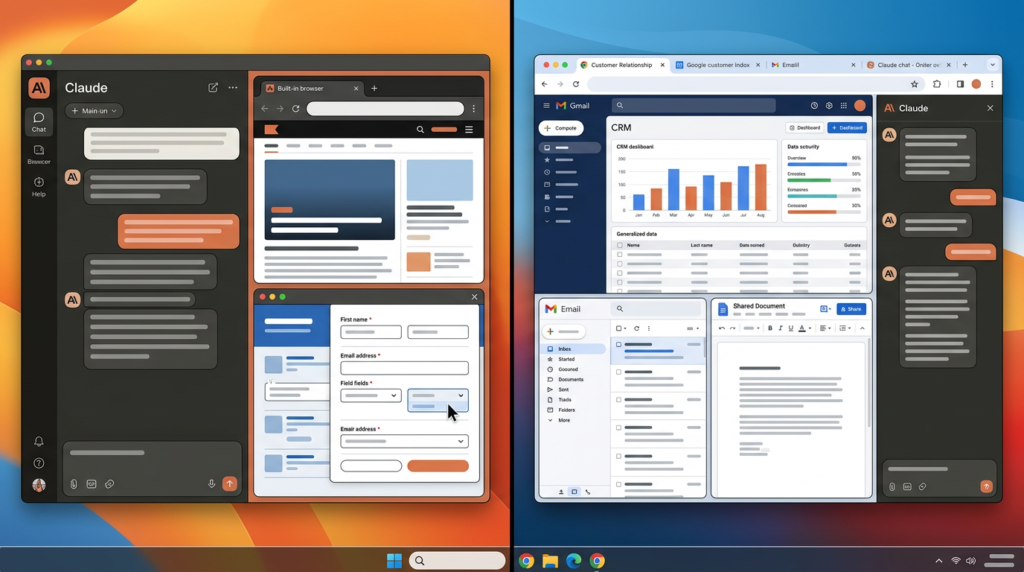
Anthropic is not retiring its Claude in Chrome extension. Instead, it now offers two browsing modes designed for different situations.
The built-in browser suits tasks that do not need your personal browser. You can send Claude to gather research, check public webpages, retrieve invoices, or work inside a separately authenticated portal. Claude performs the task in its own browsing environment while you continue using your normal browser.
Claude in Chrome serves a different purpose. It works with the webpage already in front of you and can use accounts already active in Chrome. That makes it better for updating a customer relationship management system, editing an open document, or working through an inbox.
If you already use Claude in Chrome, Anthropic says it will remain the default. Other users will receive the built-in browser as their default once the rollout reaches them.
Users can switch between the two under the Cowork settings. They can also request a particular browser for an individual task.
MacStories describes the design as a hybrid, combining the isolation of an agent-controlled browser with a desktop-based workflow.
The choice is no longer simply whether Claude can browse. It is which digital workspace Claude should enter—and how many doors you want unlocked when it arrives.
The Practical Appeal Is Enormous
AI companies have spent years connecting assistants to calendars, cloud drives, business platforms, and communication tools. Those connectors remain valuable, but they only cover services that support them.
The web itself is the universal fallback.
A browser-capable agent can interact with almost any service that exposes a standard visual interface. It does not need a bespoke integration for every invoice portal, vendor dashboard, booking site, or internal tool.
That expands the number of tasks Claude can attempt.
Imagine asking Cowork to research a market, visit several vendor websites, organize the findings, and draft a recommendation. The browser handles the web leg of the journey. Cowork can then combine those findings with documents, files, and other resources available to the session.
For businesses, the more intriguing use cases may be deeply boring ones. Copying figures from dashboards. Downloading monthly invoices. Checking whether records match. Completing repetitive forms.
Boring work is excellent territory for automation because nobody dreams of spending Friday afternoon collecting twelve nearly identical PDF receipts.
The New Stack reports that the built-in browser removes the Chrome extension requirement for many of these jobs. That lowers the setup barrier and gives Anthropic greater control over the browsing environment.
One click less may sound trivial. Multiply it across thousands of employees and recurring tasks, and suddenly the tiny interface change starts wearing a business suit.
Prompt Injection Remains the Uninvited Guest
Separating Claude’s browser from your personal one improves containment, but it does not eliminate the central security problem facing browser agents: prompt injection.
A malicious webpage can hide instructions designed for an AI system rather than a human reader. Those instructions might tell the agent to ignore the user’s request, reveal information, visit another website, or perform an unwanted action.
The trick is devilishly awkward because reading webpages is part of the agent’s job. Claude must process page content to help you, yet some of that content may attempt to manipulate Claude.
Anthropic says its built-in browser uses the same safeguards as Claude in Chrome. Claude requests permission before acting on a website for the first time. The system blocks certain high-risk sites and checks proposed actions against the user’s original instructions.
Those protections can reduce risk. Anthropic openly says they cannot remove it.
The company recommends beginning with trusted websites, closely supervising consequential tasks, and stopping a session if Claude behaves unexpectedly.
That is sensible advice. It also reveals the current limit of the technology. Browser agents are becoming useful enough to perform real work, but they are not reliable enough to receive unlimited authority.
Treat Claude like an extremely fast assistant who occasionally accepts instructions from suspicious sticky notes found in the hallway. Helpful? Absolutely. Ready for unsupervised access to the company treasury? Perhaps let us all take a breath.
A New Default Raises Bigger Questions
The built-in browser will become the default for eligible users who do not already use Claude in Chrome. That detail caught the attention of The Next Web, which connects the launch to a broader debate over browsers, platform power, and Europe’s Digital Markets Act.
The DMA requires designated gatekeepers to provide certain choices around browsers, search engines, and virtual assistants. Those rules target large platforms that control major gateways to digital services.
Anthropic is not currently a designated gatekeeper under the law, and Cowork’s browser appears inside an app rather than presenting itself as a traditional standalone browser. As TNW argues, that means the normal browser choice-screen logic may not apply in the same way.
It is a provocative point.
People may increasingly use browsers without consciously choosing a browser. An AI assistant could simply open its embedded web environment whenever work requires it. The user chooses the assistant, and the assistant quietly determines the browsing layer.
This does not necessarily mean Anthropic is evading regulation. The legal classification and practical user experience are separate questions.
Still, embedded agent browsers complicate rules built around Chrome, Safari, Firefox, and other products people deliberately open. Regulators spent years asking which browser should appear on a device.
AI agents introduce a stranger question: What happens when the browser becomes an invisible organ inside another application?
The Browser Is Becoming AI Infrastructure
Traditional browsers were designed around human attention. People open tabs, scan pages, click links, enter text, and occasionally fall into a two-hour Wikipedia tunnel about medieval siege engines.
Agent browsers reorganize that relationship.
The user describes an outcome. The agent chooses pages, navigates interfaces, and performs actions. The browser becomes less of a destination and more of an execution layer.
That shift could change online services. Websites currently optimize layouts for human visitors, advertising, search rankings, and conversion rates. If agents become regular visitors, companies may need to think about interfaces that both people and AI systems can navigate reliably.
It could also change competition among AI assistants. Model quality remains important, but practical capability increasingly depends on whether an assistant can finish tasks across messy, fragmented web services.
An AI that writes a beautiful plan is useful. An AI that retrieves the right figures, completes the required form, and hands you the finished result may be much harder to replace.
Anthropic’s browser therefore belongs to a larger industry movement. AI companies are building controlled environments where agents can operate software, use websites, and carry tasks across multiple steps.
The chatbot window is not disappearing. It is growing arms.
The arms can click things now. Everyone remain calm.
Isolation Helps, but It Is Not a Force Field
Anthropic deserves credit for separating Cowork’s browser from the user’s ordinary browsing profile. That design limits automatic exposure and gives users more deliberate control over authentication.
However, isolation should not be confused with immunity.
Once users import a login or authenticate manually, Claude can interact with that account in its built-in environment. If the agent misunderstands a request, encounters malicious instructions, or performs an incorrect action, browser separation does not magically reverse the consequences.
The safety model therefore relies on several layers: limited default access, site permissions, blocked high-risk destinations, action checks, user supervision, and careful decisions about authentication.
No single layer can carry the entire load.
Businesses considering the feature will need policies governing which sites employees may access through Cowork. They may also want human approval for actions involving publication, purchases, customer records, or irreversible changes.
Enterprise administrators can control whether the built-in browser and Claude in Chrome are available. That administrative layer matters because different organizations face wildly different risks. Researching public competitors is not the same as editing healthcare records. Collecting invoices is not the same as sending payments.
The browser makes delegation easier. Governance decides whether that delegation remains sensible.
Or, stated less formally: giving the robot a separate desk is wise. You should still decide which filing cabinets it may open.
What This Means for Claude Cowork

The built-in browser makes Cowork feel more like a genuine workplace agent and less like a chatbot surrounded by integrations.
Claude can already work with files, tools, connectors, and longer-running tasks. A browser fills one of the largest remaining gaps by letting it operate services that lack purpose-built connections.
The update also gives users a clearer privacy choice. If a task does not require personal tabs or existing sessions, Claude can use an isolated browser. When a task depends on the page already open in Chrome, the extension remains available.
That division is practical. It acknowledges that not every web task deserves the same level of access.
The feature is still rolling out, and its real value will depend on reliability. Can Claude navigate unpredictable sites? Can it recover when layouts change? Will security checks prevent dangerous actions without interrupting routine work every twelve seconds?
Those answers will emerge through actual use.
For now, Anthropic has made an important strategic move. The company is no longer treating browsing as an extension bolted onto Claude. It is turning the browser into a native part of Cowork’s operating environment.
The future of AI assistants may not involve people asking more questions. It may involve people assigning more errands.
Claude now has somewhere to run those errands—and, mercifully, it will not need to rummage through your bookmarks first.
Sources
- Anthropic: Claude Gets Its Own Browser in Cowork
- The Next Web: Claude Now Has Its Own Browser
- The Decoder: Claude Cowork Runs Its Own Browser
- Digital Trends: Claude Cowork Gets a Separate Browser
- The New Stack: Anthropic’s Claude Has a Browser of Its Own
- MacStories: Anthropic Introduces an In-App Browser for Claude Cowork
- Anthropic Help Center: Using the Built-In Browser
The Kingy Brief
Get The Kingy Brief.
AI changes, original tests and one practical thing to try. Fridays at 09:00 Vancouver time.
Free · Double opt-in · Unsubscribe anytime
Signup help and newsletter schedule
Signup form provided by Beehiiv. After submitting, check your inbox for "Confirm your subscription to The Kingy Brief" and open its confirmation link. Check Spam or Promotions if you cannot find it.
Fridays at 09:00 Vancouver time: source-checked AI changes, original tests and one practical thing to try. The weekly restart begins October 9, 2026. We skip a week when there is not enough verified material. Free. Unsubscribe anytime.