Claude Breaks Out of the Browser Tab
Browser-based AI assistants can perform increasingly impressive tricks. They can summarize sprawling webpages, complete forms, compare products, and click through repetitive menus. Yet many still suffer from a surprisingly ordinary problem: once you leave the browser, the conversation stays behind.
Anthropic wants to remove that digital dead end.
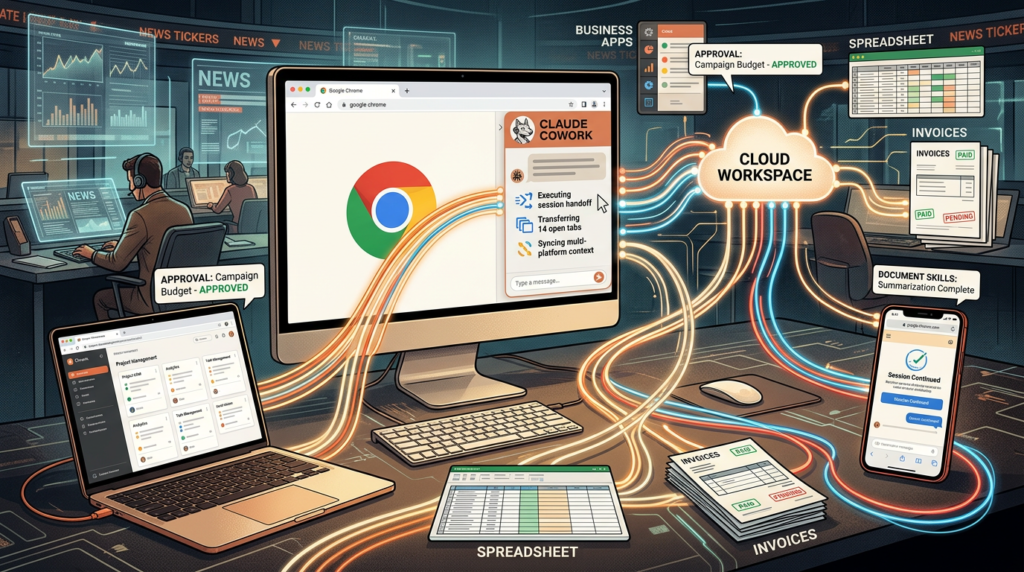
The company has upgraded Claude in Chrome so its side panel now runs as a full Claude Cowork session. Tasks started inside Chrome can continue through Claude’s desktop, web, and mobile apps without forcing users to repeat instructions or rebuild context.
According to 9to5Mac, conversations launched from the Chrome side panel now appear in a user’s regular Claude history. You can start a project beside a webpage, step away from the computer, open Claude elsewhere, and pick up the same thread.
That sounds like a modest synchronization update. It is more important than that.
Anthropic is turning Claude in Chrome from an isolated browser helper into another doorway to Cowork, its task-oriented AI workspace. The browser becomes the place where Claude gathers information and takes actions. Desktop, web, and mobile become places where the user can review, extend, or redirect that work.
In short, Claude no longer forgets everything the moment you leave the tab. A low bar, perhaps—but one worth clearing.
What Actually Changed?
The upgrade introduces three connected improvements.
First, Chrome conversations are now saved to the user’s Claude account. Previously, sessions in the browser side panel behaved like separate conversations. Moving to the desktop app often meant starting over or manually transferring whatever Claude had discovered.
Second, Cowork sessions can move between platforms. A task launched in Chrome can continue in Claude Desktop, the web app, or the mobile app. The session belongs to the account rather than the browser instance where it began.
Third, a user’s configured skills and connectors now work inside the Chrome experience. Tech My Money describes this as the browser inheriting capabilities that previously worked in the broader Cowork environment but did not accompany its side-panel conversations.
Together, those changes reduce the friction of switching tools halfway through a project.
Imagine asking Claude to investigate several webpages. It collects the relevant details while operating inside Chrome. You can later open the same session on desktop, attach locally stored material, and ask it to compare the two sets of information.
No copying. No “Here is what we were doing before.” No awkwardly pasting a miniature autobiography of the task.
The conversation simply continues.
Cowork Is More Than a Fancy Chat Window
To understand why this matters, it helps to separate Claude Cowork from ordinary chatbot conversations.
A standard chatbot usually waits for a prompt, produces an answer, and then waits again. Cowork focuses more heavily on completing multi-step tasks. It can use connected services, work with files, browse websites, create outputs, and pause when it needs a decision.
The Chrome update brings that task-oriented behavior directly beside the webpage a user is viewing.
Claude can read the current page and interact with it using the person’s existing browser session. It can click links, navigate between pages, type into fields, and fill out forms. Because it works through Chrome, it may also reach websites where the user is already signed in.
That last detail adds serious utility. It also adds serious responsibility.
The reports from 4sysops and Crypto Briefing frame the update as a bridge between browser actions and the wider Cowork ecosystem. Claude does not merely discuss what appears on the page. It can perform parts of the workflow.
The side panel is therefore becoming less like a chat bubble and more like a small operations desk—minus the swivel chair and suspicious collection of coffee mugs.
The Invoice Example Shows the Bigger Idea
Anthropic’s example involves one of office life’s least glamorous traditions: processing invoices.
A user could ask Claude to visit several vendor portals, gather invoice information, and organize the amounts and dates in a spreadsheet. Since Claude operates through the existing Chrome session, it can move through sites where the user has already logged in.
The user could then continue that Cowork session on desktop, add local files, and compare the collected figures with an earlier budget.
None of those individual actions sounds revolutionary. That is exactly the point.
The strongest automation opportunities often hide inside dull, fragmented processes. A person opens one portal, retrieves a figure, pastes it into a spreadsheet, visits another portal, downloads a file, checks a budget, and repeats the routine until their soul briefly leaves their body.
Claude’s upgrade tries to connect those steps.
Chrome handles the live websites. Cowork preserves the task and its history. Desktop adds local-file access when needed. Mobile gives the user another place to check progress or respond.
The result is not one magical interface that does everything equally well. Instead, Anthropic is linking several interfaces so the task can move to whichever one fits the next step.
That may prove more practical than cramming every capability into a single app.
Skills and Connectors Join the Journey
Session continuity would already make Claude in Chrome more convenient. Skills and connectors make it substantially more capable.
Skills are reusable instructions or workflows that help Claude perform particular types of work consistently. Instead of rebuilding the same process every time, users can rely on a saved method that tells Claude how to approach it.
Connectors give Claude access to external services and information sources authorized by the user or organization. They can bridge Cowork with places where documents, records, projects, and other work already live.
Before the upgrade, the Chrome side panel occupied an awkward position. It could see and manipulate the active webpage, yet previously configured Cowork capabilities did not fully follow users into that browser session.
Now those tools travel with the account. If a skill or connector is already configured, it can operate from the Cowork-powered side panel without a second setup process, according to the reports.
This makes the browser a stronger starting point for complex jobs.
A user can begin with information scattered across websites, apply an established workflow, reach connected resources, and then continue the same task elsewhere. The thread remains intact.
That consistency matters because automation loses much of its charm when users must repeatedly reconnect services, reload instructions, and explain the project from scratch. At that point, the “assistant” starts generating its own administrative workload. Very innovative. Slightly backwards.
Existing Browser Logins Are the Secret Ingredient
Claude in Chrome works through the user’s active browser environment rather than an entirely separate browsing profile.
That means the extension can interact with webpages using existing login sessions. If the user is already signed in to an approved vendor portal or another service, Claude can potentially operate within that session, subject to its permissions and safety checks.
This differs from browser tools that work inside isolated environments. Those environments can offer useful separation, but they may require users to log in again or may not have access to the same authenticated websites.
Using the person’s everyday Chrome session makes Claude more immediately useful. It can work where the person already works.
It also raises the stakes.
A chatbot that produces a poor summary creates an inconvenience. An agent that clicks the wrong button inside an authenticated account can create a much larger problem. Once an AI can type, submit forms, download files, or navigate private portals, errors stop being merely conversational.
Anthropic therefore gives users different approval options for browser actions. The Cowork side panel includes an automatic-approval mode designed to keep routine work moving while still reviewing actions for possible security issues.
However, faster automation does not mean unlimited authority. Certain sensitive actions still require direct human approval. Users should also review Claude’s work before treating a completed task as unquestionably correct.
In browser automation, “trust but verify” has never looked so fashionable.
Prompt Injection Remains the Uninvited Guest

Anthropic openly acknowledges that browser agents remain vulnerable to prompt injection.
Prompt injection occurs when an AI encounters hostile instructions hidden in content it is processing. A webpage might contain text designed to manipulate the agent, redirect its behavior, or trick it into exposing information. The user may never notice those instructions, but the AI can still read them.
That threat becomes more serious when the assistant can take actions.
Claude applies safety checks intended to identify suspicious behavior, data-exfiltration attempts, or instructions that conflict with the user’s original request. In automatic-approval mode, actions still undergo a separate review rather than receiving a completely unrestricted pass.
If the system blocks an action, Claude can attempt a safer route or stop and request permission. Sensitive activities, including purchases and sharing personal information, continue to require user confirmation.
These safeguards matter. They do not solve the entire problem.
Anthropic says its defenses can reduce the risk but cannot eliminate it. That is an important admission because prompt injection remains a broad challenge across the browser-agent industry—not a peculiar Claude-only bug that someone can swat with a software update and forget.
Users should provide narrow instructions, limit access to necessary websites, and monitor tasks involving confidential information or irreversible actions. Enterprises should apply even stricter boundaries.
Letting an AI loose across every authenticated tab just because it can summarize PDFs quickly would be an exceptionally modern way to have a very old-fashioned security incident.
Enterprises Get Extra Control
The update arrives differently for business environments, where convenience must coexist with security policy, regulatory obligations, and the ever-watchful eye of IT.
Enterprise administrators must enable the Cowork-powered Chrome experience for their organizations. They can also restrict Claude to approved domains, limiting where the extension may operate.
Domain controls give organizations a way to permit useful workflows without granting the agent unrestricted access to every internal dashboard, customer database, financial system, and web-based tool.
That distinction matters. A marketing team might benefit from allowing Claude to work inside selected publishing platforms and approved research sites. The same organization may want to block the extension from payroll systems, confidential legal portals, or infrastructure dashboards.
The feature therefore represents more than individual productivity. It introduces another governance question for companies deploying AI agents:
Where should the assistant be allowed to act?
Enterprises will need to evaluate connected services, browser permissions, approval settings, and the sensitivity of each workflow. They should also decide which tasks require human review regardless of what the software technically permits.
The new continuity makes Claude more useful because context and capabilities travel across surfaces. Yet the same portability can broaden the potential impact of a poorly scoped task.
For administrators, the goal will not be to eliminate every risk. That would probably eliminate most of the utility too. The goal will be to constrain Claude’s reach so a mistake remains manageable.
Boring controls save exciting amounts of trouble.
Availability Comes With Several Asterisks
The full Cowork side-panel experience is available to Claude Max and Team customers. Anthropic says it will reach Pro users over the coming weeks.
Enterprise organizations can access it when administrators enable the necessary Cowork and Chrome settings.
The extension itself does not offer identical functionality on every device or platform. Claude’s Chrome extension remains a desktop-browser tool. It does not run on mobile browsers, although users can continue a saved Cowork session through Claude’s mobile app.
Other Chromium-based browsers are not supported at this stage either. Using a browser built on Chromium does not automatically make it compatible with the Claude extension.
Local-file access also remains a desktop capability. A Chrome session can use webpages, connectors, skills, and saved Cowork context, but it cannot independently reach arbitrary files stored on the computer.
That limitation helps explain Anthropic’s broader approach.
Chrome does not replace Claude Desktop. Mobile does not replace Chrome. Each interface contributes a different part of the workflow, while the Cowork session acts as the connective tissue between them.
Users should therefore think of the update as continuity across surfaces, not perfect feature parity. The work can travel, but every destination does not carry the same toolbox.
Claude remembered the suitcase. It did not pack every appliance in the house.
Why This Small Update Could Matter
The AI race increasingly revolves around action rather than conversation.
Most major assistants can draft an email, summarize a report, or produce a respectable list of ideas. The more competitive question is whether they can complete useful work across the messy collection of websites, files, tools, accounts, and devices that people actually use.
Anthropic’s Chrome update attacks one of that vision’s least glamorous obstacles: interrupted context.
People rarely complete complex work in one tab, on one machine, during one uninterrupted sitting. They start in a browser, continue at a desk, review something on a phone, and return later with another document. An assistant that cannot follow those transitions repeatedly becomes the thing slowing the workflow down.
Claude Cowork now follows the task more naturally.
The feature may prove particularly useful for research, routine administration, data collection, content operations, and other jobs that combine websites with connected tools or local documents. However, its real value will depend on reliability. A seamless agent that occasionally takes the wrong consequential action is not seamless. It is a surprise generator.
Anthropic has improved the workflow while acknowledging the unresolved security problem underneath it. That combination—greater agency plus explicit caution—offers a realistic picture of where browser agents currently stand.
They are becoming useful colleagues. They still need supervision.
The Browser Becomes Part of the Workspace
Claude’s upgraded Chrome side panel does not introduce an entirely new AI assistant. It connects pieces Anthropic had already built.
Browser actions now sit inside a persistent Cowork session. Conversations enter Claude’s history. Skills and connectors follow the user. Work can continue through desktop, web, or mobile, while the Chrome extension remains ready to interact with authenticated webpages.
That removes one of the irritating seams between talking to an AI and asking it to perform an actual job.
Important limits remain. Local files still require desktop access. The browser extension has limited platform support. Enterprise availability depends on administrator controls. Prompt injection remains a genuine threat, and automatic approvals should never become automatic complacency.
Even so, the direction is clear.
AI assistants are moving away from isolated chat boxes and toward persistent work environments. Anthropic wants Claude to retain the assignment, understand the available tools, and meet users wherever they continue the job.
The humble browser side panel has received a promotion. It is no longer merely watching from the edge of the page. Now it is part of the workspace—and apparently it remembers what everyone was doing.
Sources
- 9to5Mac: Claude’s Chrome side panel is now a full Cowork session
- 4sysops: Claude Cowork now carries browser tasks across Chrome and desktop
- Tech My Money: Claude in Chrome now carries your session to the desktop
- Crypto Briefing: Claude’s Cowork sessions now sync across Chrome
The Kingy Brief
Get the next Kingy Brief.
Source-checked AI changes, original tests and one practical thing to try.
Free · Choose your subjects · Double opt-in · Unsubscribe anytime