
Loop engineering is the practical skill of designing AI agent workflows that can keep working, checking, revising, and stopping based on evidence. A prompt is one instruction. A loop is the whole operating system around the instruction: goal, context, tools, checks, revisions, approvals, and limits.
The provocative version is “prompt engineering is dying.” The accurate version is better: prompt engineering is becoming a smaller part of a larger workflow. You still need clear instructions. But if you use Claude Code, Codex, Cursor, GitHub Copilot agents, or any serious AI agent, the highest-leverage work is no longer writing one perfect prompt. It is designing the loop that keeps the agent useful after the first response.
That is why this guide treats loop engineering as a working discipline, not a slogan. The term became visible in the AI coding world in June 2026, when Business Insider reported on Boris Cherny, Peter Steinberger, Claire Vo, and Addy Osmani discussing loops for coding agents. But the underlying pattern is older. Research on ReAct, Reflexion, Self-Refine, and Tree of Thoughts all points in the same direction: better AI work often comes from cycles of acting, observing, evaluating, and revising.
Executive Summary
Prompt engineering is the practice of writing clear instructions so a model produces a useful output. OpenAI defines it as writing effective instructions for a model so it consistently generates content that meets your requirements. That still matters.
Loop engineering is the design of repeatable agent workflows. A loop starts with a goal, gathers context, plans, acts with tools, verifies the result, revises when the check fails, and repeats until a stop condition is met.
The shift is happening because AI agents now do more than answer. Claude Code documentation describes an agentic loop of gathering context, taking action, verifying results, and repeating until the task is complete. OpenAI Codex web can read, edit, and run code in a cloud environment, including background tasks and parallel work. Codex subagents can spawn specialized agents in parallel and collect their results. Cursor is also moving toward always-on and cloud agent workflows through Cloud Agents and Cursor Automations.
The practical takeaway: stop asking, “What prompt should I write?” Start asking, “What loop should produce, check, improve, and safely stop this work?”
Table Of Contents
- What is loop engineering?
- Prompt engineering vs. loop engineering
- Why AI agents need loops
- The basic loop: goal, context, plan, act, verify, revise
- How Claude Code-style workflows changed the mental model
- How Codex and /goal workflows fit in
- Agents prompting agents
- Common loop engineering patterns
- Practical loop templates
- Where loop engineering beats prompt engineering
- Where prompt engineering still matters
- Risks and failure modes
- Why this matters
- Should businesses care?
- Should creators care?
- Should developers care?
- What feels unproven
- FAQ
- Sources
Key Takeaways
- Prompt engineering is not gone. It is becoming one layer inside agent workflow design.
- Loop engineering means designing the cycle around an AI agent: goal, context, plan, action, verification, revision, and stop condition.
- Agent tools make loops practical because they can read files, use tools, run tests, search sources, inspect output, and continue after errors.
- The most important part of a loop is not the prompt. It is the check that decides whether the work is actually done.
- Good loops are bounded. They define permissions, budgets, sources, review gates, escalation points, and what the agent must not do.
- Bad loops create expensive nonsense faster. They burn tokens, repeat mistakes, trust stale context, and may automate risky actions.
- Beginners should learn prompting, but they should also learn small repeatable workflows.
- Creators can use loops for research, content repurposing, publishing, and quality checks.
- Businesses should treat loops like operating procedures for AI agents, not magic.
- Developers should anchor loops in tests, CI, code review, worktrees, traces, and reproducible verification.
What Is Loop Engineering?
Loop engineering is the practice of designing repeatable AI agent workflows that move from a goal to action, verification, revision, and completion.
A loop is not just a prompt that says “try again.” A real loop has structure:
- A goal: the outcome that should be true.
- Context: files, sources, constraints, examples, tools, and prior decisions.
- A plan: the next pass, not a fantasy roadmap.
- Actions: tool calls, edits, searches, tests, drafts, reviews, uploads, or messages.
- Verification: a check the agent can run or a human can inspect.
- Revision: what happens when the check fails.
- Stop conditions: what counts as done, blocked, unsafe, too expensive, or out of scope.
The prompt is still there. It tells the model what to do right now. The loop tells the system how to keep working when the first answer is incomplete.
Here is the shortest useful definition:
Loop engineering is prompt engineering plus workflow design, verification design, context management, and safe stopping rules.
Prompt Engineering vs. Loop Engineering

| Dimension | Prompt Engineering | Loop Engineering |
|---|---|---|
| Core question | What should I ask the model? | What workflow should produce and verify the result? |
| Main unit | A prompt, instruction, template, or message | A recurring goal-driven process |
| Best for | Single responses, formatting, classification, brainstorming, drafts | Research, coding, debugging, publishing, QA, monitoring, multi-step work |
| Success signal | The answer looks useful | A check passes, evidence is shown, or a human approves |
| Failure mode | Vague output, hallucination, wrong format | Runaway token use, repeated mistakes, unsafe tool action, weak verification |
| Context strategy | Put the right details in the prompt | Curate changing context across steps, sessions, tools, and agents |
| Human role | Prompt writer and evaluator | Goal setter, reviewer, operator, risk owner |
| Example | “Write a blog post about AI agents.” | “Research sources, outline, draft, fact-check, add links, optimize images, publish, verify live page.” |
Why AI Agents Need Loops
AI agents need loops because useful work rarely fits in one response.
A coding agent fixing a bug may need to run tests, read errors, inspect files, edit code, run tests again, and adjust. A research agent may need to search primary sources, compare dates, reject weak claims, rewrite a summary, and cite sources. A publishing agent may need to draft, upload images, set categories, publish, check the public page, and fix formatting.
That is exactly the shape described in Claude Code’s agentic loop documentation: gather context, take action, verify results, and repeat. Claude Code’s best-practices docs also make a blunt point: if the agent has no check it can run, you become the verification loop. The docs recommend giving Claude tests, builds, screenshots, output comparisons, or other pass/fail signals.
OpenAI’s Codex documentation points in the same direction. Codex web lets Codex work in the background in its own cloud environment. AGENTS.md gives Codex project-specific guidance before work begins. Skills package reusable instructions, resources, and optional scripts so a workflow can be followed reliably. Subagents let Codex delegate work to specialized agents, with the important caveat that subagents use more tokens.
The pattern is clear: once agents can use tools, inspect results, and continue, the user’s job shifts from crafting a sentence to designing a work system.
The Basic Loop: Goal -> Context -> Plan -> Act -> Verify -> Revise
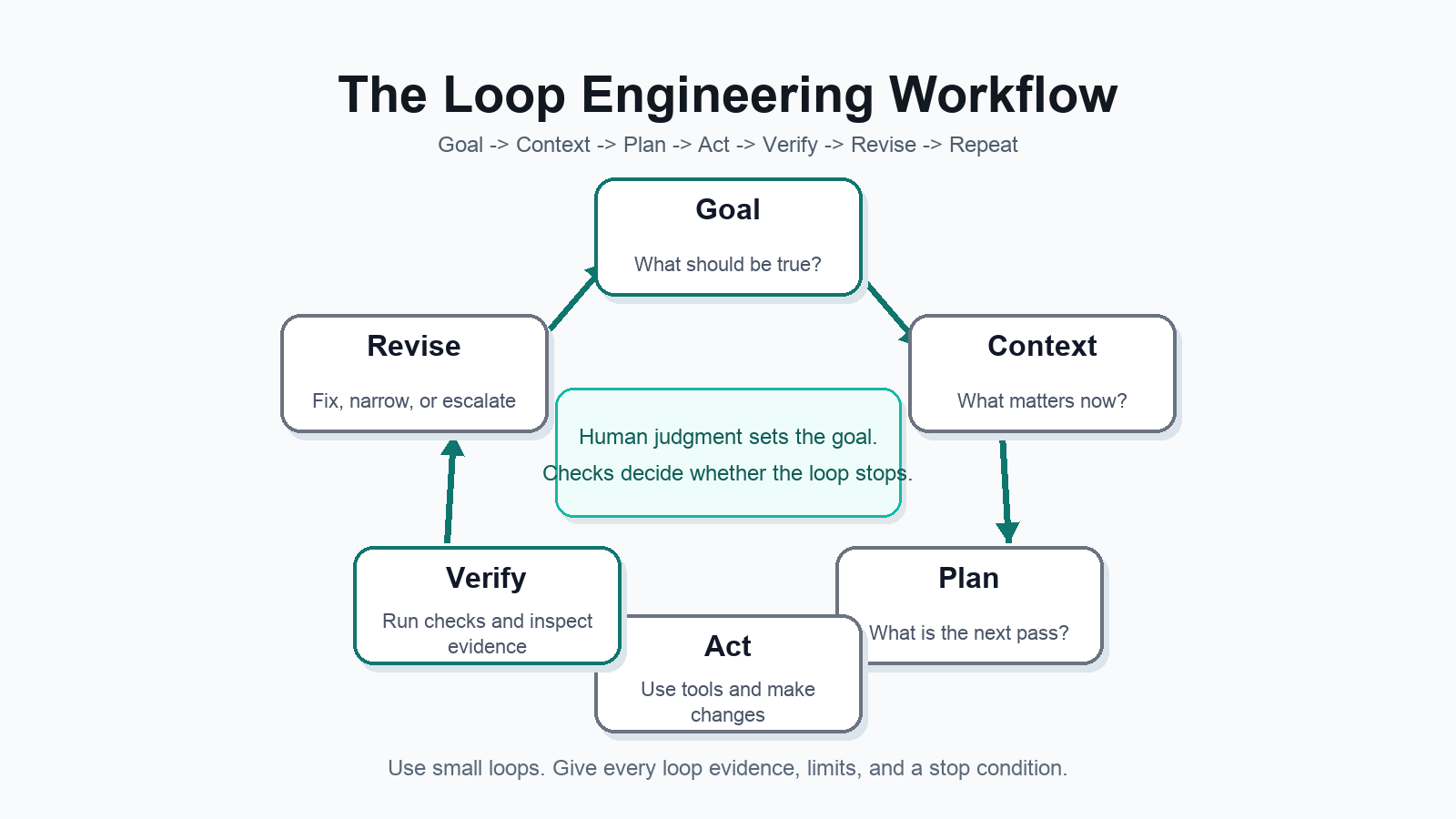
Every practical loop can start with this skeleton:
- Goal: Name the outcome in plain language.
- Context: Give or let the agent gather the relevant files, sources, constraints, examples, and current state.
- Plan: Ask for the next useful pass, especially when the work is complex or uncertain.
- Act: Let the agent use tools or produce the next artifact.
- Verify: Run tests, compare against sources, inspect a screenshot, check links, validate output, or ask a separate reviewer.
- Revise: Use the verification result as new context and make another pass.
- Repeat or stop: Continue only until the stop condition is met.
A good loop does not run forever. It stops when the check passes, when the budget is reached, when the agent is blocked, when the risk rises above a threshold, or when human judgment is needed.
How Claude Code-Style Workflows Changed The Mental Model
Claude Code is important because it made the agentic loop visible to everyday developers and builders. It is not just a chat window. The Claude Code GitHub repository describes it as an agentic coding tool that lives in the terminal, understands a codebase, and can help with routine tasks, explanations, and git workflows.
The mental model changes in three ways.
First, the agent can inspect the working environment. Instead of pasting a file into a chatbot, you can ask the agent to search, read, run, and compare inside the project.
Second, verification becomes part of the work. Claude Code’s docs recommend checks such as tests, builds, screenshots, scripts, or a second-opinion subagent. That is loop engineering in plain clothes.
Third, context becomes finite and active. Anthropic’s context engineering essay argues that building with agents is less about finding magic words and more about managing the whole context state: instructions, tools, external data, message history, and memory. An agent running in a loop generates more context each turn, so the loop must decide what to keep, summarize, discard, or hand to another agent.
This is also why the best Claude Code workflows feel more like managing a smart junior teammate than prompting a chatbot. You define the outcome. You give constraints. You ask it to explore. You review the plan. You give it a check. You make it show evidence.
How Codex And /goal Workflows Fit In
A /goal workflow is a goal-driven loop where the user defines the target state and the agent keeps working through steps until the target is satisfied, blocked, unsafe, or out of budget.
Exact command names vary by tool and surface. Some systems expose goal modes, tasks, automations, custom commands, or tickets instead of a literal /goal command. The useful idea is the same: the user stops micromanaging each prompt and starts defining the work contract.
A practical /goal has five parts:
- Objective: What should be true when the work is complete?
- Scope: What files, systems, topics, or channels are in bounds?
- Verification: What evidence proves the goal is done?
- Limits: What budget, permissions, time, or risk boundaries apply?
- Escalation: When should the agent stop and ask a human?
Codex is built for this style of work. OpenAI’s Codex app announcement describes a command center for managing multiple agents, running work in parallel, collaborating across long-running tasks, using worktrees, and delegating repetitive work with automations. OpenAI’s harness engineering essay goes further: as agents take on more of the software lifecycle, the scarce work becomes designing environments, specifying intent, and building feedback loops.
That phrase is the heart of loop engineering: build feedback loops.
Agents Prompting Agents: What It Actually Means
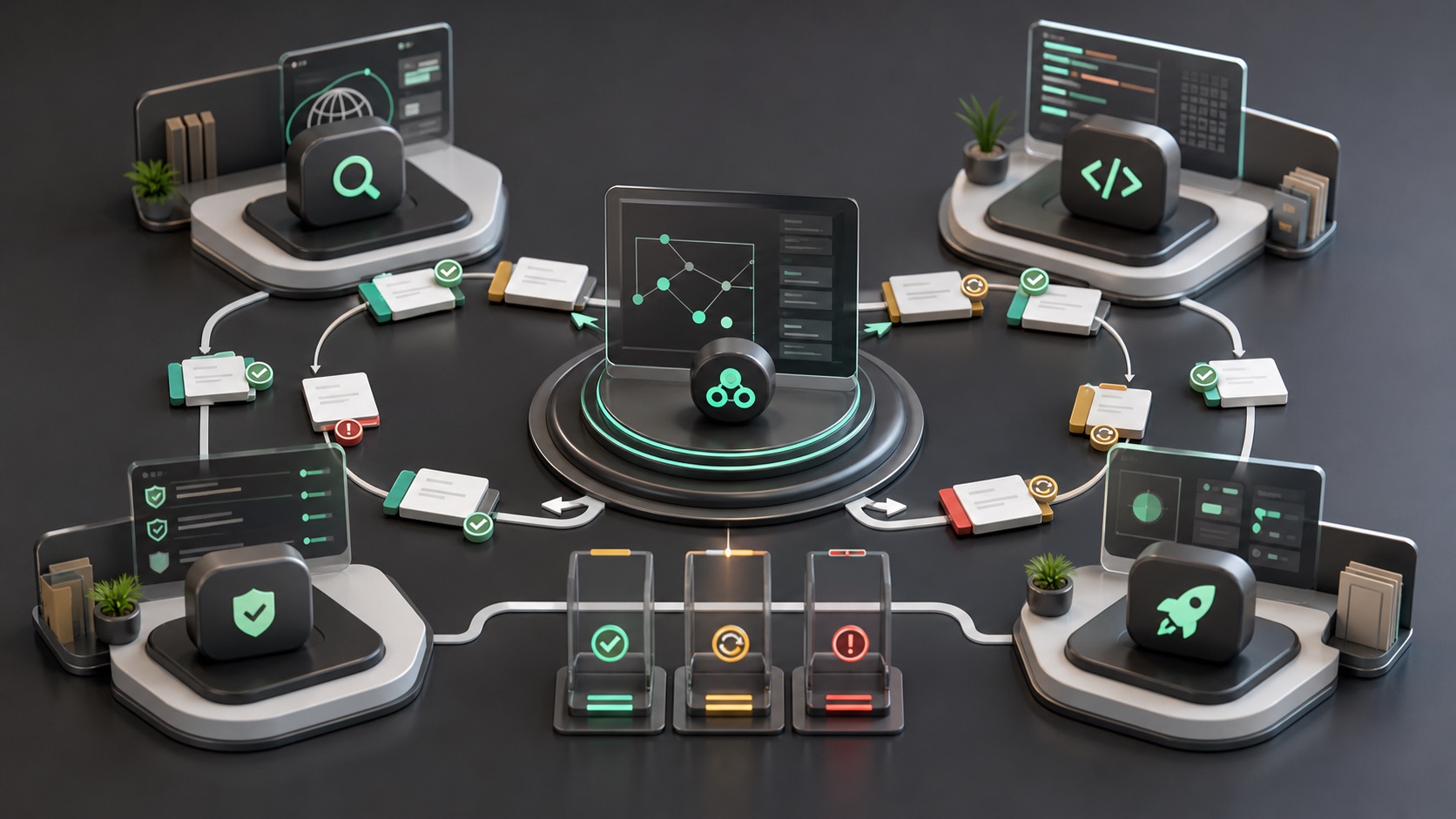
“Agents prompting agents” sounds stranger than it is.
In practice, it usually means one agent creates instructions, context, or review criteria for another agent. A coordinator agent might ask a research agent to gather sources, a coding agent to implement a fix, a QA agent to test it, and a publishing agent to prepare the release. The coordinator then reads the outputs and decides what to do next.
Business Insider’s June 20, 2026 article quoted Boris Cherny describing a workflow where an agent prompts Claude and Claude writes the prompt. Do not over-mystify that. The plain version is: humans can delegate prompt-writing and task decomposition to agents, then supervise the resulting loop.
This can be useful when:
- The task is parallelizable, such as reading many files or checking many sources.
- The first agent needs a fresh critic that was not involved in the work.
- Different subtasks need different instructions, tools, or models.
- You want to keep the main conversation context smaller.
It can also go wrong. Multiple agents can multiply cost, amplify bad assumptions, or produce confident summaries of weak work. OpenAI’s Codex subagent docs explicitly warn that each subagent does its own model and tool work, so token use rises. Use subagents when the second opinion is worth paying for, not because it feels futuristic.
Common Loop Engineering Patterns
| Loop type | Best use case | Example goal | Verification step | Risk |
|---|---|---|---|---|
| Research loop | Source-backed analysis, AI news, product research | Verify whether a new AI feature actually launched | Check official docs, primary announcements, dates, and conflicting reports | Stale sources, weak secondary citations, invented certainty |
| Coding loop | Bug fixes, refactors, tests, PR prep | Fix the checkout bug and prove the test passes | Run failing test first, implement, rerun test suite, inspect diff | Agent patches symptoms, breaks adjacent behavior, or ignores style |
| SEO content loop | Long-form guides, comparison pages, content refreshes | Publish an AI guide with sources, internal links, FAQ, and images | Check claims, links, metadata, image alt text, category, live page rendering | Thin content, duplicate claims, forced links, hallucinated sources |
| QA loop | Visual checks, accessibility, release review | Confirm the page works on desktop and mobile | Run browser checks, screenshots, link checks, and error logs | Only checking the happy path |
| Debugging loop | Intermittent bugs, production incidents, logs | Find the root cause of a recurring timeout | Reproduce, inspect logs, test hypothesis, verify fix under same condition | Loop chases noise or overfits to one trace |
| Publishing loop | WordPress, newsletters, social publishing, docs | Publish a complete article in the right category | Check public URL, status, category, featured image, images, links, metadata | Premature publishing, broken formatting, missing attribution |
| Multi-agent review loop | High-risk or broad work | Have one agent build and another agent review | Fresh reviewer checks claims, tests, security, scope, and regression risk | More tokens, conflicting advice, review without authority |
Practical Loop Templates Readers Can Use
1. A WordPress Content Creation Loop
Goal:
Create and publish a source-backed WordPress article on [topic] in [category].

Context:
- Audience:
- Existing related articles:
- Required sources:
- Internal links:
- Image requirements:
- Claims to avoid:

Loop:
1. Research primary sources first.
2. Create an outline with answer boxes, tables, examples, FAQ, and sources.
3. Draft in short paragraphs.
4. Fact-check every named claim against sources.
5. Add natural internal links and authoritative external links.
6. Create or optimize images with alt text.
7. Publish as draft or live depending on permission.
8. Verify public URL, category, images, links, metadata, and formatting.

Stop when:
- The live page is accessible.
- The category and metadata are correct.
- No broken links or missing images remain.
- Uncertain claims are marked as uncertain or removed.
2. A Codex /goal Loop For Fixing A WordPress Issue
/goal
Fix the WordPress issue where [specific symptom] happens on [page/template].

Constraints:
- Do not install plugins or themes.
- Do not edit unrelated files.
- Back up any changed content before updating.
- Use existing WordPress functionality.

Verification:
- Reproduce the issue first.
- Apply the smallest fix.
- Check the page in desktop and mobile.
- Confirm the public page no longer shows the issue.
- Report changed files or REST updates.

Stop if:
- Authentication is missing.
- The fix requires a plugin/theme install.
- The issue appears to come from hosting or a paid third-party service.
3. A Claude Code-Style Debugging Loop
Investigate the failing checkout test.

Explore first:
- Read the payment flow files.
- Run the failing test.
- Summarize the root-cause hypothesis before editing.

Implement:
- Write or update a test that reproduces the bug.
- Make the smallest code change that fixes it.
- Run the relevant test suite.

Verify:
- Show the command output.
- Explain why the fix addresses the root cause.
- List any files changed.
- If tests still fail after three attempts, stop and report the blocker.
This mirrors the official Claude Code advice to explore, plan, implement, and verify instead of jumping straight into edits.
4. A Research Loop For Verifying AI News
Goal:
Verify whether [AI product/model/company claim] is true as of [date].

Research loop:
1. Search for official source first.
2. Find primary docs, blog posts, changelogs, GitHub releases, filings, or status pages.
3. Compare at least two reputable secondary reports only after primary sources.
4. Record exact dates.
5. Separate confirmed facts from interpretation.
6. Write a summary with source links.

Verification:
- No claim without a source.
- No pricing/benchmark/product claim from memory.
- Mention uncertainty when sources conflict.
- Include the date checked.
5. A Creator Loop: One Idea To Article, Video, Short, And Newsletter
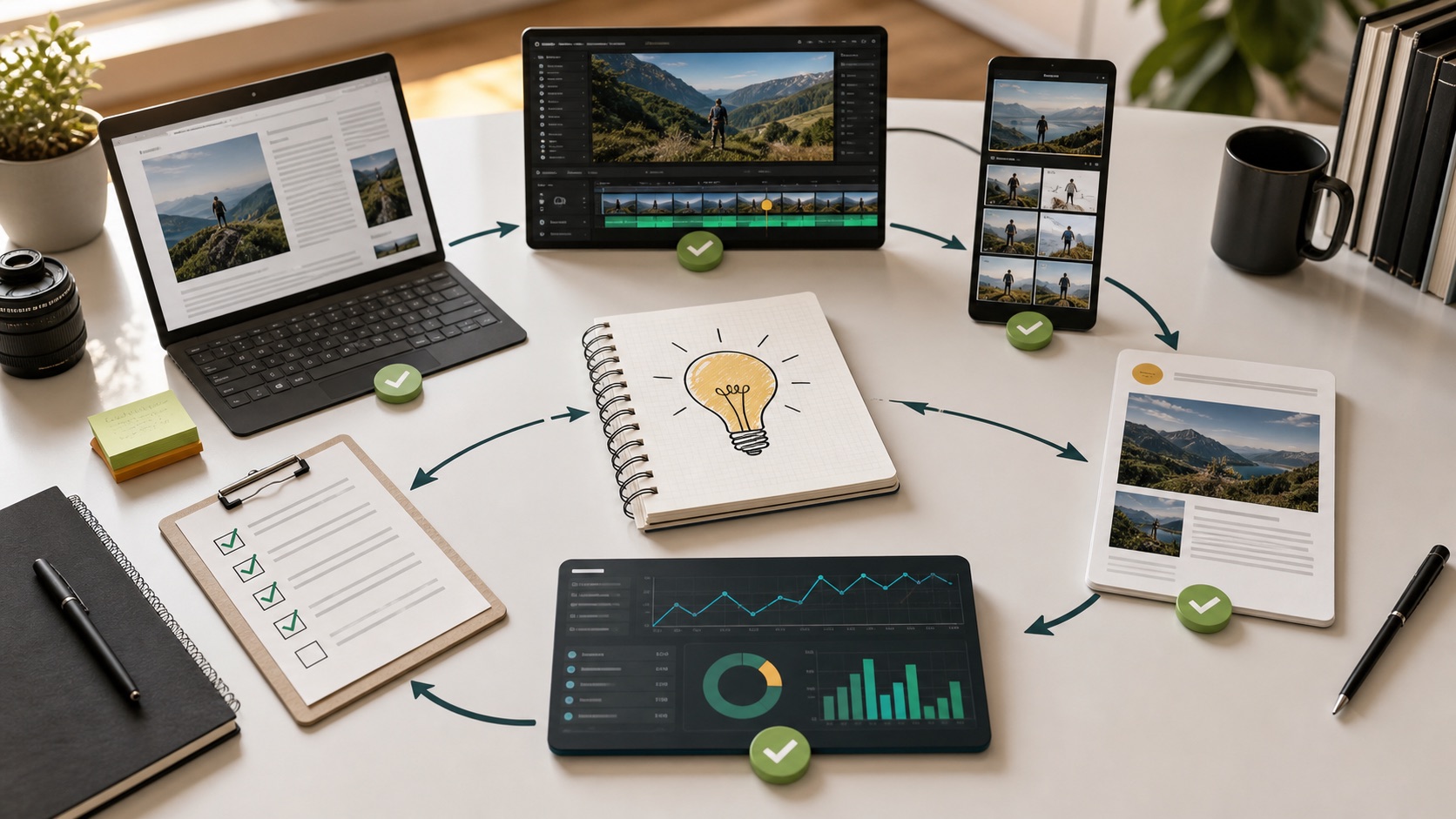
Goal:
Turn one idea into a useful content package without losing accuracy.

Loop:
1. Research the idea and source claims.
2. Draft the long-form article.
3. Extract the video outline.
4. Create three short-form hooks.
5. Draft the newsletter version.
6. Create a social post with one clear takeaway.
7. Check every asset for unsupported claims.
8. Publish, then review performance after 48-72 hours.

Stop when:
- Each asset has a clear purpose.
- Claims are sourced.
- The short-form hooks do not overpromise.
- Performance notes are saved for the next loop.
6. A Business Loop For Evaluating AI Tools Before Adoption
Goal:
Decide whether [tool] should be piloted, rejected, or monitored.

Loop:
1. Confirm what the tool does from official docs.
2. List data access, permissions, security posture, and pricing.
3. Compare it to the current workflow.
4. Run a small test with non-sensitive data.
5. Score value, risk, cost, and operational fit.
6. Create a pilot plan or rejection note.

Verification:
- Security owner reviews data access.
- Finance reviews expected cost.
- Team lead confirms the workflow problem is real.
- Pilot has a success metric and rollback plan.
This connects directly to the broader Kingy AI guidance on safe AI agent adoption, AI stack audits, and AI agent security.
Where Loop Engineering Beats Prompt Engineering
Loop engineering beats prompt engineering when the work has feedback.
That includes code that can be tested, content that can be fact-checked, designs that can be screenshotted, research that can be sourced, customer support that can be scored, and operations that can be audited.
Loops are especially strong when:
- The first answer is unlikely to be correct.
- The task depends on current external information.
- The result needs evidence, not just fluency.
- Multiple tools or systems are involved.
- The work can be broken into repeatable passes.
- A second reviewer can catch mistakes.
- The task happens often enough to justify setup.
For example, “write a post about Codex” is a prompt. “Research the latest OpenAI Codex docs, compare Claude Code and Cursor, draft a guide, add internal links, generate images, publish to WordPress, and verify the public page” is a loop.
For more on the AI coding side, see Kingy’s AI coding agent stack guide, Codex reasoning levels guide, and AI coding agents for non-developers guide.
Where Prompt Engineering Still Matters
Do not throw away prompting.
Bad prompts still create bad loops. If the goal is vague, the loop optimizes for the wrong thing. If the constraints are missing, the agent may take a path you did not want. If the verification standard is unclear, the agent may stop when the work merely looks complete.
Prompt engineering still matters for:
- Defining the goal.
- Setting tone, format, audience, and constraints.
- Providing examples.
- Explaining what not to do.
- Giving source requirements.
- Defining tool permissions.
- Writing review rubrics.
- Creating reusable skills, system prompts, or task templates.
The difference is that prompting becomes a component. The loop is the product.
Risks And Failure Modes

Loop engineering is powerful because it compounds. That is also why it is risky.
1. Token And Cost Blowups
Loops can run many model calls. Subagents multiply that. Long context windows cost money and attention. Business Insider’s loop engineering coverage and OpenAI’s Codex subagent docs both flag cost as a practical concern.
Control: Set budgets, attempt limits, tool limits, and escalation rules.
2. Self-Grading
The agent that made the mistake may be too forgiving when reviewing it. This is why separate verification matters.
Control: Use deterministic checks first. When judgment is needed, use a fresh reviewer or human review.
3. Context Rot
Long sessions can accumulate stale or distracting context. Anthropic’s context engineering post discusses context as a finite resource and notes that agent loops generate more data that must be cyclically refined.
Control: Summarize, prune, restart sessions, use skills, and isolate subagents when useful.
4. Tool Misuse
An agent with tools can change files, publish content, call APIs, send messages, or affect real systems.
Control: Use permission modes, sandboxing, dry runs, backups, staging environments, and explicit human approvals for irreversible actions.
5. Verification Theater
An agent can say it verified something without showing the evidence.
Control: Require command output, screenshots, source links, diff summaries, logs, or public URLs.
6. Automation Without Ownership
Loops can make work feel “handled” even when nobody owns the result.
Control: Assign an accountable human for every loop that touches customers, money, data, production systems, or published claims.
Why This Matters
This matters because the next productivity jump is not just better model output. It is better delegation.
In the chat era, users learned to ask better questions. In the agent era, users need to design better jobs. A job has a goal, inputs, tools, checks, deadlines, costs, and escalation rules.
That is why loop engineering feels like the practical bridge from “AI assistant” to “AI operator.”
The strongest teams will not be the ones with the longest prompt libraries. They will be the ones with the best repeatable workflows: research loops, QA loops, incident loops, publishing loops, content refresh loops, code review loops, customer support loops, and decision loops.
Should Businesses Care?
Yes, but businesses should care soberly.
Loop engineering is not a reason to replace governance with vibes. It is a reason to turn AI usage into documented operating procedures.
A business should start with loops that are:
- Low risk.
- High repetition.
- Easy to verify.
- Cost bounded.
- Useful even if the final approval stays human.
Good early candidates include research briefs, content refreshes, support-desk draft triage, CRM hygiene, documentation updates, QA checklists, and internal tool comparisons.
Bad early candidates include unsupervised financial decisions, legal advice, medical advice, customer-facing promises, production database changes, and anything involving sensitive data without clear controls.
Businesses can pair this guide with Kingy’s AI Agent Adoption Playbook, AI Stack Audit Guide, and AI Agent Security Guide.
Should Creators Care?
Yes. Creators may benefit from loop engineering faster than almost anyone.
A creator’s work already happens in loops:
- Idea collection.
- Research.
- Outline.
- Draft.
- Edit.
- Publish.
- Repurpose.
- Measure.
- Improve the next idea.
AI can help at every step, but only if the loop protects quality. A one-shot prompt can create a bland post. A creator loop can require sources, add lived examples, repurpose without exaggeration, check title promises against the actual content, and use analytics to improve the next piece.
If you care about being found in AI search systems, loops matter even more. The strongest content has clear definitions, answer boxes, examples, source-backed claims, tables, and structured FAQs. That connects directly to Kingy’s AI Search Visibility Guide and AI Search SEO Battlefield guide.
Should Developers Care?
Developers should care immediately.
Agentic coding is where loop engineering is already becoming daily practice. Claude Code, Codex, Cursor, GitHub Copilot agents, and similar tools make the loop visible because software has unusually strong verification signals: tests, type checks, linting, CI, screenshots, diffs, logs, traces, and pull requests.
The developer skill stack is shifting from “write every line” toward:
- Write the goal.
- Improve the harness.
- Give the agent useful context.
- Define tests and checks.
- Review diffs quickly.
- Split work across agents or worktrees when useful.
- Keep architecture coherent.
- Prevent the loop from creating debt faster than the team can understand it.
OpenAI’s harness engineering post makes this explicit: humans steer and agents execute. That is not “no engineering.” It is engineering at a different layer.
What Feels Unproven
Loop engineering is useful, but several claims around it are still unproven.
- It is not clear that fully autonomous loops can stay coherent for months without human taste and cleanup. OpenAI’s harness engineering post says architectural coherence over years remains an open question.
- It is not clear that more agents always help. Parallel agents can reduce wall-clock time, but they also add cost, coordination overhead, and conflicting advice.
- It is not clear which loop patterns generalize outside coding. Content, sales, research, operations, and compliance all need different verification signals.
- It is not clear what the right job title is. Loop engineering, context engineering, harness engineering, agentic engineering, and workflow engineering all describe overlapping pieces.
- It is not clear that most teams are ready to govern agent permissions safely. Tool access, data access, and external side effects need more discipline than prompt libraries ever did.
The practical stance: use loop engineering now, but keep the loops small, evidence-driven, and easy to interrupt.
FAQ
What is prompt engineering?
Prompt engineering is the practice of writing clear, structured instructions for an AI model so it produces a useful output. It includes task framing, context, examples, format requirements, constraints, and style guidance.
What is loop engineering?
Loop engineering is the design of repeatable AI agent workflows that move from goal to context, plan, action, verification, revision, and completion.
Is prompt engineering really dying?
No. Prompt engineering is not dying literally. It is becoming a smaller part of agent workflow design. Prompts still matter, but the highest-leverage work is increasingly the loop around the prompt.
Why are loops becoming more important than one-shot prompts?
Loops are becoming more important because AI agents can now use tools, inspect results, run checks, and continue working. A one-shot prompt is enough for a simple answer. A loop is better for work that needs evidence, revision, or multiple steps.
How do agent loops work?
An agent loop starts with a goal, gathers context, chooses an action, uses a tool or creates output, observes the result, checks whether the goal is satisfied, then revises or stops.
What is a /goal workflow?
A /goal workflow is a goal-driven agent pattern where the user defines the target outcome, constraints, verification, limits, and escalation rules. The agent keeps working until the goal is satisfied, blocked, unsafe, or out of budget. Exact command names vary by tool.
How do Claude Code, Codex, Cursor, and other coding agents fit in?
They are practical environments where loop engineering is already visible. They can read files, run commands, edit code, use tools, create branches or worktrees, run tests, and support longer-running agent workflows.
What does “agents prompting agents” mean?
It means one agent creates instructions, context, tasks, or review criteria for another agent. In practice, this looks like coordinator agents, research agents, coding agents, QA agents, and review agents passing work between each other.
What are common loop patterns?
Common patterns include research loops, coding loops, SEO content loops, QA loops, debugging loops, publishing loops, and multi-agent review loops.
What are the biggest risks of loop engineering?
The biggest risks are token cost, repeated mistakes, weak verification, context rot, unsafe tool use, bad source handling, and over-automation without human ownership.
Do beginners need loop engineering?
Beginners do not need complex multi-agent systems. They should start with simple loops: define the goal, ask for a plan, require a check, revise once, and stop when the evidence is good enough.
Should businesses use loop engineering?
Yes, for bounded and verifiable workflows. Businesses should start with low-risk loops such as research summaries, documentation updates, content refreshes, QA checklists, and internal tool evaluations.
Should creators use loop engineering?
Yes. Creators can use loops to turn ideas into researched articles, videos, shorts, newsletters, and social posts while preserving source quality and editorial judgment.
Should developers use loop engineering?
Yes. Developers can anchor loops in tests, CI, linting, traces, screenshots, diffs, and pull requests. Software gives agents some of the clearest verification signals available.
Conclusion
Prompt engineering taught people how to talk to AI. Loop engineering teaches people how to delegate work to AI systems that can act, check, revise, and coordinate.
The prompt is still important. But it is no longer the whole game.
The next practical AI skill is designing small, useful, bounded loops: loops that gather the right context, use the right tools, verify their work, show evidence, manage cost, protect permissions, and stop at the right time.
That is the shift. Not magic prompts. Not fully autonomous everything. Just better systems for turning goals into verified work.
For more Kingy AI guides connected to this topic, start with the AI Coding Agent Stack, the AI Agent Adoption Playbook, the AI Agent Security Guide, the AI Skill Stack, the AI tools directory, and the AI Launch Radar.
Sources
- OpenAI Prompt Engineering Guide
- Anthropic Prompt Engineering Overview
- Anthropic: Effective Context Engineering for AI Agents
- Claude Code Docs: How Claude Code Works
- Claude Code Docs: Best Practices
- Anthropic Claude Code GitHub Repository
- Anthropic: Building Effective Agents
- Anthropic: Enabling Claude Code to Work More Autonomously
- OpenAI Developers: Codex Web
- OpenAI Developers: Custom Instructions with AGENTS.md
- OpenAI Developers: Agent Skills
- OpenAI Developers: Codex Subagents
- OpenAI: Introducing the Codex App
- OpenAI: Harness Engineering
- OpenAI Agents SDK Guide
- OpenAI Function Calling Guide
- OpenAI Cookbook: Agent Improvement Loop with Traces, Evals, and Codex
- Cursor Docs: Cloud Agents
- Cursor Changelog: Automations and /automate
- Business Insider: Forget Prompt Engineering, Loop Engineering Is All the Rage Now
- ReAct: Synergizing Reasoning and Acting in Language Models
- Reflexion: Language Agents with Verbal Reinforcement Learning
- Self-Refine: Iterative Refinement with Self-Feedback
- Tree of Thoughts: Deliberate Problem Solving with Large Language Models
The Kingy Brief
Get future Kingy Brief editions.
Source-checked AI changes, original tests and one practical thing to try.
Free · Choose your subjects · Double opt-in · Unsubscribe anytime
Regular sending is paused; no restart date is set.