Microsoft’s new Copilot brings documents, app building and delegated tasks into one workspace. The ambition is clear. How well the pieces work together is the next test.
One Copilot, Three Ways to Work
You ask an AI assistant to summarize a meeting. Easy enough. Then you ask it to update the budget, turn the figures into a presentation, build a tracker for the project and follow up with colleagues next week. Suddenly, a chat window feels rather small.
That is the problem Microsoft wants its rebuilt Copilot to solve.
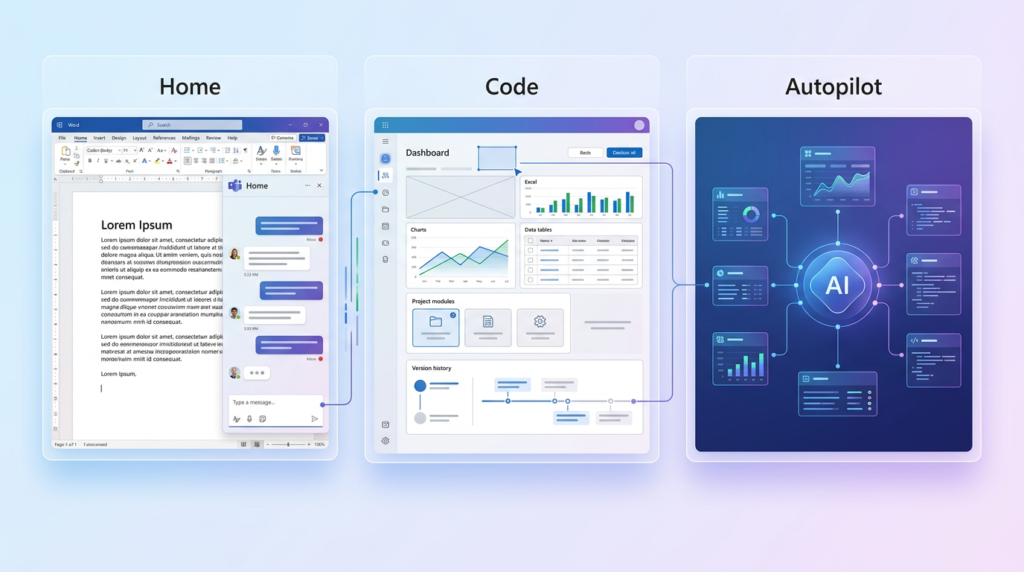
On September 25, the company introduced a Copilot experience organized around Home, Code and Autopilot. Home brings conversation, delegated tasks and Office documents together. Code lets people describe an app or workflow and have Copilot build it. Autopilot is an agent designed to continue working after its user has moved on.
Microsoft is bringing these capabilities into a unified product focused on work. It is a substantial change in what the company wants Copilot to do: move from answering requests toward helping complete projects that cross documents, applications and teams. The announcement is broad, but the rollout is gradual. Several of its most interesting features are still headed for previews.
Why Microsoft Is Bringing Copilot Together
Copilot has appeared in many places across Microsoft’s products. That reach gives the company an advantage, but it can also leave users deciding where to start. Do they open a chat? Work inside Word? Use a coding tool? Ask an agent to take over?
The new Copilot aims to make those choices feel like parts of one workflow. Microsoft’s announcement groups the experience into three areas, while bringing Word, Excel and PowerPoint directly into Copilot. The company also says it plans to route requests to the appropriate capability automatically, so a user will eventually be able to describe the result they want without selecting a mode first.
There is a business shift behind the interface, too. Bloomberg reported that Microsoft is combining the consumer and workplace versions of Copilot into one product aimed primarily at corporate customers. Some features from the consumer assistant are being incorporated; others are being retired. The result puts Microsoft’s strongest existing products its workplace software at the center of its AI pitch.
Home Starts With the Work in Front of You
Home is meant to be the starting point. It combines Chat, for questions and drafts, with Cowork, for tasks a person wants to delegate. A worker might ask a quick question about a document, then hand Copilot a more involved job such as preparing a customer briefing or assembling a launch kit.
That difference matters. Answering a question may take seconds. Completing a briefing may require gathering information, creating files and returning something a person can review and revise. Microsoft wants both actions to live in the same experience, alongside recent activity and suggestions for what Copilot can help with next.
The company describes Cowork as a way to run a defined task through to a result. That does not mean every long request will work flawlessly. A useful briefing still depends on sound source material, clear instructions and a human willing to check the finished work. But the proposed workflow is easy to understand: tell Copilot what needs doing, inspect what it produces, and keep refining it in the place where the task began.
Office Moves Inside the Conversation
One of the most practical changes may be Office in Copilot. Microsoft says users will be able to create or edit actual Word documents, Excel workbooks and PowerPoint presentations from within the Copilot experience. Those files remain editable and synchronized with the familiar Office applications.
Picture a manager preparing for a product launch. They could ask Copilot to draft a brief, develop a budget and build a presentation, then work through revisions beside the conversation that started the job. Colleagues can be brought into the editing process, too. The appeal is less about producing a first draft AI tools already do that and more about carrying that draft into a shared, usable file.
Microsoft also announced changes within the Office apps. It says PowerPoint can help keep presentations on brand, while Excel can show what changed when Copilot or a collaborator makes an edit and suggest a chart for the data. Those details address an everyday annoyance: an AI-generated result is only helpful if people can understand it, change it and confidently use it afterward.
Code Makes Small Apps Part of the Pitch
Code is Microsoft’s answer to another familiar workplace request: “Could someone build a tool for this?”
The company says a user will be able to describe an app, dashboard, tracker, automation or workflow in ordinary language. Copilot will then choose an approach and build a solution. Microsoft gives examples ranging from desktop widgets to internal apps that a team can share.
This is aimed at people whose work calls for a small piece of software but who do not spend their days writing code. A sales team might want a dashboard for exploring its pipeline. A project manager might want a tracker that reflects a specific approval process. Today, those requests can turn into a spreadsheet with too many tabs, a ticket for an overstretched development team, or both.
Microsoft says Code uses the same underlying technology as GitHub Copilot. It is a claim about the technology behind the new capability, not a promise that every employee instantly becomes a software engineer. The value will depend on whether people can build tools that keep working when data, permissions and business needs change.
Building an App Is Only Half the Job

An internal app needs somewhere to run. It may need access to live data, a way to share it and controls that an organization’s IT team can manage. Microsoft introduced Copilot Managed Runtime as the hosting foundation for that work inside a company’s Microsoft 365 environment.
The company says Code runs in a sandboxed environment and can be hosted within an organization’s tenant. Managed Runtime, now in preview, is intended to support apps created through Code, Cowork and Copilot Studio. Microsoft also plans to make the foundation available to outside and professional developers.
These details sound less flashy than asking AI to build an app in a sentence. They may matter more to whether a business can use that app on Tuesday morning. A dashboard that cannot reach approved data has limited value. One that reaches too much data creates a different problem. Microsoft is trying to connect the act of making a tool with the less glamorous work of running and governing it. How smoothly that happens will become clearer as more customers use the previews.
Autopilot Takes on Work That Outlasts a Prompt
Autopilot is the most ambitious part of the announcement. Previously called Scout, it is designed as a persistent agent: a user gives it a role, a goal and boundaries, and it can keep working across a longer period.
Microsoft says Autopilot can watch channels, follow up on conversations, handle recurring work and resume a project days later. Its example is a supplier review. The agent could help build a schedule, prepare for meetings and contact stakeholders for updates. Because it runs in the cloud, it is designed to continue when the person who assigned the work is away.
That is a bigger proposition than “write me an email.” Long-running tasks require the agent to remember the objective, recognize when circumstances change and report back in a way a person can follow. They also raise a simple workplace question: when an agent contacts a colleague, what authority does it have to speak or act?
Microsoft says Autopilot will have its own identity, memory, computer and workspace within an organization’s tenant, with permissions and auditing. Those controls will be central to judging it.
The Data Behind a Useful Answer
A workplace assistant cannot do much with a confident tone and an empty filing cabinet. It needs the right business context.
Microsoft says its Microsoft IQ platform connects Copilot with organizational knowledge and processes. The company announced broader use of Fabric IQ, including context from Power BI, for Chat and Cowork. It also described upcoming connections to data and workflows in Dynamics 365 and Power Platform, plus a registry where IT teams can manage plugins.
Here is the practical version. A salesperson writing a proposal may need previous deal information, support history and an approved description of the product. Finding those details across separate systems takes time. Microsoft wants Copilot to bring relevant information into the work itself.
The word relevant is doing heavy lifting. A good answer requires current records, suitable access and an understanding of which facts matter to the task. Microsoft’s announcement explains the direction and the controls it intends to provide. Customers will still need to see how accurately Copilot handles their own data as these connections roll out.
The Price of an Agent’s Time
Microsoft is also drawing a line between quick AI help and longer-running work.
Its announced approach places everyday uses such as answers, summaries and drafts under a user subscription license. Cowork, Code and Autopilot use usage-based billing. Microsoft says the latter model lets organizations choose models and manage the cost of more demanding tasks.
That distinction could become very visible to customers. Asking for a short meeting summary is one kind of expense. Sending an agent through multiple applications to prepare a package of work is another. If a company encourages hundreds of employees to build apps and delegate recurring jobs, it will want to know what those actions cost and what they accomplish.
Microsoft announced tools intended to help administrators set spending policies, control model availability and examine usage. Users are also meant to be able to see credit use and balances inside Copilot. It is an important companion to the product pitch: organizations will have a better chance of adopting agentic tools widely if the resulting bill is understandable.
A Sharper Workplace Focus
The rebuilt Copilot arrives in a crowded market. OpenAI and Anthropic want their assistants used for work, while Google is bringing Gemini into products many organizations already rely on. Microsoft’s advantage is the depth of its existing relationship with office workers and IT departments.
Bloomberg’s reporting offers a revealing measure of that position: companies were paying for more than 30 million Copilot subscriptions as of the end of June. It also reported that GHD, an engineering and professional services firm, expanded Copilot from a 300-person trial to its 12,000 employees. Staff there use it for tasks including meeting summaries, email, pitches and analysis.
Those examples show the ground Microsoft already holds. They do not prove the new capabilities will succeed. A team that likes meeting summaries may have different expectations of an agent managing a supplier review. But Microsoft has a route into daily work that many rivals would envy. Its challenge is to turn that access into dependable results across the whole job, rather than another helpful stop along the way.
What Arrives When?
The announcement covers products at different stages, so the dates deserve a close read.
Microsoft says Home and Code will begin rolling out through its Frontier program in the coming weeks. Code is slated for Frontier at the end of September, with broader availability planned afterward and previews for Microsoft 365 Premium and Pro subscribers later this year. Autopilot is expanding to private preview at the end of September.
Other changes have their own schedules. Copilot Managed Runtime is already in preview. Microsoft says a feature called Today, intended to surface what needs attention across mail, calendar, Teams and tasks, will enter private preview in October. A more context-aware way to call on Copilot within Teams is planned for private preview by the end of September.
In short, September 25 was the announcement of a new direction, not the day every customer received every feature. Availability, eligibility and the experience people actually get will be worth checking as each part arrives.
Can Copilot Keep a Project Moving?

Microsoft’s new Copilot has a coherent idea behind it. A person starts with a question, develops a document, builds a tool if needed and delegates follow-up work all with context carried through the process. That is a more interesting goal than adding one more button to a toolbar.
The difficult part is the handoff between those steps. Can Copilot use the correct business data? Can a colleague tell what an agent changed? Will a small app remain useful after its creator shares it? And can a manager see the cost of the work without needing a detective board and several colors of string?
Microsoft has announced features that address each of those questions. The rollout will show how well they fit together. For now, the clearest news is the change in ambition: Copilot is being rebuilt as a place where office work begins, takes shape and, increasingly, continues on someone’s behalf.
Sources
- Microsoft: “Introducing the new Copilot with Home, Code and Autopilot”
- Microsoft Source EMEA: “New Microsoft Copilot Brings Home, Code, and Autopilot Together”
- Bloomberg report published by the Los Angeles Times: “Microsoft retreats from personal AI chatbot race, refocusing Copilot on the workplace”
- Thurrott: “Microsoft Introduces Unified Copilot Desktop App With Code and Autopilot Features”
- PYMNTS: “Microsoft Bundles Copilot Features to Challenge Anthropic and OpenAI in the Workplace”
The Kingy Brief
Get the next Kingy Brief.
Source-checked AI changes, original tests and one practical thing to try.
Free · Choose your subjects · Double opt-in · Unsubscribe anytime