Last updated: 2026-07-23
Last verified: 2026-07-23
TL;DR: GitHub Copilot Chat can now show the status of a Copilot cloud agent session, retrieve its logs, and search earlier sessions by topic, title, or recency. The update improves continuity between chat and asynchronous coding work, but developers still need to inspect the code, pull request, and CI results themselves.
What changed?
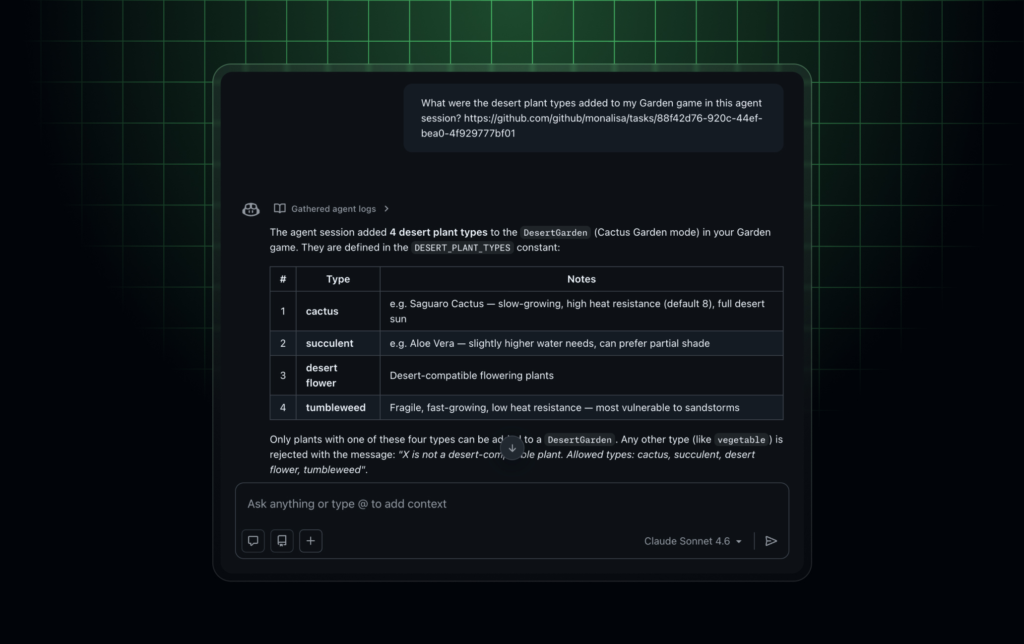
GitHub announced the session-context update on June 10, 2026. In Copilot Chat on the web, a developer can start a cloud agent task, see whether it is still running, ask follow-up questions when it finishes, and launch another session without reconstructing the earlier context.
The release adds two tools. Get agent logs pulls in the cloud agent’s work on a pull request so chat can answer questions about changes, validation, and rationale. Session search finds and summarizes past sessions, which can help a developer resume work that is no longer visible in the current conversation.
Why session context matters
Asynchronous coding agents create an evidence problem. The final diff shows what changed, but not always which approach the agent tried, which validation it ran, or why it made a particular choice. Searching session history can shorten that investigation and make handoffs less dependent on a developer’s memory.
This is a convenience layer over agent records, not a replacement for them. A summary can omit a failed command, an unresolved warning, or a risky assumption. The source of truth remains the repository, pull request, checks, and underlying logs. Readers can compare this workflow with recent AI News about coding agents without treating every agent transcript as a verified audit trail.
Useful workflows
- Ask what files a cloud agent changed and why.
- Review which tests or validation steps the agent reports running.
- Find an earlier session by repository topic or recency.
- Continue work after a pull request or research session completes.
- Prepare a human reviewer before opening the full diff and CI output.
Access and pricing
The feature is part of GitHub Copilot and depends on access to Copilot Chat and Copilot cloud agent capabilities. GitHub’s current plan page should be checked for individual, business, and enterprise availability, as well as the AI-credit rules that apply to the selected plan.
A limited Copilot Free plan exists, but that does not mean every cloud-agent or session feature is included. Organization administrators can also restrict models and agent use. Confirm entitlements and policy settings in the actual GitHub organization before promising the workflow to a team.
How to evaluate it
- Choose a small repository and give the cloud agent a bounded pull-request task.
- Ask Copilot Chat what changed, what was validated, and which issues remain.
- Compare every answer with the diff, checks, and raw session record.
- Search for the session later by topic and confirm that the summary still identifies the right work.
- Document which questions save reviewer time and which still require manual inspection.
Risks and controls
Session search makes historical agent work easier to retrieve, which also increases the importance of repository access and organization policy. Teams should review who can query sessions, which repository data appears in chat, and how long the underlying records are retained.
Do not merge because a chat summary says tests passed. Re-run the relevant checks, inspect the code, and review security-sensitive changes directly. Agent logs are useful evidence, but they are produced by the same workflow being evaluated.
Alternatives
Comparable workflows include repository-native pull-request history, CI logs, issue trackers, coding-agent transcripts, and competing coding assistants with persistent task history. GitHub’s advantage is proximity to the pull request; the tradeoff is dependence on Copilot’s cloud-agent workflow and organization controls.
Kingy AI verdict
The update is worth testing for teams already using Copilot cloud agent. It should reduce the time spent reconstructing what an agent did, especially across asynchronous handoffs. Treat the summary as navigation into the evidence, not as the evidence itself.
FAQ
What can Copilot Chat retrieve from an agent session?
GitHub says chat can retrieve agent logs and answer questions about changes, validation, and rationale from cloud-agent pull-request work.
Can Copilot Chat find old sessions?
Yes. Session search can find and summarize prior sessions by topic, title, or recency.
Does this replace code review?
No. The diff, repository state, security review, and CI results still need direct human inspection.
Official links
Related Kingy AI links
The Kingy Brief
Get the next Kingy Brief.
Source-checked AI changes, original tests and one practical thing to try.
Free · Choose your subjects · Double opt-in · Unsubscribe anytime