Kimi K3.1 Pro turned our dimensioned bench drawing into editable Blender geometry and our bracket drawing into a valid CAD solid. Both survived a direct parameter edit. But a correct shape was only part of the job: the first bench export lost its wood appearance, and the first browser scene was difficult to use on a phone.
We tested Kimi against Claude Opus 5.5, GPT-6 Astra and Gemini 4 Argon using the same three assignments. The useful differences appeared in file delivery, material portability and interface behaviour, not the dimensions of the simple objects.
Test status: pilot complete; one final bench revision unverified. This article began as a proposed test. This update reports our October 23, 2026 pilot: one run per model on each of three synthetic tasks. The review and visual inspection were performed by the Codex assistant, not an independent human panel. The reported inference cost was US$5.6716 (about US$5.67), within the authorised US$50 ceiling; no account top-up was made.
Moonshot specifically highlights reconstructing models from sketches and reference images, including scripted Blender and CAD workflows and interactive Three.js scenes. That gave us three concrete things to test. This is a controlled code-generation-and-execution comparison; we did not test Kimi’s consumer 3D Make interface. Moonshot capability guide.
What we gave each model
The furniture input was a clean drawing of a bench: 1,200 mm long, 400 mm deep and 450 mm high, with a 30 mm top and four 50 mm square legs. Their outside faces sit 40 mm inward from the tabletop edges. Those numbers appeared in the PNG; the initial prompt did not repeat the dimension sheet in text.
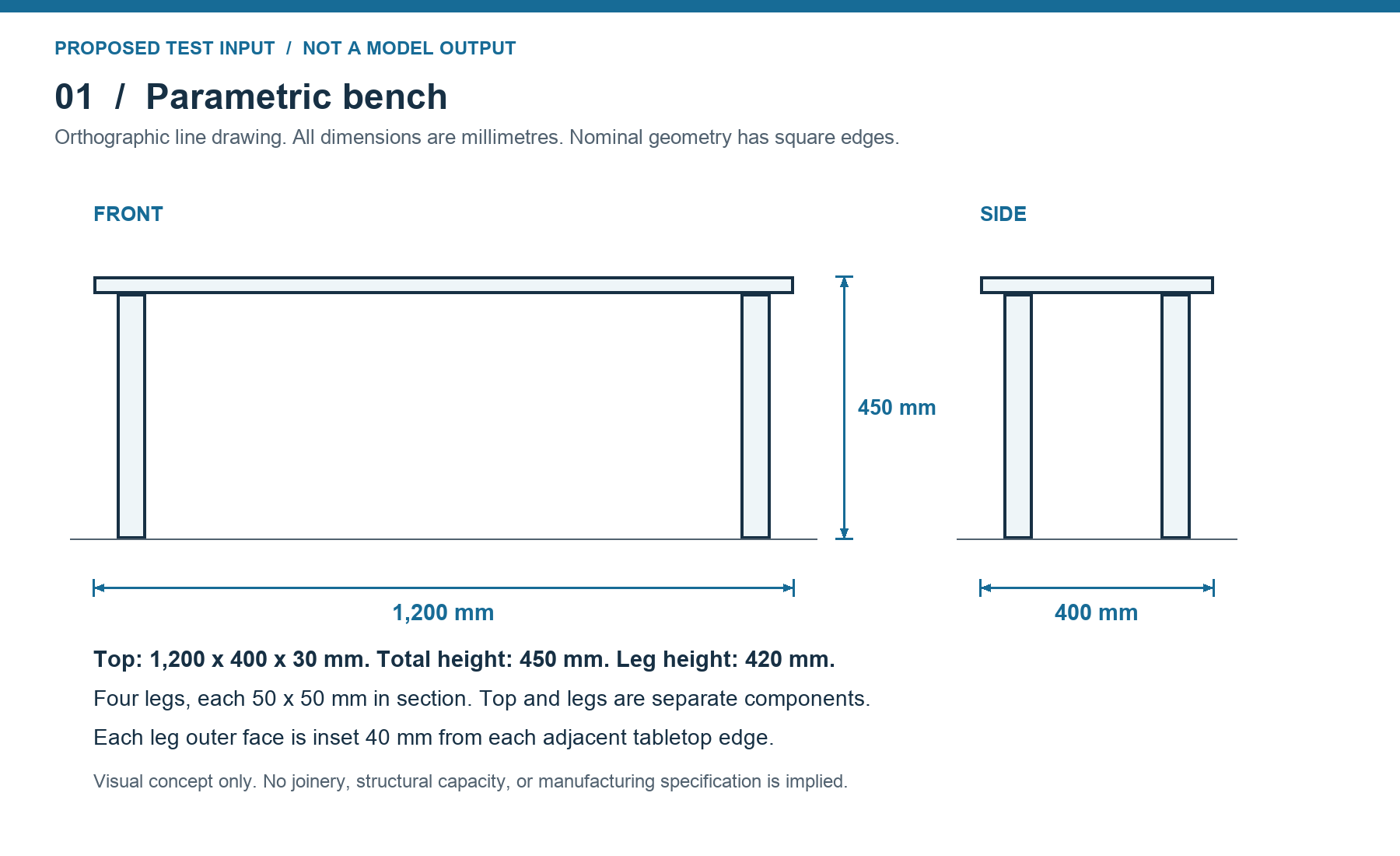
The mechanical input was an L-bracket: a 60 × 40 × 5 mm base, an upright giving an overall height of 35 mm, and three 6.5 mm through-holes with specified positions and axes. The browser assignment reused the bench drawing and a working Three.js starter containing a placeholder cube, camera, renderer and orbit controls.
These are controlled, dimensioned drawings. They test reading a visual specification and turning it into usable code. They do not establish how any model handles a rough napkin sketch, missing dimensions, an organic shape or a complex assembly.
| Model | Complete first-pass tasks | Model repair attempts | Final requested revisions |
|---|---|---|---|
| Kimi K3.1 Pro | 1/3 — CAD | 2 | 3/3 passed |
| Claude Opus 5.5 | 1/3 — CAD | 3 | 3/3 passed |
| GPT-6 Astra | 2/3 — CAD and browser | 1 | 3/3 passed |
| Gemini 4 Argon | 1/3 — CAD | 4 | 2/3 passed; bench revision unverified after delivery timeout |
A complete pass means correct geometry plus the requested files or interactions and our usability checks. For the bench, we treated loss of the authored wood appearance on export as a delivery defect needing repair. All four initial benches had correct geometry but fell short of the full delivery check. Repair attempts include incomplete model answers; the zero-token Opus transport rejection is excluded. These are twelve small assignments, not a statistically reliable model ranking.
The bench: correct geometry, incomplete delivery
All four initial benches passed our dimensional checks after reopening both the native Blender file and the GLB export. Each contained a separate top and four legs. The specified dimensions and positions were within the 1 mm digital acceptance threshold; the measured discrepancies were below 0.001 mm and consistent with floating-point representation. That is a statement about these files, not physical manufacturing precision.
Changing the declared length from 1,200 to 1,400 mm also worked in every original script. The legs kept their section, height and edge insets. This is stronger evidence of editability than asking for a second unrelated bench: the source already encoded the dependency between tabletop length and leg positions.
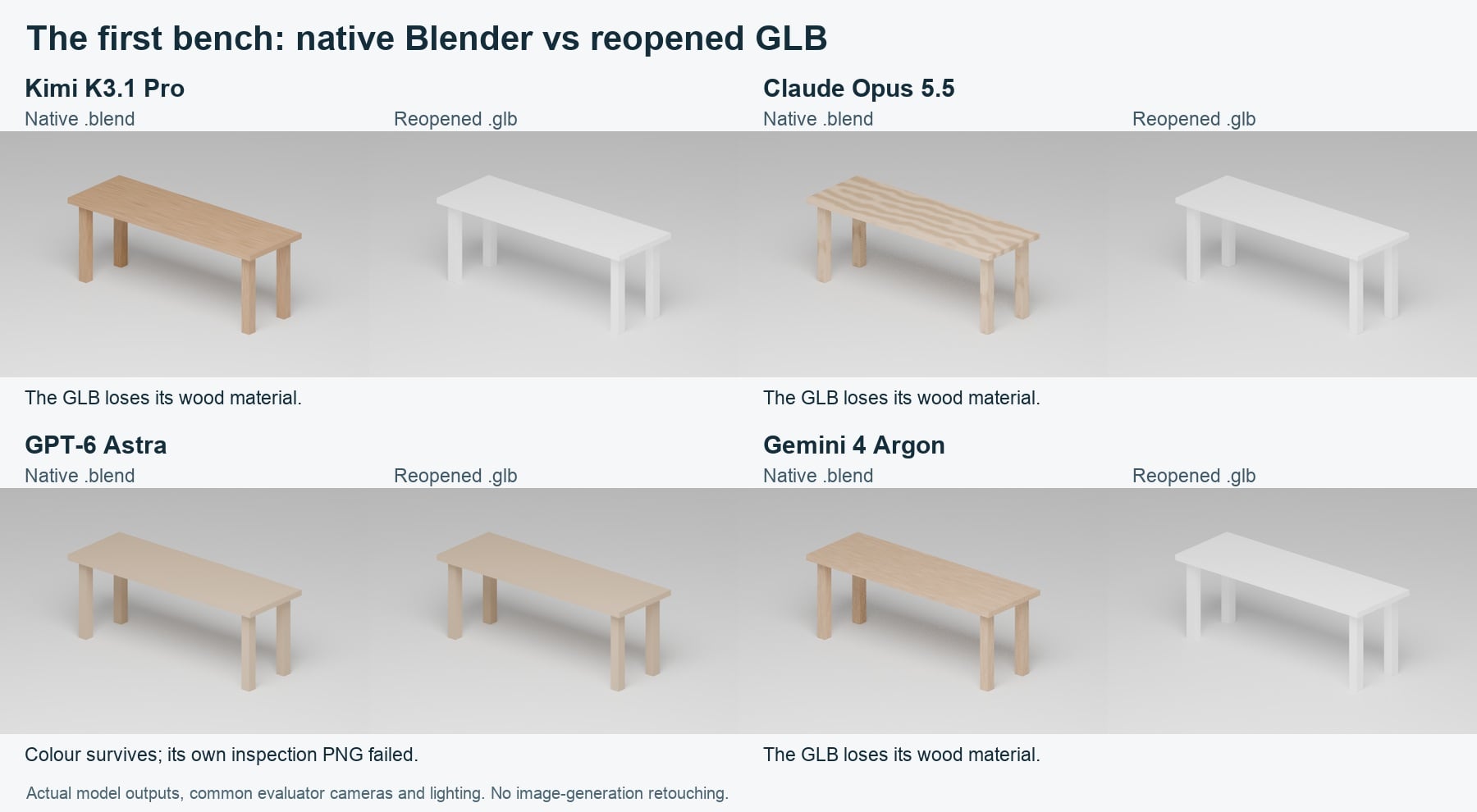
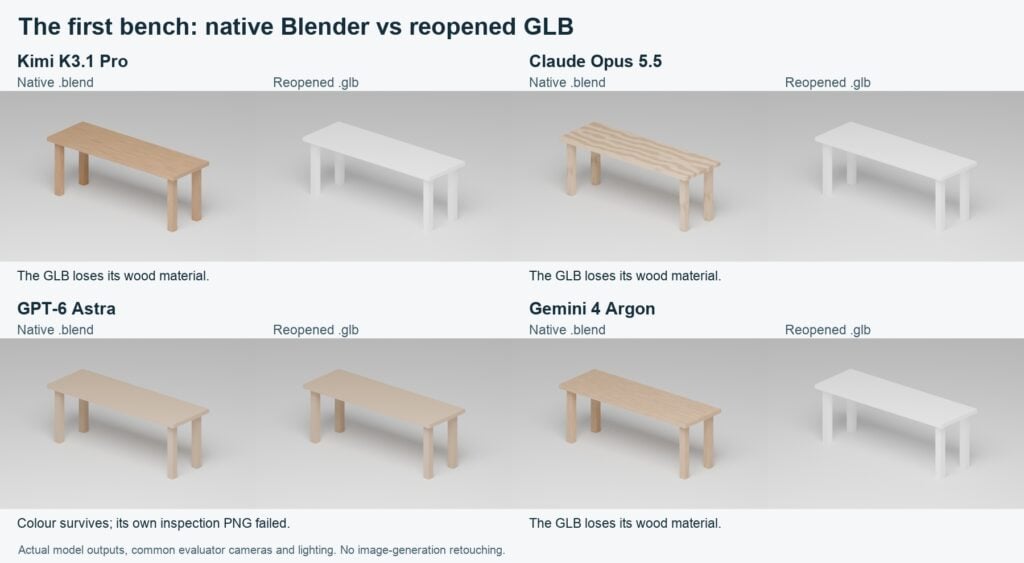
Actual first outputs, rendered with common evaluator cameras and lighting. Astra’s images here are evaluator renders of its saved files; they are not the inspection PNG its original script failed to save.
The delivery failures were different:
- Kimi: its native file had restrained wood grain, but the GLB reopened white. One repair replaced the export material with a portable constant wood colour. The native file kept the grain; the GLB did not.
- Opus: its first native material had conspicuous wavy bands and also became white in the GLB. Its repair generated an image texture, assigned UV coordinates and embedded the texture in the export. The grain survived, although its broad stripes still looked stylised.
- Astra: a simple, flat wood colour survived export from the start. Its script saved the Blender and GLB files but failed to write the required inspection PNG because of its render path. Blender returned exit code zero despite the Python error, which is why checking the files mattered. One model repair corrected the path handling.
- Argon: its native grain also disappeared in the first GLB. Its first repair embedded an image, but the export reused the brown colour image as a normal map and rendered almost black. A second repair removed that incorrect normal-map path. The reopened GLB then retained the wood image. It took two model repairs to reach a usable export.
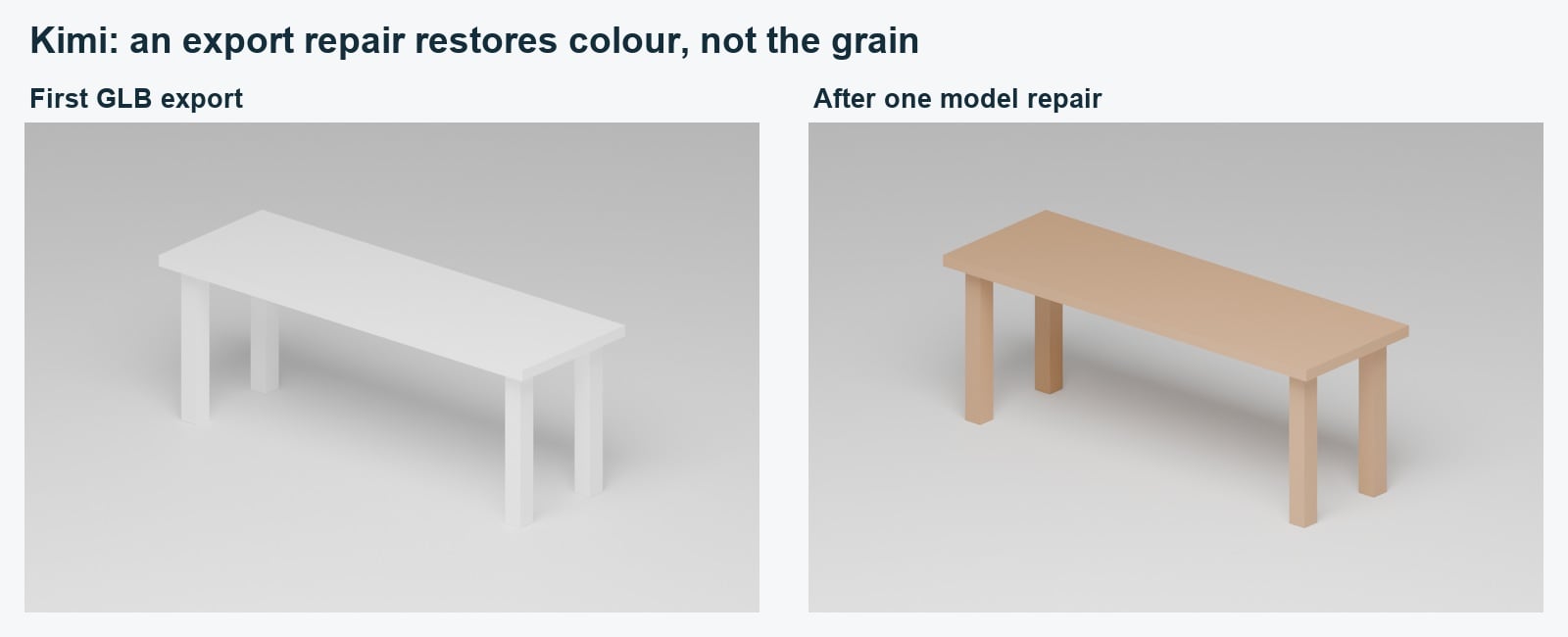
The repaired export is useful as a wood-coloured asset. It does not reproduce the procedural grain from the Blender file.
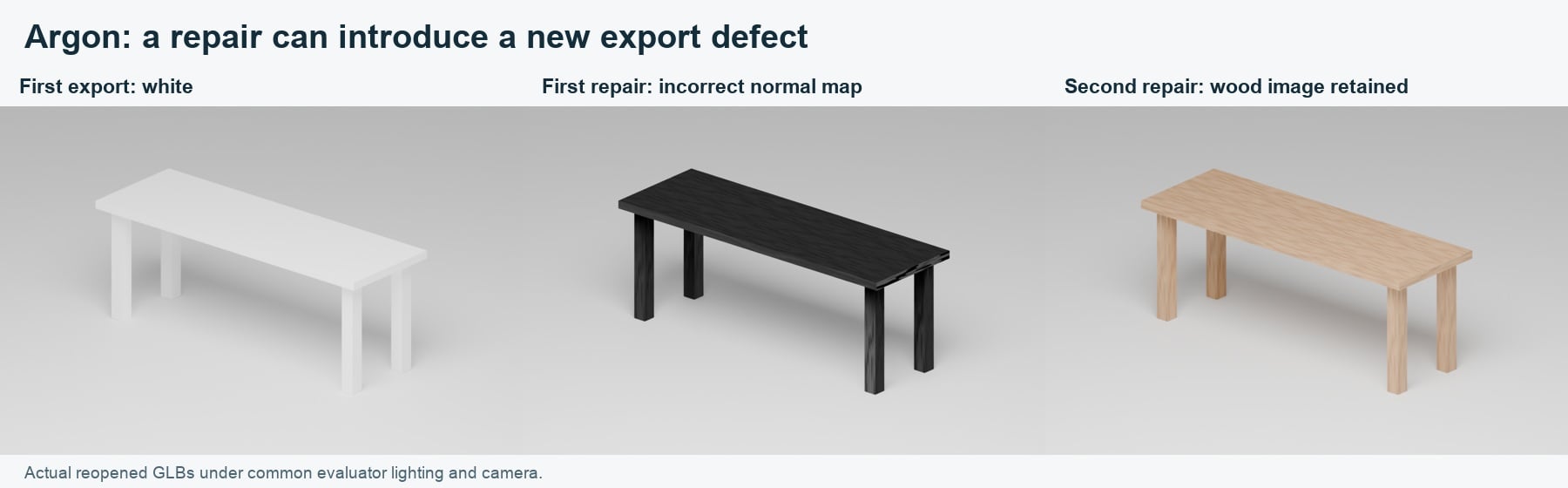
A repair needs the same export check as the first answer. Argon's first fix introduced a different material defect.
Our unblinded visual ratings for the first native benches were Kimi 4/5, Opus 3/5, Astra 3/5 and Argon 4/5. We used 1 for visibly broken, 3 for readable but needing finishing, and 5 for clean at all prescribed views. These subjective ratings are separate from dimensional passes. The pictures are more informative than treating a one-point difference as a benchmark result.
The final instruction asked for a 1,400 mm bench in dark walnut. Kimi, Opus and Astra delivered revisions that passed the file and geometry checks. Argon’s request timed out at our client after 600 seconds. The Gateway log shows that Google completed it in 82.224 seconds and charged US$0.0862607, but the answer did not reach our harness. We therefore leave that model-assisted revision unverified. Its repaired 1,200 mm export and our direct 1,400 mm parameter edit both passed. We did not rerun the final request.
The bracket: all four cleared the simple CAD task
Every initial bracket reopened as one valid STEP solid, with the correct overall dimensions and three analytic cylindrical hole surfaces. We independently checked hole diameters, locations and directions, rather than relying on numbers printed by the generated scripts. The STL exports were watertight and consistently oriented. All four passed the 0.1 mm digital acceptance threshold without a model repair.
The direct edit was more revealing than the first shape: increase the base length to 75 mm and every hole diameter to 8.5 mm, while keeping the base holes 15 mm from the free end. All four scripts rebuilt correctly after changing only the declared parameters. The base holes moved to x = 60 mm; the upright and its hole stayed in place.
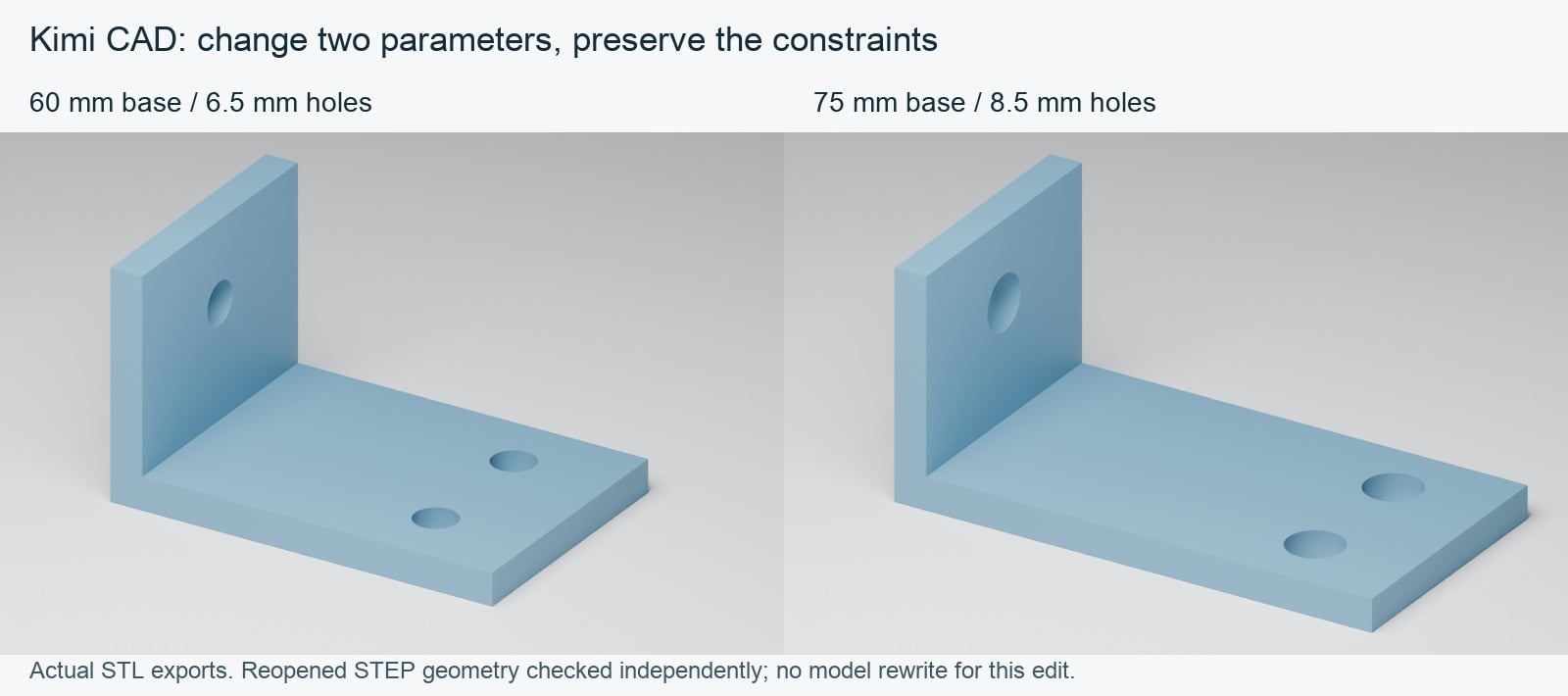
Actual exported geometry with a common evaluator material. The edit changed two source parameters; it did not use a model rewrite.
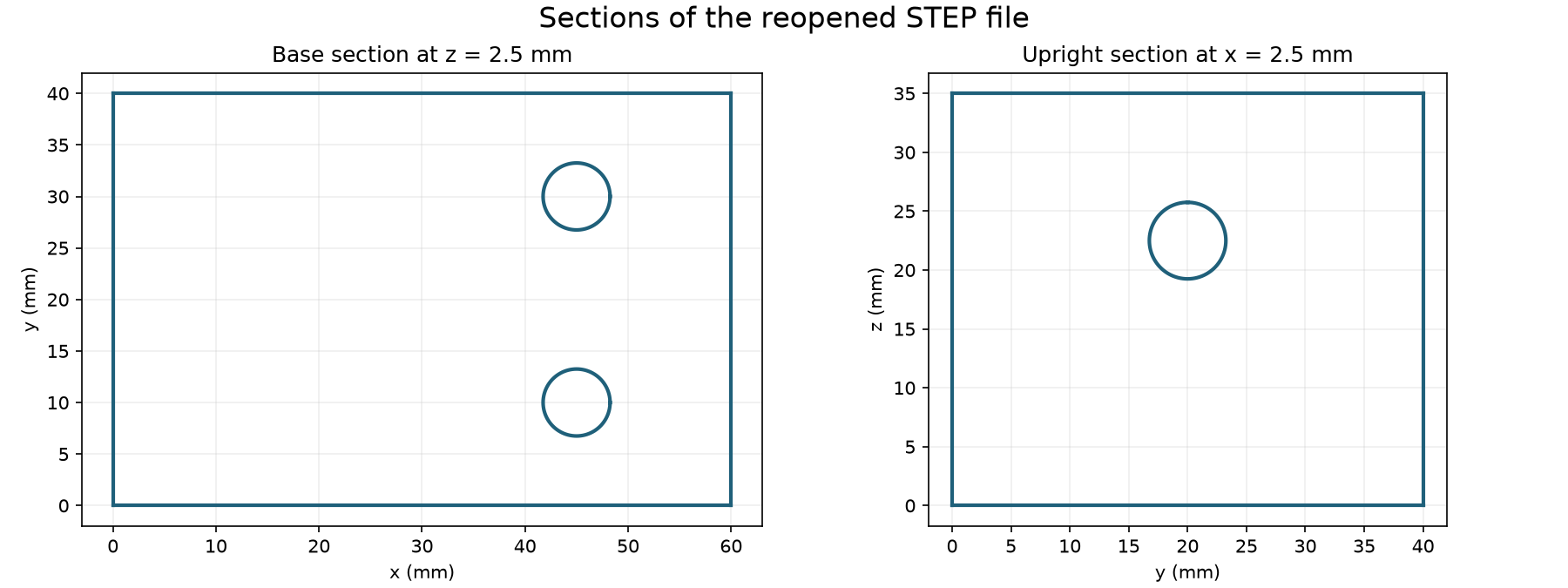
We then asked each model to make that same change through a follow-up instruction. All four revised scripts also passed the independent STEP and STL checks. There was no CAD repair round for any model.
This fixture did not separate the models on CAD accuracy. It was a small, square-edged part made from simple solids and holes. No fillets, assemblies, mating parts, fabrication or load testing were involved.
“Editable CAD” also needs a precise meaning here. We retained the CadQuery Python source that controls the dimensions. The STEP file provides exchange geometry; it does not preserve that script’s parametric design logic as a native feature tree. CadQuery import and export documentation.
The browser scene: usability needs its own test
Each model had to add a length slider from 900 to 1,600 mm, a wood-colour control, an exploded view moving the top upward by 0.25 m, and Reset. Reset had to restore dimensions, colour, exploded state and camera. We inspected actual mesh bounds after operating the controls, and checked the scene at 1440 × 900 and 390 × 844.
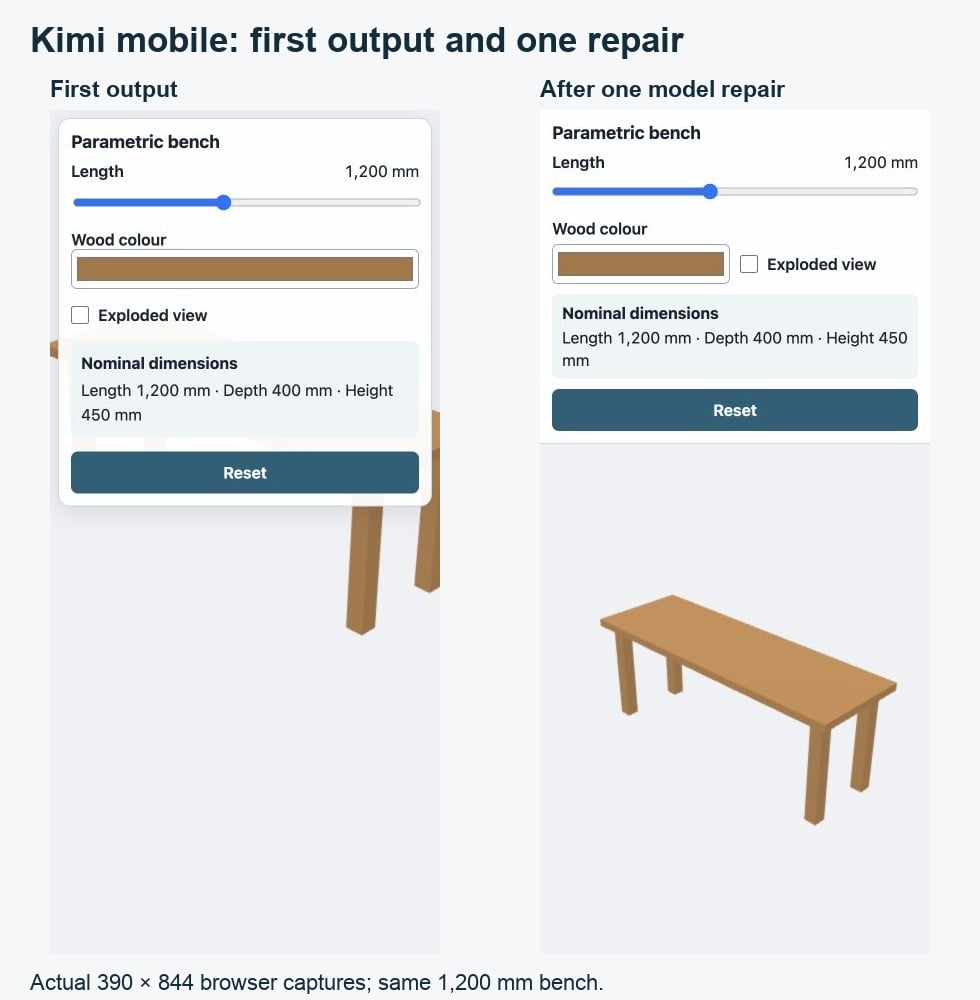
All four first scenes passed the numerical geometry checks as we moved the slider, changed colour and exploded the top. Only Astra's first scene passed the complete usability test. Its separate canvas and controls kept the bench visible on mobile, its dimension cards were readable, and its camera reset worked.
Opus also restored the camera correctly, but its bottom control panel covered the lower legs on mobile. At 1,600 mm in exploded mode, the tabletop clipped at the right edge. Kimi and Argon had both mobile-framing and camera-reset failures. None of the first scenes produced a browser error during the tested interactions, and all maintained stable geometry and texture counts over ten cycles.
Opus's first generated repair reached the 16,000-token output limit and stopped midway through its JavaScript. Argon's first repair used the same allowance without delivering any visible source. We kept both failures and did not finish the code by hand. These were delivery failures under our full-file, high-reasoning protocol; a larger response budget or a patch-based workflow would be a different test.
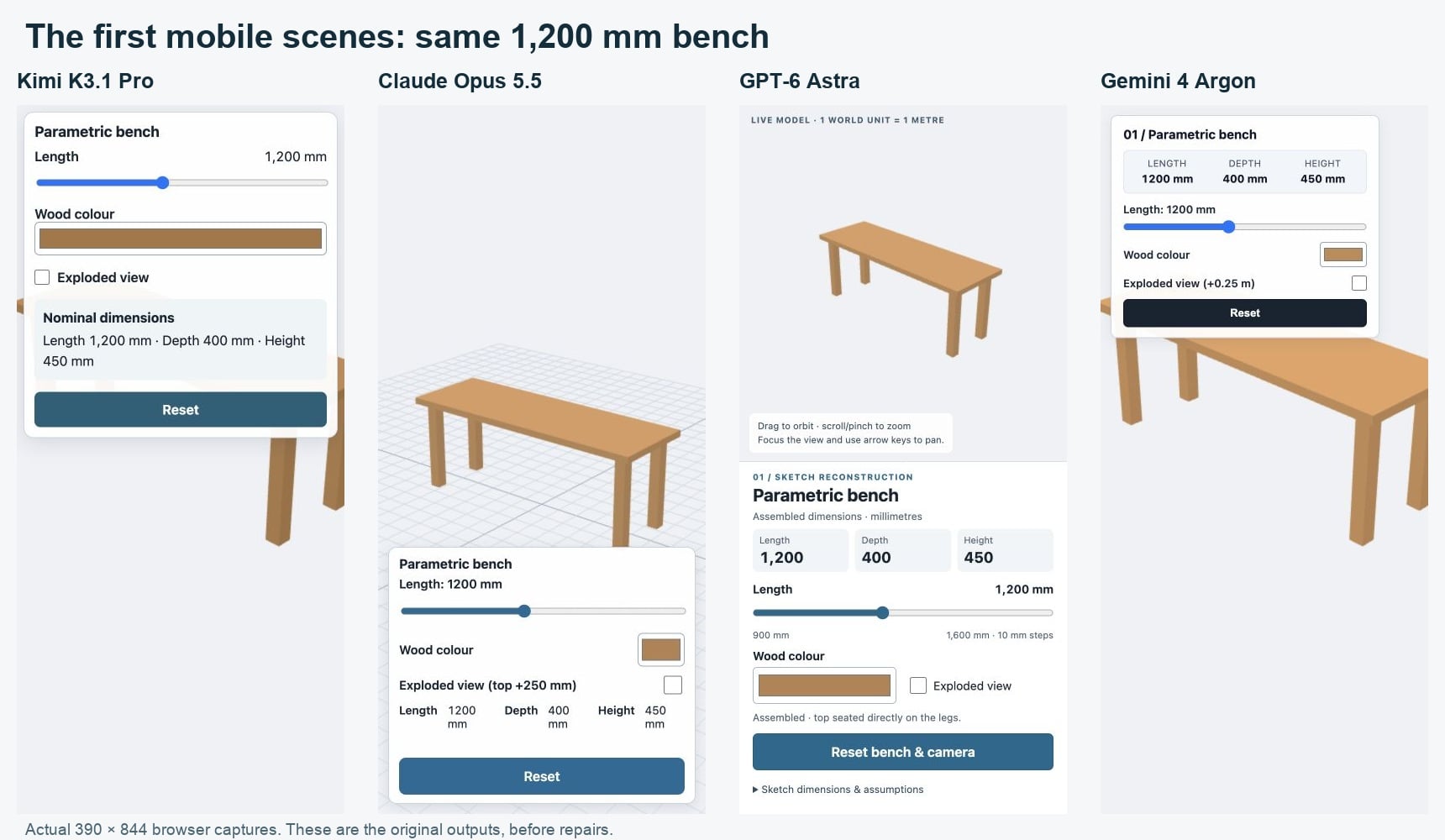
Same bench and 390 × 844 viewport. Astra reserved separate space for the controls; the other first outputs had obscured or clipped geometry.
A page can avoid horizontal scrolling and still be unusable. Kimi’s first mobile page was 390 pixels wide, but its panel covered the upper bench and the object extended beyond both sides of the viewport. Its slider, colour control and exploded offset were numerically correct. Ten repeated edit-and-reset cycles kept five geometries and zero textures, but that did not fix the framing problem.
We also found a separate reset defect: after orbiting and immediately pressing Reset, the first Kimi scene continued moving and settled away from the saved camera position. This was verified after motion settled, not inferred from a single intermediate screenshot. One model repair fixed both problems. Its revised layout reserved a separate area for the mobile controls, and its reset code cleared the remaining orbit motion before restoring the camera. The final 1,400 mm walnut revision preserved those fixes and passed the same checks.
Astra’s final 1,400 mm walnut scene passed without a repair. Opus’s second repair fixed the mobile framing, and its final revision passed too. Argon’s second repair delivered complete files, widened the mobile view and fixed the residual camera motion; its final revision preserved those fixes and passed. All four final browser scenes therefore cleared the tested interactions, although they reached that point with different repair counts.
For visual presentation, we rated Astra’s final scene 4/5 and the other three 3/5. Astra made better use of the available space and had clearer supporting interface text. The others remained simple, flat-coloured viewers. These are assistant judgments about the captured views, not measured user preferences.
A separate desktop timing pass used the same host, a 600-sample warm-up and ten edit/reset cycles, with no concurrent pilot Blender renders. Median render-call intervals were 8.3 ms for Kimi, Opus and Astra, and 8.2 ms for Argon; the 95th percentiles were 9.2, 9.2, 9.1 and 9.5 ms respectively. These small differences do not establish a performance winner. The numbers include browser-control and observer overhead, and some scenes render inside input handlers; they are not GPU timings or independent frame-rate benchmarks.
What the comparison actually cost
| Model | Blender workflow | CAD workflow | Three.js workflow | Total |
|---|---|---|---|---|
| Kimi K3.1 Pro | US$0.1939 | US$0.0672 | US$0.1812 | US$0.4423 |
| Claude Opus 5.5 | US$0.8006 | US$0.2107 | US$1.0955 | US$2.1069 |
| GPT-6 Astra | US$0.7607 | US$0.2650 | US$0.8819 | US$1.9076 |
| Gemini 4 Argon | US$0.5495 | US$0.1763 | US$0.4890 | US$1.2148 |
| All four | US$5.6716 |
Each workflow total includes its initial answer, model repairs and final revision request. Rounded table values are backed by full-precision per-call receipts in the evidence pack.
These are reported charges against USD-denominated Gateway credit for this pilot’s model requests, including billed reasoning and cache usage. Direct-provider tariffs may differ. They exclude the Codex subscription, local application setup, rendering and review. Repair counts differ because we returned the failures each output actually exhibited. The figures describe the cost of these workflows, not a universal price-per-quality ranking.
We used existing prepaid Vercel AI Gateway credit, with native-provider-only routing and a dedicated non-renewing US$50 key limit. The generation receipts identify Moonshot, Anthropic, OpenAI and Google respectively; no substitute model was used. 35 requests were made against a maximum allowance of 48.
For a repeat, the exact Gateway model IDs are moonshotai/kimi-k3.1-pro, anthropic/claude-opus-5.5, openai/gpt-6-astra and google/gemini-4-argon. We selected high reasoning and a 16,000-token output cap, with a 64,000-token input ceiling and conservative per-request cost reservations. “High” does not mean identical compute across providers. Keep the full assistant state when making follow-up requests; the retained protocol explains the input-accounting adjustment needed for signed or encrypted provider state.
Current rates and cache rules should be checked before another run. See Kimi pricing, Claude model documentation, OpenAI pricing and Gemini pricing. Our Kimi cost guide explains the separate context, caching and reasoning charges.
How to inspect or repeat the test
Download the pilot evidence pack (about 30 MiB ZIP). It contains the input drawings, prompts, source versions, successful exports, measurements, repair feedback and per-call cost records. Initial failures remain in the record. The download includes comparison figures and original model renders; repeated full-resolution evaluator views remain in our local master archive. Provider credentials and private reasoning transport data are excluded.
For the bench, run the supplied Python file inside Blender and reopen both the .blend and .glb. For the bracket, use the pinned CadQuery environment and reopen STEP independently. For a browser scene, install the pinned Three.js dependency from the supplied package lock and serve its folder over localhost. The pack’s README gives the exact commands and identifies the first, repaired and revised versions.
The local environment was an Apple M4 Pro with 24 GiB memory and macOS 26.3, Blender 5.2.1 LTS, Python 3.12.14, CadQuery 2.6.1, OpenCascade bindings 7.8.1.1.post1, Node 24.19.0 and Three.js 0.180.0. Python was executed with network access denied and writes confined to the attempt folder. Reopened geometry and browser state were checked by separate evaluator code.
A common CAD font-cache restriction was fixed before rerunning unchanged model source. A separate Opus request was rejected before inference because our harness mislabeled a JPEG screenshot as PNG; its verified cost was zero. We corrected the MIME label and excluded that rejected request from the model-generation allowance, while retaining it in the HTTP-attempt count. We also corrected the evaluator’s CAD lighting and browser sampling before final scoring. Those adjustments are documented in the pack. We did not conduct a timed human repair session, so we do not report invented human intervention minutes.
Which model would we use after this pilot?
Kimi was the cheapest completed workflow in this run: about US$0.44 for all three tasks, including two repairs and the final revisions. It produced useful source, accurate simple geometry and editable parameters. Its first material export and mobile view still needed inspection and repair.
Astra needed the fewest repairs: one, for the missing Blender inspection image. It was also the only model whose first browser scene passed the complete usability test. For this small interactive configurator, that cleaner first delivery was more useful than a tiny difference in rendering timing. Its three workflows cost about US$1.91.
Opus supplied a portable textured GLB after repair, but its browser workflow included a truncated answer before the successful fix. Its total was about US$2.11, the highest of the four under this protocol. The final files passed; the route to them was less direct.
Argon’s native wood appearance was promising, but it needed the most repair attempts. Its final CAD and browser revisions passed. The final model-assisted bench revision remains unverified because its answer was not delivered to our harness, even though the provider billed the completed request. Its total was about US$1.21. That delivery problem cannot support a claim that its geometry was wrong.
For the simple CAD bracket, we have no accuracy-based winner: all four passed the initial build, direct parameter edit and model-assisted revision. A harder second test would need curved surfaces, ambiguous drawings, assemblies and repeated runs before making broader claims.
Ask for source and exports, then test both. A convincing Blender view does not prove that a GLB carries the same materials. A valid CAD solid does not prove that the dimensions remain correct after an edit. A functioning slider does not prove that the product works on a phone.
Moonshot’s published BenchCAD comparison supplies broader context, but it uses shape-overlap scores and reported evaluations with different conditions. It is not a count of dimensionally correct, editable or manufacturing-ready parts, and this three-task pilot is not a reproduction of it. Moonshot launch report.
For the wider model specifications and launch evidence, read our Kimi K3.1 Pro guide. For this particular claim, the retained files are the evidence: inspect the first output, make the edit, and reopen the export.
The Kingy Brief
Get The Kingy Brief.
AI changes, original tests and one practical thing to try. Fridays at 09:00 Vancouver time.
Free · Double opt-in · Unsubscribe anytime
Sign up for The Kingy Brief on Beehiiv.
Signup help and newsletter schedule
Signup form provided by Beehiiv. After submitting, check your inbox for "Confirm your subscription to The Kingy Brief" and open its confirmation link. Check Spam or Promotions if you cannot find it.
Fridays at 09:00 Vancouver time: source-checked AI changes, original tests and one practical thing to try. We skip a week when there is not enough verified material. Free. Unsubscribe anytime.