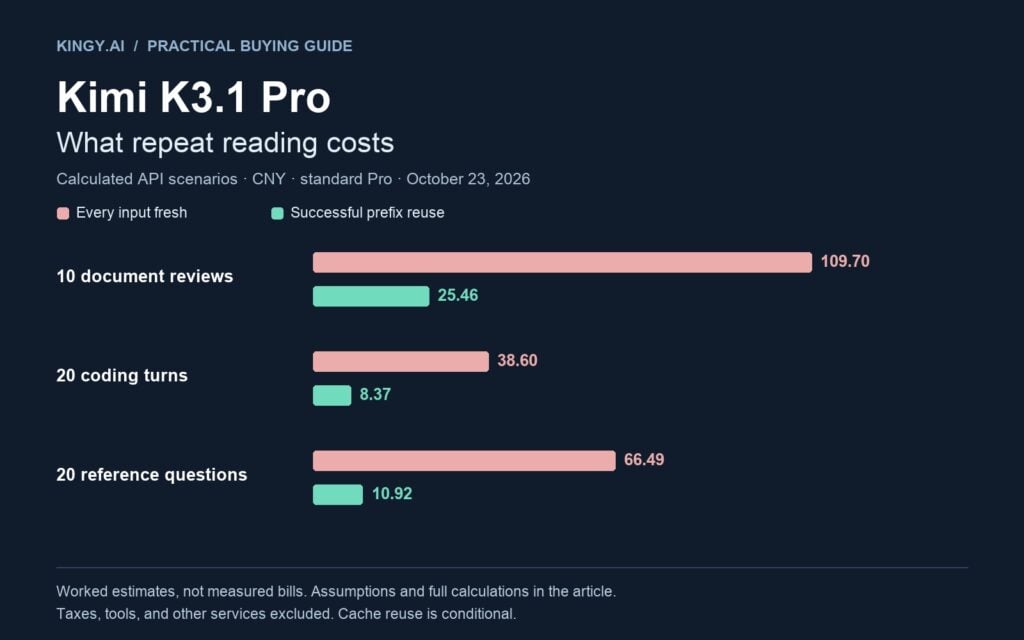
An 800,000-token document collection can cost about CNY 10.97 for an initial review under Kimi’s currently displayed standard Pro tariff. Ask another question while the collection’s prefix is still cached, with the same answer budget, and our worked estimate falls to CNY 1.61. Run a 20-turn coding conversation with good prefix reuse, and our example comes to CNY 8.37, versus CNY 38.60 if every input has to be processed at the displayed fresh-input rate.
Those are calculated scenarios, not invoices from a Kingy.ai benchmark. They show why a single “price per million tokens” cannot tell you what a project will cost. The useful questions are how much material you send, how often you send it again, how much output the model generates, and whether your requests qualify for cache reuse.
There is also a purchase decision to make before comparing any numbers. Kimi’s Open Platform API, its consumer memberships, and Kimi Code do not use interchangeable billing arrangements. Buying a membership does not turn the Open Platform API into an unlimited subscription service.
Price check: October 23, 2026. The public Kimi API pricing view we could verify displayed renminbi prices, reproduced below as CNY. Its documentation page explained billing but did not render a usable model-price table during our check. We have therefore linked the live pricing view as well as the billing documentation. We did not verify a corresponding US-dollar K3.1 Pro tariff or a separate K3.1 Pro one-hour cache-write quote. All main examples use the displayed standard write tariff, exclude taxes and extra services, and assume short-interval cache reuse. Use your account’s actual tariff before committing a budget. Official pricing view · Billing documentation
The prices we could verify
Kimi’s public pricing card distinguishes standard K3.1 Pro from K3.1 Pro Highspeed. One MTok means one million tokens, not one million words and not the size of a single context window.
| Billing item, per 1 million tokens | K3.1 Pro | K3.1 Pro Highspeed |
|---|---|---|
| Input | CNY 13.00 | CNY 26.00 |
| Output | CNY 68.00 | CNY 136.00 |
| Cache hit | CNY 1.30 | CNY 1.30 |
| Cache write, as displayed | CNY 13.00 | CNY 26.00 |
The card labels one cache-write price without identifying separate five-minute and one-hour rows. Do not interpret that single row as a verified price for both retention options. The API documentation separately describes those options. Source: Kimi’s live API pricing card
Three consequences follow directly from these figures. A million cached input tokens cost one-tenth of standard Pro’s displayed fresh-input price. Output costs substantially more per token than input. Highspeed doubles the displayed input, output, and write rates, while leaving the cache-hit rate unchanged.
That last distinction matters. A workload dominated by new generation may approach twice the standard Pro bill under Highspeed. A workload dominated by already-cached reading can have a much smaller percentage increase. We calculate an example below.
These prices are useful for budgeting against this particular public tariff. They are not a promise about every regional account, reseller, coding subscription, or future rate card. We deliberately do not add a converted dollar column: a foreign-exchange estimate would not establish the price an account billed in dollars actually pays.
Choose the product before comparing the bill
| Purchase route | What you are buying | What to check before paying |
|---|---|---|
| Kimi Open Platform API | Metered model inference for your application or supported client | Model-specific token rates, cache-write tier, account limits, and tool fees |
| Kimi membership | Access and allowances under a consumer subscription | Current tier benefits, quotas, renewal terms, and availability in your account |
| Kimi Code through membership | Coding access drawing on the membership’s shared quota | Supported models, context entitlement, rate windows, and usage across clients |
| Membership Extra Usage | A paid fallback after included quota is exhausted | Its own displayed rates, enabled status, balance, and spending cap |
The Open Platform explicitly describes its inference billing as pay-as-you-go without an API subscription plan. Its product comparison distinguishes that service from membership and Kimi Code. A familiar application name, or a client that accepts an API key, does not establish which balance pays the bill. Kimi product comparison
Kimi Code is supplied through membership and shares its quota across supported clients and keys. Current new plans offer coding from Plus upward; Pro and above unlock K3.1 Pro’s one-million-token context and Highspeed. New plans retain a rolling five-hour rate window and monthly total quota, even though their weekly limit has been removed. Legacy plans keep different weekly rules. Membership benefits · Model entitlements
The same membership documentation describes Extra Usage as a shared Kimi/Kimi Code fallback wallet. It is separate from the subscription’s included allowance. Enabling it can allow spending to continue after quota runs out; its monthly spending cap is a setting you must enable. The page describes its pricing as close to Open Platform pricing, which is not a guarantee that the two tariffs are identical. Extra Usage rules
Current membership prices, shown separately
The individual membership page displays these prices. Annual prices are paid for the year; the smaller monthly figure is the equivalent monthly cost, not a month-to-month purchase.
| Individual plan | Pay monthly | Annual payment | Annual equivalent per month |
|---|---|---|---|
| Plus | $19 | $180 | $15 |
| Pro | $39 | $372 | $31 |
| Max | $99 | $948 | $79 |
| Ultra | $199 | $1,908 | $159 |
These are the dollar-denominated membership figures displayed during our check, separate from the CNY API tariff above. Confirm currency, taxes, and terms at checkout. The consumer membership card highlights up to 1M context from Max, while the Kimi Code model table lists 1M access from Pro. Those are different product surfaces; check the entitlement for the client you intend to use. Official membership pricing · Kimi Code model table
For a person doing occasional interactive coding, the practical comparison is the subscription’s monthly charge against their expected workload and tolerance for quota limits. For an application serving customers, evaluate the API’s metered economics and capacity. For either route, inspect the account’s checkout and usage screens before buying. The model name alone cannot settle the purchase.
Understand the four parts of an API bill
An input token represents material supplied to the model: your request, instructions, document text, conversation history, or tool results. Output tokens represent generated material. Kimi bills both directions. Uploading a document does not prepay all subsequent analysis of its contents. File extraction and storage are described as temporarily free, while extracted text supplied to the model remains billable input. Billing rules
Caching adds two input categories. A cache write records eligible new content for reuse. A cache hit reads an eligible prefix already in the cache. Any remaining input is ordinary uncached input.
Kimi’s current usage contract treats cache reads, cache writes, and the uncached remainder as mutually exclusive portions of total input. For Chat Completions and Responses, subtract the reported read and write counts from total input to find the remainder. You must not charge every input token at the ordinary rate and then charge the write tokens a second time. Chat Completions reference · Responses reference
The general model-inference calculation is:
Cost = (uncached_tokens × input_rate
      + cached_tokens × cache_hit_rate
      + write_5m_tokens × write_5m_rate
      + write_1h_tokens × write_1h_rate
      + output_tokens × output_rate) / 1,000,000
All rates in that formula must use the same currency and the same price unit. Add separately charged tools and applicable taxes afterward. If you have a negotiated or regional tariff, replace the rates; the accounting structure stays useful.
Here is a small reconciliation exercise using standard Pro’s displayed rates. Suppose a response reports 100,000 input tokens: 80,000 cached, 15,000 written at the displayed standard write price, and 5,000 uncached. It also reports 2,000 output tokens.
| Component | Calculation | Cost |
|---|---|---|
| Cached reading | 80,000 ÷ 1,000,000 × 1.30 | CNY 0.104 |
| Cache write | 15,000 ÷ 1,000,000 × 13 | CNY 0.195 |
| Remaining input | 5,000 ÷ 1,000,000 × 13 | CNY 0.065 |
| Output | 2,000 ÷ 1,000,000 × 68 | CNY 0.136 |
| Total | Sum of the four components | CNY 0.500 |
Charging all 100,000 input tokens at CNY 13 and then adding a cache-write surcharge would misread this example. The input has already been divided into its billing categories.
Example 1: reviewing a large document collection
Assume you have a collection containing 800,000 tokens of extracted text. You add 2,000 tokens of instructions and a question, and budget 8,000 generated tokens for the complete response, including reasoning. You use standard Pro and the displayed standard write tariff.
We use token counts rather than a page estimate because a scanned presentation, source-code listing, and dense report can produce very different token totals. We also assume the extracted collection fits and can be supplied correctly; this is not a claim that every file type will parse cleanly.
The first review
The first request has 802,000 fresh input tokens. At the displayed tariff, input and standard cache writes have the same unit price, so their precise partition does not change this initial estimate.
| Item | Token budget | Calculation | Cost |
|---|---|---|---|
| Documents, instructions, and question | 802,000 | 0.802 × 13 | CNY 10.426 |
| Total generated output | 8,000 | 0.008 × 68 | CNY 0.544 |
| Initial review | CNY 10.970 |
The large reading budget dominates this first request. Reducing the response from 8,000 to 4,000 generated tokens saves CNY 0.272. Removing 200,000 unnecessary input tokens saves CNY 2.60 on this initial read. Neither saving tells you whether the shorter input or answer remains adequate; you still need to evaluate the result.
A follow-up while the documents remain cached
Now ask another question soon enough for reuse. Keep the same 800,000-token document prefix intact, add a fresh 2,000-token instruction/question suffix, and allow the same 8,000 output tokens.
| Item | Calculation | Cost |
|---|---|---|
| Cached document prefix | 0.800 × 1.30 | CNY 1.040 |
| Fresh suffix | 0.002 × 13 | CNY 0.026 |
| Total generated output | 0.008 × 68 | CNY 0.544 |
| Follow-up review | CNY 1.610 |
For ten independent questions about that fixed collection, the estimated total is CNY 10.970 plus nine requests at CNY 1.610: CNY 25.46. Ten fresh reads with the same token budgets total CNY 109.70. The modeled reduction is about 76.8%.
“Independent” is doing real work here. Each question sees the same collection; we are not appending every earlier answer to every later request. If you build a conversation instead, count that growing history too. If the document prefix changes or expires, budget another fresh read/write at the applicable rate.
These are idealized prefix counts. Actual cache eligibility and block boundaries determine the reported billable categories; use the returned usage counts to reconcile production requests.
Example 2: keeping a coding conversation running
A coding session is more complicated than a fixed collection because its history grows. Earlier generated answers and tool results can become input on later turns. A repository that costs little to read once may be repeatedly included while the agent edits, tests, and revises.
For this example, start with a 100,000-token first request containing selected code, instructions, and task context. Run 20 model calls. Each subsequent request is exactly 4,000 input tokens longer, including the previous response and whatever new messages or tool results are retained. Every call generates 2,000 output tokens in total.
The input sizes are 100,000, 104,000, 108,000, and so on, ending at 176,000. Their sum is:
20 × 100,000 + 4,000 × (0 + 1 + ... + 19)
= 2,760,000 input tokens across the session

20 × 2,000 = 40,000 output tokens
If every request is fresh
At standard Pro’s displayed rates, the session costs 2.760 × CNY 13 for input and 0.040 × CNY 68 for output: CNY 38.60.
Notice the difference between the largest request and the aggregate usage. No request contains 2.76 million input tokens. That number is the sum of repeated reads over 20 calls. A context window constrains an individual request; it does not cap the total tokens your project can be billed for.
If the growing prefix is reused
Now assume consecutive calls preserve an eligible prefix and arrive while its cache remains active. Across the session, 176,000 input tokens are new: the original 100,000 plus nineteen additions of 4,000. The remaining 2,584,000 input tokens are cache reads.
| Component | Calculation | Standard Pro cost |
|---|---|---|
| Fresh input and standard writes | 0.176 × 13 | CNY 2.2880 |
| Cached input | 2.584 × 1.30 | CNY 3.3592 |
| Generated output | 0.040 × 68 | CNY 2.7200 |
| Session total | CNY 8.3672 |
Rounded to cents, that is CNY 8.37, about 78.3% below the fresh-input scenario. It is a budget model for a well-behaved session, not a promised cache-hit rate for a particular editor.
At Highspeed’s displayed tariff, exactly the same token breakdown costs CNY 13.3752, or CNY 13.38. The difference is CNY 5.008 for the session, approximately 59.9% more than standard Pro. The percentage increase is below 100% because the cached-reading rate is unchanged.
Whether that premium is sensible depends on measured waiting time. If it saved five minutes of useful human time, the break-even value of that time would be about CNY 60.10 per hour: CNY 5.008 divided by five-sixtieths of an hour. Five minutes is an assumption here, not a measured speed result. If tests, downloads, or other tools dominate the session, faster model generation may save far less wall-clock time.
For Kimi Code subscriptions, do not translate this API calculation directly into a quota deduction. Its model guide describes Highspeed as using approximately twice the standard model’s quota, and its client/model entitlement rules are a separate contract. Kimi Code model guide
Example 3: repeatedly querying the same reference material
Imagine a team asking twenty separate questions about a stable 250,000-token reference collection. Each question adds 500 fresh input tokens and generates 1,000 output tokens. The application does not carry earlier answers forward.
A fresh request costs:
(250,500 × 13 + 1,000 × 68) / 1,000,000
= CNY 3.3245
A request with the entire collection cached costs:
(250,000 × 1.30 + 500 × 13 + 1,000 × 68) / 1,000,000
= CNY 0.3995
The timing of those twenty questions changes the total even though their text budgets are identical.
| Reuse pattern | Fresh collection reads | Cached collection reads | Estimated total |
|---|---|---|---|
| Every question requires a fresh collection read | 20 | 0 | CNY 66.49 |
| One continuous sequence with successful reuse | 1 | 19 | CNY 10.915 |
| Ten separated sessions, two questions per session | 10 | 10 | CNY 37.24 |
For the last row, assume each pair qualifies for reuse and the collection expires between pairs. This is why an application should budget by user behavior, not by an optimistic cache-hit percentage copied from a demo.
The same distinction affects a “monthly cost” estimate. At 100 repetitions of the continuous twenty-question sequence, the modeled inference cost is CNY 1,091.50. At 100 repetitions with no successful reuse, it is CNY 6,649.00. Those are scaled scenario totals, not membership prices or measured monthly bills. Hosting, retrieval, search, taxes, and failed-task recovery are still outside them.
Five-minute versus one-hour caching
The default retention setting is five minutes. A qualifying cache hit refreshes the entry under its existing retention setting. The timer is therefore about inactivity: a frequently reused five-minute entry can remain useful through a much longer working session. The documentation also offers one-hour retention, charges writes separately by tier, and says an existing entry’s tier cannot simply be changed in place. Chat Completions cache settings
This gives you a practical decision rule. Rapid back-and-forth work can fit the default. Human review pauses may justify longer retention. Requests separated by hours should not be budgeted as guaranteed hits just because they reuse the same documents.
We did not verify a K3.1 Pro-specific one-hour write quote, so we will not insert an invented price into the examples. Once your console supplies it, compare the additional initial write cost against the rewrites it avoids:
Extra initial cost = prefix_tokens / 1,000,000 × (write_1h_rate - write_5m_rate)

Saving per avoided rewrite = prefix_tokens / 1,000,000 × (write_5m_rate - hit_rate)
This simplified comparison assumes the same fully cacheable prefix, a constant model/tariff, and an otherwise identical workload. It excludes unchanged suffix and output costs because they cancel. Count only the hits that the longer retention option actually makes possible. If the default would have hit anyway, the longer tier bought no additional reuse.
For illustration of the method, Kimi’s documentation publishes a separate Kimi K3 example at $3 per million tokens for a five-minute write, $6 for a one-hour write, and $0.30 for a hit. On a one-million-token prefix, the extra initial cost is $3 and each avoided $3 rewrite saves $2.70 after paying for the hit. Two such avoided rewrites cover the premium. Those dollar rates belong to the documentation’s K3 example; they are not verified K3.1 Pro dollar prices. K3 cache-pricing example
The article’s main CNY examples and this explicitly labeled K3 illustration are separate calculations. Do not mix their currencies or model rates.
Make the prefix reusable
Caching works on matching request prefixes. Put stable instructions and reference material first; append changing questions and task state afterward. Keep the stable material’s text and order consistent. Inserting a changing timestamp or random identifier near the beginning can prevent the material after it from matching. The documented cache is shared within an organization and isolated between organizations. Prefix-matching rules
A useful document-query layout is:
Stable instructions
Stable reference collection, with document names and boundaries
Current question
For a coding conversation, preserve the client protocol as well as the text. Kimi’s reasoning guide says to return complete assistant messages, including reasoning content and tool calls, as required by its multi-turn workflow. Removing those fields to shrink a request can change behavior and break the intended conversation structure. Reasoning and multi-turn requirements
Treat document updates as legitimate changes. If a policy or code file changes, send the correct version and accept the resulting cache consequences. Saving money by repeatedly serving stale context is a poor trade.
A million-token window still needs a budget
Kimi documents a 1,048,576-token context window for its K3 series. That capacity is not a free allowance and does not establish how accurately a model will locate, combine, or verify facts in your collection. Model and context documentation
For planning, leave room for all request material and generated output. The collection is only one part of the budget. Instructions, tool definitions, prior messages, retrieved text, and the current question also consume space. Reserve a margin rather than filling the window with documents and hoping the answer will fit.
The 802,000-input/8,000-output example has a combined planning budget of 810,000 tokens. Against 1,048,576, that leaves 238,576 tokens before considering any omitted protocol or application material. This arithmetic is a capacity check, not an assurance that a client will accept every file or produce an adequate answer.
For broad synthesis, sending a large collection may be worth the cost. For a question about one paragraph in one policy, retrieving a smaller relevant subset may be a better starting point. That introduces its own engineering and quality questions: the retrieval step must find the right material, and its indexing, search, and operation costs belong in the total.
Ask the model for document names, section references, and supporting passages. Check them against the originals. A low inference bill provides no evidence that the answer is correct.
For related reading, our long-context guide examines why a context-window specification and evidence of useful performance are different questions. That earlier article concerns Kimi K3 and DeepSeek, not a K3.1 Pro test.
Count reasoning in the output budget
K3.1 Pro always reasons and supports low, high, and max reasoning effort, with max as the documented default. Kimi exposes generated reasoning separately in its response structure, but that does not make it a free output category. Its Responses schema defines output tokens as including reasoning tokens. Reasoning settings · Output usage definition
Every output allowance in our examples includes reasoning plus the final answer. If you intended “8,000 tokens” to mean an 8,000-token final report and the model also generated 12,000 reasoning tokens, the total output would be 20,000. At the displayed standard Pro rate, that output would cost CNY 1.36 rather than CNY 0.544, an increase of CNY 0.816.
Set a generation limit appropriate to the task and inspect actual usage. The current Chat Completions reference names max_completion_tokens; reaching the limit can end generation with a length-related finish reason. A cap limits exposure, but a cap that repeatedly truncates useful answers can create extra calls and rework. Generation parameters
Compare reasoning settings on representative tasks with a clear acceptance criterion. Count total cost through the accepted answer, including any retries. A cheaper call that repeatedly needs repair may be the more expensive workflow.
Extra charges and discounts to keep separate
Search and page fetching can add service fees beyond model inference. The international search documentation lists $0.002 for a successful, nonempty Basic search, $0.003 for Pro search, and $0.002 for a successful, nonempty URL fetch. Those are dollar-denominated tool quotes from that documentation, not additions already included in our CNY examples. Reconcile the applicable tools tariff in your account’s billing currency. Returned material can also become model input when your application supplies it to the next call. Search and fetch billing
Do not assume a general batch discount applies to K3.1 Pro. The BatchJob pricing page states 60% of standard model pricing but names K2.7 Code and K2.6 in its supported-model notes. That page does not establish a K3.1 Pro batch discount. BatchJob pricing and eligibility
Likewise, a top-up is a payment into an account, not the price of one task. Kimi’s access documentation specifies a minimum $1 top-up and links capacity to account tiers. Rate limits and spending limits answer different questions: you can have enough balance for a request while lacking the necessary throughput. Check the current account limits instead of treating model context capacity as guaranteed immediate capacity. Recharge and rate limits
Keep the rest of an application’s costs visible: document preparation, OCR where needed, retrieval, storage, compute used by tools, monitoring, and human review. Their importance varies. A ten-cent model call inside a ten-minute manual workflow does not make the workflow ten cents.
Record usage in a way you can reconcile
Save the model ID, applied cache setting, request identifier, token categories, output total, and your tariff version. Preserve currency alongside every rate. If you use streaming Chat Completions, request the final usage information with stream_options.include_usage=true. Without it, an estimate based on visible text can miss billable generation and cache behavior. Chat Completions usage
The API formats use different field conventions:
| API | Total input | Cache read | Cache write |
|---|---|---|---|
| Chat Completions | usage.prompt_tokens |
usage.prompt_tokens_details.cached_tokens |
usage.prompt_tokens_details.cache_write_tokens |
| Responses | usage.input_tokens |
usage.input_tokens_details.cached_tokens |
usage.input_tokens_details.cache_write_tokens |
| Messages | Sum of the three input categories | usage.cache_read_input_tokens |
usage.cache_creation_input_tokens |
In Messages, usage.input_tokens is the uncached remainder. Its usage.cache_creation object separates five-minute and one-hour writes. For Chat Completions, Kimi documents Msh-Usage-Cache-Write-Tokens-5m and Msh-Usage-Cache-Write-Tokens-1h response headers for that split. Keep the split if your requests can use different write tariffs. Messages reference · Cache usage and billing reconciliation
Before a large run, estimate the actual payload’s token count using Kimi’s token-estimation interface. Character counts and page counts are rough planning aids; they cannot reconcile a model invoice. Then run a small representative sample through your own chosen service, inspect its returned usage, and compare it with the billing console. Token estimation
Track cost per accepted document review, completed coding change, or correctly answered question. Include the unsuccessful attempts that preceded success. Keep a cap on calls or accumulated estimated spend, and decide how your application behaves when the cap is reached.
A practical buying decision
For a one-off long document review, start with the fresh-input estimate and an output allowance that includes reasoning. In our 800,000-token collection scenario, that means roughly CNY 10.97 under the verified public standard Pro tariff before taxes and extra services. Budget another fresh read if the next question arrives after the usable cache has expired.
For repeated questions about stable material, application layout and request timing can matter more than trimming a few sentences from the answer. Our twenty-question reference example ranges from CNY 10.915 with successful reuse to CNY 66.49 with repeated fresh reads. Use realistic session patterns in your budget.
For coding, compare the full session and its accepted result. Our 20-call example totals CNY 8.37 on standard Pro or CNY 13.38 on Highspeed with the same idealized reuse. Measure the time difference before paying a speed premium across a large workload. If you prefer a membership, compare its current price, quota, context access, and Extra Usage settings instead of importing the API bill into a subscription calculation.
Our AI coding-plan limits comparison provides a broader subscription checklist. Use the current official Kimi sources here for the specific K3.1 Pro terms.
Before you pay, write down five things: your actual model and tariff, the currency, expected fresh and cached input, total generated output, and the number of calls needed for a usable result. That is a budget you can check against a bill.
Method: Kingy.ai reviewed official pricing, billing, API, and membership documentation on October 23, 2026. The worked examples are independently calculated token-budget scenarios, not paid inference runs, measured cache performance, or quality benchmarks. No USD K3.1 Pro tariff or K3.1 Pro one-hour write price is asserted. Figures are rounded for display; totals use the unrounded calculations.
The Kingy Brief
Get The Kingy Brief.
AI changes, original tests and one practical thing to try. Fridays at 09:00 Vancouver time.
Free · Double opt-in · Unsubscribe anytime
Sign up for The Kingy Brief on Beehiiv.
Signup help and newsletter schedule
Signup form provided by Beehiiv. After submitting, check your inbox for "Confirm your subscription to The Kingy Brief" and open its confirmation link. Check Spam or Promotions if you cannot find it.
Fridays at 09:00 Vancouver time: source-checked AI changes, original tests and one practical thing to try. We skip a week when there is not enough verified material. Free. Unsubscribe anytime.