Should you buy hardware to run DeepSeek 1017?
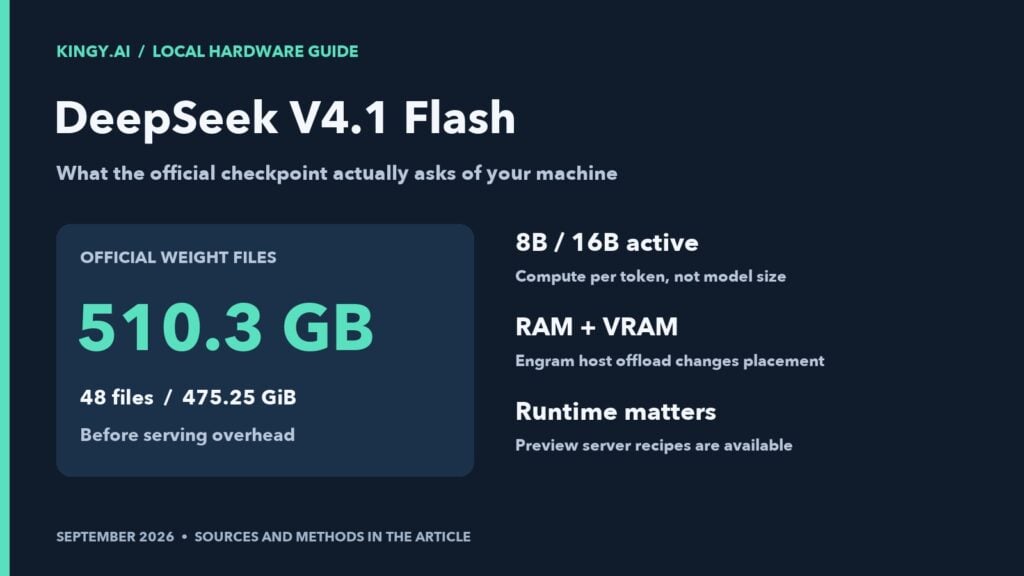
For an ordinary laptop or a consumer GPU PC, start with hosted DeepSeek. Do not buy a GPU or a bigger SSD on the assumption that it will run the official 1017 checkpoint. Its native weight files total 510.30GB before runtime memory. Smaller community builds and SSD streaming are separate configurations with their own requirements.
Choose a route before spending
| Choose | When it fits |
|---|---|
| Hosted DeepSeek | You want to check whether the model answers your task well on the computer you already own. This does not test local speed, privacy or memory use. |
| A smaller local model | You need local document work on modest hardware. The linked Qwen3-4B PDF recipe covers a specific 16 GiB M4 Mac mini setup; it is a different model. |
| A named large-machine setup | You already have suitable hardware or need to evaluate a specific deployment. Match the exact files, runtime, RAM, GPU memory, SSD and context to a completed reported run before purchasing. |
Retained rental example: our October 17 two-B300 attempt consumed US$29.28 in provider credit and verified all 48 native weight files, but the server never became ready. It produced no inference result. A large memory allocation and a completed download did not establish a working deployment; validate the loader before paying for another full download.
Buying answer updated October 22, 2026. The rental result and third-party reports below retain their original dates and exact configurations. No hardware was purchased or rented for this update.
Compare more models: Can You Run It at Home? lists every Kingy verdict by machine type, from a 16GB laptop to a 512GB Mac Studio.
You can use DeepSeek V4.1-Flash-1017 from an ordinary laptop through its website or API, although DeepSeek does not disclose the precision it serves. Running the model yourself is a much larger hardware job: the official download contains 510.30GB of weights, or 475.25GiB, before serving software and working memory. That release is already low precision: its routed experts are FP4 and most other weights FP8.
There are smaller community conversions and experimental ways to stream weights from SSD. Those options deserve attention, but they need an exact model file, a compatible runtime and measurements on the machine you intend to use. A large SSD alone does not make a normal laptop a practical DeepSeek server.
Updated October 17, 2026 after a paid two-B300 rental attempt. All 48 native weight files passed SHA-256 verification, but the server never became ready and no inference checks completed. Observed provider-credit consumption: US$29.28. The rental and its disposable storage have been terminated.
Choose a workable route before a large download
Match the exact DeepSeek 1017 files and runtime to a documented machine before planning a large download.
Check the local-AI options for your job
The tools do not qualify DeepSeek on an untested machine. The linked small-PDF recipe uses a different model.
What to check before downloading
The table below separates reported runs from estimates for the exact 1017 release. A result on a large machine does not show that the same files fit your laptop, and streaming from SSD is a different setup from keeping the full model in memory.
- Write down the exact checkpoint, quantization, runtime and intended context. Include separate Engram files and runtime working memory in the storage and memory plan.
- Match those details to a reported configuration before spending on hardware. Treat an unmatched machine as unresolved, even when its total memory looks close.
- If your goal is a small local document task, start with the retained 16 GiB M4 Mac mini PDF recipe and its stated limits. It uses a different model.
These tools do not qualify DeepSeek 1017 on an untested machine. The rental experiment and third-party speeds below retain their original configurations and dates.
Next: Hardware guide · Choose a GGUF · Local-AI tools
DeepSeek V4.1 Flash local requirements: quick answers
Can a 24GB GPU run the official 1017 checkpoint by itself? No: the native weights alone total 510.30GB. A custom offload implementation is a different deployment, and the September consumer-GPU report below does not validate 1017.
Does 128GB or 256GB RAM solve it? Neither holds the native checkpoint in memory; the cited 432.03GB MLX oQ4e conversion also exceeds those capacities. Streaming and smaller conversions need their own exact-file, runtime and performance evidence.
Which Flash version does the API use? The current official model/pricing table maps deepseek-flash to V4.1-Flash-1017; its legacy Flash aliases are also served by that model. DeepSeek does not state the precision it serves. Keep September hosted tests labeled with the version actually tested.
For a next step, choose hosted access to evaluate task quality on an ordinary computer, or audit a named local artifact and supported loader before renting hardware. The failed two-B300 deployment below remains the observed result; this maintenance pass did not rerun it.
What changed with the 1017 release?
DeepSeek released the October 17 checkpoint under the name DeepSeek-V4.1-Flash-1017. Its official website, app and deepseek-flash API route were updated. The API method and pricing remained unchanged. See the official changelog.
The official repository has 48 weight shards. At revision 1bae0e1088993b9b82de08f59de5be5a34e42170, their published sizes sum to 510,296,708,312 bytes. We subsequently downloaded every shard and verified its complete SHA-256 hash. The original capacity calculation required only the repository file metadata; readers can audit the file-size estimate without downloading half a terabyte.
The configuration still mixes formats: routed experts use FP4, while other components use FP8 and additional formats. Applying a blanket four-bit multiplier to a headline parameter count gives a poor storage estimate. The exact formats are recorded in the pinned configuration.
How much RAM and VRAM do you need?
There is no single RAM number that describes every deployment. If all weights live in GPU memory, host RAM handles a different job from a setup that offloads large model components to the CPU. A system that streams weights from SSD has different bottlenecks again.
The active-parameter count describes the work performed for a token. Other experts remain part of the model and may be selected for later tokens. Engram, the model’s lookup-memory component, adds another substantial storage requirement.
vLLM documents four MI300X GPUs with Engram offloaded to host RAM, and two B200 or B300 GPUs with host offloading. Its recipe now selects 1017, but its retained hardware measurements used the September checkpoint. These are deployment starting points, not proven minimum specifications. Our separate 1017 rental attempt below did not reach inference. See the vLLM deployment recipe.
Adding RAM and VRAM together does not automatically create a usable pool. A discrete GPU must move data over its connection to the CPU. Unified-memory systems share physical memory, so an advertised GPU allocation must not be added to total RAM as though it were extra capacity. The runtime must support the intended placement.
For our original, unavailable four-MI300X rental proposal, we budgeted for at least 512GiB of host RAM, with 400GiB available before loading, alongside four 192GB accelerators. That is a conservative test allocation, not a measured RAM minimum. If you intend to keep the native weights entirely in system RAM, their 475.25GiB payload alone is the starting point; the operating system, loader and working buffers still need memory. CPU memory bandwidth and the offload path affect speed as well as capacity.
How much SSD space should you leave?
For one native checkpoint, 1TB of free SSD space is a sensible planning target. The weights consume about 510GB; software, caches, download metadata and temporary files use more. This is an allowance, not an official minimum.
If you keep the original weights and a similarly sized conversion, the two copies can exceed 1TB before temporary files. Plan closer to 2TB free for that workflow, then check the converter’s actual requirements. A drive sold as a 1TB SSD will not provide 1TB free after the operating system and existing files.
When weights are streamed from disk during generation, storage performance affects every conversation. Prefer local NVMe for an offload experiment and record the drive and filesystem. A fast download or a cached repeat prompt does not establish sustained generation speed on unfamiliar content.
The download also takes time. At a sustained 1Gbps, 510.30GB takes about 68 minutes in ideal conditions. At 100Mbps it takes about 11.3 hours. Real transfers take longer. On a rental, that waiting time can cost more than the short inference test.
Can a 512GB Mac run a smaller version?
The MLX community’s 1017 oQ4e conversion lists 432.033GB, or 402.363GiB, of tensor storage. Its card includes the language model, Engram tables, vision components and draft head. It quantizes the Engram tables while retaining the original projection precision.
That is a more promising capacity calculation for a 512GB machine than the native release, but it is not a default fit: macOS lets the GPU use about 384GB of a 512GB Mac, and 432.03GB plus working memory exceeds that unless iogpu.wired_limit_mb is raised. It still leaves practical questions: how much memory the runtime can allocate, what it uses during loading, whether it swaps, and how quickly it produces useful answers. We have not measured this conversion on a Mac, and its size is not a reason to promise a particular token rate.
Check the full artifact name. DeepSeek V4 Flash, September V4.1 Flash and V4.1-Flash-1017 have different weights. A working recipe for an older release does not validate the new one.
What about one consumer GPU and lots of RAM?
In a September technical report, JigSawPT described V4.1 Flash running as a 502GB GGUF, with the release’s MXFP4 experts repacked unchanged and Q8_0 attention, through a custom llama.cpp fork (dsv41-porte branch) on one RTX 5090 with 31.8GiB VRAM and 125.7GiB RAM. Weights streamed from NVMe. The author reported roughly 5.1 tokens per second on new content and 21.3 on resident content. These are the developer’s measurements of the September model. See the report, code and raw results.
This makes consumer-hardware testing worthwhile. It does not establish that installing the latest desktop app will run 1017. Before recommending a purchase, we need the matching 1017 conversion, a compatible build, correct output and repeatable performance on fresh prompts.
Our US$40 rental experiment: what actually happened
We found an available alternative to the original four-MI300X plan: two B300 GPUs on RunPod Secure Cloud. We rented them, downloaded the exact 1017 checkpoint and fully verified all 48 weight hashes. The server did not become ready, so none of the 15 planned inference checks ran. There is no Kingy response-time, token-speed or correctness result from this experiment.
The final attempt failed in the eager-loading path of safetensors 0.8.0 with KeyError: 'F8_E8M0'. That is a concrete software-loading error. Our earlier host-offload attempts were interrupted before readiness. This run leaves the configuration’s ability to serve 1017 unresolved; it does not establish a minimum RAM requirement.
The hardware we actually rented
| Component | Quoted or measured allocation |
|---|---|
| Provider and region | RunPod Secure Cloud, EUR-IS-1 |
| GPU memory | 2 × NVIDIA B300 SXM6 AC; 576GB advertised VRAM total. NVIDIA reported 275,040MiB, or 268.59GiB, per card. |
| System RAM | 502GB quoted; measured container limit 502,999,998,464 bytes: 503.0GB or 468.46GiB. |
| CPU | 48 vCPUs quoted; cgroup quota equivalent to 40.8 fully occupied CPUs. Intel Xeon 6740E host. |
| GPU connection | NV18 reported between the two cards. |
| Storage | 750GB disposable volume plus 64GB container disk. The model mount was FUSE-backed storage; local-NVMe performance was not measured. |
| Software | vLLM 0.31.0; PyTorch 2.13.0+cu130; CUDA 13.0; NVCC 13.0.88; safetensors 0.8.0; NVIDIA driver 580.173.02. |
| Planned workload | Text only; one request at a time; 24,576-token configured limit; thinking, prefix caching and speculative decoding disabled. |
The host’s physical RAM and shared filesystem were much larger than the resources allocated to this container. We report the container limit and purchased disk quota. 503GB of host RAM plus separate GPU memory is also a different configuration from a 512GB unified-memory Mac.
Where the paid time went
The file transfer completed 67 selected repository files in about 7 minutes 47 seconds. From the first download start through complete verification took 19.5 minutes, including a switch from serial to four-worker hashing. The 48 weight files totaled 510,296,708,312 bytes and matched the pinned repository hashes.
We made four engine-start attempts within the same rental. The first used host offloading with an optional transparent-huge-page setting and initialized slowly. We disabled that setting, then corrected a separate compiler mismatch: the base image had NVCC 12.8 while the installed PyTorch runtime used CUDA 13.0. The matched-compiler host-offload attempt read all 48 shards but still did not reach readiness. We interrupted it to try GPU-resident loading with the eager file reader.
During initialization, the container’s peak-memory counter reached approximately 503GB, including file-backed cache and shared allocations. The final memory-event record showed zero OOM kills. GPU telemetry peaked at about 238.15GiB per card during startup. These are initialization and allocation observations, not measured inference-memory requirements. A loader displaying “48/48” or allocating GPU memory is not proof that the server can answer a request.
We also tried bounded, read-only sequential prefetching of the two large Engram shards. One complete 101.5GB shard read took about 30 seconds; the other was much slower and the prefetch was stopped. The logs retain those interventions. We have not isolated storage, memory pressure or any single flag as the sole cause of the slow host-offload initialization.
The final GPU-resident attempt disabled Engram CPU offload, raised GPU-memory utilization to 0.96 and selected eager safetensors loading. It failed while deserializing the checkpoint’s F8_E8M0 scale format. The retained traceback ends:
state_dict = load(f.read())
...
dtype = _getdtype(v["dtype"])
return _TYPES[dtype_str]
KeyError: 'F8_E8M0'
We stopped there. The prepared test would have repeated arithmetic, exact JSON extraction, a small Python-function syntax check, and filled 4K- and 16K-token retrieval prompts three times each. Those checks remain not run. No pass rate or latency figure can be inferred from the successful download or hash verification.
The complete rental cost and cleanup
We observed US$29.28 in provider-credit consumption at cleanup. Charging the full US$18.093 hourly quote through our deletion verification gives a conservative US$29.50 elapsed-time estimate; compute had actually stopped earlier. The provider's itemized usage report was one hour behind, so this is not a settled invoice total. Even that elapsed-time estimate plus a 20% contingency is US$35.41, below the same US$40 total limit.
| Quoted item | US dollars per hour |
|---|---|
| Both B300 GPUs | $17.980 |
| 64GB container disk | $0.009 |
| 750GB volume disk | $0.104 |
| Total while running | $18.093 |
The quoted-rate interval from allocation to our deletion verification was under 98 minutes. Provisioning, package installation, transfers, full hashing, aborted starts, diagnostics and evidence export all count. We used existing provider credit and made no top-up or subscription purchase.
We saved the complete evidence archive locally and verified its SHA-256 before stopping compute. We then terminated the Pod and its disposable disks. The provider console showed the Pod absent, zero network storage and a US$0.000/hour spending rate. Stopping vLLM alone would have left the rental running; stopping the Pod alone would still have left a disk charge.
Why we used B300 rather than the cheaper quote
The original four-MI300X candidate was advertised at US$2.39 per GPU-hour, or US$9.56 per hour for four GPUs before storage. It was out of capacity in our signed-in check. A suitable two-B200 allocation was also unavailable when checked. The B300 allocation was available at the final price above. These are dated availability observations, not a worldwide cheapest-provider ranking.
The earlier US$0 statement applied to the initial availability check, before we created this B300 rental. Current advertised rates and a suitable combined RAM/storage allocation still need a live quote. See RunPod’s MI300X page, its GPU pricing and storage and billing terms.
Exact checkpoint and commands we attempted
Our base image was runpod/pytorch:1.0.2-cu1281-torch280-ubuntu2404. The test environment lived in /opt/kingy-venv. These are retained execution details from an unsuccessful deployment, not a verified working installation recipe:
python3 -m venv /opt/kingy-venv
source /opt/kingy-venv/bin/activate
pip install --no-cache-dir 'vllm==0.31.0'
pip install --no-cache-dir 'nvidia-cuda-nvcc==13.0.88' \
  'nvidia-nvvm==13.0.88' 'nvidia-cuda-crt==13.0.88' \
  'nvidia-cuda-cccl==13.0.85'
export CUDA_HOME=/opt/kingy-venv/lib/python3.12/site-packages/nvidia/cu13
export CUDA_PATH="$CUDA_HOME" CUDACXX="$CUDA_HOME/bin/nvcc"
export PATH="$CUDA_HOME/bin:$PATH"
export LD_LIBRARY_PATH="$CUDA_HOME/lib:${LD_LIBRARY_PATH:-}"
[[ -e "$CUDA_HOME/lib64" ]] || ln -s lib "$CUDA_HOME/lib64"
nvcc --version
pip check
The download used the official repository with a fixed revision and four workers:
from huggingface_hub import snapshot_download
snapshot_download(
    repo_id="deepseek-ai/DeepSeek-V4.1-Flash-1017",
    revision="1bae0e1088993b9b82de08f59de5be5a34e42170",
    local_dir="/workspace/kingy-dsv41-1017/model",
    allow_patterns=["*.json", "*.safetensors", "encoding/*"],
    max_workers=4,
)
We separately compared the complete SHA-256 and byte length of every safetensors file against the pinned Hugging Face manifest. After verification, the matched-compiler host-offload attempt used this core serving command:
export VLLM_USE_RUST_FRONTEND=0 VLLM_DEEP_GEMM_WARMUP=skip
export VLLM_ENGINE_READY_TIMEOUT_S=2100 OMP_NUM_THREADS=1
export HF_HUB_OFFLINE=1 TRANSFORMERS_OFFLINE=1
vllm serve /workspace/kingy-dsv41-1017/model \
  --served-model-name deepseek-ai/DeepSeek-V4.1-Flash-1017 \
  --host 127.0.0.1 --port 8000 --tensor-parallel-size 2 \
  --tokenizer-mode deepseek_v41 --reasoning-parser deepseek_v41 \
  --language-model-only --attention-config '{"backend":"FLASHINFER_MLA_SPARSE_DSV41","indexer_kv_dtype":"mxfp4","indexer_sparse_logits":true}' --kv-cache-dtype fp8 \
  --engram-config '{"cpu_offload":true,"use_thp":false}' \
  --gpu-memory-utilization 0.9 --max-model-len 24576 \
  --max-num-seqs 1 --max-num-batched-tokens 4096 \
  --no-enable-prefix-caching --disable-uvicorn-access-log
The final failed attempt changed cpu_offload to false, selected --safetensors-load-strategy eager and used --gpu-memory-utilization 0.96. Its startup window was bounded to 11 minutes; the loader exception occurred earlier. The generic wrapper’s “did not become ready” message should not be mistaken for a completed timeout or the underlying cause.
For a future reproduction, first validate that the exact chosen loader path can deserialize this checkpoint’s scale types. Confirm the compiler as well as the PyTorch CUDA runtime, and inspect the storage mount rather than assuming every provider volume is local NVMe. We have not validated a package upgrade or a local dtype patch as a fix.
Only run a response test after a readiness check succeeds:
curl --fail --max-time 2 http://127.0.0.1:8000/healthOur deployment never passed that check. A properly budgeted retry should keep the full loading and verification cost, save raw responses and settings if inference succeeds, and reserve time to export evidence and terminate both compute and storage. This experiment establishes why an advertised hourly GPU price is only part of a cheap-test budget.
When the API is the better starting point
DeepSeek lists Flash at $0.15 per million uncached input tokens and $0.60 output off peak, or $0.30/$1.20 at peak. The documented weekday peak windows are 01:00–04:00 and 06:00–10:00 UTC, excluding Chinese public holidays; weekends are off peak. A hypothetical 100K-input/10K-output request costs $0.021 or $0.042 before other services and must include billable thinking tokens. Current model and rate table
That can answer a task-quality question for pennies, at a served precision DeepSeek does not disclose. It cannot tell you how much RAM a local engine consumes, how a local conversion compares with the official FP4/FP8 release, or how fast your laptop will run the weights.
For most laptop owners, start with hosted access. For local deployment, identify the exact artifact and runtime first. For a hardware purchase, require a completed test on the same memory class and workload you intend to use.
October 17 maintenance: Added direct RAM/VRAM and current API-version answers after reviewing the page’s local-requirements queries. Rechecked official release/pricing and runtime documentation. The retained rental costs, loader failure and not-run inference checks are unchanged.
Related Kingy reading
- DeepSeek V4.1 Flash 1017 release, pricing and benchmark context
- September V4.1 Flash versus Qwen3.8-27B hosted task test
- September V4.1 Flash versus GPT-6 and Claude hosted task test
- Qwen3.8-27B local hardware guide for a smaller-model alternative
- Earlier V4 Flash 0731 Mac guide, covering a different checkpoint
Buying details checked October 22, 2026: Qwen3-4B buying profile: The retained recipe covers selectable-text English PDFs up to thirty pages on a 16 GiB M4 Mac mini. Scans and other machines need their own checks. The original article keeps its existing dates and evidence scope; the linked profiles describe their own demonstrations.
Trending on Kingy
Keep reading with the stories getting the most attention now.
The Kingy Brief
Get The Kingy Brief.
AI changes, original tests and one practical thing to try. Fridays at 09:00 Vancouver time.
Free · Double opt-in · Unsubscribe anytime
Sign up for The Kingy Brief on Beehiiv.
Signup help and newsletter schedule
Signup form provided by Beehiiv. After submitting, check your inbox for "Confirm your subscription to The Kingy Brief" and open its confirmation link. Check Spam or Promotions if you cannot find it.
Fridays at 09:00 Vancouver time: source-checked AI changes, original tests and one practical thing to try. We skip a week when there is not enough verified material. Free. Unsubscribe anytime.