
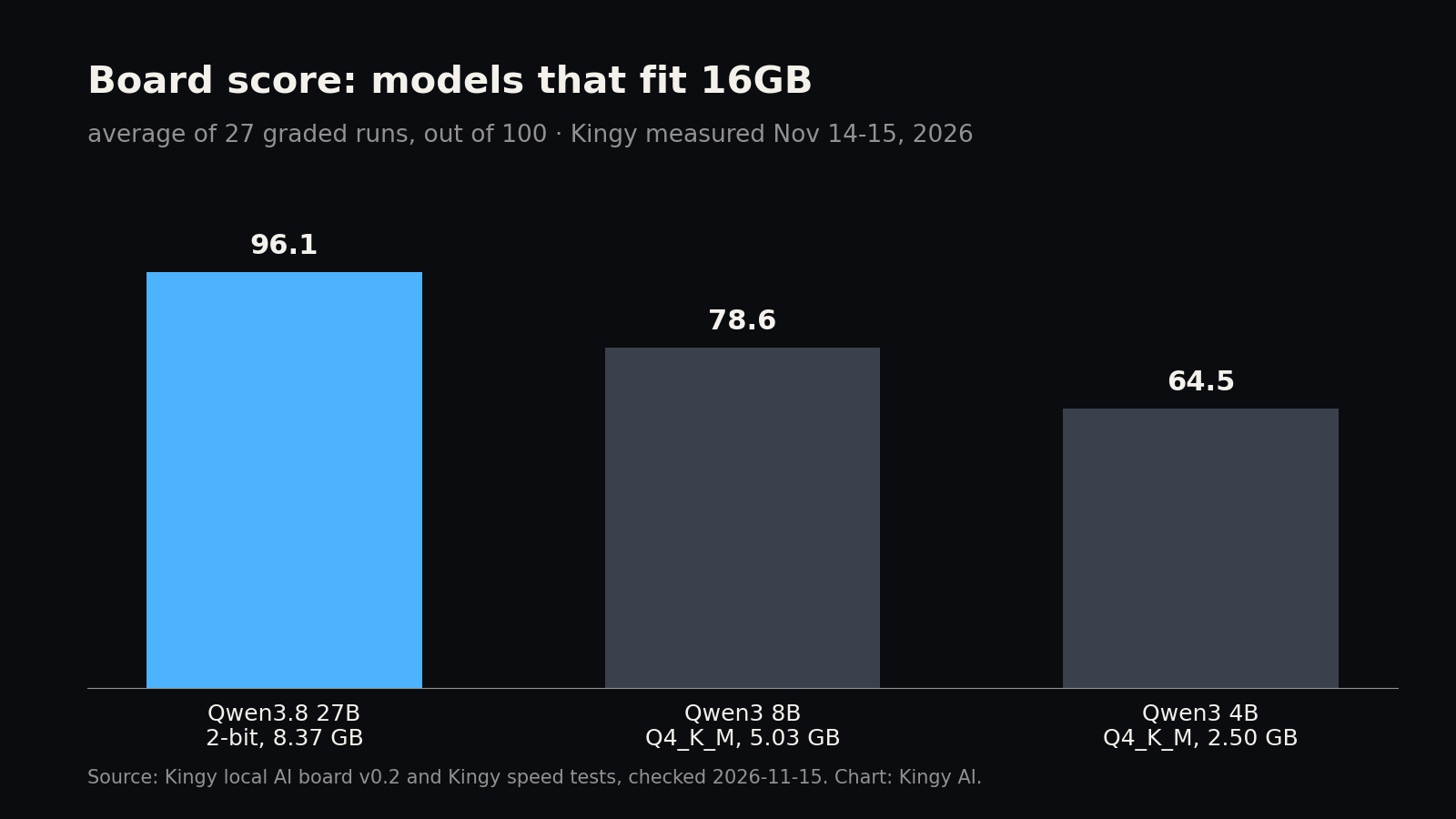
Short answer: with 16 GB, the best model we’ve scored that fits is Qwen3.8 27B in its 2-bit file (UD-IQ2_S, 8.37 GB): it scored 96.1 out of 100 on our 9-job board, the top score of any file that fits. It’s a heavily squeezed file, so for a safer, roomier everyday choice pick Qwen3 8B (78.6 on the board, 5.03 GB). The same two picks apply to 12GB graphics cards. A 16GB graphics card has more usable room than a 16GB Mac, which matters for long chats.
Who this page is for
Three kinds of machine land on the same answer here, so they share one page: a PC with a 16GB graphics card, a PC with a 12GB graphics card, and a Mac (or other shared-memory computer) with 16 GB. By our fit rule a 16GB card can use 14.5 GB, while a 12GB card and a 16GB Mac can each use 10.5 GB, because our rule leaves a third of a Mac’s memory for macOS and your apps.
Top picks for 16GB (and 12GB cards)
| Job | Our pick | File to download | Score | Speed |
|---|---|---|---|---|
| Coding and building apps | Qwen3.8 27B, 2-bit file | Qwen3.8-27B-UD-IQ2_S.gguf (8.37 GB) |
coding jobs 98.5; all 9 jobs 96.1 (likely 91.4 to 100.0) | Speed not measured yet on these machines |
| Long documents and files | Qwen3.8 27B, 2-bit file | Qwen3.8-27B-UD-IQ2_S.gguf (8.37 GB) |
long-document and file jobs 95.7; all 9 jobs 96.1 (likely 91.4 to 100.0) | Speed not measured yet on these machines |
| Everyday questions and writing | Qwen3 8B | Qwen3-8B-Q4_K_M.gguf (5.03 GB) |
Kingy Lab everyday 87%, writing-to-rules 67%; board all 9 jobs 78.6 | Speed not measured yet on these machines |
| Room to spare on a 12GB card or 16GB Mac | Qwen3 8B | Qwen3-8B-Q4_K_M.gguf (5.03 GB) |
all 9 jobs 78.6 (likely 71.0 to 86.1) | Speed not measured yet on these machines |
About the 2-bit file. Squeezing a 27-billion-parameter model into 8.37 GB throws away detail, and our rulebook rates anything at 3-bit or lower “Barely” for that reason. On our board it still scored 96.1 (likely range 91.4 to 100.0), and the board can’t separate it from the 3-bit file’s 89.2 (79.1 to 99.2): the ranges overlap. In our earlier 20-task test on a MacBook Pro, the 2-bit and 3-bit files both scored 19 of 20, but the 2-bit file’s code passed 10 of 14 hidden tests against 13 for the 3-bit (our 24GB MacBook Pro test). Use it when you want the strongest answers that fit; use Qwen3 8B when you want room to spare.
16GB graphics card
Usable room: 14.5 GB. Everything in the picks table fits with space left, and Qwen3.8 27B’s 2-bit file even fits with 32K (32,768 tokens) of conversation (11.57 GB needed), a longer chat than Qwen3 8B can hold on this card, because Qwen3 8B needs more memory per token. The 3-bit file is just too big: it needs 15.05 GB at 8K, 0.6 GB over. If you want a 27B model with more detail than 2-bit on a 16GB card, the GSQ file we tested separately (12.12 GB with its speed-up head) scored 20 of 20 on our 20-task test and fits by our rule (GSQ test); we haven’t put it on the board yet.
| Model | File we scored | Memory needed, 8K context | 16GB card (14.5 GB usable) | Board score, all 9 jobs |
|---|---|---|---|---|
| Qwen3 4B | Qwen3-4B-Q4_K_M.gguf (2.50 GB) |
4.08 GB | Fits, 10.4 GB spare | 64.5 |
| Qwen3 8B | Qwen3-8B-Q4_K_M.gguf (5.03 GB) |
6.86 GB | Fits, 7.6 GB spare | 78.6 |
| Qwen3.8 27B, 2-bit file | Qwen3.8-27B-UD-IQ2_S.gguf (8.37 GB) |
9.80 GB | Fits, 4.7 GB spare | 96.1 |
| Qwen3.8 27B, 3-bit file | Qwen3.8-27B-UD-Q3_K_XL.gguf (13.15 GB) |
15.05 GB | No: needs 15.05 GB, 0.6 GB over | 89.2 |
| Gemma 4 26B A4B | gemma-4-26B-A4B-it-Q4_K_M.gguf (16.80 GB) |
18.89 GB | No: needs 18.89 GB, 4.4 GB over | 85.2 |
12GB graphics card
Usable room: 10.5 GB. Same picks, tighter fit: the 2-bit Qwen3.8 27B leaves 0.7 GB, which is enough for 8K of conversation but not 32K (32,768 tokens needs 11.57 GB). Qwen3 8B leaves 3.6 GB.
| Model | File we scored | Memory needed, 8K context | 12GB card (10.5 GB usable) | Board score, all 9 jobs |
|---|---|---|---|---|
| Qwen3 4B | Qwen3-4B-Q4_K_M.gguf (2.50 GB) |
4.08 GB | Fits, 6.4 GB spare | 64.5 |
| Qwen3 8B | Qwen3-8B-Q4_K_M.gguf (5.03 GB) |
6.86 GB | Fits, 3.6 GB spare | 78.6 |
| Qwen3.8 27B, 2-bit file | Qwen3.8-27B-UD-IQ2_S.gguf (8.37 GB) |
9.80 GB | Fits, 0.7 GB spare | 96.1 |
| Qwen3.8 27B, 3-bit file | Qwen3.8-27B-UD-Q3_K_XL.gguf (13.15 GB) |
15.05 GB | No: needs 15.05 GB, 4.6 GB over | 89.2 |
16GB Mac or shared-memory computer
Usable room: 10.5 GB by our rule, the same as a 12GB card. The 2-bit Qwen3.8 27B fits with 0.7 GB spare, which is tight on a Mac that is also running a browser and other apps; Qwen3 8B is the comfortable choice. LM Studio’s own guidance recommends 16 GB or more on a Mac. We haven’t measured speed on a 16GB Mac yet. For a sense of scale only: on our 24GB MacBook Pro, a different machine, the 2-bit file wrote 13.8 tokens a second and Qwen3 8B 33.2 with 8K loaded (measured Nov 3, 2026).
| Model | File we scored | Memory needed, 8K context | 16GB Mac (10.5 GB usable) | Board score, all 9 jobs |
|---|---|---|---|---|
| Qwen3 4B | Qwen3-4B-Q4_K_M.gguf (2.50 GB) |
4.08 GB | Fits, 6.4 GB spare | 64.5 |
| Qwen3 8B | Qwen3-8B-Q4_K_M.gguf (5.03 GB) |
6.86 GB | Fits, 3.6 GB spare | 78.6 |
| Qwen3.8 27B, 2-bit file | Qwen3.8-27B-UD-IQ2_S.gguf (8.37 GB) |
9.80 GB | Fits, 0.7 GB spare | 96.1 |
| Qwen3.8 27B, 3-bit file | Qwen3.8-27B-UD-Q3_K_XL.gguf (13.15 GB) |
15.05 GB | No: needs 15.05 GB, 4.6 GB over | 89.2 |
Speed
We haven’t measured any of these models on a 12GB card, a 16GB card or a 16GB Mac yet, so this page shows no speeds for them. The board score is what we can stand behind:
How to run it
The easy way: LM Studio. It has a built-in model downloader. Open the Discover tab (Cmd+2 on a Mac, Ctrl+2 on Windows or Linux), paste the repository name shown for each model below into the search bar, and pick the file with the same quant name (LM Studio’s guide).
The direct way: llama.cpp, the engine we test with. Install it with winget install llama.cpp on Windows or brew install llama.cpp on a Mac (install guide). -hf downloads a model from Hugging Face and -c 8192 sets the 8K context our fit numbers assume. -hf also downloads and loads a model’s vision file if it has one (about 1.2 GB for Gemma 4); our fit numbers are for text only, so the commands below add --no-mmproj to skip it (server options).
- Qwen3.8 27B, 2-bit file: Unsloth replaced many of its Qwen3.8 27B files, including both files we scored, on November 10 to 12, 2026 (commit history), so a plain download now gets a newer file than the one we scored. To use the exact file we tested, download
Qwen3.8-27B-UD-IQ2_S.gguffrom the August 20 revision, then runllama-server -m Qwen3.8-27B-UD-IQ2_S.gguf -c 8192. The newer file has the same name; we haven’t scored it. - Qwen3 8B:
llama-server -hf Qwen/Qwen3-8B-GGUF:Q4_K_M -c 8192 --no-mmproj, or searchQwen/Qwen3-8B-GGUFin LM Studio and pick Q4_K_M. - Qwen3 4B:
llama-server -hf Qwen/Qwen3-4B-GGUF:Q4_K_M -c 8192 --no-mmproj, or searchQwen/Qwen3-4B-GGUFin LM Studio and pick Q4_K_M.
MLX on a Mac. Apple’s own MLX-LM runs models converted to MLX format: pip install mlx-lm, then mlx_lm.generate --model <an MLX model on Hugging Face> --prompt "hello" (or mlx_lm.chat for a chat session). MLX files are different downloads from the ones above, with different sizes, and we didn’t score or time them, so check the size before you download.
How we tested
Kingy tested every score on this page on our own machines. Nothing here is copied from a model maker’s chart.
- Board score. Kingy’s local AI board v0.2 gives each model the same 9 real jobs: a landing page, a budget tracker app, a browser game, a Python bug fix, a chart from a messy spreadsheet, questions about a long document, a job that means searching 37 files with tools, a motion title and a video cut. Scripts check each result; no AI judges another AI. Every job runs 3 times, so each score is the average of 27 runs, with the makers’ own settings and the exact files named on this page (checked by fingerprint). The main runs were on our Lucy AI Studio (AMD Ryzen AI Max+ 395, 128 GB), November 14 to 15, 2026 (UTC). “Likely range” is a rough 95% range around the average: when two ranges overlap, we treat the board as unable to tell those two models apart.
- Writing and everyday scores come from Kingy Lab’s 120-task test (November 7 to 12, 2026), which marks 60 everyday jobs, 30 coding tasks and 30 writing tasks with rules to follow.
- Fit uses the same rule as our Local AI checker: memory needed = file size + room for 8,192 tokens (8K) of conversation (the “KV cache”, from each model’s official settings file) + 10%. We count a graphics card’s memory minus 1.5 GB for the screen and driver, and, as a cautious rule of our own, two-thirds of a Mac’s memory up to 36 GB (three-quarters above that), leaving the rest for macOS and your apps. macOS itself lets the graphics side use more (about 19 GB of our 24GB MacBook Pro), so a Mac may fit a little more than we say. For Qwen3.6 and Qwen3.8 we leave out a small fixed memory state (under 0.2 GB). GB means a billion bytes. File sizes come from Hugging Face and Ollama, checked November 15, 2026. A “No” here means it doesn’t fit in that memory by this rule.
- Speed is only shown where we measured it, with the chip and date. Everything else says “not measured yet”. We never estimate a speed on these pages.
What we don’t know yet
- Speeds on 12GB cards, 16GB cards and 16GB Macs. Not measured yet.
- Whether Unsloth’s newer Qwen3.8 27B files (November 10 to 12) score the same as the ones we tested.
- Image generation at 16 GB. We haven’t measured image models at this size, so there’s no pick here.
Not sure how much memory you have, or using a different chip? The Kingy Local AI checker asks for your machine and shows which of 50 popular models fit, with our measured speeds where we have them.
Sources
- Kingy local AI board v0.2 and Kingy speed tests, checked 2026-11-15: Kingy’s board v0.2 scores and speed tests behind this page (method above).
- Kingy Lab: Local AI Models Tested, checked 2026-11-15: Kingy Lab’s 120-task test of 8 open models on the Lucy, November 7 to 12, 2026 (writing, everyday and coding scores).
- Kingy measured: 24GB MacBook Pro test, Nov 3 2026, checked 2026-11-15: Kingy’s own speed and quality test on a 24GB MacBook Pro (M4 Pro), November 3, 2026.
- Kingy measured: Qwen3.8-27B GSQ file on 3 machines, checked 2026-11-15: Kingy’s test of the Qwen3.8 27B GSQ file on three machines, November 8, 2026.
- Kingy Local AI checker, checked 2026-11-15: The fit rule used on this page (Kingy verdict standard v0.1).
- huggingface.co, checked 2026-11-15: Qwen’s Qwen3 4B files and sizes on Hugging Face.
- huggingface.co, checked 2026-11-15: Qwen’s Qwen3 8B files and sizes on Hugging Face.
- huggingface.co, checked 2026-11-15: Unsloth’s Qwen3.8 27B files at the revision we scored (August 20, 2026).
- huggingface.co, checked 2026-11-15: Unsloth’s Qwen3.8 27B file history: many files, including both we scored, replaced November 10 to 12.
- huggingface.co, checked 2026-11-15: Gemma 4 26B A4B files and sizes (LM Studio Community).
- lmstudio.ai, checked 2026-11-15: LM Studio’s guide to downloading a model.
- lmstudio.ai, checked 2026-11-15: LM Studio’s system requirements.
- github.com, checked 2026-11-15: llama.cpp install guide.
- github.com, checked 2026-11-15: llama.cpp server options (-hf, -m, -c).
- github.com, checked 2026-11-15: Apple’s MLX-LM project.
Revision log
- November 15, 2026: First published. Picks from Kingy board v0.2 (November 14 to 15) and Kingy Lab (November 7 to 12).