Local AI is now good enough for most everyday work on a mid-range computer, but cloud AI is still faster, stronger on hard coding and needs no setup. In Kingy’s 20-task test, free Qwen models running on a 24 GB MacBook Pro scored 19 out of 20. ChatGPT scored 20. ChatGPT finished all 20 tasks in 5 minutes; the local models took 11 to 32 minutes.
Where local AI clearly wins is privacy: your prompts never leave the machine. On cost, it wins only when it replaces a cloud bill you would otherwise keep paying. A US$1,200 upgrade needs to remove about US$35 a month of cloud spending to pay for itself over three years.
Most people should use both: a local model for drafts, summaries, private documents and bulk jobs, and a cloud model for hard problems and anything that has to be done quickly.
Local AI vs cloud AI at a glance
| What you care about | Better choice | What Kingy found |
|---|---|---|
| Everyday quality | Close to a tie | Qwen3.8-27B on a 24 GB Mac: 19/20. ChatGPT: 20/20. |
| Hard coding | Cloud | On a parser task with 14 hidden tests, ChatGPT passed 14 and the best local model 13. |
| Speed | Cloud | 5 minutes for 20 tasks on ChatGPT, against 11 to 32 minutes locally. |
| Cost | Depends on your bill | A US$1,200 upgrade breaks even at about US$35.07 a month of avoided cloud spending over 36 months. |
| Privacy | Local | Prompts stay on your computer. Cloud privacy depends on your plan and settings. |
| Setup | Cloud | Sign in and type. Local needs the right hardware, a runner such as Ollama or LM Studio, and a model download. |
Local AI means the model runs on your own computer, using apps such as Ollama, LM Studio or llama.cpp and free model files such as Qwen, Gemma or gpt-oss. Cloud AI means your prompt goes to a company’s servers: ChatGPT, Claude, Gemini or their paid APIs.
Quality: is local AI as good as ChatGPT?
On everyday tasks, nearly. In our MacBook Pro vs ChatGPT test, Kingy gave the same 20 tasks to ChatGPT and to three free Qwen models, one of them in two versions, running on a 24 GB M4 Pro MacBook Pro. Each model ran each task once.
| Model | Where it ran | Score out of 20 | Time for all 20 tasks |
|---|---|---|---|
| ChatGPT (gpt-6.1-sol) | Cloud | 20 | 5 min |
| Qwen3.8-27B, 3-bit | MacBook Pro | 19 | 29 min |
| Qwen3.8-27B, 2-bit | MacBook Pro | 19 | 32 min |
| Qwen3-8B | MacBook Pro | 18 | 14 min |
| Qwen3-4B | MacBook Pro | 15 | 11 min |
On the everyday jobs, the best local models tied ChatGPT. The gaps were code and speed. On a parser task checked by 14 hidden tests, ChatGPT passed 14, the 3-bit Qwen3.8-27B 13, Qwen3-8B 11 and the 2-bit Qwen3.8-27B 10. Qwen3-4B never produced the code.
Two caveats. We loosened three grading rules after the run. Under the original strict rules the totals were ChatGPT 18, the 2-bit Qwen3.8-27B 18, Qwen3-8B 18, the 3-bit Qwen3.8-27B 17 and Qwen3-4B 15, so strict grading makes it closer, not wider. And in a November 9 follow-up, a different Qwen3.8-27B file (GSQ IQ3_S, 12.1 GB) scored 20 out of 20 on the same Mac, so the right model file matters as much as the model name.
For a wider view, the Kingy Local AI Scoreboard ran eight local models on nine real jobs, seven of which count toward the score. Six finished within the scoreboard’s 14.7-point tie line at the top, led by gpt-oss-120b at 98.0 and the 2-bit Qwen3.8-27B at 97.9. The smallest models fell well behind: Qwen3 8B scored 74.5 and Qwen3 4B 56.5. Bigger local models are much better than small ones, and they need more memory.
Speed: how fast is local AI?
Local AI is fast enough to read along with on the right hardware, and slow on the wrong hardware. Speed depends on two things: how much fast memory your computer has, and how big the model file is.
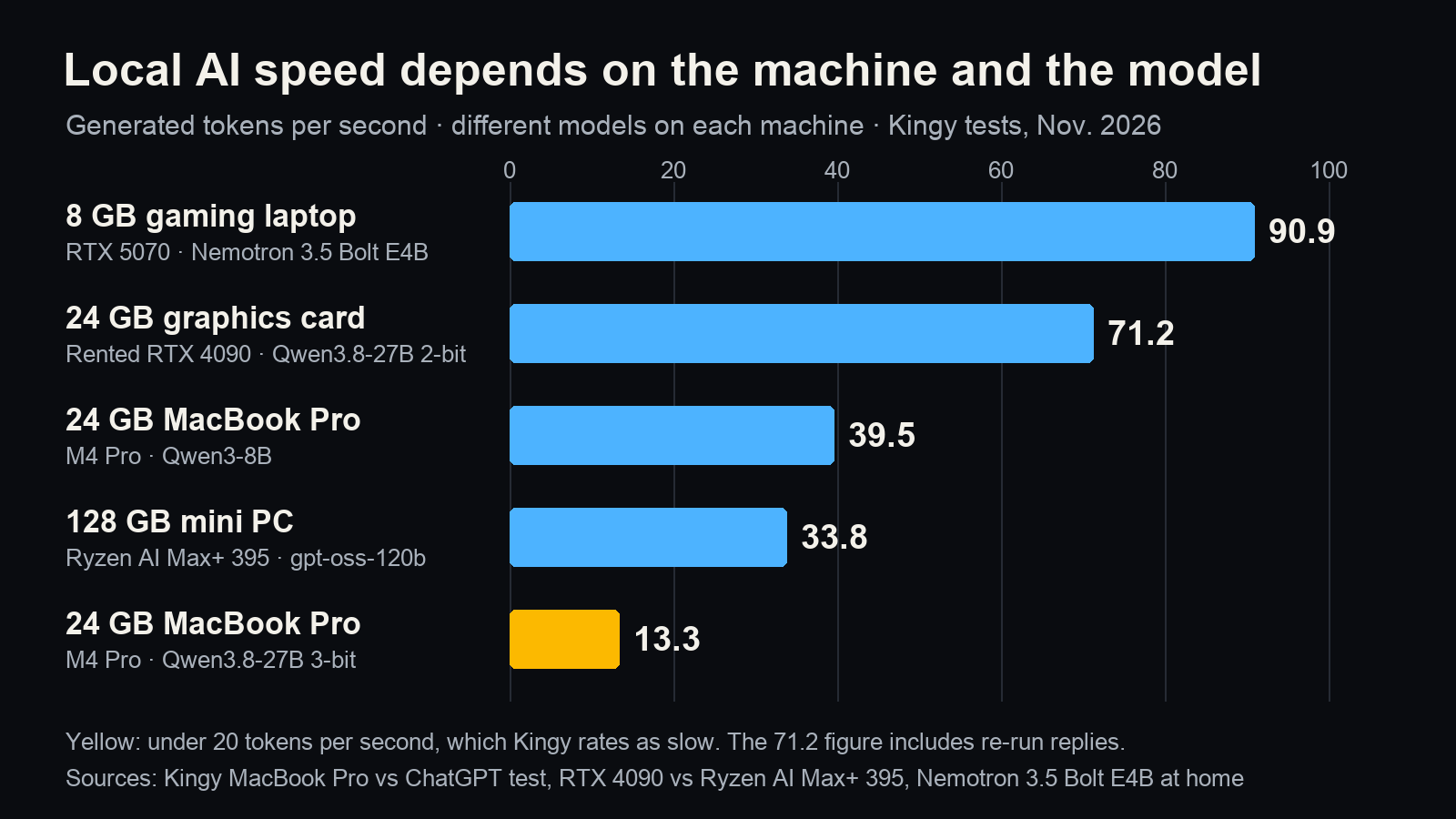
- 8 GB gaming laptop: NVIDIA’s small Nemotron 3.5 Bolt E4B wrote 90.9 tokens per second on an 8 GB RTX 5070 laptop, and about 173 with NVIDIA’s drafter model on short chats (our test).
- 24 GB graphics card: a rented RTX 4090 ran the 2-bit Qwen3.8-27B at 71.2 tokens per second, a figure that includes some re-run replies (our test).
- 24 GB MacBook Pro: Qwen3-8B wrote 39.5 tokens per second. The 3-bit Qwen3.8-27B wrote 13.3, or 12.8 with 8K of text in the chat.
- 128 GB mini PC: a Ryzen AI Max+ 395 machine ran the 65 GB gpt-oss-120b at 33.8 tokens per second. The RTX 4090 managed only 9.5 on that file, because it did not fit in the card’s 24 GB and spilled into slower system memory.
A token can be a word, a piece of a word or a punctuation mark, so even 13 tokens per second is fast enough to read along with. The bigger problem on a laptop is the wait before the answer starts. With 8K of text in the prompt, we estimate the 27B model on the MacBook Pro needs about 66 to 72 seconds to read it before writing anything; Qwen3-4B needs about 11 to 19 seconds. Those are calculated from the measured prompt-reading speed, not timed.
These speeds come from different models on different machines, so read them as typical, not as a ranking of the hardware. Kingy rented the RTX 4090 from RunPod. The Ryzen machine is a Lucy AI Studio made by Cephalon. Cephalon paid for an earlier Kingy video; it did not fund the scoreboard or control its results.
Cost: when does local AI pay for itself?
Local AI saves money only when it removes a bill. If you already own a capable computer, running a local model costs little beyond electricity. Buying hardware to replace a subscription is a much closer call.
In our local AI payback guide, a US$1,200 upgrade has to remove about US$35.07 a month of cloud spending to break even over 36 months, once the owner-reported electricity and US$2 a month of upkeep are counted. At US$35 a month it still finishes US$2.37 behind. A dollar a month either way decides whether the purchase pays.
Electricity is small. One owner reported about 0.65 extra kWh per batch of work, or about C$1.69 a month for 200 tasks at an estimated C$0.13 per kWh. Kingy did not measure that figure.
Retries and editing time count too. In our own small pilot, a 4B model on a 24 GB Mac passed 23 of 30 tasks after retries, but only 13 on the first attempt. A cheap local answer that needs fixing can cost more in time than a cloud answer that is right first time.
Put your own numbers into the local AI payback calculator: your cloud bills before and after, and what the hardware would cost you.
Privacy: what leaves your computer
With a local model, your prompts and files are processed on your own machine. Ollama’s FAQ says it plainly: “We don’t see your prompts or data when you run locally.” You still need the internet to download the app and the model.
With a cloud model, your prompt is sent to the provider. What happens next depends on the plan and your settings. These are the defaults the providers state, checked November 24, 2026:
| Service | Used to train models? | How long it is kept |
|---|---|---|
| ChatGPT Free, Plus, Pro | Yes by default. Turn off “Improve the model for everyone” in Data controls. | Saved chats until you delete them; temporary chats up to 30 days (OpenAI) |
| ChatGPT Business, Enterprise and the OpenAI API | Not by default | Business: set by your admin. API: up to 30 days for abuse monitoring (OpenAI) |
| Claude Free, Pro, Max | Your choice in privacy settings | Up to 5 years if you allow training, 30 days if you don’t (Anthropic) |
| Claude API | The consumer training choice does not apply | Deleted within 30 days, with exceptions (Anthropic) |
| Gemini app | Depending on your settings. Some chats are read by human reviewers. | History deleted after 18 months by default; about 2 months with history off; reviewed chats up to 3 years (Google) |
| Gemini API, free tier | Yes, and human reviewers may read it | Not stated (Google) |
| Gemini API, paid tier | No | Logged for a limited period to detect misuse (Google) |
Cloud AI on a business or API plan is far more private than a free consumer app, but your data still passes through and is stored on someone else’s servers for a time the provider sets, and flagged chats can be kept longer. For client files, health records, legal documents or anything under a confidentiality agreement, a local model removes the question.
One catch: some local apps now offer cloud models too. Ollama, for example, offers cloud models alongside local ones and lets you switch them off. Check that the model you picked is actually running on your machine.
Offline use
A local model generates its answers on your computer, so it does not need a cloud service to reply. All of the inference in our Mac tests ran on the Mac itself. Kingy has not yet run a test with the internet switched off, so we can’t yet tell you which apps and features keep working offline. Features that look things up on the web will not. A cloud model needs a working connection for every message.
What computer you need to run AI locally
Memory decides what you can run. The more memory your graphics card or Mac has, the bigger and better the model you can load. These verdicts come from Kingy’s Can You Run It at Home? hub, where “Yes” means the model fits fully in fast memory, writes at least 20 tokens per second with 8K of context and starts answering an 8K prompt within 30 seconds.
| Your computer | Example model | Kingy verdict |
|---|---|---|
| PC with an 8 GB graphics card | Qwen3 8B | Yes, 22.6 tok/s |
| PC with a 24 GB graphics card | Qwen3.8-27B | Yes, 49.1 tok/s (measured August 17, 2026) |
| Mac with 24 GB | Qwen3.8-27B | Yes but slow, 10.9 tok/s at 8K (measured November 8, 2026) |
| 128 GB Mac or Strix Halo PC | gpt-oss-120b | Yes, 33.8 tok/s |
The 24 GB Mac figure here is lower than the 12.8 tokens per second in our 20-task test. The two runs were on different dates, both with 8K of text in the chat, and the hub doesn’t name the exact file it used. Expect somewhere between 11 and 13 tokens per second for this model on that Mac.
To check your own machine, use What AI can my computer run? It covers 50 popular models and labels each speed as measured or estimated. For specific picks, see the best local AI models for 24 GB. If you’re thinking of buying a machine for this, start with DGX Spark vs RTX Spark vs Mac Studio.
The hybrid option: use both
Using a cheap model first and a strong cloud model only when needed sounds like the best of both worlds. Our one test of routing found it doesn’t save money automatically.
In our Qwen4-Max vs Claude Opus 5.5 test, we sent three coding tasks to the cheaper Qwen4-Max first and passed them to Opus when Qwen failed. Both approaches passed 2 of 3 tasks. Routing escalated on 2 tasks and cost about US$2.17, against US$0.78 for using Opus alone. The failed first attempts were paid for too, though they don’t explain the whole gap. Both models were hosted, but the lesson applies to a local first model as well: a failed attempt costs time even when it costs nothing else.
Routing pays off when the first model handles most jobs on its own. A practical split:
- Run locally: summaries, rewrites, extraction, first drafts, bulk jobs and anything private.
- Send to the cloud: hard coding, long reasoning, anything urgent and anything where a wrong answer is expensive.
Which should you use?
| You are | Our pick | Why |
|---|---|---|
| A casual user who asks a few questions a day | Cloud | The free tiers are fast and there’s nothing to set up. Turn off training in the privacy settings if that matters to you. |
| Working with private or confidential files | Local, or a business plan | A local model keeps the files on your machine. A business or API plan isn’t used for training by default, but the provider still stores your data for a time. |
| A developer | Both | Local for quick edits and private code; cloud for hard problems, where the local models fell short in our test. |
| Paying for heavy API use every month | Run the payback numbers | If local can remove more than about US$35 a month of spending, a US$1,200 machine can pay for itself in three years. |
| A small business | Both, starting with cloud | Cloud needs no IT support. Add a local machine for sensitive documents and steady bulk work once you know the volume. |
Not sure your computer is up to it? Start with the hardware checker, then try Kingy’s Local AI Lab to see the setup and costs for your machine.
Frequently asked questions
Is local AI cheaper than ChatGPT?
Only if it removes a real bill. Running a model on a computer you already own costs little beyond electricity. Buying a US$1,200 machine pays back over three years only if it replaces about US$35 a month or more of cloud spending.
Is local AI as good as ChatGPT?
Nearly, for everyday tasks. Free Qwen models on a 24 GB MacBook Pro scored 19 out of 20 in Kingy’s test, against 20 for ChatGPT. On hard code the local models fell behind.
Is local AI more private?
Yes. Your prompts are processed on your own computer. Cloud services receive every prompt, and consumer plans such as ChatGPT Free, Plus and Pro use chats for training by default unless you turn it off.
Does local AI work without the internet?
The model runs on your computer, so it doesn’t need a cloud service to answer. You need the internet to download the app and the model, and features that search the web won’t work offline. Kingy hasn’t yet run a test with the connection switched off.
What computer do I need to run AI locally?
An 8 GB graphics card runs small models such as Qwen3 8B well. A 24 GB card runs strong 27B models fast. A 24 GB Mac runs them slowly. 128 GB of unified memory runs 120B-class models such as gpt-oss-120b.
How fast is local AI?
From about 10 tokens per second for a big model on a 24 GB Mac to over 90 for a small model on a gaming laptop, in Kingy’s tests. ChatGPT finished our 20 tasks in 5 minutes; the local models took 11 to 32.
Can I use both local and cloud AI?
Yes, and most people should. Use local for private and routine work and cloud for hard or urgent work. Automatic routing didn’t save money in Kingy’s one test, so split the work by job type.
How we test
The quality scores come from the 20-task MacBook Pro test (published November 3, 2026, updated November 9) and the Local AI Scoreboard (measured November 14–16, 2026). Speeds are generation speeds measured on each machine and leave out network time. Costs come from the payback guide. Each linked article lists its exact model files, settings and limits. We will update this page as new models and machines are tested, and record each change below.
Sources
- Kingy: Local AI on a 24GB MacBook Pro vs ChatGPT, Local AI Scoreboard, RTX 4090 vs Ryzen AI Max+ 395, Nemotron 3.5 Bolt E4B at home, local AI payback guide, Qwen4-Max vs Claude Opus 5.5, Can You Run It at Home?
- OpenAI Data controls FAQ and Enterprise privacy
- Anthropic Updates to consumer terms and organization data retention
- Google Gemini Apps Privacy Hub and Gemini API terms
- Ollama FAQ
Revision log
- November 24, 2026: first version.