Prices and availability checked November 21, 2026. U.S. prices are before tax and exclude trade-ins.
Buy the 128 GB Mac Studio with M5 Max if your models and apps work well on macOS and you want a capable desktop for local AI and everyday work. The configuration with a 40-core GPU and 1 TB SSD costs $5,399 from Apple. Buy DGX Spark if your work depends on a Linux CUDA stack or you need NVIDIA’s documented multi-node setup. NVIDIA lists its 128 GB, 4 TB Founders Edition for $6,950. Choose an RTX Spark PC if you want Windows on Arm, NVIDIA graphics and CUDA in the same machine, especially in a laptop. Apple, NVIDIA, NVIDIA RTX Spark
For models that exceed a 128 GB machine’s practical budget, the M5 Ultra Mac Studio offers 256 GB or 512 GB in one computer, at a steep price. Several DGX Sparks can split a supported model across machines, but networking and software become part of the job. A network of machines can also distribute separate requests without combining their memory. Those are different uses, and the right purchase depends on which one you need.
The 128 GB comparison
All five examples have 128 GB installed. The Surface Laptop Ultra includes a screen and battery. The desktops require your own peripherals, and SSD capacity ranges from 1 TB to 4 TB. Windows, Linux and macOS expose different amounts of memory to the GPU. Stock and configured delivery dates can change.
| 128 GB configuration | U.S. price | Status and storage |
|---|---|---|
| Mac Studio M5 Max, 40-core GPU | $5,399 | 1 TB SSD, check delivery |
| NVIDIA DGX Spark Founders Edition | $6,950 | 4 TB SSD, check stock |
| Surface Laptop Ultra, RTX Spark N1X | $5,899.99 | 1 TB SSD, out of stock |
| MSI EdgeMesa N AI+ X-005US, RTX Spark | $7,499 | 4 TB SSD, waitlist |
| Surface RTX Spark Dev Box | $5,999.99 | 2 TB SSD, preorder |
The 64 GB MSI EdgeMesa is listed at $4,399 with a 1 TB SSD and an Add to Cart option. It may be a better fit if your chosen model, context and applications fit its smaller memory budget. Microsoft’s $2,599.99 starting price buys a Surface Laptop Ultra with 24 GB, a 512 GB SSD and the lower-tier chip. NVIDIA launched RTX Spark laptops October 16, and announced desktops from ASUS, Dell and MSI November 18. Availability still depends on the specific configuration. Microsoft Surface Laptop, MSI store, Microsoft Dev Box, NVIDIA laptop launch, NVIDIA desktop launch
| Platform | Installed memory in this comparison | Manufacturer memory bandwidth |
|---|---|---|
| DGX Spark | 128 GB | 273 GB/s |
| RTX Spark platform | Up to 128 GB | 300 GB/s |
| Mac Studio M5 Max, 40-core GPU | 128 GB | 614 GB/s |
| Mac Studio M5 Ultra | Up to 512 GB | 1.2 TB/s |
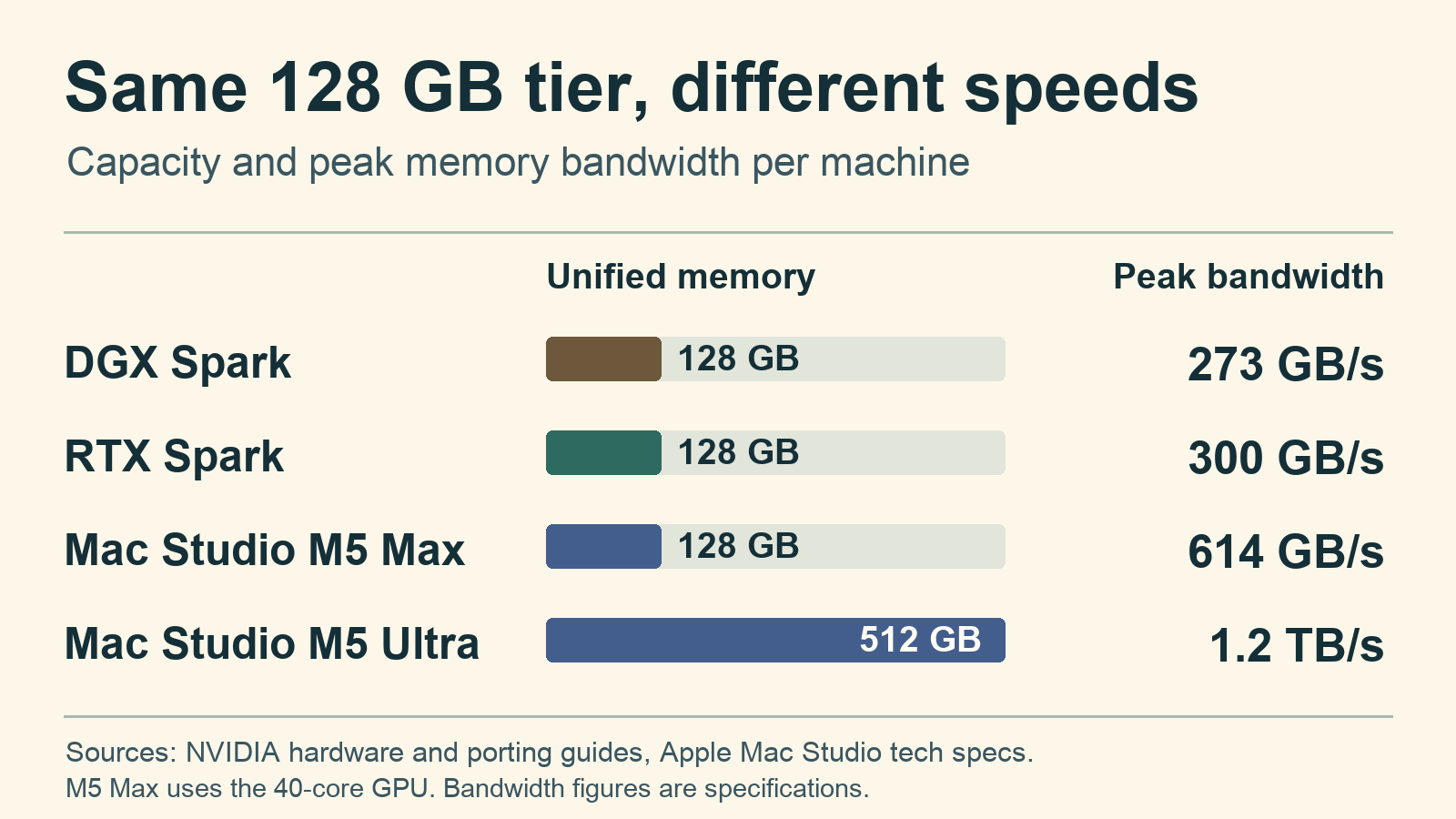
These figures describe how quickly the hardware can move data to and from memory under ideal conditions. Bandwidth matters when a model repeatedly reads weights from memory, but model architecture, runtime, quantization, batching and compute also affect results. At 128 GB, the M5 Max has about twice the published memory bandwidth of either Spark. That gives it room to feed memory-bound workloads faster when the runtime can use the bandwidth. NVIDIA DGX hardware, NVIDIA RTX Spark memory specifications, Apple specifications
What each machine is for
DGX Spark is a small NVIDIA AI development system running DGX OS, an Ubuntu-based Linux environment with NVIDIA software and drivers. Its GB10 chip combines a 20-core Arm CPU with a 6,144-core Blackwell GPU. Ethernet at 10 Gb/s handles everyday networking, and separate ConnectX-7 ports are for high-speed interconnects. It is the natural shortlist for developers who need Linux CUDA containers, NVIDIA inference software or a documented path to multi-node model serving. Check that the exact container, wheel and extension support Arm and the GPU architecture before purchasing. For a headless box to run vLLM or TensorRT-LLM, start with NVIDIA’s supported recipe for your exact model. NVIDIA DGX OS, NVIDIA hardware guide, DGX Spark playbooks
RTX Spark powers Windows 11 on Arm laptops and compact desktops. The higher-tier N1X has 20 CPU cores, 6,144 Blackwell GPU cores and up to 128 GB. The lower laptop tier has 18 CPU cores, 5,120 GPU cores and up to 64 GB. NVIDIA lists laptop chip ratings of 45–80 W and a desktop reference rating of 140 W. Cooling and power limits can vary by PC, so use exact-model tests for sustained performance or fan noise. Confirm your particular application, plugin and driver work on Windows on Arm. Some x86 or x64 software can run through Microsoft’s Prism emulation, but compatibility depends on the whole application and its dependencies. Windows still needs compatible Arm64 device drivers, including drivers used by some games for anti-cheat. RTX Spark specifications, Microsoft Windows Arm FAQ, NVIDIA porting guide, NVIDIA announcement
Microsoft says the Surface RTX Spark Dev Box will ship with WSL 2 preconfigured and GPU passthrough for CUDA. WSL lets you work in an Arm Linux environment on Windows. Verify the drivers, container and GPU memory available inside WSL for your own recipe. Native Windows users can start with NVIDIA’s llama.cpp CUDA, Ollama or LM Studio instructions. Microsoft Dev Box announcement, NVIDIA RTX Spark inference setup
Mac Studio runs macOS and Apple’s Metal-based software stack. MLX is an Apple-focused framework for machine learning on Apple silicon, while PyTorch also offers an MPS backend. Use a Metal or MLX build for inference on the Mac GPU. A CUDA-only project needs an NVIDIA machine, which can still serve requests from a Mac over the network. Both current Studios have 10 GbE, four rear Thunderbolt 5 ports and dedicated ProRes hardware. The M5 Ultra adds two front Thunderbolt 5 ports, while the Max uses those spots for 10 Gb/s USB-C. If you edit in Final Cut Pro or regularly work with ProRes, the Mac can earn its space as a workstation even when you are between inference jobs. Apple MLX, PyTorch MPS, Apple Mac Studio specifications
For an existing Mac workflow, start with the M5 Max configuration in the table. Our Mac Studio guide goes deeper on the M5 Max and Ultra choices. For a broader comparison that includes conventional GPU desktops, see our local AI hardware guide.
For image and video generation, check the workflow itself. RTX Spark and DGX Spark can use CUDA-specific extensions when there are compatible Arm builds. Mac users should verify that the same ComfyUI nodes and model formats run on Apple silicon. An existing media pipeline is a stronger reason to choose an operating system than a theoretical AI compute rating. NVIDIA RTX Spark ComfyUI setup, NVIDIA DGX Spark playbooks
How much model fits in 128 GB?
Installed memory is a capacity ceiling shared with the operating system and other work. Model weights are only one part of the bill. The runtime needs room for its own workspace, activations and the KV cache used to retain context. Longer prompts and more simultaneous users can increase that demand. A model that loads with a short prompt may fail or slow down when you increase context or concurrency.
A rough weights-only estimate is parameter count × bits per weight ÷ 8. For example, 100 billion parameters at an idealized four bits per weight would require about 50 billion bytes, or roughly 50 GB, for weights alone. Quantization metadata, the actual model format, cache and runtime add to that. Compare the actual download, then budget for everything the engine allocates after loading it. An idealized 70B model needs 35 GB for four-bit weights or 140 GB at 16 bits. At 405B, the equivalent four-bit estimate is 202.5 GB. Different quantizations and architectures change the real result.
RTX Spark has an extra allocation detail. NVIDIA describes dedicated GPU, shared system and CPU-only regions within physical memory. A 128 GB PC therefore does not provide 128 GB of freely available GPU memory. NVIDIA says GPU allocations can spill from dedicated into shared memory, where allocation behavior and performance can differ. Windows memory budgets also change under pressure. Check the actual budget in the software you intend to run and leave headroom. NVIDIA unified memory guide, CUDA allocation guide
The Mac and DGX also allocate unified memory to the system and runtime. On a 512 GB Mac, the working budget still depends on memory pressure and the runtime. Before buying, identify the exact model file and quantization, context length, engine and expected number of concurrent requests. Then check that combination on the machine, or find a reproducible test of it.
Fine-tuning needs its own memory estimate. Gradients, saved activations and optimizer state change the budget. NVIDIA documents LoRA and QLoRA on DGX Spark with LLaMA Factory and NeMo. MLX LM supports adapter training on eligible models on Apple silicon. For RTX Spark, verify the exact native Windows Arm or WSL recipe, including its GPU memory budget. Start with a small batch and sequence length before sizing hardware for a larger run. NVIDIA LLaMA Factory playbook, MLX LM fine-tuning guide
What independent tests say about speed
For chat and coding, compare time to first token and output tokens per second. The first includes the work of reading your prompt. The second is the pace after the answer starts. For a local agent, time the whole task. For a server, compare throughput and per-user latency under the same number of concurrent requests. NVIDIA advertises up to 1 petaflop of FP4 compute for both Sparks. The DGX figure uses sparsity, and peak FP4 compute does not tell you how quickly an engine will decode text. NVIDIA DGX hardware, RTX Spark specifications
Tom’s Hardware tested a 256 GB M5 Ultra Mac Studio with a 36-core CPU and 80-core GPU against DGX Spark using Qwen3.8 27B in Q4_K_M. The publication reported almost four times the generation throughput on the Mac and faster prompt processing in that test. Its Mac had 4 TB of storage and cost $12,299 as configured. That ratio applies to the tested Ultra and workload. Tom’s Hardware M5 Ultra review
A separate Tom’s Hardware AgentPerf-Local test used Qwen3.8 27B, llama.cpp and native multi-token prediction on the M5 Ultra and a Dell Pro Precision GB10. The Mac completed its tested workload in just under half the time and used about 16% less task energy. The publication’s larger-model experiments used different engines and model formats and produced different trade-offs. Tom’s Hardware follow-up
StorageReview reported median Qwen3.8 27B Q4_K_M results with llama.cpp CUDA over repeated passes. Its desktops used sr-client 1.13, and the earlier laptop tests used 1.11. Its 64 GB ASUS ProArt GR1X desktop produced 13.1 output tokens per second with one request. A 128 GB HP OmniBook Ultra 16 laptop produced 12.6. With eight simultaneous requests, the desktop reached 40.0 tokens per second combined, while the laptop reached 33.8 combined. Each user receives a share of that output. The test write-up leaves the serving context length unspecified. StorageReview’s original tests
In those tests, the desktop’s advantage was greater with eight requests than with one. In a separate Tom’s Hardware AgentPerf-Local test, a 14-inch M5 Max MacBook Pro took about 25% longer than a 15-inch RTX Spark Surface Laptop Ultra. Both used Qwen3.8 27B Q4_K_M with llama.cpp and DFlash2. That result is for the two laptops and that agent workflow. Tom’s Hardware Surface test
Software tuning can also move a result substantially. In one independent DGX Spark experiment, an author running 50 seeded HumanEval+ tasks with Qwen3.8 27B reported token-weighted decode speed of 12.65 tokens per second with SGLang NVFP4 and 36.59 with DFlash2 enabled. The pass count changed from 46 out of 50 to 45 out of 50. For a task with a correct answer, compare successful completions alongside generation speed. More Than a Machine
When to pay for M5 Ultra
M5 Ultra is the strongest option here for someone who needs more than 128 GB in a single Mac and has a compatible software stack. Apple lists 256 GB and 512 GB configurations, with 1.2 TB/s memory bandwidth. The 36-core CPU, 80-core GPU configuration with 256 GB memory and a 1 TB SSD costs $10,799. The equivalent 512 GB, 1 TB configuration costs $22,299. A 512 GB model with 16 TB storage costs $29,799. Apple Mac Studio specifications, Apple 256 GB configuration, Apple 512 GB configuration, Apple 512 GB / 16 TB configuration
Find a reproducible run with the exact model and long-context settings before paying for the extra capacity. A 128 GB M5 Max is the more sensible starting point for a Mac user whose work fits comfortably. A 256 GB Ultra can be easier to operate than coordinating two 128 GB computers for a single model, provided the Mac backend supports the workload.
Two 256 GB Ultras at the prices above total $21,598 before networking, $701 less than one 512 GB Ultra. One machine has a single 512 GB system-memory pool available to compatible local workloads. Two machines have separate pools and require a supported distributed backend to share the work of a model. Apple documents RDMA over Thunderbolt and its JACCL communication library, but useful distributed inference depends on the model, backend, topology and configuration. Apple’s Thunderbolt 5 RDMA support begins with macOS 26.2. In a vendor demo, four M3 Ultra machines reached nearly three times single-node token generation on a 27B Qwen checkpoint with tensor parallelism. Check your own model and topology before budgeting for that kind of speedup. Apple RDMA technote, Apple WWDC session
Can you combine several Sparks?
Splitting one model across systems and sending separate requests to different computers require different software.
NVIDIA documents connecting two DGX Sparks directly with one cable, three in a ring, or four in a manually configured ring. A 200 GbE switched fabric is another documented topology. NVIDIA documents 512 GB of aggregate system memory across four 128 GB Sparks. The guided vLLM cluster playbook calls for matching memory sizes and a switch for four machines. Four Founders Edition units at the current $6,950 listing would cost $27,800 before networking and tax. Each machine still has its own memory, and the interconnect is slower than local memory. A 200 Gb/s link has a theoretical raw rate of 25 GB/s before overhead. NVIDIA DGX Spark, NVIDIA cabling guide, NVIDIA guided vLLM cluster setup
Sharding divides a model’s work across nodes so that a supported model can use their combined capacity. It requires a compatible model, runtime and network setup, and it may add communication overhead. Two 128 GB DGX Sparks provide 256 GB of aggregate installed memory at $13,900 before the cable and tax. NVIDIA’s two-node vLLM example for Llama 3.1 405B Instruct uses AWQ INT4, one sequence at a time and a 64-token model length. Running that example says little about whether the same model can serve long documents or handle multiple users on the pair. NVIDIA multi-node vLLM recipe
Routing is different. NVIDIA describes PAIR as a way to distribute concurrent requests among suitable machines on a local network, including compatible Windows, Linux and macOS nodes. Its setup documentation lists llama.cpp, Ollama and LM Studio. Each request runs on one selected node. This can improve capacity for multiple users, but it does not make the memory of separate machines available to one oversized request. We found no supported transparent mixed-vendor pool that turns a Mac, an RTX Spark PC and a DGX Spark into one unified memory system. NVIDIA PAIR, PAIR setup
If your main reason for buying four DGX Sparks is to shard a CUDA workload, confirm the model’s exact distributed recipe first. Include cables or switching, setup time and the possibility that a smaller model on one node will deliver a better interactive experience.
Which should you buy?
Linux CUDA developer: Start with DGX Spark if the NVIDIA Linux environment and documented networking fit your stack. Price the exact Founders Edition or partner SKU and test the Arm/Blackwell container and extensions you need. A 64 GB partner DGX configuration also exists, so check the capacity on the quote. NVIDIA 64 GB announcement
Windows creator or portable developer: Consider an RTX Spark laptop if Windows on Arm supports your essential apps and plugins. Microsoft listed its 128 GB Surface Laptop Ultra as out of stock when we checked. Compare the price and availability for the exact capacity you need. For always-on Windows inference, compare a desktop’s noise and throughput under sustained load with the laptop’s. Add any monitor and peripherals you need to the desktop price.
Mac user running models within 128 GB: The M5 Max Studio is the clearest starting point. At $5,399 for the cited configuration, it costs less than the listed 128 GB DGX Founders Edition, though the Mac has 1 TB rather than 4 TB of storage. Verify your inference engine and any CUDA-dependent extensions first.
Large single-machine Mac workloads: Price the 256 GB Ultra before jumping to 512 GB. Buy the larger option when the actual model, context and workspace justify the $11,500 increase over the 256 GB example. For CUDA-specific multi-node work, compare a documented DGX deployment instead of assuming Mac and NVIDIA software are interchangeable.
Gaming or smaller local models: Add a conventional x86 discrete-GPU desktop to your shortlist. If the model fits its VRAM, compare the exact GPU’s performance and price. Check the games you actually play and whether the machine supports the drivers and plugins you use. Use the local AI hardware fit checker to narrow the choices, then verify the exact configuration and software yourself.
Before ordering, allow SSD space for model variants, containers and working files as well as the operating system. A larger SSD makes room for downloads and caches. An external SSD can do that job too if the machine has the ports you need. For an always-on box, compare measured power at the wall when idle and at the load you expect. For a batch job, compare energy per completed job. Chip power limits and adapter ratings are poor substitutes for either measurement. Kingy’s local-versus-cloud cost guide
Sources
- NVIDIA DGX Spark hardware and DGX OS
- NVIDIA RTX Spark platform specifications and porting guide
- Apple Mac Studio technical specifications
- Tom’s Hardware M5 Ultra review and original tests
- StorageReview ASUS ProArt GR1X review and original tests
- NVIDIA multi-Spark connection playbook
Method
Not tested by Kingy. We compared published manufacturer specifications, U.S. storefront listings and the independently published tests linked above. Prices, stock and delivery estimates can change. The cited tests use different machines, models and software configurations. We found no controlled comparison of all three current desktops on the same workload.