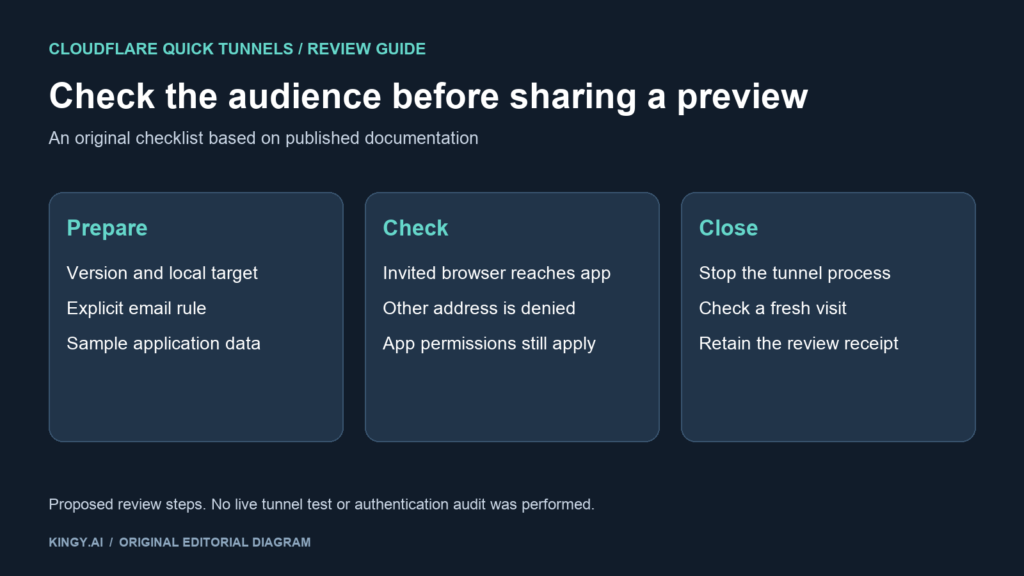
A coding agent can finish a prototype and hand you a URL that anyone who obtains it can open. Cloudflare’s October 2 announcement adds a practical option for that handoff: protected Quick Tunnels require visitors to prove control of an allowed email address before reaching the local app. The email gate is free and does not require a Cloudflare account for either participant. Cloudflare announcement
This is useful when you want to review a prototype on your phone or invite a particular collaborator. It also gives the person directing the agent a concrete check to request before sharing the preview. Decide which application and people the link should cover, then verify those boundaries.
This guide checks the published instructions, not a live deployment. Kingy did not run a tunnel, test email delivery or independently audit the authentication design for this article. The review procedure below is a proposed check you can perform on your own prototype.
The announcement date and the supported version
Cloudflare says email protection starts with cloudflared 2026.9.3. Its announcement is dated October 2, while the official GitHub release record for that version is dated September 24. The announcement and the binary release are separate dates; an existing installation may already have the relevant version. Announcement · Official release record
Ask the agent to report the installed version and show its proposed command before starting the connection. That request can catch an outdated binary or a missing access flag without opening the application to visitors first. Treat the returned version as something to inspect, not proof that the proposed setup has been verified end to end.
For one invited address, the documented command is:
cloudflared tunnel --url http://localhost:8080 --allowed-mail alice@example.com
Replace the port with your prototype’s actual local port and the example address with the intended visitor. Cloudflare’s Quick Tunnels documentation also supports repeated flags and a quoted wildcard such as '*@example.com' for a whole domain. Setup and matching rules
For an early review, an explicit address gives you a narrower invitation than an entire company domain. Use a domain rule only when everyone who can control an address in that domain is meant to have access. A convenient spelling shortcut can broaden the actual audience substantially.
An email gate is one part of the preview
Cloudflare describes two separate checks: its Access service verifies control of the visitor’s email, then cloudflared checks that identity against the locally held invitation rules. The company says the invitation list remains on the developer’s machine. This describes Cloudflare’s design; it does not mean the authentication process involves no external service. Published authentication design
Decide what the invited person should be able to do inside the app as well as whether they should be able to open it. A collaborator invited to inspect a layout may not need a working “delete account” button connected to real data. Use sample records and separate credentials for the prototype where possible.
Also inspect the local target. A preview for a small web application should not accidentally point at a different service on the machine. An address rule cannot correct a command that exposes the wrong application to the right people.
Keeping the app’s own authorization intact is especially relevant when several invited people have different responsibilities. Write down the actions each person is expected to try. That makes the preview review more useful than a general invitation to click around.
Give the coding agent a bounded preview request
A request like the following makes the intended handoff explicit. It is an example instruction, not a command Kingy executed:
Prepare a browser preview of the prototype on its local development port for one invited reviewer. Show the installed cloudflared version, the local target and the proposed allowed-mail command before starting it. Use sample data. After starting, report the URL and whether the logs identify email authentication. Keep the tunnel in this review session and tell me how to stop its process. Do not substitute a public preview if the protected setup fails.
Use the reviewer’s address in your own instruction rather than leaving the placeholder ambiguous. Cloudflare’s announcement says connector logs report whether email authentication is enabled and how many rules are present. Inspect that output rather than relying on the agent’s summary alone. Connector behavior described by Cloudflare
If the agent returns a different command from the one you reviewed, pause the handoff and inspect the difference. A useful completion receipt includes the exact local target, the command that actually ran and the process responsible for the connection. Store only the information your team needs; avoid putting private addresses or credentials into a public issue.
Verify the visitor experience with two identities
Before inviting a wider group, test the intended allow and deny cases. Use identities you control or an agreed collaborator; do not assume a browser tab that already has access represents a new visitor.
| Proposed check | Evidence to retain |
|---|---|
| Open the preview as the invited reviewer | The email challenge completes and the intended prototype appears |
| Try an address outside the invitation rule | The local application is not reached |
| Check an important interaction | The intended action works with sample data and the correct app permissions |
| Stop the tunnel process | A new visit cannot reach the prototype through that preview link |
Record failures with enough detail to investigate them. A missing email, a denied address and an application error are different results. A screenshot of the app proves that one browser reached it; it does not establish that other identities are blocked.
For a shared review, retain the check time and the configuration you checked. If you change the guest list or restart the connection, repeat the relevant visitor checks. Avoid carrying an old “access passed” label onto a new setup.
Browser previews and agent endpoints have different needs
Quick Tunnels are documented for development and testing, with changing hostnames, no uptime guarantee and a limit of 200 in-flight requests. They do not support Server-Sent Events. Protected email access requires an interactive browser and does not support non-interactive clients. Quick Tunnels limitations
That last restriction matters if your project includes an automated caller. A browser reviewer can complete an email challenge; an unattended tool integration needs a compatible authentication method. Do not promise a hosted assistant or background script access just because you can open the same URL on your phone.
Check streaming behavior separately. If the prototype expects an SSE connection, the documented limitation can affect what the reviewer sees. A page that loads successfully is only the beginning of that compatibility check.
For production traffic or a stable address, the documentation directs users to a regular Cloudflare Tunnel. Choose a deployment and access design that fits the application’s lifetime. A temporary review link should have an explicit end, even when the prototype itself continues running locally.
End the review and keep the receipt
The documentation says changing the allowed audience requires stopping the connector and creating a new Quick Tunnel; stopping its process ends access through that tunnel. Access changes and shutdown
Close the review with the process stopped and a fresh visitor check. Keep the reviewed command, the relevant authentication log result, the allow/deny outcomes and any application problem you discovered. That is a useful handoff to the next developer or reviewer.
The same habit of checking scope applies to agents controlling desktop applications. Kingy’s GitHub Copilot permission guide explains session and saved approvals; the Claude Code permissions analysis covers a separate coding-agent release.
The Kingy Brief
Get future Kingy Brief editions.
Source-checked AI changes, original tests and one practical thing to try.
Free · Choose your subjects · Double opt-in · Unsubscribe anytime
Regular sending is paused; no restart date is set.