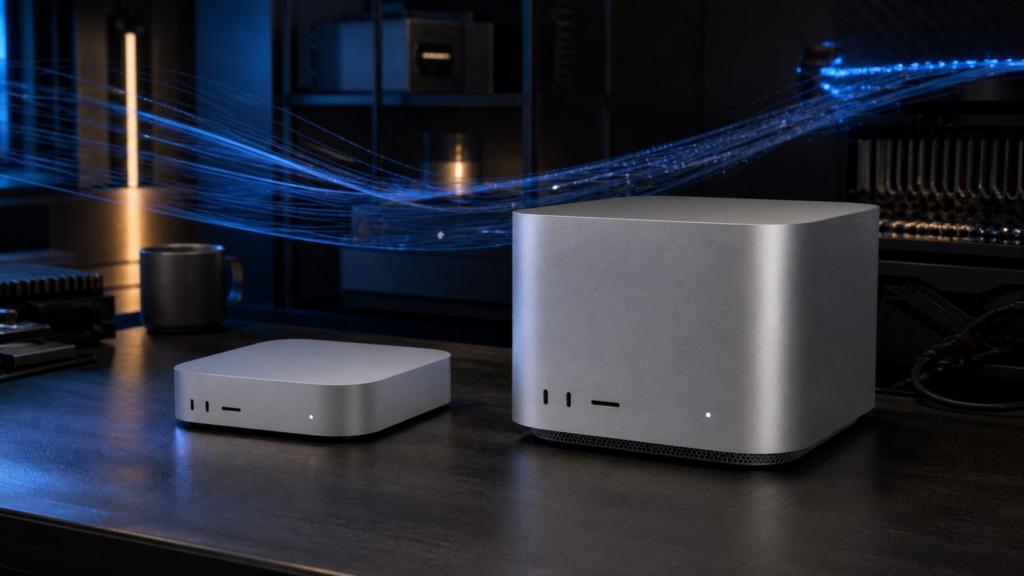
Verdict: Buy the 32GB M6 Mac mini for affordable local-AI experimentation, the 64GB M5 Pro mini only when its tiny footprint and lower power ceiling genuinely matter, and an M5 Max Mac Studio for frequent LLM or diffusion work. The 256GB and forthcoming 512GB M5 Ultra models are not extravagant versions of the same purchase. They are capacity machines for checkpoints that smaller Macs simply cannot keep resident.
This is a buying guide based on announced specifications and Apple-supplied tests, not a review. Apple says the new Mac mini and Mac Studio will reach customers on September 22, 2026; the 512GB M5 Ultra configuration is due in late October. Kingy.ai has not tested production hardware, sustained token generation, long-context stability, thermals under inference, or diffusion throughput on these systems. Prices below are U.S. Apple Store prices checked August 25, 2026 and can change.
Quick buying answer
| Buying threshold | Configuration to consider | Why it makes sense | Where it stops |
|---|---|---|---|
| Entry | M6 mini, 32GB, 512GB | The least expensive new Mac in this range that leaves useful room for a local model, macOS and a real application. | Thirty-billion-parameter-class models are edge cases, not its natural workload; 70B-class models are out. |
| Compact capacity | M5 Pro mini, 64GB, 512GB | Enough unified memory to make 70B-class four-bit inference plausible in a five-inch chassis. | At $2,699, it is only $500 below a 64GB M5 Max Studio and gives up cooling, GPU scale, ports and standard 10Gb Ethernet. |
| Performance sweet spot | M5 Max Studio, 64GB or 128GB | Much more GPU and memory bandwidth for repeated prompt processing, image generation and mixed creative work. | The 128GB/1TB configuration costs $5,399, almost the $5,499 base M5 Ultra; choose it for 128GB capacity, not because it is automatically the faster machine. |
| Extreme capacity | M5 Ultra Studio, 256GB or 512GB | For huge quantized checkpoints, long contexts, large datasets or concurrency that cannot fit on a 128GB Mac. | The 256GB/1TB top-chip configuration is $10,799. Apple has not yet exposed a selectable price for the late-October 512GB option. |
The simplest rule is to buy for resident model size first, memory bandwidth second and CPU benchmarks third. A faster chip cannot rescue a model that does not fit. Once the model fits, bandwidth and GPU scale determine how pleasant repeated local use is likely to feel.
The complete 2026 desktop range
Apple now has four desktop chip tiers across two boxes. The names are less useful than the hard limits behind them.
| Mac and chip | CPU / GPU versions | Unified memory | Memory bandwidth | Storage | U.S. starting price |
|---|---|---|---|---|---|
| Mac mini, M6 | 12-core CPU / 12-core GPU | 16GB, 24GB or 32GB | 153GB/s on the 16GB configurations; up to 170GB/s with 24GB or 32GB | 256GB to 2TB | $899 |
| Mac mini, M5 Pro | 15-core CPU / 16-core GPU; or 18-core CPU / 20-core GPU | 24GB, 48GB or 64GB | 307GB/s | 512GB to 8TB | $1,699 |
| Mac Studio, M5 Max | 18-core CPU / 32-core GPU; or 18-core CPU / 40-core GPU | 36GB, 48GB or 64GB; 128GB with the 40-core GPU | 460GB/s with 32 GPU cores; 614GB/s with 40 GPU cores | 512GB to 8TB | $2,499 |
| Mac Studio, M5 Ultra | 30-core CPU / 64-core GPU; or 36-core CPU / 80-core GPU | 96GB; 256GB or 512GB with the 36/80-core chip | 1.2TB/s | 1TB to 16TB | $5,499 |
Sources: Apple’s Mac mini technical specifications, Mac Studio technical specifications, Mac mini announcement and Mac Studio announcement, checked August 25, 2026.
One detail is easy to miss: “up to 170GB/s” does not describe every M6 mini. Apple’s specifications list 153GB/s for the 16GB versions and 170GB/s for higher-memory configurations. The M5 Max has a similar split: the 32-core GPU version is a 460GB/s machine, while the 40-core GPU version reaches 614GB/s.
Memory capacity versus memory bandwidth
Unified memory is why these Macs are interesting for local AI. The CPU and GPU share one pool instead of forcing the entire model into a separate graphics card’s VRAM. That can make unusually large local models possible in a compact, quiet system. It does not make all installed memory freely available: macOS, applications, Metal buffers, the inference runtime, model weights, temporary workspaces and the context or KV cache all draw from the same pool.
Capacity answers “can the workload stay resident?” Bandwidth helps answer “how quickly can the processors keep reading it?” For autoregressive LLM decoding, large weight tensors are repeatedly streamed from memory. More bandwidth normally helps, but tokens per second also depend on the exact model architecture, quantization, runtime, batch, context, prompt length and kernel support. Apple has announced large gains in LM Studio prompt processing; those are not independent measurements of sustained generation speed.
If you need a primer on the software side, see Kingy.ai’s Can a Mac Run Local LLMs? compatibility guide.
What fits at 16GB, 32GB, 64GB, 128GB, 256GB and 512GB?
The table below is a planning guide, not a compatibility guarantee. “Four-bit” is not one exact file size, and a model’s parameter count does not include every runtime allocation. A rough first pass is about half a byte per parameter for pure four-bit weights, then additional quantization metadata and operating headroom. Multimodal projectors, mixture-of-experts layouts, large contexts and concurrent sessions can materially change the answer.
| Unified memory | Comfortable planning target | Possible but compromised | Practical reading |
|---|---|---|---|
| 16GB | 7B–8B-class quantized LLMs; small speech and image models | 12B–14B at aggressive settings and modest context | Application minimum, not a durable local-AI workstation tier. |
| 24GB | 7B–14B with useful application headroom | Models around 20B, depending on quant and context | A workable starter tier, but 32GB is the safer M6 purchase. |
| 32GB | 14B–24B-class quantized models; lighter diffusion workflows | 30B–32B at four-bit with restrained context and few other apps | The real entry point for experimentation without immediately fighting memory pressure. |
| 48GB | 30B–32B-class models with more breathing room | Some 70B-class low-bit builds, usually with context or quality compromises | An awkward middle: useful, but often not enough for the jump buyers actually want. |
| 64GB | 30B–32B easily; many 70B-class four-bit builds with modest context | Higher-quality 70B quants, very long context or concurrent sessions | The compact large-model threshold and the point where the Studio comparison becomes mandatory. |
| 96GB | 70B-class models with better quantization or context headroom | Roughly 100B–120B-class four-bit models | The base Ultra is fast, but its 96GB capacity is lower than the 128GB Max option beside it. |
| 128GB | 70B at high-quality quantization; many 100B–120B-class four-bit models | Larger sparse or multimodal models when their exact artifact fits | The best all-round single-user capacity tier before pricing becomes extreme. |
| 256GB | Very large quantized models and serious long-context or multi-session work | 200B–400B-class models depending heavily on architecture and quantization | Buy only against a measured file and memory budget. Kingy.ai’s 239GB GLM-5.2 case study shows how little room can remain. |
| 512GB | Quantized checkpoints in the several-hundred-billion-parameter class | Some 600B–700B-class four-bit builds, if runtime support and overhead cooperate | This tier can hold artifacts ordinary workstations cannot, but it does not guarantee that every frontier model is supported or fast. |
Do not buy from parameter count alone. Before ordering, record the exact model repository, file or shard total, quantization, runtime, context target, cache precision, multimodal components and concurrency. Add an operating reserve rather than spending the last gigabyte on weights.
Expected LLM experience: prompt processing, generation and context
Prompt processing
Prompt ingestion can use the wider GPU more aggressively than one-token-at-a-time decoding. Apple says the M6 mini delivers up to 4.8 times the LM Studio prompt-processing performance of M4, the M5 Pro up to four times M4 Pro, the M5 Max up to 3.9 times M4 Max, and the M5 Ultra up to four times M3 Ultra. Those comparisons were run by Apple and use different previous-generation baselines. They are useful directionally, but they do not rank all four new machines against one another.
Token generation
For large models at batch one, generation often becomes a memory-traffic problem. That is where 307GB/s, 460GB/s, 614GB/s and 1.2TB/s should separate the tiers. It would still be irresponsible to convert those bandwidth figures into promised tokens per second. Framework maturity can erase or amplify hardware differences, especially with new GPU Neural Accelerators and less common model architectures.
Long context and agents
Long context is not free memory. The KV cache grows with model dimensions, context length, cache precision, number of sequences and sometimes tool or multimodal state. An agent also repeatedly submits large system prompts, tool schemas, retrieved files and conversation history. A model that fits for a short chat may fail—or slow sharply under memory pressure—when turned into an always-on coding or research agent.
That makes the 32GB M6 suitable for focused single-user tasks, the 64GB machines better for 70B-class experiments and larger coding models, the 128GB Studio more forgiving for long sessions, and the Ultra tiers relevant when the weights themselves consume most of an ordinary workstation.
Image and video generation
Diffusion and transformer image models usually need less resident memory than the largest LLMs, so GPU size and bandwidth matter sooner. Apple says the M5 Max Studio reaches up to 3.5 times the text-to-image performance of M4 Max, while M5 Ultra reaches up to 4.3 times M3 Ultra. These are Apple tests, not Kingy.ai benchmarks.
- M6, 32GB: appropriate for occasional image generation, upscaling and smaller workflows where waiting is acceptable.
- M5 Pro, 64GB: more model and batch headroom, but its main reason to exist is compact capacity rather than peak diffusion throughput.
- M5 Max, 64GB or 128GB: the sensible tier for frequent image generation, video enhancement, larger ControlNet-style pipelines and simultaneous creative applications.
- M5 Ultra, 256GB or 512GB: justified by unusually large models, training or fine-tuning experiments, heavy video pipelines, concurrency or datasets—not ordinary single-image generation.
Video generation is the least predictable purchase case. Model support, temporal attention, resolution, frame count, offloading and application implementation can dominate. The Studio’s larger thermal envelope, Media Engine and 10Gb Ethernet are valuable around the workflow, but they do not turn an unsupported CUDA-first stack into a native Mac application.
Thermals, ports, networking and always-on operation
The mini is five inches square, weighs 1.5 to 1.6 pounds and has a 155W maximum continuous power specification. Apple lists 5dBA at idle, not during sustained inference. It supplies two front USB-C ports, three rear Thunderbolt 4 ports on M6 or Thunderbolt 5 ports on M5 Pro, HDMI and 2.5Gb Ethernet; 10Gb Ethernet costs $100.
The Studio is 7.7 inches square, 3.7 inches tall and weighs 6.0 pounds with M5 Max or 8.0 pounds with M5 Ultra. Its 480W maximum continuous power figure is a ceiling, not an expected wall draw. Every configuration includes four rear Thunderbolt 5 ports, two USB-A ports, HDMI 2.1 and 10Gb Ethernet. The M5 Max has two front USB-C ports; M5 Ultra upgrades those front ports to Thunderbolt 5. Both include an SDXC slot.
For an always-on personal agent, the mini’s size and lower system ceiling are compelling. For frequent sustained inference, the Studio’s larger enclosure and cooling system are the safer bet, but that conclusion remains architectural until independent stress tests arrive.
Apple also advertises Thunderbolt 5 clustering and RDMA. Treat that as an advanced software project, not a substitute for buying enough memory in one machine. Distributed inference adds orchestration, communication and framework constraints; four Macs do not automatically behave like one simple shared-memory computer.
The configuration-price traps
- The $899 M6 is a headline, not the local-AI recommendation. It has 16GB of unified memory and 256GB of storage. The 32GB/512GB M6 is $1,499; moving to 1TB raises it to $1,799. An external SSD is usually the better place to economize because memory cannot be upgraded later.
- A max-memory mini is no longer cheap. The 15-core CPU, 16-core GPU M5 Pro mini with 64GB and 512GB costs $2,699. Adding the faster 18/20-core chip, 1TB and 10Gb Ethernet can take the small box well past its value advantage.
- The famous $500 Studio jump needs one correction. A 64GB/512GB M5 Max Studio with the 32-core GPU is about $3,199—$500 more than the comparable mini. It includes a much larger GPU, Studio cooling and 10Gb Ethernet, but its bandwidth is 460GB/s, about 50 percent above the mini’s 307GB/s. Reaching 614GB/s requires the 40-core GPU upgrade, taking the comparable Studio to about $3,499. That is still compelling, but it is an $800 jump, not $500.
- The 128GB M5 Max collides with the base Ultra. A 40-core GPU M5 Max with 128GB and 1TB is $5,399. The base M5 Ultra is $5,499 with 96GB and 1TB. Buy the Max when 128GB capacity is the requirement; buy the Ultra when the workload fits in 96GB and more bandwidth and GPU scale matter.
- The Ultra memory upgrade is enormous. Apple’s top 36-core CPU/80-core GPU M5 Ultra with 256GB and 1TB is $10,799. The 512GB option is promised for late October but is not selectable or priced in the U.S. configurator as of publication. Waiting is rational unless a named model demonstrably exceeds a safe 256GB budget.
- Internal SSD upgrades are expensive. Model libraries grow quickly, but external Thunderbolt storage can hold inactive weights and datasets. Keep enough internal storage for macOS, applications, swap avoidance and the active working set; do not sacrifice unified memory to fund an oversized factory SSD.
Five buyer profiles, one machine each
1. The curious local-AI newcomer: M6 mini with 32GB and 512GB
This is the best entry-level choice. It can run useful smaller coding, writing, transcription and image models without turning every session into memory triage. Skip the 16GB version for a machine bought specifically for local AI, and use external storage before reducing memory.
2. The compact always-on developer: M5 Pro mini with 64GB and 512GB
Choose this only when five-inch size, a lower maximum power envelope or a rack of compact nodes is part of the requirement. It opens the door to many 70B-class four-bit workloads. If it will sit alone on a normal desk, price the Studio before ordering.
3. The frequent LLM and diffusion user: M5 Max Studio with 64GB, 40-core GPU and 1TB
This is the performance sweet spot. It pairs 614GB/s bandwidth with a larger GPU, better I/O and a chassis built for sustained pro work. It will not hold every large model, but it should feel materially less compromised than a maxed mini for repeated prompts, image generation and mixed creative applications.
4. The private-AI workstation owner: M5 Max Studio with 128GB and 1TB
This is the best all-round capacity workstation for one demanding user. It is the natural home for high-quality 70B quants, many 100B-class models, longer sessions and larger multimodal pipelines. The $5,399 price makes it a deliberate capacity choice; buyers whose work fits under 96GB should compare the base Ultra.
5. The model researcher with a named target: M5 Ultra Studio with 256GB—or 512GB after October pricing
Buy the 256GB model only after reproducing a memory budget from exact files. Wait for 512GB when a specific, supported artifact exceeds the safe 256GB envelope. “Future-proofing” is not enough justification for an unpriced configuration in this category.
FAQ
Is a 32GB M6 Mac mini enough for local AI?
Yes, for smaller quantized LLMs, local speech tools, embeddings and light image generation. It is a good experimentation machine, not a 70B-class workstation.
Can a 64GB Mac run a 70B model?
Many four-bit 70B-class artifacts can fit, but model file size, context, cache precision and runtime overhead decide whether the session is useful. Treat 64GB as the threshold, not a guarantee of long context or heavy multitasking.
Is the 64GB M5 Pro mini better value than the Studio?
Only when compactness and lower system power are requirements. At $2,699, the mini is close enough to the $3,199 base-GPU 64GB Studio that the Studio’s stronger GPU, cooling, ports and included 10Gb Ethernet usually justify the difference.
Does the $3,199 M5 Max Studio have 614GB/s bandwidth?
No. The base 32-core GPU M5 Max is specified at 460GB/s. The 40-core GPU version reaches 614GB/s and adds $300, making a 64GB/512GB configuration about $3,499.
Should I buy the 128GB M5 Max or the 96GB M5 Ultra?
Choose the 128GB Max when the model needs more than a safe 96GB budget. Choose the 96GB Ultra when everything fits and bandwidth, GPU scale or multi-stream media work matters more. Their near-identical prices make model capacity the deciding question.
When is the 512GB M5 Ultra Mac Studio available?
Apple says late October 2026. The other announced Mac mini and Mac Studio configurations are scheduled to begin arriving September 22.
Can the 512GB Studio run any open-weight model?
No. Capacity is necessary but not sufficient. The artifact, runtime, Metal or MLX support, cache, architecture and acceptable speed still matter. Some frontier models also exceed 512GB even after aggressive quantization.
Final verdict
The M6 mini is the easy recommendation at 32GB: affordable enough to experiment, capable enough to be useful. The M5 Pro mini earns its place at 64GB only for buyers who value the tiny enclosure or always-on efficiency. Once that mini reaches $2,699, Mac Studio pricing must be part of the same shopping session.
For frequent local AI, the M5 Max Studio is the range’s centre of gravity. Choose 64GB and the 40-core GPU for performance; choose 128GB when model capacity is the constraint. The M5 Ultra is a different category. Its 256GB and forthcoming 512GB configurations should be purchased against a named checkpoint, a measured memory budget and a supported runtime—not a vague desire to own the fastest Mac.
Buy the M6 mini for exploration, the M5 Max Studio for sustained work and the M5 Ultra for models that prove they need it.
Official sources
- Apple Mac mini announcement
- Apple Mac mini technical specifications
- Apple Mac Studio announcement
- Apple Mac Studio technical specifications
- Apple Mac mini configurator
- Apple Mac Studio configurator
The Kingy Brief
Get The Kingy Brief.
AI changes, original tests and one practical thing to try. Fridays at 09:00 Vancouver time.
Free · Double opt-in · Unsubscribe anytime
Signup help and newsletter schedule
Signup form provided by Beehiiv. After submitting, check your inbox for "Confirm your subscription to The Kingy Brief" and open its confirmation link. Check Spam or Promotions if you cannot find it.
Fridays at 09:00 Vancouver time: source-checked AI changes, original tests and one practical thing to try. The weekly restart begins October 9, 2026. We skip a week when there is not enough verified material. Free. Unsubscribe anytime.