Apple’s smallest 64GB desktop has an unusual local-LLM advantage. At the top of the configuration ladder, however, the Mac Studio doubles the GPU cores and memory bandwidth for essentially the same money.
The 64GB M5 Pro Mac mini can do something most compact PCs cannot: keep a heavily compressed 70B-class language model in one CPU-and-GPU-accessible memory pool. That is a legitimate advantage for private local inference.
It is also easy to oversell.
A model fitting in memory says nothing about how quickly it will answer. It says even less about video generation, where every clip demands repeated work across many frames. Once the M5 Pro mini is upgraded to its fastest chip, 64GB of memory, and a 1TB SSD, its price reaches $3,199. A 64GB Mac Studio with the 40-core M5 Max costs $3,200 with a 512GB SSD, and Apple lists twice the GPU cores and twice the memory bandwidth.
That produces a clean split in the buying advice.
Editorial verdict: Choose the 64GB M5 Pro Mac mini for large private LLMs in the smallest possible box. If local video generation is the priority, buy the M5 Max Mac Studio or an Nvidia system.
Testing disclosure: Kingy has not tested the new M6 Mac mini, M5 Pro Mac mini, or M5 Max Mac Studio. Pre-orders opened August 25, 2026, and Apple says availability begins September 22. Hardware facts below are labeled confirmed specifications; prices are labeled current U.S. prices; one MLX-Gen result is labeled an independent project measurement. All untested workload guidance is labeled editorial projection or editorial recommendation.
Key takeaways
- Confirmed specification: M5 Pro Mac mini can be configured with 64GB of unified memory, 307GB/s of memory bandwidth, and up to a 20-core GPU.
- Editorial calculation: A dense 70-billion-parameter model at exactly 4 bits per parameter starts at about 35GB for weights alone. Quantization metadata, runtime allocations, KV cache, macOS, and other applications raise the real requirement.
- Editorial projection: A 64GB M5 Pro mini should fit some 70B-class 4-bit models at restrained context settings. “Fits” does not mean every 70B model, every quantization, long context, high concurrency, or fast generation.
- Current U.S. price: The 20-GPU-core M5 Pro mini with 64GB and 1TB is $3,199. A 40-GPU-core M5 Max Mac Studio with 64GB and 512GB is $3,200; matching the Studio to 1TB raises it to $3,500.
- Confirmed specification: The 40-core M5 Max has 614GB/s of memory bandwidth and two video encode engines. M5 Pro has 307GB/s and one video encode engine.
- Editorial projection: The Studio should be materially faster for many GPU-heavy local-AI workloads, especially video generation. The 2× core and bandwidth figures are specifications, not proof of a 2× application speedup.
- Independent project measurement: MLX-Gen documents roughly 30 minutes on an M5 Max with 128GB for a 5.05-second, 480×240, 101-frame Wan2.2 A14B clip at 25 steps. That result shows why “it runs” is not the same as production throughput.
- Editorial recommendation: Buy M5 Pro 64GB when fitting a large private LLM into the smallest possible Mac matters most. Buy M5 Max Mac Studio for local AI video. Choose an Nvidia system when CUDA-first compatibility and maximum generative throughput outrank compactness and a single large memory pool.
First, what “can fit a 70B LLM” actually means
The simple math is useful. A dense model with 70 billion parameters stored at exactly 4 bits per parameter needs:
70 billion × 4 bits ÷ 8 = 35GB of weight data.
Editorial calculation: That 35GB is a theoretical floor, not a shopping guarantee. Real quantized files also carry scales, metadata, and sometimes higher-precision tensors. Inference adds temporary buffers and a KV cache that grows with context length. macOS, the model runner, embeddings, and any agent tools must use the same 64GB pool.
The phrase “70B model” also hides architectural differences. A dense 70B model, a mixture-of-experts model with 70B total parameters, and a multimodal model with vision components can have very different working sets and compute patterns. Quantization recipes differ too. Some protect sensitive layers at higher precision, improving quality while consuming more memory.
Editorial projection: A 64GB M5 Pro mini should fit some dense 70B-class models at 4-bit or mixed low-bit quantization with moderate context and little competing load. It should not be assumed to fit every 70B-class package, a long-context session, multiple concurrent users, or an unquantized model. Swap may let a job start after physical memory is exhausted, but SSD-backed paging is not a substitute for adequate memory in an interactive inference system.
Apple silicon is unusually accommodating here because its CPU and GPU share unified memory. Apple’s open-source MLX unified-memory documentation states that both processors directly access the same pool and that MLX arrays do not need to be copied between conventional system RAM and dedicated VRAM. MLX LM then provides Apple-silicon-native text generation, quantization, and fine-tuning workflows.
That is the M5 Pro mini’s strongest local-AI argument. A GeForce RTX 5090 has 32GB of dedicated GDDR7 memory, according to Nvidia’s specifications. A 4-bit 70B dense model normally exceeds that capacity before runtime overhead, so an RTX 5090 system may need CPU offload, more aggressive quantization, or multiple GPUs. The 64GB Mac can keep a larger working set GPU-accessible in one pool.
The Nvidia system may still finish a compatible workload sooner. Capacity and speed are separate questions.
M6, M5 Pro, and M5 Max: the configuration facts
Apple’s new desktop line has three relevant tiers for local AI.
The M6 Mac mini has a 12-core GPU, up to 32GB of unified memory, and either 153GB/s or 170GB/s of memory bandwidth depending on memory configuration. The M5 Pro mini starts with a 16-core GPU, can be upgraded to 20 GPU cores, reaches 64GB, and supplies 307GB/s. The 40-core M5 Max Mac Studio reaches 128GB and 614GB/s. These are Apple’s confirmed Mac mini specifications and Mac Studio specifications.
The prices below are current U.S. configure-to-order totals as of August 25, 2026, before tax. Apple’s store is dynamic; the arithmetic is cross-checked against Daring Fireball’s launch-day configuration table.
| Configuration | Current U.S. price | Unified memory | Memory bandwidth | GPU cores | Storage | Projected role |
|---|---|---|---|---|---|---|
| M6 Mac mini | $1,299 | 24GB | 170GB/s | 12 | 512GB | Editorial projection: balanced 7B–14B LLM, RAG, transcription, and small image-model node |
| M6 Mac mini | $1,299 | 32GB | 170GB/s | 12 | 256GB | Editorial projection: capacity-first M6 for 32B experiments; plan on external storage |
| M6 Mac mini | $1,499 | 32GB | 170GB/s | 12 | 512GB | Editorial projection: best self-contained M6 local-AI configuration; not a sensible 70B target |
| M5 Pro Mac mini, 15-core CPU/16-core GPU | $2,699 | 64GB | 307GB/s | 16 | 512GB | Editorial projection: lowest-cost 64GB mini; best fit-first configuration for large private LLMs |
| M5 Pro Mac mini, 18-core CPU/20-core GPU | $3,199 | 64GB | 307GB/s | 20 | 1TB | Editorial projection: faster and roomier mini, but poor value for video beside Mac Studio |
| M5 Max Mac Studio, 18-core CPU/40-core GPU | $3,200 | 64GB | 614GB/s | 40 | 512GB | Editorial projection: strongest same-price Apple choice for local video; half the internal storage of the $3,199 mini |
| M5 Max Mac Studio, 18-core CPU/40-core GPU | $3,500 | 64GB | 614GB/s | 40 | 1TB | Editorial projection: storage-matched Studio; $301 more than the top mini |
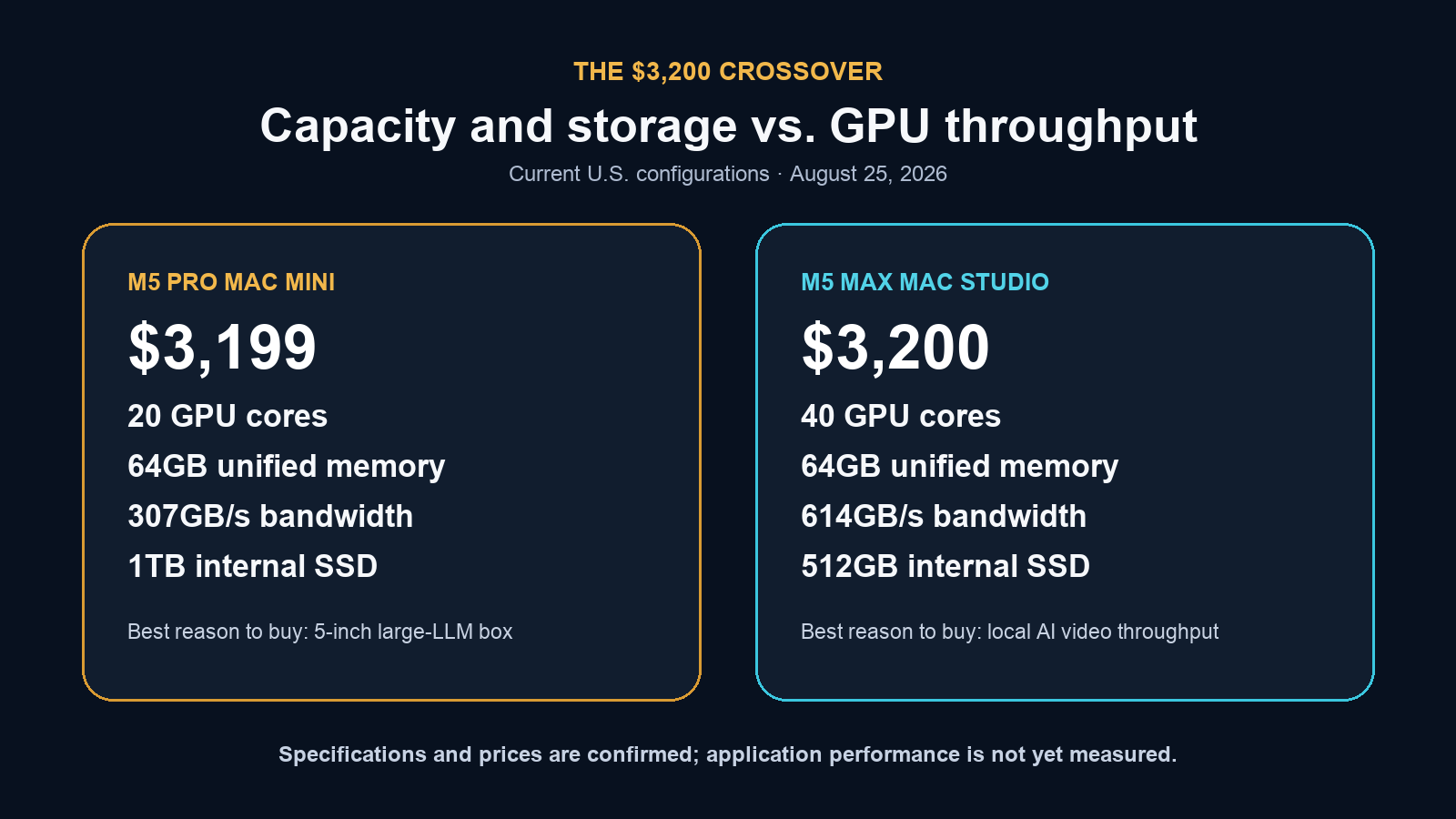
The $3,199-versus-$3,200 comparison is therefore fair only if the storage difference is printed beside it. The mini includes 1TB; the Studio includes 512GB. Give the Studio 1TB and its price becomes $3,500.
That $301 premium does not undo the hardware gap. It makes the decision workload-dependent instead of literally equal-price.
Why the 64GB M5 Pro mini makes sense for large local LLMs
LLM inference has two performance phases that matter to a user.
During prefill, the system reads and processes the prompt and supplied context. GPU compute, kernels, memory bandwidth, prompt length, and model architecture all matter. During decode, the model generates output tokens sequentially. For a single large model and small batch, decode often spends much of its time streaming weights from memory, so bandwidth can become a major limiter.
M5 Pro’s 307GB/s is substantial for a computer measuring five inches square. Its 64GB ceiling is more important than M6’s newer architecture when the model’s working set simply does not fit inside M6’s 32GB maximum.
Editorial recommendation: For a buyer whose first requirement is “run a 70B-class 4-bit model locally,” start with the $2,699 M5 Pro mini: 15-core CPU, 16-core GPU, 64GB, and 512GB. It has the same 307GB/s bandwidth and the same memory capacity as the $3,199 configuration. An external Thunderbolt 5 SSD can hold a model library without paying Apple’s internal-storage premium.
The 20-core GPU upgrade may improve compute-heavy prefill, prompt ingestion, image work, and some fine-tuning tasks. It should not be presented as a guaranteed 25 percent LLM speed increase simply because it has 25 percent more GPU cores. Memory bandwidth remains 307GB/s, and runtime kernels may shift the bottleneck.
Editorial projection: A 64GB M5 Pro mini should be a good single-user appliance for private document analysis, code assistance, retrieval-augmented generation, and agents that need a more capable model than 32GB can hold. It should be less convincing as a high-concurrency server, a long-context 70B endpoint with several parallel sessions, or a training workstation.
Privacy deserves precision. A Mac running a model locally can keep prompts and source documents off a third-party inference API. So can a local Nvidia workstation. Apple’s advantage is not exclusive ownership of “private AI”; it is offering a large, shared memory pool, compact enclosure, quiet idle specification, and integrated software stack in one small system. Security still depends on the application, network exposure, logging, backups, plugins, and any cloud services the workflow calls.
Why the M6 mini belongs in this comparison
M6 is newer, less expensive, and likely the better general-purpose Mac mini for smaller AI models. It is not the large-model answer.
Confirmed specification: M6 tops out at 32GB. The 24GB and 32GB versions provide 170GB/s, while 16GB configurations provide 153GB/s. M6 also adds Neural Accelerators in its 12-core GPU and uses a Dual 16-core Neural Engine. Apple’s Mac mini specifications establish those facts.
Editorial projection: The 24GB/512GB M6 should be the balanced local-agent and RAG machine. The 32GB/256GB model is the capacity-per-dollar choice for users comfortable with external storage. A 32GB/512GB M6 is easier to live with and should suit 14B models, multimodal experiments, and constrained 32B 4-bit use. None should be bought for a dense 70B model.
Software decides which part of the chip is used. MLX publicly targets the CPU and GPU. Core ML can schedule supported workloads across available compute units, as explained in Apple’s Core ML documentation. A Dual Neural Engine or GPU Neural Accelerator does not automatically accelerate every Ollama, llama.cpp, PyTorch, or MLX workload.
The M6 mini is the sensible default when AI is one workload among many and the target models fit in 24GB or 32GB. The M5 Pro exists for buyers whose model capacity requirement crosses that hard ceiling.
The price crossover that changes the video recommendation
The top M5 Pro mini looks strong in isolation:
- Confirmed specification: 18-core CPU, 20-core GPU, 64GB unified memory, 307GB/s memory bandwidth.
- Current U.S. price: $3,199 with 1TB of internal storage.
- Confirmed specification: five-inch-square enclosure, Thunderbolt 5, one video encode engine, and one ProRes encode/decode engine.
At almost exactly the same price, the M5 Max Mac Studio changes the comparison:
- Confirmed specification: 18-core CPU, 40-core GPU, 64GB unified memory, 614GB/s memory bandwidth.
- Current U.S. price: $3,200 with 512GB, or $3,500 with 1TB.
- Confirmed specification: two video encode engines, two ProRes encode/decode engines, four rear Thunderbolt 5 ports, standard 10Gb Ethernet, and a larger thermal envelope.
The 40-core M5 Max therefore has exactly 2× the listed GPU cores and 2× the listed memory bandwidth of the 20-core M5 Pro. It also doubles the fixed-function video encode engines.
Editorial projection: Those specifications should give the Studio a large advantage in local diffusion- and transformer-based video generation, image generation, compute-heavy prefill, and other sustained GPU workloads. They do not establish a universal 2× speedup. Kernel efficiency, quantization, model architecture, thermals, CPU work, storage, and application support can all prevent linear scaling.
The mini retains real advantages: it is much smaller, uses less desk space, includes twice the internal storage at the near-equal price point, and has a lower maximum continuous system power rating. Apple lists 155W for Mac mini and 480W for Mac Studio, but those are maximum ratings, not measured AI wall power. A post-launch test must compare energy per completed job, not assume the smaller number directly predicts efficiency.
For LLM capacity, either 64GB machine clears the same basic fit threshold. For video throughput, the Studio’s extra silicon is the reason to spend at this level.
Video generation is not “LLM inference with pictures”
A local LLM can load one set of compressed weights, process a prompt, and generate tokens one after another. Video generation builds many frames through repeated denoising or transformer passes over spatial and temporal data. Resolution, frame count, sampling steps, precision, caches, and conditioning inputs can multiply both memory use and runtime.
The official Wan2.2 repository says its baseline A14B text-to-video command at 1280×720 can require at least 80GB of GPU memory, with offload and dtype options offered for out-of-memory cases. The official HunyuanVideo repository states that an Nvidia CUDA GPU is required for its reference implementation and lists 45GB to 60GB of peak GPU memory for its documented single-GPU profiles. Those are requirements for the cited reference implementations, not universal minimums for every community port or quantized variant.
Apple-silicon ports make smaller profiles possible. They also reveal how long a “possible” job can take.
Independent project measurement: The open-source MLX-Gen Wan guide reports about 30 minutes on an M5 Max with 128GB unified memory for a 5.05-second Wan2.2 T2V-A14B clip at 480×240, 101 frames, 20fps, and 25 steps. The same guide reports about 12 minutes for a 5.05-second Wan2.2 TI2V-5B clip at 832×480 and 25 steps. These are project measurements for exact profiles, not Kingy tests and not M5 Pro results.
Thirty minutes for five seconds of low-resolution output may be acceptable for research, overnight ideation, or a few carefully selected shots. It is a weak foundation for an iterative production workflow in which a creator may reject dozens of generations before keeping one.
Editorial projection: The M5 Pro mini should run compatible, memory-appropriate video models through MLX-native or Metal-aware ports. It should be treated as an experimental video machine. The M5 Max Studio should cut waiting substantially on workloads that scale across its larger GPU and bandwidth, but independent testing is needed before assigning a multiplier. An Nvidia workstation remains the safer choice when the model’s official implementation, attention kernels, quantization tools, or ComfyUI nodes are CUDA-first.
Apple silicon versus Nvidia: the honest comparison
There is no single winner because the architectures optimize different constraints.
| Decision factor | 64GB Apple silicon | GeForce RTX 5090-class Nvidia system |
|---|---|---|
| Model capacity | Confirmed architecture fact: CPU and GPU share one 64GB pool; more of a large model can remain GPU-accessible, subject to OS and runtime use | Confirmed specification: 32GB dedicated GDDR7 VRAM; larger models may need offload, stronger quantization, or multiple GPUs |
| Raw memory bandwidth | M5 Pro: 307GB/s; 40-core M5 Max: 614GB/s | RTX 5090: 1,792GB/s, per Nvidia’s published specification |
| Local LLM fit | Editorial projection: unusually good for 70B-class 4-bit capacity at 64GB | Editorial projection: excellent for models that fit 32GB; 70B-class dense models generally require compromises |
| Video generation | Editorial projection: viable through compatible MLX/Metal ports; Studio is the better Apple choice | Editorial projection: generally the stronger throughput and compatibility choice for CUDA-first video stacks |
| Software | MLX, Metal, Core ML, PyTorch MPS, llama.cpp, Ollama, and Mac-native apps | CUDA Toolkit, CUDA-X libraries, TensorRT, broad research-code and node support |
| Privacy | Local execution can keep data off hosted inference APIs | Local execution can keep data off hosted inference APIs |
| Packaging | Integrated, compact, quiet at idle by Apple’s published specification | User-configurable; size, noise, CPU RAM, cooling, and power vary by system |
| Upgrade path | Memory and SoC are fixed at purchase | Desktop GPU, system RAM, storage, and sometimes multiple GPUs can be upgraded |
The bandwidth numbers are not directly interchangeable. Apple’s figure describes unified-memory bandwidth used by the SoC; Nvidia’s describes dedicated GPU memory. Nvidia’s 1,792GB/s is about 5.8× M5 Pro’s bandwidth and 2.9× the 40-core M5 Max figure, but an application benchmark is still required to translate that into completed clips or tokens per second.
Nvidia’s larger advantage may be software. Its CUDA Toolkit combines compilers, runtimes, debugging tools, and accelerated libraries, while CUDA-X spans deep learning and generative-AI components. Many research repositories publish CUDA instructions first. Apple’s MLX ecosystem is active and capable, but ports can arrive later, support fewer optimizations, or require different quantized model packages.
Apple’s advantage is clean access to more memory in a compact system. Nvidia’s is the shortest path to the code and kernels many generative-AI projects were built around.
What to buy
Buy M6 24GB or 32GB when the target is 7B to 32B
Editorial recommendation: Choose the $1,299 M6 with 24GB/512GB for a balanced local assistant, RAG server, transcription station, or general-purpose Mac. Choose 32GB/256GB at the same price if memory matters more than internal storage, or 32GB/512GB for $1,499 if you want the simplest self-contained setup.
Do not buy M6 for a dense 70B-class model. Its 32GB maximum is the limit, regardless of its newer AI hardware.
Buy the $2,699 M5 Pro 64GB mini when model fit is the goal
Editorial recommendation: The base 15-core CPU/16-core GPU M5 Pro with 64GB and 512GB is the most rational large-LLM mini. It preserves the full 307GB/s bandwidth and 64GB capacity while saving $500 against the 20-core/1TB configuration. Add fast external Thunderbolt storage if the model library outgrows 512GB.
This is the configuration for a buyer who values a five-inch local inference box more than maximum tokens per second.
Buy the 64GB M5 Max Mac Studio when video is the goal
Editorial recommendation: At $3,200, the 40-core M5 Max Studio with 64GB and 512GB is the better Apple video-generation purchase than the $3,199 mini. Budget $3,500 if 1TB internal storage is required. The Studio also makes more sense for image generation, sustained GPU work, and buyers who want more LLM speed without changing the 64GB capacity class.
Buy Nvidia when CUDA compatibility and iteration speed come first
Editorial recommendation: Choose an Nvidia workstation when your required video model or node stack assumes CUDA, when rapid iteration is commercially important, or when you need the widest pool of published optimizations. Confirm VRAM requirements before buying. A 32GB RTX 5090 can be far faster on compatible jobs yet still fail to hold a model that fits in 64GB of Apple unified memory.
The private-AI requirement does not decide between them. Both can run locally. The model, memory footprint, runtime, and desired turnaround time do.
Post-launch benchmark plan
The decisive tests must separate fit, latency, throughput, memory pressure, and energy. One headline score will not do that.
Systems to test
- M6 Mac mini, 32GB/512GB.
- M5 Pro Mac mini, 15-core CPU/16-core GPU, 64GB/512GB.
- M5 Pro Mac mini, 18-core CPU/20-core GPU, 64GB/1TB.
- M5 Max Mac Studio, 18-core CPU/40-core GPU, 64GB/1TB.
- M5 Max Mac Studio, 128GB, to test models and video profiles that exceed 64GB.
- RTX 5090 workstation with 32GB VRAM, with CPU, system RAM, storage, driver, CUDA, and power limits fully disclosed.
LLM test matrix
- Use one reproducible 14B, 32B, and dense 70B-class model with fixed model revision and quantization files.
- Test identical prompt text at 2K, 8K, and 32K input lengths where memory permits.
- Report time to first token, prompt-processing tokens per second, sustained decode tokens per second, peak resident memory, MLX or Metal allocation, swap use, total completion time, and output-token count.
- Run cold-load and warm-load tests separately.
- Test one and four concurrent requests. Stop and label any configuration that swaps heavily or fails.
- Pin MLX LM, llama.cpp, Ollama, macOS, and model-runner versions. Do not compare different quantization quality as though it were the same model.
Video test matrix
- Reproduce MLX-Gen’s documented Wan2.2 profiles before adding higher-resolution tests.
- Record model package, precision, resolution, frames, fps, steps, guidance, seed, cache settings, offload settings, and input media.
- Measure load time, generation time, encode time, total wall time, peak memory, swap, wall energy, fan noise, and thermal stability.
- Run at least three seeds per profile and publish all results, including failed and rejected generations.
- On Nvidia, use the closest quality- and precision-matched CUDA path. If the backends cannot produce equivalent computation, publish them as separate implementation results rather than a direct hardware race.
- Add an end-to-end creator test: prompt iteration, preview generation, selected final render, upscaling, and export. Report minutes of operator waiting per accepted second of video.
Pass/fail questions
- Does a 70B-class 4-bit model remain fully resident on 64GB at 8K context?
- How much decode speed does 614GB/s buy over 307GB/s with the same 64GB capacity?
- Does the 20-core M5 Pro justify its $200 chip premium for prefill or video?
- Does either 64GB Mac avoid swap on the documented Wan profiles?
- How many watt-hours and minutes does each system require per accepted clip?
- Which workloads fail because of software support rather than hardware capacity?
Kingy should update every editorial projection with a measured result only after the hardware, model revision, runtime, settings, and logs are published.
FAQ
Can a 64GB M5 Pro Mac mini really run a 70B LLM?
Editorial projection: It should fit some dense 70B-class models at 4-bit or mixed low-bit quantization with moderate context. A theoretical 4-bit 70B weight set is about 35GB, but real working memory is higher. Model architecture, quantization, KV cache, macOS, and concurrent applications determine whether a specific setup fits comfortably.
Will a 70B model be fast on the M5 Pro mini?
Unmeasured: Kingy does not yet have independent M5 Pro mini results. The 307GB/s memory bandwidth should make the machine usable for single-user inference, but model, context, runtime, and kernels will determine actual prompt and decode rates. Do not infer speed from capacity.
Is the M6 Mac mini better for AI because it is newer?
Not when the model needs more than 32GB. Confirmed specification: M6 adds newer GPU Neural Accelerators and a Dual Neural Engine, but its memory ceiling is 32GB. Editorial recommendation: Choose M6 for smaller models and general edge-AI work; choose M5 Pro 64GB for model capacity.
Why not configure the fastest M5 Pro mini for video?
At $3,199, it reaches the Mac Studio crossover. Confirmed specification: the 40-core M5 Max Studio has twice the GPU cores and twice the bandwidth. Editorial projection: that is the stronger foundation for local video, even though the $3,200 Studio has 512GB rather than the mini’s 1TB.
Is the Mac Studio guaranteed to generate video twice as fast?
No. Confirmed specification: 40 versus 20 GPU cores and 614 versus 307GB/s are 2× hardware ratios. Editorial projection: real application speed should improve materially but may scale by less or more depending on kernels, model precision, memory use, CPU stages, thermals, and fixed-function media work. Independent tests are required.
Is Nvidia always better for local AI?
No. Editorial assessment: Nvidia generally has the stronger CUDA software path and raw generative throughput. A 64GB or 128GB Apple system can fit models that exceed a 32GB GeForce card’s dedicated memory, while offering a compact integrated machine. The better platform depends on whether the binding constraint is capacity, speed, software compatibility, size, or upgradeability.
Final verdict
The 64GB M5 Pro Mac mini is a large-model specialist hiding in a five-inch case. Its unified memory gives it access to 70B-class 4-bit workloads that are awkward on a single 32GB consumer GPU. For private document work, code assistance, RAG, and a single-user local model service, that combination is genuinely useful.
The mistake is treating every AI workload as a memory-capacity contest.
At $2,699, the 64GB base-chip M5 Pro mini is the configuration that makes sense. It buys the large pool and full 307GB/s bandwidth without overinvesting in internal storage or a GPU upgrade that still leaves it far behind M5 Max.
At $3,199, the top mini crosses into Mac Studio territory. The near-equal-price Studio gives up 512GB of internal storage but doubles the GPU cores and bandwidth. Match storage and it costs $301 more. For anyone waiting on generated frames rather than LLM tokens, that is the better trade.
Editorial recommendation: Buy M5 Pro 64GB for a compact, private, large-LLM appliance. Buy M5 Max Mac Studio for local AI video. Buy Nvidia when CUDA-first software and maximum iteration speed matter more than Apple’s larger shared memory pool.
Evidence and claim audit
| Claim | Evidence label | Source boundary |
|---|---|---|
| M5 Pro mini reaches 64GB, 20 GPU cores, and 307GB/s | Confirmed specification | Apple Mac mini technical specifications |
| 40-core M5 Max reaches 64GB or more and 614GB/s | Confirmed specification | Apple Mac Studio technical specifications |
| $3,199 mini and $3,200/$3,500 Studio configurations | Current U.S. price | August 25 Apple configure-to-order arithmetic, cross-checked by Daring Fireball |
| Theoretical 4-bit 70B weights equal about 35GB | Editorial calculation | Parameter-count arithmetic; excludes overhead |
| Some 70B-class 4-bit models should fit 64GB | Editorial projection | Capacity analysis; not a measured M5 Pro result |
| Studio should be materially faster for video | Editorial projection | Core/bandwidth/software analysis; not a measured speedup |
| Wan clip times on M5 Max | Independent project measurement | Exact MLX-Gen profiles only; not Kingy testing |
| Nvidia generally leads CUDA-first compatibility | Editorial assessment | Nvidia toolkit scope plus requirements in cited model repositories |
Sources
Official product and platform sources
- Apple Mac mini technical specifications — chip, memory, bandwidth, ports, dimensions, media engines, and maximum continuous power.
- Apple Mac Studio technical specifications — M5 Max cores, memory, bandwidth, ports, media engines, dimensions, and maximum continuous power.
- Apple Mac mini launch announcement — launch date, pre-order timing, availability, and base prices.
- Apple MLX unified-memory documentation — direct CPU/GPU access to one memory pool.
- Apple MLX LM — Apple-silicon LLM inference, quantization, and fine-tuning support.
- Apple Core ML compute units — available compute-device selection for supported Core ML workloads.
- Nvidia GeForce RTX 5090 specifications — 32GB GDDR7 capacity and GPU specifications.
- Nvidia RTX 50-series architecture announcement — RTX 5090 memory bandwidth.
- Nvidia CUDA Toolkit and CUDA-X libraries — Nvidia development and accelerated-library ecosystem.
- Wan2.2 official repository — reference model profiles, memory guidance, and offload options.
- HunyuanVideo official repository — reference CUDA requirement and memory table.
Current pricing and independent implementation evidence
- Daring Fireball configuration and pricing table — launch-day configure-to-order increments, used to cross-check totals.
- MLX-Gen Wan video guide — independent project measurements for exact M5 Max/Wan profiles.
Related Kingy coverage
- The $899 M6 Mac mini Isn’t the AI Mac Apple Benchmarked — M6 launch analysis, memory-tier guidance, and post-launch test framework.
Disclosure
This article is independent editorial analysis. Kingy did not receive test hardware or compensation from Apple, Nvidia, or the cited software projects for this coverage. The featured image is an AI-generated editorial visualization, not a photograph of tested hardware. Prices can change; verify the live configurator before purchase.