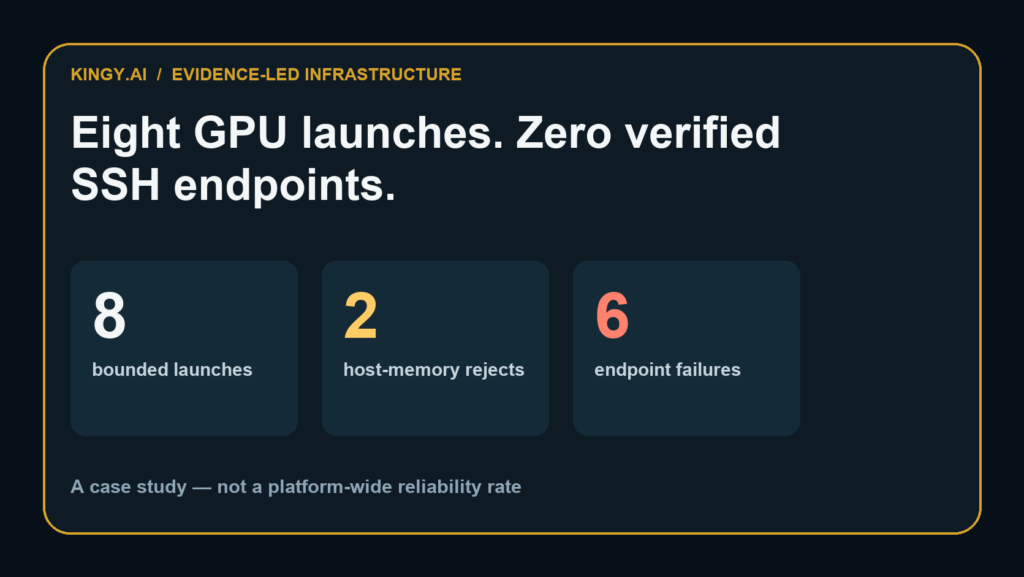
Verdict: A RunPod Pod showing up in an account is not yet a usable SSH machine. In eight bounded GPU-launch attempts for a Kingy.ai benchmark, two allocations failed our preregistered 64GB host-memory requirement and six never produced a verified public SSH/runtime endpoint during their admission windows. We stopped, deleted every resource and ran zero benchmark tasks.
That does not prove RunPod has an eight-out-of-eight failure rate. It proves something narrower and more useful: a paid GPU workflow should have a fail-closed readiness gate before it downloads a model, installs a benchmark or starts accumulating an expensive queue of work.
Testing disclosure: This is a case study of one attempted Kingy.ai setup on August 20, 2026. It is not a platform-wide RunPod reliability test. We used bounded attempts across RTX 5090, Secure A40 and Secure A100 80GB pools. No Qwen checkpoint was downloaded, none of the five coding harnesses reached the GPU, and no benchmark cell ran. RunPod did not provide us with provider-side telemetry establishing a root cause.
The downloadable evidence pack contains the sanitized eight-row dataset, claims ledger, offline endpoint checker, fail-closed watchdog, synthetic fixtures, decision tree and SHA-256 manifest. It contains no Pod IDs, IP addresses, account identifiers, locations, keys or private endpoints.
The eight attempts at a glance
The intended experiment was a controlled comparison of five coding-agent harnesses using the same local Qwen3.8-27B checkpoint. That design required a Linux GPU host with at least 64GB of system memory, enough disk, a working runtime endpoint and stable SSH access.
The GPU was only the first gate.
| Attempts | GPU pool | Host-memory result | Endpoint result | Workload result |
|---|---|---|---|---|
| 1–3 | RTX 5090 | Passed; one retained host reported 94GB | No verified SSH/runtime endpoint | No model download; zero cells |
| 4 | RTX 5090 | Failed: less than 64GB | Not evaluated | Zero cells |
| 5–6 | RTX 5090 | Passed at 125GB and 143GB | No verified SSH/runtime endpoint | No model download; zero cells |
| 7 | Secure A40 | Failed: less than 64GB | Not evaluated | Zero cells |
| 8 | Secure A100 80GB | Passed at 117GB | No verified endpoint within 12 minutes | No model download; zero cells |
Attempts one through six used five-minute endpoint-admission windows. The final A100 attempt used a private SSH-bootstrap template, a container image pinned by digest, an explicit request for TCP port 22 and public-IP support, and a 12-minute window. It still did not satisfy the external endpoint check.
All eight resources were deleted. The task-created private template was deleted too. Total reconciled RunPod cost for the abandoned benchmark was $0.6444337722. There are no active Pods from this work and no ongoing spend.
Those details matter because “the benchmark failed” would be an inaccurate summary. The benchmark never started. What failed was the infrastructure admission sequence that had to complete before a valid run could exist.
What “SSH ready” actually means on RunPod
RunPod documents two distinct connection layers that are easy to collapse into one mental picture.
First, the Pod must be running. Second, the service you need must be reachable.
RunPod’s port-exposure guide says a Pod displayed as running may not yet be ready. It recommends checking telemetry and notes that individual services can take additional minutes to start. For direct TCP access, the template or Pod configuration must expose the internal port. After startup, the assigned public IP and external mapping should appear under Direct TCP Ports.
For SSH, the important mapping is an external address pointing to internal port 22. RunPod’s SSH guide says password-based SSH requires a public IP and exposed TCP port 22. It also documents the RUNPOD_PUBLIC_IP and RUNPOD_TCP_PORT_22 environment variables and warns that missing values mean one or more endpoint requirements have not been met.
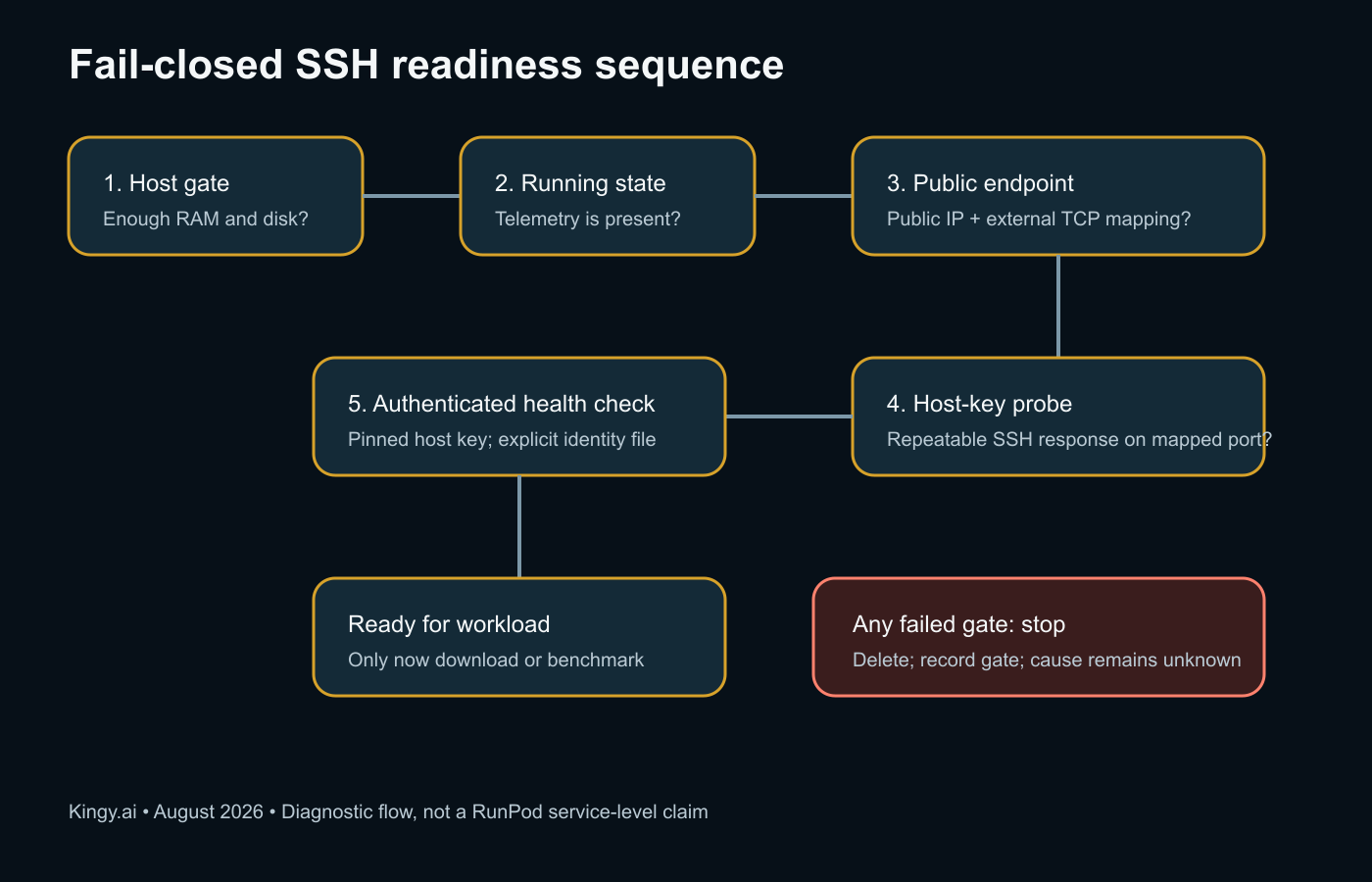
A useful readiness definition therefore has four independent checks:
- The allocated host meets the workload’s CPU, memory, GPU and disk requirements.
- The Pod reaches a running state and produces expected telemetry.
- A public IP and external TCP mapping to internal port 22 appear.
- The mapped address returns a stable SSH host key and accepts an authenticated health check.
The word independent is important. A GPU allocation can exist while the host-memory requirement fails. A Pod can say “running” while its mapped service is unavailable. A mapping can appear while the daemon is still starting. A daemon can answer while authentication fails because the wrong key or configuration is being used.
Treating all four as one green dot makes debugging much harder.
What we observed—and what we did not
Here is the complete claims boundary.
| Statement | Classification | What it means |
|---|---|---|
| Eight bounded attempts were made | Observed | Retained state, event and spend records support the count |
| Two attempts had less than 64GB host RAM | Observed | Our preregistered gate rejected them before workload setup |
| Six did not produce a verified endpoint in their windows | Observed | The external readiness checker did not reach the SSH gate |
| SSH needs a public IP and TCP port 22 exposure | Officially documented | This is RunPod’s current connection requirement |
| The exact provider-side cause was X | Unknown | We do not have provider telemetry that establishes it |
| RunPod fails 100% of the time | Unsupported | Eight purpose-selected attempts are not a representative reliability sample |
| RTX 5090, A40 or A100 caused the problem | Unsupported | The attempts changed more than GPU type and did not isolate a causal GPU variable |
| Qwen3.8-27B or a coding harness failed | False | Neither the model nor the harnesses ran |
Scientific honesty is not an ornamental limitations paragraph. It changes the headline conclusion. The evidence supports “our bounded readiness sequence did not complete.” It does not support “RunPod is broken.”
Three failures that look similar from the outside
“I cannot SSH into the GPU” describes a symptom, not a layer. For an evidence-led diagnosis, split that symptom into three failure classes.
Allocation failure
The provider returns a machine, but the machine does not satisfy the workload specification. Our two sub-64GB allocations belong here. The correct response is rejection, even if the Pod has a desirable GPU and could technically accept an SSH connection.
This is a benchmark-design failure if it is discovered only after work begins. Host RAM, disk and CPU are not secondary details; they are experimental controls.
Endpoint-admission failure
The allocation passes its hardware gate, but the expected public connection details and stable service response do not become verifiable inside the bounded window. Our other six attempts belong in this public category.
That wording is deliberately broader than “the SSH daemon failed.” Without a verified external mapping, an outside observer cannot isolate the daemon from the networking and admission path. The evidence should stop at the first unpassed gate.
Authentication failure
A public mapping and stable SSH host key exist, but the client cannot authenticate. Now key pairing, file permissions, username and SSH configuration become relevant. None of our six endpoint cases advanced to a verified authentication test, so describing them as bad-key failures would be inaccurate.
This classification prevents troubleshooting advice from jumping ahead. Rotating keys cannot repair a missing public mapping. Changing container startup cannot fix an allocation that lacks required memory. Increasing the admission window may collect more evidence, but it does not retroactively identify the cause of an earlier bounded failure.
Why the original benchmark was stopped
The frozen benchmark required 20 containerized coding tasks, five harnesses and three runs per task-harness pair: 300 scored cells. Its purpose was to isolate the harness as a variable while holding the model, checkpoint, task order, sampling settings and hardware constant.
Allowing partial or improvised infrastructure would have weakened the comparison in several ways.
Different hosts can change latency and timeouts. Different container images can change tool behavior. A model download interrupted by a resource deletion can corrupt or partially populate a cache. Reusing a machine after an uncertain startup can leave state behind. Running only the first harness to become available destroys the randomized schedule.
Most importantly, an agent benchmark needs complete traces. If the endpoint is unstable, missing tool calls and truncated output can be mistaken for agent failures.
Stopping before the checkpoint download was therefore the correct experimental decision. The earlier Qwen3.8-27B local hardware guide remains a hardware-planning article; this case study does not add model-performance results to it. The much larger Qwen3.8 Max hardware analysis similarly separates measured repository sizes from runtime estimates. The same discipline applies here: infrastructure observations are not model observations.
The readiness gate I would use next time
The downloadable checker is intentionally offline. It consumes a sanitized or synthetic JSON snapshot and refuses fields that look like identifiers or secrets. It does not call RunPod. The point is the decision sequence, not an unofficial replacement client.
Gate 1: reject the wrong host immediately
Write hardware requirements before selecting inventory. For our workload, less than 64GB of host memory was a hard rejection even when the GPU itself was attractive.
The gate should cover:
- Minimum host RAM
- Minimum local disk
- Required GPU model and count
- Maximum hourly price
- Maximum projected experiment cost
- Required cloud type, if applicable
Do not begin setup and hope the machine is “close enough.” The benchmark definition should decide whether the host is valid.
Gate 2: verify running state separately from service state
Record the provider status and telemetry, but do not call the workload ready yet. RunPod itself distinguishes a running Pod from ready services in its documentation.
The admission timer should start at creation. If no usable runtime appears within the preregistered window, delete the resource and record a bounded failure. A timer without automatic or carefully supervised cleanup is merely a reminder while the meter continues.
Gate 3: require the actual TCP mapping
For SSH, look for a public address and external port mapped to internal port 22. Do not assume the internal port number will also be the public port; RunPod says external mappings normally differ.
This is also the point to distinguish SSH from HTTP proxy access. RunPod’s connection-options overview presents multiple connection methods. A working proxy URL for Jupyter or an HTTP service does not, by itself, establish direct TCP SSH readiness.
Gate 4: pin the host key before authentication
An automated system should obtain the SSH host key twice, require stable output, store it in a task-specific known-hosts file and invoke SSH with an explicit identity file. That avoids silently accepting a changed endpoint or a key from a broad user configuration.
Never publish the captured address, host key or identity path as part of an editorial evidence pack.
Gate 5: run a tiny health check
Before downloading a large checkpoint, confirm:
- Expected architecture and operating system
- GPU visibility
- Available host memory and disk
- Required runtime version
- Ability to create and delete a small task-owned file
- No unexpected existing workload state
Only after those checks should the model download begin.
A fail-closed budget pattern
GPU experimentation can turn a five-minute connection problem into an hour of billing if cleanup depends on somebody watching a terminal.
A safer pattern has three deletion triggers:
| Trigger | Example | Action |
|---|---|---|
| Readiness deadline | No verified endpoint after five minutes | Delete and log the failed gate |
| Spend ceiling | Settled or projected cost reaches cap | Delete before new work starts |
| Account anomaly | Hourly spend exceeds the expected resource rate | Delete and investigate |
The provider’s native termination time should be the outer backstop, not the first line of defense. A separate watchdog should act earlier. Store only the minimum private state needed to delete the exact task-owned resource, and keep that private state out of public evidence.
Our public watchdog is a decision helper, not a cloud controller. It accepts elapsed time and spend values and returns whether the fail-closed condition has been reached. That makes it safe to inspect, teach from and test without credentials.
Troubleshooting RunPod SSH without guessing
If SSH is not working, diagnose the first failed layer.
No suitable host allocation
Check inventory against the complete workload specification, not only VRAM. A 24GB or 48GB GPU does not imply enough system RAM or local disk. Reject the allocation if the preregistered minimum is not met.
Pod exists but no Direct TCP Ports entry appears
Confirm TCP port 22 was included in the Pod or template configuration. RunPod says direct mappings appear in the Connect menu under Direct TCP Ports. If the mapping never appears, record that as an endpoint-admission failure; do not reclassify it as an authentication failure.
Mapping exists but the port does not answer
The SSH daemon may still be starting, the container may not include it, or another startup condition may be unresolved. Those are hypotheses until logs establish one. Poll within a bounded interval and keep the raw provider diagnostics private.
Host key answers but login fails
Now inspect authentication: key pairing, file permissions, explicit IdentityFile, username and known-hosts configuration. RunPod’s SSH documentation lists wrong private-key paths, permissive key-file permissions and mismatched SSH configuration as common authentication problems.
SSH works but the workload is invalid
Do not confuse connectivity with benchmark readiness. Re-run the hardware and runtime health checks inside the host. A reachable machine that fails the memory or version gate remains an invalid benchmark host.
What this case study changes
It does not change a conclusion about Qwen or coding agents, because there was no such conclusion to change.
It changes the order of operations:
allocate → validate host → verify endpoint → authenticate → health check → download → warm up → benchmark
Many cloud-GPU tutorials begin at the download command. That is convenient when everything works. For reproducible paid experiments, it is one step too late.
The eight failed admissions cost less than a dollar because the work stopped before the expensive stage. The more important saving was epistemic: no partial trace was allowed to become a benchmark result.
If you are planning a local or rented-GPU model run, download the sanitized readiness evidence pack, adapt the gates to your workload and keep provider identifiers in a separate private log.
FAQ
Why was the RunPod Pod running but SSH unavailable?
We cannot establish a provider-side cause from the retained evidence. RunPod documents that a running Pod may precede service readiness. Our required external SSH mapping and host-key response were not verified inside the bounded windows.
Does this prove RunPod is unreliable?
No. These eight attempts were selected for one benchmark and changed configuration while troubleshooting. They are a case study, not a representative sample or service-level measurement.
Did you test Qwen3.8-27B on the GPUs?
No. No checkpoint was downloaded and zero benchmark cells ran. The observed failures occurred before model or harness execution.
What does RunPod SSH require?
RunPod’s current documentation requires a public IP and TCP port 22 exposure for direct password-based SSH. The assigned public IP and external mapping should appear under Direct TCP Ports.
How long should I wait for an SSH endpoint?
There is no universal number for every image and workload. Pick a bounded window before launch, based on the expected startup path, and disclose it. Our first attempts used five minutes and the final SSH-bootstrap attempt used 12 minutes.
What should I check before downloading a model?
Verify host RAM, disk, GPU visibility, public endpoint mapping, stable SSH host key, authenticated access and required runtime versions. Download only after all gates pass.
Sources and methodology
- RunPod: Connect to a Pod with SSH
- RunPod: Expose ports
- RunPod: Connection options
- Kingy.ai retained private state, event and spend records, sanitized for the public evidence pack
Research cutoff: August 20, 2026. This article will be updated if RunPod’s documented connection flow materially changes. The private logs remain private; future updates will preserve the distinction between observed behavior, provider documentation, inference and unknown cause.
The Kingy Brief
Get The Kingy Brief.
AI changes, original tests and one practical thing to try. Fridays at 09:00 Vancouver time.
Free · Double opt-in · Unsubscribe anytime
Signup help and newsletter schedule
Signup form provided by Beehiiv. After submitting, check your inbox for "Confirm your subscription to The Kingy Brief" and open its confirmation link. Check Spam or Promotions if you cannot find it.
Fridays at 09:00 Vancouver time: source-checked AI changes, original tests and one practical thing to try. The weekly restart begins October 9, 2026. We skip a week when there is not enough verified material. Free. Unsubscribe anytime.