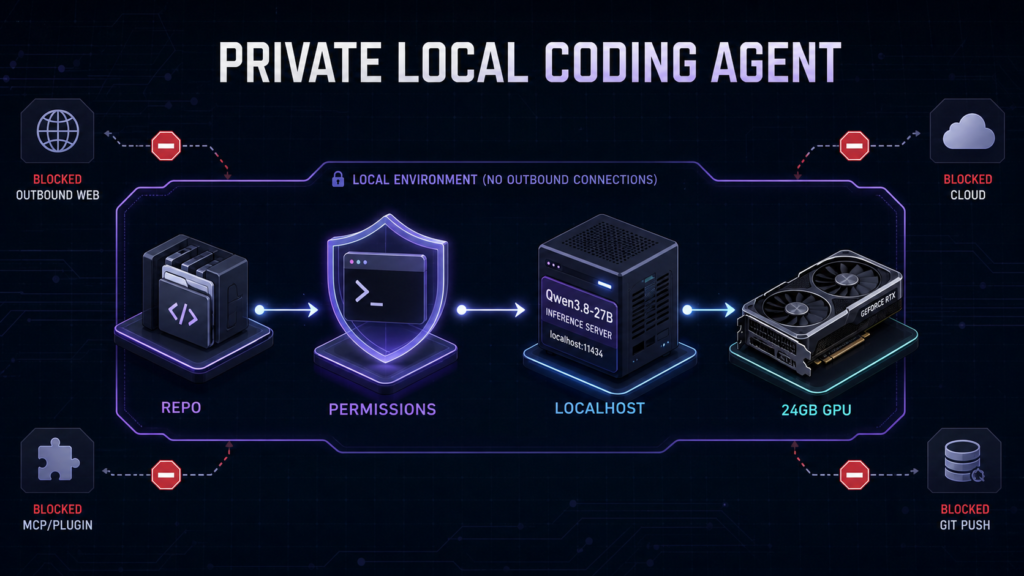
Verdict: The most defensible 24GB build is Qwen3.8-27B Q4_K_M → a pinned CUDA build of llama-server → Qwen Code in approval-first sandbox mode. It is a strong candidate local coding stack, not a completed Kingy performance recommendation. Our preparation, artifact, runtime and fixture gates passed, but the measured coding, VRAM and privacy tests never started because the pinned 17.1GB model could not finish transferring before the laboratory VM’s fixed deletion deadline.
Testing disclosure: We verified the 24GB NVIDIA host, driver, CUDA toolkit, llama.cpp source and binary, Qwen Code package, sandbox image, sanitized coding fixtures and checksum-sealed evidence. We did not obtain model inference, tokens-per-second, loaded VRAM, task-success, permission-enforcement or no-egress results. Every unmeasured result remains labelled
NOT_RUN; nothing in this guide should be read as a benchmark.
If you want a practical blueprint you can reproduce on an RTX 3090, RTX 4090 or another 24GB NVIDIA card, this guide gives you the exact model artifact, server flags, Qwen Code controls and verification gates. If you want proof that this exact local agent reliably edits code, runs tests and blocks every unwanted action, that verdict still requires a completed run.
Qwen3.8-27B local coding agent: the quick answer
For one 24GB NVIDIA GPU, start with this configuration:
| Layer | Recommended candidate | Why |
|---|---|---|
| Model | Qwen3.8-27B | Open-weight 27B model with coding, tool-use and agent-oriented positioning |
| Quant | Qwen3.8-27B-Q4_K_M.gguf |
15.93 GiB weight file, leaving more room than Q5/Q6 for context and runtime overhead |
| Runtime | llama.cpp llama-server |
Direct GGUF control, CUDA offload and an OpenAI-compatible local API |
| Context | 16K first; attempt 32K only after measuring | The safer path on 24GB; published maximum context is not a local-memory guarantee |
| KV cache | Q8_0 K/V candidate | More memory-efficient than F16 cache; still needs hardware validation |
| Interface | Qwen Code | Official local OpenAI-compatible provider path plus permissions and sandbox controls |
| Network | 127.0.0.1 only |
Prevents accidental LAN exposure; it does not by itself prove zero egress |
| Agent mode | Ask before edits; deny network, push and destructive commands | Keeps the human in the loop for consequential actions |
Before downloading anything, use our Qwen3.8-27B hardware requirements guide to confirm that your GPU, system RAM and storage are appropriate. The exact memory ladder also explains why a model that fits as a file can still fail after context, cache and runtime allocations are added.
What “private local coding agent” should mean
Running model weights on your own GPU is only one part of privacy. A coding agent can still contact update servers, send usage statistics, call web tools, connect to MCP servers, run package managers, read files outside the repository or push changes to a remote Git host.
A credible private baseline needs four separate boundaries:
- Model boundary: weights and inference remain on the local machine.
- API boundary: the inference server listens only on loopback and requires an API key.
- tool boundary: reads, edits and shell commands are restricted to a disposable or approved repository.
- network boundary: telemetry, updates, web tools and external connections are disabled and then independently observed.
That last word matters. A settings file is an intention; a packet capture, firewall counter and connection audit are evidence. Do not call a setup “air-gapped” unless the host is actually isolated. Do not say “nothing leaves the machine” until you have tested every process that participates in the workflow.
The recommended 24GB architecture
The coding interface, not the model, owns the tools. Qwen Code reads the repository, proposes edits and asks to run tests. It sends only the model conversation to the local OpenAI-compatible endpoint. llama-server loads the GGUF and performs inference on the GPU.
Repository
  ↕ approved read / edit / test tools
Qwen Code + permission policy + sandbox
  ↕ http://127.0.0.1:8080/v1
llama-server (loopback + API key + offline mode)
  ↕ CUDA
Qwen3.8-27B Q4_K_M on one 24GB GPU

Blocked in the strict baseline:
web • remote MCP • extensions • git push • package installs • outside-workspace reads
This design keeps the model server simple. It also makes failures easier to diagnose: server/API problems are separated from agent permissions and from network controls.
Exact components and pinned identities
The pins below are the versions used in our August 2026 laboratory packet. They are reproducibility anchors, not a claim that they will remain the best versions forever.
| Component | Pinned identity | What we verified |
|---|---|---|
| Qwen3.8-27B | model revision 1d4bf0f2ff6012fd82039f2fa52739d0dd7c60c0 |
Model identity and Apache-2.0 licence metadata |
| Q4_K_M GGUF | Unsloth repo revision f1bfb127c64f7072bdd2cad55f258b9c8b2910fe |
Filename, size and declared SHA-256 |
| GGUF file | 17,106,775,008 bytes / 15.93 GiB | Expected SHA-256 7e78da5d7e3ae28d178121f58646953305f3e5bd3cb46f4a75584e8b6c6fe169 |
| llama.cpp | release b10453, commit 4df29be4f4c3673f428170fda944a5b19f743bb8 |
Source identity and CUDA build |
| Qwen Code | v0.21.13 |
Package version and package hash |
| Sandbox image | ghcr.io/qwenlm/qwen-code:0.21.13 |
Image digest sha256:3f9411a80190dea1b88cb2303c16bd308f4a4e5e28d8871713ba441574c8a9b0 |
The main GGUF is text-capable without a projector. We excluded mmproj-F16.gguf with --no-mmproj, saving roughly 0.86 GiB and reducing complexity. Vision can be evaluated later as a separate profile.
Prerequisites
The reference design assumes:
- Linux on an RTX 3090, RTX 4090 or comparable 24GB NVIDIA GPU;
- current NVIDIA drivers and a CUDA-capable llama.cpp build;
- at least 32GB system RAM, with more headroom preferred for model verification and tooling;
- roughly 25GB of free fast storage for the model, build artifacts and working copies;
- Docker or Podman if you use Qwen Code’s Linux sandbox;
- Node.js for Qwen Code plus your repository’s own offline-ready test toolchain;
- a repository you can copy into a disposable test workspace.
Our cloud reference host used an NVIDIA L4 with 23,034 MiB reported VRAM, driver 580.95.05 and CUDA 13.0. That system reached preflight readiness, but it did not reach model loading. Consumer GPU behaviour therefore remains unmeasured in this run.
Step 1: download and verify the exact GGUF
Use the pinned Unsloth Qwen3.8-27B GGUF repository. Download Qwen3.8-27B-Q4_K_M.gguf, then check both its byte size and SHA-256 before starting a server.
wc -c Qwen3.8-27B-Q4_K_M.gguf
sha256sum Qwen3.8-27B-Q4_K_M.gguf
Expected results for the pinned artifact:
17106775008 bytes
7e78da5d7e3ae28d178121f58646953305f3e5bd3cb46f4a75584e8b6c6fe169
Stop if either value differs. A familiar filename is not a sufficient identity check, and quantization labels are not universal across publishers. Our separate GGUF selection article was not live when this guide was published, so this page does not link readers to an unpublished URL.
Step 2: build or obtain the pinned llama-server
The reproducible path is to check out commit 4df29be4f4c3673f428170fda944a5b19f743bb8 from llama.cpp, then build with CUDA enabled according to the project’s current build instructions.
Record these before using the binary:
./llama-server --version
sha256sum ./llama-server
nvidia-smi
Our lab produced a CUDA-enabled llama-server with SHA-256 b2b52dceb23f8093970e062b83d294c4c87910c06742ce7ae176e1f05fa75bb3. Your binary can differ when compilers, CUDA versions or build flags differ. Treat the source commit and your locally recorded hash as a pair.
Do not blindly copy the command below into a newer release. llama.cpp evolves quickly; check the pinned server documentation or run llama-server --help when versions change.
Step 3: create a local API key
Loopback binding reduces exposure, but another process on the workstation could still call an unauthenticated endpoint. Create one random key in a mode-0600 file:
install -m 600 /dev/null "$HOME/.qwen-local-api-key"
openssl rand -hex 32 > "$HOME/.qwen-local-api-key"
chmod 600 "$HOME/.qwen-local-api-key"
Do not place the key inside the repository or commit it. The connection is plain HTTP on loopback; the key controls local-process access, not encryption over a network.
Step 4: start with the 16K compatibility profile
The laboratory packet’s daily-use candidate was 32K context with Q8_0 K/V cache, but that profile never reached a model-load test. The safer editorial recommendation is therefore to start at 16K, confirm residency and tool behaviour, and only then try 32K.
export LAB_MODEL_PATH="/absolute/path/Qwen3.8-27B-Q4_K_M.gguf"
export LAB_API_KEY_FILE="$HOME/.qwen-local-api-key"

/absolute/path/llama-server \
  -m "$LAB_MODEL_PATH" \
  -a qwen3.8-27b-local \
  --host 127.0.0.1 \
  --port 8080 \
  --api-key-file "$LAB_API_KEY_FILE" \
  --offline \
  --no-mmproj \
  --jinja \
  --reasoning-format deepseek \
  --reasoning-effort medium \
  -ngl 99 \
  -fa on \
  -c 16384 \
  -np 1 \
  -ctk q8_0 \
  -ctv q8_0 \
  --no-context-shift \
  --metrics \
  --no-webui \
  --log-disable
Why these flags?
--host 127.0.0.1avoids LAN exposure.--api-key-fileprotects model endpoints from unrelated local processes.--offlineprevents runtime downloads; it is not a firewall.--no-mmprojremoves the unused vision projector.-ngl 99requests full GPU offload; verify that CPU offload did not occur.-np 1reserves one server slot for one interactive agent.- Q8_0 K/V cache is the candidate memory compromise.
--no-context-shiftmakes an overlong session fail instead of silently shifting context.- disabling the web UI and logs reduces exposed surface and the chance of code appearing in logs.
Watch nvidia-smi during startup. A successful health response is not enough: record loaded VRAM, whether every model layer is offloaded, server startup time and any allocation failure.
Step 5: verify the local API before adding an agent
Test the server in layers.
# The health endpoint can be public by design.
curl -sS http://127.0.0.1:8080/health

# A protected endpoint should reject a missing key.
curl -i http://127.0.0.1:8080/v1/models

# The same endpoint should work with the key.
API_KEY="$(cat "$HOME/.qwen-local-api-key")"
curl -sS -H "Authorization: Bearer $API_KEY" \
  http://127.0.0.1:8080/v1/models

# Confirm the listener is loopback-only.
ss -ltnp | grep ':8080'
Fail the setup if an inference endpoint accepts an unauthenticated request or if the listener is on 0.0.0.0, ::, a LAN address or a public interface.
Step 6: install and pin Qwen Code
The lab used Qwen Code v0.21.13. Pin that version if you want the configuration below to match exactly:
npm install -g @qwen-code/qwen-code@0.21.13
qwen --version
Qwen Code’s official documentation supports local self-hosted models through an OpenAI-compatible endpoint. Its settings schema also exposes privacy, telemetry, permissions and sandbox controls. Defaults and configuration keys can change, so re-audit the settings whenever you upgrade.
Step 7: use a strict Qwen Code configuration
The essential provider block is:
{
  "$version": 4,
  "general": {
    "enableAutoUpdate": false,
    "chatRecording": false,
    "gitCoAuthor": {"commit": false, "pr": false}
  },
  "privacy": {"usageStatisticsEnabled": false},
  "telemetry": {
    "enabled": false,
    "logPrompts": false,
    "includeSensitiveSpanAttributes": false
  },
  "modelProviders": {
    "openai": [{
      "id": "qwen3.8-27b-local",
      "name": "Qwen3.8-27B local — 16K medium",
      "envKey": "QWEN_LOCAL_API_KEY",
      "baseUrl": "http://127.0.0.1:8080/v1",
      "generationConfig": {
        "timeout": 600000,
        "maxRetries": 0,
        "contextWindowSize": 16384,
        "samplingParams": {
          "temperature": 0.2,
          "top_p": 0.9,
          "max_tokens": 8192,
          "reasoning_effort": "medium"
        }
      }
    }]
  },
  "security": {"auth": {"selectedType": "openai"}},
  "model": {"name": "qwen3.8-27b-local", "enableOpenAILogging": false},
  "tools": {
    "approvalMode": "default",
    "autoAccept": false,
    "sandbox": true,
    "toolSearch": {"enabled": false},
    "computerUse": {"enabled": false},
    "disabled": ["task", "skill", "web_fetch", "web_search", "computer_use"]
  },
  "mcpServers": {},
  "mcp": {"allowed": [], "excluded": ["*"]}
}
The strict policy should also deny:
.envand outside-workspace reads;git push,ssh,scp,curl,wgetand network utilities;rm,sudo, Docker/Podman control and package installation;- remote MCP, web fetch, subagents, extensions and session sharing.
Allow read operations and a small set of project-specific status, diff and test commands. Put edits in ask, not allow, until you have reviewed the model on disposable fixtures. The complete lab configuration used a system-settings layer so a project-level file could not silently weaken the restrictions.
Qwen Code documents that usage statistics are enabled by default in the pinned settings schema. A local endpoint therefore does not automatically make the interface private. Turn the setting off and verify behaviour rather than assuming the toggle is sufficient.
Step 8: launch from a disposable repository copy
Do not start the agent from your home directory, a monorepo containing secrets or the directory that stores acceptance tests. Prepare a fresh working copy:
git clone --no-hardlinks /path/to/source-repo /path/to/qwen-agent-trial
cd /path/to/qwen-agent-trial
git status --short
Set the API key in the environment, point Qwen Code at the system settings file and start the sandbox:
export QWEN_LOCAL_API_KEY="$(cat "$HOME/.qwen-local-api-key")"
export QWEN_CODE_SYSTEM_SETTINGS_PATH="/absolute/path/qwen-strict-settings.json"
export QWEN_SANDBOX=docker

qwen --auth-type openai --model qwen3.8-27b-local
On Linux, a containerized Qwen Code client may need host networking to reach a llama-server bound to host loopback. Host networking does not block internet access. If you use it, apply an independently reviewed egress control that preserves loopback, then observe connections during the test. Do not paste an unreviewed firewall command from a blog into a production workstation.
Step 9: verify permissions and privacy before real code
Run negative tests in a disposable fixture. The agent should be unable to:
| Probe | Expected result |
|---|---|
Read .env |
Denied |
Read ../ or /etc |
Denied |
| Delete a protected file | Denied |
Run git push |
Denied |
Use curl, wget, SSH or package installers |
Denied |
| Connect to web, MCP or remote providers | Denied or externally blocked |
| Edit a normal source file | Ask for approval |
| Run an approved offline test command | Allowed |
Observe process connections with operating-system tools or packet capture. Check for update, telemetry, DNS, registry and model-provider traffic. If any unexpected non-loopback connection appears, stop the test and preserve the evidence.
Step 10: test the complete edit–test–repair loop
A chat response is not a coding-agent benchmark. Use a repository with a known defect and an evaluator the agent cannot see. A useful acceptance task should require it to:
- inspect multiple files;
- explain a plan;
- make a bounded edit;
- run an allowed local test;
- interpret a failure;
- repair the implementation;
- stop with a clean explanation and no unrelated changes.
Repeat each task from a fresh repository copy. Preserve the original failure, diff, transcript, tool-call log, test output, timing and VRAM trace. Never replace a failed run with a more flattering rerun.
What happened in the Kingy.ai lab
Our accelerated run used a dedicated Google Cloud g2-standard-8 VM with one NVIDIA L4. The host passed hardware and software identity checks. The driver, CUDA toolkit, llama.cpp source/build, Qwen Code package, sandbox image and fixture baselines were all prepared and recorded.
The model was relayed through an offline artifact path because the VM had no external IP and networking could not be modified. At the mandatory go/no-go decision:
| Time-gate evidence | Observed value |
|---|---|
| Complete, size-verified model parts | 6 of 64 |
| Verified bytes | 1,610,612,736 |
| Last stable chunk elapsed time | 226 seconds |
| Remaining chunks | 58 |
| Projected transfer time | 13,108 seconds |
| Time remaining to measured-start cutoff | 11,318 seconds |
The projected transfer alone exceeded the time available, before final assembly and a full 17GB SHA-256 pass. We stopped rather than lower the integrity bar or begin a test that could not finish before automatic VM deletion.
The result was INCONCLUSIVE. It was not evidence that Qwen3.8-27B fails on 24GB. It was not evidence that it succeeds. Calibration, practical coding tasks, permission probes and privacy tests remained NOT_RUN.
That distinction is why this article uses “candidate,” “start with” and “verify” instead of “tested,” “proven” or “fully private.” For the model’s published architecture and benchmark context, see our Qwen3.8-27B specifications and launch analysis. Our real-work evaluation framework explains why vendor benchmarks cannot replace the workflow test above.
16K versus 32K on a 24GB GPU
Qwen3.8-27B may publish a much larger native context window, but a 24GB GGUF deployment must budget for weights, KV cache, runtime buffers and the operating environment. The 262K context trap is especially important for coding agents because tool results, diffs and test logs accumulate quickly.
Use this ladder:
- Start at 16,384 tokens with one slot and Q8_0 K/V cache.
- Confirm full GPU offload, stable startup and a complete tool call.
- Record loaded VRAM and minimum free headroom.
- Move to 32,768 only if the 16K profile is stable.
- Repeat the same task and compare success, latency and memory.
- Treat 64K as an optional ceiling probe, not a default.
Do not silently enable context shifting or CPU offload to make a profile appear to fit. Those changes alter both performance and comparability.
Troubleshooting
| Symptom | Likely layer | What to check | Safer fix |
|---|---|---|---|
Connection refused |
Server/API | Process, port, loopback listener | Start llama-server; verify 127.0.0.1:8080 |
401 or 403 |
Authentication | Key file and bearer header | Re-export the same key; never remove auth as the first fix |
| Qwen Code uses a cloud model | Provider selection | Effective settings, auth type, model id | Force the pinned OpenAI-compatible provider and local model id |
| Invalid tool JSON | Template/parser/model | Raw response in a sanitized fixture | Pin runtime/template; simplify schema; compare reasoning settings |
| GPU out of memory | Context/cache | Loaded VRAM, context, KV type, projector | Drop to 16K, one slot, Q8 cache and text-only mode |
| Slow after “fitting” | Offload | Startup log and GPU/CPU activity | Verify all layers are on GPU; do not hide CPU offload |
| Agent reads outside repo | Permissions/sandbox | Effective scope and launch directory | Stop; strengthen system-level deny rules; use a disposable copy |
| Unexpected outbound traffic | Interface/toolchain | Telemetry, updates, DNS, MCP, package managers | Stop; preserve capture; disable source and add independent egress control |
| Sandbox cannot reach server | Container networking | Host/bridge route to loopback | Use a reviewed host-network arrangement behind an egress block |
| Logs contain source code | Diagnostics | Qwen/llama/openAI logging settings | Disable raw logs; sanitize before sharing |
After experiments, return to the pinned known-good profile. Change one variable at a time and record it.
llama.cpp, Ollama or LM Studio?
llama.cpp/llama-server is the best fit when you want exact GGUF identity, cache flags, endpoint authentication and reproducible commands. It also exposes the most moving parts.
Ollama is easier for model lifecycle and local API setup. If you use it, pin the version and Modelfile, explicitly set context, confirm tool-call behaviour and repeat every privacy check.
LM Studio is the easiest GUI path for many readers. Its local server and request logs are convenient, but app/runtime version drift makes exact reproduction harder. Verify offline mode, authentication and the loaded context rather than relying on defaults.
Qwen Code is not your only interface. OpenCode, Pi, Continue and Cline can connect to local servers, but their permissions, sharing, extensions, tool schemas and network behaviour differ. Changing the interface invalidates the permission and privacy conclusions. For the broader model choice on the same card, see Qwen3.8-27B versus Qwen3.6-27B and Gemma 4 31B.
Who should use this setup?
Use the strict llama.cpp + Qwen Code path if you value reproducibility, local control and inspectable boundaries more than one-click convenience.
Choose LM Studio or Ollama if you are willing to trade some low-level control for a simpler model lifecycle. Keep the permission and egress tests; convenience is not privacy evidence.
Use an IDE interface if editor integration matters most, but treat it as a different system and re-audit it. Use a cloud or hybrid coding agent if your work requires frontier-model reliability, long autonomous tasks or managed infrastructure, and only if your code policy allows it.
FAQ
Can Qwen3.8-27B run on a 24GB GPU?
The 15.93 GiB Q4_K_M file leaves theoretical room inside 24GB, and the broader hardware analysis supports 24GB as the fit-first tier. This laboratory run did not complete model loading, so it does not provide a measured VRAM-residency result. Start at 16K context and verify on your exact card.
Which Qwen3.8-27B GGUF should I use for coding?
Q4_K_M is the conservative candidate for a 24GB coding agent because it leaves more headroom for cache and runtime allocations than Q5 or Q6. That is a fit recommendation, not proof that it has the best coding quality.
Is Qwen Code fully private with a local model?
Not automatically. Disable usage statistics, telemetry, recording, updates, web tools, MCP and extensions; restrict permissions; bind the model server to loopback; then independently observe network behaviour.
How much context should I use on an RTX 3090 or RTX 4090?
Start at 16K. Attempt 32K only after confirming full GPU offload and adequate headroom. Do not infer local memory fit from the model’s published maximum context.
Is Ollama or llama.cpp better for Qwen3.8 coding?
llama.cpp provides more exact control and reproducibility. Ollama is easier to operate. Either can work as an OpenAI-compatible local backend, but each must be pinned and validated with the same task and privacy gates.
Can the agent work with the internet disabled?
It should, after the model, runtime, interface, sandbox image and repository dependencies are installed. Prove it with a complete task under observed egress blocking. Our accelerated run stopped before that test.
Is a local 27B model as reliable as a frontier coding agent?
Do not assume so. A local 27B model can offer control, predictable infrastructure cost and code locality, while frontier agents may be stronger on difficult reasoning, long tool loops and recovery. Compare them on the same repository task before making a workflow decision.
Sources and methodology
This guide separates official documentation, pinned artifact metadata and Kingy.ai laboratory evidence:
- Qwen3.8-27B model repository: model identity and licence.
- Pinned Qwen3.8-27B GGUF repository: file identity and quantized artifact.
- Pinned llama-server documentation: server/API controls.
- Qwen Code v0.21.13 local provider documentation: OpenAI-compatible local endpoint.
- Qwen Code v0.21.13 settings: privacy, telemetry and tool settings.
- Qwen Code v0.21.13 sandbox guide: sandbox providers and limits.
The laboratory evidence was checksum-sealed after the run. The corrected evidence manifest has SHA-256 30ce35115e75b6b77c3a4ca89084600a5b4af865f93a0b7be9818d2de6d374a6, and every listed file passed verification before the VM was deleted. The incomplete result remains intentionally visible: no performance, quality, permission-enforcement or no-egress claim is derived from tests that did not run.