MiniMax H3 can run without ComfyUI, but only part of the official system is open-weight. H3-Context-IR and H3-Regenerate-2K remain hosted; H3-Base FL2VA and Ref2VA are the downloadable components. This guide shows what “local” really means, what to download, which hardware tiers are credible, and when ComfyUI, Diffusers, SGLang, vLLM-Omni, a cloud GPU, or the hosted API is the sensible route.
Version 1.0 — last verified August 4, 2026. H3 was released August 2, ComfyUI support arrived August 3, Diffusers support remains in an open draft pull request, and current SGLang support postdates its latest stable package. Pin working revisions and recheck the linked primary sources before a production install.
Evidence standard: “Official” means MiniMax or framework documentation, source code, release notes, or a maintained recipe. “Documented path” means the commands were checked against those sources but were not run end to end for this article. “Community report” means one third-party test, not a specification or expected speed. No local H3 generation was performed for this guide; the available Apple Silicon Mac has no documented H3/MPS route.
In this guide
- The short answer
- The license warning
- What runs locally
- Hardware decision
- Download layouts
- ComfyUI
- Diffusers
- SGLang
- vLLM-Omni
- Community weights
- Cloud and hosted H3
- Troubleshooting
- FAQ
The short answer
No, you do not need ComfyUI. It is simply the easiest released route for most people with one consumer NVIDIA GPU.
If you only want that visual workflow, use Kingy.ai’s focused MiniMax H3 ComfyUI setup guide. This pillar article covers the wider decision. Our separate MiniMax H3 benchmarks and specifications review examines the model and published performance claims.
| You are… | Start here | Why | Main drawback |
|---|---|---|---|
| A creator with one 12–32 GB NVIDIA GPU | ComfyUI 0.30.0+ | Released core support, official compact files, visual workflows | Heavy CPU offload; speed varies sharply |
| A Python developer | Diffusers PR #14355 | Direct component and pipeline control | Unmerged API; roughly 134 GiB for one task family |
| An inference engineer with two or four large GPUs | SGLang or vLLM-Omni | Video APIs, queues, distributed execution | Linux/server complexity and large host-RAM budgets |
| On a Mac, low-memory PC, or consumer AMD GPU | Hosted H3 or a rented NVIDIA GPU | Avoids an unverified or painfully slow local path | Remote processing and usage fees |
| Trying an 8 GB GPU for the challenge | ComfyUI plus aggressive offload or a community quant | Community reports prove limited feasibility | Long runs, swap pressure, weak quality evidence |
Read this license warning before downloading
The MiniMax H3 Community License excludes the United States, European Union, United Kingdom, and Republic of Korea from its “Applicable Territory.” A person or organization in those places needs separate authorization from MiniMax to use the weights. The public, ungated Hugging Face repository does not override the license.
The license also contains a commercial-revenue threshold, attribution requirements, restrictions on using outputs to improve another AI model, public-content disclosure duties, and acceptable-use terms. Read the source text; this summary is not legal advice. MiniMax says its hosted API is globally available in the official license Q&A.
What runs locally
The official model card separates H3 into four relevant pieces:
| Component | Function | Open-weight? |
|---|---|---|
| H3-Context-IR | Interprets prompts and mixed references | No; hosted API |
| H3-Base FL2VA | Text-to-video-and-audio plus optional first/last frames | Yes |
| H3-Base Ref2VA | Reference-guided video-and-audio | Yes |
| H3-Regenerate-2K | Recreates a valid Base result at 2K | No; hosted API |
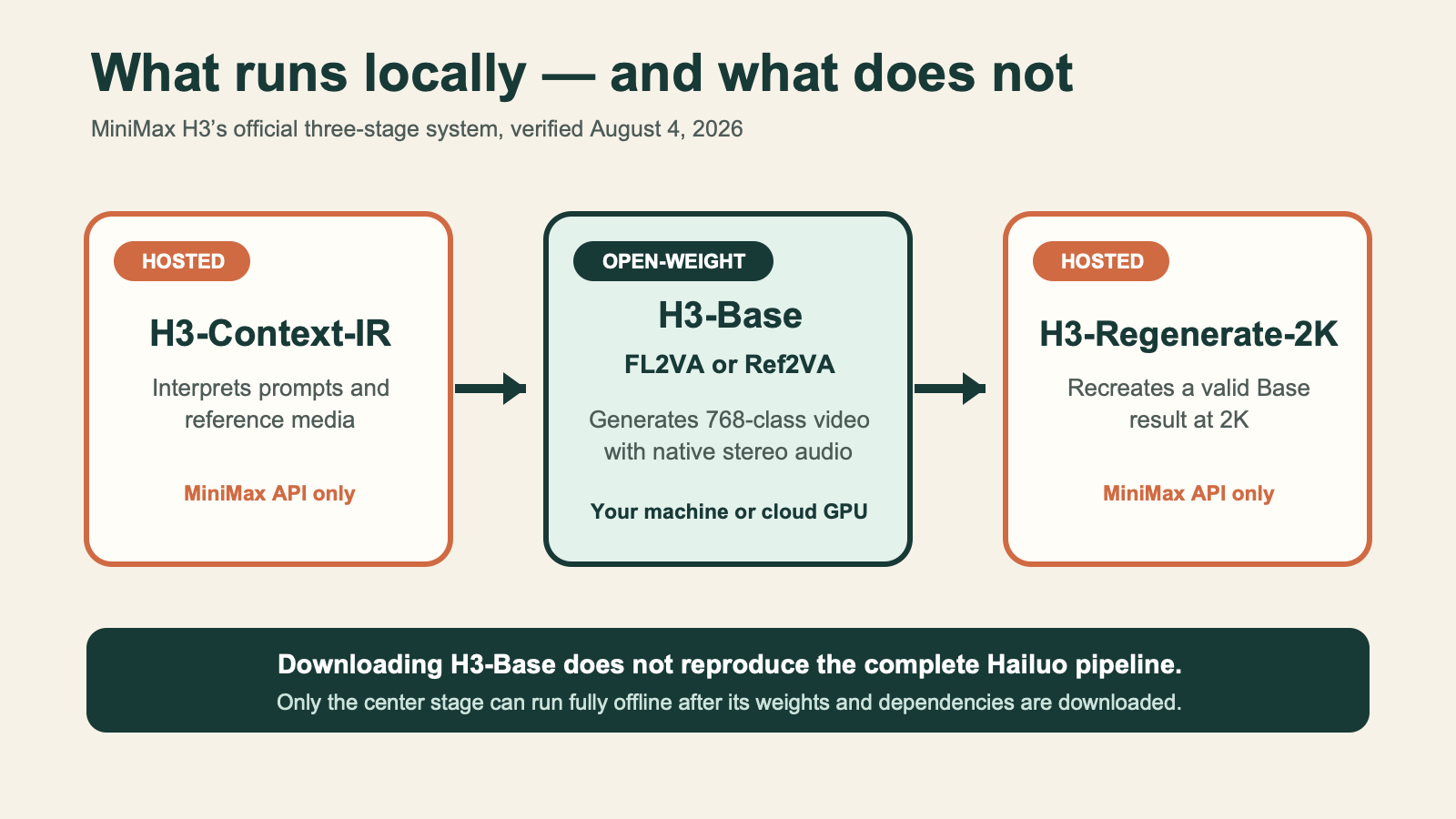
Only H3-Base is open-weight; instruction planning and official 2K regeneration remain hosted. Source: MiniMax model card, verified August 4, 2026.
H3-Base uses a dense 33-billion-parameter Omni Transformer and a Qwen3-VL-32B encoder. It jointly generates 24 fps video and 32 kHz stereo audio. The common local 16:9 canvas is 1344×768. FL2VA also performs text-to-video when no frame is supplied. Ref2VA accepts mixed image, video, and audio references within the model card’s limits.
Downloading H3-Base therefore does not reproduce the complete Hailuo pipeline. A fully local run means writing the prompt yourself and generating the 768-class Base result. A hybrid run calls Context-IR, generates Base locally, then calls Regenerate-2K. A local ComfyUI graph that invokes partner nodes is only a local interface to remote inference.
Choose by hardware and goal
There is no honest universal minimum VRAM. The checkpoint format, host RAM, offload method, canvas, frame count, CUDA stack, and attention backend all matter.
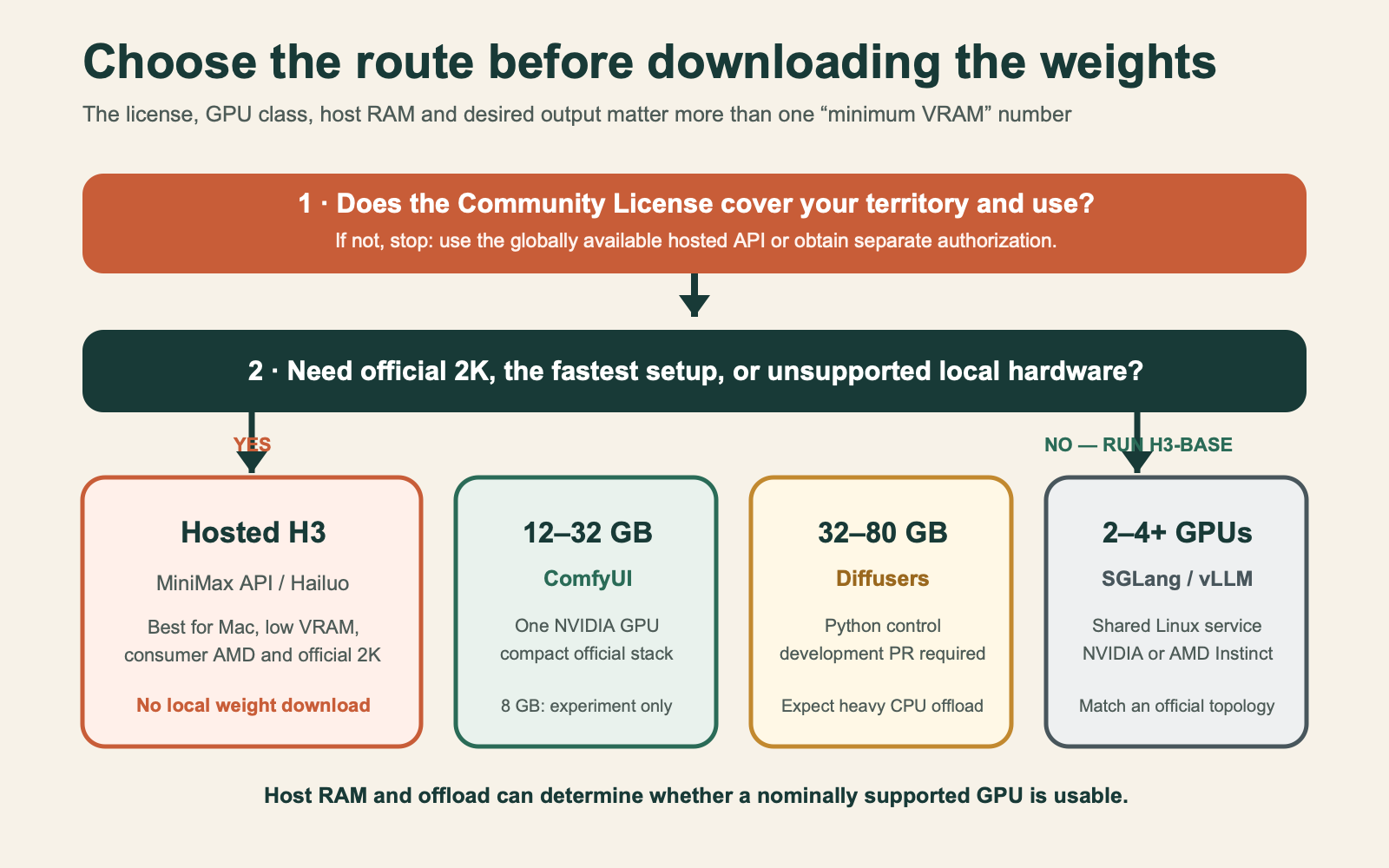
For a wider baseline, compare Kingy.ai’s local AI hardware guide and local AI compatibility matrix.
| Hardware | Evidence | Sensible route | Practical note |
|---|---|---|---|
| 8 GB VRAM | Community-only | Hosted first; ComfyUI experiment | One 4060 Ti report took about 20 minutes cold for a very small run |
| 12–16 GB | Documented reduced-canvas/offload paths | ComfyUI | Prefer 64 GB system RAM; begin below 1344×768 |
| 24–32 GB | Strong consumer tier | ComfyUI; Diffusers for developers | Official compact stack; substantial host offload may remain |
| 48–80 GB | Official framework recipes | ComfyUI or Diffusers | Full BF16 components still do not coexist comfortably on one 48 GB card |
| 2×4090/5090 | Official server profiles | SGLang or vLLM-Omni | Distributed offload profiles can call for roughly 384 GiB host RAM |
| Four server GPUs | Official profiles | SGLang or vLLM-Omni | Match the published topology; do not compare unmatched workloads |
| AMD Instinct | Official SGLang and vLLM validation | Server runtime | MI300X/MI355X have full profiles; vLLM lists MI325X verified without a separate benchmark |
| Consumer AMD / Apple Silicon | Community or unverified | Hosted or rented NVIDIA | Instinct support does not establish Radeon or Metal support |
Start at roughly five seconds and a reduced canvas. H3 frame counts follow 17n + 5; about 124 frames is 5.17 seconds at 24 fps. Duration often hurts memory and transfer time more than users expect.
Download the right layout
The MiniMax repository contains original FL2VA and Ref2VA partitions plus converted Diffusers components. An unrestricted download is about 498.5 GB decimal. Use hf download --include and --dry-run.
python -m pip install --upgrade huggingface_hub
hf auth login

hf download MiniMaxAI/MiniMax-H3 \
  --include "model_index.json" "modular_model_index.json" "FL2VA/*" \
  --local-dir /path/to/MiniMax-H3 \
  --dry-run
Remove --dry-run after checking the scope. One original partition is about 144.05 GB. SGLang selects a partition from the repository root; vLLM-Omni points to the downloaded FL2VA or Ref2VA directory. Diffusers uses the converted root components and consumes about 134.1 GiB for one task family.
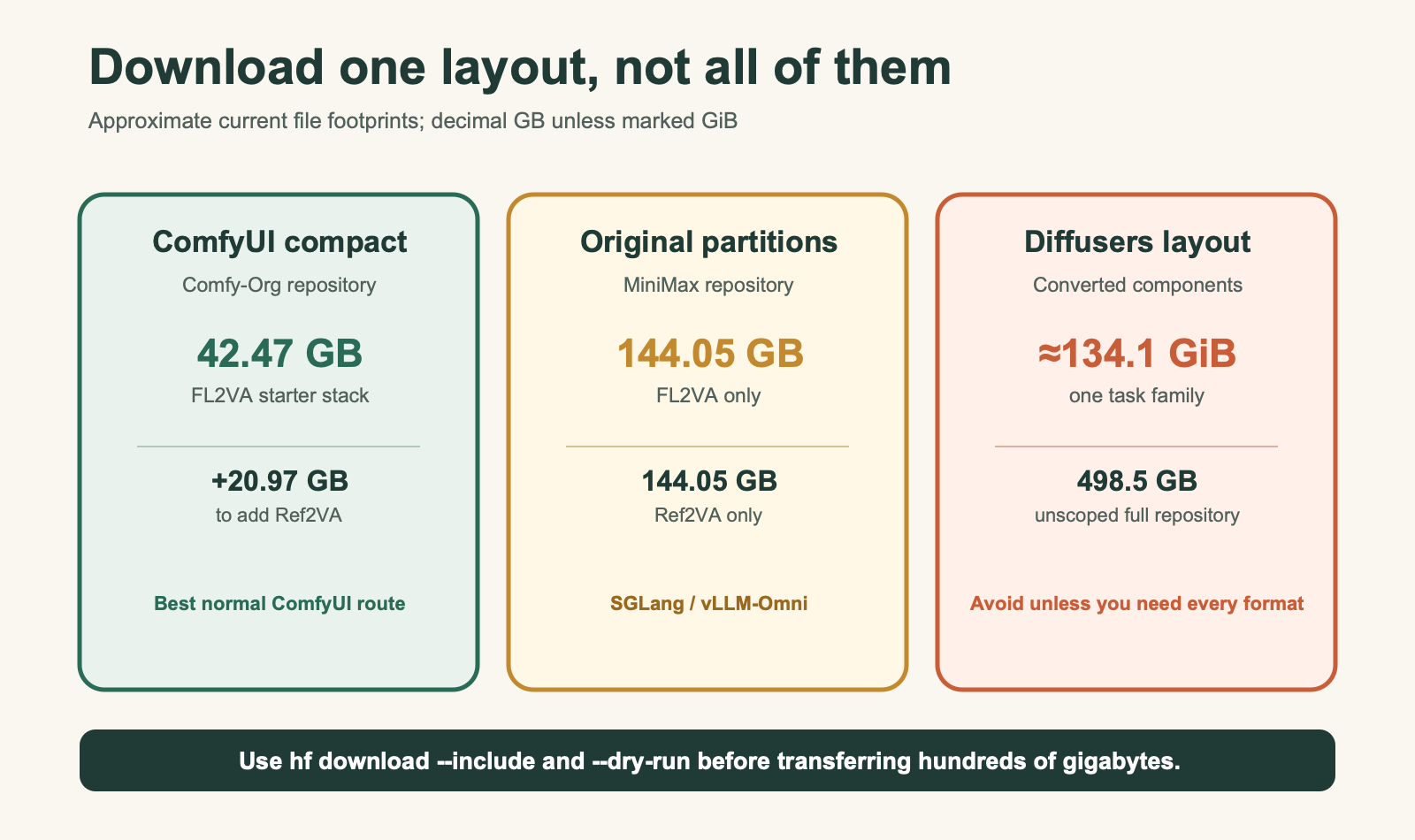
The normal ComfyUI FL2VA starter stack is 42.47 GB; adding Ref2VA costs another 20.97 GB when shared components are already present.
MiniMax also publishes an official ModelScope mirror. The Hugging Face command is easier to scope precisely. Rerun the same command to resume an interrupted transfer, and record LFS hashes for high-assurance deployments.
Option 1: ComfyUI
ComfyUI added native H3 support in version 0.30.0. The normal route needs no custom node. The official H3 tutorial links T2V, first/last-frame, and reference templates. Kingy.ai’s ComfyUI profile explains the interface itself.
Ease: easiest local route. Best for: one NVIDIA workstation. Pros: official compact weights, graph-based troubleshooting, strong offload, reusable API workflows. Cons: large host-memory demand, version-sensitive CUDA kernels, and no credible native H3 validation for Mac or consumer AMD.
Update a Git install and confirm the version:
cd /path/to/ComfyUI
git pull
python -m pip install -r requirements.txt
python main.py --version
For Windows Portable, use the stable update script or the application’s update control. Current accelerated quant operations expect ComfyUI’s CUDA 13-era stack; older CUDA can fall back and become much slower.
The smallest official FL2VA stack contains:
- pruned INT8 FL2VA diffusion model: 20.97 GB
- NVFP4/AWQ Qwen3-VL encoder: 16.58 GB
- video VAE: 4.53 GB
- audio VAE: 3.06 GB
Place the diffusion model under models/diffusion_models, the encoder under models/text_encoders, and both VAEs under models/vae. Load the official T2V or I2V template, select those four files, and begin at 960×544, 124 frames, 20 steps, and a fixed seed. Move to 1344×768 only after the baseline works. Add the separate Ref2VA diffusion file when reference media is required.
NVFP4 compute is native on Blackwell-class NVIDIA GPUs. Older RTX cards still benefit from the smaller encoder representation but do not receive the same native path. Avoid SageAttention, TeaCache, EasyCache, custom GGUF loaders, and extra frame interpolation until the official graph produces a valid MP4 with audio.
Option 2: Hugging Face Diffusers
H3 is not in stable Diffusers 0.39.0. The implementation remains in draft PR #14355, while PR #14371 is already refactoring its API. This is a documented development route, not a stable install.
Ease: hard. Best for: Python applications requiring component control. Pros: programmatic pipelines, TorchAO INT8, explicit offload and parallelism. Cons: unmerged code, roughly 134.1 GiB per task layout, and an unresolved two-GPU device-mismatch report.
Pin the reviewed commit rather than installing a moving branch:
python -m venv .venv
source .venv/bin/activate
python -m pip install --upgrade pip
python -m pip install \
  "git+https://github.com/huggingface/diffusers.git@abc5e9bf71fd38f53cd471bc3acaa84bc5ecbfdc" \
  transformers accelerate safetensors torchao sentencepiece av
Install an appropriate CUDA build of PyTorch first. The PR documents reduced-canvas INT8 paths for 12–32 GB cards, one 80 GB BF16 card with CPU offload, and two-GPU plans. Treat its exact Python API as provisional. Diffusers returns video and audio tensors separately; PyAV/FFmpeg muxes them into H.264 plus stereo AAC.
Choose Diffusers only when Python-level control outweighs upgrade risk. If a graphical workflow plus ComfyUI’s local API is acceptable, ComfyUI is currently the lower-risk automation path.
Option 3: SGLang Diffusion
SGLang is a server runtime, not a desktop editor. Its official H3 cookbook covers distributed launch profiles and an asynchronous /v1/videos API.
Ease: very hard. Best for: queues and multi-user Linux serving. Pros: broader H3 conditioning, NVIDIA and AMD Instinct profiles, Ulysses/tensor parallelism, layerwise offload. Cons: H3 support landed after stable 0.5.16, so current source or a development image is required.
git clone https://github.com/sgl-project/sglang.git
cd sglang
uv pip install -e "python[diffusion]"

python -m sglang.multimodal_gen.runtime.server \
  --model-path MiniMaxAI/MiniMax-H3 \
  --model-variant fl2va \
  --host 127.0.0.1 --port 30010
That minimal shape is not a consumer-GPU promise. Use the cookbook’s complete hardware-specific flags. Its two-RTX-5090 profile combines layerwise offload with roughly 384 GiB host RAM. Official measurements include about 74 seconds for a specific 4×H200 workload and 559.67 seconds for a specific 2×5090 workload; neither predicts ComfyUI speed.
SGLang validates MI300X and MI355X through AITER. This is AMD Instinct evidence, not Radeon evidence. Pin the exact source commit or container digest that passes validation and keep the endpoint on loopback or behind authenticated infrastructure.
Option 4: vLLM-Omni
H3 support belongs to vLLM-Omni, not ordinary vLLM. The current official H3 recipe supplies H3-specific CUDA and ROCm images, synchronous and asynchronous video endpoints, and one server per FL2VA or Ref2VA partition.
Ease: very hard. Best for: teams already operating vLLM-style services. Pros: service boundary, distributed offload and parallelism, official NVIDIA and AMD profiles. Cons: complex topology, large host-memory requirements, and narrower conditioning than the Base model exposes.
docker pull vllm/vllm-omni:minimax-h3
docker pull vllm/vllm-omni-rocm:minimax-h3

uv venv
source .venv/bin/activate
uv pip install vllm==0.26.0
git clone https://github.com/vllm-project/vllm-omni.git
cd vllm-omni
uv pip install -e .
Use the [fa4] extra only on the Blackwell CUDA path that needs it; do not install that CUDA-only extra on AMD. A one-GPU CPU-offload recipe exists but does not establish a 24 or 32 GB floor. The official two-GPU 4090/5090 profiles use distributed layerwise offload and roughly 384 GiB host RAM.
The refreshed recipe verifies MI300X, MI325X, and MI355X. It provides full four-GPU MI300X and MI355X profiles; MI325X is listed as verified without a separate detailed benchmark. Its 4×MI300X BF16 results report 267.42 seconds end to end for T2VA and 287.07 seconds for FL2VA at 1344×768 and 209 frames. Those are profile-specific server results, not Radeon guidance.
Current vLLM-Omni FL2VA exposes first-frame conditioning but not last-frame-only or first-plus-last. Ref2VA exposes a narrower mix than the Base model’s complete input set. Current main-branch H3 FP8 work is not the stable 0.26.0 path and is incompatible with H3 layerwise offload.
Community quantizations
Community W4, INT4, NVFP4, and GGUF files can make marginal hardware fit, but “smaller file” does not guarantee speed or acceptable output.
The best-documented early W4 repository publishes hashes and loader checks but explicitly lacks a complete prompt-to-decoded-video perceptual A/B. An INT4 repository markets a 12 GB target without a reproducible full-run log. ComfyUI-GGUF remains work in progress and lacks some recent native offload improvements, so a smaller GGUF can run slower.
Use community weights only after an official baseline works. Verify the publisher, license, file hashes, encoder compatibility, loader revision, and complete output including audio. Keep community evidence separate from official specifications.
Cloud GPU, hosted API, and Hailuo
A cloud GPU preserves local H3-Base control without buying hardware. Choose by exact GPU, host RAM, persistent NVMe, outbound fees, and whether the instance is dedicated. A 48 GB GPU paired with 32 GB RAM is a poor H3 machine. Protect ComfyUI and inference ports with authentication or an SSH tunnel and delete reference media when the work is finished.
If local control is not essential, compare Kingy.ai’s best AI video generators and state of AI video tools before renting a server.
MiniMax’s direct API is the simplest complete route. The current creation endpoint supports 768P or 2K, 4–15 seconds, and prompts up to 7,000 characters. The live pricing table lists $0.08 per output second at 768P and $0.13 at 2K, plus charges for some additional input media. Regeneration is separately priced. Recheck the live page before batching.
Hailuo is the easiest no-code route. fal offers a managed developer endpoint at a premium over MiniMax’s direct output rate. Both are hosted services; neither proves that Context-IR or Regenerate-2K weights are downloadable.
Security and privacy
- Local H3-Base can remain offline after dependencies and weights are downloaded. Context-IR, Regenerate-2K, API graphs, Hailuo, and managed endpoints upload inputs.
- Official ComfyUI H3 needs no custom node. GGUF does. Git packages,
--trust-remote-code, custom kernels, and containers all execute third-party code; pin and isolate them. - Bind interfaces to loopback by default. Add TLS, authentication, rate limits, and firewall rules before remote access.
- Safetensors reduces one Python-pickle risk; it does not prove model lineage, licensing, or quality.
For the wider open-weight and sovereignty trade-off, see Kingy.ai’s open-source and local AI guide.
Troubleshooting
Out of memory or frozen machine: reduce frames first, then canvas; close other GPU applications; verify host RAM and swap; use the runtime’s documented offload; avoid assuming that a smaller VRAM figure means faster execution. On affected Linux ComfyUI systems, --disable-pinned-memory is a community workaround, not a universal fix.
Missing ComfyUI nodes or template: confirm core 0.30.0+, restart, and check the loaded core path. Official H3 uses core nodes; a GGUF graph requires its custom loader.
Wrong checkpoint or loader error: FL2VA and Ref2VA diffusion files are not interchangeable. Diffusers converted components are not the compact ComfyUI stack. Native ComfyUI diffusion files go under models/diffusion_models, not the GGUF loader’s path.
CUDA or quantization is unexpectedly slow: current ComfyUI accelerated quant operations expect the newer CUDA stack. NVFP4 native compute is Blackwell-only; RTX 30/40-series cards fall back. Match Torch, CUDA, attention backend, model format, and ComfyUI version before comparing timings.
No audio: confirm the audio VAE is selected and the graph carries audio to the combine node. Server output should contain H.264 video at 24 fps and stereo AAC at 32 kHz. Use FFmpeg/ffprobe to inspect both streams.
Server performance misses a published number: match GPU, quantization, canvas, frames, steps, warmup, compile state, host RAM, interconnect, and offload. Separate load, text encoding, denoising, VAE decode, and mux time. Never compare unmatched SGLang, vLLM, Diffusers, and ComfyUI workloads as a leaderboard.
FAQ
Do I need ComfyUI?
No. Diffusers, SGLang Diffusion, and vLLM-Omni are current alternatives. ComfyUI is the easiest released route for one consumer NVIDIA GPU.
Is the complete H3 system open source?
No. H3-Base FL2VA and Ref2VA are open-weight under a restricted community license. Context-IR and Regenerate-2K remain hosted.
Can local H3 produce official 2K?
No. The open Base model produces the 768-class result. MiniMax’s official 2K regeneration stage is hosted. Third-party upscalers are separate tools.
What is the smallest official ComfyUI download?
About 42.47 GB for one compact FL2VA task stack. Ref2VA adds about 20.97 GB when the encoder and VAEs are already installed.
Is 8 GB enough?
Community reports show technically successful reduced runs with aggressive offload and long waits. That is not a comfortable or officially recommended baseline.
Does H3 run on Apple Silicon?
No credible native ComfyUI or Diffusers H3/MPS end-to-end validation was found by the verification date. General ComfyUI Mac support is not H3 proof.
SGLang or vLLM-Omni?
Both target shared Linux services and validate NVIDIA plus AMD Instinct hardware. SGLang currently exposes broader H3 conditioning but needs source or a development image. vLLM-Omni provides H3-specific CUDA/ROCm images and sync plus async endpoints, but its conditioning set is narrower. Match an official topology rather than choosing from a generic speed claim.
Can I use the weights in the US, EU, UK, or South Korea?
Not under the standard Community License territory grant. Obtain separate MiniMax authorization. MiniMax identifies the hosted API as the globally available alternative.
What may change
Diffusers PRs may merge or change the API. SGLang may release a stable H3-capable package. vLLM-Omni may expose fuller FL2VA/Ref2VA conditioning and release its current FP8 work. ComfyUI may revise its compact formats or CUDA requirements. MiniMax may change gating, licensing, limits, availability, or pricing. Treat this as a versioned guide: pin the versions above and recheck every release, recipe, license, and pricing page before production.
Final recommendation
Use the weights only if the license covers your location and use. Then choose ComfyUI for one NVIDIA workstation, Diffusers for development-only Python control, SGLang or vLLM-Omni for a matched server topology, and the hosted API when you need official 2K, the fastest setup, or unsupported local hardware.
That is the durable answer to “Do I need ComfyUI?”: no. On a creator workstation, however, it currently offers the best balance of released support, download size, visual control, and recoverable troubleshooting.
For a separate published Hailuo/MiniMax H3 full test—not a local-hardware or moderation benchmark—see the MiniMax H3 video receipt.
The Kingy Brief
Get the free AI price sheet.
25 AI plans and models on one page, from official pricing pages, updated every month. Free when you join The Kingy Brief: AI changes, original tests and one practical thing to try, Fridays at 09:00 Vancouver time.
Free · Double opt-in · Unsubscribe anytime
Sign up for The Kingy Brief on Beehiiv.
Signup help and newsletter schedule
Signup form provided by Beehiiv. After submitting, check your inbox for "Confirm your subscription to The Kingy Brief" and open its confirmation link. Your price sheet download is on the page that opens. Check Spam or Promotions if you cannot find it.
Fridays at 09:00 Vancouver time: source-checked AI changes, original tests and one practical thing to try. We skip a week when there is not enough verified material. Free. Unsubscribe anytime.