
Last reviewed: June 19, 2026. AI model pricing, context windows, rate limits, benchmark rankings, and availability change constantly. Treat every static model example in this guide as a starting point, then check the linked official pricing pages and live leaderboards before you commit budget.
Image note: Token budgeting is the discipline of matching the model to the mission instead of sending every task to the biggest model by default.
Most people think the AI game is about finding the best model. It is not. The real skill is knowing when not to use the best model.
A frontier reasoning model might be the right choice for debugging a messy codebase, planning a migration, or analyzing a high-stakes contract with human review. It is usually ridiculous for rewriting a two-sentence email. A tiny local model might be perfect for classifying 50,000 low-risk support tickets. It is usually a bad choice for legal, medical, financial, or security reasoning where a bad answer can hurt someone.
Token budgeting is the practical discipline of spending AI capacity intelligently. It means choosing the right model, the right context size, the right prompt length, the right retrieval strategy, the right escalation path, and the right human review point for each task.
The best AI users do not always use the most powerful AI model. They use the right model for the job.
That matters more every month. The model market now includes frontier general models, reasoning models, fast mini models, open-weight models, local models, coding models, multimodal models, long-context models, embedding models, rerankers, moderation classifiers, image models, audio models, video models, browser agents, coding agents, and workflow agents. If your only decision rule is “use the smartest one,” you will overspend. If your only decision rule is “use the cheapest one,” you will ship weak work.
This guide is for people building real workflows: creators, developers, marketers, founders, operators, AI product teams, internal automation teams, and business leaders. It is written for practical use, not benchmark drama. You will see references to live resources such as Artificial Analysis, LMArena, LiveBench, SWE-bench, LiveCodeBench, OpenRouter, official provider docs, model cards, and benchmark papers. Use them as reality checks. Then run your own evaluations, because your workflow is the benchmark that matters.
If you follow Kingy AI for AI launches, you already know the market moves fast. New model releases show up in the Kingy AI Launches of the Week, coding tools evolve through launches like Cursor /automate and GitHub Copilot Auto Mode, and model families keep changing. Token budgeting is how you turn that noise into a usable decision system.
What Is Token Budgeting?
Token budgeting is the process of deciding how much AI capacity a task deserves.
It includes seven decisions:
- Which model should handle the task?
- How much context should you send?
- How long should the output be?
- Should you use retrieval instead of pasting everything into the context window?
- Should you start cheap and escalate only when needed?
- Should a specialized model, tool, or agent handle the work instead of a general chat model?
- Where should human review enter the workflow?
Prompt engineering is about how to ask. Token budgeting is about what the request should cost, how much context it should carry, and whether the model is even the right tool.
A good token budget improves quality per dollar. A bad token budget creates one of two failures: expensive overkill or cheap underperformance.
Examples are easy:
- Do not use a top reasoning model to rewrite a two-sentence email.
- Do not use a tiny local model to analyze a 100-page legal agreement.
- Do not use a slow reasoning model for autocomplete.
- Do not paste a huge document into context when five retrieved passages would answer the question.
- Do not use a general model when a code-specific, vision-capable, embedding, reranker, transcription, or moderation model is the real fit.
- Do not use AI at all when the task requires a licensed professional, original source verification, or human accountability.
The core thesis is simple: match the model to the mission.
What Is a Token?
A token is a chunk of text used by a model. It can be a word, part of a word, punctuation, whitespace, or a short piece of code. Different model families use different tokenizers, so the exact count varies. The practical point is what tokens control: cost, speed, context capacity, and output length.
For API models, you usually pay for input tokens and output tokens. Input tokens are the instructions, files, chat history, retrieved context, tool results, and system messages sent into the model. Output tokens are the response the model writes back.
Some providers also expose special pricing or accounting for cached tokens. Caching can make repeated context cheaper when the same long prompt, policy, document, or system context is reused. Some reasoning models may also account for internal reasoning tokens or hidden thinking budget. The implementation details vary by provider, so always check the official docs rather than assuming one pricing model applies everywhere.
Multimodal systems add more wrinkles. Images, audio, and video may be billed as tokens, units, seconds, minutes, pixels, frames, or another provider-specific measure. A screenshot analysis call and a text-only summarization call do not have the same cost shape. A video generation workflow can burn budget through prompt iterations, previews, upscale passes, and final renders before you ever reach the deliverable.
Here is the simplest mental model:
User prompt + files + chat history + retrieved context + system instructions = input tokens
Model answer = output tokens
Total bill = input tokens + output tokens + cache rules + tool calls + retries + provider pricing
Output tokens often cost more than input tokens because generation is computationally intensive. Long prompts can also slow the model down and increase failure risk. A 1 million token context window sounds powerful, but long context is not the same thing as good long-context reasoning. Research such as Lost in the Middle showed that models can struggle to use information placed deep inside long contexts, and benchmarks such as RULER were created to test long-context behavior more carefully.
That is why token budgeting is not just accounting. It is workflow design.
Token Budgeting vs Prompt Engineering
Prompt engineering improves the request. Token budgeting improves the system around the request.
A prompt engineer asks: “How should I phrase this so the model does better?” A token budgeter asks: “Should this be one model call, several model calls, a retrieval pipeline, a cheap classifier, a local model, a coding agent, a human-reviewed workflow, or no model at all?”
Both matter. A clean prompt sent to the wrong model can still fail. The right model with a bloated context can still waste money. A smart agent without guardrails can loop through tools and multiply cost. A RAG system without reranking can stuff irrelevant chunks into the context window and degrade the answer.
The practical rule:
Prompt engineering improves quality. Token budgeting improves quality per dollar.
The AI Model Selection Ladder
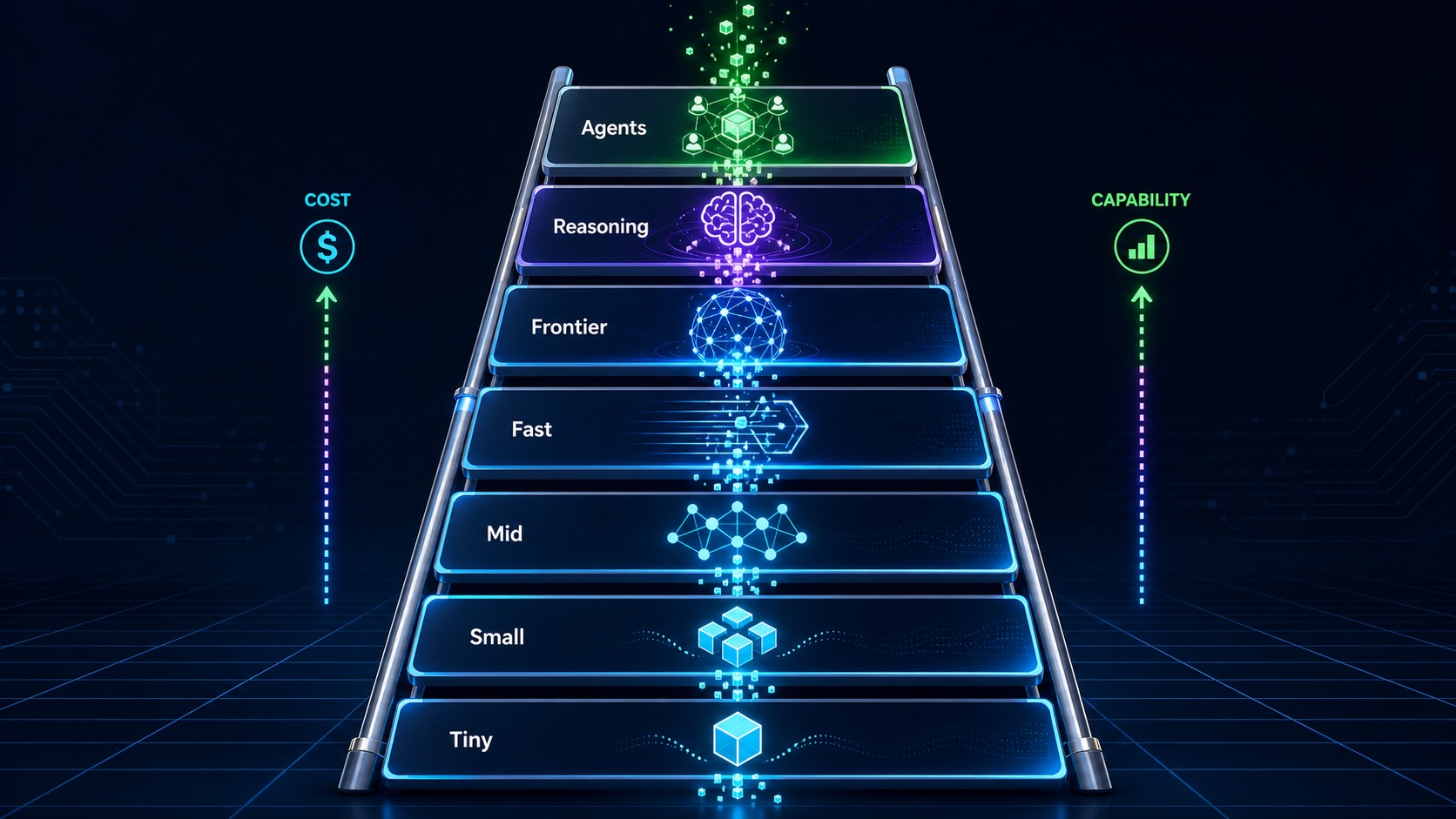
Use this ladder as a first-pass routing system. It is not a ranking. It is a spending discipline.
| Tier | Model Class | Use For | Avoid For | Budget Note |
|---|---|---|---|---|
| 1 | Tiny local or utility models | Classification, tagging, routing, simple extraction, short rewrites, privacy-sensitive local filtering | Hard reasoning, nuanced writing, high-stakes analysis, complex code | Cheap per call, but still has hardware and maintenance cost if self-hosted |
| 2 | Small open-weight models | Draft generation, structured extraction, simple agents, low-risk internal automation | Complex synthesis, deep research, legal/financial judgment, difficult debugging | Useful when privacy, control, or high volume matter |
| 3 | Mid-size open-weight or cheap API models | Support drafts, data cleanup, moderate summarization, basic coding help, workflow automation | Final judgment, hard multi-step reasoning, strategic decisions | Often the best default for repetitive business work |
| 4 | Strong fast proprietary models | Everyday business work, content drafts, fast coding, product copilots, customer-facing assistants, multimodal tasks | Benchmark-level math, complex legal analysis, deep architecture planning without review | Usually the sweet spot for quality, latency, and cost |
| 5 | Frontier non-reasoning models | High-quality writing, synthesis, strategy, research summaries, complex coding, multimodal interpretation | Simple bulk tasks where cheaper models are enough | Spend here when quality and judgment matter |
| 6 | Frontier reasoning models | Hard math, difficult debugging, multi-step planning, scientific reasoning, technical analysis, high-stakes review | Simple rewriting, tagging, summarization, autocomplete, routine social posts | Powerful but slower and easier to overuse |
| 7 | Specialized systems and agents | Browser agents, coding agents, research agents, data agents, repo edits, spreadsheet and report generation | One-shot tasks that do not need tools, planning, retries, or validation | Budget for tool calls, retries, intermediate context, validation, and human handoff |
The ladder also explains why one model cannot be “best” in a universal sense. A model that wins a preference leaderboard may be overkill for classification. A very fast model may be ideal for autocomplete and terrible for deep legal analysis. A local model may be free of per-call API fees but expensive in GPU, engineering time, or quality tradeoffs.
The Kingy AI Model Selection Matrix
Before you pick a model, score the task. This matrix is the fastest way to avoid both waste and underpowered output.
| Task Factor | Low Requirement | Medium Requirement | High Requirement | Recommended Model Tier |
|---|---|---|---|---|
| Task difficulty | Rewrite, classify, tag | Summarize, draft, extract | Analyze, reason, plan | 1-3 low, 4-5 medium, 6 high |
| Stakes and risk | Internal note | Customer-facing draft | Legal, medical, financial, security | Escalate with risk; add human review |
| Required accuracy | Good enough | Needs verification | Must be evidence-backed | Use stronger model plus sources and review |
| Context length | Short prompt | Several documents | Large corpus or codebase | Use RAG, compression, or long-context model |
| Output length | Short label or JSON | Draft answer | Long report or guide | Budget output tokens; use planning passes |
| Latency tolerance | Realtime | A few seconds | Minutes acceptable | Fast model for realtime; reasoning model for slow hard tasks |
| Cost sensitivity | High volume | Moderate volume | Low volume, high value | Route cheap first for volume; spend for judgment |
| Privacy requirement | Public data | Internal data | Regulated or sensitive data | Enterprise controls or local/open-weight model |
| Tool use | No tools | Simple API call | Multi-step agent | Tool-capable model or agent system |
| Structured output | Loose text | Simple JSON | Strict schema | Model with strong structured output support plus validation |
| Multimodal input | Text only | Images or PDFs | Video, audio, screenshots, charts | Use specialized multimodal model |
| Coding ability | Explain snippet | Fix file | Repo-level migration | Coding model or coding agent |
| Reasoning depth | Pattern matching | Several steps | Hard logic or math | Reasoning model only when needed |
| Real-time freshness | Static knowledge ok | Recent but known | Current facts required | Use search/retrieval tools and citations |
| Repeatability | Creative variance ok | Mostly stable | Deterministic workflow | Use structured prompts, schemas, evals, and tests |
The Cheap-First, Escalate-When-Needed Strategy
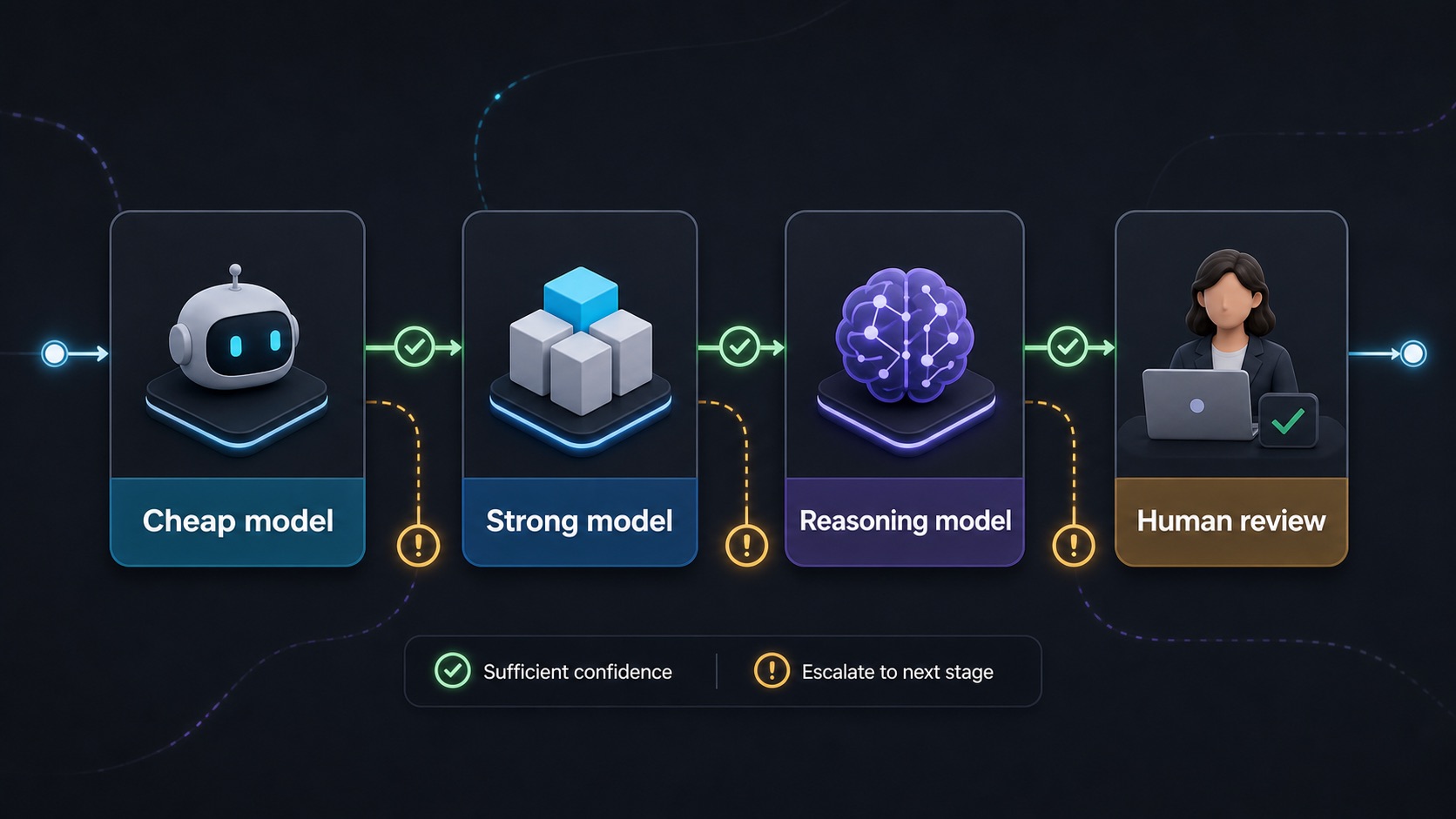
Cheap-first routing is the default for high-volume, low-risk workflows. Start with the cheapest model that can plausibly do the job. Escalate only when confidence is low, the task is hard, or the stakes justify stronger judgment.
Example support pipeline:
- Cheap model classifies the support ticket.
- Mid-tier model drafts the reply.
- Frontier model reviews difficult or angry cases.
- Human approves refunds, legal claims, safety issues, and sensitive escalations.
This approach works because most tasks are not equally hard. If 70 percent of tickets are password resets, order status questions, and basic troubleshooting, sending all of them to a frontier reasoning model is waste. Save the expensive model for the 10 percent where judgment changes the outcome.
The Expensive-First, Compress-Later Strategy
Sometimes the opposite workflow is better. Use a frontier model first when the initial thinking is the expensive part.
Good expensive-first cases include:
- Difficult research planning
- Large software architecture decisions
- Legal risk analysis with human review
- Technical diagnosis
- Product strategy
- Data interpretation
- Complex content briefs where the outline determines the quality of everything downstream
The pattern is:
- Use a frontier model to build the plan, rubric, outline, or architecture.
- Use cheaper models to execute repetitive subtasks.
- Use a frontier or reasoning model again for final review.
This is especially useful for content workflows. A strong model can design the editorial angle, source plan, audience assumptions, and structure. Cheaper models can draft variations, write social posts, generate thumbnails ideas, or turn the long article into a newsletter. A human editor or stronger model can then review for accuracy and usefulness.
Model Categories and Best Uses
Frontier General-Purpose Models
Frontier general-purpose models from providers such as OpenAI, Anthropic, Google, xAI, and others are the models most people reach for when quality matters. They are useful for high-quality writing, strategy, synthesis, complex coding, multimodal interpretation, tool use, and agentic planning.
Use them when the task needs judgment. Do not use them for every tiny request. If a task is repetitive, low-risk, and easy to evaluate, a smaller model usually deserves the first attempt.
For current model availability, pricing, and context details, check official pages such as OpenAI models, OpenAI API pricing, Anthropic model docs, Anthropic pricing, Google Gemini models, Gemini API pricing, and xAI model docs.
Reasoning Models
Reasoning models are built or tuned to spend more computation on harder problems. They can be valuable for math, code architecture, multi-step logic, scientific reasoning, planning, and difficult debugging. They are often slower and more expensive. They can still hallucinate. They still need verification.
Use reasoning models when the task requires actual reasoning, not when it merely feels important. A CEO memo may need clarity and judgment, but it may not need a math-style reasoning model. A complex production incident or deep architecture migration might.
Benchmarks that often matter here include GPQA, MATH, competition math evaluations such as AIME-style tests, FrontierMath, ARC-AGI, and Humanity’s Last Exam. Do not treat any one score as destiny. Treat it as a clue.
Fast, Flash, Mini, and Utility Models
Fast models are the quiet budget heroes. They are best for high-volume, low-risk, low-latency work: classification, extraction, routing, simple summaries, rewriting, autocomplete, support triage, moderation pre-checks, and simple app interactions.
They are often the best model for product experiences because users notice latency. A slightly weaker answer delivered in one second may beat a stronger answer delivered in fifteen seconds, especially for autocomplete, chat support, and UI copilots.
Open-Weight Models
Open-weight models matter because they give teams more control over deployment, privacy, tuning, and cost structure. Families such as Llama, Mistral, Qwen, DeepSeek, GLM, Gemma, Phi, and others can be run locally or through inference providers depending on license, hardware, and serving stack.
“Open source” and “open weight” are not always the same thing. Many models publish weights with specific licenses and use restrictions, while the full training data, code, or process may not be open. Always read the model card and license. Start with sources such as Meta Llama, Mistral news and model releases, Hugging Face model hub, and provider model cards.
Open-weight models are ideal when you need local control, data residency, fine-tuning, offline workflows, or cost predictability at scale. Closed frontier APIs are often better when you need maximum quality, easier operations, enterprise support, or state-of-the-art multimodal and reasoning performance.
Local Models
Local models run on your Mac, Windows machine, Linux workstation, NAS, local GPU server, or private cloud. Tools such as Ollama, LM Studio, llama.cpp, vLLM, and Text Generation Inference make local or self-hosted inference practical for many teams.
Local does not mean free. You pay with hardware, setup time, latency, quality tradeoffs, maintenance, monitoring, and energy. Local is a strong choice for private notes, internal classification, offline drafting, sensitive document exploration, and high-volume workflows that do not require frontier quality.
Coding Models and Coding Agents
Coding is not one task. Autocomplete, explaining code, fixing a function, reviewing a pull request, writing tests, migrating a repo, and operating an agent inside a codebase have different token budgets.
Use fast coding models for autocomplete and simple snippets. Use stronger coding-capable models for bug fixes, test generation, and code review. Use frontier models for architecture and difficult debugging. Use coding agents when the work requires reading files, editing code, running tests, and iterating.
Benchmarks such as SWE-bench, SWE-bench Verified, LiveCodeBench, Terminal-Bench, HumanEval, and MBPP are useful, but coding score does not always equal developer usefulness. A useful coding assistant needs good repo navigation, patch quality, test discipline, instruction following, and the ability to recover from failures.
Kingy has been tracking this category closely through pieces like Claude Code Artifacts, GitHub Agent Finder, and GitHub Copilot App. Those launches are all symptoms of the same trend: the model is only part of the coding workflow. The agent harness matters.
Long-Context Models
Long-context models are useful when the model truly needs to see a large body of material at once: long documents, many files, dense chat history, legal packets, codebases, research corpora, transcripts, and multi-document synthesis.
But long context has three costs: money, latency, and attention risk. Even if the model accepts a huge context window, it may not use every part equally well. Long-context benchmarks help, but you still need task-specific tests.
Use RAG when the answer depends on a small set of relevant chunks inside a larger corpus. Use long context when the relationships across the whole document matter, when retrieval might miss important cross-references, or when the cost of missing context is higher than the cost of sending more context.
Vision Models
Vision-capable models are useful for screenshots, charts, UI analysis, image understanding, document images, diagram interpretation, product photos, thumbnails, visual QA, and multimodal research. Benchmarks such as MMMU can help you compare multimodal reasoning, but your real use case matters more than a general score.
Do not send images to a text-only workflow and hope the system will infer what it cannot see. Do not use a vision model when OCR, a PDF parser, or a structured data extraction tool would be cheaper and more reliable.
Audio and Voice Models
Audio workflows include transcription, speech generation, call agents, meeting notes, podcasts, voice assistants, and real-time voice interfaces. Token budgeting here is not just prompt length. It includes audio duration, streaming latency, turn-taking, transcription quality, voice generation cost, and whether the workflow needs a general LLM after transcription.
Use specialized speech-to-text models for transcription-heavy work. Use a general model for summarization, action extraction, reasoning over the transcript, or agentic follow-up.
Image and Video Generation Models
Budget image and video generation separately from chat. The expensive part is often iteration. You might generate ten image concepts, pick two, upscale one, edit it, then make social crops. Video adds storyboard planning, motion tests, preview renders, final renders, voice, captions, and revisions.
Use cheap drafts before expensive renders. Use still images before video. Use lower-resolution previews before final output. For creators and marketers, this is where model routing saves real money.
Embedding Models
Embeddings are not chat models. They turn content into vectors for search, clustering, recommendations, memory, deduplication, and retrieval augmented generation. Good embeddings can reduce token waste by retrieving the right passages before you call a more expensive answer model.
Check official docs for embedding options from providers such as OpenAI embeddings, Cohere embeddings, Gemini embeddings, and open embedding models hosted on platforms such as Hugging Face.
Reranker Models
Rerankers improve retrieval quality by reordering candidate chunks before they enter the expensive answer model. A reranker can reduce token waste because it helps you send fewer, better chunks. That is especially important for RAG systems where bad retrieval leads to confident but unsupported answers.
See examples such as Cohere Rerank and open reranking models on Hugging Face. The important question is not “do I need a reranker?” It is “does a reranker reduce cost per correct answer?”
Moderation, Safety, and Classification Models
Cheap classifiers are useful budget gates. They can screen content, route tickets, detect sensitive topics, flag unsupported requests, classify intent, estimate difficulty, and decide whether a stronger model or human should step in.
This is one of the easiest token budgeting wins: do not spend expensive reasoning tokens to decide whether a message is a refund request, a bug report, or spam.
Benchmarks: What They Mean and What They Do Not
Benchmarks are useful, but they are not truth tablets. They can be narrow, contaminated, gamed, outdated, or disconnected from your workflow. Use them to ask better questions, not to avoid your own evaluations.
| Benchmark or Leaderboard | What It Tests | What a High Score Suggests | What It Does Not Prove | Who Should Care |
|---|---|---|---|---|
| MMLU / MMLU-Pro | Broad academic knowledge and reasoning | General knowledge strength | Real business quality, current facts, agent reliability | Teams comparing general model capability |
| GPQA | Graduate-level science questions | Hard reasoning and expert-domain ability | Safety, business usefulness, citation accuracy | Research, science, technical analysis teams |
| AIME-style math | Competition math problem solving | Formal reasoning strength | Writing quality or support usefulness | Math, logic, reasoning-heavy workflows |
| MATH | Mathematical problem solving | Step-by-step reasoning ability | General factual reliability | Education, tutoring, reasoning evals |
| HumanEval | Function-level code generation | Basic coding skill | Repo-level engineering competence | Developer tools and coding assistants |
| MBPP | Introductory programming tasks | Simple coding ability | Debugging, architecture, large codebase edits | Coding model comparisons |
| SWE-bench and SWE-bench Verified | Real software issue resolution | Agentic coding and patching ability | That a model will behave well in your repo | Teams choosing coding agents |
| LiveCodeBench | Live coding problems designed to reduce contamination | More current coding problem-solving ability | Production engineering quality | Competitive coding and coding assistant evaluators |
| Terminal-Bench | Terminal-based task completion | Tool and environment competence | Safe autonomy in your stack | Agent builders and developer tool teams |
| Berkeley Function Calling Leaderboard | Tool/function calling | Structured tool-use ability | Long-horizon agent reliability | Agent and API workflow builders |
| MMMU | Multimodal reasoning | Vision-language strength | OCR reliability or domain-specific visual QA | Vision product teams |
| ARC-AGI | Abstract reasoning tasks | Pattern reasoning ability | General workplace performance | Reasoning researchers and advanced eval teams |
| FrontierMath | Difficult mathematical problems | Deep math reasoning potential | Everyday usefulness | Advanced reasoning evaluators |
| Humanity’s Last Exam | Hard cross-domain expert questions | Frontier knowledge and reasoning signals | Trustworthiness in production | Frontier model watchers |
| LiveBench | Fresh benchmark questions designed around contamination resistance | Current general capability signal | Your workflow outcome | Teams tracking frontier model movement |
| LMArena | Human preference comparisons | Real-user preference signal | Cost efficiency, latency, private use performance | Product teams and model watchers |
| Artificial Analysis | Intelligence, speed, pricing, context, latency comparisons | Useful live operational comparison | Perfect fit for your workload | Anyone comparing model tradeoffs |
The best benchmark is your own task set. Keep 50 to 200 examples from your real workflow. Include easy, medium, and hard cases. Score quality, latency, cost, format compliance, citations, safety, and human edits required. Then choose models based on cost per successful task, not cost per million tokens alone.
Build a Real Token Budget
The simplest cost formula is:
(Input tokens x input price) + (Output tokens x output price) = estimated model cost
Use the provider’s unit. Some pricing is shown per million tokens. Some multimodal services use different units. Some providers have caching, batch, fine-tuning, training, image, audio, or video prices. Always check the live pricing page.
Monthly batch cost:
Cost per task x tasks per day x days per month = monthly model cost
Agentic cost:
Planner tokens + tool calls + retrieved context + intermediate reasoning + final answer + retries + validation = real agent cost
Notice what gets forgotten: output tokens, retries, cache misses, tool loops, and human review time. Those are often the difference between a demo that looks cheap and a production workflow that is not.
| Task | Typical Input Tokens | Typical Output Tokens | Recommended Tier | Notes |
|---|---|---|---|---|
| Classify support ticket | 100-800 | 5-100 | 1-3 | Use a cheap model and strict labels |
| Rewrite short email | 100-600 | 100-400 | 1-3 | Fast model is enough |
| Summarize meeting notes | 2,000-15,000 | 300-1,500 | 3-5 | Use stronger model when decisions matter |
| SEO article outline | 2,000-20,000 | 800-2,500 | 4-5 | Research quality matters more than raw length |
| Long research report | 20,000-200,000+ | 3,000-10,000 | 5-6 plus RAG | Use retrieval, source tracking, and final review |
| Code bug fix | 2,000-80,000 | 500-5,000 | 4-7 | Budget for tests and retries |
| Website chatbot | 500-8,000 per turn | 100-1,000 | 3-5 plus RAG | Context management dominates cost |
| RAG assistant | Query + retrieved chunks | Answer | Embeddings + reranker + answer model | Retrieval quality controls cost and accuracy |
| YouTube script workflow | 5,000-50,000 | 2,000-8,000 | 4-6 | Use cheap models for variants, strong model for editorial judgment |
| Browser research agent | Variable | Variable | 6-7 | Budget for browsing, tool calls, notes, and validation |
Cost Comparison Charts
These charts are conceptual. The exact price numbers change too often to freeze into a long-lived guide. Use them to reason, then verify current prices through OpenAI pricing, Anthropic pricing, Gemini pricing, DeepSeek pricing, Cohere pricing, OpenRouter model pages, and live comparison tools such as Artificial Analysis.
Chart 1: Model Capability vs Cost
| Model Tier | Approximate Capability | Approximate Cost Risk | Use Pattern |
|---|---|---|---|
| Tiny utility | Volume, routing, classification | ||
| Small open-weight | Private drafts and extraction | ||
| Cheap API / mid model | Everyday automation | ||
| Strong fast model | Product copilots and business work | ||
| Frontier model | Judgment, synthesis, complex work | ||
| Reasoning / agentic system | Hard problems, tools, retries, validation |
Chart 2: Task Complexity vs Recommended Model Tier
| Task Complexity | Examples | Recommended Starting Tier | Escalate When |
|---|---|---|---|
| Low | Tags, labels, short rewrites | 1-3 | Confidence is low or customer impact is high |
| Medium | Drafts, summaries, support responses | 3-4 | Answer affects money, trust, or policy |
| High | Research synthesis, code fixes, analysis | 4-6 | The first pass is uncertain or unsupported |
| Very high | Architecture, legal review, incident diagnosis | 6-7 plus human review | Always validate through tests, sources, or experts |
Chart 3: Latency Sensitivity vs Model Class
| Latency Need | Use Case | Model Class | Budget Principle |
|---|---|---|---|
| Sub-second to very fast | Autocomplete, UI hints, routing | Tiny, small, fast mini | Speed beats depth |
| Few seconds | Chat, support, drafts | Fast proprietary or mid-tier | Balance usefulness and responsiveness |
| Dozens of seconds | Research, code review, planning | Frontier model | Spend for judgment |
| Minutes acceptable | Deep reasoning, agents, reports | Reasoning model or specialized agent | Validate output and control retries |
Chart 4: Context Length vs Cost Risk
| Context Strategy | Cost Risk | Quality Risk | When It Works |
|---|---|---|---|
| Short prompt | Low | Missing information | Simple tasks |
| Retrieved chunks | Low to medium | Bad retrieval | Knowledge-base QA and focused research |
| Compressed context | Medium | Compression may drop nuance | Long inputs with known goals |
| Full long context | High | Lost-in-the-middle and distraction | Whole-document reasoning or codebase-wide analysis |
Chart 5: Cheap-First Escalation Flow
Classify task with cheap model -> if easy and low risk, answer or draft -> if uncertain, use stronger model -> if high-stakes or multi-step, use reasoning model -> if impact is legal, medical, financial, security, personnel, or brand-critical, add human review.
Chart 6: RAG vs Long-Context Decision Tree
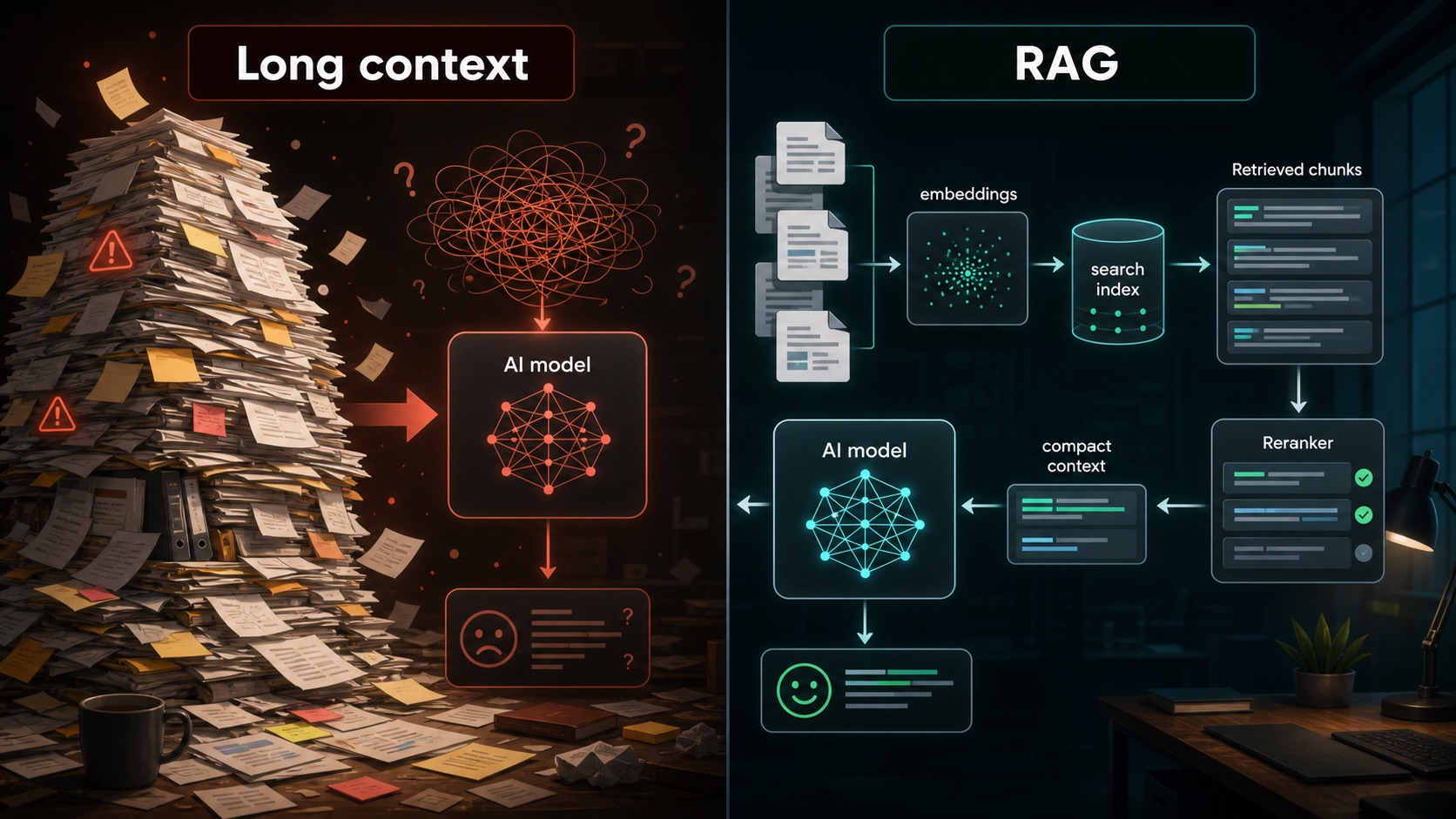
If the answer depends on a few passages: use embeddings, retrieval, reranking, and a compact prompt.
If the answer depends on relationships across the whole document: consider long context, but budget for cost and validation.
If the corpus changes constantly: use RAG or search so the model sees current evidence.
If retrieval keeps missing key context: improve chunking, metadata, query rewriting, and reranking before increasing context size.
Token Budgeting for Content Creation
For creators, marketers, and publishers, token budgeting is editorial leverage. Use cheap models for volume and variations. Use strong models for editorial judgment. Use research-capable workflows for facts. Use humans for taste, risk, and accountability.
| Content Task | Recommended Model Type | Budget Move | Review Requirement |
|---|---|---|---|
| Brainstorm angles | Cheap or fast model | Generate many options cheaply | Human taste filter |
| SEO research | Search-capable workflow plus strong model | Spend on source quality | Verify links and search intent |
| Outline | Frontier model | Spend early because structure drives quality | Editor checks angle |
| Draft article | Strong model | Use sections and source constraints | Fact-check pass |
| Rewrite paragraphs | Cheap fast model | Use low-cost variations | Light edit |
| Fact checking | Research workflow plus strong model | Use sources, not memory | Human verifies claims |
| Social posts | Cheap model | Batch variations | Brand review |
| YouTube titles | Cheap model plus human taste | Generate many candidates | Human selects |
| Video script | Strong model | Spend on structure and retention | Editor review |
| Newsletter | Mid or strong model | Repurpose from source article | Human final pass |
For a site like Kingy AI, a daily launch workflow could look like this:
- Cheap model classifies new AI launches by category.
- Search and source collection tools gather official pages, pricing, model cards, and credible coverage.
- Strong model drafts the article using only verified material.
- Reasoning model identifies what actually matters: pricing, access, risk, use cases, and unanswered questions.
- Cheap model creates social variations, newsletter summaries, and YouTube title ideas.
- Human editor approves the final article.
That same operating model shows up in the AI Launch Academy, where the value is not just spotting launches, but learning how to evaluate them with a repeatable framework.
Token Budgeting for Coding
Developers waste tokens in two common ways: they send too much repo context for simple questions, or they under-context a hard problem and force the model to guess.
| Coding Workflow | Recommended Model | Context Strategy | Budget Warning |
|---|---|---|---|
| Autocomplete | Fast coding model | Small local context | Latency matters more than deep reasoning |
| Explain code | Cheap or mid model | Relevant file or function | Do not send the whole repo |
| Single-file edit | Mid or strong coding model | File plus nearby interfaces | Ask for patch and tests |
| Debug failing test | Strong or reasoning model | Error, test, code path | Include command output, not random files |
| Pull request review | Strong coding model | Diff plus critical files | Prioritize bugs over style chatter |
| Repo-wide refactor | Coding agent | Read files as needed | Budget for iteration and test runs |
| Architecture planning | Frontier or reasoning model | System map and constraints | Ask for plan before patch |
| Migration | Coding agent plus human review | Repo, tests, docs | Cost is tool loops plus validation |
| Security review | Strong model plus specialist tools | Threat model and code | Do not replace professional review |
Use a coding agent when the system needs to read files, make edits, run tests, inspect failures, and revise. Use a chat model when you need explanation, direction, or a bounded patch. Ask for a plan only when architecture, risk, or migration sequence matters more than speed.
The token-saving move in coding is relevance. Give the model the failing test, the error, the target file, the related interface, and the expected behavior. Do not paste the entire codebase because the context window allows it.
Token Budgeting for Agents
Agents are expensive because they do not just answer. They plan, call tools, read files, browse pages, write intermediate notes, retry, validate, reflect, and sometimes loop.
| Agent Cost Component | What It Means | Budget Control |
|---|---|---|
| Planner tokens | The agent decides what to do | Use a strong planner only for hard workflows |
| Tool-call context | Inputs and outputs from tools | Summarize or compress tool results |
| Browsing | Pages, search results, source extraction | Limit source count and require citations |
| File reading | Code, docs, spreadsheets, PDFs | Read relevant files first; expand only when needed |
| Retries | Failed actions and corrections | Add tests and stop conditions |
| Memory | Saved context across turns | Store concise facts, not full transcripts |
| Validation | Tests, checks, reviewer model | Spend here for high-stakes tasks |
| Human handoff | Final approval or blocked state | Route sensitive decisions to humans |
A good agent budget uses different models for different roles. A cheap model can route or classify. A strong model can plan. A specialized tool can execute. A separate model can judge. A human can approve high-impact actions.
This is also why agent launches require careful reading. A launch may promise autonomy, but the real evaluation is cost per completed task, validation quality, safety controls, and how often the agent gets stuck. The AWS agents and guardrails coverage on Kingy is a good reminder that context and control matter as much as model intelligence.
Token Budgeting for RAG and Knowledge Bases
RAG stands for retrieval augmented generation. The system retrieves relevant information from a knowledge base, sends that context to a model, and asks the model to answer with evidence. The original RAG paper is a useful starting point, but production RAG is now a broad engineering practice.
A practical RAG budget includes:
- Embedding model choice
- Chunk size
- Chunk overlap
- Metadata quality
- Retrieval count
- Reranking
- Context compression
- Citation formatting
- Answer model selection
- Hallucination checks
Documents -> chunks -> embeddings -> retrieval -> reranking -> compressed context -> answer model -> cited answer
| Decision | RAG Is Better When | Long Context Is Better When |
|---|---|---|
| Question scope | The answer is in a few relevant chunks | The answer depends on many cross-document relationships |
| Corpus size | The knowledge base is large or constantly updated | The input is a bounded document set |
| Cost | You need to minimize context tokens | The cost of missing context is higher than the token cost |
| Freshness | Sources change often | Sources are static for the task |
| Reliability | Retrieval is accurate and citations matter | Retrieval misses too much nuance |
| Engineering | You can maintain indexes and metadata | You need a simpler one-off workflow |
Do not use RAG when the source documents are low quality, when retrieval cannot reliably find the answer, when the answer requires calculations over structured data better handled by a database, or when a human expert should review the source directly.
Token Budgeting for Businesses
Business token budgets should be designed around risk, volume, and review. The right model for customer support is not necessarily the right model for legal review or executive research.
| Business Use Case | Recommended Tier | Reason | Budget Risk | Human Review |
|---|---|---|---|---|
| Customer support triage | 1-3 | High-volume classification | Escalation misses | For sensitive tickets |
| Support draft replies | 3-5 | Quality affects trust | Wrong policy advice | For refunds, legal, safety |
| Sales research | 4-5 with sources | Needs synthesis and freshness | Stale facts | Before outreach |
| Marketing drafts | 3-5 | Volume plus brand quality | Generic output | Brand/editorial review |
| Internal knowledge base | Embeddings + reranker + 4-5 | Retrieval quality matters | Hallucinated policy | For HR/legal/finance |
| Legal review | 6 plus human | High stakes and nuance | Bad advice | Always legal professional |
| Finance analysis | 5-6 plus tools | Needs accuracy and calculations | Numeric errors | Finance owner |
| HR workflows | 4-5 with policy controls | Sensitive personal data | Bias and privacy | Always for decisions |
| Analytics summaries | 4-5 plus data tools | Needs interpretation | Bad assumptions | Data owner |
| Engineering assistant | 4-7 | Code quality and tests matter | Broken changes | Code review |
| Executive research | 5-6 with sources | Judgment and citations | Strategic misread | Executive/staff review |
| Education and training | 3-5 | Clear explanations | Wrong instruction | Expert review for curriculum |
Privacy and Compliance
Token budgeting is also data budgeting. Ask where the data goes, who can access it, how long it is retained, whether it can be used for training, what logging exists, and what contract terms apply.
Key questions:
- Is this public, internal, confidential, regulated, or personal data?
- Does the provider offer enterprise privacy controls or zero data retention options where applicable?
- Do you need local deployment or private cloud deployment?
- Do logs contain prompts, documents, user messages, or generated outputs?
- Who can audit model calls?
- Can prompts leak vendor data, customer data, code, credentials, or legal strategy?
- Does the workflow require human review by policy?
For regulated industries, do not let model selection be a purely technical decision. Legal, security, compliance, and business owners should define the allowed data paths. Local and open-weight models may reduce some data exposure, but they do not automatically solve governance. You still need access controls, logging, model evaluation, incident response, and human accountability.
Open-Weight Models: When They Win and When They Do Not
Open-weight models are powerful budget tools when control matters. They can be self-hosted, fine-tuned, quantized, distilled, routed alongside closed models, and optimized for narrow workflows.
But the budget math is not only tokens. It includes GPU memory, throughput, serving infrastructure, developer time, monitoring, inference framework, failover, security, and model updates.
| Open-Weight Model Class | Example Parameter Range | Hardware Needs | Best Uses | Not Ideal For |
|---|---|---|---|---|
| Tiny | Under 3B | CPU or modest local machine depending on quantization | Classification, routing, simple extraction | Nuanced reasoning or writing |
| Small | 3B-8B | Modern laptop or small GPU depending on quantization | Private drafts, tagging, simple assistants | Hard tasks and high-quality final copy |
| Medium | 8B-30B | Local GPU or hosted inference | Internal assistants, coding help, moderate summarization | Frontier reasoning |
| Large | 30B-100B+ | Serious GPU resources or inference provider | Higher-quality open workflows, private enterprise use | Casual local use without infrastructure |
| Specialized | Varies | Depends on task | Code, embeddings, reranking, vision, domain tasks | General chat outside training target |
| Dimension | Open-Weight Advantage | Closed API Advantage |
|---|---|---|
| Privacy | Can run locally or in private infrastructure | Enterprise controls may be simpler to manage |
| Cost | Potentially lower at high volume | No infrastructure management for low to medium volume |
| Quality | Good for tuned narrow tasks | Often strongest frontier performance |
| Latency | Can be very fast near the user | Provider-optimized serving |
| Customization | Fine-tuning, quantization, distillation | Limited but improving through tools and APIs |
| Operations | More control | Less maintenance |
| Licensing | Must check license carefully | Commercial terms through provider |
A strong strategy is hybrid: open-weight models for private, repetitive, or high-volume work; frontier APIs for judgment, hard reasoning, and final review.
The Model Router Approach
Advanced teams do not manually choose a model every time. They build routers. A router looks at the request, estimates difficulty and risk, checks context needs, and sends the task to the cheapest acceptable model. If the answer fails validation, it escalates.
Useful routing tools and frameworks include OpenRouter, LiteLLM, LangChain, LangGraph, and LlamaIndex. You can also build a simple internal router with your own rules and eval logs.
If task = classification and risk = low:
    use small fast model
If task = legal review and risk = high:
    use frontier reasoning model plus human review
If context > 100k tokens:
    use RAG or long-context model depending on whether the answer needs the whole document
If user input includes screenshots, charts, or images:
    use vision-capable model
If output must be JSON:
    use model with strong structured output support and validate schema
If model confidence is low or answer fails tests:
    escalate to stronger model
The router should optimize for cost per successful task. A cheap model that requires three retries and a human cleanup may be more expensive than a stronger model that gets it right once.
The Token Budgeting Playbook
- Do not pay for reasoning when you only need rewriting.
- Do not pay for long context when retrieval would work.
- Do not use local models just because they feel free if hardware and time costs are higher.
- Do not judge models by one benchmark.
- Separate draft generation from final review.
- Use cheap models for volume and frontier models for judgment.
- Compress context before sending it to expensive models.
- Keep a model leaderboard for your own workflows.
- Measure cost per successful task, not cost per token.
- Re-evaluate models monthly because the market changes fast.
Task-by-Task Model Selection Table
| Task | Recommended Model Type | Cheap Option | Strong Option | Frontier Option | Use Reasoning Model? | Use Local/Open-Weight? | Notes |
|---|---|---|---|---|---|---|---|
| Rewrite email | Fast utility | Yes | Rarely needed | No | No | Yes | Keep it cheap |
| Summarize meeting notes | Mid or strong | For low stakes | Yes | For executive notes | Rarely | Yes if private | Budget for long transcript input |
| Summarize book chapter | Mid or strong | Maybe | Yes | For deep analysis | Sometimes | Yes | Use chunking for long books |
| Classify support ticket | Small classifier | Yes | Only for edge cases | No | No | Yes | Use strict labels |
| Extract invoice fields | Structured extraction | Yes | For messy documents | No | No | Yes | Validate against schema |
| Generate blog outline | Strong general model | For variants | Yes | For major guide | Sometimes | Maybe | Spend on structure |
| Write SEO article | Strong model plus sources | For sections | Yes | For final synthesis | Sometimes | Maybe | Fact-check separately |
| Fact-check article | Research workflow | No | Yes | For high stakes | Sometimes | No if web needed | Use primary sources |
| Write YouTube script | Strong creative model | For hooks | Yes | For final script | Rarely | Maybe | Human taste matters |
| Generate thumbnail ideas | Cheap creative model | Yes | For final concepts | No | No | Yes | Generate many options |
| Create image prompts | Cheap or mid | Yes | For brand systems | No | No | Yes | Separate prompt from render cost |
| Analyze spreadsheet | Data tool plus model | No | Yes | For interpretation | Sometimes | Maybe | Use actual calculation tools |
| Generate SQL | Strong coding model | For simple queries | Yes | For complex schema | Sometimes | Maybe | Test queries |
| Debug Python script | Strong coding model | For syntax | Yes | For hard bug | Sometimes | Maybe | Include traceback |
| Refactor codebase | Coding agent | No | Yes | Yes | Sometimes | Maybe | Run tests |
| Build WordPress feature | Coding agent or strong model | No | Yes | For architecture | Sometimes | Maybe | Respect existing plugins/theme |
| Explain code | Cheap or mid | Yes | For complex systems | No | No | Yes | Limit context |
| Review pull request | Strong coding model | Maybe | Yes | For risky changes | Sometimes | Maybe | Focus on bugs and tests |
| Analyze legal contract | Frontier reasoning plus lawyer | No | No | Yes | Yes | Only with privacy controls | Human legal review required |
| Compare vendor contracts | Frontier model plus human | No | Maybe | Yes | Often | Only with privacy controls | Extract terms first |
| Analyze financial report | Strong model plus calculations | No | Yes | For executive synthesis | Sometimes | Maybe | Verify numbers |
| Brainstorm product ideas | Cheap then strong | Yes | Yes | For strategy | Rarely | Yes | Use cheap model for quantity |
| Write sales copy | Mid or strong | For variants | Yes | For final positioning | No | Maybe | Brand review |
| Generate social posts | Cheap fast model | Yes | For campaigns | No | No | Yes | Batch outputs |
| Answer customer support | Mid plus RAG | For simple answers | Yes | For escalations | Rarely | Maybe | Policy citations matter |
| Build chatbot | Fast model plus RAG | Maybe | Yes | For premium tier | Rarely | Maybe | Latency matters |
| Run RAG knowledge base | Embedding + reranker + answer model | For routing | Yes | For high-stakes answers | Sometimes | Yes | Retrieval quality is everything |
| Analyze screenshots | Vision model | No | Yes | For complex UI reasoning | Sometimes | Maybe | Use images only when needed |
| Read charts | Vision plus data tools | No | Yes | For complex interpretation | Sometimes | Maybe | Verify with data when possible |
| Transcribe audio | Speech model | Yes | For noisy audio | No | No | Maybe | Use specialized transcription |
| Summarize podcast | Transcription + summarizer | For first summary | Yes | For polished article | Rarely | Maybe | Separate transcription from analysis |
| Voice agent | Realtime audio plus LLM | No | Yes | For complex reasoning | Sometimes | Maybe | Latency and turn-taking dominate |
| Create research report | Research agent plus strong model | No | Yes | Yes | Sometimes | No if web current | Require citations |
| Make executive memo | Frontier general model | No | Yes | Yes | Rarely | Maybe | Human judgment required |
| Plan software architecture | Frontier or reasoning model | No | Maybe | Yes | Often | Maybe | Ask for tradeoffs |
| Solve math problem | Reasoning model | No | Maybe | Yes | Yes | Maybe | Check answer independently |
| Build AI agent | Strong model plus framework | No | Yes | Yes | Sometimes | Maybe | Budget for tool loops |
| Evaluate AI launch | Research workflow plus strong model | For classification | Yes | For judgment | Rarely | No if current web needed | Use official sources first |
| Compare AI models | Live leaderboard plus strong model | No | Yes | For complex tradeoffs | Sometimes | No if current data needed | Use Artificial Analysis, LMArena, LiveBench |
| Translate content | Specialized or strong multilingual model | For drafts | Yes | For sensitive content | No | Maybe | Native review for important copy |
| Multilingual support | Fast multilingual model plus RAG | For routing | Yes | For escalations | Rarely | Maybe | Locale and policy matter |
| Generate structured JSON | Structured-output model | Yes | For complex schema | No | No | Yes | Validate schema |
| Moderation | Safety/classification model | Yes | For edge cases | No | No | Maybe | Use policy thresholds |
| Sentiment analysis | Classifier | Yes | Rarely | No | No | Yes | Calibrate on your data |
Practical Worksheets
Token Budget Worksheet
- What task am I solving?
- How often will it run?
- How many input tokens per run?
- How many output tokens per run?
- How many retries should I expect?
- What model tier is the first attempt?
- What model tier handles escalations?
- What is the estimated cost per run?
- What is the monthly volume?
- What is the monthly model cost?
- What happens if the model is wrong?
- Is human review required?
- Can retrieval reduce context?
- Can a cheaper model do the first pass?
- How will I measure success?
Model Selection Checklist
- Does this task require reasoning?
- Does it require creativity?
- Does it require citations?
- Does it require current web research?
- Does it require image input?
- Does it require codebase understanding?
- Does it require privacy controls?
- Does it need to be fast?
- Does it need to be cheap?
- Does it need to be repeatable?
- Does it need structured output?
- Does it need a human approval step?
Real-World Examples
Example 1: Solo Creator Making YouTube Videos
A solo creator should not use the same model for everything. Use a cheap model to generate topic variations, hooks, title ideas, thumbnail concepts, and social captions. Use a stronger model to outline the video and tighten the narrative. Use a research workflow when facts are current. Use image or video generation models only after the concept is clear.
The budget mistake is generating expensive visuals before the idea works. Draft cheap, decide carefully, render later.
Example 2: AI News Website Producing Daily Launch Coverage
An AI news site needs speed and verification. A cheap classifier can group launches by category. A search workflow gathers official sources. A strong model drafts the story. A reasoning model or editor identifies why the launch matters. A cheap model repurposes the article into social posts. A human reviews claims before publishing.
This is close to the workflow behind Kingy’s launch coverage and tools like the AI Launch Scorecard.
Example 3: Startup Building a Customer Support Chatbot
The startup should not put every turn through the most expensive model. Use a fast model for intent detection, embeddings for knowledge retrieval, a reranker for better chunks, and a strong answer model for responses. Escalate angry customers, refund requests, legal issues, and low-confidence answers to humans.
The key metric is not answer cost. It is resolved ticket cost with acceptable customer satisfaction and risk.
Example 4: Developer Using AI Coding Tools
Use autocomplete for speed. Use chat for explanation. Use a strong coding model for bugs. Use an agent when file edits and tests are required. Use a reasoning model for architecture or hard debugging. Keep context tight until the model needs more.
The mistake is pasting the whole repo into a chat window for a simple error. The opposite mistake is asking for a system-wide migration with only one file attached.
Example 5: Enterprise Building an Internal Knowledge Assistant
An enterprise assistant needs retrieval, access controls, logging, data retention rules, citations, and human escalation. The model is only one part of the budget. Embedding, reranking, chunking, metadata, permissions, and auditability may matter more than choosing the most impressive chat model.
For internal knowledge, the right answer is not just fluent. It must be grounded and permission-aware.
Example 6: Local Private AI Setup
A local setup can be excellent for private notes, sensitive drafts, offline writing, local code explanation, and personal search. It is less ideal for current facts, frontier reasoning, high-quality multimodal work, or business-critical decisions without review.
The budget is hardware plus time. If a local model saves API cost but wastes hours of review, it may not be cheaper.
Example 7: Expensive Agent Workflow Without Routing
Imagine an agent that browses the web, reads ten pages, drafts a report, revises it, checks sources, makes charts, writes social posts, and updates a CMS. If every step uses a frontier reasoning model, the bill grows fast. A better system uses cheap models for classification and formatting, strong models for drafting, specialized tools for data and charts, and a frontier model for final judgment.
The agent budget should be designed before the agent is deployed, not after the invoice arrives.
Common Token Budgeting Mistakes
- Using the most expensive model for everything.
- Using the cheapest model for everything.
- Pasting entire documents instead of retrieving relevant parts.
- Forgetting output tokens.
- Ignoring retries.
- Ignoring agent tool-call loops.
- Ignoring latency.
- Ignoring context caching where providers support it.
- Ignoring image, audio, and video costs.
- Comparing models only by benchmarks.
- Ignoring privacy and data retention.
- Forgetting to re-check pricing.
- Assuming open-weight is always cheaper.
- Assuming bigger context equals better reasoning.
- Not measuring cost per successful task.
Best Model for the Job: Quick Summary
| Need | Best Starting Point |
|---|---|
| Simple rewriting | Cheap fast model |
| Deep research | Frontier model plus sources and citations |
| Hard reasoning | Frontier reasoning model |
| Code autocomplete | Fast coding model |
| Repo-level coding | Coding agent or frontier coding-capable model |
| Private documents | Local/open-weight model or enterprise privacy settings |
| RAG | Embeddings plus reranker plus strong answer model |
| High-volume support | Cheap classifier plus mid-tier draft model plus escalation |
| Image understanding | Vision-capable model |
| Long documents | RAG first unless whole-document reasoning is truly needed |
| Final editorial judgment | Strong frontier model or human editor |
FAQ
What is token budgeting?
Token budgeting is the practice of choosing the right model, context size, prompt length, retrieval strategy, and escalation path for a task so you get the best quality per dollar.
How do I know which AI model to use?
Start with task difficulty, stakes, accuracy needs, context length, latency, privacy, and cost. Use a cheap model for easy low-risk work, a strong model for everyday business work, and a reasoning or frontier model for hard high-stakes work.
Should I always use the most powerful AI model?
No. The most powerful model is often wasteful for simple rewriting, classification, extraction, and batch variation tasks. Save it for judgment, synthesis, hard reasoning, complex code, and high-stakes review.
Are open-source AI models cheaper?
Sometimes. Open-weight models can be cheaper at scale or better for privacy, but they also require hardware, serving, maintenance, monitoring, and evaluation. Compare total cost, not just API price.
What is the difference between input tokens and output tokens?
Input tokens are what you send into the model: prompts, documents, chat history, retrieved chunks, and tool results. Output tokens are what the model generates back.
Why are output tokens often more expensive?
Generation usually requires more active computation than reading input. Pricing varies by provider, so check the official pricing page for the model you plan to use.
What is a context window?
The context window is the maximum amount of input and output the model can handle in one request. A bigger context window lets you send more, but it can cost more and does not guarantee better reasoning.
Is long context better than RAG?
Not always. RAG is often better when the answer depends on a few relevant passages inside a large corpus. Long context can be better when the model needs to reason across the whole document or codebase.
When should I use a reasoning model?
Use a reasoning model for hard math, difficult debugging, multi-step planning, scientific reasoning, complex technical analysis, and high-stakes review. Do not use it for routine rewriting or tagging.
What is the best AI model for coding?
There is no universal best. Use coding benchmarks such as SWE-bench, LiveCodeBench, Terminal-Bench, HumanEval, and MBPP as signals, then test the model on your own repo tasks. Autocomplete, code review, debugging, and repo-level agents need different budgets.
What is the best AI model for content creation?
Use cheap models for brainstorming and variations, strong models for outlines and drafts, research-capable workflows for source-grounded articles, and human editors for final taste and accuracy.
What is the best AI model for customer support?
For high-volume support, use a cheap classifier, a mid-tier draft model, RAG over your knowledge base, escalation rules, and human review for sensitive issues.
How do I estimate monthly AI model costs?
Estimate input tokens, output tokens, retries, tool calls, and monthly volume. Multiply cost per task by task volume. For agents, include planning, browsing, retrieved context, intermediate outputs, validation, and failed attempts.
How often should I update my model selection strategy?
Review it monthly, or whenever a major provider releases a new model, changes prices, expands context windows, updates privacy terms, or improves speed. The model market changes too quickly for annual reviews.
Conclusion: Match the Model to the Mission
The future of AI work is not one model doing everything. It is model selection, routing, retrieval, evaluation, and human judgment working together.
Use cheap models for volume. Use strong fast models for everyday work. Use frontier models for judgment. Use reasoning models for hard problems. Use embeddings and rerankers to avoid wasting context. Use local and open-weight models when privacy, control, or high-volume economics justify them. Use agents when the task actually needs tools, files, browsing, retries, and validation.
Then measure the result. Keep your own leaderboard. Re-check live model rankings, context windows, prices, and release notes often. Compare models by cost per successful task, not by vibes, hype, or one benchmark screenshot.
That is token budgeting: spend the expensive intelligence where it changes the outcome.
To keep up with the model launches, tools, coding agents, research systems, and practical workflows that affect your AI budget, follow Kingy AI Launches of the Week, browse the AI tools directory, explore AI courses, and subscribe to Kingy AI.
Sources and Further Reading
Model Comparison, Pricing, and Availability
- Artificial Analysis model comparison
- LMArena leaderboard
- OpenRouter model pages
- OpenAI API pricing
- OpenAI model docs
- Anthropic pricing
- Anthropic model overview
- Google Gemini API pricing
- Google Gemini model docs
- xAI model docs
- DeepSeek API pricing
- Cohere pricing
Benchmarks
- LiveBench
- SWE-bench
- LiveCodeBench
- Terminal-Bench
- Berkeley Function Calling Leaderboard
- MMMU benchmark
- ARC-AGI
- FrontierMath
- Humanity’s Last Exam
- MMLU paper
- GPQA paper
- MATH dataset paper
- HumanEval paper
- MBPP paper
Open-Weight and Local Model Resources
RAG, Routing, and Agent Frameworks
- Lost in the Middle
- RULER long-context benchmark
- OpenAI embeddings guide
- Cohere rerank overview
- LiteLLM
- LangChain
- LangGraph
- LlamaIndex
The Kingy Brief
Get the next Kingy Brief.
Source-checked AI changes, original tests and one practical thing to try.
Free · Choose your subjects · Double opt-in · Unsubscribe anytime