• AI Tools
  • AI Launches
    • AI Launch Academy
    • AI Agent Launches
    • AI App Builder and Vibe Coding Launches
    • AI Coding Tool Launches
    • AI Companies and Launches With Strong Creator Coverage Potential
    • AI Funding Announcements
    • AI Image Tool Launches
    • AI Launch Visibility Score Calculator
    • AI Open-Weight Model Launches
    • AI Search and Research Tool Launches
    • AI Video Tool Launches
    • AI Launch Scorecard
  • AI Companies
  • AI Courses
    • AI Loop Engineering for Beginners
    • OpenAI Codex Course for Beginners: Build Apps Without Coding
    • How to Use ChatGPT: The Complete Beginner-to-Expert Course
    • AI Agents for Beginners: Build Your First AI Worker Without Coding
    • AI Coding Foundations for Beginners
    • AI Loop Engineering for Beginners
    • AI Search and Discovery Courses
    • AI Video and Creator Courses
    • AI Context Engineering Courses
    • AI Agents for Beginners
    • OpenAI Codex Course for Beginners
    • Microsoft and Copilot Courses
  • Calculators
    • YouTube Sponsorship ROI Calculator
    • AI Agent Launches
    • AI Product Sponsorship Calculator
    • AI Tool Directory
    • 100 AI Agent Use Cases That Actually Work in 2026: Real Workflows for Founders, Marketers, Creators, and Operators
  • Clients
  • Sponsor Kingy AI
  • Resources
    • AI News
    • Blog
    • AI Launch Tracker
    • Contact
  • AI Models
Thursday, June 18, 2026
Kingy AI
  • AI Tools
  • AI Launches
    • AI Launch Academy
    • AI Agent Launches
    • AI App Builder and Vibe Coding Launches
    • AI Coding Tool Launches
    • AI Companies and Launches With Strong Creator Coverage Potential
    • AI Funding Announcements
    • AI Image Tool Launches
    • AI Launch Visibility Score Calculator
    • AI Open-Weight Model Launches
    • AI Search and Research Tool Launches
    • AI Video Tool Launches
    • AI Launch Scorecard
  • AI Companies
  • AI Courses
    • AI Loop Engineering for Beginners
    • OpenAI Codex Course for Beginners: Build Apps Without Coding
    • How to Use ChatGPT: The Complete Beginner-to-Expert Course
    • AI Agents for Beginners: Build Your First AI Worker Without Coding
    • AI Coding Foundations for Beginners
    • AI Loop Engineering for Beginners
    • AI Search and Discovery Courses
    • AI Video and Creator Courses
    • AI Context Engineering Courses
    • AI Agents for Beginners
    • OpenAI Codex Course for Beginners
    • Microsoft and Copilot Courses
  • Calculators
    • YouTube Sponsorship ROI Calculator
    • AI Agent Launches
    • AI Product Sponsorship Calculator
    • AI Tool Directory
    • 100 AI Agent Use Cases That Actually Work in 2026: Real Workflows for Founders, Marketers, Creators, and Operators
  • Clients
  • Sponsor Kingy AI
  • Resources
    • AI News
    • Blog
    • AI Launch Tracker
    • Contact
  • AI Models
No Result
View All Result
  • AI Tools
  • AI Launches
    • AI Launch Academy
    • AI Agent Launches
    • AI App Builder and Vibe Coding Launches
    • AI Coding Tool Launches
    • AI Companies and Launches With Strong Creator Coverage Potential
    • AI Funding Announcements
    • AI Image Tool Launches
    • AI Launch Visibility Score Calculator
    • AI Open-Weight Model Launches
    • AI Search and Research Tool Launches
    • AI Video Tool Launches
    • AI Launch Scorecard
  • AI Companies
  • AI Courses
    • AI Loop Engineering for Beginners
    • OpenAI Codex Course for Beginners: Build Apps Without Coding
    • How to Use ChatGPT: The Complete Beginner-to-Expert Course
    • AI Agents for Beginners: Build Your First AI Worker Without Coding
    • AI Coding Foundations for Beginners
    • AI Loop Engineering for Beginners
    • AI Search and Discovery Courses
    • AI Video and Creator Courses
    • AI Context Engineering Courses
    • AI Agents for Beginners
    • OpenAI Codex Course for Beginners
    • Microsoft and Copilot Courses
  • Calculators
    • YouTube Sponsorship ROI Calculator
    • AI Agent Launches
    • AI Product Sponsorship Calculator
    • AI Tool Directory
    • 100 AI Agent Use Cases That Actually Work in 2026: Real Workflows for Founders, Marketers, Creators, and Operators
  • Clients
  • Sponsor Kingy AI
  • Resources
    • AI News
    • Blog
    • AI Launch Tracker
    • Contact
  • AI Models
No Result
View All Result
Kingy AI
No Result
View All Result
Home AI Launch Radar

Inside GitHub Copilot Auto Mode, the New Automatic model selection for Copilot Chat Worth Testing

Curtis Pyke by Curtis Pyke
June 18, 2026
in AI Launch Radar, AI News
Reading Time: 12 mins read
A A
AI-generated editorial featured image for GitHub Copilot Auto Mode

Last updated: 2026-06-18

Last verified: 2026-06-18

TL;DR: GitHub Copilot Auto Mode is gitHub made Copilot auto model selection generally available in Copilot Chat on github.com and mobile for all Copilot plans, routing prompts by task complexity and model availability. The key question is whether its source-backed details, pricing, and practical use cases make it worth testing for your workflow.

What launched?

On June 17, 2026, GitHub announced that Auto mode in Copilot Chat is generally available on github.com and the GitHub mobile app for all Copilot plans, following earlier availability in IDE clients and docs describing task-optimized auto model selection. The current draft is based on the official/source URLs checked for this run, with launch/update source treated as the primary launch evidence when available.

This matters because Model routing is becoming a core developer-platform feature; Auto Mode matters because it turns Copilot from a static model picker into a managed routing layer that can optimize quality, availability, token usage, and enterprise policy compliance. The useful editorial angle is not hype; it is whether the product gives founders, marketers, builders, and AI buyers a clearer way to decide if it is worth testing.

What is GitHub Copilot Auto Mode?

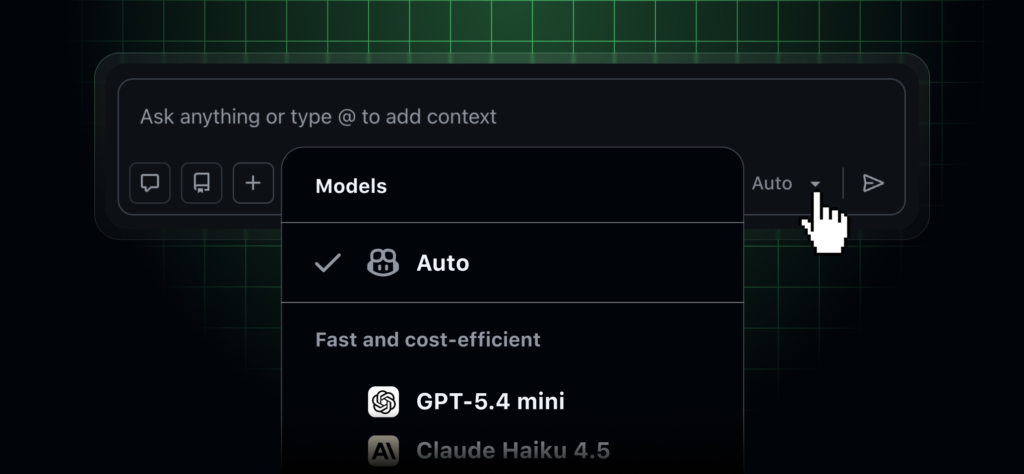
Copilot Auto Mode chooses an available model for a Copilot Chat request based on task complexity, system health, availability, and policy controls, so users do not have to manually pick a model for every coding, review, or planning prompt. If that positioning holds up, GitHub Copilot Auto Mode belongs in the AI coding tools category, with a more specific fit around Automatic model selection for Copilot Chat.

For broader Kingy AI context, compare GitHub Copilot Auto Mode with other AI launch radar coverage and recent AI News before treating this as a standalone buying decision.

The maker is listed as GitHub. Verified founder, funding, and customer claims should remain conservative unless they are backed by an official company page, reputable profile, or source checked during the run.

Key features to review

  • Copilot Auto Mode chooses an available model for a Copilot Chat request based on task complexity, system health, availability, and policy controls, so users do not have to manually pick a model for every coding, review, or planning prompt.
  • Open Copilot Chat on github.com, GitHub mobile, or a supported IDE, choose Auto in the model picker where available, and confirm any organization or enterprise model-access policies before using it for production work.
  • https://docs.github.com/copilot/concepts/auto-model-selection
  • https://docs.github.com/en/copilot/how-tos/use-ai-models/change-the-chat-model
  • Whether the product has enough official documentation to support production use.
  • Whether the stated access path is clear enough for a reader to try it without guessing.
  • Whether the launch details are materially new or only a minor feature update.
AI-generated editorial workflow image for GitHub Copilot Auto Mode in the AI coding tools category

Real use cases

  • Letting Copilot choose a model for routine coding questions
  • Routing harder planning or review prompts to a more suitable model where policy allows
  • Reducing manual model-picker decisions for mobile and web Copilot Chat users
  • Testing whether Auto lowers rate-limit friction for developer teams
  • Applying organization model-access policies while still using automated routing
  • Founder research: compare the product against existing tools before committing budget or launch time.
  • Marketing research: decide whether the product deserves a deeper review, tutorial, or sponsored content angle.
  • Buyer research: identify pricing, access, and workflow risks before asking a team to test it.

Founder, marketer, builder, and buyer notes

For founders: GitHub Copilot Auto Mode is worth reviewing if it solves a painful workflow that is already costing time, support capacity, engineering attention, or launch momentum. The useful question is not whether the launch sounds impressive; it is whether the product can replace a messy manual process with something easier to test, explain, and measure.

For marketers: the angle to watch is whether GitHub Copilot Auto Mode creates a clear story for campaigns, demos, tutorials, or creator-led education. A good AI launch article should help marketers understand the audience, the buyer pain, the objection, and the before/after workflow without turning the page into vendor copy.

For builders: check whether the docs, API page, examples, changelog, and access model are detailed enough to support a real implementation. If the launch page is strong but the docs are thin, the product can still be interesting, but it should stay in review until the technical path is clearer.

For buyers: treat pricing, free-plan language, security posture, integration details, and support expectations as open questions until they are confirmed through an official source. If the product affects customer data, production workflows, or customer-facing output, run a small test before making it part of a core process.

Pricing and free plan

Pricing: GitHub says Auto mode is available for all GitHub Copilot plans. GitHub’s pricing page lists Copilot Free at $0 with limited usage, Pro at $10 USD per user per month, Pro+ at $39 USD per user per month, and Max at $100 USD per user per month; premium request, AI Credit, and organization policy behavior should be checked before relying on Auto for heavy usage. If pricing is unclear, readers should confirm it through the official pricing page, product dashboard, or sales process before making a buying decision.

Free plan: yes. Do not treat this as final unless the free plan is visible on an official pricing, signup, docs, or product page.

How to try it

Open Copilot Chat on github.com, GitHub mobile, or a supported IDE, choose Auto in the model picker where available, and confirm any organization or enterprise model-access policies before using it for production work. For technical products, check the docs and API page before assuming the product is ready for developer workflows.

Comparison snapshot

Question Current verified answer
Primary job Copilot Auto Mode chooses an available model for a Copilot Chat request based on task complexity, system health, availability, and policy controls, so users do not have to manually pick a model for every coding, review, or planning prompt.
Best fit AI Platform Teams, AI Engineers, Developers, Enterprises
Pricing status GitHub says Auto mode is available for all GitHub Copilot plans. GitHub’s pricing page lists Copilot Free at $0 with limited usage, Pro at $10 USD per user per month, Pro+ at $39 USD per user per month, and Max at $100 USD per user per month; premium request, AI Credit, and organization policy behavior should be checked before relying on Auto for heavy usage.
Free plan yes
Access Open Copilot Chat on github.com, GitHub mobile, or a supported IDE, choose Auto in the model picker where available, and confirm any organization or enterprise model-access policies before using it for production work.
Main alternatives Manual Copilot model selection, OpenAI model routing, Anthropic model selection, Cursor model picker, Windsurf model selection
AI-generated editorial comparison image for GitHub Copilot Auto Mode showing use cases, pricing, alternatives, and risks

Alternatives

GitHub Copilot Auto Mode should be compared with alternatives on workflow fit, output quality, pricing clarity, documentation depth, data/security requirements, and whether the product solves a real daily problem rather than a demo-only use case.

  • Manual Copilot model selection
  • OpenAI model routing
  • Anthropic model selection
  • Cursor model picker
  • Windsurf model selection
  • custom LLM routers

The strongest alternative is not always the closest feature match. Sometimes the better comparison is the current manual workflow, an internal script, a broader automation platform, or a more mature category leader. Before publishing a final recommendation, Kingy AI should check whether GitHub Copilot Auto Mode is meaningfully different from those options or mainly a new wrapper around a familiar capability.

Risks and unknowns

[‘Users may not always know which model answered unless the client clearly exposes routing details.’, ‘Enterprise model policies and premium request accounting can affect which models Auto may choose.’, ‘Auto routing does not remove the need to review generated code, test outputs, and security-sensitive suggestions.’] Kingy AI should avoid unsupported claims about benchmarks, funding, customers, model quality, or firsthand testing unless those claims are verified in a source log.

Other risks to review include onboarding friction, unclear cancellation terms, weak documentation, limited export options, privacy obligations, model-output reliability, and whether the product has enough differentiation to deserve its own indexable page. If those details are missing, the safest editorial decision is to keep the draft unpublished or noindexed until stronger evidence is available.

Should you try it?

Try it if the official source, pricing, and workflow match your use case. Review the product directly before depending on it. If the product is important to your work, start with the official source, confirm pricing, and compare it with at least two alternatives before depending on it.

FAQ

What does GitHub Copilot Auto Mode do?

Copilot Auto Mode chooses an available model for a Copilot Chat request based on task complexity, system health, availability, and policy controls, so users do not have to manually pick a model for every coding, review, or planning prompt.

Is GitHub Copilot Auto Mode free?

GitHub says Auto mode is available for all GitHub Copilot plans. GitHub’s pricing page lists Copilot Free at $0 with limited usage, Pro at $10 USD per user per month, Pro+ at $39 USD per user per month, and Max at $100 USD per user per month; premium request, AI Credit, and organization policy behavior should be checked before relying on Auto for heavy usage.

Who is GitHub Copilot Auto Mode for?

AI Platform Teams, AI Engineers, Developers, Enterprises

What are alternatives to GitHub Copilot Auto Mode?

Manual Copilot model selection, OpenAI model routing, Anthropic model selection, Cursor model picker, Windsurf model selection, custom LLM routers

Official links

  • Official website
  • Launch/update source
  • Pricing
  • Docs
  • Demo/video

Related Kingy AI links

  • AI Launches
  • AI Tools
  • AI News
  • Kingy AI launch coverage
  • AI Sponsored Video ROI Calculator
Curtis Pyke

Curtis Pyke

A.I. enthusiast with multiple certificates and accreditations from Deep Learning AI, Coursera, and more. I am interested in machine learning, LLM's, and all things AI.

Related Posts

Original editorial graphic showing a coding terminal turning into a shared team dashboard
AI News

Claude Code Artifacts Explained: How Claude Turns Coding Sessions Into Live Shareable Web Pages

June 18, 2026
AI Launch Radar

MolmoMotion: What the Launch Means for AI Product Teams

June 18, 2026
AI-generated editorial featured image for Google Home Speaker with Gemini
AI Launch Radar

Google Home Speaker with Gemini: What the Launch Means for Small Business Owners

June 18, 2026

Leave a Reply Cancel reply

Your email address will not be published. Required fields are marked *

I agree to the site terms and privacy practices.

Recent News

Original editorial graphic showing a coding terminal turning into a shared team dashboard

Claude Code Artifacts Explained: How Claude Turns Coding Sessions Into Live Shareable Web Pages

June 18, 2026
AI-generated editorial featured image for GitHub Copilot Auto Mode

Inside GitHub Copilot Auto Mode, the New Automatic model selection for Copilot Chat Worth Testing

June 18, 2026

MolmoMotion: What the Launch Means for AI Product Teams

June 18, 2026
AI-generated editorial featured image for Google Home Speaker with Gemini

Google Home Speaker with Gemini: What the Launch Means for Small Business Owners

June 18, 2026

Kingy AI Launch Intelligence

Choose the Kingy AI updates you want:

Check your inbox or spam folder to confirm your subscription.

The Best in A.I.

Kingy AI

We feature the best AI apps, tools, and platforms across the web. If you are an AI app creator and would like to be featured here, feel free to contact us.

Recent Posts

  • Claude Code Artifacts Explained: How Claude Turns Coding Sessions Into Live Shareable Web Pages
  • Inside GitHub Copilot Auto Mode, the New Automatic model selection for Copilot Chat Worth Testing
  • MolmoMotion: What the Launch Means for AI Product Teams

Recent News

Original editorial graphic showing a coding terminal turning into a shared team dashboard

Claude Code Artifacts Explained: How Claude Turns Coding Sessions Into Live Shareable Web Pages

June 18, 2026
AI-generated editorial featured image for GitHub Copilot Auto Mode

Inside GitHub Copilot Auto Mode, the New Automatic model selection for Copilot Chat Worth Testing

June 18, 2026
  • Home
  • Sponsor Kingy AI
  • Contact Us

© 2026 Kingy AI

No Result
View All Result
  • AI Tools
  • AI Launches
    • AI Launch Academy
    • AI Agent Launches
    • AI App Builder and Vibe Coding Launches
    • AI Coding Tool Launches
    • AI Companies and Launches With Strong Creator Coverage Potential
    • AI Funding Announcements
    • AI Image Tool Launches
    • AI Launch Visibility Score Calculator
    • AI Open-Weight Model Launches
    • AI Search and Research Tool Launches
    • AI Video Tool Launches
    • AI Launch Scorecard
  • AI Companies
  • AI Courses
    • AI Loop Engineering for Beginners
    • OpenAI Codex Course for Beginners: Build Apps Without Coding
    • How to Use ChatGPT: The Complete Beginner-to-Expert Course
    • AI Agents for Beginners: Build Your First AI Worker Without Coding
    • AI Coding Foundations for Beginners
    • AI Loop Engineering for Beginners
    • AI Search and Discovery Courses
    • AI Video and Creator Courses
    • AI Context Engineering Courses
    • AI Agents for Beginners
    • OpenAI Codex Course for Beginners
    • Microsoft and Copilot Courses
  • Calculators
    • YouTube Sponsorship ROI Calculator
    • AI Agent Launches
    • AI Product Sponsorship Calculator
    • AI Tool Directory
    • 100 AI Agent Use Cases That Actually Work in 2026: Real Workflows for Founders, Marketers, Creators, and Operators
  • Clients
  • Sponsor Kingy AI
  • Resources
    • AI News
    • Blog
    • AI Launch Tracker
    • Contact
  • AI Models

© 2026 Kingy AI

This website uses cookies. By continuing to use this website you are giving consent to cookies being used.