Free beginner course · one complete build
Build and test your first Codex app
Start with a safe practice folder, give Codex one exact brief, inspect the result, and prove that every control works. You will finish with a one-file Launch Checklist app you can read and reset yourself.
Step 1
Choose the Codex surface that fits your work
You can use Codex in several places. This lesson uses the ChatGPT desktop app with Codex selected because a beginner can choose a local folder, see proposed work, and review the result in one flow. If you already work in a terminal, editor, or configured cloud environment, the same brief and test habits still apply.
| Surface | Best beginner use | Course treatment |
|---|---|---|
| ChatGPT desktop app (select Codex) | A local practice folder and a guided workflow | Recommended for this lesson |
| Codex cloud | Coding tasks in configured cloud environments | Alternative when the project is ready for remote work |
| Codex CLI | Terminal-first local projects | Continue with Codex Zero to Hero |
| Codex IDE extension | Work inside a supported editor | Use after you know the basic loop |
Interfaces and account availability can change. Check the official ChatGPT quickstart for current setup instructions.
Four terms you will see in this course
Folder
A folder is the boundary around this exercise. Codex can read the files you place there and may edit them after you approve the work. A clean folder lets you see every new file and makes removal simple.
File
A file holds the actual page code. This project uses one file named index.html. Browsers recognise that name as a common starting page, but there is nothing magical about it.
Browser and console
The browser renders the page. Its developer console reports JavaScript and loading errors. You will use the page itself for interaction checks and the console as a separate error signal.
Diff
A diff is a review view that shows added and removed lines. On this empty project, every line is new. In later projects, read the diff before accepting changes to files you already rely on.
How to choose without overthinking it
If you can select a local folder in the ChatGPT desktop app, use that path here. Choose the CLI only if commands and working directories already feel familiar. Choose an IDE extension when you already use that editor and can tell which project it has opened. Codex cloud is useful when the source project and its environment are ready for remote work, but that adds account and repository context that this first lesson does not need.
The surface changes where you click and where work runs. It does not change your responsibility: define a narrow task, protect sensitive material, inspect the proposed scope, test the result, and decide whether to keep it.
Step 2
Give Codex a safe place to work
Create a new folder named codex-launch-checklist. Put nothing else in it. This boundary makes the task easy to inspect and easy to delete.
Before
Use an empty folder. Back up anything important elsewhere. Close unrelated sensitive files.
During
Read the plan and changed files. Pause if Codex reaches outside the chosen folder or proposes extra tools.
After
Test the result yourself. If this was only practice, keep the files as a reference or delete the whole folder.
Create the practice boundary
- Make the new
codex-launch-checklistfolder somewhere easy to find, such as your Documents folder. - Open that exact folder in Codex. Check the displayed path before continuing.
- Confirm it is empty. A hidden operating-system file is harmless, but your own documents, credentials, and projects do not belong there.
- Tell Codex that all work must stay inside the chosen folder and that it must ask before adding packages or using the network.
Folder permission is practical authority, not a formality. If you select a broad folder containing many projects, you make the review harder and increase the cost of a mistake. Start with the smallest useful boundary. Expand it only when the task genuinely needs another file and you understand why.
What a safe pause looks like
Stop before approval if the plan names a parent folder, a secret file, an unfamiliar command, a package installation, a remote service, or more files than the brief requires. Ask: “Why is this needed for the stated done criteria? Can you complete the task without it?” A good answer connects the action to a requirement. If it cannot, remove the action from scope.
This lesson has no production value to protect, so recovery is intentionally simple. On real work, recovery must be designed before editing: current backup, tested restore path, version history, and a named person allowed to approve the change.
The working method
Use the same five-step loop on every small project
- Define. Say what you want, who it is for, and what finished means.
- Plan. Ask Codex to inspect the folder and explain its intended changes before editing.
- Build. Approve a small, bounded implementation.
- Test. Run automated checks, then use the result like a real visitor.
- Review. Read what changed, what could still fail, and how to undo it.
Each step produces evidence for the next one. The definition gives the plan a target. The plan gives the build a boundary. The build creates something testable. The tests give the review facts. The review decides whether the result is safe to keep. Skipping a step usually moves uncertainty forward rather than removing it.
The loop is deliberately small. You do not need a large specification or a long conversation for a one-file page. You do need enough detail to distinguish a correct result from a plausible-looking result.
Step 3
Build the Launch Checklist
The app has one job: let a user mark five launch checks and see the completed count update. It uses a single index.html file, with no packages, server, saved data, or network requests.
Definition of done
- Five labelled checkboxes appear.
- The status begins at “0 of 5” and updates after every change.
- Reset clears all checks and returns keyboard focus to the first checkbox.
- The page has visible keyboard focus and a narrow-screen layout.
- Refreshing or closing the page saves nothing.
Why this is a useful first project
The checklist is small enough to understand in one sitting, but it still has real application behaviour. The HTML defines five controls and their labels. CSS makes the page readable and shows keyboard focus. JavaScript counts checked items, updates live status, and resets the interface. Testing touches structure, appearance, interaction, accessibility, and state.
The restrictions matter as much as the features. No package installation means there is no dependency tree to trust. No network call means the app cannot send its state elsewhere. No saved data means refresh is a predictable reset. One file means the learner can open the entire implementation and connect each requirement to a visible part of the source.
First ask for a plan
Inspect this empty practice folder. Do not create or edit files yet.

Plan a one-file Launch Checklist app for a beginner. It needs five labelled checkboxes, a live “0 of 5” completion count, a Reset button, visible keyboard focus, and a layout that works on a narrow phone. It must not save data or call the network.

Tell me which file you would create, how the controls will work, how you will test them, and any assumptions you are making.
Then approve the bounded build
Create the planned Launch Checklist in this folder as index.html.

Keep all HTML, CSS, and JavaScript in that one file. Use exactly five labelled checkboxes. Update the completed count after every checkbox change. Make Reset clear all checks and return focus to the first checkbox. Include an aria-live status, visible keyboard focus, and a mobile layout. Do not add packages, storage, analytics, external URLs, or network calls.

After building, test the five controls, count updates, Reset behaviour, focus return, mobile CSS, and absence of persistence or network calls. Report what changed and the exact test result.
Keep approval precise
Read the plan before sending the build prompt. It should name one file, the five behaviours, and the checks. If it proposes more, change the plan first. Approval should refer to the plan you actually read: “Proceed with that one-file plan. Do not add anything outside it.”
Codex may choose different names for JavaScript variables or a different visual style. Those choices are acceptable when the required behaviour, safety limits, and testability remain intact. The definition of done controls the result; cosmetic preference should not quietly replace it.
Read before accepting
What to look for in the Codex reply
The plan is bounded
It names index.html, stays inside the practice folder, and does not introduce packages or services.
The behaviour is traceable
It connects the five controls to the count and explains how Reset returns focus.
The tests match the brief
Each definition-of-done item has a check. “It looks right” is not enough.
The report admits limits
Automated checks and browser checks are separate. Codex should not claim a browser result it did not observe.
Separate observation from assurance
“I added five checkboxes” is a change summary. “A source check found five checkbox elements” is an automated observation. “I clicked all five in Chrome and watched the count reach 5 of 5” is a browser observation. None of those statements alone proves the entire app is correct.
Ask for the exact command and output when Codex reports an automated pass. For browser work, ask which browser, viewport, and interactions it actually used. If Codex only read source, the honest result is “browser QA still required.” This distinction becomes important when a page looks correct but has a broken keyboard path, stale status, clipped mobile control, or console error.
Inspect the changed file
Open index.html and locate three parts. In the HTML, find the five checkbox inputs, their visible labels, the status, and the Reset button. In the CSS, find the focus rule and the narrow-screen media query. In the JavaScript, find the control list, the counting function, change listeners, and Reset listener. You do not need to memorise syntax. You should be able to point from each done criterion to the code that attempts to satisfy it.
Step 4
Test the result yourself
- Open
index.htmlin a browser. Confirm the count starts at 0 of 5. - Check each item once. Confirm the count moves through 1, 2, 3, 4, and 5.
- Select Reset. Confirm all items clear, the count returns to 0, and focus returns to the first checkbox.
- Use Tab and Space without a mouse. Confirm every control has visible focus and can be changed.
- Narrow the browser to about 390 pixels. Confirm there is no horizontal page scroll or clipped control.
- Refresh. Confirm the checklist returns to its initial state.
Record the result as you go
| Check | Expected observation | If it fails |
|---|---|---|
| Initial load | Five unchecked items and 0 of 5 | Reload once, then inspect initial checkbox and status values |
| Each checkbox | Count changes by exactly one | Note which label, prior count, and new count disagree |
| Reset | Zero checked, 0 of 5, focus on first item | Report clearing, status, and focus as three separate facts |
| Keyboard | Tab reaches controls; Space changes a focused box | Name the control that cannot be reached or changed |
| 390 px and 320 px | No horizontal page scroll or clipped control | Record viewport width and the element that exceeds it |
| Refresh | Returns to five unchecked items and 0 of 5 | Look for unintended browser or code storage |
| Console | No application error | Copy the first error and the action that triggered it |
Run tests in a fresh state. If an early action changes the page, Reset or reload before the next independent check. That keeps one failure from confusing later observations. Do not edit while you are still collecting the first failure report; evidence is easier to trust when the starting point stays fixed.
What the automated test covers
The companion test reads the completed HTML, checks for exactly five controls, looks for the accessibility and mobile hooks, and rejects storage, fetch calls, and external URLs. It then runs the inline JavaScript against small stand-ins for the page controls. Those stand-ins let the test check 0, 1, and 5 completed items plus Reset and focus return without installing a browser test package.
That is useful evidence, but it cannot judge visual spacing, text clipping, actual keyboard focus appearance, or a browser-specific problem. The manual list fills those gaps. Good QA uses the smallest set of checks that covers the credible failures.
First-hand evidence
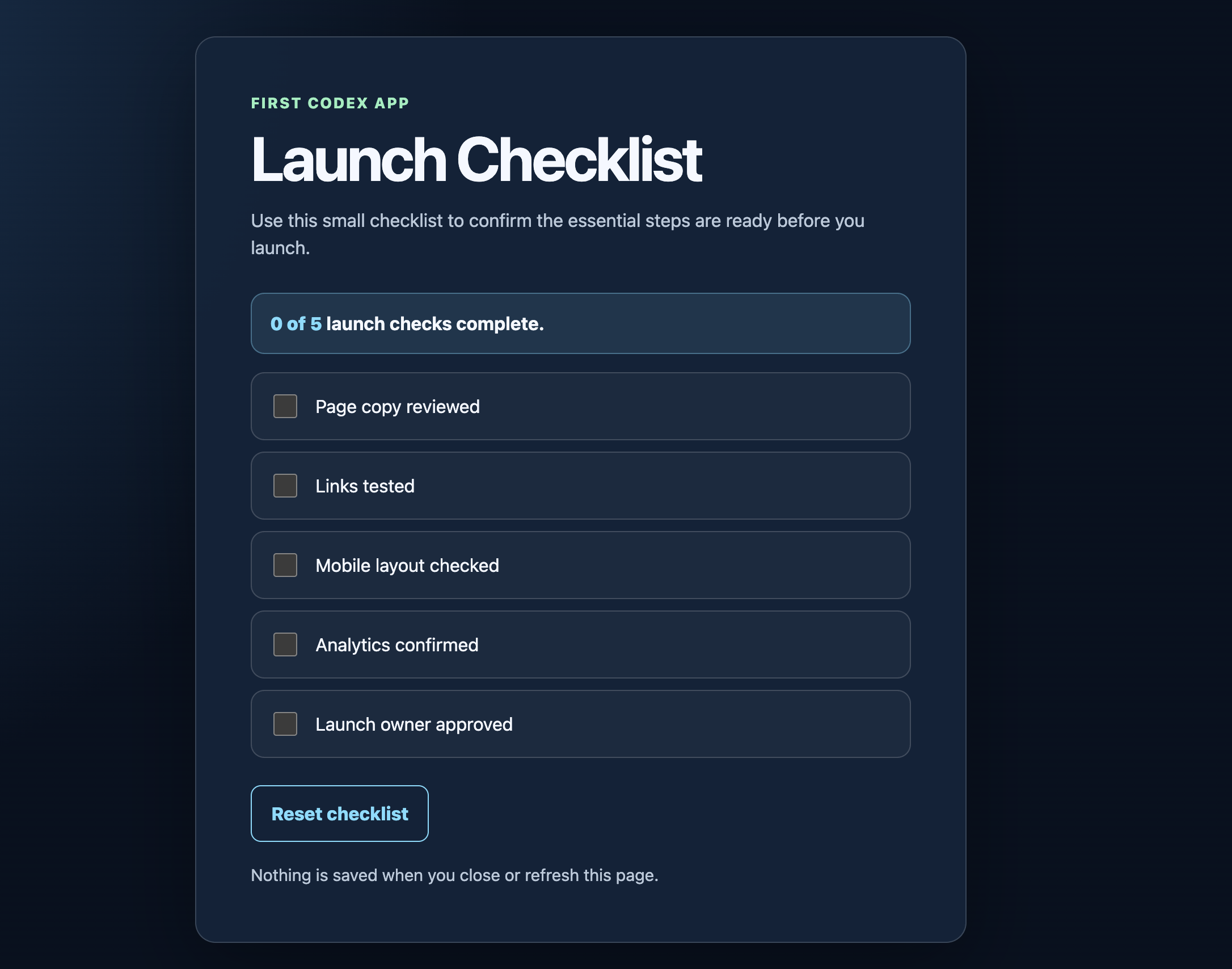
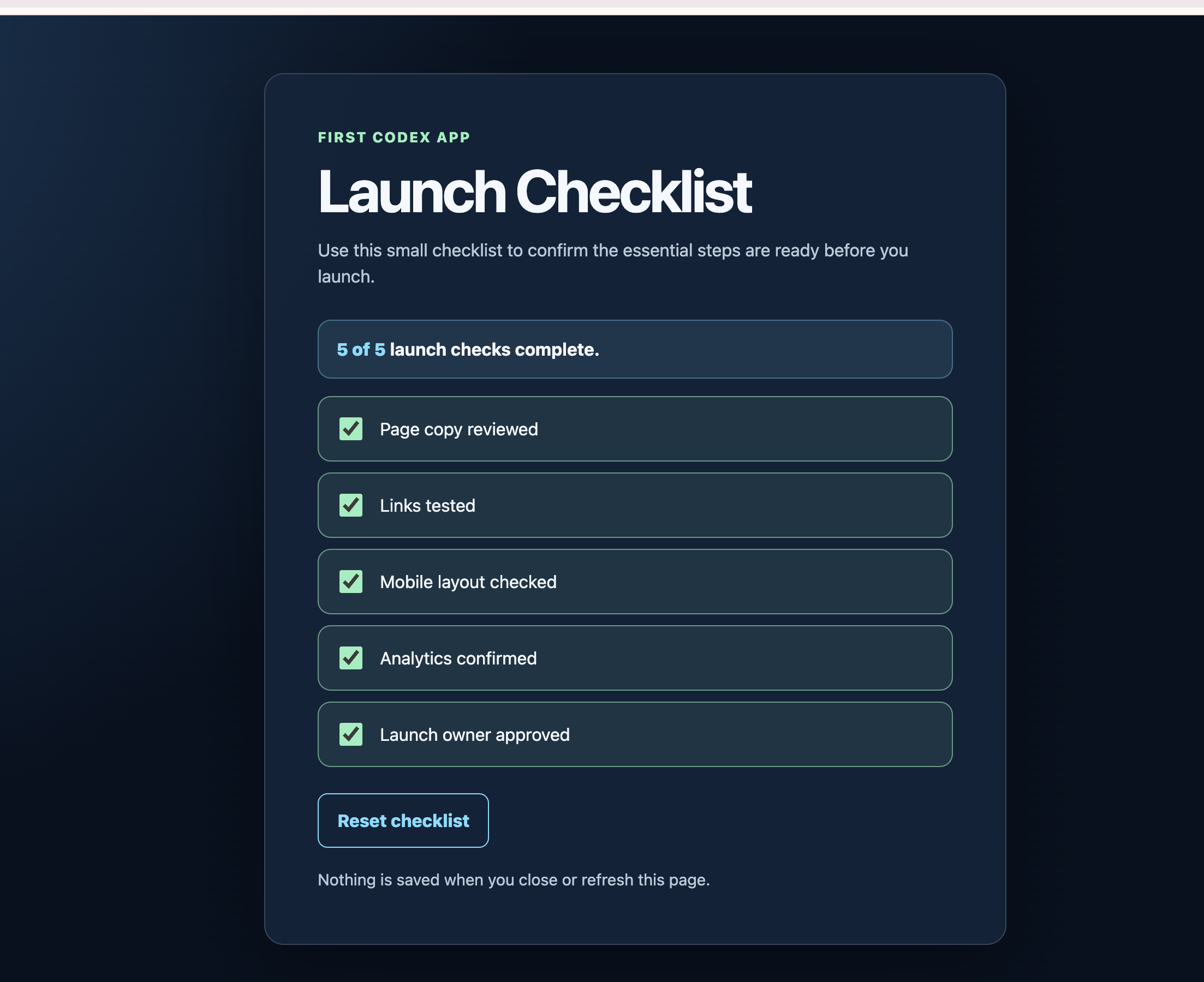
Compare the initial and completed states
Step 5
Practise one controlled failure
Use this as a hypothetical debugging exercise: imagine Reset clears the boxes but leaves the status at 5 of 5. A useful bug report separates what you expected from what happened.
Fix the smallest possible issue in index.html.

Expected: selecting Reset clears all five checkboxes, changes the status to “0 of 5 launch checks complete,” and returns focus to the first checkbox.

Actual in this practice scenario: the checkboxes clear, but the status still says “5 of 5.”

Reproduction: check all five items, then select Reset.

Inspect the current code, explain the cause, make only the needed change, and rerun the relevant tests. Do not add packages or change the design.
After the fix, repeat the exact reproduction steps. A passing test is evidence only for what that test covers.
Write a bug report Codex can act on
A useful report has four fields: expected behaviour, actual behaviour, exact reproduction steps, and the boundary on the fix. Add the first console error when one exists. Avoid reports such as “Reset is broken” or “the page looks weird”; they make Codex guess which state, control, viewport, or rule you mean.
The smallest-fix boundary protects working behaviour. For the practice failure, the visual design and checkbox clearing already work. A full rewrite would create more review work and more ways to break the page. Ask Codex to identify the cause, change only the responsible code, and rerun both the failing check and the nearby regression checks.
Distinguish cause from symptom
The stale number is the symptom. A missing call that recalculates the status after clearing might be the cause. Codex should inspect the current event flow before editing rather than assume. When it explains the cause, verify that the explanation matches the changed line and the reproduction steps.
If the first small fix fails, do not stack unrelated changes on top. Return to the last understood state, capture the new observation, and revise the hypothesis. Debugging is a sequence of measured checks, not a vote on which code looks most likely.
Review and recover
Finish by asking four questions
What changed?
Expect one new file and a plain-language description of its structure.
What could break?
Look for unsupported assumptions, untested browsers, and anything outside the brief.
How was it tested?
Match each claim to an automated check or an observed browser step.
How do I undo it?
For this isolated exercise, delete index.html or the entire practice folder. Do not use that advice on a real project without a backup.
Read the final report against the brief
A strong report is short and specific. It names index.html, describes the count and Reset logic, lists the test command and observed pass, separates browser observations from source checks, and names any untested environment. It does not use confidence words in place of evidence.
When something remains uncertain, decide whether it blocks acceptance. An untested phone layout blocks a mobile-layout claim. An untested browser that your audience rarely uses may be a recorded follow-up rather than a blocker. The decision depends on the promised result and real use, not on a desire for perfect coverage.
Know the recovery level
Deletion is appropriate here because the project began empty and all work is contained in one disposable folder. A small existing project usually needs version control or a known-good copy. A production service needs a tested rollback, owner, timing window, and post-change checks. Never carry the beginner exercise’s delete-and-retry advice into a system where other work or data shares the same location.
Reusable tool
Build your next Plan, Build, and Review prompts
Write the facts once. This local form turns them into three prompts. It does not save or send what you type.
Use concrete nouns and observable results. “Improve my page” leaves the target open. “Add a five-item checklist whose count updates after each click” gives Codex something to inspect and test. Put current file names and audience facts in Context. Put forbidden actions and protected behaviour in Constraints. Put clicks, text, sizes, and test commands in Done criteria.
Knowledge check
Can you make the safe call?
Companion files
Use the beginner starter kit
The beginner starter kit puts the project brief, exact completed app, four copy-ready prompts, dependency-free tests, browser QA notes, two verified screenshots, and repository editing rules in one package. Use it to repeat the lesson or teach the same workflow without reconstructing the evidence.
Start cleanly
Open the brief and define the boundary before asking Codex to edit.
Compare honestly
Use the completed app and evidence to check behaviour, not to skip the test.
Repeat the method
Adapt the Plan, Build, Review, and smallest-fix prompts to your own small project.
A clean way to use the package
- Read the brief without opening the completed app.
- Copy the Plan prompt into Codex and compare its answer with the brief.
- Approve only the bounded one-file build.
- Run the supplied automated test against your result, then complete the browser checklist yourself.
- Use the completed app and screenshots to investigate differences. A different colour or variable name is not a failure when behaviour and safety still match.
- Read the repository editing rules before asking Codex to change the package itself.
The downloadable package separates reusable code from teaching material. The app, tests, workflow, and executable examples use the MIT License. Original prompts, prose, evidence, and owned screenshots use Creative Commons Attribution 4.0, so educators can adapt them with credit and a note describing changes.
Use the versioned download when you need a stable classroom or workshop reference. The source and evidence show exactly what was tested.
Continue learning
Choose the next guide for your goal
Go deeper
Codex Zero to Hero covers a broader learning path.
Write better requests
Browse the Codex prompt library.
Work on WordPress
Use the production-aware Codex for WordPress guide.
Check a term
Use the Codex glossary for concise definitions.
Method and sources
How this lesson was checked
The first-app reference file was inspected and tested locally. The two screenshots show only the initial 0-of-5 state and completed 5-of-5 state. They do not prove a Codex plan, keyboard test, or mobile test. Those checks are documented separately.
Author: Curtis Pyke
First app last tested: 18 August 2026 · ChatGPT desktop app (Codex) and Chrome
FAQ
Common beginner questions
Do I need to know JavaScript?
No. You should still read Codex’s summary, test each control, and ask about any line you do not understand.
Does this project need npm or a server?
No. The completed example is one HTML file with no external dependencies. Open it directly in a browser.
Can I use a real website folder?
Not for the first exercise. Use an empty disposable folder. Work on a live site only with a current backup, a rollback plan, and explicit authority.
What if Codex proposes extra packages?
Pause and ask why they are necessary. This brief does not require them, so extra packages are outside scope.
How do I recover from a bad result?
For this isolated exercise, delete the generated file or the practice folder and begin again. On a real project, use its version history or tested backup process.
Codex learning hub
Related Codex resources
Use the main Codex course as the pillar path, then move into the most relevant supporting resource for your next task.