Kingy Video Test
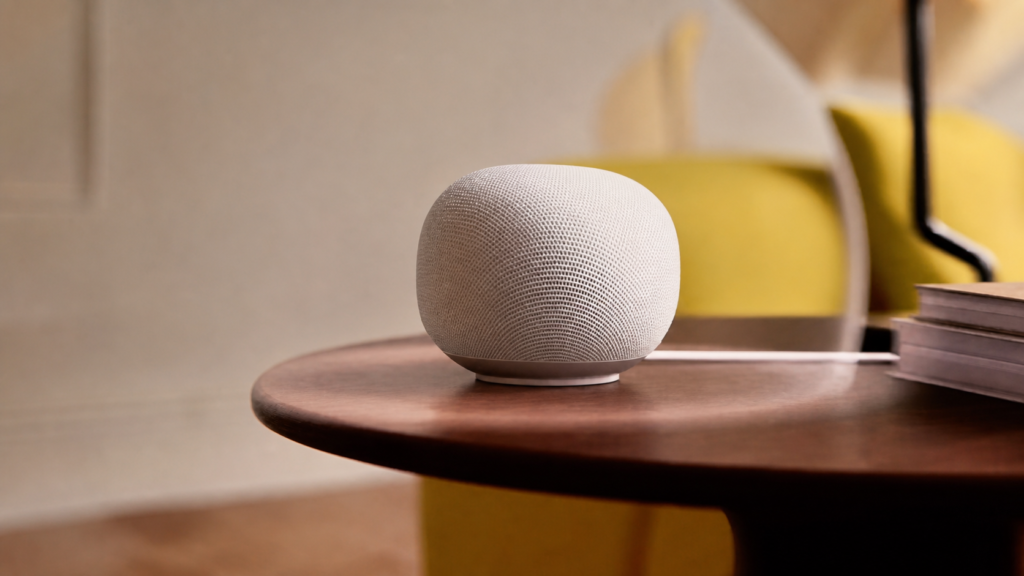
Google Just Put Gemini AI Inside a $99 Smart Speaker
We could not verify how the speaker was obtained or whether Google supported this coverage. No Google affiliate link appears here. The new speaker is the hardware entry point; Gemini for Home and the subscription matrix are the actual buying decision.
Video published July 12, 2026. The snapshot records below are tied to that publication date; their latest verification date is July 26, 2026. Live data is labeled separately and updates from current KALI records.
Video
Exact moments from this test
Commercial relationship: unknown — No retained commercial-relationship fact; do not infer independence.
What price did Kingy report for Google's Gemini smart speaker?
Kingy reports a $99 price in the video.
Evidence boundary: Historical in-video price; availability, bundles, and current price need a fresh check.
Historical — amount stated or shown in the video; not a current-price claim.
Commercial relationship: unknown — No retained commercial-relationship fact; do not infer independence.
Where did Kingy demonstrate Gemini's live conversation mode?
At 2:20, he invokes “Hey Google, let's chat” and the speaker explains follow-up conversation behavior.
Evidence boundary: Single demonstration, not a reliability test.
Commercial relationship: unknown — No retained commercial-relationship fact; do not infer independence.
What was Kingy's first impression of the Gemini speaker?
He calls it the most interesting smart-speaker release in years because Gemini feels more like an assistant than a command line.
Evidence boundary: Explicitly framed as a first impression.
Commercial relationship: unknown — No retained commercial-relationship fact; do not infer independence.
What did Kingy say was still unproven about the Gemini speaker?
He says day-to-day reliability outside demo conditions still requires a longer household test.
Evidence boundary: This is an unresolved question, not a negative finding.
Commercial relationship: unknown — No retained commercial-relationship fact; do not infer independence.
Full evidence
In the dated video, Curtis reports testing setup, natural follow-ups, Gemini Live and the physical microphone switch. This review did not rerun the speaker test. The guide separates those attributed video observations from Google’s camera and subscription claims, then gives buyers an exact setup, acceptance and privacy checklist.
Verdict: buy for an existing Google Home household; wait if reliability is the deciding factor
Buy it if your home already runs on Google Home and you want more natural voice control plus a Matter hub and Thread border router at a reasonable price. Wait if you are moving from Alexa or Apple Home, need a 30-day reliability result or expect camera intelligence without compatible cameras and a paid plan.
The prices, plan terms and availability notes below are dated buying context, not a live checkout check. Confirm current price, availability and subscription terms on Google’s official links before buying.
At the listed US$99.99 or CA$139.99, the Google Home Speaker is a straightforward upgrade for the right household. Curtis’s several-day video test supports a narrower conclusion: setup was quick, follow-ups and Gemini Live felt more natural than command-by-command Assistant interactions, the physical mute switch was useful and audio sounded solid for the price.
The video does not establish month-long reliability, measured audio quality, migration from another ecosystem, camera-history accuracy or the daily usefulness of Home Brief. Core voice, media and home controls do not require Home Premium. Gemini Live requires Standard; camera-history search and Home Brief require Advanced.
Useful chapters
- 00:00 — Why the speaker matters
- 00:47 — Gemini for Home versus Google Assistant
- 01:43 — Price, colours and Home Premium
- 02:10 — Natural requests and follow-ups
- 02:39 — Camera-history search and Home Brief explained
- 03:20 — Hardware, microphones and physical mute
- 04:34 — Three-minute setup
- 05:12 — First verdict and unanswered reliability question
What the dated video reports—and what it does not establish
Attributed to Curtis’s dated video test
- The Google Home app found the speaker; Wi-Fi and account linking took about three minutes in his existing Home setup.
- Natural follow-ups worked in the filmed interaction without repeating the wake phrase.
- “Hey Google, let’s chat” opened Gemini Live for a longer conversation.
- The rear two-stage microphone switch was present and useful to him.
- Audio sounded “solid for the price” after several days. This was subjective, not a level-matched or instrumented test.
Explained in the video, but not shown as a completed household test
- Camera-history search and Home Brief.
- Stereo pairing and Google TV Streamer integration; Curtis said he did not own the Streamer.
- Thirty-day reliability, measured failure rate, instrumented audio, direct competitor comparison, Alexa/HomeKit migration and a security or privacy audit.
Officially sourced
The cited Google pages support the prices, plan boundaries, specifications, Matter/Thread support, compatibility, regional availability, retention and privacy controls. These are source claims, separate from the hands-on test.
Two corrections to the video
- Nest Audio launched in 2020, not 2022. Google’s safer wording for this product is its first audio device built for Gemini.
- Do not repeat the local-processing claim. Google lists an NPU, but the official material reviewed does not establish local Gemini inference. Google’s privacy guidance says that after activation, requests are sent to Google servers.
Price, subscriptions and availability — checked July 28, 2026
- Speaker: US$99.99 in the United States; CA$139.99 in Canada.
- Included trial: six months of Home Premium Standard, subject to eligibility and renewal terms.
- Home Premium Standard: US$10/month or US$100/year; CA$13/month or CA$130/year. Adds Gemini Live and other premium features.
- Home Premium Advanced: US$20/month or US$200/year; CA$26/month or CA$260/year. Adds camera-history search and Home Brief.
- Core Gemini for Home: basic questions, media, broadcasts, timers, reminders and compatible smart-home controls are included without Home Premium.
The United States lists Porcelain, Hazel, Berry and Jade; Berry and Jade are US exclusives. Canada lists Porcelain and Hazel. Camera search also needs compatible Nest cameras in the Google Home app with event descriptions enabled.
Canada caveat: the Canadian store comparison lists sound detection with Standard, while Google’s support page identifies speaker/display sound detection as US-only. Canadian buyers should not purchase the plan for that feature until Google confirms it for the specific account.
Exact setup and compatibility workflow
Before buying
- Decide whether you are staying in Google Home or are willing to rebuild devices, services and routines.
- Choose the required tier: free controls, Standard for Gemini Live, or Advanced for camera search and Home Brief.
- If cameras are the reason to buy, confirm compatible Nest cameras are in the Google Home app and event descriptions are enabled.
- Get household agreement that activated requests are processed on Google servers and answers can be overheard.
If Gemini Live is the only goal, test it on an existing compatible Nest speaker or display first. Google expanded the feature to additional first-generation devices after filming.
Install the speaker
- Update the Google Home app on iOS or Android and sign into the account that manages the intended Home.
- Connect the phone to the Wi-Fi network the speaker will use.
- Plug in the speaker, open Google Home, select the detected device, choose its Home and room, then complete Wi-Fi and account linking.
- Allow firmware and app updates to finish before judging latency or missing features.
- Test the physical mute switch: its status indicator should change and the wake phrase should stop working while muted.
Curtis reports completing this in about three minutes inside an existing Google Home setup. That is one reported setup, not a universal timing promise.
Configure it deliberately
- Choose the supported household language and voice.
- Enable Continued Conversation only if the household wants wake-phrase-free follow-ups.
- Set up Voice Match for each person who needs personal results.
- Review calendars, contacts, notes, lists and reminders separately for each account.
- Link the intended media services and confirm the defaults.
- Review wake-word sensitivity if another device answers or this one misses requests.
Run a ten-command acceptance test
Record the exact prompt, result, latency and whether a retry was required. Repeat from normal room positions with ordinary background noise.
- Set a 12-minute timer.
- Play a named playlist at 25 percent volume.
- Combine three actions: dim lights, start music and set a timer.
- Turn off every light except one named lamp.
- Correct a room or device name naturally mid-request.
- Ask about tomorrow’s weather, then ask about Saturday without repeating context.
- Start Gemini Live and ask two related follow-ups. Standard is required.
- Control a paired Matter/Thread device and confirm its state in the app.
- Mute the microphone and confirm the device does not answer, then unmute and retest.
- With Advanced, test camera-history search and Home Brief; record accuracy, omissions and latency.
Privacy setup before daily use
- Show everyone in the room the physical mute switch and listening indicator.
- Review Home History at Google My Activity. The default auto-delete period is 18 months; choose the household’s intended retention.
- Keep “Improve Google services with voice, audio and Gemini Live recordings” off unless the household deliberately opts in. Google says this separate setting is off by default.
- Explain that Gemini Live keeps the microphone available briefly for follow-ups and shows an indicator.
- Configure Voice Match and disable personal results where private account information could be overheard.
- Use Guest Mode for non-personal visitor interactions.
- If cameras are enabled, restrict camera-history search with Voice Match unless broader access is intentional.
- Remove former residents and audit Home manager/member permissions.
- Review parental controls for children and supervised accounts.
- Repeat the history, audio, membership, camera and subscription review every quarter.
Turning off Home History does not mean zero retention: Google says activity can still be stored for up to 24 hours for service and safety. Activated requests are sent to Google servers.
What changed after filming
Updated July 28, 2026: Google’s July 23 release notes say Gemini for Home now retains conversational context for 15 minutes. Gemini Live also expanded to first-generation Google Home Mini and Nest Hub devices for Home Premium subscribers, so this speaker is not the only route to that feature.
The expansion changes the buying logic: existing owners should test supported hardware before spending US$99.99/CA$139.99. The new unit still adds Matter/Thread hub capability and its specific acoustic and microphone design.
Download the Google Home compatibility and privacy pack
The original companion pack includes a US/Canada plan matrix, device and camera compatibility checks, a Curtis-tested-versus-sourced evidence sheet, a room-by-room privacy setup and a print-friendly acceptance checklist.
Official sources
- Google Store US product and plan comparison
- Google Store Canada product and plan comparison
- Google product announcement
- Gemini for Home features, plans and compatibility
- Gemini for Home privacy settings
- Google Home Privacy Hub
- Google Home release notes
- Matter hubs and Thread border routers
Related Kingy links
The Kingy Brief
Get The Kingy Brief.
AI changes, original tests and one practical thing to try. Fridays at 09:00 Vancouver time.
Free · Double opt-in · Unsubscribe anytime
Sign up for The Kingy Brief on Beehiiv.
Signup help and newsletter schedule
Signup form provided by Beehiiv. After submitting, check your inbox for "Confirm your subscription to The Kingy Brief" and open its confirmation link. Check Spam or Promotions if you cannot find it.
Fridays at 09:00 Vancouver time: source-checked AI changes, original tests and one practical thing to try. We skip a week when there is not enough verified material. Free. Unsubscribe anytime.
Keep checking the evidence
Current Product Facts
These links resolve only to approved public Product Facts records. Unresolved records are omitted.
As of publication
These values come only from the verified, write-once snapshot stored for this video. Current tool values are never substituted here.
Google Home Speaker
- Pricing at publication
- Launch Price Usd: 99.99; Market: United States; Note: Google-reported price; current price, region, availability and subscription terms are volatile.
- Features at publication
- Gemini for Home voice assistance is included on the Google Home Speaker; Gemini Live, camera-history search and daily summaries depend on Google Home Premium tiers; The hardware includes a physical microphone mute control and can operate as a Thread border router.
Historical record date: July 12, 2026. Snapshot verification date: July 26, 2026.
Live now
These modules read the current KALI tool records. Their verification dates are current-record dates, not historical evidence.
Google Home Speaker
Current pricing
- Pricing
- Canada/CAD: C$139.99 hardware
- Free plan
- No
Current record verification date: July 10, 2026. This identifies the current record only; it is not historical evidence.
Current feature summary
- What it does
- A Google smart speaker with voice assistance and smart-home controls.
- Best for
- Creators considering a voice assistant for a studio or home and willing to separate hardware from paid home features.
- API
- Unknown
- Open source/open weight
- Unknown
Current record verification date: July 10, 2026. This identifies the current record only; it is not historical evidence.
Verification & Sources
- Evidence state
- Recheck due
- Sources
- 5 sources
- Freshness
- Needs recheck: checked July 10, 2026
- Last verified
- July 10, 2026
- Last updated
- October 22, 2026
What this evidence state means
- Definition
- The claim was previously checked, but its review window expired or a material change may have invalidated it.
- Required provenance
- The prior evidence and check date are retained, together with the expiry or change signal that triggered recheck.
- Owner
- Kingy freshness queue owner and assigned editorial reviewer
- Freshness rule
- This is already outside its freshness rule. It must not be presented as current until reviewed against current evidence.
- Disputes and corrections
- Use “Suggest a correction” on the record. Kingy editorial reviews the cited evidence, records material corrections, and changes or removes the state when it is not supported.
Key source checks
Suggest a correction
What's changed since this video
Compare the verified publication snapshot with the current KALI record. This side-by-side view does not claim changes that the evidence cannot verify.
Google Home Speaker
At publication
Google Home Speaker
- Pricing at publication
- Launch Price Usd: 99.99; Market: United States; Note: Google-reported price; current price, region, availability and subscription terms are volatile.
- Features at publication
- Gemini for Home voice assistance is included on the Google Home Speaker; Gemini Live, camera-history search and daily summaries depend on Google Home Premium tiers; The hardware includes a physical microphone mute control and can operate as a Thread border router.
Historical record date: July 12, 2026. Snapshot verification date: July 26, 2026.
Current record
Current pricing
- Pricing
- Canada/CAD: C$139.99 hardware
- Free plan
- No
Current record verification date: July 10, 2026. This identifies the current record only; it is not historical evidence.
Current feature summary
- What it does
- A Google smart speaker with voice assistance and smart-home controls.
- Best for
- Creators considering a voice assistant for a studio or home and willing to separate hardware from paid home features.
- API
- Unknown
- Open source/open weight
- Unknown
Current record verification date: July 10, 2026. This identifies the current record only; it is not historical evidence.
Canonical tool guides
Use the canonical tool, pricing, and comparison pages for the latest entity-level guidance.