The answer: Released on August 13, 2026, OpenAI Computer History is an opt-in macOS feature for Pro, Business, and Enterprise users in supported regions. It turns selected app and web activity into context for ChatGPT and Codex. Its best fit is a Mac power user seeking continuity; its clearest benefit is rapid context recovery. Cloud processing, persistent local memories, consent, and prompt injection make narrow allowlists essential. Kingy.ai did not test it. OpenAI documentation.
Testing disclosure: This is a research-led first look based on reverified OpenAI documentation. Kingy.ai did not independently test the live feature, and this article makes no experiential claim or product score.
Quick verdict
| Field | Kingy.ai assessment |
|---|---|
| Verdict | A promising continuity layer; enable it only for carefully selected apps and sites. |
| Best for | Mac power users with bounded, low-sensitivity workflows. |
| Skip if | You handle confidential communications, use a shared Mac account, or cannot police captured sources. |
| Strongest idea | Turning fragmented recent activity into context that ChatGPT and Codex can retrieve. |
| Biggest limitation | No independent evidence yet on recall quality, latency, reliability, prompt-injection resilience, or token consumption. |
| Privacy posture | Opt-in and controllable, but neither fully local nor risk-free. |
| Testing status | Documentation-led analysis; Kingy.ai did not test the live feature. |
| Confidence | High in the reverified documented mechanics; unknown for real-world performance. |
OpenAI Computer History at a glance
| Fact | Current documented state |
|---|---|
| Official name | Computer History |
| Company | OpenAI |
| Official release record | August 13, 2026 |
| Product surface | ChatGPT desktop app |
| Operating system | macOS |
| Listed plans | ChatGPT Pro, Business, and Enterprise |
| Workspace access | Business and Enterprise admin approval is required before members can opt in |
| Personal choice | Off by default; every user must opt in personally |
| Dependency | Memories must be enabled |
| Initial regional exclusions | EEA, Switzerland, and United Kingdom |
| Authentication exclusions | Not available with an API key or Amazon Bedrock |
| Captures | Interaction events from allowed apps and sites |
| Explicitly excludes | Screenshots, screen recordings, microphone input, system audio, private-mode browsing |
| Cost and token status | Uses tokens while activity is summarized and memories are created; quantity, quota treatment, and incremental price are not disclosed |
| Formal maturity label | Not stated in the launch entry or product documentation |
| Official source | OpenAI Computer History documentation and ChatGPT & Codex changelog |
| Last verified | August 13, 2026 |
Source: OpenAI’s Computer History documentation and ChatGPT & Codex changelog, checked August 13, 2026.
What OpenAI released on August 13, 2026
Computer History converts activity across permitted apps and websites into a timeline and memories that ChatGPT and Codex can reference. OpenAI frames the feature around three jobs: resuming interrupted work, finding recent material using imperfect human recollection, and identifying repeated workflows that may be worth turning into a skill or automation. Collection starts only after a user opts in. OpenAI’s Computer History overview describes the current behavior and controls.
The launch is also a second attempt at ambient work memory. Computer History replaces Chronicle, an earlier opt-in research preview. OpenAI stresses that the new feature is rebuilt rather than merely renamed. Chronicle used screenshots; Computer History uses interaction events and explicitly excludes screen and audio capture. The change removes a vivid collection mechanism, but it does not remove sensitive context from the system’s reach. OpenAI’s Chronicle comparison.
The changelog says Computer History “is available” to listed plans with initial regional exclusions; it does not call the product generally available, Stable, or Beta. Access still depends on admin eligibility, individual opt-in, Memories, app permissions, account type, region, and macOS. This is a gated release, not a universal rollout. OpenAI’s dated release entry.
How Computer History turns activity into usable context
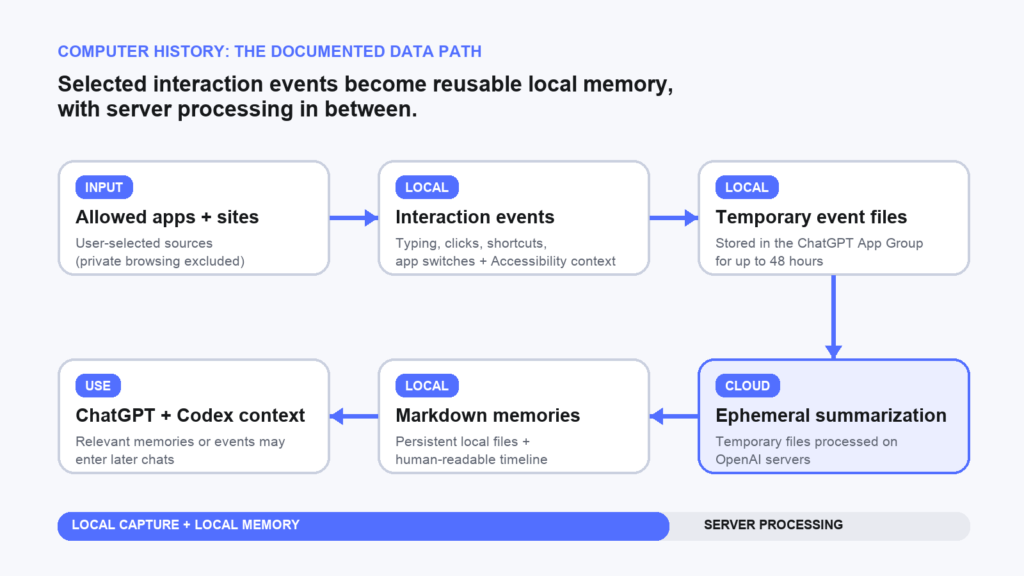
Computer History is not a continuous screen recording. OpenAI describes a pipeline that converts selected interaction events into summaries, local memory files, and a timeline that ChatGPT and Codex can reference later. OpenAI’s architecture description.
The pipeline has six stages:
- You choose the sources. Computer History starts only after opt-in. Permissions can include only named apps and websites, or exclude specified apps and website URLs.
- The Mac records interaction events. Events can include clicks, typing, keyboard shortcuts, app switches, and context exposed by the macOS Accessibility system.
- Temporary event files remain on the Mac. OpenAI says these files are isolated inside the ChatGPT App Group and retained for up to 48 hours.
- OpenAI summarizes the activity. Computer History periodically starts an ephemeral Codex session with access to the stream. Temporary event files are processed on OpenAI servers.
- Memories return to local storage. The output includes plain-text Markdown memory files and human-readable timeline summaries.
- ChatGPT or Codex can retrieve relevant context. A later request can use a memory or event context to reconstruct work, locate an original source, or identify a workflow.
The shortest accurate representation is:
Allowed apps and websites → interaction events → temporary local event files → ephemeral server-side Codex processing → local Markdown memories and timeline → later ChatGPT or Codex context
OpenAI says the feature does not capture screenshots, screen recordings, microphone input, or system audio. Private-mode web browsing is excluded, and Screen Recording permission is not required. Those exclusions matter, but they should not be mistaken for an absence of sensitive data. Typing and Accessibility context can expose material that appears during normal work. That final sentence is Kingy.ai’s inference from the documented event types. OpenAI’s architecture and capture disclosure provides the underlying facts.
The timeline can show a title, text summary, contributing apps, and, where a repeated process is identified, a suggested skill or automation. A suggestion is not an autonomous deployment. OpenAI’s stated flow is that the user reviews the suggestion and then asks Codex to create it. OpenAI’s timeline documentation.
Computer History can also act as a pointer rather than a substitute for primary evidence. If a file, Slack conversation, or Google Doc is the better source, ChatGPT or Codex can use history to identify it and then read the source directly. This is an important boundary: a memory is a generated summary of activity, not necessarily a complete or authoritative record. OpenAI’s source-retrieval example.
What it records, and what it does not
| Signal or source | Documented status | Practical caveat |
|---|---|---|
| Clicks | Can be included | A click can reveal interaction sequence and intent. |
| Typing | Can be included | Typed material may be sensitive even without a screenshot. |
| Keyboard shortcuts | Can be included | May reveal workflow steps and app commands. |
| App switches | Can be included | Exposes which sources were used and in what order. |
| macOS Accessibility context | Can be included | The exact fields and application coverage are not fully documented. |
| Screenshots | Not captured | This removes an image channel, not every sensitive signal. |
| Screen recordings | Not captured | Computer History does not require Screen Recording permission. |
| Microphone input | Not captured | This is separate from text exposed in a communication app. |
| System audio | Not captured | Audio exclusion does not equal communication exclusion. |
| Private-mode browsing | Never included, according to OpenAI | The exclusion is documented for browser private mode, not every private mode in every app. |
| Allowed apps and sites | Can contribute events | Users should prefer include-only permissions for narrow workflows. |
Source: OpenAI’s capture and permission documentation, checked August 13, 2026.
The central interpretive point is simple: no screenshots is a meaningful architectural change, not a privacy or prompt-injection guarantee. OpenAI does not document blanket filtering for password fields, secure inputs, clipboard contents, notifications, or every secret category. It would be irresponsible to infer protections the company has not stated. OpenAI’s capture and security guidance.
Practical uses: where Computer History could earn its place
Computer History’s most credible use is recovering context after an interruption. Instead of reopening every app and reconstructing a half-finished thought, a user could ask what they were doing before lunch, which task they had reached, or what remained unresolved. OpenAI also proposes daily and standup summaries, but Kingy.ai has not tested how accurately the system separates completed work from browsing, discussion, and abandoned attempts. OpenAI’s Computer History documentation establishes the workflow, not its reliability.
A second useful role is source finding. People often remember a document by its subject, the colleague involved, or roughly when they saw it, not by its filename. Computer History can use its timeline to identify a likely file, conversation, document, or other source. OpenAI says ChatGPT or Codex can then read the original source directly. That makes history more defensible as an index than as the final authority. For consequential work, the source still needs verification. OpenAI’s source-finding example.
A timeline could help managers and contributors prepare a standup, identify which projects received attention, or recover several task states. The possible context-switching savings add up, but accuracy and completeness for reporting remain unproven.
The more ambitious use is workflow discovery. When Computer History identifies repeated work, a timeline entry can suggest a skill or automation. It does not silently create or run either one. OpenAI’s documented flow requires review followed by an explicit request for Codex to build the reusable workflow. OpenAI’s workflow-suggestion documentation.
A sensible evaluation starts with one low-risk workflow. Allow only the apps and sites needed for that task, use the feature for several days, then inspect the timeline and local memories. Look for omitted steps, false associations, vague summaries, stale information, and whether a suggested workflow matches what actually happened. A broad always-on rollout would make both usefulness and risk harder to judge.
Computer History versus Chronicle
| Dimension | Chronicle | Computer History |
|---|---|---|
| OpenAI description | Opt-in research preview | Rebuilt successor released in the current desktop product |
| Capture method | Screenshots | Interaction events |
| Screen and audio capture | Screenshot-based; no broader inference made here | No screenshots, screen recordings, microphone input, or system audio |
| Output | Searchable/recalled activity in the earlier preview | Timeline summaries plus local Markdown memories |
| Current relationship | Replaced | Current documented feature |
| Migration | Not established | OpenAI does not document Chronicle data or settings migration |
| Maturity label | Research preview | No formal label stated on the current product page or launch entry |
| Regional posture | Earlier availability differed | Initial release excludes EEA, Switzerland, and UK |
Source: OpenAI’s Computer History documentation and official changelog.
Replacing screenshots with events changes the shape of exposure. A screenshot may reproduce a broad visual field in one frame. An event stream can preserve sequence, typed interaction, app identity, and accessibility context. It is reasonable to call the screenshot removal a privacy improvement in one specific dimension. It is not evidence that the total system is categorically safer. That comparison requires real testing and a clearer account of field-level capture.
How it differs from Memories, Computer Use, and other history
| Feature | Primary purpose or input | Takes actions? | Key boundary |
|---|---|---|---|
| Computer History | Recent events from allowed Mac apps and sites | No, it supplies context | Creates a timeline and local memories; server summarization occurs |
| Memories | Useful context carried across chats | No | Computer History requires Memories, but local Codex memory is distinct from ChatGPT web memory |
| Computer Use | Live graphical interfaces | Yes, within permissions and approvals | Can click and type in approved apps; requires separate setup and permissions |
| Chat history | Prior conversation records | Not by itself | Records conversations, not general cross-app activity |
| Built-in browser history | Activity in ChatGPT’s separate browser profile | Browser can act during tasks | Managed as browser data; not the same as system-wide event memory |
| Chronicle | Earlier screenshot-based activity preview | Not treated as the current control layer | Replaced by Computer History; migration is not documented |
Computer History and Memories are connected but not interchangeable. Memories is the mechanism for carrying useful context into future work. Computer History adds cross-app activity as an input and requires Memories to be on. OpenAI also distinguishes local Codex memory from ChatGPT web memory, so there is no basis for describing one undifferentiated account-wide database.
The most important product boundary is Computer History versus Computer Use. Computer History supplies historical context. Computer Use can see and operate graphical interfaces on macOS or Windows. One helps the model understand what happened; the other can change app or system state during a task. Combining rich history context with action tools can be useful, but it raises the consequence of mistaken or malicious instructions.
The built-in browser has its own profile, separate from a user’s regular browser, and its data is managed through Browser settings. Browser history answers where activity occurred inside that profile. Computer History is designed to turn selected activity across apps and websites into AI-usable context. Chat history, meanwhile, is conversational history. These products may intersect, but their capture surfaces and controls should not be collapsed.
Privacy, storage, and data use
The most misleading description of Computer History would be that nothing leaves the Mac. Event collection begins locally and generated memories are stored locally, but OpenAI also processes temporary event files on its servers. OpenAI’s data-flow disclosure.
Temporary interaction events
Computer History stores its event stream temporarily on the Mac. OpenAI says the files can remain for up to 48 hours and are isolated inside the ChatGPT App Group. “Up to” matters; it is not a promise that every file persists for exactly two days. OpenAI’s storage and retention explanation contains the current policy.
Computer History periodically gives an ephemeral Codex session access to the event stream. OpenAI then processes the temporary files on its servers to create memories. The company says it does not retain those event files after processing unless required by law, and does not use the temporary event files for training. OpenAI’s server-processing statement.
“Ephemeral session” therefore does not mean on-device processing. The documented architecture combines local capture, temporary server processing, and local durable output. OpenAI’s architecture documentation.
Generated memory files
The generated memories are plain-text Markdown files under $CODEX_HOME/memories/extensions/skysight/, typically ~/.codex/memories/extensions/skysight/. Unlike the temporary event stream, those files remain until the user deletes or clears them. OpenAI’s local-storage documentation.
OpenAI says Computer History does not encrypt these files itself, and other programs running as the same macOS user may be able to access them. That creates a distinct local risk: another same-user process could potentially read durable summaries. The statement should not be broadened into a claim that the Mac’s disk is unencrypted. OpenAI’s narrower disclosure is specific to Computer History’s files. OpenAI’s local-memory security disclosure supplies the basis.
Later chat context
When ChatGPT or Codex uses a memory, relevant memory contents and interaction events may enter the chat context. At that point, the chat follows the user’s ChatGPT data controls. OpenAI says the content may be used to improve its models if those controls allow it. OpenAI’s data-use explanation.
This creates an important training distinction. OpenAI says the temporary event files used to generate memories are not used for training. It does not say that every later chat containing retrieved Computer History material is categorically excluded. The later context follows applicable account and workspace controls. OpenAI’s privacy disclosure.
| Data state | Location | Retention | OpenAI processing and use | Control |
|---|---|---|---|---|
| Interaction event stream | Mac, ChatGPT App Group | Up to 48 hours | Accessible to an ephemeral Codex summarization session | Pause, stop, source permissions, clear history |
| Temporary event files during summarization | OpenAI servers | OpenAI says not retained after processing, except where required by law | OpenAI says these temporary files are not used for training | Governed by feature operation and account terms |
| Generated memories | Local Markdown files | Persist until deleted or cleared | May later be retrieved into chat context | Inspect, reveal in Finder, delete, clear, chat-level memory controls |
| Later retrieved chat context | ChatGPT or Codex session | Follows the chat and applicable controls | May be used to improve models if data controls allow | ChatGPT data controls and memory choices |
Source: OpenAI’s Computer History privacy and storage documentation. This table separates policies that should never be compressed into one retention claim.
Kingy.ai assessment: Computer History has a mixed privacy model. Its screenshot-free design narrows one category of collection, but typed content, Accessibility context, server-side summarization, durable local memories without feature-level encryption, and later chat retrieval still create meaningful exposure. “No screenshots” is accurate. “No sensitive data leaves your Mac” is not.
Consent, workplace use, and sensitive data
OpenAI gives unusually direct consent guidance: turn off Computer History during communications with other people unless they have given prior express consent. The company also advises pausing collection or excluding sources containing sensitive health, financial, or personal information. OpenAI’s permissions and consent guidance is explicit on both points.
That warning matters because one message can contain information about several people even when only one person controls the Mac. A permission selected by the user does not establish that a colleague, customer, patient, source, or family member agreed to processing.
Business and Enterprise access has two gates. A workspace administrator grants eligibility, then each member opts in personally. Admin approval does not activate Computer History for anyone. The documentation does not establish whether administrators can view individual timelines or generated memory files, and this article makes no claim either way. OpenAI’s workspace-access documentation.
Kingy.ai assessment: Admin enablement is a technical permission, not blanket consent or a complete governance policy. Teams handling regulated, privileged, contractually restricted, or customer-confidential material need a written decision about acceptable sources before any pilot.
Shared Macs create another concern. Durable Markdown memories sit in the macOS user environment, and OpenAI warns that other processes running as that user may access them. Separate accounts may reduce casual cross-user exposure, but the official documentation does not claim a Computer History encryption boundary for those files. OpenAI’s local-memory security note.
The prompt-injection problem
OpenAI explicitly warns that Computer History increases prompt-injection risk from content in apps and websites. Its example is direct: a website may contain malicious instructions that ChatGPT or Codex later follows. OpenAI’s prompt-injection warning should be treated as a material launch fact.
The threat can travel across time:
- A permitted app or website exposes hostile text through normal interaction or Accessibility context.
- The event stream records context associated with that activity.
- Computer History converts the events into a summary or memory.
- A later chat retrieves relevant history.
- The model mistakes untrusted content for an instruction instead of evidence.
This defensive model follows OpenAI’s warning about malicious instructions from apps or websites; not every event will survive each stage.
Summarization can change wording while preserving influence, and retrieval can separate the affected answer from the original page visit. That delayed path may make the source less obvious when the problem appears. This is Kingy.ai analysis; OpenAI has not published a Computer History injection-detection rate, benchmark, sanitization guarantee, or memory-level trust boundary.
Computer History itself supplies context rather than operating an interface. Consequential action would require another capability, such as Computer Use, shell access, or a connected service. OpenAI says Computer Use has separate app permissions and may request confirmation for sensitive or disruptive actions. Those controls can limit impact, but they do not make retrieved content trustworthy. OpenAI’s Computer Use documentation.
The practical defense is layered: use include-only permissions for trusted sources, exclude unfamiliar or high-risk sites, pause during open-ended browsing, inspect generated memories, and delete suspicious items. For money, credentials, publication, external messages, production systems, or customer data, verify the original source and preserve explicit approval steps. History output is potentially useful recall, not trusted instruction.
The controls that matter most
Computer History has four control layers: workspace eligibility, personal opt-in, Memories, and source permissions.
The feature is off by default. Pro users enable it themselves. Business and Enterprise members need an administrator to grant access to the appropriate workspace role, then must opt in personally. Computer History also requires Memories. The /memories command can govern whether an individual chat uses local memories or contributes to future memories. OpenAI’s access controls and Memories documentation describe the layers.
Source permissions offer two approaches. Exclusion rules block named apps or URLs while allowing other supported sources. Include-only rules permit only explicitly selected apps and sites. Users can also exclude an app from a timeline item. Any permission change affects future collection, not history already stored. OpenAI’s source-control documentation.
Collection can be paused or resumed in Settings or from the macOS menu bar. Turning Computer History off stops future collection. The menu also shows what activity the feature is capturing, providing a visible check before a sensitive workflow. OpenAI’s pause and menu-bar documentation.
The History view supports inspection, revealing a memory file in Finder, deleting one item, or clearing the last 10 minutes, hour, day, or all history. The menu bar can clear a recent app’s last session. OpenAI says clearing removes the relevant events and memories and cannot be undone. The documentation does not establish that clearing also removes material already incorporated into earlier chats or every downstream derivative. OpenAI’s deletion documentation.
Kingy.ai recommendation: Start with include-only access to one or two low-risk apps, review the first day of summaries, and expand only if the benefit is clear. Permission changes govern future capture; deletion governs existing history. A clean exit requires both stopping collection and clearing the stored items no longer wanted.
Availability, plans, regions, and token use
| Access question | Documented answer on August 13, 2026 |
|---|---|
| ChatGPT Pro | Listed; user must opt in |
| ChatGPT Business | Listed; admin grants eligibility, then user opts in |
| ChatGPT Enterprise | Listed; admin grants eligibility, then user opts in |
| Free or Plus | Not documented as available for Computer History |
| API key | Explicitly unavailable |
| Amazon Bedrock | Explicitly unavailable |
| Platform or region | Documented status |
|---|---|
| macOS ChatGPT desktop app | Listed surface |
| Windows, Linux, mobile | Not documented as available for Computer History |
| EEA | Not currently available |
| Switzerland | Not currently available |
| United Kingdom | Not currently available |
| Other countries | No complete country-by-country list published on the feature page |
Source: OpenAI’s Computer History availability documentation and official changelog. Recheck immediately before upload because access terms can change.
OpenAI says Computer History uses tokens while summarizing activity and creating memories. It does not disclose the summarization cadence, tokens per hour, quota treatment, or incremental price. There is no evidence for calling the feature free, unlimited, or cost-neutral. OpenAI’s token-use note.
What Kingy.ai could not independently verify
The official documentation leaves several decision-relevant questions open:
- Recall accuracy, omission rate, source attribution, and hallucination behavior.
- Latency between an activity and its appearance in a usable timeline or memory.
- Exact summarization cadence and the conditions that trigger a pass.
- A complete supported-app and supported-browser list.
- Minimum macOS or ChatGPT app versions.
- Field-level treatment of credentials, secure inputs, clipboard contents, and notifications.
- Token quantity, billing treatment, and rate-limit impact.
- Computer History-specific prompt-injection filtering and detection.
- Server-processing regions, feature-specific transit-encryption details, and metadata retention.
- Effect of history deletion on material already used in previous chats.
- Enterprise admin visibility, centralized retention, DLP, audit events, and deletion controls.
- Chronicle data or settings migration.
- A formal maturity label or roadmap for more platforms and regions.
The highest-impact gap is performance under adversarial and messy real work. A useful evaluation needs fixed workflows, known source documents, planted irrelevant material, benign and malicious instructions, repeated runs, raw result capture, and a scored rubric for recall, omission, attribution, latency, and safe refusal. Without that evidence, any claim that Computer History works well or resists injection would be speculation.
Who should enable it, wait, or avoid it?
Enable selectively
Computer History is best suited to solo Mac power users, developers, researchers, writers, and managers whose work spans many documents, conversations, and browser tabs. The strongest candidate regularly loses time reconstructing recent work and can define a small set of low-sensitivity sources.
Start with an include-only list. Permit a few trusted apps and sites, keep communications excluded, and review the resulting memories before expanding access. A one-workflow pilot is far easier to evaluate than ambient capture across an entire working day.
Wait for more evidence
Business and Enterprise teams should treat Computer History as a limited pilot until local memories, server-side summarization, consent, retention, and internal policy fit together. Teams needing documented accuracy, centralized retention, processing-region guarantees, DLP controls, admin auditability, or a formal maturity label should wait because the current documentation does not establish them.
Avoid for now
Avoid Computer History on a shared macOS account or during work involving credentials, privileged legal material, health records, financial information, customer secrets, or confidential communications. OpenAI specifically advises turning it off during communications unless other participants have given prior express consent. OpenAI’s consent guidance.
It is also a poor fit for anyone unwilling to have temporary interaction-event files processed on OpenAI servers. The system captures locally, but summarization is not fully on-device. OpenAI’s server-processing documentation.
Why Computer History matters to OpenAI’s agent strategy
Kingy.ai analysis
Computer History points to a shift from agents that know only what a user supplies in the current task toward agents that can recover the context surrounding recent work. OpenAI already uses Memories to carry useful context between chats. Computer History adds activity from permitted apps and sites. If it works, the user will not need to restate every file opened, decision considered, or thread left unfinished.
The larger loop is observe, summarize, retrieve, and reuse. Computer History records events, converts them into memories, identifies repeated behavior, and can suggest a skill or automation. The user decides whether Codex should turn the pattern into a reusable asset. This is not autonomous workplace management. It is a mechanism for translating human routines into agent-readable workflows.
Computer History may also complement Computer Use. History supplies context about what happened; Computer Use can operate graphical interfaces during a scoped task. Together, those capabilities suggest a stack that can remember activity, locate a source, recognize recurring work, and later act through approved tools.
The same loop creates risk. Malicious instructions encountered in an allowed source may enter future context. The strategic prize is richer continuity, but richer context expands the trust boundary. OpenAI will need to demonstrate that useful memory can scale without treating every viewed page as a plausible instruction source.
Final verdict
Computer History has a credible benefit: it could reduce the friction of resuming work, finding recent sources, and spotting repeated workflows. The evidence is not strong enough to justify broad collection. Kingy.ai has not tested accuracy, omissions, latency, token use, deletion behavior, or resistance to prompt injection.
For eligible Mac users, the sensible choice is a narrow include-only pilot using low-sensitivity sources, regular memory review, and deliberate pauses around communications. People handling confidential information, using shared accounts, or requiring centralized governance should wait. The decisive unanswered question is whether Computer History can recover useful context consistently without carrying misleading or malicious instructions into later tasks.
Frequently asked questions
What is OpenAI Computer History?
Computer History is an opt-in macOS feature that turns activity from permitted apps and websites into a timeline and local memories that ChatGPT and Codex can reference. It requires Memories and is off by default. OpenAI’s feature overview explains the current design.
Is Computer History a screen recorder?
No. OpenAI says it records interaction events such as clicks, typing, shortcuts, app switches, and Accessibility context. It does not capture screenshots, screen recordings, microphone input, or system audio. Private-mode browsing is excluded. OpenAI’s capture disclosure.
What data leaves my Mac, and where are Computer History memories stored?
Temporary event files are processed on OpenAI servers through an ephemeral Codex session to create memories. The resulting Markdown memories are stored locally under $CODEX_HOME/memories/extensions/skysight/. OpenAI says the temporary server files are not retained after processing unless legally required and are not used for training; later retrieved chat context follows the user’s data controls. OpenAI’s storage and processing documentation.
How long does OpenAI keep Computer History event data?
Local temporary event files may remain for up to 48 hours. OpenAI says server copies are not retained after processing except where legally required. Generated local memories persist until deleted or cleared, so there is no single retention period for all Computer History data. OpenAI’s retention disclosure.
Can I pause or delete Computer History?
Yes. Users can pause, resume, or turn off collection, delete individual items, or clear recent periods or all history. Changing source permissions affects future collection only. Clearing relevant events and memories is irreversible. OpenAI’s controls documentation.
How is Computer History different from Chronicle and Computer Use?
Computer History replaces Chronicle but uses interaction events instead of screenshots. Computer Use is separate: it can see and operate app interfaces during a task, while Computer History mainly supplies recent activity as context. See OpenAI’s Computer History comparison and Computer Use documentation.
Who can access Computer History, and does it use tokens?
OpenAI lists Pro, Business, and Enterprise users in the macOS desktop app. Business and Enterprise admins must grant eligibility before members opt in. It is unavailable with API keys or Bedrock and initially excludes the EEA, Switzerland, and the UK. OpenAI says summarization and memory creation use tokens but does not quantify them. OpenAI’s access and token documentation.
Is Computer History safe for confidential work?
Not by default. Its files can contain sensitive information, local memories lack encryption provided by Computer History, server processing occurs, and OpenAI warns about consent and prompt injection. Confidential use requires controls and evidence beyond the current documentation. OpenAI’s security and consent guidance.
Official sources and update record
- OpenAI Computer History documentation: mechanics, permissions, storage, processing, privacy, deletion, prompt injection, and token use.
- ChatGPT & Codex changelog: release date, initial plans, and regional availability.
- OpenAI Memories documentation: local memory behavior and chat-level controls.
- OpenAI Computer Use documentation: action capability and permission boundary.
- OpenAI Browser documentation: separate browser profile and browser-data boundary.
- OpenAI feature-maturity definitions: maturity vocabulary; no Computer History label was found.
Last verified: August 13, 2026.
Update triggers: plan or geographic expansion; Windows, Linux, or mobile support; changes to retention, encryption, training language, token charges, Chronicle migration, admin visibility, product maturity, or prompt-injection controls.
The Kingy Brief
Get the next Kingy Brief.
Source-checked AI changes, original tests and one practical thing to try.
Free · Choose your subjects · Double opt-in · Unsubscribe anytime