DoorDash opened a broader waitlist for its corporate-ordering connector on September 30. It gives compatible workplace agents a route to search for food and supplies, build carts, place orders and track deliveries. The launch is a limited beta for companies ordering for employees; joining the waitlist does not mean your team has access. DoorDash’s announcement.
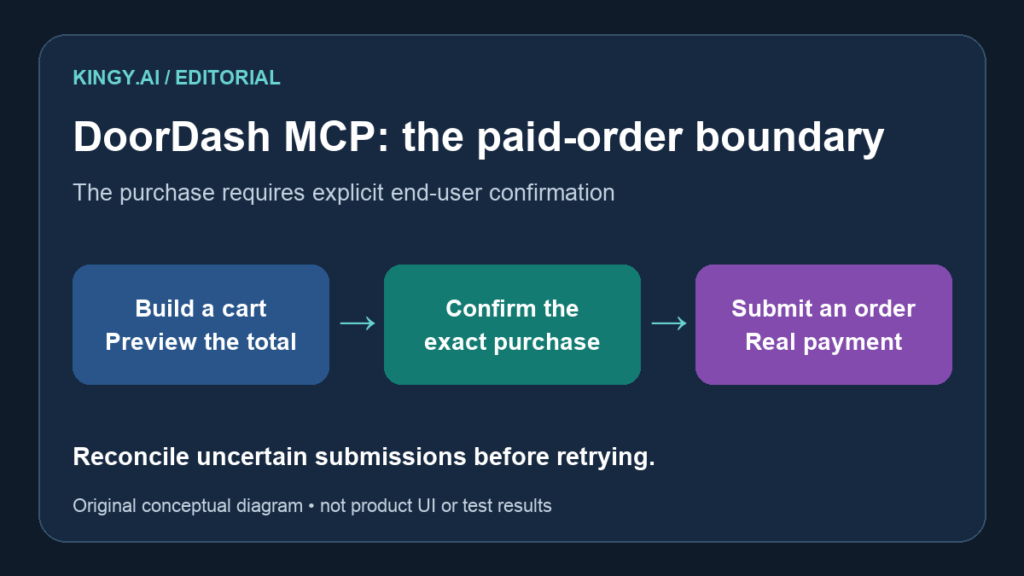
For a company building an office lunch bot, the useful detail is in the developer documentation: preview_order shows the bill, while submit_order places a real order and charges the customer’s payment method. DoorDash requires explicit end-user confirmation before submission. A successful preview is therefore an intermediate result, with a separate decision still to make. Available tools.
This article reviews the published connector and proposes a pilot design. We have not connected an account, placed an order or tested the beta.
Choose the right DoorDash integration
The developer portal separates two products. The CLI serves personal ordering through an individual’s DoorDash account. Corporate Ordering MCP is a DoorDash-hosted server for internal company tools, with employees authorizing their own access through OAuth. It works with corporate meal budgets. The announcement also expands the CLI beta waitlist; it does not turn either product into unrestricted public access.
That distinction should determine the project brief. An employee’s personal dinner assistant and a shared office-ordering service have different owners, payment responsibilities and approval flows. Write down which one you are building before choosing a client or asking people to connect accounts.
DoorDash also announced a separate consumer text-ordering beta, with a U.S. waitlist. That product is not the corporate MCP integration. Avoid presenting its availability as evidence that your company’s connector application will be approved. Text-ordering announcement.
Approval comes before integration
DoorDash’s MCP quickstart says access is restricted to approved testers. Following approval, DoorDash provisions an OAuth client and supplies setup instructions. Users then sign in and authorize the connection; the guide specifies OAuth 2.1 with PKCE.
The public guide is enough to plan the flow, but it is not a substitute for the configuration supplied to an approved company. Ask about supported countries, account eligibility, redirect URLs and client compatibility. The corporate announcement does not establish a universal regional rollout or a published connector fee schedule.
Keep authentication separate from an order decision. Connecting a DoorDash account gives the integration a way to act for that user. The documented checkout requirement still calls for explicit confirmation of the purchase. Your product should show who is ordering and whose payment responsibility applies before asking for that confirmation.
Build the first pilot around a preview
DoorDash documents a no-charge starting sequence: find a restaurant, retrieve its menu, add items, preview the order and clear the cart. The guide explicitly ends that exercise before submit_order. Follow that sequence when access is approved, rather than making a real purchase the first acceptance test. Safe first steps.
For a proposed lunch-bot pilot, retain a record of the request, selected restaurant, quantities, modifiers, address and previewed total. Show that record to the person responsible for the order. If someone changes a quantity or delivery address afterward, obtain a fresh preview and confirmation. That is our recommended application design, not a claim that DoorDash supplies every control automatically.
A group thread needs an explicit owner. “Lunch for the team” can contain conflicting choices and late replies. Decide when requests close, who can edit the shared cart and who can authorize checkout. A message that adds a sandwich should not silently grant permission to spend for everyone.
| Proposed pilot case | Evidence to retain | Acceptance condition |
|---|---|---|
| Three employees choose different quantities | Original requests and final cart | Each choice appears once, with the correct quantity |
| One employee changes an item after preview | Earlier and refreshed previews | The approver sees the revised cart and total |
| Checkout returns an ambiguous result | Tool response and order-status lookup | The bot reconciles the existing attempt before considering another submission |
| A cart exceeds the company’s chosen budget | Preview and policy decision | The bot requests a human decision before any paid submission |
These are proposed checks, not measured DoorDash results. A useful acceptance record includes failures and the steps needed to recover, rather than only the successful lunch.
Treat retries as part of the purchase workflow
A timeout is an incomplete observation. Your application should distinguish a request that was never submitted from one that may have succeeded before the response was lost. DoorDash lists get_order_status and get_order_receipt; ask how to bind those responses to the exact submission you are reconciling. Order tools.
The reviewed public pages do not establish an end-to-end duplicate-order guarantee for your agent. Do not assume that issuing the same request again is harmless. Preserve the first attempt’s identifiers, stop automatic resubmission while the outcome is uncertain and give an operator enough information to resolve it.
Apply the same discipline to recurring orders. Set a named owner, a schedule and an expiry for the routine. Provide a visible way to pause it. Test a missed run and a late wake-up with a preview-only flow so the team can decide whether the correct behavior is to skip or seek approval.
Our n8n Agents explainer covers the related problem of bounding an agent’s actions. Here, the concrete boundary is the transition from a proposed cart to a paid order.
Measure the work the office actually saves
For the first approved pilot, compare the time spent collecting choices, correcting the cart and handling delivery exceptions with the team’s previous process. Count duplicate items, wrong addresses and human interventions alongside completion time. A bot that assembles a cart quickly can still create more work for the person fixing it.
Keep meal spending separate from the cost of the model, hosting and workplace integration. Record the exact fees and total returned by the preview; avoid budgeting from an item’s menu price alone. Before enabling recurring purchases, keep one complete preview, confirmation, submission and reconciliation record that the office administrator can inspect.
The Kingy Brief
Get future Kingy Brief editions.
Source-checked AI changes, original tests and one practical thing to try.
Free · Choose your subjects · Double opt-in · Unsubscribe anytime
Regular sending is paused; no restart date is set.