- Selected model attempts
- Not recorded
- Selected model charges
- Not recorded
- Human editing
- Not recorded
kingy tested
Reproduce the outcome
- Extract the starter ZIP and open scenes/room_v001.blend. Save a separate room_v002.blend beside the original. The ZIP contains checkpoint stills; it does not include a complete room movie.
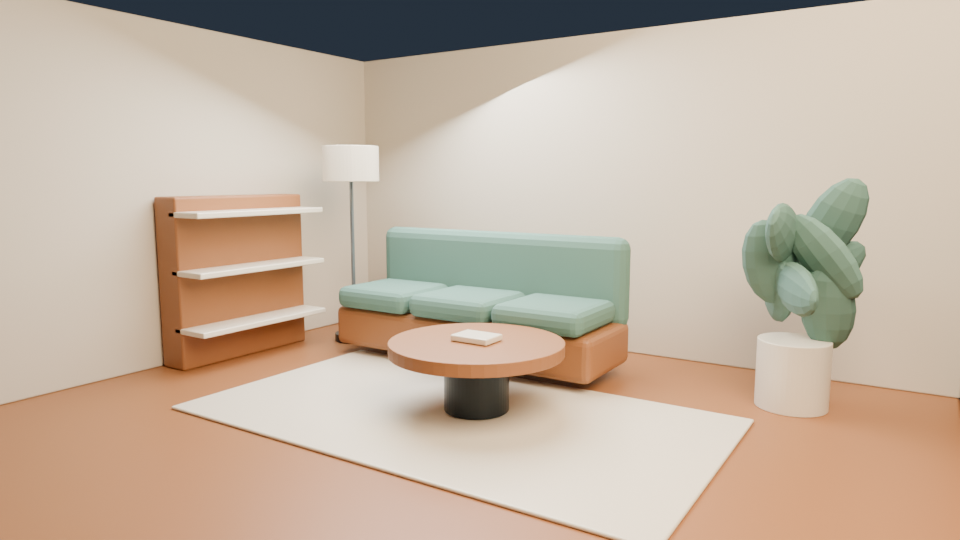
- Open previews/room_0001.png, room_0096.png and room_0192.png. Compare the wide opening with the closer final view. These are actual retained renders.
- In Blender use View → Viewpoint → Top to inspect the 6 × 5 m floor and furniture. Select Floor, Back wall and Left wall to check dimensions; the walls are 3 m high. Keep the open front and right side visible.
- Switch to the active camera and scrub frames 1, 96 and 192, then scrub the intervening frames. The saved path moves from outside the room toward the sofa at 1.65 m height, across frames 1–192 at 24 fps.
- Choose one material study below. Edit only that material in the copied scene, preserving room dimensions, furniture positions and camera keys. Save the copy.
- Set Resolution percentage to 50% and render stills at frames 1, 96 and 192 through Render → Render Image. Save each PNG separately. Check the path before choosing to render a full sequence.
- If the camera cuts through furniture, inspect the path in solid view and correct the camera in your copy. If the rug intersects the floor, adjust its height by a measured amount. Restore temporarily hidden objects before the render.
- Completion check: reopen room_v002.blend; confirm named editable furniture, the room dimensions and all three camera checkpoints. Inspect each saved still for clipping and object intersections. A full room video remains an optional render you perform locally.
Original input and exact settings
- Original editable scene and retained previews in the Kingy.ai starter ZIP.
- Optional rebuild: scripts/build_scene.py, using Blender's own Python.
- renderer
Cycles- samples
32- resolution
1920 × 1080 at 100% in saved scenes- previewResolution
960 × 540 retained checkpoint PNGs- fps
24- frames
1–192- checkpointFrames
[1,96,192]- cameraHeightMetres
1.65
Original prompt
Build a 6 × 5 m furnished room cutaway in Blender 5.2.1. Include a sofa, coffee table, rug, shelf, floor lamp, and stylized plant. Use warm plaster, timber, and muted green upholstery. Keep the front and right side open for inspection. Add an eight-second camera approach at 1.65 m height, 24 fps. Render start, middle, and end previews before a complete tour. Name all furniture and keep it editable.
Attribution and rights: Original Kingy.ai meshes, materials, renders and code; MIT license. Keep LICENSE.txt with redistributed copies. No third-party models, textures or real-product branding are included.
Sources & limits
Kingy.ai Blender guide and original editable starter package
Record checked 2026-09-21.
Files reopened on September 21, 2026; the previews are retained renders from the original September 5 project. No new image or movie was rendered for this recipe.
Original model attempts, charges and active human editing time were not recorded. This retained project does not establish a one-prompt success rate.
Only the saved camera path and three retained checkpoint stills are supplied. The complete room movie has not been rendered for this recipe.
This is a simple open cutaway learning scene, not a construction plan or a photorealistic whole-house tour.