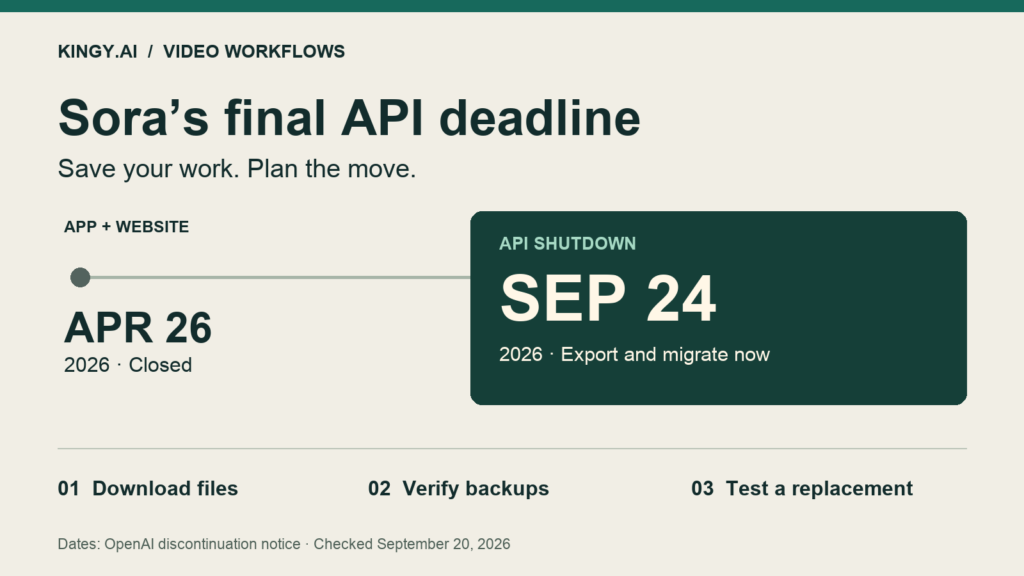
OpenAI discontinued the Sora API on September 24, 2026, after the website and apps closed on April 26. Replace remaining integrations and check the copies of your work that you already control. OpenAI confirms the dates in its discontinuation notice.
Buying details checked October 22, 2026: Sora buying profile: The demonstration uses Sora through Artlist and assembles in Premiere. It is not evidence that direct Sora or any partner route remains available today. The original article keeps its existing dates and evidence scope; the linked profiles describe their own demonstrations.
Kingy’s recommendation is to finish the backup first, then test one replacement against the work you already do. A creator exporting finished clips has a different job from a developer replacing a production API.
Alternative-source cutoff: September 20, 2026. Sora discontinuation and post-shutdown instructions corrected November 2, 2026. This is a documentation-based migration guide. We did not run a new paid comparison or test an account export for this article.
The short migration checklist
- Request your consumer export. Open Sora’s export page, sign in, and click Export. OpenAI says it will email you when it is ready.
- Check saved API outputs. Inspect files previously copied to your own storage. A saved job ID or temporary URL is not a video backup.
- Keep the production ingredients. Collect prompts, reference images, original footage, audio, project files, settings and client approvals from your own records.
- Check the backup. Open the archive, play the important videos, and keep a second copy in a different location.
- Replace the dependency. Choose a workflow below, test a representative shot, and remove calls to the retired API.
The notice gives no shutdown hour or time zone, and no fixed final export deadline. It says any final export window is conditional and that Sora data will eventually be permanently deleted. Do not plan around a last-minute grace period.
What to save, beyond the finished video
Start with anything you cannot easily recreate: approved client work, successful variations, reference assets and the edit that ties them together. Treat the export as something to inspect. OpenAI’s notice does not provide an itemized guarantee of everything the archive contains.
| Save this | Why it matters |
|---|---|
| Finished clips and useful alternate takes | Preserves the actual result, including variations you may need for a later edit. |
| Prompts, settings and reference assets | Gives another tool a usable brief. Include duration, aspect ratio, camera direction and what must remain unchanged. |
| Edit projects, voiceovers, music and captions | Lets you revise the complete video after the generation service disappears. |
| Job IDs, request records and approval notes | Connects each file to its source request and the version the client approved. |
Use a small folder structure such as project / source-assets / prompts / generated-clips / final-edit. Add a text file that identifies the approved version. Keep credentials out of exported request logs.
For a consumer export, download the archive when the email arrives and check it against your own project list. If expected material is missing or the export fails, record the error and contact OpenAI support promptly. This guide cannot promise recovery of missing files.
For developers: save the media, then switch the integration
The retired video API documentation described GET /v1/videos/{video_id}/content downloads. Keep this route only as historical context for your request records.
The following unexecuted example is historical reference. Do not run it as a recovery step after the API shutdown.
curl --fail --location \
  "https://api.openai.com/v1/videos/YOUR_VIDEO_ID/content" \
  --header "Authorization: Bearer $OPENAI_API_KEY" \
  --output saved-video.mp4
Keep an inventory with one row per job: ID, status, local filename, download result and playback check. An expired link or failed download needs investigation; do not mark it backed up because the metadata exists.
Then review every place that submits Sora jobs: the app, scheduled tasks, automation platforms and retry queues. Remove retired Sora calls and give users a clear message when an old job cannot be completed. Disable retries that would keep calling a retired endpoint.
A replacement integration needs its own checks for authentication, supported inputs, job polling or webhooks, moderation failures, rate limits, billing and output retention. Keep provider-specific request fields behind a small adapter so the rest of your application can work with a common job status and a file in your own storage.
What to use next, based on your current workflow
These are starting points for a migration test, not a quality leaderboard. Access, features and charges depend on the exact model, account and region. Check those before buying credits or promising a delivery date.
| Your workflow | Start here | Check before switching |
|---|---|---|
| You create clips in a browser | Google Flow | Whether the selected model supports your reference images, start/end frames, aspect ratio and required duration. |
| You already work with Adobe tools | Adobe Firefly Generate Video | The active Adobe or partner model, generation settings, credit cost and export fit for your edit. |
| You run a video-generation API | Runway API or Google’s Gemini API video routes | Request schema, asynchronous jobs, audio needs, quotas, retention and billing. Budget for integration work. |
| You already have usable clips and need to finish a project | Your existing video editor | Whether editing, narration, captions or licensed footage can cover the remaining shots without generating them again. |
Browser creators: start with your references
Flow supports creation from prompts, ingredients, frames and other videos. Its model and feature table distinguishes the available capabilities. Choose the feature you need before settling on a model.
For a product clip, bring the same clean reference image and a modest camera move to the replacement tool. Check the logo, label, shape and materials throughout the shot. Kingy’s product image-to-video guide covers that workflow in more detail.
Adobe users: check which model is selected
Firefly’s Generate Video interface offers Adobe and partner models; available controls vary by selection. Record the model used for each test. Do not assume that every option in the same interface has identical capabilities or terms.
API teams: compare the integration as well as the output
Runway documents text-to-video and image-to-video generation with task-based handling. Its API FAQ says web-app plans and credits are separate from API credits. An existing creator subscription does not fund an API migration.
Google’s current video API overview lists Gemini Omni Flash and Veo 3.1 for different workflows, including conversational editing on the Omni route and native audio, extension and frame-directed generation on the Veo route. Follow the documentation for the chosen model; replacing a Sora model name in existing code will not complete the migration.
Run one useful test before committing
Take a real shot from your backlog and write down what a usable result must do. For example: a six-second product close-up, a slow push-in, a readable label, no shape changes, and an export that fits your editing timeline.
Give each candidate the same brief and source assets where supported. Record attempts, total charges, waiting time and the amount of repair needed. If you spend $6 across several attempts and only one clip is usable, that usable clip cost $6 before editing. That is an illustrative calculation, not a provider price.
Use Kingy’s AI video prompting guide to turn your old prompt into a clearer shot brief. Our product-demo testing methodology explains the criteria for a planned evaluation; it is not evidence that these replacements won a new head-to-head test.
What happens to unused Sora credits?
OpenAI says purchased ChatGPT/Sora credits can still be used in Codex. For refund questions, its shutdown notice points users to the ChatGPT subscription refund process. It does not promise an automatic refund or a credit transfer to another video provider.
Finish by checking that your important videos play from your own storage and that your next project has a working generation or editing route. Those are the two results to check as you replace the retired service.