A Grok Bot message is not a fixed unit of usage: one request can send the agent through many steps and tools. On The X Subscription, Bot shares a weekly pool with eligible Grok and Cursor activity. Start with your own account: Settings → Usage & Billing shows weekly usage and the next reset, with controls depending on your account.
In our four-run invoice pilot, all four answers contained the five correct reconciliation fields. The meter rose from 0% to 1% after setup and the first run, then still showed 1% at the end; that display cannot establish savings from requesting a shorter answer.
There is no reliable universal number of Bot messages per week or reset hour in the documentation we reviewed. Older Cursor and linked SuperGrok plans work differently from the current unified subscription, so check which plan you have before following someone else’s advice.
Find your usage and next reset
- Open Grok Bot and go to Settings → Usage & Billing.
- Record your plan, weekly usage percentage and the next reset shown there. Check whether extra usage is enabled and whether a reset is available.
- Inspect the usage charts by Bot and by source, if available. Look for work you recognize, recurring jobs and activity from other products if your plan uses a shared pool.
- Check the screen again after a representative job. Allow for rounding or reporting delay, and avoid treating a small displayed change as an exact cost.
You can also ask a Bot you own in a private chat about plan and usage. Compare its answer with the billing screen. On mobile, use Settings → Usage, as described in the mobile guide.
In the web account we tested, the route was account menu → Dashboard → Usage. You can open the web usage dashboard after signing in. The screenshots below show that dashboard, which differs from the desktop settings dialog.
If you’re looking for what the product can do before setting up an agent, see our Grok Bot explainer. This guide concentrates on the usage meter and what to do when it runs down.
What our four-run test showed
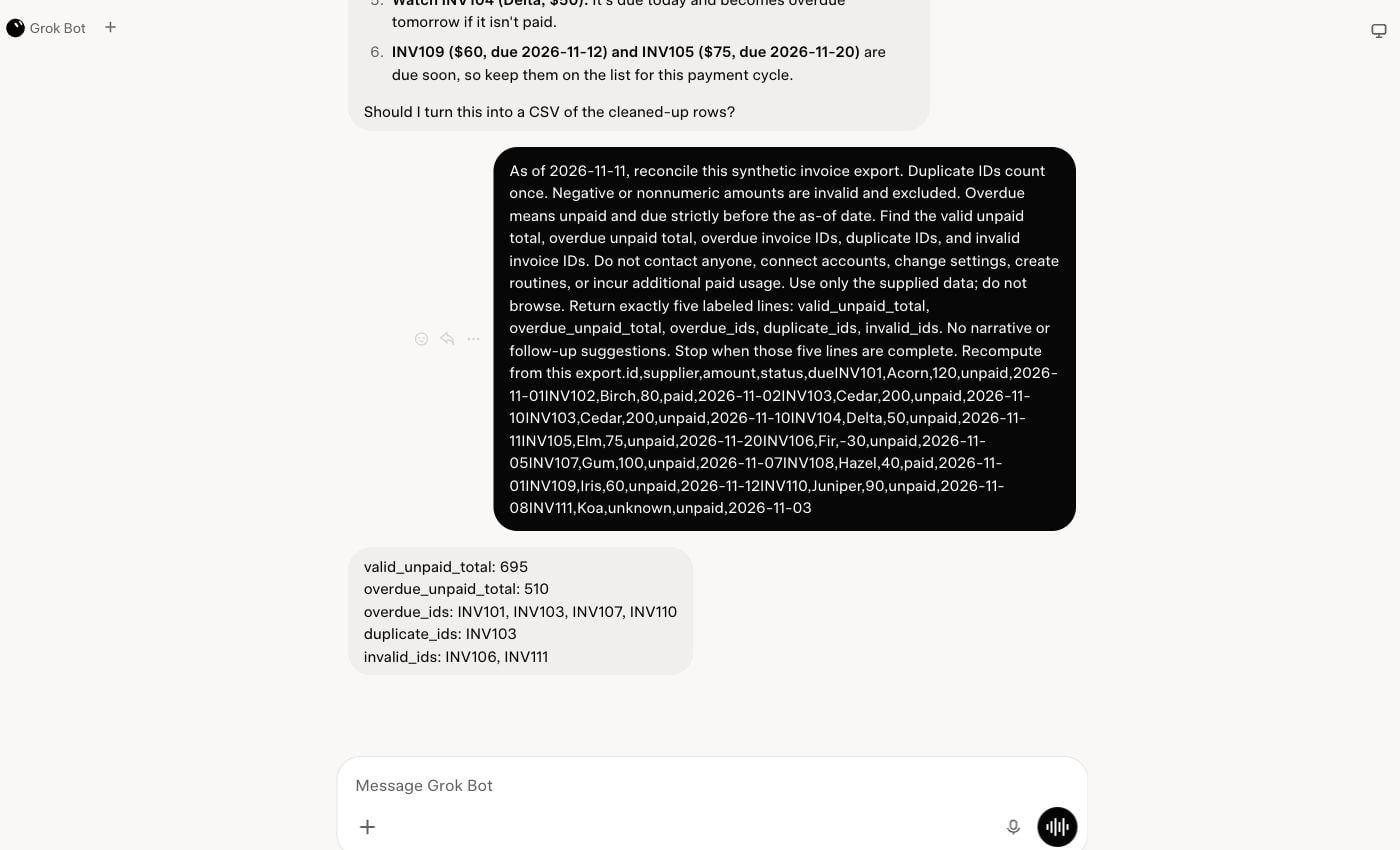
On November 11, we used Grok Bot on the web with The X Subscription Premium to reconcile the same 12-record synthetic invoice export four times. Each run had to report five fields: valid unpaid total, overdue unpaid total, overdue IDs, duplicate IDs and invalid IDs. We checked each field against an answer key. All four runs got all five fields correct, with no incorrect fields found.
We ran the prompts in A–B–B–A order in one new Bot and conversation. Version A asked for a detailed row-by-row report, calculations and next actions. Version B changed three things together: it restricted the Bot to supplied data with no browsing, requested only the five fields, and told it to stop after producing them. Both versions requested recomputation. Browser entry flattened the line breaks in both versions, including the invoice data; the exact submitted prompts are preserved in the evidence.
| What we checked | Observed result |
|---|---|
| Four requested answers | Five of five reconciliation fields correct in each run |
| Weekly meter | 0% before setup; 1% after setup and the first run; 1% at the final reading |
| Dashboard reported tokens | 0 initially; 303,906 at the final reading, including onboarding |
| Additional usage | Dashboard reported $0 used |
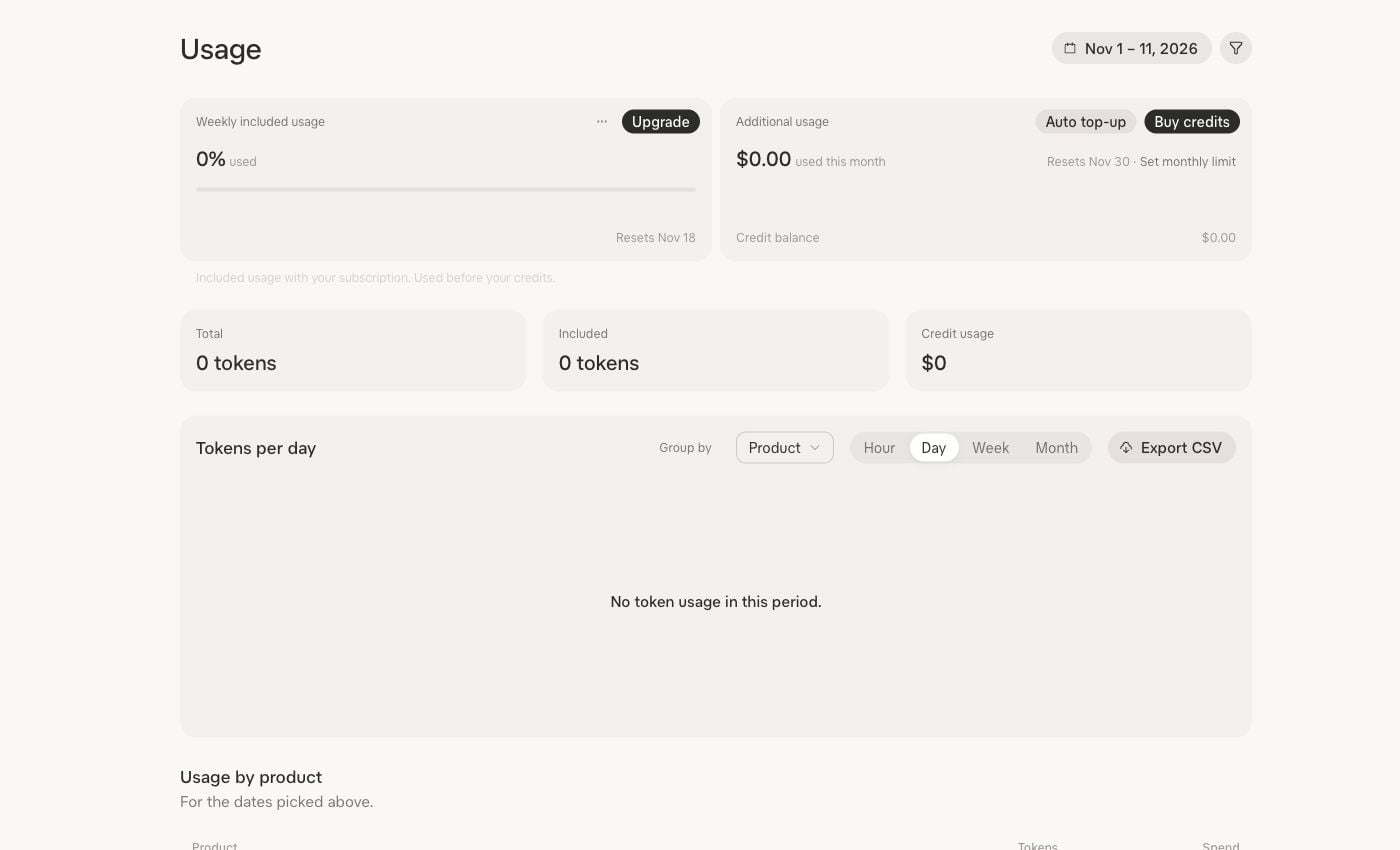
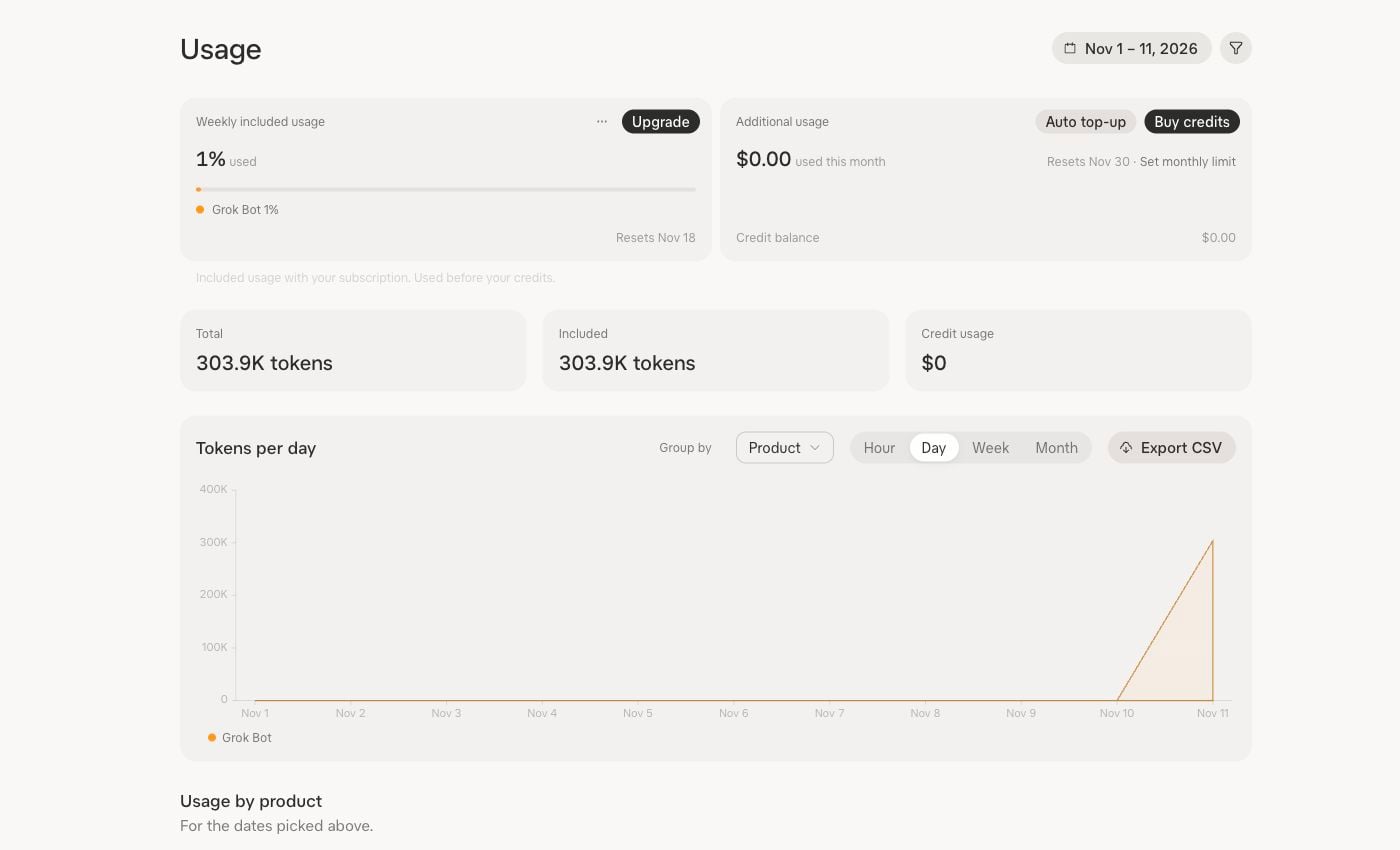
The unchanged 1% reading does not mean the later runs used nothing. The percentage was displayed in whole numbers, and dashboard entries posted with delay. Setup and onboarding occurred between our initial reading and the first run, so we cannot separate startup from that task. The token total is an account dashboard total, not a per-task price or a tariff. Cached and new input need not have the same price.
All four runs shared a conversation and identical data, so retained context, caching or repeated answers could have affected later runs. We changed three instructions at once, and the five-field version omitted the detailed explanation requested by A. A correct five-field answer is useful if that is all the job requires; it is not equivalent to a full report when a reader needs its reasoning or next actions. The comparison cannot tell us which change affected usage, whether either version saved capacity, or how other jobs would behave.
Our attempted CSV export did not produce a download within 15 seconds. We captured rendered dashboard event rows instead; that measurement failure is separate from the correctness of the four answers. Download the captured prompts, outputs and usage evidence and the synthetic input to inspect the pilot. We did not test routines, upgrades or resets.
Why Grok Bot usage can go quickly
A message is an instruction, not a standard unit of work. Grok Bot runs in the cloud and can work with a computer, apps and files. A request to research a topic, inspect several documents and produce a report can involve many more steps than a short question. The product documentation describes this agent workflow; it does not provide a fixed charge for a task.
Context matters too. In a Cursor support forum discussion, a reply explains that instructions, memory, tool information and recent conversation can all contribute to input. It also distinguishes cached input from new input. That is a reason to inspect repetitive background instructions, not proof that deleting a particular memory will save a known amount.
On the unified plan, activity in Grok or Cursor can also use the same weekly pool. The products consume that pool at different rates, according to The X Subscription usage documentation. A quiet day in Bot therefore does not necessarily mean a quiet day across the whole account.
Grok Bot chooses its own underlying model. Cursor’s Bot model guide says users cannot select a model for each Bot request. It specifically says routing a task to Opus 5.5 does not change the Bot price per token. Task effort can still vary. Model selection in the Cursor editor is a separate control; do not assume an internally routed Bot task incurs the same separate charge as deliberately selecting a third-party model in Cursor.
Current shared plans and legacy plans
First identify your billing arrangement. The X Subscription includes Bot in Premium, Super and Ultra, with a weekly pool shared across Bot, Grok and Cursor. Plus does not include Bot.
| Individual plan | Displayed monthly price | Grok Bot |
|---|---|---|
| Plus | $8 | Not included |
| Premium | $30 | Included in shared pool |
| Super | $100 | Included; larger shared pool |
| Ultra | $200 | Included; larger shared pool |
These are displayed monthly dollar list prices checked November 11, 2026, before sales tax. The pages reviewed used the dollar symbol without an ISO currency code; verify your regional and app-store price at checkout. See the subscription pricing guide.
The official usage comparisons do not agree exactly. The general pricing page advertises Premium, Super and Ultra as 4×, 15× and 50× Plus usage. The Bot page instead lists Super at 3.5× Premium and Ultra at 12× Premium. The first set would imply 3.75× and 12.5× Premium. We found no explanation for the difference, so this table gives no exact Bot capacity conversion. Neither set establishes a fixed number of messages or jobs.
If you have an older Cursor or SuperGrok plan
Existing legacy subscriptions can continue. Cursor’s Bot billing guide describes increasing weekly Bot grants for Cursor Pro, Pro+ and Ultra. An eligible linked SuperGrok or X Premium+ grant and a Cursor grant do not stack: the larger eligible grant applies. Both subscriptions keep billing separately. Check both bills before assuming two payments double your Bot capacity.
New customers start on the unified subscription, while eligible existing customers can choose whether to switch. Cursor says completed unification is permanent. Treat it as a billing decision, not a reversible experiment to see whether the meter looks better. Some older FAQ text still describes a separate Grok meter; that explanation should not be applied to the current shared-pool plan.
What runs while you’re away?
Routines run in the cloud, including when your laptop is closed. Each run, including Test, uses capacity; a routine that never runs does not. Busy event triggers and frequent schedules deserve attention.
Pause obsolete jobs and review useful ones for an appropriate schedule and trigger. After changing a report, check whether it still arrives in time and contains the information you need.
For perspective, in a regular 24-hour day an hourly schedule offers 24 starts; a four-hour schedule offers six. That is 75% fewer scheduled opportunities to start, not a measured 75% reduction in usage. Each run may do different amounts of work, and triggers or manual tests can add runs.
Notifications and initiative are separate controls. Turning off alerts does not itself stop proactive check-ins. The initiative guide directs users who want check-ins disabled to support. It does not give a consumption figure for them, so do not assume muting notifications saves a measurable amount.
Audit your usage, then test one change
Start with the meter rather than guessing which instruction is expensive. Record the current percentage, reset time, plan and largest visible sources. List active routines and recent jobs alongside the result each produced. If the dashboard cannot attribute a charge to a particular task, mark that as unknown.
You can ask your Bot for a starting inventory. This prompt is a proposed aid, not a tested way to recover missing billing data:
Review my current plan and usage using information available to you. Identify the largest usage sources you can verify, show the next reset if visible, and list routines or recurring triggers I should inspect. Separate recorded figures from estimates and say when you cannot see a figure. Suggest changes, but do not change settings, schedules or billing.
Compare its answer with the account screen. A plausible explanation is not a usage receipt. If the source chart cannot isolate a Bot or routine, do not treat the Bot’s allocation as an audited number.
Give a job a clear stopping point
A bounded task makes it easier to judge whether the result was useful. Supply the input, desired output and a stop condition. For example, adapt this prompt to a document you are authorized to share:
Read the attached meeting notes only. Extract decisions, owners and due dates stated in the notes into a table. Mark an owner or date as “not stated” when absent. Do not search the web, message anyone or create follow-up tasks. Stop after producing the table and a list of unresolved questions.
This is a suggested scope, not a promise of lower consumption. If the job needs web research, authorize that separately and set a source limit or time boundary. Keep necessary context; remove obsolete repeated instructions only after preserving anything the work depends on. Combining related questions may help avoid repeated setup, but a giant unrelated assignment can be harder to review and finish.
Run a small comparison you can interpret
To test a change yourself, choose a recurring task with a clear definition of success. Run the current version and the revised version on comparable inputs, preferably more than once. Record other activity in the shared pool and any routine runs during each measurement. Keep the same plan and note if the reset or billing state changes.
| Record | Current version | Revised version |
|---|---|---|
| Date, plan and reset time | ________ | ________ |
| Task and input | ________ | ________ |
| Meter before → after | ________ | ________ |
| Other activity or routine runs | ________ | ________ |
| Completed? Output usable? | ________ | ________ |
| Errors, omissions and manual fixes | ________ | ________ |
Percentages can be rounded, update late or include other work. A single run cannot establish a reliable saving, especially when a revised task does less or fails. Compare completion and quality alongside the meter, repeat with similar inputs, and keep the change only if the result still meets your needs.
Weekly resets, subscription renewals and extra usage
Your included usage resets on the schedule displayed in your account. A monthly subscription renewal is a billing event; it should not be confused with the weekly usage reset. We found no documented reset weekday or hour that applies to every account. Check your own screen rather than planning around a date reported by another user.
Using an available reset
The mobile documentation says an available usage reset immediately returns the weekly meter to zero. Using one early forfeits the remaining allowance, and there is a wait before another reset can be used. The documentation we reviewed did not specify a universal cooldown or establish that an early reset changes the next scheduled reset date. Read the confirmation in your account before using it.
Referral rewards are a separate, limited route. Cursor’s referral terms describe eligibility restrictions, delayed rewards and expiration; they are not an instant refill available to every subscriber.
Check the paid-usage controls
On The X Subscription, prepaid extra-usage credit and the monthly additional-usage cap are different things. Credit can remain even when the cap prevents more additional usage. Auto Top-up is optional, and the extra-usage guide says switching subscriptions does not enable it automatically. Turning it off stops automatic purchases; it does not remove credit already purchased or necessarily prevent that credit from being used.
For legacy Bot billing, Cursor describes optional on-demand usage after the included weekly grant and a separate monthly limit. An active run may finish beyond that limit. Cursor also notes that spending-cap enforcement can briefly lag. On legacy plans, Cursor temporarily credits limited overage before enforcement; raising the cap in the same cycle can make that credited usage billable. Review the correct dashboard for your plan.
What to do when the limit looks wrong
- Identify the message. A weekly usage limit, an additional-usage cap, a routine run-rate error and a service outage are different problems. Save the exact message and a screenshot of the meter.
- Check your plan and account. Confirm that the expected subscription is linked and that you are viewing the account that ran the work. Look at the source breakdown and any recent Grok or Cursor activity on a shared plan.
- Inspect recent routines. Compare their actual run history with the work you intended.
- Check service status. If the meter has capacity but jobs fail, consult the Bot troubleshooting guidance and service status. Reinstalling or resetting a computer does not refill a usage allowance.
- Escalate with evidence. If a linked legacy SuperGrok upgrade has not appeared after the documented window of up to 24 hours, Cursor recommends contacting support with the account emails and a screenshot of the weekly limit.
The routine execution ceilings are 300 runs per account per hour and 200 for one routine. The same rate-limit error can reflect a shared service limit; runs that fail with that error are not automatically retried. These ceilings are separate from weekly capacity.
Should you upgrade?
Consider a higher tier when useful, repeatable work regularly exhausts the shared pool after you have checked routines and other product usage. Compare the displayed price, included features and actual billing platform. A larger pool will not fix a loop or an incorrect deliverable. If the pressure is occasional, waiting for the displayed reset or reviewing available extra usage may be more sensible than a permanent upgrade.
Timing depends on the purchase. The X Subscription upgrade guide says web upgrades start immediately, while Apple and Google purchases depend on store confirmation. That differs from the linked legacy SuperGrok refresh described above. Verify the price and effective date on the platform that bills you.
Some users in a community usage discussion reported rapid depletion; later comments also described lower meter readings or improved usage. Those accounts are useful leads for troubleshooting, but they do not establish a universal allowance cut, its cause or whether any change is permanent.
Frequently asked questions
What day does Grok Bot reset?
Use the next-reset date on your own account; we found no universal weekday or hour.
Does closing my laptop stop Grok Bot using capacity?
No. Pause the relevant cloud routine; closing the laptop does not stop it.
Can I select a cheaper model for Grok Bot?
The Bot model guide says Bot chooses its backend model and does not offer a per-request model picker. Focus on scope, recurring jobs and measured results. Cursor editor model choices are a separate matter.
Do two subscriptions give me two Bot allowances?
Legacy Cursor and linked SuperGrok or X Premium+ grants do not stack; the larger applies. Check the legacy-plan explanation before buying another subscription.
Does the free trial reset every week?
The Bot FAQ describes a trial usage credit within a seven-day window, measured in agent work rather than a set message count. A long task can exhaust it. That Bot trial does not become a paid plan; an introductory subscription trial through an app store is a different offer and can have renewal terms. Check the actual offer before accepting it.
- Tested
- Four runs of one 12-record synthetic invoice task: two detailed reports and two five-field answers.
- Runner
- Grok Bot web in signed-in Chrome.
- Settings
- One Premium account and conversation; A–B–B–A order, identical data, automatic model routing.
- Grading
- Each run checked against five expected reconciliation results; all five fields correct in each.
- Cost
- Dashboard showed $0 additional usage; existing Premium subscription used.
- Meter
- 0% before setup; 1% after setup and first run; 1% at final reading.
- Reported tokens
- 303,906 total including setup; not a per-task tariff or a measured saving.
- Limits
- Setup not isolated; repeated answers/context possible; rounded meter and delayed reporting; no routine, reset or upgrade test.
- Dates
- run 2026-11-11 · checked 2026-11-11
Limits of our test
Our four-run pilot used one Premium account, one conversation and one synthetic invoice task. The dashboard’s rounded percentages, delayed reporting and combined setup and task activity prevent a per-run usage comparison. Repeated input and context could affect later runs; changing three prompt features together prevents attribution to any one of them. The test establishes neither a saving nor a general allowance. We did not test routines, plan upgrades or resets.
Sources and method
Checked November 11, 2026. We reviewed xAI and Cursor documentation on usage, plans, routines, models and billing, plus a vendor-hosted discussion and user reports linked above. We also ran the four-job pilot described above and checked the five requested fields against an answer key. We did not verify individual community reports. Plan details, prices and interfaces can change; the live account and checkout govern your own situation.