
Codex Record & Replay
Codex Record and Replay is one of the most important automation features OpenAI has added to Codex because it changes the starting point from “write the perfect prompt” to “show Codex how the work is done.” Instead of describing every click, preference, field, upload, naming convention, and review step, you can demonstrate a repetitive workflow once on your Mac and let Codex turn that demonstration into a reusable skill.
Image note: Cinematic workspace showing Codex converting a demonstrated workflow into reusable automation skills.
This guide is for AI power users, founders, marketers, creators, operators, developers, no-code builders, and enterprise automation teams. It is not just an announcement recap. It is a practical field guide to what OpenAI has confirmed, what is still uncertain, how to think about the business impact, where Record & Replay fits against prompting and automation platforms, and which workflows are worth recording first.
If you are new to the broader product, start with Kingy AI’s complete OpenAI Codex guide and the Codex app super guide. This article assumes you already understand the basic idea of Codex as an AI coding and work agent, but it explains Record & Replay from the ground up.
The Short Version
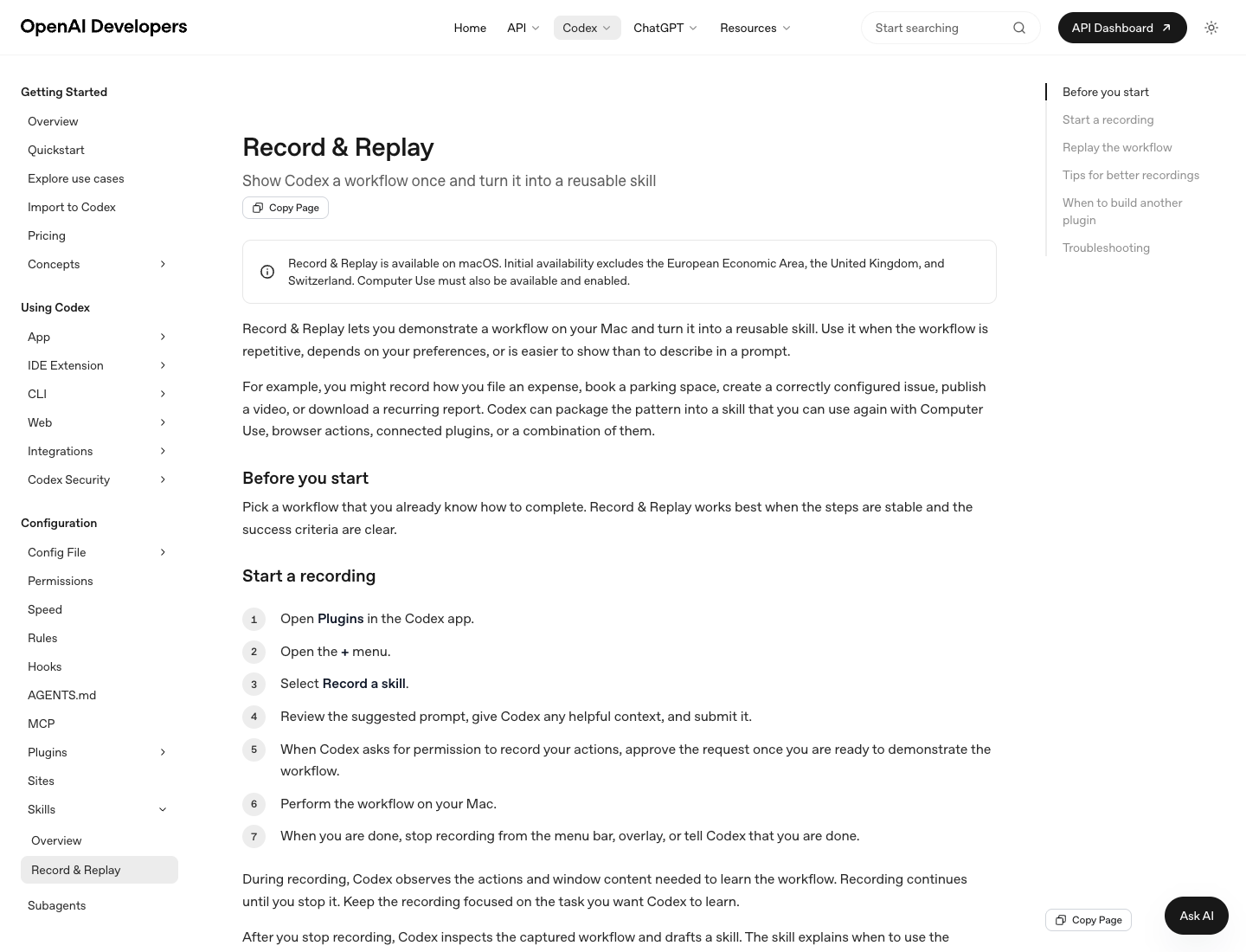
OpenAI’s Record & Replay documentation says Record & Replay lets you demonstrate a workflow on your Mac and turn it into a reusable skill. OpenAI says it is available on macOS, with initial availability excluding the European Economic Area, the United Kingdom, and Switzerland. It also requires Computer Use to be available and enabled.
The flow is simple:
- Open Plugins in the Codex app.
- Open the plus menu.
- Select Record a skill.
- Give Codex context and approve recording.
- Perform the workflow on your Mac.
- Stop recording when the workflow is complete.
- Let Codex inspect the captured workflow and draft a skill.
- Reuse that skill later in a new thread with changed inputs.
OpenAI’s examples include filing an expense, booking a parking space, creating a correctly configured issue, publishing a video, and downloading a recurring report. In this guide, examples like CRM updates, recruiting workflows, sponsor outreach, social media publishing, and AI Launch Intelligence research are Kingy AI workflow examples. They are plausible uses for stable, repetitive workflows, but they should be treated as workflow design examples rather than additional OpenAI-confirmed example categories.
What Was Announced?
Record & Replay is a demonstration-based skill creation feature for the Codex app. The official description is refreshingly concrete: show Codex a workflow once, and Codex turns it into a reusable skill.
That matters because many high-value workflows are difficult to prompt from scratch. A founder might know exactly how to prepare a weekly investor update but forget to mention the formatting rules. A marketer might know the exact sequence for uploading a blog post, checking internal links, setting the excerpt, compressing images, and assigning categories, but writing a perfect prompt for every step is tedious. A creator might know the video publishing ritual by muscle memory, not by a written SOP.
Record & Replay is designed for that gap. It captures a demonstrated workflow and packages the pattern into a Codex skill. OpenAI’s Agent Skills documentation describes skills as reusable task workflows, typically centered on a SKILL.md file with optional supporting files. The Record & Replay docs say the generated skill explains when to use the workflow, what inputs it needs, what steps to follow, and how to verify the result. You can also ask Codex to refine the skill.
The key idea is not “Codex will magically automate anything.” The key idea is “Codex can learn a stable workflow you already understand, then reuse that workflow as context later.”
Why This Matters
Most AI automation advice still starts with prompting. Prompting is powerful, but it has a ceiling. Every time you ask an AI agent to repeat a workflow, you either restate the instructions or hope the agent remembers your preferences. That works for one-off tasks. It is clumsy for production work.
Record & Replay pushes Codex toward a different model:
| Old pattern | New pattern |
|---|---|
| Describe the workflow in a prompt | Demonstrate the workflow once |
| Hope the prompt captures hidden preferences | Let Codex observe the actual steps |
| Re-explain the same process repeatedly | Reuse a skill |
| Treat automation as a one-off chat | Treat automation as an asset |
| Store process knowledge in one person’s head | Convert process knowledge into agent-readable instructions |
This is especially important for teams that do not have clean APIs for every task. Many real workflows live inside a browser, a desktop app, a CMS, a file picker, a spreadsheet, an internal dashboard, or a sequence of half-structured systems. The Computer Use documentation says Codex can see and operate graphical user interfaces in supported environments, with macOS requiring Screen Recording and Accessibility permissions. Record & Replay builds on that idea: the GUI is not just something Codex can operate, it becomes a teaching surface.

For non-technical users, this is huge. It lets a marketer, operator, recruiter, analyst, creator, or founder teach a workflow by doing the work naturally. For developers and enterprise automation teams, it creates a bridge between informal human process knowledge and more durable automation. A recorded skill can be a first draft of the workflow. If the process becomes mission-critical, it can later be hardened with plugins, MCP servers, scripts, tests, approvals, or a dedicated integration.
How Codex Record and Replay Works
The official workflow is intentionally short.
First, choose a workflow you already know how to complete. OpenAI says Record & Replay works best when the steps are stable and the success criteria are clear. That is the first filter. Do not start with a messy, judgment-heavy, high-risk process. Start with a process you can finish cleanly while Codex observes.
Second, start a recording from the Codex app’s Plugins area. You select “Record a skill,” review the suggested prompt, add helpful context, and approve the request to record once you are ready.
Third, perform the workflow on your Mac. During recording, Codex observes the actions and window content needed to learn the workflow. Recording continues until you stop it, so keep the demo focused. Do the task, finish the task, and stop.
Fourth, Codex drafts the skill. According to OpenAI, the skill should explain when to use the workflow, what inputs it needs, what steps to follow, and how to verify the result. You can ask Codex to refine the skill further. This is where you should add hidden preferences: naming conventions, default settings, edge cases, review gates, content standards, and “never do this” rules.
Fifth, replay the workflow in a new thread. Ask Codex to use the generated skill and provide the values that change this time, such as the file to upload, date range, destination folder, campaign name, or report period.
Step-by-Step Walkthrough
Use this as a practical checklist before your first recording.
1. Pick a workflow with a clean ending
Good first recordings have a visible finish line:
- Upload this finished video and save it as a draft.
- Create this WordPress article and leave it pending review.
- Download this weekly report and place it in the reporting folder.
- File this expense with the receipt attached.
- Update these CRM records from this list.
Bad first recordings are open-ended:
- “Find good leads.”
- “Make our marketing better.”
- “Handle customer support.”
- “Research everything about this market.”
Those may become useful agentic workflows later, but they are too ambiguous for a first recording.
2. Write the context before recording
Before you click Record, tell Codex the goal, the variable inputs, and the success criteria. For example:
I am going to show you how I create a WordPress draft on Kingy.ai. The variables are title, slug, article HTML, excerpt, category, tags, featured image, Yoast SEO title, Yoast meta description, and focus keyphrase. The goal is a draft or published article that preserves formatting, uses the featured image, and has Yoast metadata filled in. Do not publish during future replays unless I explicitly ask.
That context helps Codex understand what is permanent and what changes each time.
3. Record the clean path
Do the work as if you were making a training video for a careful teammate. Avoid unrelated browsing. Avoid checking messages. Avoid opening secret documents. Avoid fixing unrelated site issues in the middle of the recording.
If the process requires sensitive values, use realistic dummy data where possible. OpenAI’s Record & Replay tips explicitly recommend realistic inputs but avoiding secrets and sensitive data.
4. Stop at the finish line
Stop recording when the workflow is complete. Do not keep recording while you clean your desktop, answer an email, compare other tools, or browse dashboards. The recording should teach one process, not your whole afternoon.
5. Refine the skill
After Codex drafts the skill, review it like a process owner:
- Did it identify the right inputs?
- Did it capture the order of operations?
- Did it include verification steps?
- Did it record temporary details that should not be repeated?
- Did it miss naming rules, categories, review gates, or privacy requirements?
- Did it assume a specific file or date that should be variable?
Ask Codex to refine the skill before using it widely.
6. Replay with changed inputs
Start a new thread, ask Codex to use the generated skill, and provide the new variables. Watch the first few replays closely. Treat them as supervised runs, not unattended production automation.
Requirements and Availability
Here is the fact-checked status as of June 21, 2026.
| Requirement | Current status |
|---|---|
| Codex app | Required. Record & Replay is a Codex app feature. |
| macOS | Required for Record & Replay according to OpenAI’s current Record & Replay docs. |
| Computer Use | Required. Computer Use must be available and enabled. |
| Region | Initial availability excludes the EEA, United Kingdom, and Switzerland. |
| Permissions | Computer Use on macOS requires Screen Recording and Accessibility permissions. |
| Windows | Computer Use supports Windows in supported regions, but OpenAI’s Record & Replay page says Record & Replay is available on macOS. Do not assume Windows Record & Replay support. |
| Enterprise policy | If an organization disables Computer Use through managed configuration, Record & Replay is unavailable too. |
For Computer Use setup, OpenAI says users install the Computer Use plugin and grant Screen Recording and Accessibility permissions on macOS. Because Computer Use can see and operate apps, use it for scoped tasks and review permission prompts before continuing.
Record vs Prompting
Prompting and recording are not enemies. They are different control surfaces.
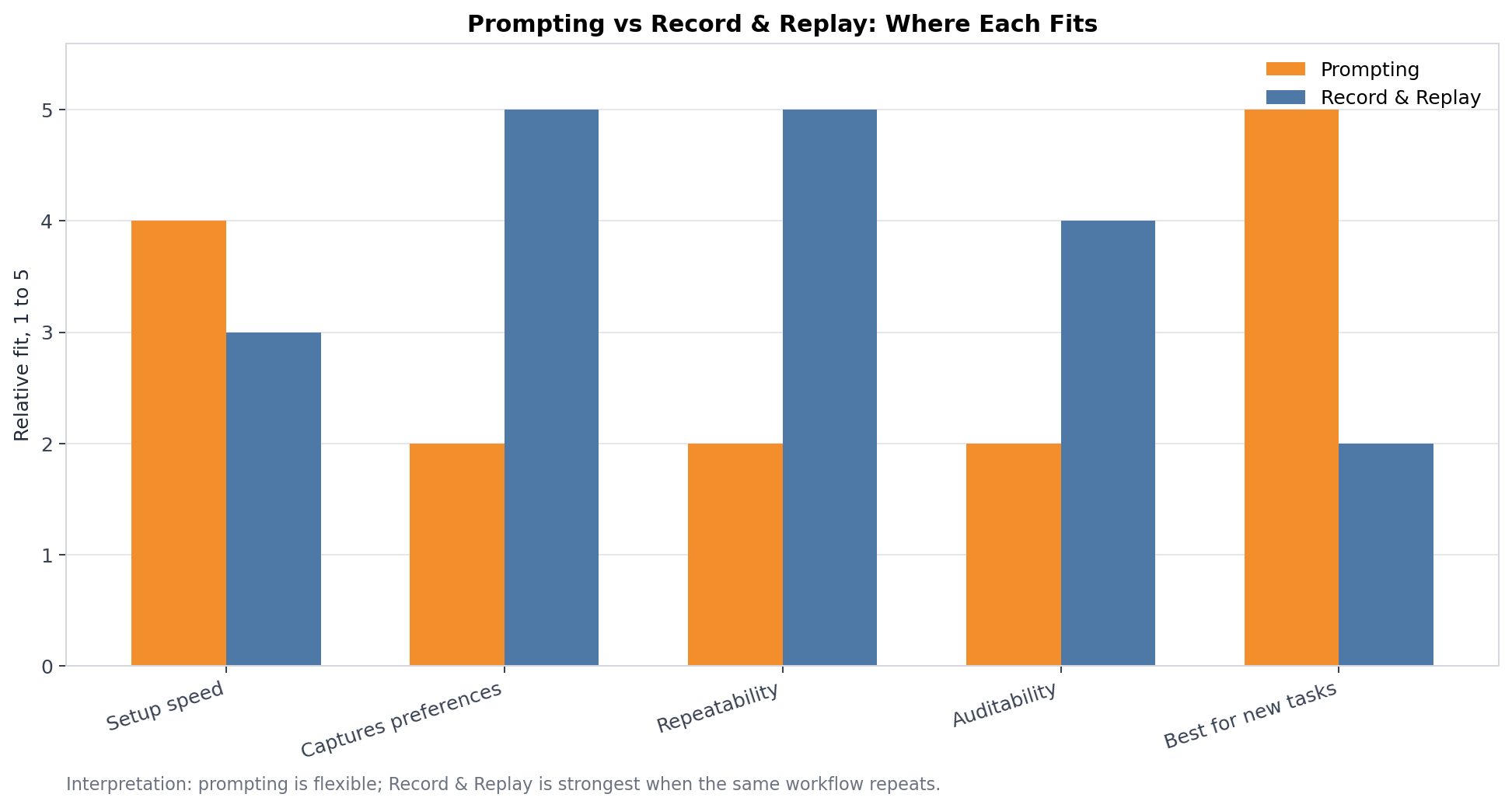
Use prompting when:
- The task is new.
- The workflow is mostly reasoning or writing.
- You do not know the exact process yet.
- The result matters more than repeating your process.
- You need exploration, brainstorming, debugging, or strategy.
Use Record & Replay when:
- The workflow repeats.
- The steps are stable.
- The process depends on your preferences.
- It is easier to show than explain.
- Verification can be described.
- The workflow crosses UI surfaces that are hard to express as a clean API call.
The most powerful pattern is to combine them. Prompt Codex to help design the workflow, record the actual execution, then prompt Codex to refine the generated skill.
If this theme resonates, Kingy AI’s essay on AI loops, not one-off prompts is the broader operating philosophy. Prompting gets you started. Loops, skills, checks, and review gates make the work repeatable.
Record & Replay vs Zapier
Zapier is an automation platform for connecting apps, triggers, actions, tables, forms, AI tools, and agents. Zapier’s own site describes it as an AI orchestration platform with more than 9,000 app integrations. That is a different center of gravity from Record & Replay.
| Dimension | Codex Record & Replay | Zapier |
|---|---|---|
| Starting point | Demonstrate a workflow on your Mac | Choose triggers/actions across apps |
| Best fit | Personal or team workflows that are easier to show than describe | Structured app-to-app automation |
| Surface | Codex app, Computer Use, browser actions, plugins | Zapier platform, integrations, agents, tables, forms |
| Strength | Captures preferences and GUI process knowledge | Broad app ecosystem and governed workflows |
| Weakness | Needs stable UI and human review for risky tasks | Can be limited by available integrations and plan/task constraints |
| Skill output | Codex skill | Zap, agent, workflow, table, or app integration |
Use Zapier when the workflow is event-driven and app integrations already exist: new lead -> enrich -> create CRM record -> notify Slack -> update spreadsheet. Use Record & Replay when the workflow is local, visual, preference-heavy, or trapped in a UI that does not expose the exact integration you need.
For many teams, the answer will be both. Record & Replay can capture how a human prepares or verifies something; Zapier can move structured data between systems. The workflow design question is not “which tool is cooler?” It is “where is the work actually happening?”
Record & Replay vs Claude Computer Use
Anthropic’s Claude computer use tool documentation describes a beta capability that lets Claude interact with desktop environments through screenshot capture, mouse control, keyboard input, and desktop automation. It also emphasizes security considerations, prompt injection risk, and human confirmation for consequential actions.
Codex Computer Use and Claude Computer Use both point toward agents operating graphical interfaces. The distinction for this article is Record & Replay’s skill creation flow. OpenAI’s feature is not merely “the model can use a computer.” It is “show Codex a workflow and turn it into a reusable skill.”
| Dimension | Codex Record & Replay | Claude Computer Use |
|---|---|---|
| Primary idea | Demonstrate a workflow and create a reusable Codex skill | Let Claude operate a computer environment through tools |
| Output | Skill that can be reused and refined | Tool-use loop inside an agent implementation |
| Audience | Codex app users, operators, developers, teams | Developers building with Claude APIs and tools |
| Best fit | Capturing repeatable personal/team workflows | Building custom computer-use agents and environments |
| Shared caution | GUI automation can see sensitive content and act in signed-in contexts | Same broad risk class, with prompt injection and approval concerns |
Do not treat these as identical features. Computer use is the ability to see and operate interfaces. Record & Replay is a workflow-teaching layer on top of that ability.
Record & Replay vs Browser Automation Tools
Browser automation tools like Playwright and Selenium are deterministic developer tools. They are excellent for testing, scraping permitted pages, QA flows, regression checks, and scripted browser interactions. They are not the same thing as showing an AI agent how you personally perform a workflow.
| Dimension | Record & Replay | Playwright / Selenium |
|---|---|---|
| User | Operator, creator, marketer, founder, developer | Developer or QA engineer |
| Setup | Demonstrate workflow in Codex | Write scripts/tests/selectors |
| Adaptability | AI can reason about the workflow context | Script follows programmed logic |
| Reliability | Depends on UI stability and skill quality | Strong when selectors and test environment are stable |
| Best use | Reusable agent workflow from human demonstration | Automated testing and deterministic browser workflows |
The practical rule: if the process is a product test that must run the same way every time, use Playwright or Selenium. If the process is a human business workflow with preferences, judgment, and UI navigation, Record & Replay may be a better first step.
Real-World Examples
The following examples are workflow design examples. They do not expand the official OpenAI feature list. Each one assumes the workflow is stable, the user has the right access, and the user reviews risky steps.

1. Publishing a YouTube Video
Problem: A creator has a finished video, thumbnail, title, description, tags, chapters, pinned comment, playlist, end-screen preference, and publish schedule. The upload flow is repetitive, but the details change every time.
Manual process: Open the platform, upload the video, add metadata, choose visibility, add thumbnail, select playlist, check monetization or audience settings, schedule or save as draft, and verify the final preview.
Record & Replay process: Record a clean example where you upload a non-sensitive sample video, fill metadata, choose standard defaults, add the thumbnail, and save as draft. Refine the generated skill so the variables are video file, title, description, thumbnail, tags, playlist, schedule date, and review mode.
Time saved: 15 to 30 minutes per video is realistic for teams that already have the assets prepared. The bigger gain is consistency: fewer missed metadata fields and fewer forgotten review steps.
Limitations: Do not let the skill publish without a human approval gate unless the channel can tolerate mistakes. Platform UI changes can break the workflow. Account, monetization, copyright, and sponsor disclosures need review.
2. Creating a WordPress Article
Problem: A site like Kingy.ai needs long articles uploaded with headings, tables, images, internal links, external citations, categories, tags, excerpt, slug, featured image, and Yoast SEO fields.
Manual process: Log into WordPress, create a post, paste content, fix formatting, upload assets, set featured image, fill Yoast title/meta/focus keyphrase, assign categories, preview, and publish or schedule.
Record & Replay process: Record the creation of one article as a draft. Show Codex where the content goes, how images are uploaded, how the featured image is set, how categories are selected, and how Yoast metadata is entered. Refine the skill with site-specific rules: never overwrite existing posts without confirmation, preserve source links, use descriptive alt text, and preview before publishing.
Time saved: 30 to 90 minutes for a long, media-rich post. The value compounds when the site publishes frequently.
Limitations: WordPress themes, editor plugins, and custom fields can change. Publishing is a real external action. A recorded skill should default to draft or pending review unless the user explicitly asks to publish.
3. Filing Expense Reports
Problem: Expense filing is repetitive, boring, and full of small rules: category, receipt, project code, reimbursement notes, tax fields, and approval routing.
Manual process: Open the expense app, create report, upload receipt, enter merchant, date, amount, currency, category, business purpose, cost center, and submit.
Record & Replay process: Record one expense with dummy or low-risk data. Refine the skill so the variables are receipt file, amount, merchant, date, project, category, and notes. Add a review gate before final submit.
Time saved: 10 to 20 minutes per expense report, plus reduced friction for people who postpone admin tasks.
Limitations: Expense systems often contain financial data. Do not record card numbers, personal addresses, or sensitive receipts unless necessary and approved. Keep human review before submission.
4. Weekly Reporting
Problem: Weekly reports often require downloading data from several dashboards, renaming files, pasting metrics into a template, writing commentary, and sending the result.
Manual process: Visit analytics tools, export CSVs, copy charts, update a spreadsheet or document, write summary bullets, and distribute to stakeholders.
Record & Replay process: Record the download and assembly flow using a sample reporting period. Refine the skill so date range, destination folder, metric sources, and report template are variables. Ask Codex to verify that all expected exports exist before drafting commentary.
Time saved: 30 to 60 minutes per week for a simple report; more for multi-dashboard reporting.
Limitations: Dashboards change, export buttons move, and data quality issues still require human judgment. For critical reporting, use deterministic APIs when available and use Record & Replay for the parts still trapped in UI.
5. CRM Updates
Problem: Sales and partnership teams often need to update records after calls, research, email replies, or campaign responses.
Manual process: Open the CRM, search the account, add notes, update lifecycle stage, add next action, tag the contact, and create a follow-up task.
Record & Replay process: Record a safe example on a test or low-risk record. Refine the skill so it requires account name, contact, note, next step, date, and source. Add strict rules: do not create duplicate contacts, do not change deal stage without confirmation, and verify the record before saving.
Time saved: 5 to 15 minutes per record, especially when updating batches after events or outreach.
Limitations: CRM data quality matters. Wrong-record updates are costly. Human review is mandatory for deal stage, revenue, account ownership, and customer-facing changes.
6. Lead Research
Problem: Lead research involves repeatable gathering: company site, LinkedIn-style profile pages, product pages, funding news, tech stack, hiring signals, and relevance notes.
Manual process: Search the company, open sources, copy key details, summarize fit, add fields to a spreadsheet or CRM, and note next outreach angle.
Record & Replay process: Record a research pass for one sample lead. Refine the skill with source preferences, allowed sites, output schema, disallowed data collection, and citation requirements.
Time saved: 20 to 40 minutes per small batch, depending on depth.
Limitations: Web research can drift into unreliable sources or private data. Define allowed sources and require citations. Do not automate spam or scrape restricted sites.
7. Recruiting Workflows
Problem: Recruiting coordinators repeat scheduling, candidate record updates, resume packet assembly, and interview loop setup.
Manual process: Open ATS, update candidate stage, attach resume, schedule interview panel, email template, and add notes.
Record & Replay process: Record a candidate workflow in a sandbox or with dummy data. Refine the skill with variables for candidate, role, stage, interviewers, date windows, and template. Add a hard approval step before sending candidate emails.
Time saved: 15 to 45 minutes per candidate loop.
Limitations: Recruiting data is sensitive. Avoid recording personal data when possible. Do not automate rejection, offer, or compensation communications without human approval.
8. Customer Support Workflows
Problem: Support teams often repeat triage: read ticket, inspect account, check logs, tag category, draft response, escalate if needed, and update status.
Manual process: Open support queue, read issue, gather context, draft reply, apply tags, set priority, and route.
Record & Replay process: Record a low-risk example where the skill drafts and tags but does not send. Refine the skill with escalation rules, restricted actions, tone requirements, and verification checks.
Time saved: 10 to 25 minutes per ticket for repetitive categories.
Limitations: Support workflows can involve private customer data and emotional context. Keep the human in the loop for refunds, account access, cancellations, security issues, and angry customers.
9. Social Media Publishing
Problem: Social distribution requires resizing creative, copying captions, adding UTMs, scheduling posts, and verifying previews across platforms.
Manual process: Open scheduler, upload creative, paste caption, set channel, add link, schedule, and verify.
Record & Replay process: Record a single scheduling workflow using test content. Refine the skill with variables for asset, caption, link, channel, date, and approval state. Add a “save draft” default.
Time saved: 10 to 30 minutes per campaign batch.
Limitations: Social platforms change UI frequently. Public posts carry brand risk. Use approval gates and preview checks.
10. AI Launch Intelligence Research
Problem: Kingy AI’s launch intelligence work involves monitoring AI product launches, checking official sources, categorizing tools, collecting source URLs, drafting summaries, and updating internal trackers.
Manual process: Review launch feeds, open official pages, verify claims, record company/tool/category/date/source, write a short summary, and queue updates for publication.
Record & Replay process: Record a launch research pass for one low-risk product. Refine the skill with the exact source hierarchy: official announcement first, documentation second, reputable coverage third, no unsupported claims, and clear “unverified” labels.
Time saved: 20 to 60 minutes per research batch, depending on the number of launches.
Limitations: Launch research is fact-sensitive. The skill should collect and structure evidence, not invent capabilities. Human editorial review stays essential.
Time Saved by Workflow Automation
The chart below uses illustrative estimates, not OpenAI-published ROI data. Use it to think about workflow economics, then time your own process.
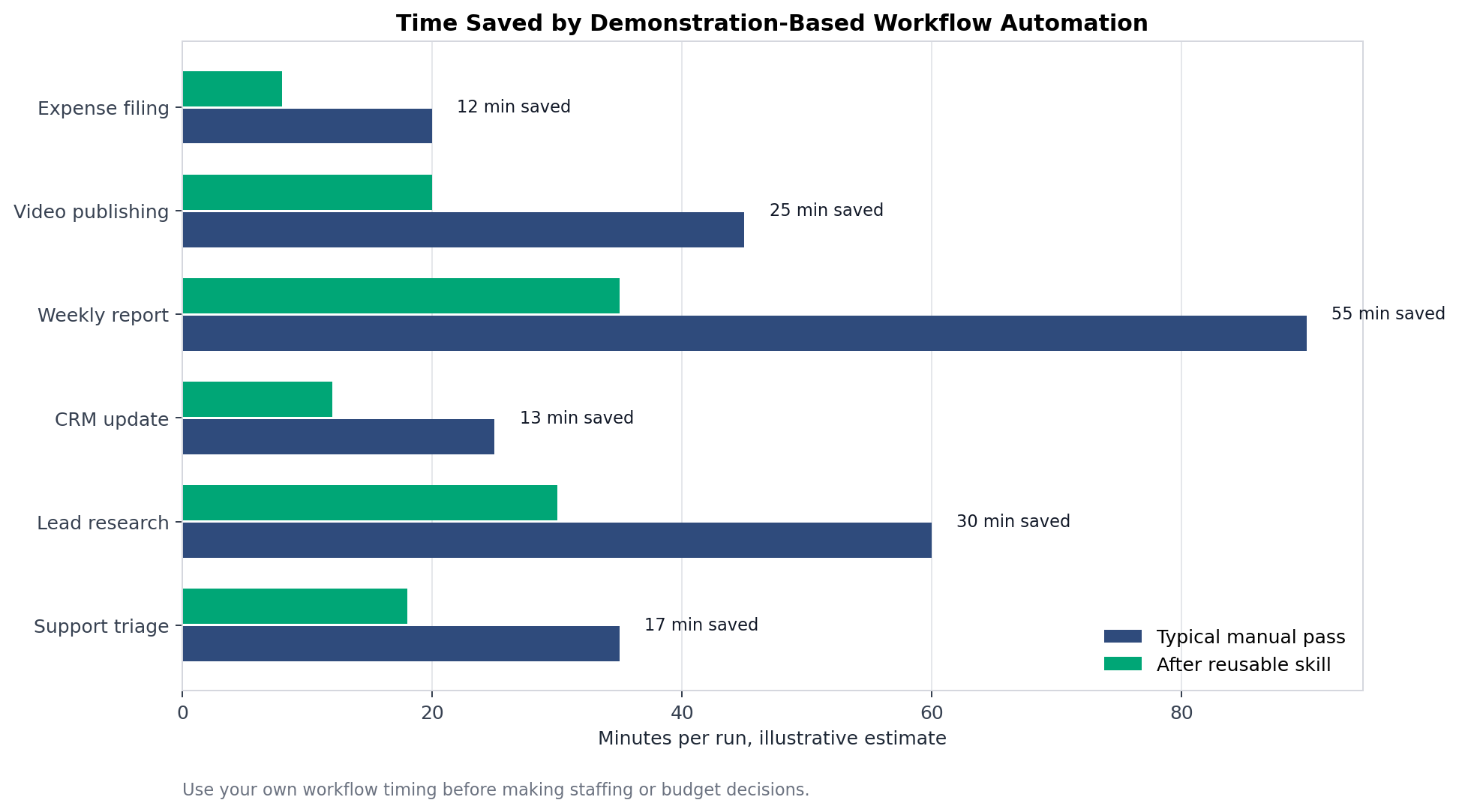
The strongest candidates have three traits:
- The task happens often.
- The manual process takes more than a few minutes.
- The cost of a mistake is manageable with a review gate.
A workflow that saves 12 minutes once a quarter is not urgent. A workflow that saves 25 minutes three times a week is worth recording. A workflow that saves 60 minutes but can accidentally submit tax, legal, customer, or payment data should be redesigned with approvals before it is automated.
How Kingy AI Could Use Record & Replay
Kingy AI is a good example because it mixes research, publishing, SEO, media production, internal linking, WordPress operations, sponsor workflows, and recurring reporting.

AI Launch Intelligence Publication
Kingy AI could record the process for taking a verified launch item from research notes to publication queue: open launch tracker, verify official source, assign category, write summary, add source links, set launch date, and mark review status. This should not replace editorial judgment. It should reduce the repetitive data-entry work around it.
Internal links: AI Launch Tracker, AI Agent Launches, and AI Coding Tool Launches.
WordPress Publishing Workflows
Kingy could record a WordPress draft workflow for long guides: upload article HTML, replace media placeholders, set featured image, fill Yoast title/meta/focus keyphrase, choose categories, add tags, preview, and publish after review. This pairs naturally with Kingy’s OpenAI Codex course for beginners and Codex Zero to Hero course.
YouTube Publishing
For Kingy videos, a skill could help prepare upload drafts, titles, descriptions, tags, thumbnails, chapters, sponsor disclaimers, and cross-links back to the site. The skill should save drafts and require final human review.
Internal Linking
An internal-linking skill could open a new article, identify natural anchor opportunities, search Kingy’s existing Codex, AI agents, AI tools, AI news, and AI courses pages, then insert links with descriptive anchors. Pair this with the AI Agent Readiness Scorecard to decide which workflow deserves automation.
Image Optimization
A recorded skill could compress images, rename assets, write alt text, upload to WordPress, and verify that images appear correctly in preview. For image-heavy posts, this could save serious production time.
Sponsor Outreach Preparation
Kingy could record a sponsor prep workflow: research sponsor fit, collect relevant site stats, prepare an outreach packet, draft email, and leave it unsent for review. This is exactly the kind of workflow where Record & Replay should assist but not autonomously send.
Daily Reporting
A daily reporting skill could gather traffic, newsletter, launch tracker, search, and affiliate metrics into a single dashboard or brief. The skill should include data freshness checks and obvious anomaly flags.
Best Practices

When to Use Record & Replay
Use Record & Replay when the workflow is:
- Repetitive.
- Stable.
- Easier to show than describe.
- Dependent on your preferences.
- Bounded by a clear beginning and ending.
- Safe to supervise.
- Verifiable after completion.
Good examples include publishing drafts, filing routine admin, downloading recurring reports, assembling content packets, updating structured fields, and navigating familiar internal tools.
When Not to Use It
Do not start with:
- Workflows involving passwords, payment submission, legal filings, medical decisions, or account security.
- Highly variable judgment tasks.
- Processes you do not understand yourself.
- Sites or apps that change constantly.
- Tasks where the wrong click causes serious harm.
- Workflows that violate platform terms.
- Workflows that require bypassing CAPTCHAs, paywalls, or consent checks.
Workflow Design
Treat the recording as a training session. Before recording, write down:
- Trigger: when should the skill be used?
- Inputs: what changes each time?
- Defaults: what should stay the same?
- Decision points: where does judgment enter?
- Review gates: what must be approved?
- Completion criteria: how do we know it worked?
- Rollback: what should happen if something goes wrong?
Stable Processes
Record & Replay works best on stable processes. If the UI changes every week, the skill will need maintenance. If the workflow has five different branches, record the simplest branch first and add branches later.
Error Handling
Add explicit instructions for common failures:
- If a required field is missing, ask the user.
- If the app shows an error, stop and report it.
- If the wrong record appears, do not continue.
- If a file upload fails, retry once and then stop.
- If a preview does not match expected content, do not publish.
Security Considerations
Computer Use can see screen content and interact with allowed apps. Treat visible app content, browser pages, screenshots, files, and clipboard state as context Codex may process while the task runs. Keep sensitive apps closed unless they are required. Stay present for account, security, privacy, payment, credential, or customer-data flows.
The Anthropic computer-use docs make a similar point for browser and desktop agents: computer-use tools introduce special risks, especially when interacting with the internet, and human confirmation is important for consequential actions. This is not unique to Codex. It is a general property of agents that can operate interfaces.
Permissions
On macOS, Computer Use needs Screen Recording and Accessibility permissions. App approvals control which apps Codex can use. Review prompts carefully. Do not use “Always allow” for apps you do not trust Codex to use in future tasks.
Privacy
Do not record workflows that expose unnecessary personal data. If a task can be demonstrated with dummy data, use dummy data. If real data is required, keep the recording narrow and avoid unrelated windows.
Limitations
Record & Replay is powerful, but it is not a full automation platform, not a magic API generator, and not a guarantee of correctness.
Key limitations:
- Platform limitations: OpenAI currently documents Record & Replay as available on macOS. Do not assume Windows support for Record & Replay just because Computer Use has Windows support.
- Regional limitations: Initial availability excludes the EEA, UK, and Switzerland.
- Computer Use dependency: If Computer Use is unavailable, disabled, or blocked by enterprise policy, Record & Replay is unavailable too.
- Workflow brittleness: GUI workflows can break when apps redesign screens, move buttons, change labels, add modals, or alter permissions.
- Maintenance requirements: Skills should be reviewed and refined over time.
- Human review: Sensitive workflows need approval gates.
- No invented capabilities: A recorded skill does not automatically gain API access, background scheduling, or permission to act in apps not available in the current environment.
- Not a plugin replacement: OpenAI says if you need a distributable stable package across a team, multiple skills, app integrations, MCP servers, or install metadata, build a plugin instead.
Skills vs Plugins
This distinction matters.
A skill is reusable context for Codex. It can describe when to use a workflow, what inputs it needs, what steps to follow, and how to verify the result. Record & Replay is a fast way to create a skill from a demonstrated workflow.
A plugin is a larger package. OpenAI says to build another plugin when you want to distribute a stable package across a team, bundle multiple skills, include app integrations, add MCP servers, or manage install metadata.
In practical terms:
| Use a recorded skill when… | Build a plugin when… |
|---|---|
| One person or small team wants to reuse a workflow | Many people need a maintained package |
| The process is mostly instructions and UI actions | The process needs code, APIs, MCP, or app integrations |
| You are still learning the best workflow | The workflow is stable and worth productizing |
| You want speed | You need governance, distribution, and versioning |
For deeper Codex customization context, see Kingy’s AGENTS.md guide and OpenAI Codex command guide.
The Bigger Picture

Record & Replay is part of a larger shift toward demonstration-based automation. The old way to automate work was to write code, create a Zap, document an SOP, or tell an assistant what to do. The new pattern is more fluid: a human demonstrates work, the AI converts that demonstration into reusable instructions, and the organization gradually turns repeated work into agent-readable assets.
This matters because a huge amount of business knowledge is procedural and tacit. People know how to do things that they cannot easily explain. They know which dropdown usually matters, which field gets skipped, which warning is safe, which preview looks wrong, which export is trustworthy, and which naming convention keeps the team sane. Prompting misses that unless the user remembers to say it. Demonstration captures more of the real process.
The deeper shift is from individual chats to reusable operational memory:
- Prompts become workflows.
- Workflows become skills.
- Skills become team assets.
- Team assets become governed automation.
- Governed automation becomes agentic infrastructure.
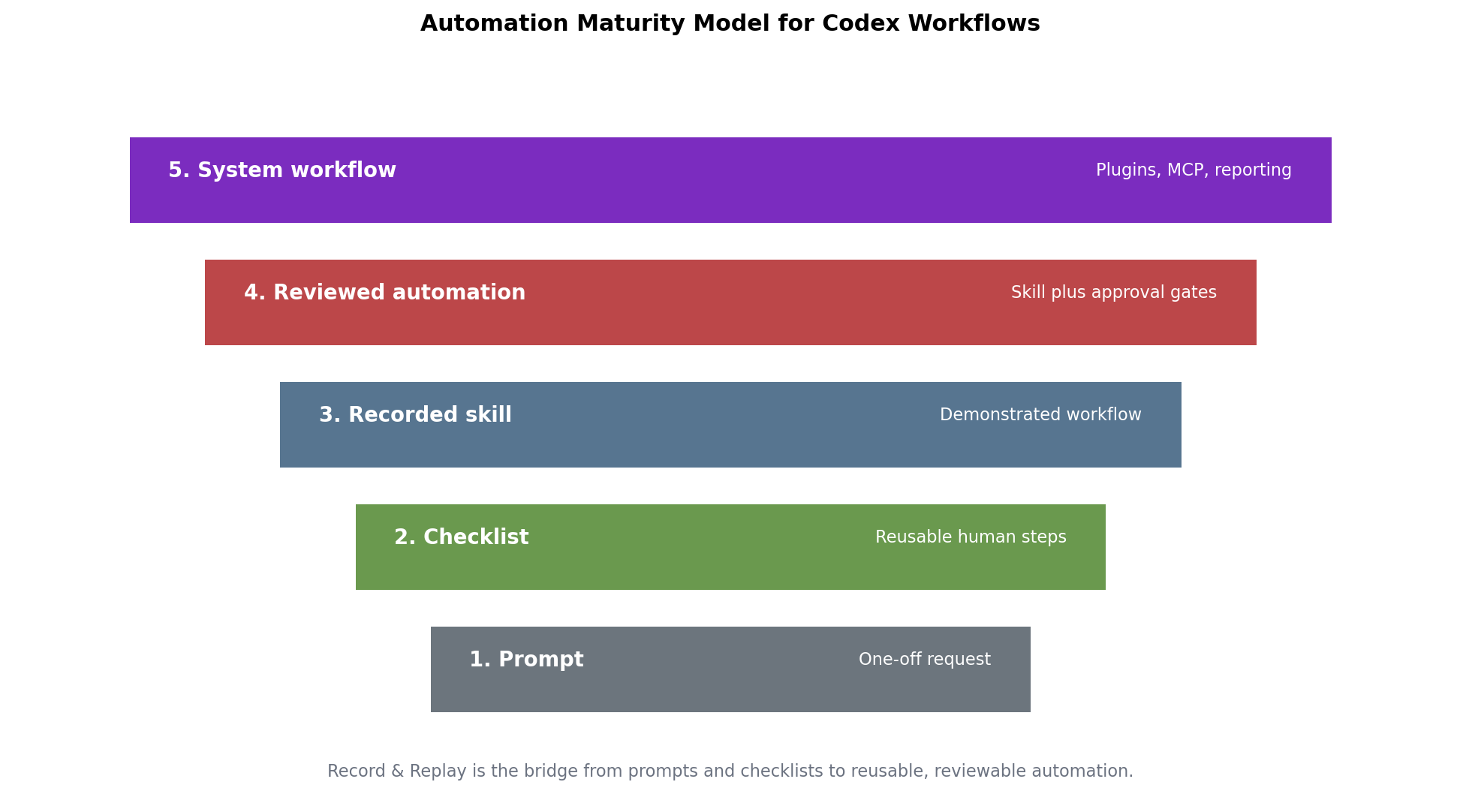
This is where Record & Replay connects to the future of personal automation and agentic workflows. It gives non-developers a way to teach agents. It gives developers a quick path from observed human workflow to a draft skill. It gives operations teams a way to capture process knowledge before hardening it. It gives enterprises a bridge between messy GUI work and structured automation.
The future will not be one giant agent doing everything. It will be many narrow, reviewable, reusable workflows: some prompted, some recorded, some scripted, some integrated through APIs, some governed by plugins and MCP, and some kept human-only because the risk is too high.
Comparison Matrix
| Tool pattern | Best for | Weakness | Human role |
|---|---|---|---|
| Prompting Codex | New tasks, reasoning, debugging, writing | Repetition requires restating context | Define goal and review output |
| Codex Record & Replay | Stable demonstrated workflows | UI brittleness and availability limits | Demonstrate, refine, approve |
| Codex plugin | Distributable team workflows and integrations | More setup and maintenance | Design, package, govern |
| Zapier | App-to-app automation and AI orchestration | Depends on integrations and platform model | Configure, monitor, govern |
| Claude Computer Use | Custom computer-use agent environments | Beta tool risk and implementation work | Build environment and supervise |
| Playwright/Selenium | Browser testing and deterministic automation | Requires engineering and selectors | Write scripts/tests |
| Human-only SOP | High-judgment or sensitive tasks | Does not scale well | Own the decision |
Workflow Qualification Checklist
Before recording, score the workflow from 1 to 5 in each category:
| Category | Question | Good sign |
|---|---|---|
| Frequency | How often does this happen? | Weekly or more |
| Stability | Do the steps change? | Rarely |
| Clarity | Can you define done? | Yes |
| Risk | What happens if it goes wrong? | Low or reviewable |
| Inputs | Are variables known? | Yes |
| Verification | Can Codex check success? | Yes |
| Sensitivity | Does it expose secrets or private data? | No or minimized |
| ROI | Does it save meaningful time? | 15+ minutes per repeated run |
If the total is high and risk is manageable, record it. If risk is high, redesign the workflow with approval gates or keep it human-only. The AI Agent Readiness Scorecard is a useful companion for this kind of triage.
Practical FAQ
What is Codex Record and Replay?
Codex Record and Replay lets you demonstrate a workflow on your Mac and turn it into a reusable Codex skill. It is designed for repetitive workflows that depend on your preferences or are easier to show than describe.
Does Record & Replay require Computer Use?
Yes. OpenAI’s Record & Replay docs say Computer Use must be available and enabled. On macOS, Computer Use requires Screen Recording and Accessibility permissions.
Is Codex Record & Replay available on Windows?
OpenAI’s current Record & Replay docs say Record & Replay is available on macOS. Computer Use can support Windows in supported regions, but you should not claim Record & Replay Windows support unless OpenAI updates the Record & Replay documentation.
Are generated skills editable?
Phrase this carefully. OpenAI says after recording, Codex drafts a skill and you can ask Codex to refine it. Codex skills are file-based workflows centered on SKILL.md with optional supporting files. Do not claim a dedicated visual skill editor unless you have verified it in the product.
Can Record & Replay automate logged-in websites?
It can replay workflows using the tools available in the current environment, including Computer Use, browser actions, and installed plugins. If the workflow uses a logged-in website, treat approved actions as actions from your account. Use review gates for publishing, payments, customer data, account settings, and other consequential actions.
Can Record & Replay run on a schedule?
Record & Replay creates reusable skills. Scheduling is a separate automation concern. Codex has Automations features, but do not assume a recorded skill automatically runs on a schedule without configuring the relevant Codex automation and available tools.
What should I avoid recording?
Avoid secrets, passwords, sensitive customer data, personal data, payment flows, security settings, legal filings, medical or financial decisions, and any workflow where the wrong click creates serious harm.
When should I build a plugin instead?
Build a plugin when you need to distribute a stable package across a team, bundle multiple skills, include app integrations, add MCP servers, or manage install metadata. Use Record & Replay for faster workflow capture and skill drafting.
Final Take

Codex Record & Replay is not just another automation button. It is a sign that AI work is moving from one-off prompting toward teachable, reusable, inspectable workflows. The most important skill for power users will not be writing longer prompts. It will be designing better demonstrations, cleaner workflows, safer approval gates, and more useful reusable skills.
For creators, it can reduce publishing friction. For marketers, it can standardize campaign operations. For founders, it can turn founder-only process knowledge into repeatable execution. For operators, it can shrink recurring admin work. For developers, it can become the first draft before a workflow is hardened into code. For enterprises, it is another step toward human-to-agent knowledge transfer.
The right way to use it is simple: start small, record cleanly, avoid secrets, refine the skill, replay under supervision, and harden only the workflows that prove their value.
Sources and Further Reading
- OpenAI: Record & Replay documentation
- OpenAI: Codex Skills documentation
- OpenAI: Computer Use documentation
- OpenAI: Codex Automations documentation
- Anthropic: Claude computer use tool documentation
- Zapier: What is Zapier?
- Playwright: Installation and getting started
- Selenium: Browser automation documentation
- Kingy AI: The Complete Guide to OpenAI Codex
- Kingy AI: Codex App Super Guide
- Kingy AI: OpenAI Codex vs Claude Code
Kingy Launch Brief
Put the week’s verified AI launches in your inbox.
Get a source-checked briefing on consequential AI launches, with a clear try, watch or skip verdict. Beehiiv will ask you to confirm your address, then you can choose the subjects you want to follow.
Free · Choose your subjects · Double opt-in · Unsubscribe anytime