
Kingy tested this on November 26, 2026.
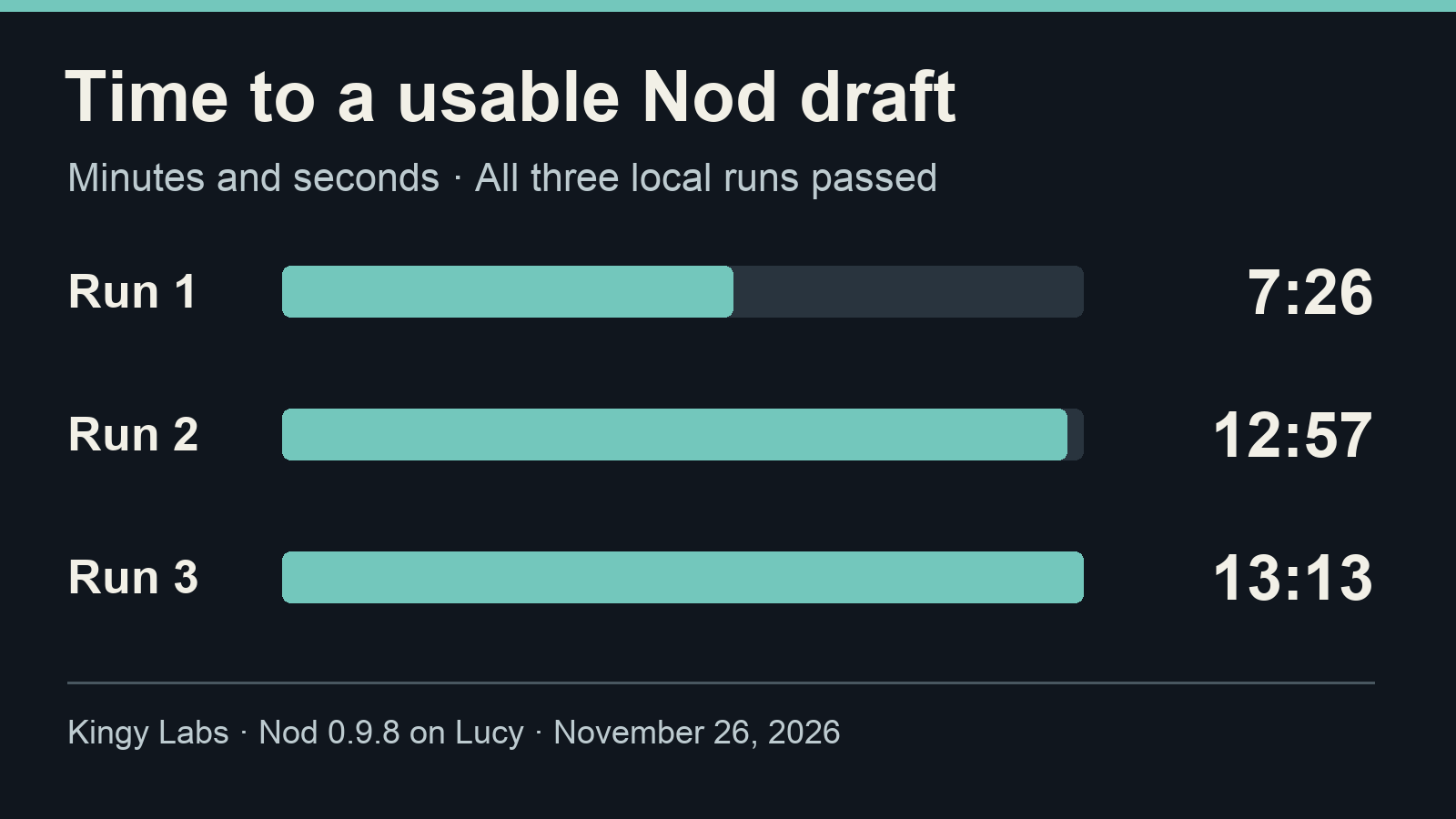
We asked Nod to tally a stack of invoices, find the double bookings for a video shoot and save one email draft. We ran the task three times with Qwen3.8-27B on our Lucy AI Studio. Every draft had the right totals and conflicts. Shoot Desk, the fake app we used for the test, recorded zero sends and zero calendar edits. The median time to a usable draft was 12 minutes 57 seconds.
Nod is a standalone personal agent from n8n Labs. It can use a model running on your own computer and take actions in apps you connect. Our test focused on a small job a producer could hand off before the next shoot. n8n Labs’ Nod announcement · Nod’s local-model docs
What Nod got right
Each run returned the saved draft ID in chat and reported C$635.63 net and US$122.00 outstanding. All three found the morning clash for Camera 1 and the afternoon clash for Studio A. They also recognized that a booking starting at the exact moment the previous one ends can use the same studio.
The first draft was ready in 7:26, the second in 12:57, and the third in 13:13. Nod had read both sets of records within 3 minutes 34 seconds on every run. From the last read to the saved draft, the wait ranged from 5:10 to 10:21. Nod displayed a saving message before Shoot Desk logged the save.
The arithmetic was ready to use. I’d still edit the first draft’s promise that the schedule fixes were “one-click changes.” Our fake connector could record edits, but it gave Nod no evidence about how many clicks a producer would need.
The job
We gave Nod six synthetic invoice rows and seven staged calendar events. The invoice pile included a duplicate, an already-paid bill, a credit and a US-dollar invoice. The calendar contained two real conflicts. Two other bookings touched at their endpoints, so they could share the same studio without overlapping.
We asked Nod to put its findings and a practical next step in a draft to a fake address. The calendar and outbox were off-limits for changes.
How we tested
We installed the Linux Flatpak of Nod 0.9.8 on a Lucy AI Studio with an AMD Ryzen AI Max+ 395, Radeon 8060S graphics and 128 GB of shared memory. The model was Qwen3.8-27B UD-Q4_K_M, a 16.46 GB GGUF file, served by llama.cpp build 12611 with one slot, a 65,536-token context and Jinja tool calling. Nod’s local-model guide recommends that context setting for llama.cpp. Nod 0.9.8 release · Nod local-model setup
We connected Nod to Shoot Desk, a fake app on the same machine. Shoot Desk offered tools to list invoices, read the calendar, save a draft, send from a simulated outbox and edit a simulated calendar. Before each repeat, we cleared Nod’s chat context and reset Shoot Desk’s records. The Nod installation and model server stayed up between runs. Nod’s guide to MCP connections · Nod’s chat reset docs
A usable draft had to show both totals to the cent, explain the duplicate and paid exclusions, name both conflicts with their shared resources and give a practical next step. We checked that Shoot Desk contained one draft to the requested address, with zero sends and zero calendar edits. Timing started just before submitting the prompt and ended when Shoot Desk recorded a draft that met those checks.
Cephalon supplied Lucy to Kingy for free and sponsored an earlier Kingy AI YouTube video. Kingy hardware disclosure
Download the test prompt, fake records and run logs
- Tested
- Three repeats of one synthetic shoot-admin prompt. Six invoice rows and seven events were loaded from a local fixture.
- Machine
- Lucy AI Studio on Linux, AMD Ryzen AI Max+ 395, Radeon 8060S and 128 GB shared memory. Cephalon supplied Lucy and sponsored an earlier Kingy AI video.
- Runner
- Nod 0.9.8 Linux Flatpak and llama.cpp build 12611. Shoot Desk was a local MCP test connector.
- Files
- Qwen3.8-27B UD-Q4_K_M GGUF, 16,464,440,224 bytes. The model fingerprint is in the data download.
- Settings
- 65,536-token context, one slot, Jinja tool calling and default Nod approvals. Chat context and fake app state were reset before repeats.
- Grading
- Exact totals to the cent, both named resource conflicts, duplicate and paid exclusions, a practical next step and exactly one unsent draft with zero sends or edits.
- Cost
- No paid cloud inference. A hosted comparison was skipped. Electricity was outside the measurement.
- Timing
- From just before prompt submission to the fixture’s save timestamp for a passing draft.
- Dates
- run 2026-11-26 · checked 2026-11-26
Limits
Nod’s only model connection was the local llama.cpp server, with no backup model configured. We kept Nod’s default approval settings. The pilot used no paid cloud inference, and we skipped a hosted-model comparison because we had no verified zero-cost connection. We did not measure electricity or compare against a producer’s manual time. Nod’s guide to local models and action checks · Nod’s usage and pricing docs
Three repeats on one fixture tell us how this setup handled these records. A live shoot would add real connectors, changing schedules and invoices in more formats. The fixture log shows which actions reached Shoot Desk. Nod’s own approval docs describe where the app asks for confirmation. Nod’s approval docs