If an attack may be happening now, go to the first-hour response card or download the printable one-page PDF. Hold affected payments and call your bank’s fraud line immediately if money moved. Reach IT on a device and channel you trust. Isolate affected systems from the network when safe and preserve logs and messages. In safety-critical operations, involve the safety lead before disconnecting equipment.
Download the printable cybersecurity packet (PDF) or download the fillable version (PDF). Both include the first-hour response card and the 7-, 30-, and 90-day checklists.
Today, name the person responsible for security, protect your email and administrator accounts with phishing-resistant sign-in, check your internet-facing systems for urgent updates, verify payment changes by phone, and restore one critical file or record in a safe environment.
A small business can assign the work to an employee or managed service provider. Keep one person inside the business accountable for decisions and verification. Larger organizations need the same controls across more systems, suppliers and teams.
Secure accounts · Test recovery · Follow the 90-day plan · Check reporting rules
What attacks look like in the evidence
In the Verizon 2026 Data Breach Investigations Report, vulnerability exploitation was the first identifiable access method in 31% of the breaches in Figure 10. Phishing accounted for 16%, credential abuse for 13% and pretexting for 6%. Pretexting means using a fabricated story or identity to persuade someone to act. The figure shows selected methods among 20,023 breaches after Error and Misuse cases were excluded. The cases occurred from November 1, 2024 through October 31, 2025. The contributor sample describes investigated breaches. Your own exposure depends on the systems you run and how you secure them. Verizon 2026 Data Breach Investigations Report, Figure 10
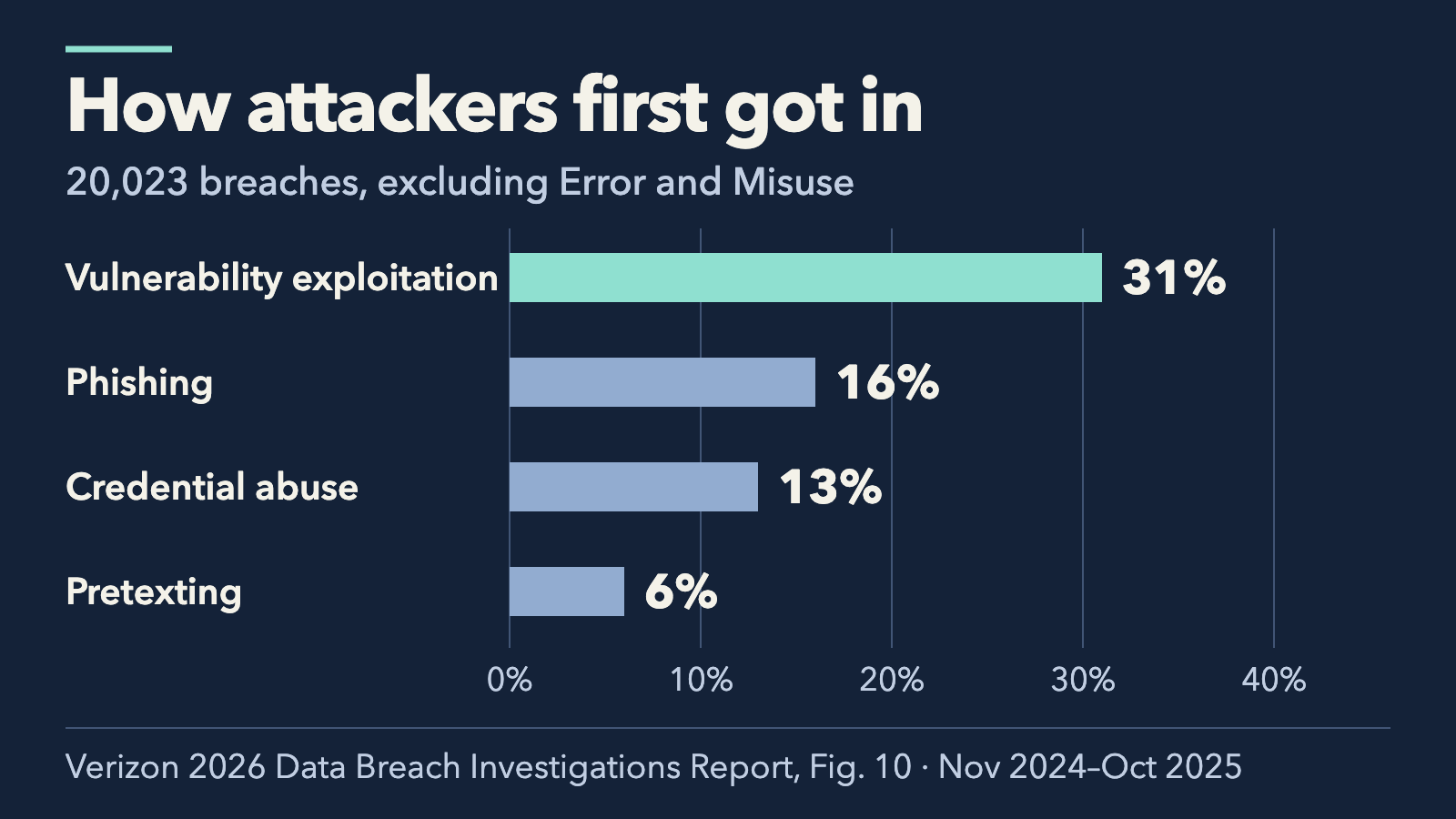
Chart source and case definitions are in Figure 10 of the Verizon 2026 Data Breach Investigations Report.
Credential abuse appeared at some stage in 39% of 20,023 breaches in Verizon’s separate analysis of the full attack chain. Verizon began tracking pretexting as an initial access category in this edition, which affects year-over-year comparisons for credential abuse. Keep patching and identity protection on the same priority list. Verizon 2026 Data Breach Investigations Report, Figures 10 and 19
The FBI’s Internet Crime Complaint Center received 24,768 business email compromise complaints in 2025, with approximately US$3.05 billion in reported adjusted losses. The portal accepts international submissions, and complaints can overlap. ENISA measured a different kind of risk. In its mainly open-source collection of 8,257 EU-related incidents during calendar 2025, distributed denial of service (DDoS) accounted for 51.3% of recorded incidents. Many of these attacks had low impact and the dataset captures targeted campaigns against public administration. Treat each dataset as evidence about the activity it covers. Businesses that depend on online availability should rehearse calling the provider that can mitigate a DDoS outage. FBI 2025 IC3 Annual Report, ENISA Threat Landscape 2026
There is no reliable worldwide attack count in these sources from which to project the next several years. For budgeting, pick scenarios you can quantify in your own business. Ask what happens if your email provider is unavailable during a payment run, your order system is down for two days, or a supplier with remote access is compromised. Include the cost of staff time, interrupted sales, delayed operations and incident response. Give each scenario an owner and a recovery test.
The first hour when an attack is suspected
Keep a paper or protected offline copy of this card outside your normal email and document system. Fill in the numbers before you need them. Adjust the order to the incident and the safety of the people involved.
Incident lead and backup [names and trusted numbers]
IT responder and safety lead [names and trusted numbers]
Bank fraud line [number from bank records]
Time and time zone [first report and when the business became aware]
Affected workflow or payment [what is known and who is affected]
Decisions and actions [who did what and when]
Next update [time, audience and trusted channel]
- Record and call. Note the time, what was observed and who reported it. Contact the incident lead, IT provider and relevant business owner using a trusted number. If a payment may be fraudulent, call the originating bank immediately and ask about a recall or reversal. Recovery is not guaranteed.
- Move to a clean channel. Use a known-clean device and an agreed phone number or separate communications service. Assume a compromised mailbox or chat account may be observed.
- Contain safely. Isolate affected devices from the network and restrict compromised accounts where safe. Coordinate safety-critical changes with operational leaders. During active ransomware, if you cannot isolate an infected device and it is safe to do so, powering it down may limit spread. This can lose evidence held in memory. Follow your responder’s direction when available and preserve devices for investigation. CISA ransomware response checklist
- Preserve evidence. Keep suspicious emails, payment details, timestamps, relevant logs and a record of each action and decision. Restrict access to the material. Your responder can advise what else to preserve.
- Secure compromised accounts. From a known-clean administrative path, disable or restrict affected access, revoke sessions and tokens where applicable, rotate relevant credentials, and inspect recovery methods, forwarding rules and connected applications. Follow your identity provider’s instructions because session revocation differs across services.
- Assess and notify. Identify affected systems, data, customers and jurisdictions. Involve legal, privacy, insurance and specialist responders as appropriate. Record notification decisions and deadlines. Notify authorities, customers and partners when applicable obligations or circumstances require it. Check reporting triggers
- Start continuity and plan recovery. Activate any approved manual workaround. Before reconnecting systems, address the entry point, rebuild from trusted sources, restore verified data, and have business owners test the affected workflow. Monitor for renewed activity. NIST incident response guidance, Canadian Cyber Centre ransomware playbook, FBI business email compromise guidance, Microsoft account containment example
Choose the response that fits the symptoms
- Money went to the wrong account. Finance calls the originating bank and asks what it can do to stop or recall the transfer. Have the amount, reference, time and receiving bank information ready. Hold related payments. Verify the supplier’s details through a number already on file, and give IT the original messages to investigate. A recall depends on the bank, payment rail and timing. FBI business email compromise guidance
- Someone else appears to control a mailbox or administrator account. The identity administrator contains the account through a clean sign-in, revokes sessions as supported, checks new recovery factors, mailbox rules, delegates, app approvals and audit records, and resets credentials. Check other applications that relied on that account, since each can maintain its own session. Review what was sent or shared before trusting the mailbox again. Microsoft email account recovery, Microsoft session revocation guidance
- Files are being encrypted or a ransom demand appears. Isolate affected systems where safe, alert a qualified responder, and protect backup access. Keep a record of the demand without sharing it publicly. Follow the responder’s process to determine what was accessed and which recovery points remain trustworthy. Bring counsel and your insurer into ransom decisions early. Payment carries uncertainty and may create legal exposure. Canadian ransomware playbook, CISA ransomware response checklist
- A website or API goes offline. Check provider status and your own service and traffic telemetry. Escalate to the hosting, network or DDoS protection provider with the affected service and start time. Record what you observe before attributing the outage to an attack. Use the separate customer status channel if you have one. Joint DDoS response guidance
Start with ownership and the work that must continue
Write down the activities your business must keep running, such as receiving orders, treating patients, paying staff or operating a production line. For each, identify the systems, people, suppliers, accounts and data it depends on. Include email, your identity provider, the domain registrar, finance and payroll, backups, remote access, cloud services and outsourced IT. Record an owner and a way to contact that owner when email is unavailable.
A small firm may keep this in a short, protected spreadsheet with a printed emergency contact card. An enterprise needs a maintained inventory connected to its service owners and risk register. Either way, an inventory is useful only if someone checks it against what is actually in use. NIST Cybersecurity Framework 2.0, Canadian small and medium organization baseline
Assign a decision-maker, even when an outside provider performs the work. The owner approves priorities and exceptions. IT or the provider maintains systems and supplies evidence. Finance owns payment controls. People managers tell IT when access must change. Legal or privacy staff assess applicable reporting duties. In a small company one person may hold several roles, but the responsibility for each task should still be explicit.
Two incidents that show where to look
In May 2024 testimony to the US Senate, UnitedHealth Group CEO Andrew Witty said attackers used compromised credentials to access a Change Healthcare remote desktop portal on February 12. The portal lacked multifactor authentication, and ransomware followed nine days later. Inventory every remote entry point, including legacy and acquired systems, check its enforced sign-in policy, and make sure someone investigates suspicious access after login. Andrew Witty’s Senate testimony
The British Library’s review of its 2023 attack describes secure copies of collections alongside the loss of usable infrastructure. Some major legacy software could not be restored in its previous form. In your next recovery exercise, have someone stand up the application and its dependencies from the documentation, then have a business user complete a real workflow using test data. British Library incident review
Secure accounts before buying more tools
Start with the accounts running your identity provider, email, domain registrar, backups, remote access, finance, payroll and password manager. Require phishing-resistant multifactor authentication where supported, such as FIDO2 security keys or compatible passkeys. Review which fallback and recovery paths can override the policy. If you use push approval and need time to migrate, enable number matching where available as an interim step. Record its owner and expiry date. CISA phishing-resistant MFA, CISA number matching guidance
Plan recovery before enforcing a new sign-in method. Give each critical administrator a second enrolled key or another controlled recovery route. Protect emergency access with independently stored credentials and alert on its use. Test what happens if a key, device or external sign-in provider is unavailable. For an outage of the identity platform itself, document which business workflows can operate independently and how to reach provider support. Microsoft emergency access guidance
Use a managed password manager and unique passwords where passwords remain necessary. Give administrators separate accounts for ordinary work and privileged tasks. Limit standing privileges, review service accounts and connected applications, and remove access promptly when employees or contractors leave. NIST’s identity guidance does not recommend routine password changes without evidence of compromise. NIST digital identity guidance
In Microsoft Entra, register compatible methods first, then use a Conditional Access policy with the Phishing-resistant MFA authentication strength. Start in report-only mode, inspect the outcome for the pilot group, and handle separately protected emergency accounts under Microsoft’s guidance before enforcing. In Google Workspace, pilot the 2-Step Verification Only security key setting, which also accepts supported passkeys. Test enrollment, the grace period and the recovery process before broad enforcement. Check licensing and device support for your tenant. Microsoft Entra guidance, Google Workspace guidance
Check it works. The identity owner exports the list of privileged accounts and compares it with the users covered by each enforced policy. In a pilot with a designated test account, verify that a supported key works and that a weaker method cannot satisfy the protected sign-in. Try the approved recovery route. Record the owner and expiry date of each exception, especially for older applications.
For departing staff, give HR and IT a single checklist that covers the central identity account, local accounts, group memberships, active sessions, shared credentials and company devices. Include third-party apps with their own logins. For workloads, give each integration its own identity, scope it to its task, and prefer short-lived credentials where supported. Review accounts or credentials with no current owner. CIS Controls for account and access management
Find exposed systems and fix the most dangerous weaknesses
Maintain a list of public websites, applications, firewalls, routers, VPNs, remote access services and administrative interfaces. Record the owner, software version, business purpose and whether each needs to be reachable from the internet. Include systems managed by suppliers. Remove unnecessary exposure, particularly public management interfaces, and retire unsupported products or isolate them while an approved replacement is arranged.
Prioritize updates by known exploitation, exposure, business impact and vendor advice. CISA’s Known Exploited Vulnerabilities catalog is one useful input. Use applicable legal and contractual deadlines and set internal targets for remaining systems. Verify the installed version or mitigation after deployment and record who owns any exception and when it expires. NIST enterprise patch management, CISA Known Exploited Vulnerabilities catalog
Give the on-call owner an emergency lane. For example, if your vendor confirms active exploitation in a version of a VPN you expose, assess it the same day. Confirm the affected version from your own inventory, apply the vendor’s update or approved mitigation, and verify from management records that all instances changed. If a change would interrupt a critical workflow, arrange an approved alternative or reduce exposure while you fix it. A routine update to an internal device with no known exploitation can go through your normal testing window. Set deadlines for both and escalate a missed deadline to the service owner.
When a fix cannot be installed immediately, follow appropriate vendor mitigation, reduce exposure or isolate the service. If you suspect attackers already used the weakness, applying a patch does not establish that they have left. Treat that as an incident requiring investigation.
Check it works. Compare the exposure list with your own DNS records, cloud inventory and contracts. Ask the owner for the before-and-after versions of a sample of completed updates. Review each overdue high-risk item, the substitute protection and the date it expires.
Protect money, email and conversations
Make a payment rule that applies even when a request sounds urgent or comes from the chief executive. For new bank details, changed supplier details or unusual transfers, pause and call a previously verified number or use another independently established channel. Do not use contact details supplied in the request. For material payments, use a second approver who can independently check the change. Give employees permission to hold a transaction without penalty. FBI business email compromise guidance
Protect business email with strong sign-in and an easy way to report suspicious messages. Review external forwarding and third-party app permissions. Configure SPF, DKIM and DMARC for domains you own. List every legitimate sender, including billing and marketing services. Confirm those senders authenticate mail using your visible From domain and review DMARC reports before moving from monitoring to enforcement. A lookalike address, a compromised legitimate mailbox or a phone call still needs human verification. FBI cloud email guidance, CISA phishing guidance
Verify unusual requests through a separate channel even when the voice, video or writing sounds familiar. The UK National Cyber Security Centre saw attackers use AI tools in incidents it handled between September 2025 and August 2026. Within that caseload, its team described the AI uses it observed as enabling familiar classes of attack. Keep the same callback and payment approval process for a convincing voice or video request. UK NCSC Annual Review 2026
A small team can adopt this written rule. “Hold every request to change supplier bank details. Call the supplier on the number already in our approved records. A second authorized person checks the change before payment.” The caller can say, “We received a request to change your payment details. Did your team submit it? I am calling the number already in our records.” Record the caller, number source, time and outcome. Keep full banking information in the system approved for it.
Check it works. Finance should rehearse a changed-bank-details request, confirm the callback uses a previously held number and retain a record of the approval. IT should test the reporting route and review mail forwarding and application grants.
Protect devices, networks and cloud services
Inventory company laptops, phones and servers. Enable automatic updates where practical, storage encryption and screen locks. Restrict local administrator rights, deploy suitable endpoint protection and ensure alerts reach someone who will respond. Decide what access an unmanaged personal device may have and how it is removed. For remote workers, use managed identity and approved remote access with multifactor authentication. UK NCSC device guidance, CIS Controls
Separate guest access from business systems. Where practical, separate user devices, servers, management interfaces and backup systems so that one compromised account or laptop cannot administer everything. Test changes before deployment and document the connections the business actually needs. Industrial and medical networks need additional planning because a routine scan, restart or disconnection can affect safety or availability. Their operational owners should approve maintenance windows and remote access arrangements. NIST operational technology security guide
For each cloud or software-as-a-service provider, establish who controls identity, security settings, logs, backups and incident communications. Limit administrative access and external sharing, remove unused app grants, protect secrets, encrypt data in transit and at rest where appropriate, and retain the data you need for the period you need it. Confirm what you can export and restore under the actual service terms. Test that a standard employee cannot make a restricted folder public or authorize an app that reads company mail without approval. If your subscription lacks a control you need, record the gap and how you will cover it. Cloud Security Alliance shared responsibility explanation, CISA cloud security guidance
Check it works. Compare the device inventory with management and endpoint-protection coverage. Verify encryption and screen lock on a sample of managed devices. Ask the cloud owner to review privileged users, external sharing and application grants, then demonstrate how a representative record can be restored.
Add safeguards for safety and payment systems
- Healthcare. Ask clinical leads to rehearse how staff will record orders, medication and handoffs while electronic systems are unavailable. Keep approved forms and contact details accessible and test how staff will reconcile those records when systems return. HHS healthcare planning and recovery guidance
- Manufacturing and operational technology. Ask site engineers to map the connections between business IT, control networks and vendor access. Begin with existing documentation and approved passive observation. Schedule active checks, updates and restarts through engineering and safety change control. NIST operational technology security guide, Australian Cyber Security Centre operational technology principles
- Retail and e-commerce. Ask your acquiring bank or processor which payment security responsibilities you retain and how it will contact you during a suspected compromise. Keep unprotected card numbers out of ordinary email, text and chat. PCI Security Standards Council merchant guide, PCI SSC guidance on messaging
Make recovery a tested business capability
Keep a separate offline or immutable copy of critical data, protect backup administration from ordinary production accounts, and include the configurations, identity recovery information, databases and SaaS data needed to restart critical work. An immutable copy is protected against deletion or alteration for a defined retention period. Confirm that the account that can delete production data cannot also erase every recovery copy. Store encryption keys and recovery instructions securely and make sure authorized people can obtain them if production sign-in is down. Canadian ransomware playbook
For each critical service, agree on two targets with its business owner. The recovery time objective (RTO) is the target time to restore service. Set it within the maximum downtime the business can tolerate. The recovery point objective (RPO) is how far back in time the restored data can be, which sets the amount of recent work you might have to reconstruct. A payroll system and a live booking service may need different targets. NIST contingency planning guide
Restore representative data into a safe environment. Open files, reconcile records, check permissions and measure the time until the business function works. Test dependencies and restoration order, including identity and network access. Record what failed, who will fix it and when the test will be repeated. Plan separately for data theft and disclosure since restoration cannot retrieve copies already taken. Canadian ransomware playbook, CISA ransomware guide
Take a booking service with a four-hour RTO and a one-hour RPO. In the exercise the service fails at 10 a.m. The team restores a 9:20 a.m. copy. Operations signs in, finds an existing booking, creates a new test booking and reconciles it with the calendar by 1 p.m. The exercise meets both targets at three hours to restore and 40 minutes of data to reconstruct. An 8:45 a.m. copy would miss the RPO even if the service came back on time. Record the result and the workaround for bookings received during the outage. Assign an owner and date to fix any failed check.
Give alerts an owner
Collect the records needed to understand an incident, starting with identity and administrator activity, cloud and email changes, endpoint detections, network edge events, and changes to backups or security policies. Protect the logs, synchronize system clocks and choose retention periods that fit investigation needs and applicable obligations. Australian Cyber Security Centre event logging guidance
Start with events someone can investigate, such as a new administrator, suspicious sign-in, unexpected forwarding rule, new app consent, endpoint detection or attempted backup deletion. Name a primary and backup responder, including outside working hours if the risk requires it.
Check it works. Use a provider’s test function or an approved benign change in a test environment. For each route, verify that a ticket or page reached the right person, contained enough context to act on and was acknowledged within your target. Start with high-risk admin changes and backup failures. If a provider promises around-the-clock response, verify what its contract covers and rehearse the after-hours contact path.
Check suppliers and managed service providers
Rank suppliers by the access they have, the sensitivity of data they handle and the disruption their failure would cause. For the most important providers, document their responsibilities for updates, monitoring, backups and incident notification. Obtain support contacts, agree how you will communicate during an outage, and plan how to retrieve data or change providers. Check whether several critical services depend on the same identity, DNS or communications provider. NIST supply-chain risk quick start
Give providers individually attributable accounts, multifactor authentication and only the access needed. Review remote access periodically and remove it when the work ends. Ask for evidence relevant to your service, such as a restore exercise or a clear explanation of alert coverage. Review the scope and date of any certification against the service you use. Joint guidance for managed service providers and customers
When buying a service with privileged access, ask the provider to show three things before you sign. Ask who can enter your environment, how your team gets alerts and logs, and what happens if you need to revoke access and export your data that day. Put the answers and the incident notice window in the contract. Run an exit drill for a critical provider that includes rotating credentials, taking an export and confirming who retains access.
Secure software and AI your business deploys
If your business builds software, assign ownership for public applications and APIs. Test that one test customer cannot view or change another test customer’s records. Keep production secrets out of code and test environments, review dependency updates, and limit who or what can publish a release. Keep an inventory of critical components, a known-good release and a tested rollback path. For a site that generates revenue, agree on denial-of-service protection, rate limits that preserve genuine customer traffic, and an escalation contact with your hosting and network providers. NIST Secure Software Development Framework, OWASP Application Security Verification Standard, CISA DDoS guidance
Maintain a list of approved AI services and their connectors. Check provider terms and restrict sensitive inputs, data retention and access according to your obligations. If an AI agent can read business data or take actions, give it a separate, minimally scoped identity. Treat documents, messages and web pages it reads as untrusted input. Set permissions and approval requirements in the connected tools, record who authorized an action, and make access revocable. For example, a support assistant might read only tickets assigned to it and draft replies. Keep sending, bulk export and refunds behind an authorized employee’s review. In a sandbox with sample data, verify the assistant cannot perform those actions without approval and that you can disable its connector. UK NCSC secure AI development guidelines, OWASP GenAI Security Project
A 7, 30 and 90-day plan
Use these milestones to assign work. Move faster on an active threat or an exposed critical service. Adjust for staffing, operational safety and applicable deadlines.
First 7 days
Download the first-week cybersecurity checklist (PDF)
- Business owner. Name leads for IT, finance and response. Record critical workflows and emergency contacts, and keep an offline copy.
- IT lead. Secure priority accounts, review urgent updates for exposed systems and restore one critical record safely. Keep the account coverage list, named patch exceptions and evidence that the restored record opens.
- Finance lead. Set the callback and approval rule. Have the two people who will run it rehearse a supplier bank change and record how they verified it.
By day 30
Download the 30-day cybersecurity checklist (PDF)
- IT lead. Inventory devices and cloud services, remove unnecessary access and review mail and sharing controls. Test priority alerts and confirm who responds out of hours.
- Recovery owner. Run a full-service restore exercise. Keep the elapsed time, data recovery point and a business user’s sign-off on the restored workflow.
- Business owner. Confirm who patches, monitors and restores each critical supplier service. Keep contacts and escalation times where the response lead can find them.
By day 90
Download the 90-day cybersecurity checklist (PDF)
- IT and service owners. Expand phishing-resistant sign-in, verify network separation and test recovery if a major dependency is unavailable. Resolve overdue exceptions or obtain an accountable decision with a new deadline.
- Incident lead. Run a response exercise with finance, IT and a business owner. Record which controls worked, the actions people missed, and who will close each gap. Schedule a retest of the failed steps.
Where to put time and money
- Small firm with no dedicated IT. Assign a staff owner and use supported, managed services. Start by checking the sign-in, device update, logging and backup controls you already pay for. If you cannot check them yourself, ask a provider for a scoped job with a list of protected accounts, a verified restore and a named incident contact as deliverables.
- Growing business with internal IT. Put device inventory and updates under central management, assign an owner for cloud permissions, and cover nights or holidays for incidents that cannot wait. Where that coverage is missing, compare providers on which systems they monitor, who answers after hours, whether they can contain an incident, and how they prove an alert made it to a responder.
- Enterprise or regulated operator. Build the plan around critical services and their suppliers. Separate administration of production, identity and backups where feasible, test recovery without the primary identity or network dependency, and assign decision authority for containment, public communications and legal obligations. Give the board named risks, overdue decisions and results from exercises.
Ask of every purchase what risk it reduces, which systems it covers, who will run it, and how you will test it. Price staff time, integration, monitoring and recovery support along with the subscription. Put the next dollar or hour into the biggest verified gap in a critical workflow.
A worked example
Consider a hypothetical 25-person distributor with cloud email, a finance application, a hosted website and outsourced IT. The owner lists order processing and payroll as critical. The finance manager owns payment callbacks. The IT provider owns updates, supplies the internet-facing inventory and agrees to alert the business immediately about urgent exposures. The owner keeps the provider’s emergency contact outside company email.
At 9:10 on a Tuesday, a clerk spots changed bank details on a supplier invoice after the payment is sent. Finance calls the bank from the fraud number in its own records and asks for a recall. It holds any other payments under the same change. The owner opens the incident log and calls the IT provider using the offline contact list. The provider secures the affected account from a clean device and checks recent sign-ins, changed rules and connected apps. Finance calls the supplier using the number on record. That response starts while the bank investigates, whatever the eventual outcome.
The team then checks what the exercise or incident taught them. Can a clerk find the bank number in two minutes? Who handles the next supplier payment while finance email is isolated? Does the IT contract cover log review for the affected tenant? The owner turns each unanswered question into a task with a deadline and repeats the drill after fixing the gaps.
Review the evidence and decide what to fix next
At least monthly, the accountable owner should review critical risks, overdue patches, privileged access changes, alerts and backup results with the people doing the work. Review sooner after a significant system change, incident or relevant threat. At least quarterly, exercise a recovery or incident scenario appropriate to the business and review important supplier access. Frequency is an editorial starting point, not a legal rule.
At a weekly operations check, review open urgent vulnerability tickets and exceptions, verify that protected backup jobs are still running and aging alerts have owners, and check whether staff departures or supplier changes left access behind. Route urgent vendor notices and suspicious activity to an owner as they arrive.
Keep a short scorecard that makes gaps visible:
- Priority accounts protected. Divide the number covered by an enforced phishing-resistant policy by the total in the defined priority-account inventory. List exceptions separately.
- Exposed systems addressed. Divide patch or mitigation tasks closed on time by all tasks due for the period. Track high-risk overdue items by asset, owner and age.
- Recovery demonstrated. Record the date and result of the latest representative restore and compare observed recovery time and data loss with the targets.
- Alerts routed. Record how many selected test alerts reached the right person and were acknowledged within the agreed time. Assign follow-up for each failure.
- Payment verification. Sample changes to supplier bank details and confirm the callback and second approval were recorded before the payment, where required under your policy.
- Access and supplier reviews. Track unresolved privileged accounts, expired exceptions and the date of the last review.
Keep the inventory and definition behind each metric. If 49 of 50 priority accounts are protected, name the remaining account and the risk it carries. When a safeguard cannot be applied, record the reason, affected system, temporary protection, responsible decision-maker and expiry date.
Know whom to notify before an incident
Build a contact list for the bank and payment processor, your incident responders and insurer, local cybercrime or incident-reporting authorities, privacy or sector regulators, critical suppliers and affected customers. For each applicable obligation, record the trigger, when the clock starts, the deadline, the notice recipient and the person who signs it off. Time-stamp when the organization learned of the incident, what it knew then, and later decisions as facts become clearer. A police report and a regulator notice serve different purposes.
These examples show how the triggers and clocks differ. Your legal or privacy lead should confirm the current local rules, sector requirements and contractual deadlines that apply.
- EU and UK. Under EU and UK GDPR, a controller reports a personal data breach unless it is unlikely to pose a risk to people’s rights and freedoms. For reportable breaches, notify the relevant authority without undue delay and, where feasible, within 72 hours of awareness. A likely high risk can also trigger notice to affected people. Check distinct requirements under local NIS2 implementation and the Cyber Resilience Act if your business or products are in scope. European Data Protection Board, UK ICO, European Commission CRA reporting
- United States. Check state and sector rules. SEC registrants covered by Form 8-K Item 1.05 generally have four business days from determining a cybersecurity incident is material, subject to specified exceptions. The materiality decision must be made without unreasonable delay after discovery. IC3 provides a separate route for reporting cybercrime or fraud. SEC Form 8-K, FBI IC3
- Canada. Under PIPEDA, covered organizations report breaches that pose a real risk of significant harm to the Privacy Commissioner and notify affected people. They must also keep records of all covered breaches. Check provincial and sector rules for your operations. Office of the Privacy Commissioner of Canada
- Australia. Under the Notifiable Data Breaches scheme, covered entities assess likely serious harm and the effect of remedial action. When the breach is eligible, notify the OAIC and people at risk as soon as practicable. Check separate obligations if your business is subject to ransomware payment reporting. OAIC Notifiable Data Breaches scheme, Australian Cyber Security Centre payment reporting
- Singapore. For an organization subject to the PDPA, notice to the Personal Data Protection Commission is due as soon as practicable and at the latest three calendar days after the day the organization determines the breach is notifiable. Check separately whether affected individuals must be notified. Singapore PDPA, sections 26C and 26D
- Brazil. ANPD’s reporting rules generally require a controller to notify the regulator and affected individuals of incidents that may pose relevant risk or harm, within three working days of the controller learning that personal data was affected. Check for rules specific to your sector and exceptions for eligible small processing agents. ANPD incident reporting guidance, Brazil’s incident reporting regulation
How this maps to NIST
The NIST Cybersecurity Framework 2.0 organizes outcomes into six functions. Govern covers accountability and risk decisions. Identify covers assets, risk assessment and finding improvements after exercises and operations. Protect includes access and safeguards. Detect covers finding suspicious activity. Respond covers managing an incident. Recover covers restoring services and communicating about recovery. NIST CSF 2.0, NIST small-business quick start
Use the framework to organize decisions, then choose specific safeguards suited to your environment. CIS Controls Implementation Group 1 provides a prioritized starting point. Australia’s Essential Eight and CISA’s voluntary cross-sector performance goals offer further references for relevant environments. Alignment with a framework does not by itself establish legal compliance. CIS Implementation Group 1, Australian Essential Eight, CISA performance goals
Methodology and updates
Evidence reviewed November 22, 2026. Kingy checked the cited reports, incident accounts, standards and regulator guidance. The figures describe their respective datasets. The roadmap, response exercise and example targets illustrate how to apply the guidance in a business.
Kingy reviews this guide weekly. Material changes to recommendations, evidence or reporting rules are dated here, with the affected guidance and its source.
Sources
- Verizon 2026 Data Breach Investigations Report
- FBI 2025 Internet Crime Report
- NIST Cybersecurity Framework 2.0
- NIST incident response guidance
- Canadian Cyber Centre ransomware playbook
- CISA Known Exploited Vulnerabilities catalog
- CIS Controls Implementation Group 1
- UK NCSC guidance for small organizations