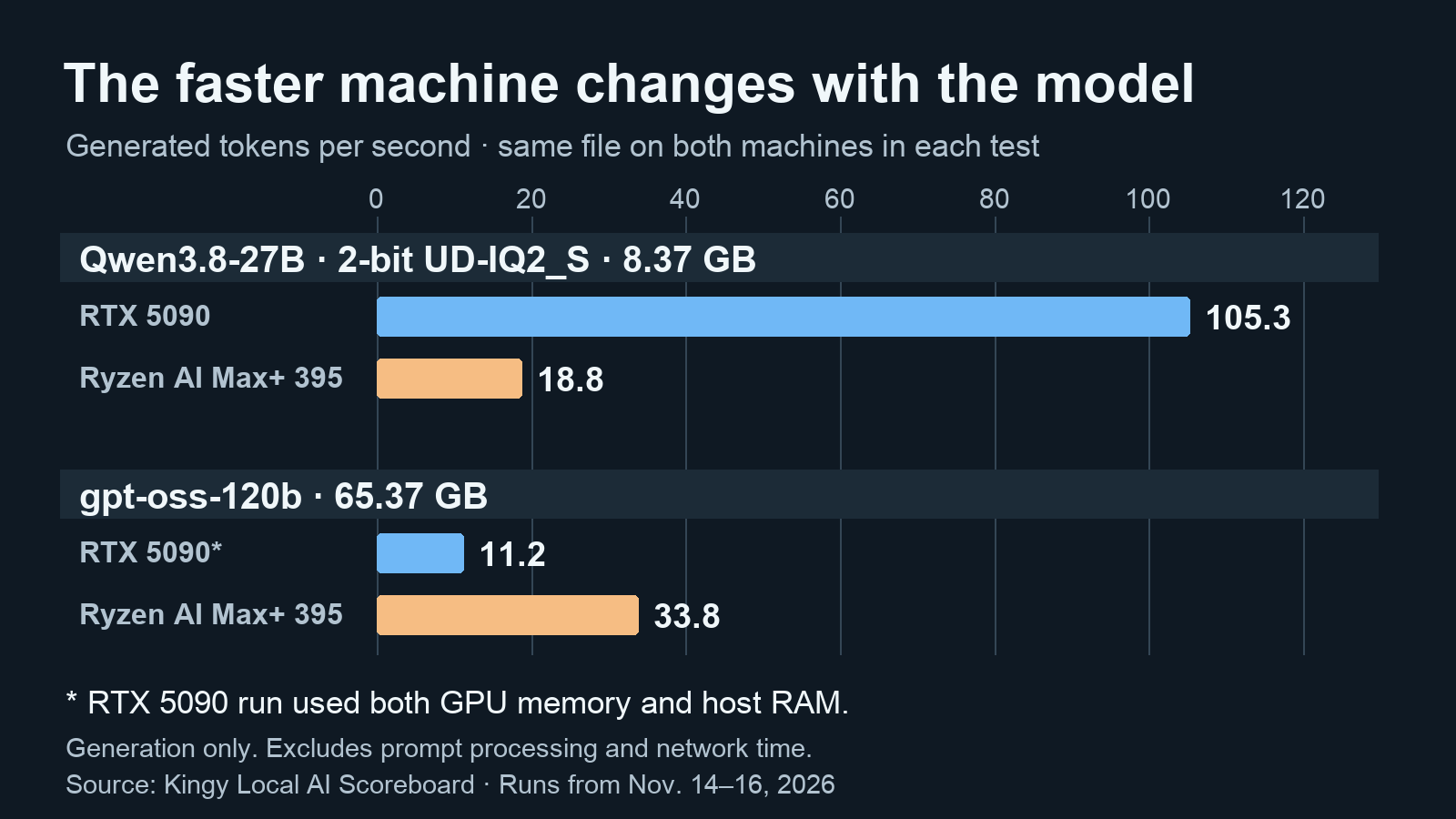
The RTX 5090 wrote our 2-bit Qwen3.8-27B replies at 105.3 tokens per second. Our 128 GB Ryzen AI Max+ 395 mini PC managed 18.8. That is a 5.60× advantage for the NVIDIA system on the same model file and settings.
On a much bigger file, gpt-oss-120b, the Ryzen machine wrote at 33.8 tokens per second. The rented RTX 5090 system reached 11.2. The 65.37 GB file could not fit in the card’s 32 GB of graphics memory, so the NVIDIA run split the model between the card and its host’s main memory. The Ryzen system was 3.02× faster in that particular comparison.
Those results describe how two complete setups ran these workloads. If the models you want fit comfortably in 32 GB of VRAM, the 5090 is the stronger speed choice in our tests. If you want to run much larger files on one machine, a 128 GB Ryzen AI Max+ 395 system opens up options that require offloading or a different GPU setup on the 5090.
We reused results from the Kingy Local AI Scoreboard, measured November 14–16, 2026. We did not run a new benchmark for this article. Cephalon sent Kingy the Lucy AI Studio for free and paid for an earlier YouTube video. It did not sponsor the scoreboard, see its results before publication, or control them. Kingy paid to rent the RTX 5090 from RunPod.
Which system fits your workload
| Your priority | Better starting point | Why |
|---|---|---|
| Fast responses from models that fit on the GPU | RTX 5090 desktop | It generated 3.7–6.3× as fast on the five smaller matched files shown below. |
| Larger local model files on one compact machine | 128 GB Ryzen AI Max+ 395 system | The CPU and integrated GPU share a much larger memory pool. Actual usable capacity depends on the machine and software. |
| Existing desktop, plus gaming or CUDA applications | RTX 5090 | It is a discrete card for a compatible PC, with NVIDIA’s CUDA software ecosystem. |
| Long documents, multiple sessions or local vision | Test the exact workload first | Prompt processing, cache size, image encoders and concurrency can change how much memory you need. |
Start with the exact file, working context and software. A heavily compressed 27B model can fit easily on the 5090. The same model at a higher precision or with a much longer context can need substantially more memory.
Kingy tested
We compared the same model files, checked byte for byte, with the same settings for each model. The Lucy AI Studio has a Ryzen AI Max+ 395, Radeon 8060S integrated graphics and 128 GB of shared memory. The other system was a rented RunPod machine with an RTX 5090 and 32 GB of VRAM. Both ran Linux and llama.cpp build 11538, compiled for different hardware backends. Lucy ran November 14–15 and the RTX system November 15–16, all UTC.
Each model received nine practical jobs three times. Seven jobs counted toward the headline quality score. The speed figures divide generated tokens by generation time logged by llama.cpp. We left out prompt processing and network travel. On the rented machine, the model generated the replies, while the jobs and grading scripts ran on Lucy. See the scoreboard’s method and full rows and the published dataset.
| Same model file on both machines | RTX 5090 system | 128 GB Lucy | What the row tells you |
|---|---|---|---|
| Qwen3.8-27B, 2-bit | 105.3 tok/s | 18.8 tok/s | 5090 system was 5.60× faster. |
| Qwen3.8-27B, 3-bit | 85.3 tok/s | 14.2 tok/s | 5090 system was about 6.0× faster. |
| Gemma 4 31B | 65.8 tok/s | 10.5 tok/s | 5090 system was about 6.3× faster. |
| Qwen3.6 35B A3B | 229.2 tok/s | 62.0 tok/s | 5090 system was about 3.7× faster. |
| Gemma 4 26B A4B | 227.7 tok/s | 54.5 tok/s | 5090 system was about 4.2× faster. |
| gpt-oss-120b | 11.2 tok/s | 33.8 tok/s | Lucy was 3.02× faster. The 5090 run split the model between GPU and host memory. |
The rates apply to these files and jobs. The two A3B and A4B models use mixture-of-experts designs, which activate only part of their model for a given token. That helps explain how the 35B Qwen3.6 file reached 62.0 tok/s on Lucy while the smaller dense 27B Qwen3.8 file reached 18.8.
For the first row we used Qwen3.8-27B-UD-IQ2_S.gguf, an 8.37 GB file with SHA-256 prefix 7897d2c5a5ce. The file’s upload was later replaced under the same name. Pinned upload used in the test
Both machines used thinking on and a 32,768-token reply cap. The cap is how much the model can write in a reply. The separately configured context window also has to hold the prompt and chat history. At the measured rates, generating 1,000 tokens would take roughly 9.5 seconds on the RTX system and 53.2 seconds on Lucy. That illustration excludes loading, reading the prompt, network time and everything else around generation. A token can be a word, a fragment of a word or a punctuation mark. With thinking enabled, generation can include reasoning tokens before text appears in the final answer.
The gpt-oss result used Unsloth’s gpt-oss-120b-F16.gguf, 65.37 GB, with SHA-256 prefix 2d1f0298ae4b. The large expert weights retain the model’s native MXFP4 format. Both runs used medium reasoning and a 16,384-token reply cap. At the measured rates, 1,000 generated tokens would take about 89 seconds on the split RTX setup and 30 seconds on Lucy, again excluding the rest of the request. OpenAI’s model card describes the model and its mixture-of-experts design.
Speed is not a quality score
For the 2-bit Qwen file, the RTX run scored 85.8 and Lucy scored 97.9 on the seven counted jobs. The 12.1-point gap is below the scoreboard’s 14.7-point tie line, which is based on variation across repeated passes. The board treats the two scores as tied. Eight replies hit the length limit on the RTX run and ten did on Lucy. Judge unfinished replies separately from how quickly the model generates them.
The test covers a small job set and three passes, so it can miss differences that a larger study might find. It also does not establish that every 2-bit model retains the quality you need. Check outputs on your own documents and tasks before picking a smaller file solely for speed.
Memory is where the comparison changes
The desktop RTX 5090 has 32 GB of GDDR7. That is dedicated graphics memory, separate from the desktop’s system RAM. The Ryzen AI Max+ 395 is a processor with integrated Radeon 8060S graphics; systems can be configured with up to 128 GB of memory shared by the CPU and GPU. AMD lists 16 CPU cores and 32 threads for the chip. See AMD’s processor specifications.
The 128 GB pool also has to serve the operating system, applications, driver, buffers and the model’s working memory. Allocation rules also vary by operating system and software. AMD describes allocating up to 96 GB of a 128 GB Windows system to graphics using Variable Graphics Memory in a supported LM Studio setup. On Linux, the GPU’s access to shared memory also depends on the kernel, driver and allocation settings. AMD’s RDNA 3.5 memory guidance
Our 128 GB model guide uses 96 GB as a planning budget. It adds the file size, an estimate of the cache for 8,192 tokens and a 10% buffer. That puts the tested gpt-oss-120b file at an estimated 72.24 GB, leaving about 23.8 GB against that planning budget. The table shows how the same estimate changes across files.
| Exact file or quantization | Download | Estimated memory at 8K |
|---|---|---|
| Qwen3.8-27B UD-IQ2_S | 8.37 GB | 9.80 GB |
| Qwen3.8-27B UD-Q3_K_XL | 13.15 GB | 15.05 GB |
| Gemma 4 31B Q4_K_M | 18.69 GB | 22.22 GB |
| Qwen3.6 35B A3B Q4_K_M | 21.72 GB | 24.08 GB |
| gpt-oss-120b F16 GGUF | 65.37 GB | 72.24 GB |
These are text-only estimates in decimal GB. GPU tools may report GiB, where 1 GiB equals about 1.074 GB. Compare your actual allocations in the same units. Longer context, more simultaneous users, other software and different runtime settings can change the requirement.
The file itself is only the first line of the budget. Add the runtime’s working space and the KV cache, which holds information from the conversation while the model generates. Longer context and concurrency generally increase that cache. Leave headroom for the display and operating system, and test the actual context you intend to use. A model that loads with a short prompt can still run out of memory on a long document.
On the 5090, putting some layers in ordinary system RAM can make an oversized file usable. Our gpt-oss result demonstrates one such split, with an important cost in generation speed. Your desktop’s CPU, RAM bandwidth, PCIe connection, software and offload settings can all change the result. Extra system RAM gives the runtime somewhere to put layers that overflow the GPU. Those layers still use the host’s memory path.
Bandwidth and model design explain part of the gap
Memory capacity decides whether a file and its working space fit. Memory bandwidth affects how quickly data can be moved while the model runs. NVIDIA’s Blackwell architecture whitepaper lists 1,792GB/s of memory bandwidth for the RTX 5090. AMD lists up to 256GB/s for its Ryzen AI Halo developer platform. Those specifications differ by 7× on paper. The bandwidth ratio alone cannot predict tokens per second.
The 5090’s wide bandwidth advantage helps explain why it did so well on the smaller matched files. Model architecture, precision, active expert count, software kernels and workload also matter. When a file exceeds VRAM, the path through host memory changes the calculation; the theoretical card bandwidth no longer describes the entire job.
Batching is another reason a benchmark may differ from a personal chat. Processing several requests together can improve total throughput. It also increases memory demand and can change how long each person waits. To size a team service, check both per-user and total throughput, prompt processing and memory use under simultaneous requests.
Choose the file and context before the hardware
Start with the model and a task you care about. Then find the exact downloadable file, quantization and intended context length. Quantization compresses weights: a 2-bit file usually occupies less memory than a higher-bit version, but compression choices can affect quality and different formats are not interchangeable. Model labels such as “27B” do not specify a file’s size, context cache or runtime overhead.
For Qwen3.8-27B, our hardware requirements guide lists measured files at several precisions. The 8.37 GB 2-bit file leaves considerably more VRAM headroom than the 29.05 GB Q8_0. In a separate test, we loaded every layer of that Q8_0 file onto a rented RTX 5090 and measured 50.8 tok/s with 8,192 tokens already loaded. The same test measured 77.7 tok/s for the 16.56 GB UD-Q4_K_M file. Those figures are from short llama-bench runs with flash attention. Use the earlier table for the longer scoreboard jobs. Qwen3.8-27B benchmark and settings
A practical trial is to load the intended file, set the context you need, and inspect the runtime’s GPU and memory report while running a representative long prompt. Check whether layers are offloaded and whether the output is good enough. Then time the whole request as well as token generation. For a long document, time to first token can matter as much as the speed of the reply.
Software matters on both sides
NVIDIA’s CUDA ecosystem is a strong reason to choose the 5090 if your preferred application or workflow depends on NVIDIA-specific support. Check the application’s GPU requirements and the driver version, especially for a new card. The llama.cpp build guide documents CUDA and other backends; its server documentation covers serving options.
On Ryzen AI Max+ 395, check support for the Radeon 8060S and your operating system in the exact application and release you plan to use. AMD’s ROCm guidance for RDNA 3.5 explains its architecture mappings. Vulkan is another backend available in llama.cpp. Ollama’s GPU documentation lists supported routes and requirements. Check the model and feature too. Support for text generation on a particular backend gives little information about vision, fine-tuning or a custom CUDA extension.
The scoreboard also compared llama.cpp, Ollama and LM Studio on several machines and files. In four of five tests where the model fit in graphics memory, their reply-generation rates were within 6%; in the fifth, within 9.5%. The app mattered more in one split-memory laptop test. Those app tests used different software versions and settings from the main board, so do not mix their rates with the table above. Try the app you prefer, then verify actual GPU use.
What you are buying
The RTX 5090 is sold as a graphics card. Budget for a compatible CPU, motherboard, RAM, storage, case, cooling and power supply if you do not already own them. NVIDIA lists 575W total graphics power and a 1,000W required system power in its specifications, with the latter based on a stated reference configuration. Partner card dimensions and power needs can vary. NVIDIA announced a US$1,999 launch starting price in January 2025. Use a current quote for the card and any upgrades your PC needs. NVIDIA’s launch announcement
A Ryzen AI Max+ 395 system bundles the processor, integrated graphics and memory into a complete machine. Check the installed memory, available GPU allocation, cooling, storage, ports, warranty and operating system. A 128 GB configuration is central to the large-file example in this article; a lower-memory version does not acquire the same capacity merely because it has the same processor. Compare delivered prices for a complete system on both sides. Include any RAM, SSD or power-supply upgrades, and check whether memory and cooling can be serviced or upgraded after purchase.
Also distinguish the desktop RTX 5090 from an RTX 5090 Laptop GPU. Our results apply to the desktop RTX 5090. Keep the model name and memory capacity visible when comparing a laptop quote.
- Tested
- Kingy Local AI Scoreboard v1, job set 0.2. Nine jobs, three passes per model and machine. This article reuses the November 14–16, 2026 UTC results.
- Machine
- Lucy AI Studio, Ryzen AI Max+ 395, Radeon 8060S and 128 GB shared memory. Rented RunPod host with a desktop RTX 5090 and 32 GB GDDR7.
- Runner
- Linux and llama.cpp build 11538 on both machines, compiled for their respective hardware.
- Files
- Qwen3.8-27B UD-IQ2_S, 8.37 GB, SHA-256 prefix 7897d2c5a5ce. gpt-oss-120b F16 GGUF with MXFP4 experts, 65.37 GB, prefix 2d1f0298ae4b. Same files on both systems.
- Settings
- Qwen thinking on, 32,768-token reply cap. gpt-oss medium reasoning, 16,384-token reply cap. The rented gpt-oss run used the GPU and host RAM.
- Grading
- Scripts checked seven of the nine jobs for the published score. Tokens per second use llama.cpp generation timings and exclude prompt processing.
- Dates
- run 2026-11-16 · checked 2026-11-22
Limits
This is a comparison of one Lucy AI Studio and one rented 5090 setup using specific model files, settings and software builds. It does not isolate the chip from the rest of each system, measure power at the wall, establish current prices or test every context length, application, quantization or multi-user workload. Linux backends differed, as required by the hardware. Other drivers and releases may change the results.
Our generation rates leave out prompt processing, network delay and model loading. The 1,000-token examples are arithmetic illustrations, not recorded end-to-end requests. The large-model 5090 number is for a GPU-and-host-memory split, and the 72.24 GB figure is an 8K planning estimate rather than a measured peak. The quality results and tie rule are useful signals for this job set, not a guarantee for your work.
Before buying, check that your chosen application supports the hardware and load the precise model file with the context and concurrency you intend to use. If you cannot test the planned machine yourself, look for a result that names the file, backend, memory allocation and workload.
Sources
- Kingy Local AI Scoreboard, method and machine results
- Kingy Local AI Scoreboard dataset
- Kingy’s Qwen3.8-27B local hardware requirements and 128 GB model guide
- NVIDIA RTX 5090 specifications and Blackwell GPU architecture whitepaper
- AMD Ryzen AI Max+ 395 specifications, Ryzen AI Halo platform and AMD’s Windows memory allocation example
- llama.cpp build guide, llama.cpp server, Ollama GPU support and AMD ROCm RDNA 3.5 guidance
- OpenAI gpt-oss-120b model card