

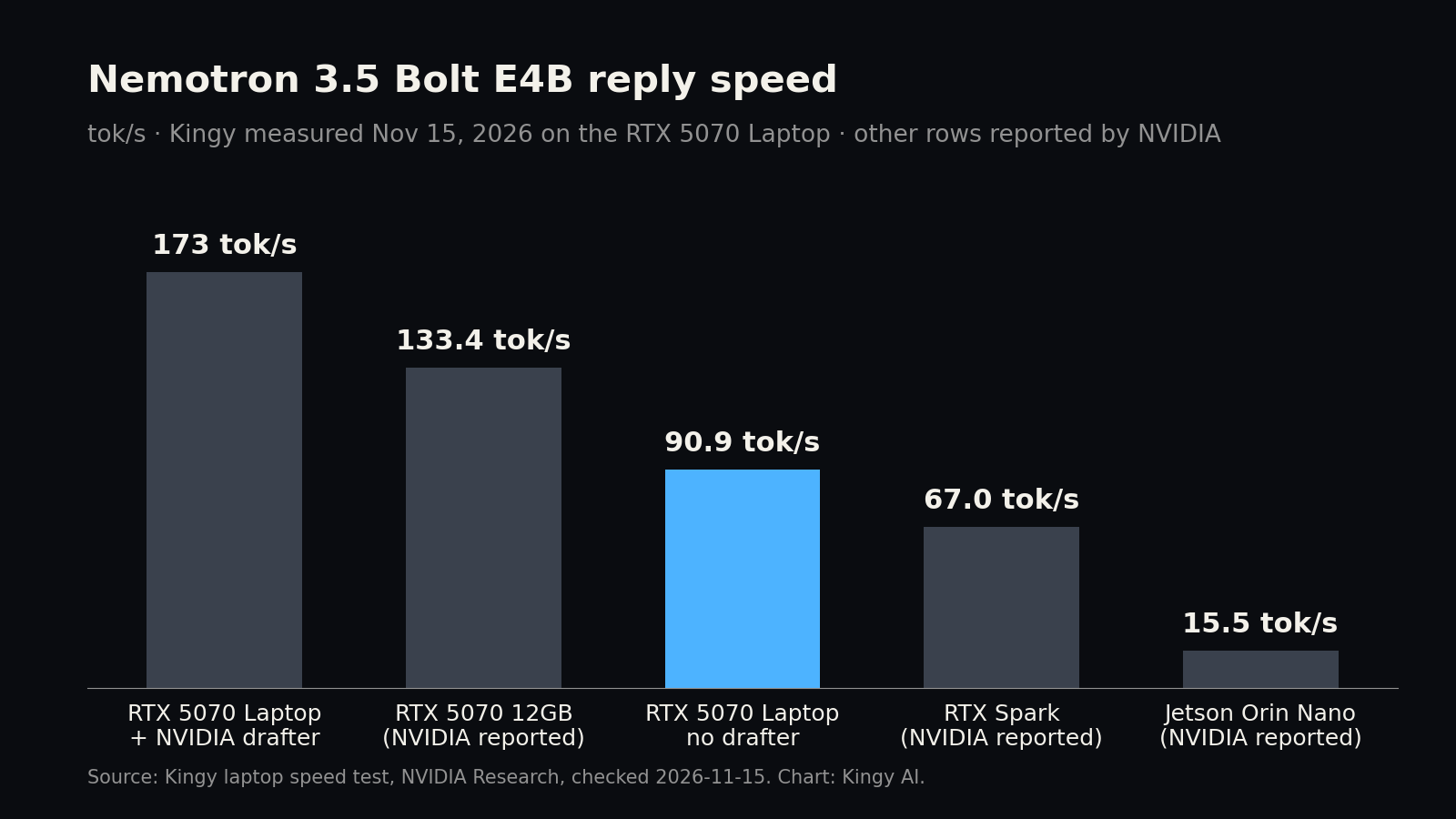
Short answer: yes, and easily. NVIDIA’s Nemotron 3.5 Bolt E4B ran with all its layers on the graphics card of our RTX 5070 laptop with 8 GB, writing replies at 90.9 tokens per second in our standard test. With NVIDIA’s own small “drafter” model switched on, replies came out at 136 to 231 tokens per second, 173 tok/s on average. The “4GB” in the name is not the download size: the official file is 6.18 GB. It is close to how much graphics memory the model used on our laptop, which was about 4.7 GB.
Laptop bought by Kingy AI. NVIDIA was not involved in this test.
What NVIDIA released
NVIDIA released Nemotron 3.5 Bolt E4B 4GB on Hugging Face on Oct 23, 2026. It is Google’s Gemma 4 E4B, further trained by NVIDIA for local voice and device assistants, chat characters, apps that call tools over several turns, and embedded interfaces.
- Size: 8 billion parameters, which NVIDIA describes as “4B effective”.
- Text only: NVIDIA lists text in and text out for this file.
- Context: up to 64K tokens in and 64K out.
- License: OpenMDW 1.1, with Google’s Gemma 4 base model under Apache 2.0. NVIDIA says it is ready for commercial and non-commercial use.
- What “4GB” means: NVIDIA’s announcement says the model fits “into as little as ~4GB in its target workloads”, meaning graphics memory in use while it runs, not the file size.
The official files
| File | What it is | Size |
|---|---|---|
| Nemotron-3.5-Bolt-E4B-Q4_K_M.gguf | The model (4-bit, the official release format) | 6.18 GB |
| Nemotron-3.5-Bolt-E4B-DFlash-BF16.gguf | Optional drafter that guesses ahead to speed up replies | 0.74 GB |
Sizes from NVIDIA’s Hugging Face pages, checked Nov 15, 2026, in GB of 109 bytes. Both files we downloaded matched the SHA-256 fingerprints NVIDIA published. NVIDIA also publishes a full-size BF16 version (about 16 GB) for other software.
What Kingy measured
We ran NVIDIA’s official file on an ASUS ROG Strix G16 gaming laptop: RTX 5070 Laptop GPU with 8 GB, Intel Core Ultra 9 290HX Plus, 32 GB of memory, Windows 11, plugged in, in Turbo mode. We used llama.cpp build b12199 (commit 372dc5ca1) with CUDA. NVIDIA’s drafter needs build b11808 or newer, so this build qualifies.
| Test | Reply speed | Reading speed |
|---|---|---|
| llama-bench, empty chat | 90.9 tok/s | about 8,100 tok/s |
| llama-bench, 8K already in the chat | 85.3 tok/s | about 6,900 tok/s |
| Chat server, NVIDIA’s command, no drafter | 87 to 88 tok/s on two prompts, 64 on one | short prompts only |
| Chat server, NVIDIA’s command, with the drafter | 136 to 231 tok/s, 173 tok/s on average | short prompts only |
Kingy measured, Nov 15, 2026 (Vancouver time). Reply speed is how fast it writes; reading speed is how fast it takes in your prompt. llama-bench is llama.cpp’s own speed test, and its figures are the average of 3 runs. Chat-server figures are three fixed prompts (Python code, a 300-word explainer and a ten-item list), up to 512 reply tokens each, at NVIDIA’s recommended temperature 1.0 and top-p 0.95.
- Memory: llama.cpp put all 43 of the model’s layers on the graphics card. With NVIDIA’s 64K-token setting, the card had about 4.7 GB in use (4,507 MiB), so more than 3.5 GB of its 8 GB stayed free. With NVIDIA’s drafter on, about 6.8 GB was in use, leaving about 1.8 GB free. llama.cpp also kept about 3.7 GB of model data in normal system memory.
- Reading is near instant: at about 6,900 to 8,100 tokens per second, an 8,000-token document is read in about a second.
- The drafter helps a lot, unevenly: it kept 55% of its guesses on the code prompt (231 tok/s), but only 25% and 32% on the explainer and the list (136 and 153 tok/s). Our verdict uses the speed without the drafter, because our rules count speeds with guess-ahead tricks separately.
- One slow reply: the third prompt ran at 64 tok/s without the drafter in one run, against 87.5 tok/s for the same prompt in an earlier run. We report both.
Can you run it at home?
Can you run Nemotron 3.5 Bolt E4B on a laptop with an 8GB graphics card? Yes. RTX 5070 Laptop 8GB, 32 GB system memory · NVIDIA’s official Nemotron-3.5-Bolt-E4B-Q4_K_M.gguf (6.18 GB) · llama.cpp b12199, CUDA · 90.9 tok/s, 85.3 tok/s with 8K already in the chat, about a second to read an 8K prompt · Kingy measured Nov 15, 2026
Can you run it on a 16GB laptop such as a MacBook Air? Yes, but slow (estimated). MacBook Air M4 16GB · the same file · llama.cpp · needs about 7.1 GB of the roughly 10.5 GB macOS lets a model use; estimated about 19 tok/s · Estimated Nov 15, 2026
Can you run it on a PC with a 24GB or 32GB graphics card? Yes (estimated). RTX 4090 24GB or RTX 5090 32GB · the same file · llama.cpp · needs about 7.1 GB; estimated well over 100 tok/s · Estimated Nov 15, 2026
Can you run it on a 64GB or 512GB Mac Studio? Yes (estimated). Mac Studio M4 Max 64GB or M3 Ultra 512GB · the same file · llama.cpp · needs about 7.1 GB; estimated about 88 and 133 tok/s · Estimated Nov 15, 2026
Can you run it on a 128GB Ryzen AI Max+ 395? Yes (estimated). Ryzen AI Max+ 395 128GB · the same file · llama.cpp · needs about 7.1 GB; estimated about 41 tok/s · Estimated Nov 15, 2026
Estimates use our Can You Run It at Home rules: file size plus chat memory at 8K plus 10% overhead, and half of each machine’s memory speed divided by the data read for each word. They are deliberately cautious. NVIDIA lists only NVIDIA chips as supported hardware, so we have not confirmed Mac or AMD support for this file.
For Google’s original Gemma 4 E4B, see Can You Run Gemma 4 12B or E4B Locally?
What NVIDIA reports
- Speed and memory: NVIDIA reports 133.4 tok/s and 3.5 GB of graphics memory on a desktop RTX 5070 (12GB) with a 3,000-token prompt, and 106.2 tok/s and 4.3 GB with 32,000 tokens already in the chat. On an RTX Spark (32GB) it reports 67.0 tok/s and 52.0 tok/s, and on a Jetson Orin Nano (8GB) 15.5 tok/s and 13.0 tok/s. All measured by NVIDIA with llama.cpp, not Kingy tested.
- Quality: NVIDIA’s card reports that the 4-bit file beats Google’s Gemma 4 E4B at the same 4-bit setting on 18 of the 21 tests it lists (our count), for example 55.60 against 39.36 on MultiChallenge and 82.40 against 66.61 on IHEval. These are NVIDIA’s numbers; we did not test answer quality.
How to run it (NVIDIA’s official steps)
- Get llama.cpp. Download a ready-made build for your system from the llama.cpp releases page; the
llama-serverprogram is inside. NVIDIA’s card runs llama.cpp’s official server (it uses the Docker image for build b11459). The drafter needs build b11808 or newer. - Download the files from nvidia/NVIDIA-Nemotron-3.5-Bolt-E4B-4GB and, for the drafter, nvidia/NVIDIA-Nemotron-3.5-Bolt-E4B-4GB-DFlash. NVIDIA’s card uses the
hf downloadcommand. - Start the server. Without Docker, NVIDIA’s settings come down to:
llama-server -m Nemotron-3.5-Bolt-E4B-Q4_K_M.gguf \
  --spec-draft-model Nemotron-3.5-Bolt-E4B-DFlash-BF16.gguf \
  --spec-type draft-dflash --spec-draft-n-max 7 --spec-draft-ngl 999 \
  --alias nemotron-bolt -c 65536 -ngl 999 --jinja
Leave out the four
--specsettings (the second and third lines) to run without the drafter. - Talk to it through llama.cpp’s OpenAI-compatible API on the port the server prints. NVIDIA recommends temperature 1.0 and top-p 0.95, and thinking can be switched on or off through the chat template.
How we tested
- Speed:
llama-bench -p 512 -n 128 -d 0,8192 -r 3 -fa on, the same settings as all our earlier runs, with llama.cpp choosing the layer placement. - Chat server: NVIDIA’s command exactly (64K context, all layers on the card, drafter with 7 guesses), first with the drafter and then without, the server stopped between runs.
- Idle machine: before testing we checked that no other model or test was using the graphics card and that the laptop was on its charger. The card drew up to 106 W during the test.
- Files: we checked both files’ SHA-256 fingerprints before testing and deleted them afterwards.
Limits of this test
- One machine measured. Only the 8GB laptop was measured; the other lines are estimates and are labelled that way.
- Speed only. We did not grade the answers. The quality figures are NVIDIA’s.
- Short chat-server prompts. Our chat-server prompts were short; long-document speed comes from llama-bench.
- A first try we threw out. In our first chat-server run, the server from the no-drafter test was still running while the drafter test ran, so those drafter numbers were not valid. We discarded them and re-ran both tests cleanly.
- Versions move. llama.cpp changes daily, and newer builds may be faster, especially with the drafter.
Sources
- Kingy measured: speed tests on the RTX 5070 Laptop 8GB (Nov 15, 2026), as described in How we tested
- nvidia/NVIDIA-Nemotron-3.5-Bolt-E4B-4GB on Hugging Face: file size, fingerprint, model summary, license, run steps and benchmark scores, checked Nov 15, 2026
- nvidia/NVIDIA-Nemotron-3.5-Bolt-E4B-4GB-DFlash on Hugging Face: drafter file size, fingerprint and minimum llama.cpp build, checked Nov 15, 2026
- nvidia/NVIDIA-Nemotron-3.5-Bolt-E4B-BF16 on Hugging Face: full-size file size, checked Nov 15, 2026
- NVIDIA Research, Nemotron 3.5 Bolt E4B 4GB, published Oct 23, 2026: the “~4GB” design goal and NVIDIA’s speed and memory table, checked Nov 15, 2026
Revision log
- November 15, 2026: first version. Kingy measured on the RTX 5070 Laptop 8GB, Nov 15, 2026.