
If you need a starting point for difficult coding, visual analysis or an agent that has to work through a messy problem, put Kimi K3.1 Pro on your shortlist first. If you process a lot of repeatable requests and cost matters, start with DeepSeek V4.1 Flash. If you already use Qwen tools or need one of its listed regional endpoints, Qwen4-Max is a credible middle-priced option worth testing alongside both.
Those are starting points, not a claim that any model will win your particular workload. DeepSeek has the lowest published API rates of the three; Kimi leads this group on Artificial Analysis while Qwen narrowly leads on Vals; and Qwen has just launched, leaving less independent performance data. Kimi also faces a substantive question about one prominent coding benchmark, discussed below.
Not tested by Kingy: This comparison reviews published documentation, independent benchmark snapshots and pricing as observed November 15, 2026 Pacific time. We calculated the examples below. We did not run the models, measure their latency or verify their answers in a hands-on comparison. Qwen’s launch date is November 16 in China, which was still November 15 in Vancouver when we checked.
The versions and limits that matter
Specifications and access for all three models
| Specification | Qwen4-Max | Kimi K3.1 Pro | DeepSeek V4.1 Flash |
|---|---|---|---|
| Hosted model ID | qwen4-max |
kimi-k3.1-pro; separate kimi-k3.1-pro-highspeed |
deepseek-flash, currently V4.1-Flash-1017 |
| Advertised context | 1,000,000 tokens | 1,048,576 tokens | 1,000,000 tokens |
| Input and output | Text, image and video input; text output | Text, image and video input in hosted API; text output | Text and image input; text output |
| Reasoning | On by default; low, high or xhigh; can be disabled | Always on; low, high or max | On by default; low, high or max; can be disabled |
| Weights | No Max release verified | Available under a custom license | Current 1017 weights available under MIT |
| Best first evaluation | Qwen users and listed endpoint options | Difficult agentic, visual and coding tasks | Cost-sensitive, repeatable workloads |
Sources: Qwen model documentation, Kimi quickstart, Kimi vision documentation, DeepSeek API documentation and the current DeepSeek model card.
A million-token window is capacity, not a guarantee that a model will reliably find every detail in a million-token document. Output and reasoning budgets also matter. Qwen lists up to 131,072 output tokens with thinking off, or 262,144 combined thinking and answer tokens with it on. Its maximum input is lower than the headline context figure: 983,616 tokens in thinking mode and 991,808 without it. DeepSeek lists a maximum output of 384K. We could not establish an equivalent exact Kimi output ceiling from the sources reviewed.
Qwen’s production API documentation now lists pay-as-you-go access as well as its Token Plan. Earlier preview descriptions do not establish today’s production limits. DeepSeek’s alias points to a particular version today, but an alias can change: record the returned model identifier and date with any evaluation. Kimi’s Highspeed endpoint is a separate paid option, not a free speed switch.
What the independent scores do—and don’t—show
Artificial Analysis’s Intelligence Index methodology combines nine evaluations, including coding, knowledge work and scientific reasoning. Its live v5.0.1 snapshot gives these three models the following scores:
Artificial Analysis: capability, cost and speed
| Model and evaluator listing | Intelligence Index v5.0.1 | Estimated cost per task | Estimated time per task | End-to-end output speed |
|---|---|---|---|---|
| Qwen4 Max | 43 | $3.27 | Not published | Not published |
| Kimi K3.1 Pro | 46 | $3.68 | 40.0 minutes | 30 tokens/second |
| DeepSeek V4.1 Flash 1017 Max | 33 | $0.60 | 13.3 minutes | 174 tokens/second |
This is evidence for testing Kimi on difficult work, not proof that it is better at every task. A three-point difference from Qwen is not a demonstrated significant advantage for your application. DeepSeek’s listing explicitly says Max; the readable Qwen and Kimi pages did not establish their evaluation effort settings. Do not assume equal reasoning budgets. The index is a composite, not an accuracy percentage, and the evaluator’s estimated time per task is derived from output and measured speed rather than a stopwatch on your workflow. Endpoint performance can vary; Qwen had no speed result in this snapshot.
Vals puts the three models much closer together
The separate Vals Index v2.2, updated November 15, weights finance, coding, legal and tax tasks using US economic-activity proxies. Qwen leads this three-model subset on that index, while Kimi leads on Artificial Analysis.
Vals Index v2.2: scores and reported test costs
| Model | Index score | Reported cost per test |
|---|---|---|
| Qwen4-Max | 63.20% | $9.33 |
| Kimi K3.1 Pro | 62.52% | $6.44 |
| DeepSeek V4.1 Flash 1017 | 61.26% | $0.66 |
The scores are within 1.94 percentage points. That spread is not evidence of a decisive winner on your workload. Vals and Artificial Analysis use different tasks, weighting and configurations; their scores and costs must not be combined into one ranking. Vals used max effort for Kimi and DeepSeek; we did not establish Qwen’s exact configuration from its model page. These are published evaluator costs, not our equal-token price examples below.
Vendor results provide a useful reminder that coding itself is not one skill. Kimi’s model card reports Kimi ahead of DeepSeek 1017 on Terminal-Bench 4.0, but DeepSeek ahead on DeepSWE 1.1. Those are vendor-reported results under the card’s settings and harnesses, separate from the independent index. Neither tells you whether an agent will safely repair your own repository.
Coding benchmarks reported by Moonshot
| Vendor-reported coding benchmark | Kimi K3.1 Pro | DeepSeek V4.1 Flash 1017 |
|---|---|---|
| Terminal-Bench 4.0 | 65.7 | 42.3 |
| DeepSWE 1.1 | 75.5 | 77.0 |
| ProgramBench | 31.5 | 29.1 |
These scores come from Kimi’s model card; benchmark harnesses and settings matter. They are not Artificial Analysis index scores.
There is another reason to be careful with the Kimi Terminal-Bench result. An R40 Research audit examined 189 attempts across 63 tasks and reported that the model stated hidden grading rules as prior instructions in 23.3% of attempts. The researchers reported a 66.7% pass rate, falling to 61.4% after excluding identified grader loophole and incomplete-work passes. They found behavior consistent with training exposure but could not prove the training mechanism or intentional score optimization. Their edited-task experiment was small and selected. This is a reason to discount a single benchmark, not proof that Kimi will fail on your work.
API pricing: region, cache and reasoning change the bill
Prices below are US dollars per million tokens. Output includes reasoning tokens. The cache-write columns are input categories, not an extra regular-input charge on the same tokens. Taxes and tool fees are excluded.
API prices including cache charges, in US dollars per million tokens
| Model and region | Regular input | Output | Cache read | 5-minute write | 1-hour write |
|---|---|---|---|---|---|
| Qwen4-Max Singapore / International | $1.50 | $4.50 | $0.075 | $1.875 | $3.00 |
| Qwen4-Max Beijing / Global | $1.413 | $4.24 | $0.071 | $1.767 | $2.827 |
| Kimi K3.1 Pro standard | $2.00 | $10.00 | $0.20 | $2.00 | $4.00 |
| Kimi K3.1 Pro Highspeed | $4.00 | $20.00 | $0.20 | $4.00 | $8.00 |
| DeepSeek Flash, peak | $0.30 | $1.20 | $0.006 | No separate rate listed | No separate rate listed |
| DeepSeek Flash, off-peak | $0.15 | $0.60 | $0.003 | No separate rate listed | No separate rate listed |
Sources: Qwen pricing, Kimi’s model-specific pricing, Kimi billing and DeepSeek pricing.
Qwen lists Singapore as International; Beijing and its Global endpoints share the other rate in this table. Global endpoints include Frankfurt, Hong Kong, Tokyo and Virginia. Confirm the endpoint and applicable region in the console before committing to a deployment. The Global endpoint can route inference to any available node, including mainland China, so its name does not establish data residency. There are no Qwen4-Max input-length price tiers and the rates apply in thinking and nonthinking modes. Qwen says this model does not support batch processing.
DeepSeek’s peak window is 01:00–04:00 and 06:00–10:00 UTC on weekdays, excluding Chinese public holidays; other hours are off-peak. Search and fetch operations cost $0.75 per 1,000 each, and file parsing/OCR costs $0.225 per 1,000 pages. Those charges can matter in an agent that repeatedly searches or reads files.
Kimi’s standard model supports batch at 60% of its standard rate. That makes its listed batch input and output rates $1.20 and $6.00 per million respectively, before taxes or other charges. Do not assume that discount applies to Highspeed. Kimi’s caching guide says caching is automatic for repeated prefixes, with a five-minute default. A hit renews the selected time-to-live without a new write charge. Design prompts so the shared prefix stays stable, and check actual billed categories: changing an early instruction can prevent the reuse you expected.
What one request costs
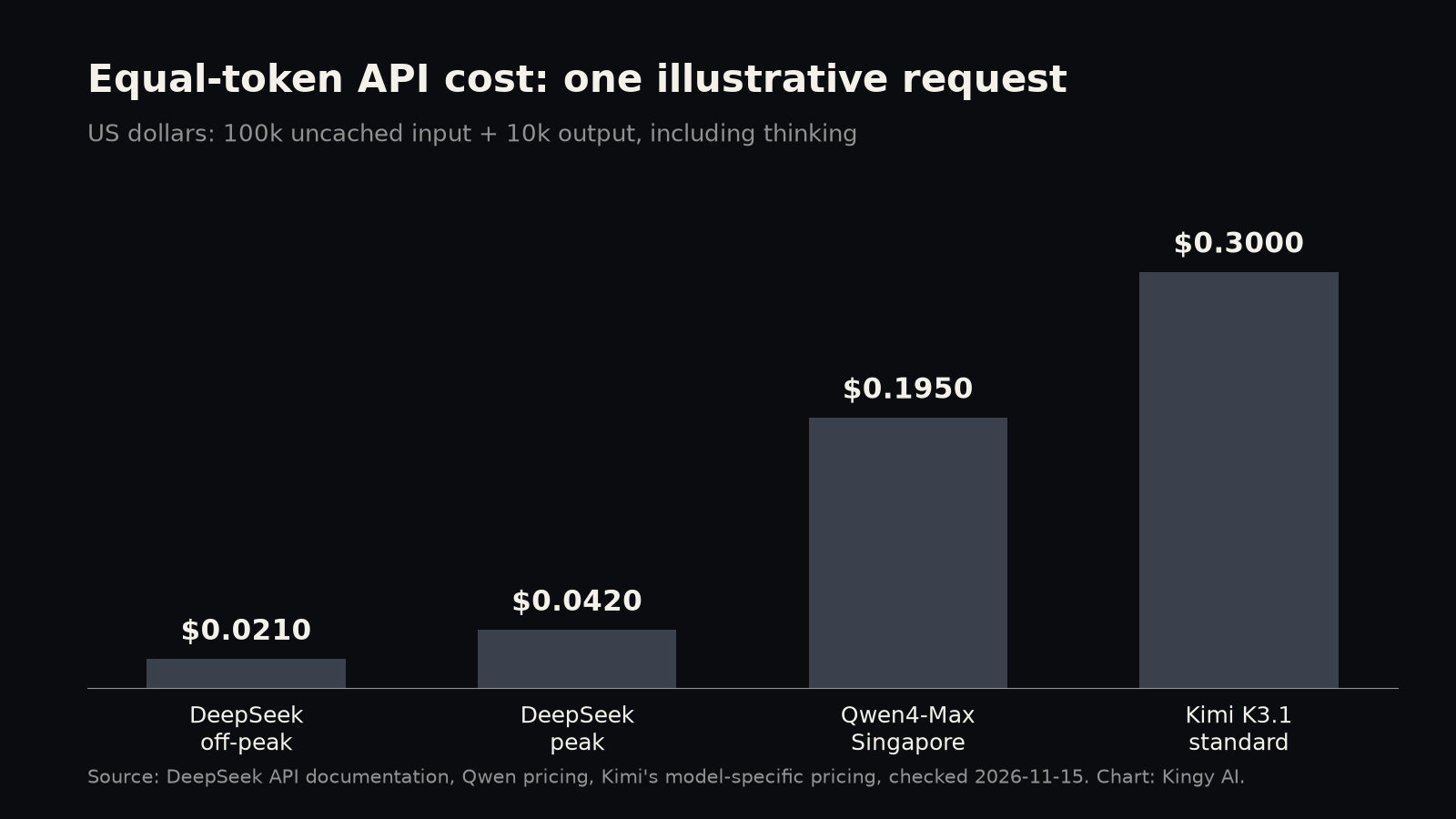
For an illustrative request with 100,000 uncached input tokens and 10,000 output tokens, including thinking, the calculation is (input tokens ÷ 1 million × input rate) + (output tokens ÷ 1 million × output rate):
Calculated costs for 100,000 input and 10,000 output tokens
| Endpoint | Illustrative cost per request | Cost for 1,000 requests with these token counts and no cache hits |
|---|---|---|
| Qwen Singapore | $0.1950 | $195.00 |
| Qwen Beijing / Global | $0.1837 | $183.70 |
| Kimi standard | $0.3000 | $300.00 |
| Kimi Highspeed | $0.6000 | $600.00 |
| DeepSeek peak | $0.0420 | $42.00 |
| DeepSeek off-peak | $0.0210 | $21.00 |
These are equal-token examples, not equal-quality jobs. A real model may use more reasoning tokens, require retries, call paid tools or fail the task. At these assumed token counts, Kimi standard costs about 7.14 times as much as DeepSeek at peak. If all other costs are ignored and both have the same number of attempts per job, Kimi would need to deliver over 7.14 times as many successful jobs per attempt to have a lower cost per success. For example, if DeepSeek succeeds 10% of the time, Kimi must exceed about 71.4%; if DeepSeek succeeds at 14%, Kimi at 100% only ties; above 14%, Kimi cannot be cheaper under these assumptions. Different token use or retries change the calculation. Human review time and the cost of a bad answer may justify paying more even when the API bill alone does not break even.
For repeated long prompts, estimate cache savings separately. See Qwen’s explicit caching guide for its configuration requirements. Suppose ten requests share an 80,000-token prefix and each adds 20,000 new input tokens and produces 10,000 output tokens. If the first prefix is written to a five-minute cache and the next nine are hits, Qwen Singapore’s listed categories total about $0.954 and Kimi standard’s about $1.704. That assumes every later request qualifies for a hit within the TTL. It is not a quote or a guarantee of caching behavior. Inspect usage records before relying on the saving.
Which model should you actually try?
For a developer repairing a difficult codebase: Start with Kimi, then run the same fresh issue through Qwen and DeepSeek. Give each the same repository state, tools and acceptance tests. Review the patch and run the tests yourself. Kimi’s aggregate and vendor results justify inclusion; the R40 findings make a private, task-specific check especially useful. Measure total tool calls and reasoning tokens as well as whether the fix passes.
For a high-volume extraction or classification pipeline: Start with DeepSeek. Its peak price is already much lower on the example above, and off-peak can be cheaper still. Build a held-out set with ambiguous and malformed inputs, and measure error rates by category. A cheap answer that needs human correction every time can cost more overall. Escalating uncertain cases to another model may be useful, but validate the routing rule and full cost first.
For research and document-heavy analysis: Try Kimi and Qwen on a packet with known answers and citations, then compare DeepSeek on the same packet. Check whether citations actually support each claim and whether the model notices conflicting evidence. Large context is useful for fitting material into a request; it does not replace source verification. For sensitive documents, review each provider’s current data terms and your organization’s policies before uploading.
For images, video and visual work: Qwen and Kimi list video input in their hosted APIs; DeepSeek’s core model lists image and text input. Kimi and Qwen may be the more relevant first tests for video, while all three can be evaluated on images. If you need a 3D object or a CAD file, specify the required file and verification step: a model producing code or calling a tool to create an artifact is not the same as a documented native 3D output modality.
For teams already in the Qwen ecosystem: Qwen4-Max’s production API and listed regional options make it a sensible contender, especially if integration work is lower for your team. Its output rate sits between DeepSeek and Kimi standard in the examples above. The launch is new, however, and the independent snapshot lacks its speed measurement; check availability and performance in your actual region.
Consumer plans and self-hosting are separate decisions
Kimi offers limited free use of K3.1 and paid international consumer plans: Plus at $19 a month, Pro at $39, Max at $99 and Ultra at $199. Annual billing is available at lower monthly equivalents, paid upfront. The current membership page describes shared monthly credits; Kimi Code also has a rolling five-hour limit. Plus includes Kimi Code, Pro includes Highspeed, and Max and Ultra advertise extra-long chats. Those subscriptions do not purchase API credit, and the published plan information does not promise a fixed credit-to-token conversion.
Qwen’s Token Plan is a credit-metered subscription for supported interactive tools, while production API pay-as-you-go is separately listed. Token Plan uses the Singapore region with distinct keys and endpoints. We could not retrieve reliable public Token Plan tier prices, so check the console before buying. DeepSeek lists web, app and API access, but verify current consumer limits in the product before choosing a plan. Kimi’s API documentation says a successful minimum $1 top-up is required; a free chat allowance should not be assumed to fund API calls.
For self-hosting, check the actual weights and license, not just the word “open.” Kimi’s published weights list 2.8 trillion total and 104 billion active parameters. Its custom license includes a separate-agreement requirement for model-as-a-service operators when aggregated licensee and affiliate revenue exceeds $20 million over a consecutive 12-month period, and attribution conditions for qualifying large commercial products. It also defines exemptions for internal use and official or certified services. Read the full terms for your situation.
DeepSeek’s current 1017 weights are published under MIT. The base technical card describes a 552-billion-parameter backbone with 8 billion active parameters during prefill and 16 billion during decoding, plus conditional memory reported separately. Active parameters are not the same as all stored weights or the memory needed to serve the model. Qwen’s homepage lists a 2.4-trillion-parameter backbone; we did not verify a downloadable Max release or an active-parameter count. None of these figures establishes that a model will run on your laptop. Check the actual files, quantization, runtime, memory and throughput requirements before buying hardware.
Run a five-task comparison before you commit
This is a test you can run; Kingy has not run it. Use fresh, nonpublic examples you are allowed to share. Keep the task, input, tools, time limit and scoring criteria the same, while recording each exact model ID and reasoning setting. Run multiple trials where variation matters.
- Extract: Give each model a messy document and ask for a structured table with evidence for each field. Score correct fields, unsupported fields and valid format.
- Code: Provide a contained bug and an independent test suite. Score the tests passed, regressions and whether the patch actually addresses the issue.
- Research: Supply a small source packet with a contradiction. Score supported claims, correct citations and whether the conflict is disclosed.
- Visual: Use an image relevant to your work and questions with known answers. Score details identified correctly and unsupported claims. Test video separately only where the endpoint supports it.
- Instructions and uncertainty: Include an instruction in a document that conflicts with your legitimate task, plus an unanswerable question. Check whether the model follows the task boundary and admits missing evidence.
For every attempt, record input and output tokens, cache hits, tool fees, elapsed time, retries and human review time. Divide total cost by the number of accepted results, not the number of requests. Inspect failures rather than averaging them away: a model that misses a rare but consequential case may need a human gate regardless of its average score.
Start with DeepSeek when cost is the main constraint, add Kimi when difficult outcomes justify its higher price, and keep Qwen in the trial when its ecosystem or endpoints fit. Choose the model that meets your own acceptance threshold at a cost and latency your workflow can sustain.