
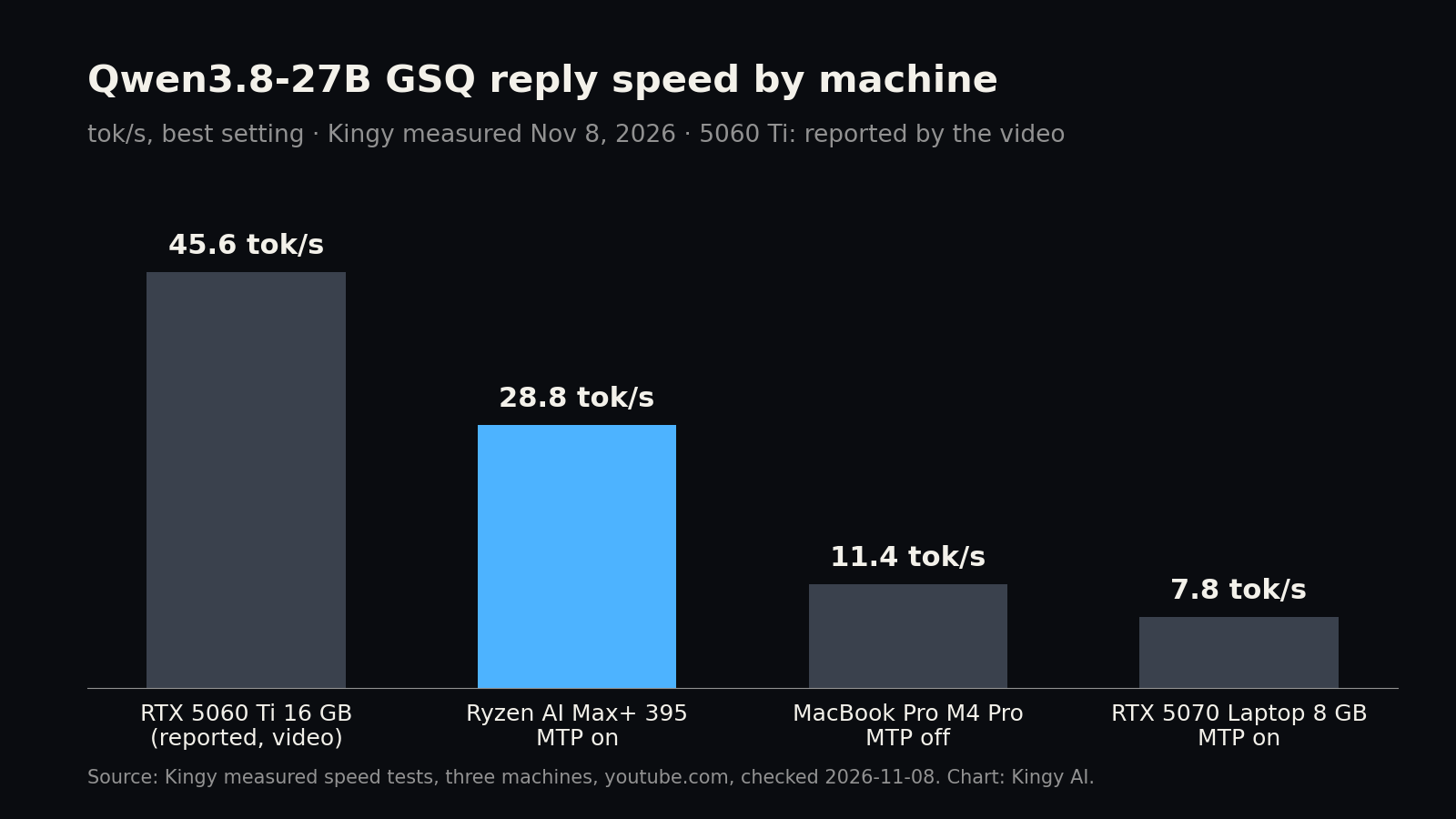
Short answer: the compressed Qwen3.8-27B file from the viral “16GB Is All You Need” video is the best-scoring local file on our 20-task quality test. It scored 20/20, the same as ChatGPT, and it is the first local model to pass our hardest coding task (in 2 of 3 tries). Speed depends heavily on the machine. Our Ryzen AI Max+ 395 box wrote replies at 28.8 tok/s with the model’s built-in speed trick (MTP) switched on, against 16.1 tok/s without it. Our MacBook Pro managed 11.4 tok/s, and the trick did nothing there. Our 8 GB RTX 5070 gaming laptop ran it at 7.8 tok/s, because the file does not fit in its graphics memory. None of our machines came near the 45.6 tok/s the video reports on a 16 GB RTX 5060 Ti. Kingy tested all three machines on Nov 8, 2026. We do not own a 16 GB graphics card, so the video’s own number is Not tested by Kingy.
What the video claims
Manolo Remiddi’s video “16GB Is All You Need for Serious AI” (Sept 12, 2026) had about 770,000 views when we checked on Nov 8. Its description makes three claims, all reported by the creator:
- A new compressed version of Qwen3.8-27B fits in 11.8 GB of graphics memory with quality close to the uncompressed model.
- On an RTX 5060 Ti with 16 GB, it runs at 45.6 tokens per second “on a real browser agent task”, helped by multi-token prediction (MTP).
- On an RTX 5090, the same model reaches 136 tokens per second.
We wanted to know what the same file does on machines people already own: a Mac laptop, an AMD “AI PC” with lots of shared memory, and an ordinary gaming laptop.
What the file is
The file comes from ISTA-DASLab on Hugging Face. It is Qwen3.8-27B squeezed with two methods the lab calls GSQ (Gumbel-Softmax Quantization) and RCO (Riemannian Constrained Optimization). Instead of compressing every part of the model the same way, each part gets its own compression level within a total size budget. The result is a normal GGUF file that runs in llama.cpp, Ollama and LM Studio.
- The file we tested: Qwen3.8-27B-GSQ-RCO-IQ3_S-mtp.gguf, 12.12 GB. It is the lab’s recommended IQ3_S file (11.77 GB) plus the model’s MTP head, which adds about 0.35 GB. The lab says the weights are otherwise identical. Every copy we ran matched the published SHA-256 fingerprint.
- The maker’s quality claim: ISTA-DASLab reports that IQ3_S scores about the same as the full-size model on its benchmarks, at a little over a fifth of the full file size. That is reported by ISTA-DASLab, not Kingy tested.
What Kingy tested
- Linux box: AMD Ryzen AI Max+ 395 with Radeon 8060S graphics and 128 GB of shared memory, Ubuntu 26.04.1, llama.cpp build 79e2e74eb using Vulkan. The whole model fits in graphics memory.
- MacBook Pro: Apple M4 Pro with 24 GB, llama.cpp 0.6.0 from Homebrew using Metal. The whole model fits.
- Gaming laptop: ASUS ROG Strix G16 with an RTX 5070 Laptop GPU (8 GB), Intel Core Ultra 9 290HX and 32 GB of memory, Windows 11, llama.cpp build b12199 using CUDA, Turbo power mode, plugged in. The 12.12 GB file does not fit in 8 GB, so llama.cpp’s fit tool put 27 of the model’s 64 layers on the graphics card for the benchmark (and estimated 24 for the chat server, which keeps a longer context), and the rest ran on the main processor.
Each machine got two speed tests: llama.cpp’s own benchmark (llama-bench), and real chat replies through llama-server with MTP off and on. The answer-quality test ran on the Mac only, because quality does not depend on the machine.
How fast it is
Speed is counted in tokens per second (tok/s). A token is a piece of a word. “Reply speed” is how fast the model writes. “8K wait” is how long it reads an 8,217-token document before the first word of its answer.
| Machine | Reply speed, MTP off | Reply speed, MTP on | MTP guesses kept | 8K wait |
|---|---|---|---|---|
| RTX 5060 Ti 16 GB (the video) | not stated | 45.6 tok/s | not stated | not stated |
| Ryzen AI Max+ 395, 128 GB | 16.1 tok/s | 28.8 tok/s | 71% | about 25 to 26 s |
| MacBook Pro M4 Pro, 24 GB | 11.4 tok/s | 10.9 tok/s | 70% | about 82 to 87 s |
| RTX 5070 Laptop, 8 GB | 7.0 tok/s | 7.8 tok/s | 69% | about 19 to 20 s |
Kingy measured, Nov 8, 2026, except the first row, which is reported by the creator for a browser-agent task we did not run. Our rows average four prompts (code, a plain-English explainer, an HTML report and a question about an 8,217-token document) at temperature 0, with MTP drafting 2 tokens at a time.
llama-bench, the standard test we use on every machine, tells the same story: 16.7 tok/s on the Linux box (16.0 with 8K already in the chat), 12.3 on the Mac (10.9) and 7.4 on the laptop (6.0). On the Linux box, the older 3-bit Qwen3.8-27B file we tested on Nov 6 (UD-Q3_K_XL) ran at 15.8 tok/s, so the new file is slightly faster as well as smaller.
What MTP does, and why it helped so unevenly
MTP (multi-token prediction) is a small extra part of the model that guesses the next few words. The full model then checks those guesses in one go, which is faster than writing one word at a time whenever the guesses are right. In llama.cpp you switch it on with --spec-type draft-mtp, as the llama.cpp speculative decoding docs describe.
- Linux box: 16.1 to 28.8 tok/s, about 1.8 times faster. Drafting 2 tokens worked best. Drafting 3 or 4 kept fewer guesses and was slightly slower (27.8 and 27.4 tok/s).
- Mac: no gain. It kept 70% of its guesses, as many as the Linux box, but replies got no faster. Our best guess, not proven, is that checking several guessed tokens at once costs the Mac’s graphics chip about as much as the time the guesses save.
- Gaming laptop: a small gain, 7.0 to 7.8 tok/s. Most of the model runs on the main processor here, which limits how much any trick can help.
One side effect: with MTP on, replies at temperature 0 were not word-for-word the same as with it off. They drifted apart after a few hundred characters. That is normal for this kind of speed-up and is not a quality loss we could measure, but it means MTP on and off are not exact copies.
How good the answers are
We gave the file the same 20 graded tasks we used in our MacBook Pro vs ChatGPT test on Nov 3, with the same settings, on the same Mac. A script checks every answer against one right answer, so no one’s opinion decides a score.
| Model | File size | Everyday (10) | Hard (10) | Total | Time for all 20 |
|---|---|---|---|---|---|
| ChatGPT, gpt-6.1-sol (Nov 3) | cloud | 10 | 10 | 20/20 | 5 min |
| Qwen3.8-27B GSQ IQ3_S (this file) | 12.12 GB | 10 | 10 | 20/20 | 26 min |
| Qwen3.8-27B UD-Q3_K_XL (Nov 3) | 13.15 GB | 10 | 9 | 19/20 | 29 min |
| Qwen3.8-27B UD-IQ2_S (Nov 3) | 8.37 GB | 10 | 9 | 19/20 | 32 min |
| Qwen3-8B (Nov 3) | 5.03 GB | 10 | 8 | 18/20 | 14 min |
Kingy measured on the MacBook Pro M4 Pro 24 GB, Nov 3 and Nov 8, 2026. One run per task. Re-grading on Nov 8 left every Nov 3 score unchanged.
- The coding task. One hard task asks for a small parser that must pass 14 hidden tests. On Nov 3 every local model failed it. This file passed all 14. We then ran that task twice more with different random seeds: it passed once and failed once (its code passed 9 of 14 tests). So it writes working code about 2 times in 3, not every time.
- Strict grading. After the Nov 3 test we loosened three grading rules and said so. Under the original strict rules this file scores 19, because one of its answers relied on a loosened rule. ChatGPT scores 18 under the same strict rules.
- Speed of thinking. It finished all 20 tasks in 26 minutes on the Mac, a little faster than the older 3-bit file’s 29 minutes. ChatGPT took 5.
Can you run it at home?
Can you run Qwen3.8-27B GSQ IQ3_S on a Ryzen AI Max+ 395 with 128 GB? Yes. Ryzen AI Max+ 395, 128 GB · Qwen3.8-27B-GSQ-RCO-IQ3_S-mtp · llama.cpp 79e2e74eb, Vulkan · 28.8 tok/s with MTP, 16.1 without, about 26 s before it starts on an 8K prompt · Kingy measured Nov 8, 2026
Can you run it on a 24 GB MacBook Pro? Yes, but slow. MacBook Pro M4 Pro 24 GB · same file · llama.cpp 0.6.0, Metal · 11.4 tok/s, MTP gives no gain, about 82 to 87 s before it starts on an 8K prompt · Kingy measured Nov 8, 2026
Can you run it on an 8 GB RTX 5070 laptop? Yes, but slow. RTX 5070 Laptop 8 GB, 32 GB system memory · same file, 24 to 27 of 64 layers on the graphics card · llama.cpp b12199, CUDA · 7.8 tok/s with MTP, 7.0 without, about 19 s before it starts on an 8K prompt · Kingy measured Nov 8, 2026
- Is 16 GB enough? For this file, the video’s point stands on paper: at 12.12 GB it leaves room on a 16 GB card for a working chat. We did not test a 16 GB card, so we can’t confirm the 45.6 tok/s.
- Is 8 GB enough? It runs, and it reads documents fast, but replies come out at 7 to 8 tok/s, under half the Linux box’s speed without MTP. For everyday use on an 8 GB card, a smaller model such as Qwen3-8B (which matched ChatGPT on our everyday tasks) is the more comfortable choice.
- Shared-memory machines like the Ryzen AI Max+ 395 get the most from MTP in our test. Macs, on this llama.cpp version, did not.
For other files of this model, see our Qwen3.8-27B GGUF guide and hardware requirements. For other models and machines, see the Can You Run It at Home hub.
How we tested
- Speed:
llama-bench -p 512 -n 128 -d 0,8192 -r 3 -fa on, the same settings as all our earlier runs (on the laptop with-ngl 27, the most layers llama.cpp’s fit tool said would fit). Replies: llama-server with a 32K context, prompt cache off, temperature 0, seed 42, up to 1,024 reply tokens, MTP via--spec-type draft-mtp --spec-draft-n-max 2(also 3 and 4 on the Linux box). The Linux box ran each prompt twice with MTP off and with 3-token drafts, and once for the other settings; the Mac and laptop ran each prompt once. - Quality: the 20 tasks from Nov 3, llama-server 0.6.0 on the Mac, temperature 0.6, top-p 0.95, top-k 20, seed 1103, thinking capped at 2,048 tokens, one run per task. The coding-task repeats used seeds 2 and 3.
- Files: each machine downloaded the file from Hugging Face and we checked its SHA-256 fingerprint before testing. All copies were deleted afterwards.
Limits of this test
- No 16 GB card. We can’t confirm or refute the video’s 45.6 tok/s, and the video measured a browser-agent task, not our prompts.
- Speed replies were all “thinking”. In the speed test, every reply spent its full 1,024 tokens on the model’s reasoning, so those runs measure speed, not answer quality. The quality test is separate.
- A busy Mac. The Mac had 7 to 16 GB of swap in use from other apps during its runs and spent part of the time on battery. An earlier Mac run with 14.7 GB of swap fell from 13 to 2 tok/s and was discarded. Expect a cleaner Mac to be somewhat faster.
- Small samples. Twenty tasks, one run each. Treat a one-point difference as a tie. Most speed settings ran once or twice.
- Versions move. llama.cpp changes quickly. MTP results in particular may change with newer versions.
Sources
- Kingy measured: speed tests on three machines (Nov 8, 2026) and the 20-task quality test (Nov 3 and Nov 8, 2026), as described in How we tested
- Manolo Remiddi, “16GB Is All You Need for Serious AI” on YouTube, published Sept 12, 2026: video description claims, checked Nov 8, 2026
- ISTA-DASLab/Qwen3.8-27B-GSQ-RCO-GGUF on Hugging Face: method, file sizes, fingerprints and the maker’s quality table, checked Nov 8, 2026
- llama.cpp speculative decoding docs: the draft-mtp option, checked Nov 8, 2026
Revision log
- Nov 9, 2026: first published.